Selecting the right software determines whether a marketing agency thrives or merely survives. The digital tools you choose affect every aspect of operations: how quickly campaigns launch, how efficiently teams collaborate, whether client feedback gets lost in email threads, and ultimately, how much revenue you generate per project.
Marketing agencies operate with dozens of different solutions working in concert. Project management platforms track deliverables. CRM systems store client interactions. Analytics dashboards measure campaign performance. Email automation sequences nurture leads. Calendar tools coordinate launches across time zones. Each piece plays a specific role, and when integrated properly, these tools create a competitive advantage that separates profitable agencies from struggling ones.
This guide helps you choose the best digital marketing agency software based on your agency’s type, scale, objectives, and specific operational needs. We cover the most popular categories, compare specific tools within each segment, and provide recommendations tailored to agencies of different sizes—from three-person creative studios to 200-person full-service firms.

What Tasks Does Marketing Agency Software Help Solve?
Modern software for marketing agencies addresses the key operational needs that determine whether projects succeed or fail. These digital tools enable systematic process management at every stage of client engagement, from initial planning through campaign launch to final results analysis.
Planning and monitoring marketing campaigns requires visibility into every campaign element. Software allows teams to visualize each step, track progress, and maintain timelines for content releases and advertising launches. Agencies handling multiple clients simultaneously need this structure. Otherwise, details slip through cracks, deadlines pass unnoticed, and campaigns launch incomplete. Campaign management software ensures everyone knows what needs to happen when, reducing the constant status-check meetings that drain productivity.
Task and project management keeps work moving forward despite complexity. Agencies juggle competing priorities across multiple accounts, each with different stakeholders, approval processes, and delivery expectations. Project management tools allow teams to assign responsibilities, set deadlines, monitor workloads, and track progress toward milestones. They support various methodologies—Kanban for visual workflow management, Scrum for iterative development, Waterfall for sequential campaigns—letting agencies match tools to their preferred working style.
Working with clients and freelancers demands centralized communication. Marketing agencies frequently collaborate with remote designers, copywriters, developers, and strategists scattered across different time zones. CRM and collaboration platforms store all interactions in one location, enable material approvals, collect feedback, and maintain accountability. The project management software market reached USD 9.76 billion in 2025 and continues advancing at a 15.65% CAGR, reflecting how essential these tools have become. External access controls let agencies provide clients and contractors with precisely the visibility they need without compromising security.
Analysis and reporting turns raw data into actionable intelligence. Agencies need clear insights into what’s working: which campaigns drive conversions, which channels deliver ROI, which content engages audiences. Integration with advertising platforms, analytics services, and CRM systems allows agencies to gather performance data in centralized dashboards. Automated reporting simplifies client communications and supports data-driven decision-making rather than guesswork.
Organizing teamwork and communications prevents information silos. Modern platforms include team chats, comment threads, @mentions, and notification systems that keep everyone informed. These features matter especially for distributed teams working across multiple concurrent projects. They provide consistency and enable rapid feedback without requiring everyone to attend yet another meeting.
Financial management and billing ensures agencies get paid accurately and on time. Automating invoicing, tracking project budgets, and monitoring billable hours creates financial transparency that benefits both agencies and clients. Time tracking features help agencies understand project profitability, identify which client types generate the best margins, and price future work appropriately.
| Task area | What it solves | When it matters | Example tools |
| Campaign & content planning | Visual timelines, cross-channel coordination | Multi-client juggling, interdependencies | CoSchedule, Loomly, Notion |
| Task & project management | Ownership, deadlines, workload visibility | Parallel accounts, approvals | Trello, Asana, ClickUp, Monday.com |
| Client collaboration & CRM | Centralized comms, approvals, deal tracking | Distributed teams, long sales cycles | HubSpot, Zoho CRM, Salesforce |
| Analytics & reporting | Unified KPIs, automated client updates | Multi-channel performance | Google Analytics, Supermetrics, Databox |
| Team comms & co-editing | Real-time feedback, version history | Remote work, fewer status meetings | Google Docs, Microsoft 365, Figma, Miro |
| Time & finances | Billable hours, budgets, invoicing | Profitability clarity | Toggl, Harvest, Float |
Types of Software for Marketing Agencies
Digital marketing agency management software covers a wide range of tasks, from project coordination to AI-powered content generation. The tools you choose determine how efficiently campaigns launch, how smoothly teams collaborate, and how accurately you measure results. Understanding which categories matter most for your agency type helps you build a software stack that actually solves problems rather than creating new ones.
What software do marketing agencies use?
Most marketing agencies use a combination of tools rather than a single platform: CRM systems, project management software, content calendars, AI services, analytics platforms, collaboration tools, and cloud storage. The specific mix depends on the agency’s size, business model, and priorities. According to Jasper’s 2025 State of AI in Marketing report, 63% of marketers currently use generative AI, showing how rapidly agencies adopt new technologies that provide competitive advantages.
Marketing agency software encompasses a wide range of tasks, from coordinating projects to generating content with artificial intelligence. Let’s examine the main categories, the specific challenges they address, and which tools excel in each area.
Planning marketing campaigns and content calendars
These tools help agencies create marketing calendars, plan campaigns by channel—email, social media, paid advertising, SEO—and coordinate deadlines with clients. Campaign planning software becomes essential when working on multiple projects with interdependencies between tasks.
The best platforms track planned launches against actual execution, identify bottlenecks before they cause delays, and improve accuracy over time. They suit both content-focused agencies producing editorial calendars and performance marketing firms where synchronized launches across channels determine campaign success. Visual calendars combined with collaborative editing capabilities make these tools particularly effective.
- CoSchedule functions as a universal marketing calendar built specifically for coordinating complex campaigns. It provides drag-and-drop scheduling, team workflows, and analytics that show campaign performance alongside the planning interface.
- Loomly specializes in scheduling publications across social media channels. It offers post optimization tips, content inspiration from trending topics, and approval workflows that streamline client sign-offs.
- Notion delivers flexible planning capabilities through its database and page system. Teams can build custom campaign calendars, link related tasks and documents, and maintain a single source of truth for all campaign planning. Its adaptability makes it popular with agencies that need customized workflows rather than rigid templates.
💡 Learn more about the best marketing tools out there in our dedicated guides:
- Email Marketing Calendar: Full Guide with Templates and Tools
- Marketing Calendar: Templates, Planning, Software and Management
Task and project management
Task planning, responsibility assignment, deadline tracking, and progress monitoring all flow through project management platforms. These systems help agencies coordinate work between team members, visualize workloads, and prevent anyone from becoming overwhelmed or underutilized.
The platforms support multiple project methodologies and offer various views—Kanban boards for visual task flow, Gantt charts for timeline dependencies, calendars for deadline management, and list views for straightforward task tracking. They ensure process transparency, enable quality control, and reduce the manual reminders that waste time.
Project management tools prove especially valuable when handling multiple client projects simultaneously. Agencies need visibility into priorities across accounts, upcoming deadlines that might conflict, and team capacity to take on new work.
- Trello provides visual task management through its card-based Kanban system. Teams move cards across columns representing workflow stages. The simplicity helps smaller agencies adopt project management practices without overwhelming their teams. However, it lacks some advanced features that larger agencies require.
- Asana offers flexible project management with multiple view options and robust task dependencies. Asana’s automation enables automatic task triggering once dependent tasks complete, ensuring smooth workflows without constant manual oversight. Teams can organize work by projects, use custom fields for metadata, and automate repetitive processes.
- ClickUp positions itself as an all-in-one solution combining tasks, documents, goals, time tracking, and reporting. ClickUp integrates with over 1,000 apps through native and Zapier integrations, connecting to CRM platforms, email marketing tools, and social media schedulers to create unified information flow. The platform’s extensive customization options appeal to agencies wanting complete control over their workflows, though this flexibility creates a steeper learning curve than simpler alternatives.
- Monday.com emphasizes visual workflows and powerful customization for agency-specific processes. Its colored status indicators, timeline views, and workload management features help agencies balance resources across projects. The platform scales well from small teams to enterprise operations.
Working with clients and contractors
Marketing agencies collaborate with clients across different regions, work with freelance specialists, and coordinate approvals from multiple stakeholders. CRM and collaboration systems centralize these communications, track deal status, store interaction history, and ensure nothing falls through gaps.
These tools become relevant for agencies with long sales cycles, multiple simultaneous leads, competitive tenders, or distributed teams spanning time zones. The ability to configure external access—guest accounts with limited permissions—proves critical for collaborating with clients and freelancers while maintaining data security.
- HubSpot CRM delivers a flexible solution with integrated marketing automation. HubSpot’s 2025 updates introduce Breeze, a complete AI solution designed to boost productivity through AI-assisted task management, automated workflows across sales and marketing, and enriched CRM data. The platform’s free tier provides substantial functionality, making it accessible to smaller agencies before they upgrade to paid plans with advanced automation and reporting.
- Zoho CRM offers affordable customization options suitable for agencies needing CRM capabilities without enterprise pricing. It includes sales automation, workflow rules, and analytics that help agencies manage client relationships systematically.
- Salesforce provides powerful enterprise capabilities for large agencies managing complex client portfolios. Its extensive customization, robust automation, and deep integration ecosystem make it the standard for agencies at scale, despite higher costs and longer implementation timelines than alternatives.
| Platform | Best for | Key strengths | Watch-outs |
| HubSpot | Growing agencies | Integrated marketing automation; generous free tier | Advanced features require paid tiers |
| Zoho CRM | Budget-sensitive teams | Affordable customization; solid automation | Less enterprise depth than Salesforce |
| Salesforce | Large/complex orgs | Deep customization; vast integration ecosystem | Higher cost; longer implementations |
Automation software for digital marketing agency
Automation platforms handle email communication chains, triggered messages, retargeting sequences, and audience segmentation. They simplify routine processes, improve personalization in customer interactions, and reduce manual effort required for nurture campaigns.
Marketing automation excels at managing bulk emails, behavior-based marketing, and complex multi-touch campaigns that would overwhelm teams if handled manually. The technology enables agencies to deliver personalized experiences at scale.
- ActiveCampaign combines email marketing with sophisticated automation and CRM capabilities. The platform uses machine learning algorithms to optimize campaign elements such as optimal send times and predict contact engagement likelihood. With 135+ triggers and actions to build automation sequences, ActiveCampaign’s automation builder extends beyond competitors’ capabilities. Its site and event tracking functionality enables highly personalized campaigns based on user behavior.
- Mailchimp focuses on bulk emails with simple automation suitable for straightforward campaigns. The platform’s ease of use appeals to agencies new to marketing automation, though more advanced users often outgrow its capabilities.
- Ortto specializes in data-driven automation with visual process editing. It helps agencies build complex customer journeys based on behavioral triggers and engagement patterns, making it valuable for agencies emphasizing conversion optimization.
Analytics and reporting
Analytics platforms collect and visualize data on KPIs, ROI, traffic sources, and campaign results. Integration with advertising platforms—Google Ads, Meta, LinkedIn—CRM systems, and business intelligence tools allows agencies to gather performance data in unified dashboards.
Automated reporting simplifies client interactions and supports strategic decision-making. This capability matters especially when managing multiple advertising channels and providing regular performance updates to clients who expect data-backed results.
- Google Analytics serves as the primary source for traffic analysis and user behavior insights. The platform provides detailed information about visitor demographics, acquisition channels, content performance, and conversion paths.
- Supermetrics functions as a data connector pulling information from various platforms into Google Sheets, Data Studio, or business intelligence systems. It automates the tedious process of manually exporting data from multiple sources, saving agencies hours each week.
- Databox delivers real-time dashboard visualization with customizable widgets displaying metrics that matter most to clients. Agencies can create branded dashboards showing campaign performance, compare time periods, and set goals with progress tracking.
Organizing teamwork and communications
Modern collaboration platforms include real-time team chats, threaded comments, @mentions for drawing attention, and notification systems that keep everyone informed. Integration with Teams, Slack, and Zoom extends communication capabilities beyond the core tools.
These features prove essential for distributed teams and agencies managing multiple concurrent projects. They ensure consistency and enable rapid feedback without requiring synchronous meetings.
- Collaborative editing platforms like Google Docs, Microsoft 365, Figma, and Miro enable multiple team members to work on the same documents, designs, or brainstorming sessions simultaneously. Version history prevents lost work, and commenting features facilitate asynchronous feedback.
- Video conferencing tools including Zoom, Google Meet, and Microsoft Teams form the foundation for remote collaboration. They support client meetings, internal standups, creative reviews, and screen sharing for walking through work in progress.
Time and resource management
Time tracking, workload monitoring, schedule planning, and task performance evaluation all contribute to effective resource management. These capabilities matter especially for agencies billing hourly or operating with limited staff.
Proper resource management prevents team overload, accounts for project budgets, and helps agencies plan around vacation schedules and capacity constraints.
- Toggl provides convenient time tracking with one-click timers, detailed reporting, and project profitability analysis. Its simplicity encourages actual use rather than becoming another abandoned tool.
- Harvest combines time tracking with expense tracking and invoicing. Agencies can see exactly where time goes, which projects generate profit, and which clients consume disproportionate resources.
- Float specializes in resource planning and schedule visualization. It helps agencies forecast capacity, plan project staffing, and identify potential conflicts before they cause problems.
Email marketing platforms
Email marketing tools enable agencies to create newsletters, segment audiences, launch automated message sequences, and track campaign results. They’re particularly relevant for agencies working with large lead volumes or running regular client campaigns.
Many platforms include pre-built email templates, A/B testing capabilities, and reporting on open rates and conversions. Integration with CRM systems, analytics platforms, and landing pages allows agencies to build complete engagement funnels.
- Mailchimp offers a popular solution with simple editing and basic automation suitable for small to medium agencies. Its drag-and-drop email builder and template library make campaign creation straightforward even for non-designers.
- SendGrid targets technical teams and transactional emails with scalable infrastructure. It handles high volumes reliably and provides developer-friendly APIs for custom integrations.
- Constant Contact focuses on small businesses with an intuitive interface and built-in templates. The platform emphasizes ease of use over advanced features, making it accessible for agencies just starting with email marketing.
SEO tools
SEO platforms prove essential for agencies providing search optimization, content marketing, and technical website improvements. They help conduct website audits, research keywords, track search rankings, analyze competitors, and create SEO-optimized content.
These tools become especially useful for agencies regularly publishing articles, maintaining blogs, or working with eCommerce clients. They enable data-driven content strategies based on actual search behavior rather than assumptions.
- Ahrefs provides a powerful platform for backlink analysis, competitor research, and content insights. Ahrefs excels at surfacing underutilized keyword opportunities and provides clean data visualizations that help translate findings into action. Built around one of the largest web crawlers second only to Google, Ahrefs maintains some of the most trusted backlink databases and keyword indexes for SEO strategy. The platform’s Site Explorer, Keywords Explorer, and Content Explorer tools give agencies comprehensive visibility into organic search opportunities.
- SEMrush delivers a versatile toolkit with modules for SEO, PPC, content marketing, and technical audits. It combines competitive intelligence with keyword research and site health monitoring in a single platform.
- Moz offers user-friendly interfaces and excellent educational resources, making it ideal for agencies starting with SEO or training clients. Its Domain Authority metric has become an industry standard for evaluating website strength.
Using AI tools
Artificial intelligence tools encompass text generation, user behavior analysis, predictive analytics, automated recommendations, and optimization. They accelerate content preparation, improve forecast accuracy, personalize offers, and automate repetitive tasks.
AI integrates quickly into SEO workflows, content marketing processes, advertising management, and analytics operations. The 2025 State of AI in Marketing report found that increased productivity (28%) and improved marketing ROI (25%) are the top-identified benefits of AI adoption.
- Jasper specializes in AI-powered content creation with over 80 pre-built templates for different content types. Jasper’s Brand IQ feature uses no-code tooling to embed brand guidelines into AI models for consistent text and visual outputs, while Marketing IQ adds marketing optimization knowledge for SEO blog posts and email subject lines. One marketer reported that Jasper generates content five times faster, with teams creating up to 7,500 product descriptions and press releases within 24 hours.
- SurferSEO combines AI with SEO analysis to optimize content for search engines. It provides real-time suggestions for improving on-page SEO while writing, examining factors like keyword density, content structure, and competitive analysis.
- ChatGPT + Zapier enables agencies to automate workflows using conversational AI. Teams can generate content, summarize meeting transcripts, draft responses to common inquiries, and trigger actions across connected applications based on AI-generated insights.
- AI-powered analytics tools like Looker and Tableau with AI add-ons provide predictive capabilities that help agencies forecast campaign performance, identify emerging trends, and make proactive adjustments before problems arise.
💡 Learn more about AI tools in our guides:
- AI Scheduling Assistant: What It Is, How It Works, and Best Tools
- Best AI Task Managers for Smarter, Automated Task Planning
- AI Project Management Guide: Tools & Practical Uses, and Future Trends
- Top AI Calendars and Scheduling Assistants for Smarter Planning
Adaptation for different types of agencies
Different agency specializations require different tool combinations. SEO agencies need robust platforms for managing technical tasks and content production—Ahrefs for research, Surfer for optimization, and content planning systems for editorial coordination. Creative agencies value process visualization and smooth design approval workflows through tools like Figma for collaborative design, Miro for brainstorming, and visual Kanban boards for production management.
Digital full-cycle agencies require comprehensive platforms managing the entire value chain from lead generation through campaign execution to results reporting. Performance marketing agencies need specialized tools for budget management, media planning, and advertising automation across multiple channels. Each agency type benefits from selecting tools that align with their core competencies and client deliverables.
Best Marketing Agency Tools for Agencies of Different Sizes
Rather than chasing a mythical “best” solution, smart agencies match tools to their current reality and growth trajectory.
| Agency size | Project management | Planning / social | CRM / automation |
| 3–10 (small) | Trello | Loomly, Google Workspace | MailerLite |
| 15–50 (medium) | ClickUp | Notion | HubSpot CRM, ActiveCampaign |
| 50+ (large) | Workfront (Adobe), Microsoft 365 | Microsoft 365 | Salesforce, Adobe Work Management |
What software is best for marketing agency?
Choosing appropriate software depends on agency size, budget, team composition, and process complexity. No universal solution works for every agency, but proven approaches exist for different scales of operation.
Budget constraints matter differently at each stage: small agencies need low-cost tools they can implement quickly, while large agencies can afford enterprise licenses but face complex integration challenges. Team expertise varies too—sophisticated automation helps experienced marketers but overwhelms beginners.
For small agencies
Small agencies with 3-10 team members need accessibility, simplicity, and rapid implementation. Low entry barriers, minimal training requirements, ready-made process templates, and versatility matter most at this scale.
Teams often operate with one specialist handling multiple roles simultaneously—account management, design, copywriting, strategy. Tools must accommodate this flexibility without creating administrative burden.
Recommended tools:
- Trello provides visual Kanban boards for task assignment and progress tracking without overwhelming users with excessive features. Its card-based system helps small teams visualize work clearly.
- Google Workspace offers familiar tools for communication, collaboration, and basic workflow automation. Email, documents, spreadsheets, and video conferencing integrate seamlessly, and most team members already understand how to use them.
- Loomly simplifies content planning and social media management with straightforward scheduling and approval workflows tailored for agencies serving multiple clients.
- MailerLite delivers affordable email marketing with templates and automation suitable for small agencies just establishing systematic client communications.
- Virto Shared Calendar App provides lightweight event management for small teams prioritizing simplicity. The platform offers one-click event creation with color-coded tags, anonymous access links that let clients and contractors view calendars without Microsoft accounts, and cross-platform availability through both Microsoft Teams and a standalone web app. At $15 monthly for teams under 20 users, it delivers enterprise-grade scheduling without complex integrations.
💡 Operating a small business? Refer to our dedicated guides:
- Top Teams Calendars for Small Business in 2025
- Online Booking System for Small Business: Features, Benefits & Best Tools
- Scheduling Software for Small Business: Best Tools, Features, and How to Choose
For medium-sized agencies
Medium-sized agencies with 15-50 employees focus on process automation, centralized task and client management, and robust analytics. Teams expand to include dedicated account managers, analysts, and project managers who need specialized capabilities.
Deeper integration between marketing, sales, and customer service becomes essential at this scale. Agencies require tools that handle increased complexity without becoming unwieldy.
Recommended tools:
- ClickUp serves as a universal project management platform with calendars, tasks, templates, automation capabilities, and comprehensive reporting. ClickUp’s customizable dashboards and task automation features help agencies manage client projects, track feedback and revisions, and keep creative teams aligned.
- ActiveCampaign provides advanced email marketing and automation including nurture communication scenarios and behavioral triggers. Its CRM integration enables sophisticated lead scoring and sales workflows.
- HubSpot CRM offers user-friendly customer relationship management with integrated marketing, service, and sales data. The platform scales from basic contact management to sophisticated automation as agency needs grow.
- Notion functions as a central platform for documentation, briefing templates, content planning, and internal knowledge management. Its flexibility supports diverse workflows without forcing agencies into rigid structures.
- Virto Kanban Board App transforms task management through dynamic visual workflows designed to adapt to agency complexity. The platform provides highly customizable boards with swimlanes, categorization, color-coding, and subtasks for managing campaigns, content pipelines, and client deliverables. Its agile task management capabilities enable teams to prioritize backlogs, manage sprints with precision, and track progress through customizable dashboards. Native Microsoft 365 integration ensures consistency in security and user experience while supporting cross-platform accessibility on Teams Web, Desktop, and Mobile.
- Virto Calendar App coordinates planning for deadlines, launches, email campaigns, and marketing activities with comprehensive integration capabilities. The platform merges multiple calendars from different sources—SharePoint lists and libraries, Outlook, Planner, Google Calendar, iCal, and Apple Calendars—into a centralized scheduling hub. Its native Microsoft 365 integration ensures consistency in security and user experience while supporting cross-functional team collaboration across departments and client accounts.
For large agencies
Large agencies with 50+ employees require scalability, end-to-end integrated processes, cross-department coordination between marketing, sales, finance, and customer service, robust security controls, and extensive customization capabilities.
These organizations increasingly need centralized oversight, service-level agreements, granular access controls, and sophisticated workload management. Tools must integrate into existing corporate ecosystems, scale to accommodate new service lines, and adapt to complex agency-specific processes.
Large agencies often employ enterprise ERP and HCM systems—solutions like Workday, SAP, and Oracle for comprehensive resource and financial management that integrate with marketing platforms.
Recommended tools:
- Salesforce delivers powerful CRM with deep customization and sophisticated marketing automation. Its extensive AppExchange ecosystem provides pre-built integrations with thousands of business applications.
- Workfront (Adobe) offers project and content management built for distributed teams coordinating complex creative workflows across multiple time zones and stakeholder groups.
- Adobe Work Management encompasses tools for visual content creation, including branding, video production, and design collaboration at enterprise scale.
- Microsoft 365 serves as the corporate standard for file management, communications, calendars, and document collaboration. Its enterprise security controls and compliance features meet requirements for regulated industries.
- Virto Calendar App provides advanced calendar management for coordinating marketing activities and deadlines across large organizational structures. The platform’s comprehensive overlay functionality merges calendars from multiple data sources, enabling teams to synchronize work across departments, coordinate campaigns spanning multiple functions, and manage complex scheduling scenarios. With enterprise-grade security, diverse data source integration, and tiered pricing starting at $2 per user monthly for teams up to 30 users, it scales effectively from mid-size to enterprise operations with 200+ employees.
- Virto Kanban Board App delivers advanced visual project management for all levels of organizational complexity. The platform combines agile task management with comprehensive analytics—offering filters, WIP limits, and flexible charts to analyze workflows and improve productivity. Teams can assess velocity and capacity to adjust workloads and prevent bottlenecks for smooth project execution. With detailed reports and insights that inform decision-making, informative task cards displaying deadlines and progress status, and tiered pricing, it scales effectively from mid-size to enterprise operations with 200+ employees.
The ability to configure external access in VirtoSoftware applications allows effective collaboration with external contractors. Agencies can provide access to specific calendars or boards without violating corporate security policies, streamlining client and vendor interactions.
👉 So, what’s the best marketing agency software? The best software for marketing agencies depends on your team size and workflow complexity. Smaller agencies with 5-15 employees often succeed with native Microsoft 365 tools like Teams and SharePoint, enhanced with VirtoSoftware solutions like Virto Calendar App for coordinating deadlines and campaigns, or Virto Kanban Board for visual task management. Mid-sized agencies with 15-50 employees typically need more specialized project management platforms like Asana or Monday.com, while large agencies exceeding 50 employees require enterprise-grade solutions or sophisticated Microsoft 365 implementations with VirtoSoftware’s advanced scheduling and workflow tools.
How to Choose the Right Software
Selecting appropriate marketing agency tools requires systematic evaluation of several key factors that determine whether a platform delivers value or creates frustration.
Agency size and team structure
Before selecting tools, assess employee count, role specialization—whether you have dedicated managers, creatives, and analysts—and the presence of remote or external specialists. Small agencies benefit from simple tools with low learning curves and minimal integration requirements. Medium and large organizations need distributed permissions, role-based access controls, group management, and centralized administration.
Project frequency and scope
Evaluate how many parallel projects run simultaneously, campaign launch frequency, and average project duration. Agencies with high workloads require real-time collaboration capabilities and comprehensive alert systems that prevent tasks from falling through cracks. Managing multiple projects demands visibility into workflow stages, approaching deadlines, and task status to avoid “lost” campaigns that miss deadlines because nobody tracked them properly.
Need for customization
Determine how important platform adaptability matters for your specific processes. Can you modify stage names and custom fields? Does the system support creating task templates, forms, or automated workflows? Does the platform accommodate multiple languages or time zones for globally distributed teams? Rigid tools that force agencies into predetermined workflows often create more problems than they solve.
Budget
Calculate monthly or annual software expenses including subscription fees, per-user charges, and hidden costs such as data storage fees or API integration expenses. Factor in implementation costs, staff training time, and ongoing support requirements. Cheaper tools sometimes cost more in wasted time and workarounds than slightly more expensive platforms that actually fit agency needs.
Integration with other systems
Verify which services the selected tool must connect with: CRM platforms, email marketing systems, analytics tools, calendars, Slack, Microsoft Teams, and others. Confirm solutions can exchange data automatically via API connections or integration platforms like Zapier. Manual data transfer between systems wastes countless hours and introduces errors that damage client relationships.
Support and training
Investigate available support options—live chat, phone support, knowledge bases, tutorial videos. High-quality support and training materials dramatically simplify implementation and daily operations. Agencies can’t afford to spend hours troubleshooting software issues when client deadlines loom.
Reviews and reputation
Review feedback from other agencies on platforms like G2, Capterra, or Trustpilot. Note recurring patterns: which features earn consistent praise and which problems appear frequently in complaints. Other agencies’ experiences provide valuable insights that marketing materials carefully avoid mentioning.
Recommendations for selecting the best marketing agency management software
Theory matters less than execution. Agencies that successfully implement new software follow a systematic approach rather than making impulsive purchases based on compelling demos or aggressive sales pitches. These practical steps guide the selection process from initial assessment through full deployment.
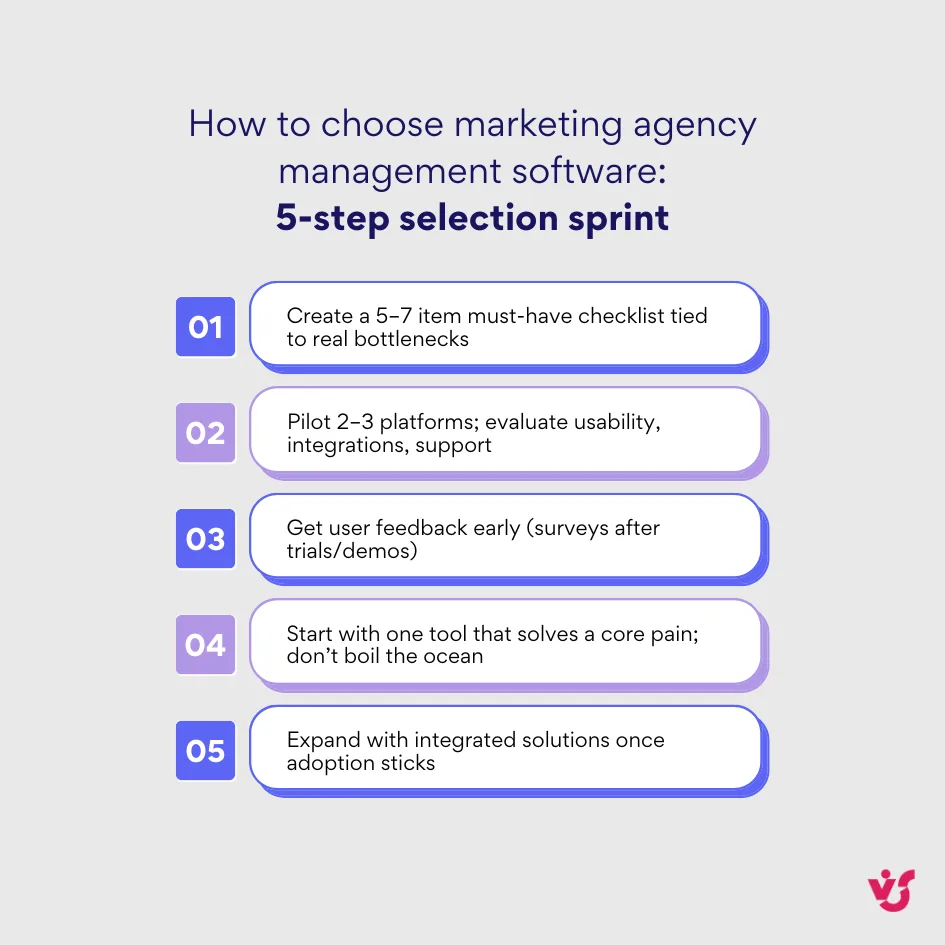
- Create a priority checklist: Identify 5-7 key tasks you want to automate or simplify. Distinguish between must-have features that block adoption and nice-to-have capabilities that would be convenient but aren’t essential. For example, a visual Kanban board might be essential for your creative team while ROI reporting would be nice to have.
Ask yourself these questions to build your checklist:
- What tasks currently consume the most time without adding value?
- Where do errors or miscommunications most frequently occur?
- Which manual processes cause the most frustration?
- What client complaints stem from internal process failures?
- Which team members struggle most with current tools?
- Conduct pilot testing: Sign up for trial versions of 2-3 platforms. Evaluate ease of use, team adaptation speed, and available integrations. Compare functionality, usability, and support responsiveness during the trial period. Many agencies discover deal-breaking limitations only after hands-on testing reveals workflow incompatibilities.
- Gather feedback from your team: Involve key employees in the selection process, especially those who will use the software daily. Conduct brief surveys after testing sessions or demos. People resist tools they didn’t help choose, so early involvement increases adoption rates and reduces implementation friction.
- Start with one tool, but think long-term: Don’t implement everything simultaneously. Begin with a single platform that solves a specific problem—task tracking or email automation, for instance. Later, expand your software stack with integrated solutions. For example, agencies might start with Virto Kanban Board for task management, then add Virto Calendar to coordinate campaign timing once the team has adopted the first tool.
The Impact of AI and Automation on Agency Work
Modern marketing agency tools increasingly incorporate AI features that accelerate task completion, reduce manual workload, and improve results. Automation handles routine activities while artificial intelligence provides insights and suggestions that would require extensive manual analysis.
Fast content generation
AI tools enable rapid creation of marketing copy, product descriptions, headlines, video scripts, and advertising content. This capability proves especially valuable for agencies handling high-volume content requirements or facing tight deadlines. According to Jasper’s research, AI platforms are designed to enhance human creativity by taking on time-consuming tasks like content generation and data analysis, freeing marketers to focus on strategy and storytelling.
Automated newsletters and reports
Email sequences with personalized content, performance reports sent to clients, and campaign summaries can now run without human intervention. Agencies configure triggers and conditions that automatically deliver appropriate information to clients at predetermined times. This automation eliminates the tedious weekly routine of compiling spreadsheets and writing summary emails.
Audience segmentation
AI algorithms analyze user behavior, interaction history, click patterns, email opens, and other engagement signals to automatically segment audiences by interests, funnel stage, and conversion probability. This sophisticated analysis would consume hours if performed manually, and AI often identifies patterns humans miss entirely.
User behavior analysis
Artificial intelligence examines actions on websites and within email campaigns, predicts churn risk, identifies growth opportunities, and generates personalized recommendations. These capabilities make marketing more precise and targeted, moving beyond demographic segmentation to behavioral prediction.
SEO automation
AI tools automate routine SEO tasks including keyword selection, meta description creation, and backlink analysis. Text generation, query clustering, and optimization of titles and page structure happen faster and more accurately than manual processes. While human oversight remains necessary, AI handles the repetitive groundwork.
Paid advertising optimization
AI manages bidding strategies, tests ad variations, and identifies top-performing creatives without human intervention. These systems help identify target audiences, launch behavior-based campaigns, and dynamically adjust budgets based on performance. Agencies can run more sophisticated campaigns with the same staff size.
Video marketing acceleration
AI accelerates video content creation from generating short-form videos to automatic editing and subtitle generation. This capability makes video marketing accessible even to small agencies that previously couldn’t justify the resource investment required for video production.
Example AI integrations in everyday work
Understanding AI’s theoretical benefits means little without seeing how agencies actually deploy these tools. These specific combinations demonstrate practical implementations that solve real workflow challenges rather than just adding impressive features to marketing decks:
- Jasper + Notion: Jasper generates marketing content while Notion serves as the workspace for storing and organizing content plans. Together, these tools enable rapid content creation, editing, and publishing without switching between platforms constantly.
- ChatGPT + Zapier: ChatGPT integration via Zapier allows agencies to use AI for text generation, client inquiry responses, call summaries, and internal communication automation. For instance, agencies can configure automatic Google Docs reports for Zoom meetings where ChatGPT processes transcriptions and extracts action items.
- AI suggestions in Asana: Asana increasingly incorporates AI-powered features including task suggestions, priority recommendations, and automated discussion summaries. These capabilities prove especially useful when managing large projects with dozens of tasks and multiple stakeholders who each have different visibility needs.
| Workflow | Tool combo | Outcome | Where it shines |
| Content production & planning | Jasper + Notion | Faster drafts organized in one workspace | Blogs, product copy, briefs |
| Meeting → actions | ChatGPT + Zapier | Auto-summaries and action-item docs | Client calls, standups |
| PM assistance | Asana (AI features) | Priority suggestions & summary threads | Large, multi-stakeholder projects |
| Predictive reporting | Looker/Tableau with AI add-ons | Trend detection & proactive adjustments | Multi-channel performance reviews |
Why marketing agencies should implement AI today
The question isn’t whether to adopt AI, but how quickly your competitors will leave you behind if you don’t. Agencies implementing AI now gain tangible advantages that compound over time. Here’s what changes immediately:
- Reduce routine workloads for specialists so they focus on strategic thinking rather than repetitive tasks. AI handles the tedious parts of marketing work.
- Increase campaign and content launch speed by automating steps that previously required manual effort. Faster execution means more opportunities to test and optimize.
- Enable personalized customer experiences at scale by analyzing behavioral data and automatically delivering relevant content. Personalization improves conversion rates without increasing team size.
- Gain competitive advantage in increasingly crowded markets where agencies compete on both quality and speed. AI adoption separates leaders from laggards.
- Achieve scalability without proportional staffing increases. Automated processes handle growing task volumes without requiring additional employees, improving profitability.
Recommended Tools for Marketing Agencies from VirtoSoftware
Marketing agencies operating within the Microsoft Teams and Microsoft 365 ecosystem can significantly simplify task management, planning, and collaboration using Virto applications. These solutions suit both small creative teams and agencies with extensive organizational structures.
Explore VirtoSoftware solutions

Virto Shared Calendar
Virto Shared Calendar is a standalone web app and Microsoft Teams-integrated solution designed for simple event management with tagging, color-coding, and anonymous sharing.

Virto Calendar
Consolidate events from SharePoint, Exchange, Google, and more into one calendar view for simplified planning.

Virto Kanban Board
This tool transforms team collaboration through visual task management for consistent stage-by-stage progress.
Virto Kanban Board App for Microsoft Teams and M365

Virto Kanban Board delivers advanced visual project management that adapts to all levels of project complexity, from simple task tracking to sophisticated agile workflows. Unlike basic task management tools, this platform emphasizes dynamic, customizable boards that transform how marketing agencies coordinate campaigns, content production, and client deliverables.
The application functions as a comprehensive agile task management system designed to adapt to agency workflow requirements. Marketing teams visualize and track every stage of projects—from inception to completion—ensuring campaigns progress according to schedule while maintaining visibility across departments and client accounts.
Key capabilities include:
Highly customizable boards enable agencies to tailor Kanban views with swimlanes for different clients or service lines, categorization by campaign type or priority, color-coding for quick visual identification, and subtasks for breaking down complex deliverables into manageable components.
Agile task management provides dynamic workflows that adapt as projects evolve. Teams can prioritize backlogs, organize tasks by urgency or strategic value, and manage workflow to maximize outcomes rather than simply tracking completion status.
Native Microsoft 365 integration ensures seamless operation within the existing technology ecosystem. The platform integrates directly into Microsoft Teams channels and SharePoint sites, maintaining consistency in security, authentication, and user experience across all Microsoft applications.
Cross-platform accessibility allows teams to access Kanban boards through Microsoft Teams Web, Desktop, and Mobile applications, ensuring full flexibility regardless of where team members work or which devices they use.
Progress tracking and visualization transforms abstract project status into concrete visual representations. Agencies see exactly where tasks sit in the workflow, identify bottlenecks before they become critical, and track completion rates across multiple projects simultaneously.
Reports and insights provide detailed analytics that inform strategic decisions. Agencies gain visibility into team velocity, capacity utilization, cycle times, and completion patterns—data that supports resource allocation decisions and client communications.
Planning and backlog management functionality helps agencies prioritize important work, organize workflow systematically, and ensure high-value tasks receive appropriate attention before deadlines become urgent.
Capacity and bottleneck management enables agencies to assess team velocity and capacity, adjust workloads proactively, and prevent blockers that could derail project execution or client deliverables.
The platform supports critical marketing agency scenarios:
- Campaign management: Track creative development, content production, approval workflows, and launch coordination across multiple campaigns simultaneously
- Sprint planning: Manage agile workflows with precision, organizing two-week sprints for development teams or monthly cycles for content production
- Resource allocation: Visualize team capacity across projects to identify overallocation before it impacts deliverables
- Client reporting: Generate progress reports showing task completion, timeline adherence, and team productivity metrics
Use Virto Kanban Board when:
- Managing complex, multi-stage workflows that require visual representation beyond simple task lists
- Coordinating agile development or content production processes with defined sprints and backlogs
- Medium and large agencies require sophisticated project management capabilities beyond basic task tracking
- Teams need to analyze workflow patterns, identify bottlenecks, and optimize productivity through detailed metrics
- Organizations want comprehensive project management within their existing Microsoft 365 environment
One license for all platforms covers SharePoint, Microsoft Teams, and Azure without additional purchases, enabling agencies to deploy consistent Kanban functionality across their entire technology infrastructure.
The platform’s sophisticated visual project management capabilities make it suitable for agencies requiring comprehensive workflow orchestration rather than simplified task tracking. Teams benefit from seeing work progress through customizable stages that reflect actual agency processes, analyzing performance metrics that inform strategic decisions, and coordinating complex projects within the familiar Microsoft 365 environment where they already collaborate.
Virto Calendar App for Microsoft Teams and M365
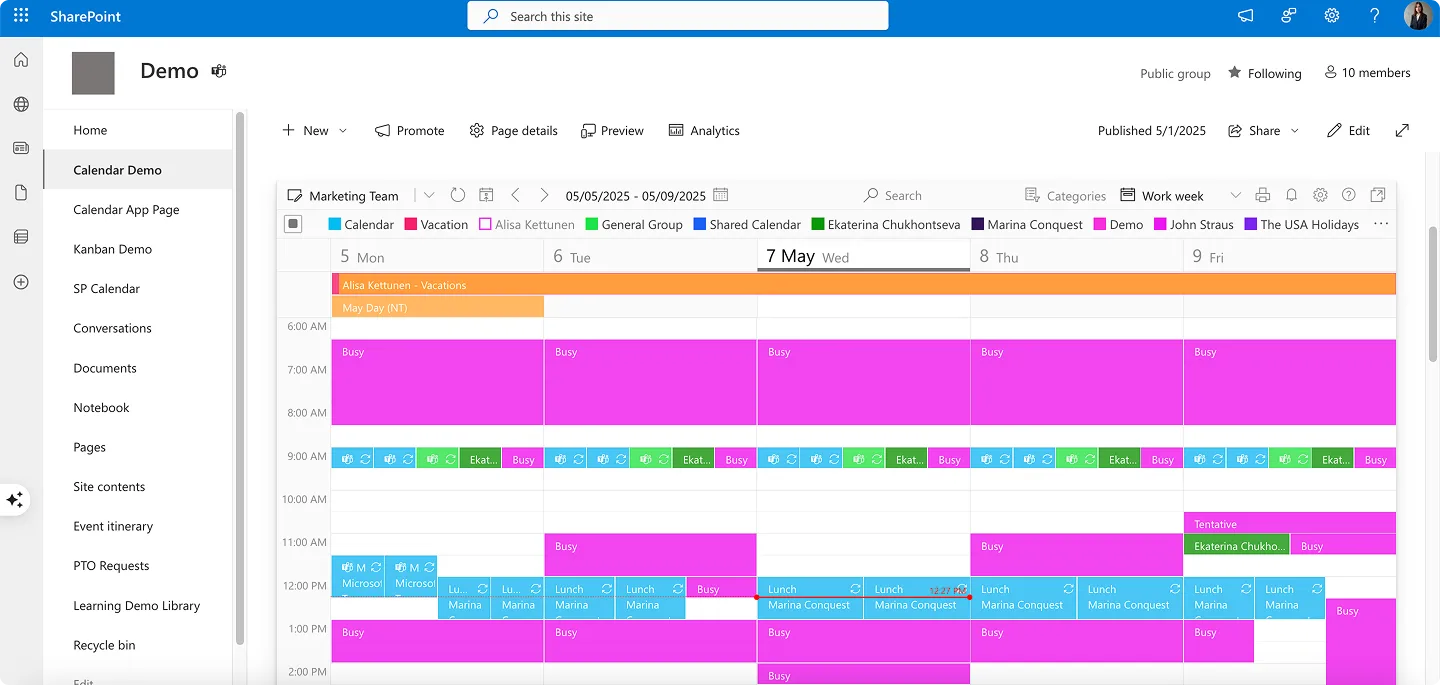
Virto Calendar App delivers powerful capabilities for planning marketing activities, managing deadlines, coordinating events, and scheduling launches across complex organizational structures. Unlike the simplified Shared Calendar, this platform emphasizes comprehensive integration—merging multiple calendars from different sources into unified views.
The application functions as a central scheduling hub that simplifies planning and coordination across projects and teams. Marketing agencies can overlay calendars from SharePoint lists and libraries, Outlook, Microsoft Planner, Google Calendar, iCal, and Apple Calendars, creating a single source of truth for all scheduling activities.
Key capabilities include:
Diverse data source integration enables agencies to consolidate scheduling information regardless of where teams store it. Rather than switching between platforms, agencies view everything in one interface.
Native Microsoft 365 integration provides consistency in security, compliance, and user experience. The platform leverages existing M365 authentication and authorization, maintaining enterprise-grade protection for sensitive scheduling data.
Versatile and adaptive functionality tackles all calendar-related scenarios—from project management timelines to resource booking, employee vacation tracking to event coordination. This flexibility makes it suitable for agencies handling diverse client needs.
One license for all platforms covers SharePoint, Microsoft Teams, and Azure without additional purchases. Agencies deploy the same calendar solution across their entire technology stack.
Cross-platform accessibility allows teams to access calendars within Microsoft Teams channels, through SharePoint sites, or via standalone web applications, ensuring availability regardless of where team members work.
The platform supports multiple real-world scenarios critical to marketing agencies:
- Project management: Track campaign milestones, coordinate deliverables, and monitor progress across multiple client accounts
- Resource booking: Manage conference rooms, equipment, and shared resources to prevent scheduling conflicts
- Team coordination: Overlay individual team members’ calendars to identify availability for meetings and collaborative work
- Event planning: Coordinate webinars, conferences, and client events with real-time visibility for internal and external stakeholders
Use Virto Calendar App when:
- Creating detailed monthly or quarterly marketing calendars that integrate data from multiple sources
- Coordinating deadlines across different marketing disciplines—content, advertising, email, social media—each managed in separate systems
- Medium and large agencies require sophisticated calendar overlay functionality beyond basic scheduling
- Teams need to consolidate Outlook appointments, SharePoint events, and external calendar feeds into unified views
- Enterprise-grade security and compliance requirements mandate Microsoft 365-native solutions
The platform’s robust integration capabilities make it suitable for agencies requiring comprehensive calendar management rather than simplified event sharing. Teams benefit from seeing scheduling information from disparate sources in coordinated views that enable strategic resource planning and conflict prevention.
Virto Shared Calendar App
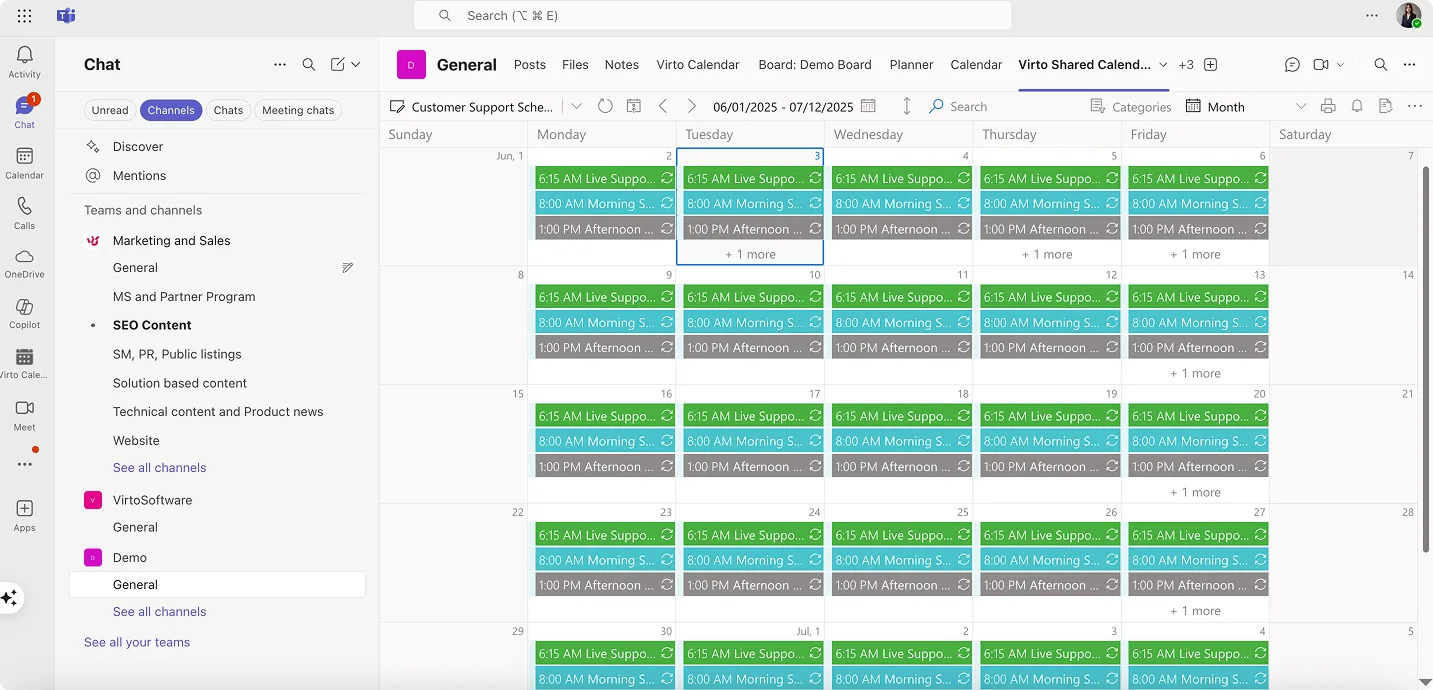
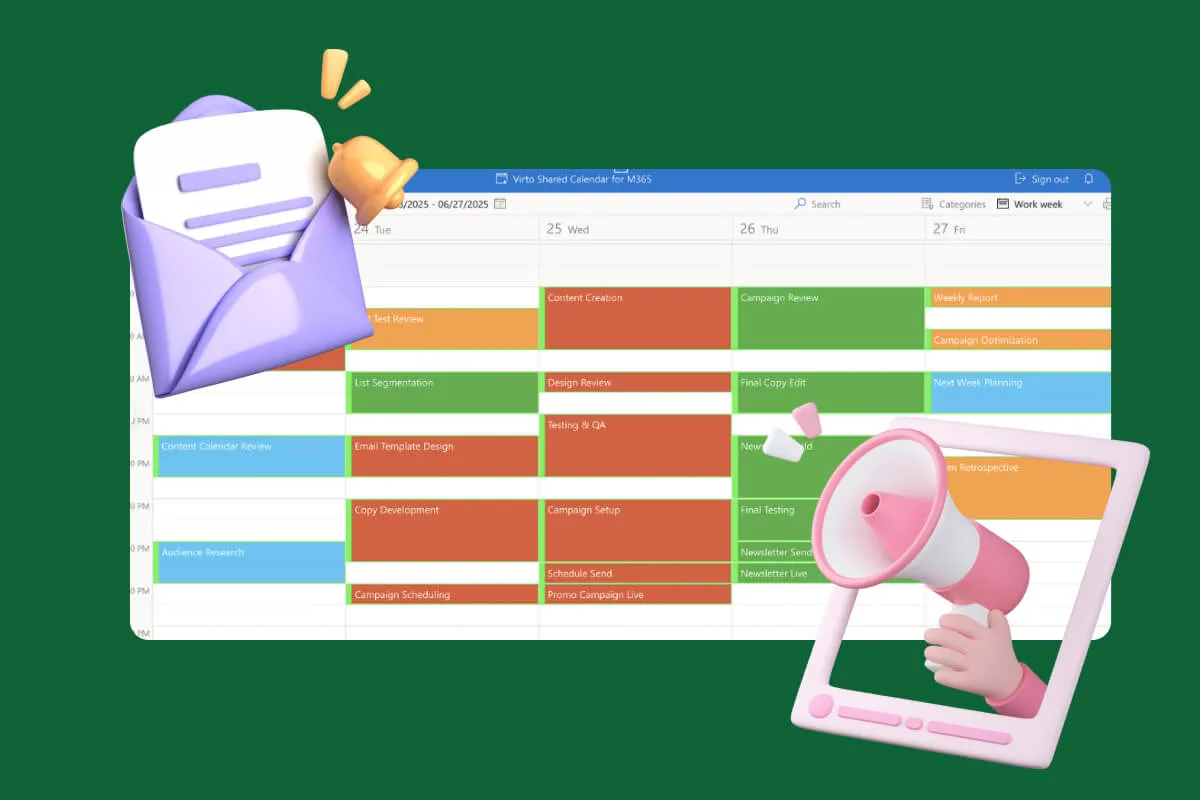
This streamlined calendar solution works ideally for small agencies and teams seeking straightforward scheduling without unnecessary complexity. Unlike Virto’s more robust Calendar App, the Shared Calendar eliminates overlay features to focus exclusively on event tagging, sharing, and collaboration.
The platform emphasizes universal accessibility. Anonymous access links allow agencies to share calendars with freelancers, contractors, and clients without requiring Microsoft accounts—removing a common friction point in external collaboration. Teams can use the calendar natively within Microsoft Teams or access it as a standalone web application, ensuring availability across devices and platforms.
List the advantages of Virto Shared Calendar:
One-click event creation with color-coded tags for instant categorization and visual clarity across team schedules.
Real-time updates across all devices ensure everyone sees the same information whether accessing through Teams, web browser, or mobile.
Granular permissions let agencies control who can edit versus only view calendars, maintaining security while enabling transparency.
Zero-login collaboration makes it effortless to coordinate with external parties who don’t use Microsoft 365.
Use Virto Shared Calendar when:
- Small team size requires simple tools without feature overload
- Frequent collaboration with external parties who lack Microsoft accounts
- Agencies need quick deployment without extensive training requirements
- Budget constraints favor straightforward solutions over enterprise platforms
- Managing projects for individual clients with limited participants
The platform’s minimalist interface enables fast adoption—teams can set up and start scheduling within minutes rather than spending hours configuring complex calendar systems.
| Need | Virto app | Why it fits | Where to use |
| Visual workflow & sprints | Virto Kanban Board | Custom boards, swimlanes, metrics | Campaign pipelines, content ops |
| Calendar overlays | Virto Calendar App | Merge Outlook/SharePoint/Google/iCal | Cross-team launches & events |
| Simple shared scheduling | Virto Shared Calendar | Anonymous links; fast adoption | Client-facing timelines, freelancers |
Collaboration with external contractors
All VirtoSoftware calendar solutions support external access—critically important when working with freelancers, contractors, and clients. Agencies can create separate calendars by client or project and configure access via link, domain, or email address.
This capability helps coordinate publications, branding campaigns, media plans, releases, visual materials, and other work stages with external parties. Support for notifications and reminders ensures everyone stays informed about key milestones and deadlines.
Why external collaboration matters:
- Simplifies communication and increases transparency for clients who want visibility into progress
- Reduces manual reminders and follow-up emails that consume agency time
- Increases client loyalty through streamlined, professional interactions that demonstrate organizational competence
Agencies using VirtoSoftware tools gain structured approaches to marketing management without unnecessary complexity. These platforms help agencies build effective systems for both internal operations and client communications, ultimately delivering better results with less friction.
Explore VirtoSoftware Use Cases

Conclusion on Digital Marketing Agency Tools
Choosing the right digital marketing software for agencies fundamentally depends on your agency’s scale, objectives, and operational processes. Start with priority tasks: planning, execution, and reporting. Build from this foundation rather than attempting to implement everything simultaneously.
VirtoSoftware products—Virto Kanban Board, Virto Calendar, and Virto Shared Calendar—enable agencies to establish effective marketing management systems without overwhelming complexity. These tools streamline internal processes while simultaneously improving communication with clients and contractors, creating value at multiple levels of agency operations. We invite you to schedule a quick demo call and install free trial versions of those apps to see for yourself.
The software choices you make today determine your competitive position tomorrow. Select wisely, implement thoughtfully, and adjust as your agency grows.
Relevant resources: