Creative agencies operate in a unique ecosystem where brilliant ideas need to flow seamlessly between minds, iterations happen at lightning speed, and subjective feedback can completely reshape a project’s direction. Unlike manufacturing or software development, where processes tend to be linear and predictable, creative work thrives on flexibility, visual thinking, and constant collaboration.
This is exactly why standard project management approaches often fall flat in creative environments. While traditional methods focus on rigid timelines and measurable deliverables, creative teams need something different—tools that embrace the beautiful chaos of the creative process while keeping everyone aligned and moving forward.
The right project management software doesn’t just organize tasks; it becomes the central nervous system of your agency. It transforms scattered conversations into structured progress, turns deadline anxiety into confident delivery, and most importantly, gives your team more time to focus on what they do best: creating exceptional work.
In this guide, we’ll explore what makes project management different for creative agencies, examine the specific challenges your software needs to solve, and walk through the key features that separate good tools from game-changers. We’ll also dive into detailed reviews of the most popular platforms, complete with real-world scenarios to help you envision how each might work for your team.
What Is Project Management in Creative Agencies?
If you’ve ever tried to apply traditional project management methods to creative work, you’ve probably discovered they fit about as well as a square peg in a round hole. While project management in engineering or manufacturing follows predictable patterns—clear specifications, linear workflows, measurable outcomes—creative project management operates in an entirely different universe.
In traditional industries, success means delivering exactly what was specified, on time and on budget. But in creative work? Success often emerges from the unexpected. That brilliant campaign concept might come from a casual conversation during the third round of revisions. The perfect color palette could surface when someone accidentally applies the wrong filter. The most compelling headline might be the one that breaks all the established rules.
This fundamental difference shapes everything about how creative teams need to work together. While traditional project management focuses on strict deadlines, clear metrics, and linear processes, creative environments demand flexibility, visual progress tracking, iterative workflows, and constant collaboration between team members with very different skill sets and perspectives.
Understanding this distinction is essential for choosing tools that enhance rather than hinder your team’s natural creative process. Let’s explore the core principles that make creative project management unique, using real scenarios you’ll recognize from your own work.
| Aspect | Traditional project management | Creative project management |
| Planning approach | Fixed specifications, linear workflow | Flexible concepts, iterative development |
| Change management | Changes are disruptions to avoid | Changes are opportunities to explore |
| Success metrics | On-time, on-budget delivery | Client satisfaction + creative excellence |
| Feedback cycles | Formal reviews at milestones | Continuous collaboration throughout |
| Quality standards | Measurable, objective criteria | Subjective judgment + brand alignment |
| Team structure | Hierarchical roles, clear boundaries | Collaborative roles, overlapping skills |
Visual and transparent planning
Everyone on your team should instantly understand where a project stands, who’s responsible for what, and what needs to happen next. This isn’t just about efficiency—it’s about maintaining creative momentum.
Consider this example: Your designer opens the project board Monday morning and immediately sees that the copywriter finished the website text Friday afternoon. Instead of starting their week with emails and status meetings, they can jump straight into laying out the homepage. Meanwhile, your account manager spots that the client approval deadline is approaching and proactively schedules a review meeting. This kind of seamless handoff only happens when project status is visible at a glance.
Flexibility and adaptability
In creative work, change is a feature. Your project management approach needs to roll with the punches, not fight them.
For instance—a client calls Wednesday morning asking to completely pivot their banner campaign concept just one week before launch. Instead of panic and overtime, your project manager quickly reshuffles priorities in the task system, updates the timeline, and reallocates resources. The designer and copywriter get immediate notifications about the new direction, and the revised deadline automatically appears in everyone’s calendars. What could have been a crisis becomes just another day at the office.
Iteration and feedback cycles
Creative work rarely follows a straight line from concept to completion. Instead, it spirals upward through multiple rounds of development, feedback, and refinement.
Here’s how this looks in practice: Your team creates the first cut of a promotional video and uploads it to the project workspace. The client reviews it directly in the system, leaving timestamped comments about pacing and music choices. Your video editor sees the feedback immediately, makes adjustments, and uploads version two. This cycle continues until everyone’s happy with the final product—and every version, comment, and decision is preserved for future reference.
Constant communication
Creative projects thrive on dialogue. Ideas evolve through conversation, problems get solved through collaboration, and the best solutions often emerge from unexpected connections between team members.
Your internal chat becomes the place where concept details get hashed out, layout feedback gets shared instantly, and urgent changes get communicated immediately. Meanwhile, your shared calendar keeps everyone aligned on client meetings, internal reviews, and project milestones. This ongoing conversation isn’t just nice to have—it’s where the magic happens.
Managing subjectivity
“I’ll know it when I see it” might be the most dreaded phrase in creative work, but it’s also a reality you need to navigate skillfully. Success requires finding ways to make subjective judgments more objective and collaborative.
Smart teams tackle this upfront by establishing clear examples of desired visual style, tone of voice, and quality standards before work begins. When everyone agrees on reference points early in the process, later feedback becomes more specific and actionable. Instead of “make it pop,” you get “let’s use the bold, geometric style we agreed on in example three.”
👉 Any ideas on how to manage a creative agency? Running a creative agency means walking a tightrope between artistic expression and business rigor. You need well-defined processes—clear creative briefs, structured feedback loops, and approval workflows—yet these systems must nurture rather than constrain the collaborative spirit that produces breakthrough work. The best agency leaders act as facilitators—they clear roadblocks, maintain transparency, properly allocate resources, and carefully orchestrate client relationships among other things. Honestly? It’s about reading the room as much as reading the schedule.
Accounting for cross-functional interaction
Creative projects require specialists from different disciplines to work together seamlessly. The content strategist, visual designer, developer, and project manager all need to understand how their work connects to everyone else’s.
Think about launching a new website: The content manager needs to wait for both design approval and SEO analysis before uploading text to the content management system. Your project management system should automatically track these dependencies, so nobody’s left wondering why their part of the project is stuck in limbo.
Clear distribution of roles and responsibilities
When creative people collaborate, there’s always potential for overlap, confusion, or gaps in coverage. Everyone needs to understand their specific area of responsibility to avoid duplicated effort and missed deadlines.
Successful teams define these boundaries explicitly in their project briefs: The UX designer owns the final layout decisions, the account manager handles all client communication, and the content manager is responsible for publication. This clarity eliminates the guesswork that can derail projects and strain relationships.
A culture of collaboration, not control
The project manager’s role in creative work isn’t to micromanage talented people—it’s to remove obstacles so they can do their best work. This requires a fundamentally different management philosophy than traditional project oversight.
Instead of hovering over shoulders and demanding constant updates, effective creative project managers focus on daily standups where they ask simple questions: “What’s blocking you today? How can I help? Do you need me to organize a client meeting, streamline an approval process, or clarify something in the brief?” This supportive approach keeps projects moving while preserving the autonomy that creative people need to thrive.
👉 How does project management for creative agencies differ from project management for other agencies? Project management for creative agencies operates on different principles than traditional business project management because creative work is inherently subjective, iterative, and collaborative rather than linear and measurable. Manufacturing and engineering projects operate within well-defined parameters—they have precise specifications, follow established workflows, and measure success against objective criteria. Creative projects, by contrast, unfold through a more fluid process. They develop through repeated rounds of feedback, with scope that shifts as ideas take shape, and decisions based on subjective judgments that can fundamentally alter the project’s trajectory even in its final stages.
What Tasks Does Software for Creative Agencies Solve
Modern project management software doesn’t just help creative agencies assign tasks—it transforms how teams collaborate, reduces the chaos that comes with multiple revisions and stakeholder feedback, and creates sustainable workflows that actually support creativity rather than stifle it. This becomes especially crucial when you’re juggling frequent client changes, managing parallel projects with overlapping deadlines, and dealing with the inherent subjectivity that makes creative work both exciting and challenging.
Creative agencies need tools that understand their unique rhythm. While a manufacturing company might follow the same production steps for every widget, creative teams deal with projects that evolve organically, clients who change their minds (sometimes multiple times), and deliverables that require subjective judgment calls. The right software embraces this reality instead of fighting it.

So what software do creative agencies use? The most successful teams choose platforms that combine visual project management with robust collaboration features, seamless file sharing, and flexible approval workflows. They need systems that make it easy to comment on designs, track multiple versions of creative assets, and maintain clear communication channels with both internal teams and external clients.
Let’s examine the specific challenges that the right project management software helps solve for creative teams:
Task and stage management
Creative projects naturally break down into distinct phases, but these phases often overlap, iterate, and sometimes loop back on themselves. Effective software helps you map out these stages while maintaining the flexibility to adapt when client feedback sends you in a new direction.
Take a typical landing page project: Your initial phases might include strategy development, copywriting, design concepts, layout development, client review, revisions, development handoff, and final approval. A good task management system displays each stage clearly—perhaps on a visual board where everyone can see that copywriting is complete, design concepts are in review, and development is waiting for final assets. When the client requests changes to the messaging strategy, you can quickly adjust dependencies and timelines without losing track of what’s already been accomplished.
Campaign and deadline planning
Creative work operates on multiple timelines simultaneously. You might have a social media campaign launching next week, a rebrand project due next month, and a trade show booth design needed for an event in three months. Visual planning tools help you orchestrate these overlapping deadlines without letting anything slip through the cracks.
Consider your campaign manager preparing for a product launch: They can see that YouTube ads need to go live on the 20th, which means final video edits must be complete by the 17th to allow time for client approval and platform upload. The timeline automatically shows dependencies—scripts need approval before video production begins, and product photography must be finished before the design team can create supporting graphics. This bird’s-eye view prevents last-minute scrambles and helps everyone understand how their work fits into the bigger picture.
Coordination and feedback on layouts and texts
One of the biggest pain points in creative work is managing feedback and revisions. Without proper systems, comments get scattered across emails, Slack messages, and sticky notes, making it nearly impossible to track what’s been addressed and what’s still pending.
Modern project management platforms solve this by embedding feedback directly into the creative process. Your designer uploads the first banner concept to the project workspace, and the account manager can comment directly on specific elements: “Can we make the call-to-action button more prominent?” The copywriter adds a note about headline alternatives, and the client can review everything in one place. Each revision gets stored with a clear version history, so you never lose track of why certain decisions were made or what alternatives were considered.
👉What is creative agency software? Creative agency management software is specialized project management and workflow tools designed specifically for the unique needs of design studios, marketing agencies, and creative teams who work on subjective, iterative projects with frequent revisions and client collaboration. Unlike traditional business software that focuses on linear processes and measurable outputs, creative agency software emphasizes visual organization, flexible workflows, collaborative feedback systems, and seamless integration with creative tools.
Team workload monitoring
Creative talent is your most valuable resource, and uneven workload distribution can lead to burnout, missed deadlines, and quality issues. Good project management software gives you visibility into who’s swamped and who has capacity for new work.
Your resource planning dashboard might reveal that two senior designers are overbooked for the next two weeks while a newer team member has lighter project load. Instead of defaulting to overtime or delayed deliveries, you can redistribute some tasks, perhaps moving a less complex design project to the available designer or adjusting timelines to better balance the workload. This kind of proactive resource management keeps teams healthy and projects on track.
Centralization of all information and files
Creative projects generate mountains of information: original briefs, reference materials, work-in-progress files, client feedback, final deliverables, and all the decisions made along the way. When this information lives scattered across email threads, shared drives, and individual computers, simple questions become time-consuming treasure hunts.
Comprehensive project management platforms create a single source of truth for each project. Your rebranding initiative becomes a central hub containing the updated logo files, brand guidelines, messaging framework, approved color palettes, client correspondence, and revision history. New team members can get up to speed quickly, clients can access the latest versions of everything, and nobody wastes time hunting for that “final final FINAL” version of the logo.
Collaboration and notifications
Creative work thrives on timely communication, but nobody wants to live in their email inbox or constantly ping colleagues for status updates. Smart notification systems keep everyone informed without creating information overload.
When your copywriter finishes the email campaign text, the designer automatically gets notified that they can begin layout work. When the client approves the final concept, everyone involved receives an update, and the next phase of work can begin immediately. These automated touchpoints maintain project momentum while respecting everyone’s focus and workflow preferences.
Visual control and ease of navigation
Creative teams think visually, so their project management tools should reflect this natural inclination. Dense spreadsheets and text-heavy interfaces create cognitive friction that slows down decision-making and obscures project status.
The best creative project management platforms embrace visual design principles: color-coded project cards, intuitive drag-and-drop functionality, thumbnail previews of creative assets, and clear visual indicators of project health. Your team should be able to glance at the project board and immediately understand what’s moving smoothly, what needs attention, and where bottlenecks might be forming. This visual clarity isn’t just about aesthetics—it’s about creating tools that match how creative minds naturally process information.
Criteria for Choosing Project Management Software for Creative Agencies
Choosing project management software for a creative agency isn’t like picking accounting software or inventory management tools. Creative teams operate at the intersection of art and commerce, where spontaneous brilliance needs to coexist with client deadlines, and where the most important decisions often happen in the space between what was planned and what emerges through collaboration.
This unique environment demands software that can adapt to your team’s creative process rather than forcing your process to adapt to rigid technological constraints. The wrong choice can turn your project management system into a creativity killer—a bureaucratic layer that slows down innovation and frustrates talented people. The right choice becomes invisible infrastructure that amplifies your team’s natural abilities and removes friction from collaborative work.
Here are the essential detailed criteria that should guide your decision:
Convenient visual interface
Creative professionals are visual thinkers. They process information spatially, understand relationships through layout and design, and make decisions based on how things look and feel together. This cognitive preference isn’t just a nice-to-have—it’s fundamental to how creative teams operate most effectively.
Your project management software should embrace this visual orientation through interfaces that feel familiar and intuitive to creative minds. Kanban boards let teams see project flow at a glance, with tasks moving smoothly from “concept” to “in progress” to “client review.” Timeline views help visualize how different projects overlap and interact. Calendar displays make it easy to spot potential conflicts between deadlines and resource availability.
But visual clarity goes beyond just choosing the right view. The interface itself should feel designed rather than engineered. Clean typography, thoughtful use of white space, logical information hierarchy, and intuitive navigation patterns all contribute to a tool that supports rather than hinders creative thinking. When your team can focus on their work instead of deciphering complex menus and cluttered screens, everyone’s productivity improves.
Collaboration features
Creative work is inherently collaborative, but not all collaboration features are created equal. Your software needs to support the specific ways creative teams communicate and iterate together.
The ability to leave contextual comments directly on tasks and creative assets transforms feedback from a scattered conversation into a structured dialogue. Instead of hunting through email threads to find that comment about font size, team members can see feedback attached to the specific design element in question. Mention functionality (@-mentions) ensures important messages reach the right people without creating notification noise for everyone else.
File attachment and preview capabilities should handle the reality of creative work—large image files, video content, design mockups, and presentation materials. Your account manager should be able to review layout concepts directly in the project interface, and your designer should be able to upload new versions without breaking existing comment threads or approval workflows.
Integrations with cloud services and email
Creative teams already have established workflows around cloud storage, email communication, and specialized creative tools. Your project management software should integrate seamlessly with these existing systems rather than requiring people to abandon tools they’re already comfortable using.
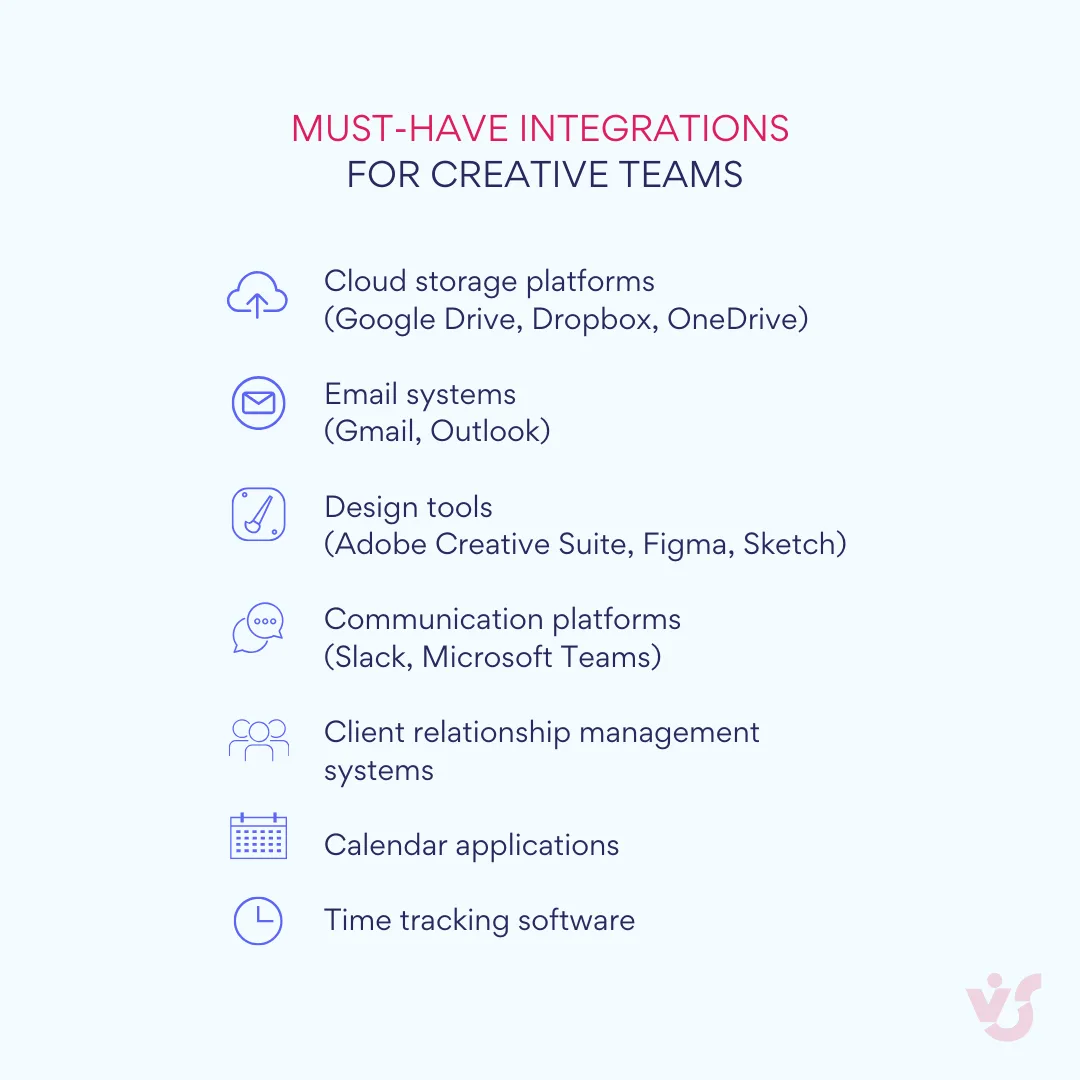
Connections with Google Drive, Dropbox, and OneDrive eliminate the friction of file sharing and ensure everyone’s working with the most current versions of creative assets. Integration with Gmail and Outlook means project updates can flow naturally into existing communication patterns without requiring constant platform-switching.
These integrations aren’t just about convenience—they’re about maintaining the flow state that’s essential for creative work. When people have to constantly switch between disconnected systems, they lose the mental momentum that produces their best ideas and most efficient work.
Support for calendars, deadlines, and reminders
Creative work might be flexible and iterative, but it still happens in the real world of client presentations, campaign launch dates, and budget deadlines. Your project management system needs to help teams balance creative exploration with practical constraints.
Deadline management should feel natural and supportive rather than punitive. Visual calendar views help teams understand how different projects interact and compete for resources. Intelligent reminder systems can escalate gently—perhaps starting with a friendly nudge a few days before a deadline and becoming more urgent as the date approaches.
The key is creating awareness without creating anxiety. Your team should always know what’s coming up and have enough advance notice to plan their work thoughtfully. Nobody should be surprised by sudden deadlines or discover conflicts at the last minute.
Flexible scalability for tasks of any size
Creative agencies work on an incredible range of projects. One week you might be designing a simple social media graphic; the next week you could be orchestrating a multi-channel rebrand involving dozens of deliverables and external vendors. Your project management software needs to scale gracefully from simple tasks to complex campaigns.
This scalability isn’t just about handling more tasks—it’s about maintaining usability and clarity as complexity increases. Small projects should feel lightweight and easy to manage, while large initiatives should break down into manageable components without losing sight of the big picture.
The ability to quickly add team members, create new project categories, and allocate resources becomes critical when you’re working under tight deadlines or dealing with unexpected scope changes. Your software should make these adjustments feel effortless rather than requiring extensive setup or configuration.
Mobile accessibility
The creative process doesn’t happen only at desks during business hours. Inspiration strikes during client dinners, problems get solved while commuting, and urgent feedback often comes through when people are away from their computers. Mobile accessibility ensures your team can stay connected to projects without being chained to their workstations.
A well-designed mobile experience goes beyond simply shrinking the desktop interface to fit smaller screens. It prioritizes the most important functions for on-the-go use: checking project status, responding to comments, approving time-sensitive deliverables, and communicating with team members. Your account manager should be able to approve client feedback while traveling to a meeting, and your creative director should be able to review concepts and leave feedback from anywhere.
Implementation simplicity and learning curve
Perhaps most importantly, your chosen project management system should integrate smoothly into your team’s existing workflows without requiring extensive training or major process overhauls. Creative professionals are generally eager to adopt tools that make their work better, but they’re understandably resistant to systems that feel bureaucratic or overly complex.
The best creative project management tools feel intuitive from day one while offering deeper functionality for teams that want to customize their workflows. People should be able to accomplish basic tasks—creating projects, assigning work, sharing files, leaving feedback—within minutes of their first login. Advanced features should be discoverable and optional rather than required for basic functionality.
| Criteria | Small teams (3-10) | Medium teams (10-25) | Large teams (25+) |
| Visual interface | Critical | Important | Important |
| Collaboration features | Important | Critical | Critical |
| Cloud integration | Important | Critical | Critical |
| Mobile access | Nice-to-have | Important | Critical |
| Advanced reporting | Not needed | Nice-to-have | Important |
| Custom workflows | Not needed | Important | Critical |
| Client portals | Nice-to-have | Important | Critical |
| Enterprise security | Important | Critical | Critical |
Remember, your project management system should enhance creativity, not constrain it. The ideal tool becomes such a natural part of your workflow that people stop thinking about the software and focus entirely on producing exceptional creative work.
Review of the Best Project Management Tools for Creative Agencies
the key criteria for evaluation, let’s dive into the specific tools that have proven themselves in real creative environments. These platforms have each carved out their own niche by understanding different aspects of creative work and building features that address specific agency needs.
From simple visual boards that get small teams organized quickly to comprehensive platforms that can orchestrate complex multi-channel campaigns, each tool offers a different approach to managing creative chaos. We’ll examine how each platform performs across the criteria we’ve discussed and explore the scenarios where each one shines.
Trello
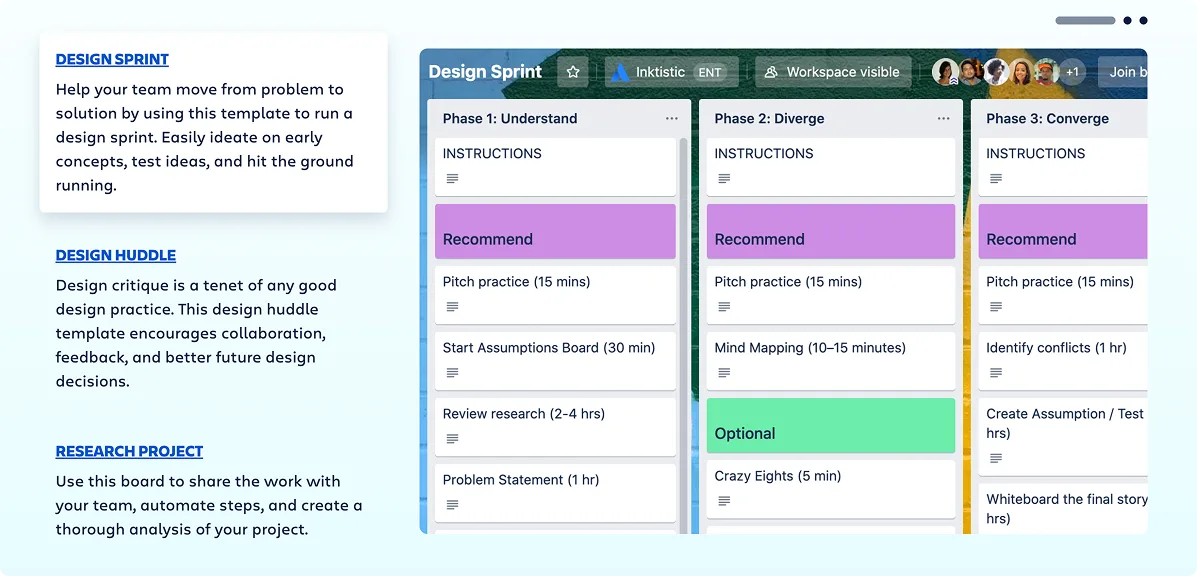
Trello has earned its popularity through ruthless simplicity. Built around the Kanban board concept, it transforms project management into something that feels more like organizing a visual workspace than wrestling with complex software.
Latest features and capabilities: Trello has enhanced its foundation with calendar views that help teams visualize deadlines alongside their familiar board structure. Custom fields allow agencies to track client information, project budgets, or creative brief details directly on each card. Real-time collaboration means multiple team members can work on the same board simultaneously without conflicts or confusion.
The platform’s strength lies in its integration ecosystem. Connections with Slack keep communication flowing smoothly, while Google Drive and Dropbox integrations ensure creative assets are always accessible from within project cards. Automated notifications keep everyone informed about task updates, deadline approaches, and new comments without overwhelming people with unnecessary alerts.
Visual functionality: Trello’s card-based system creates an intuitive way to organize creative work. Each project becomes a board, with lists representing different stages like “Ideas,” “In Progress,” “Client Review,” and “Complete.” Cards can hold detailed task information, file attachments, checklists, and team discussions.
This approach works particularly well for brainstorming sessions and storyboarding processes. Creative teams can quickly capture ideas as cards, move them through development stages, and maintain a clear visual record of how concepts evolve. The ability to organize boards by client, department, or project type provides flexibility without complexity.
Best suited for: Small to medium creative teams that value simplicity and visual clarity over advanced features. Trello excels in environments where projects have relatively straightforward workflows and where team members prefer intuitive tools over feature-rich platforms. It’s particularly effective for content marketing teams, small design studios, and creative departments within larger organizations that need to track multiple ongoing projects without getting bogged down in complex configuration.
Pricing: Free plan available for basic use; paid plans start at $10 per user per month.
Asana
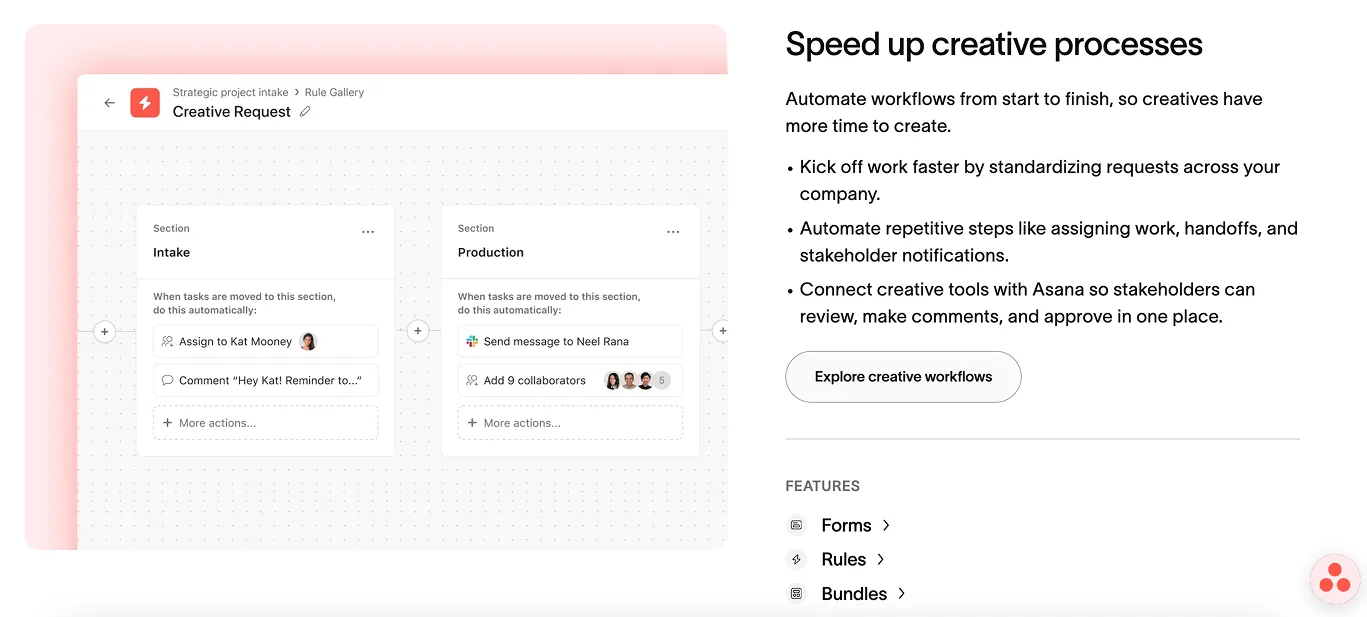
Asana strikes a balance between visual appeal and robust functionality, making it a favorite among creative teams that need more structure than Trello provides but don’t want to sacrifice usability for features.
Latest features and capabilities: Asana offers multiple project views—Kanban boards for visual workflow management, timeline views for deadline tracking, and calendar displays for resource planning. Task automation reduces manual work by triggering actions based on project milestones or deadline approaches. Custom forms streamline client intake and creative brief processes.
The platform’s integration with Adobe Creative Cloud makes it particularly appealing for design-focused teams. Portfolio views help agencies manage multiple client relationships and track milestones across different projects simultaneously. Advanced search and filtering capabilities help teams find specific tasks or assets quickly, even in complex project structures.
Visual functionality: Asana’s interface reflects thoughtful design principles that resonate with creative professionals. Projects can be visualized as clean Kanban boards that map creative workflows naturally, with tasks flowing from concept development through client approval to final delivery. The timeline view helps teams understand how different creative projects overlap and identify potential resource conflicts before they become problems.
File sharing and commenting features support the iterative nature of creative work. Team members can attach design mockups, leave feedback directly on tasks, and maintain clear revision histories that track how creative concepts evolve through collaboration.
Best suited for: Creative teams that need flexible project views and systematic approaches to managing client work. Asana works particularly well for agencies with clear project phases and milestone-based workflows. Marketing agencies planning campaign launches, design studios managing multiple client brands, and creative departments preparing for events or product launches often find Asana’s structured approach helpful for maintaining quality while meeting deadlines.
Pricing: Free plan available for small teams; paid plans start at $10.99 per user per month.
ClickUp

ClickUp positions itself as the comprehensive solution for teams that want extensive customization options and aren’t afraid of feature complexity in exchange for powerful functionality.
Latest features and capabilities: ClickUp receives frequent updates that continuously expand its feature set, making it highly adaptable for creative agencies with evolving needs. Advanced automation capabilities help streamline repetitive processes, while extensive customization options allow teams to configure workflows that match their specific creative processes.
The platform’s strength lies in its versatility. Teams can switch between multiple viewing modes—Gantt charts for complex project planning, mind maps for brainstorming sessions, calendar views for deadline management, and traditional task lists for detailed work breakdown.
Visual functionality: ClickUp offers perhaps the most diverse set of visual tools among project management platforms. Gantt charts help visualize complex creative projects with multiple dependencies and overlapping timelines. Mind mapping features support ideation and concept development phases. Kanban boards provide familiar workflow visualization, while dashboard views offer high-level project health monitoring.
This variety of visual options makes ClickUp particularly suitable for creative agencies that work on diverse project types requiring different management approaches. A video production project might benefit from timeline visualization, while a branding project could work better with mind mapping during concept development and Kanban boards during execution.
Best suited for: Creative agencies that need highly customizable workflows and aren’t deterred by complexity. ClickUp works well for multidisciplinary teams that handle diverse project types—from quick social media content to comprehensive brand overhauls. Agencies with technical team members who enjoy optimizing workflows often appreciate ClickUp’s extensive configuration options.
Pricing: Affordable initial costs, though expenses can accumulate with advanced features; specific pricing varies based on team size and feature requirements.
Notion

Notion approaches project management from a unique angle, combining task management with knowledge base functionality to create comprehensive workspaces for creative teams.
Latest features and capabilities: Notion’s Team Wiki functionality creates centralized knowledge management that proves invaluable for creative agencies maintaining brand guidelines, creative brief templates, and project retrospectives. Flexible Kanban boards and database views allow custom task management approaches that can evolve with changing team needs.
The platform’s database functionality allows creative teams to build custom solutions for client management, asset libraries, and project documentation. Shared notes and collaborative editing features support the documentation-heavy aspects of creative work—maintaining creative briefs, style guides, and project retrospectives.
Visual functionality: Notion embraces flexibility over prescriptive structure. Teams can create custom layouts that combine project tasks with supporting documentation, reference materials, and team knowledge. This approach works particularly well for creative teams that need to maintain extensive documentation alongside their project management.
The block-based editing system allows teams to create rich project pages that combine task lists, embedded files, reference images, and collaborative notes. This comprehensive approach helps maintain context that often gets lost in more specialized project management tools.
Best suited for: Creative teams that value comprehensive documentation and knowledge management alongside traditional project tracking. Notion excels in environments where creative brief development, style guide maintenance, and team knowledge sharing are critical to project success. Digital agencies managing multiple client brands, creative departments maintaining extensive asset libraries, and teams that frequently onboard freelancers or collaborate with external partners often find Notion’s comprehensive approach valuable.
Pricing: Free plan available; paid tiers offer additional features and storage capacity.
Monday.com
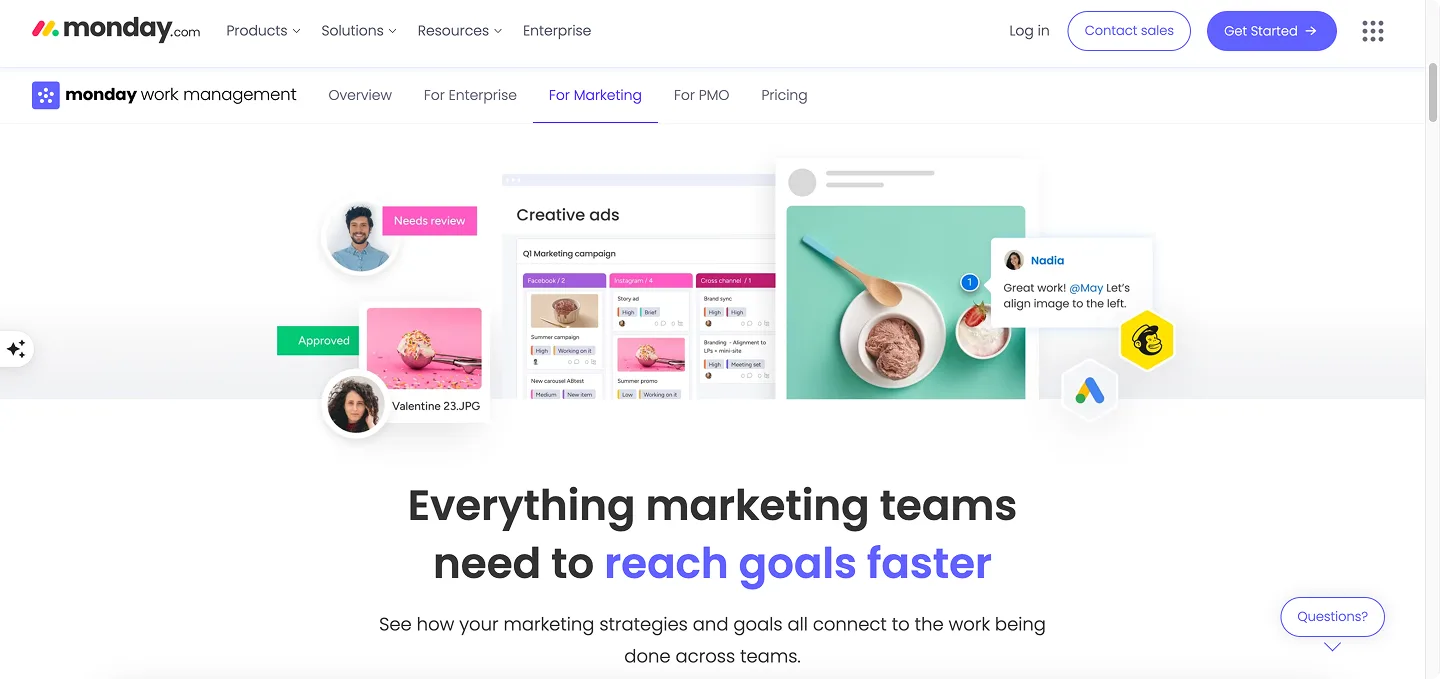
Monday.com focuses on workflow centralization and stakeholder collaboration, making it particularly effective for creative agencies that need to coordinate complex projects involving multiple internal teams and external partners.
Latest features and capabilities: Monday.com offers sophisticated workflow automation that can handle complex creative approval processes. Customizable boards adapt to different project types, while multiple view options (Kanban, Gantt, workload, calendar) provide flexibility for different team preferences and project requirements.
The platform’s collaboration features extend beyond internal teams to include external stakeholders. Shareable forms streamline client intake processes, while guest access controls allow clients to participate in feedback and approval workflows without compromising internal project security.
Visual functionality: Monday.com’s interface emphasizes clarity and quick information access. Color-coded project boards make it easy to distinguish between different clients, project types, or priority levels. File annotation and version control features support creative asset management, while customizable dashboards provide project health visibility for both team members and management.
The workload view helps creative teams balance resources effectively, showing when designers are overcommitted and when capacity is available for new projects. This resource visibility proves particularly valuable for agencies managing multiple concurrent projects with varying deadlines.
Best suited for: Creative agencies that need robust stakeholder collaboration and systematic workflow management. Monday.com works particularly well for larger teams managing multiple client relationships simultaneously, agencies that frequently collaborate with external partners, and creative departments within larger organizations that need to coordinate with other business functions.
Pricing: Plans start at $8 per user per month when billed annually.
Wrike
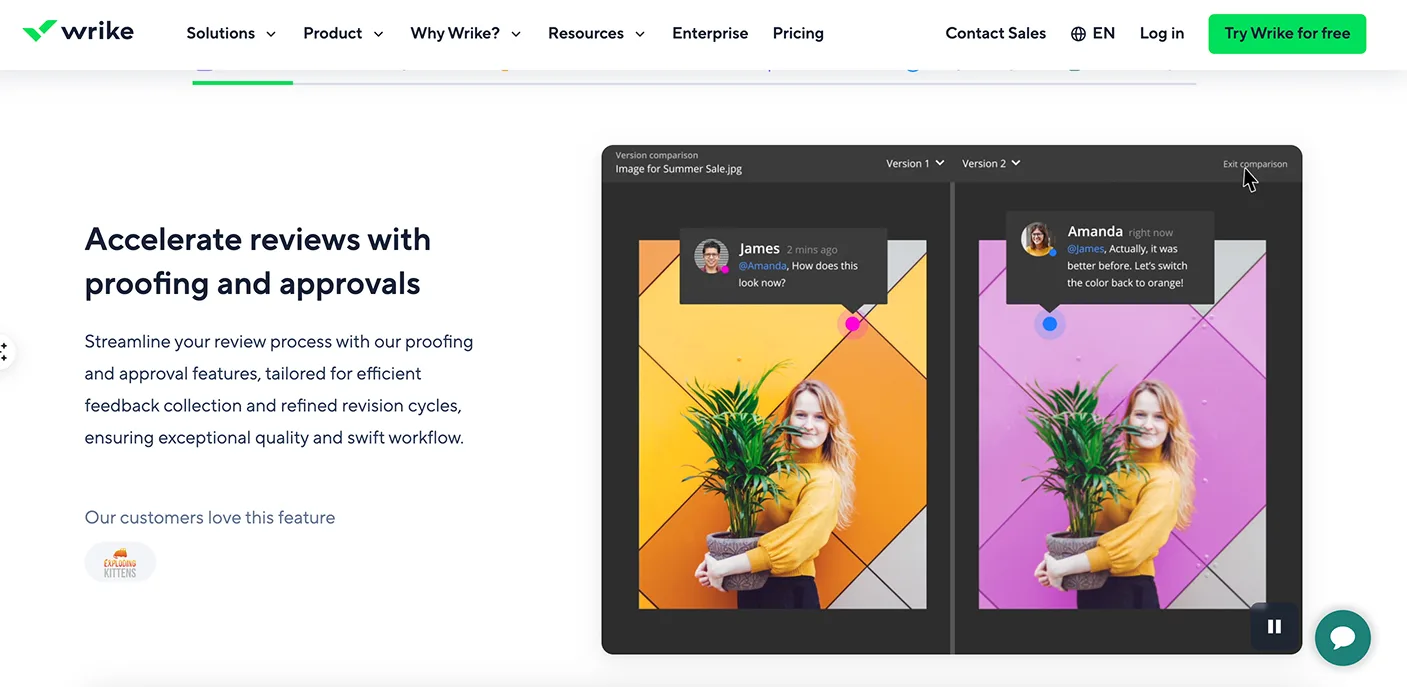
Wrike targets creative agencies that need sophisticated project control, detailed reporting, and enterprise-level security features without sacrificing usability for creative teams.
Latest features and capabilities: Wrike’s recent introduction of the Wrike MCP Server provides advanced capabilities for teams working with real-time data across multiple systems. Interactive Gantt charts and the specialized Wrike Proof feature create comprehensive asset review workflows that handle the complex approval processes common in creative work.
The platform offers over 400 pre-built integrations, ensuring connectivity with virtually any creative tool or business system. Customizable dashboards provide visibility into project progress, resource utilization, and creative team performance metrics.
Visual functionality: Wrike combines powerful functionality with visual clarity through customizable workflows, comprehensive dashboards, and multiple project view options. Kanban boards support agile creative workflows, while Gantt charts help manage complex projects with multiple dependencies and stakeholder involvement.
The Wrike Proof feature specifically addresses creative team needs by providing structured feedback and approval workflows for visual assets. This functionality streamlines the often chaotic process of gathering, organizing, and implementing creative feedback from multiple stakeholders.
Best suited for: Larger creative agencies and enterprise creative departments that need comprehensive project oversight, detailed reporting capabilities, and sophisticated approval workflows. Wrike works particularly well for agencies managing high-stakes projects with multiple stakeholders, teams that need detailed project analytics, and organizations that prioritize security and compliance alongside creative functionality.
Pricing: Plans start at $10 per user per month with a minimum of 2 seats.
Virto Kanban Board App
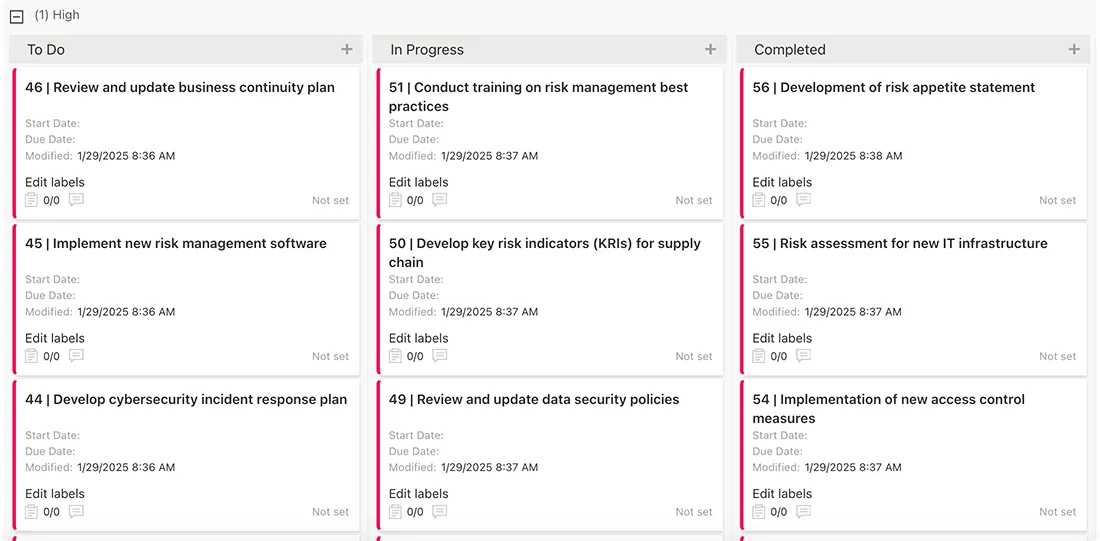
The Virto Kanban Board App specifically targets creative teams already working within Microsoft’s ecosystem, providing visual task management that integrates seamlessly with existing Microsoft 365 workflows.
Latest features and capabilities: Designed specifically for Office 365, Microsoft Teams, and SharePoint environments, the Virto Kanban Board App provides familiar Kanban functionality within Microsoft’s collaborative framework. Features include kanban cards, customizable columns, filtering options, and statistical charts for workflow analysis.
The deep Microsoft integration means notifications flow through Teams, calendar integration works with Outlook, and file storage connects with OneDrive and SharePoint. This native integration eliminates the platform-switching that can disrupt creative workflows.
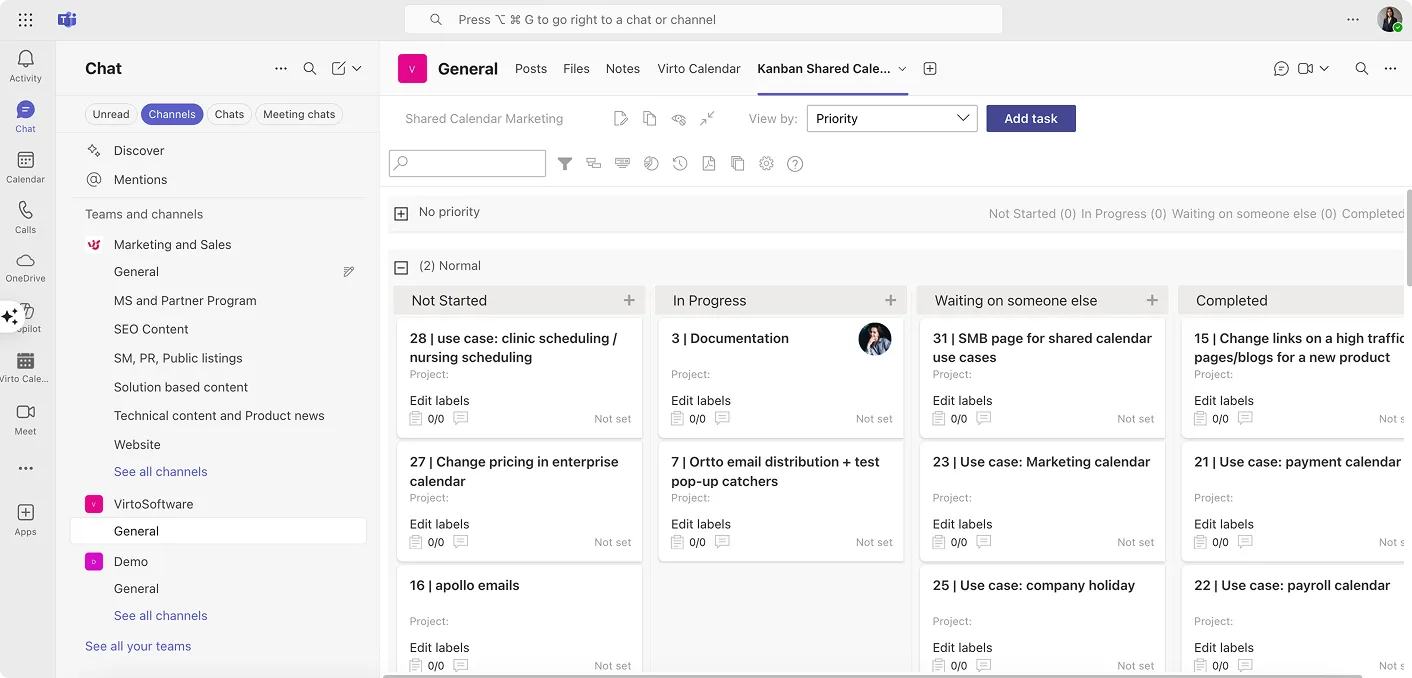
Visual functionality: The app provides clean, intuitive Kanban board interfaces that feel familiar to teams already comfortable with Microsoft’s design language. Tasks can be visualized by status, team member, project type, or custom categories that match agency workflow needs.
Statistical charts and workflow analysis tools help creative teams understand their productivity patterns and identify bottlenecks in their creative processes. This data-driven approach to workflow optimization can help agencies improve both efficiency and creative output quality.
Best suited for: Creative agencies and departments already committed to Microsoft 365 environments who want visual project management without abandoning their existing collaboration infrastructure. This solution works particularly well for corporate creative departments, agencies with strong IT governance requirements, and teams that prioritize seamless integration over extensive feature customization.
Virto Calendar App
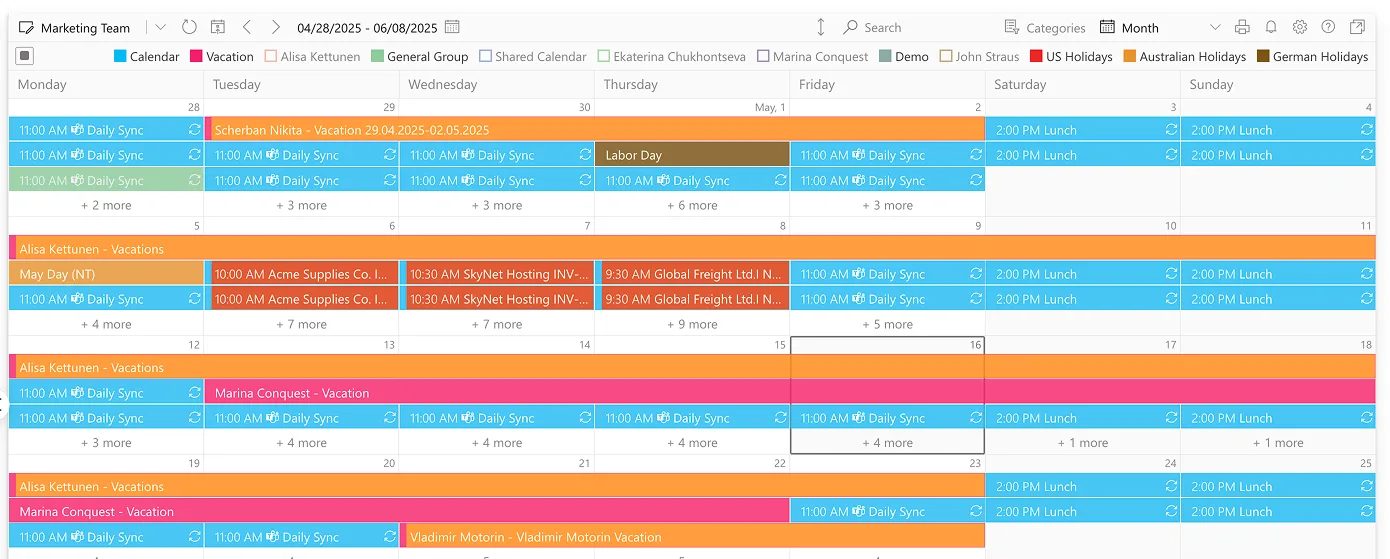
The Virto Calendar App complements the Kanban Board App by providing sophisticated calendar management for creative teams working within Microsoft ecosystems.
Latest features and capabilities: The app manages multiple calendars within SharePoint and Microsoft 365, with overlay features that create unified views of complex creative project timelines. Integration with Exchange, Outlook, and Google Calendar ensures comprehensive calendar management regardless of external requirements.
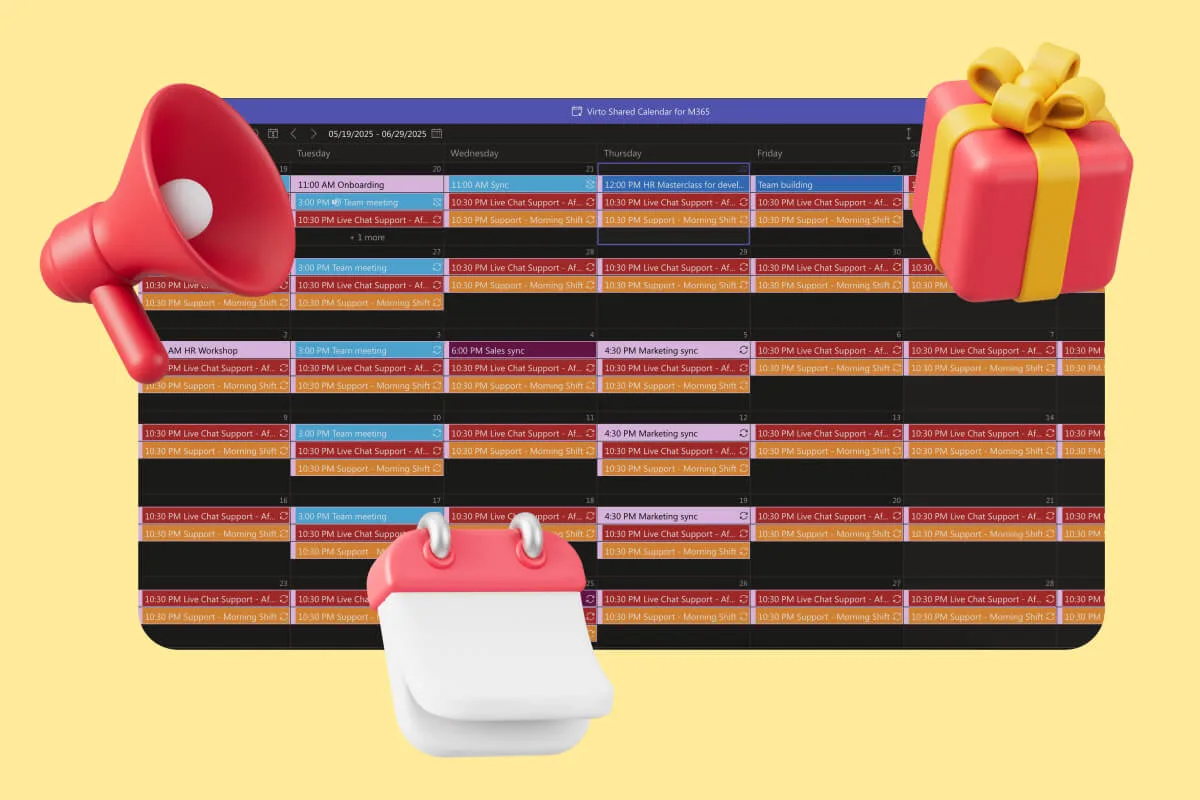
Multiple view options—day, week, month, year, and task-based displays—provide flexibility for different planning needs and team preferences. Color-coded events enhance visual organization and make it easy to distinguish between different projects, clients, or team responsibilities.

Visual functionality: The calendar interface provides clear, color-coded visualization of complex creative project schedules. Teams can see how different projects overlap, identify potential resource conflicts, and maintain awareness of approaching deadlines across multiple concurrent projects.
The overlay functionality proves particularly valuable for creative agencies managing multiple client relationships, each with distinct timelines and milestone requirements. Project managers can quickly assess overall team availability and identify opportunities to optimize resource allocation.
Best suited for: Creative teams within Microsoft 365 environments that need sophisticated calendar management for complex project coordination. This solution works particularly well for agencies managing multiple client projects with overlapping timelines, creative departments coordinating with other business functions, and teams that need to balance internal creative work with external client commitments.
FunctionFox

FunctionFox takes a specialized approach by focusing specifically on the business management aspects of creative work, particularly time tracking and billing processes that many other project management tools handle as secondary features.
Latest features and capabilities: FunctionFox provides comprehensive time tracking, billing, and project management features designed specifically for creative workflows. The platform streamlines invoicing processes while maintaining detailed project tracking that helps agencies understand project profitability and resource allocation effectiveness.
Client-facing tools enhance collaboration by providing controlled access to project status and deliverables without compromising internal workflow privacy. Integration capabilities connect with Microsoft ecosystems and other productivity tools commonly used by creative teams.
Best suited for: Creative agencies that prioritize financial management and detailed time tracking alongside project coordination. FunctionFox works particularly well for billable-hour agencies, creative consultancies that need detailed project profitability analysis, and teams that need to demonstrate time allocation and project value to clients or management.
Redbooth
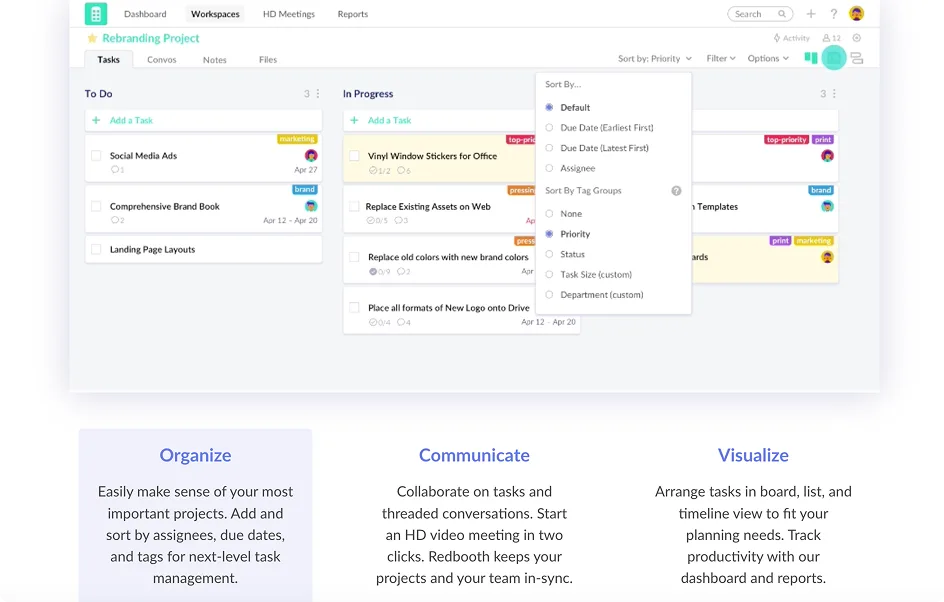
Redbooth emphasizes user-friendly collaboration with features designed to make team communication and task management feel natural and effortless.
Latest features and capabilities: Real-time editing capabilities allow multiple team members to collaborate on project planning and task development simultaneously. Task-specific chat functionality keeps project conversations organized and contextual, while straightforward mobile apps ensure team members can stay connected to projects regardless of location.
The platform’s clean interface and intuitive navigation reduce the learning curve that can slow adoption of new project management tools. Integration with Google Drive, Slack, and other common creative tools maintains workflow continuity.
Visual functionality: Redbooth provides clean Kanban board interfaces that prioritize usability over feature complexity. Task visualization focuses on clarity and quick comprehension, making it easy for creative teams to understand project status and identify next steps without getting lost in complex interface elements.
Best suited for: Small to medium creative teams that prioritize ease of use and quick collaboration over extensive customization options. Redbooth works particularly well for teams that want effective project management without investing significant time in system configuration, creative departments that frequently work with freelancers or external collaborators, and agencies that value streamlined communication over complex workflow automation.
Pricing: Free plan available for basic functionality; paid plans start at $10 per user per month.
👉So, which software is best for project management in creative agencies? There’s no single “best” project management software for creative agencies because the optimal choice depends on your team size, Microsoft 365 commitment, and complexity needs. For teams already working within Microsoft 365, VirtoSoftware’s Kanban Board and Virto Calendar apps provide seamless integration that eliminates platform-switching while supporting creative-specific workflows. The table below compares additional criteria worth considering.
Comparison overview
To help visualize how these tools compare across the key criteria for creative agencies, here’s a summary of their strengths:
| Tool | Interface simplicity | Visual features | Collaboration | Integrations | Scalability | Mobile access |
|---|---|---|---|---|---|---|
| Trello | Excellent | Good | Good | Excellent | Limited | Good |
| Asana | Good | Excellent | Excellent | Good | Good | Excellent |
| ClickUp | Complex | Excellent | Good | Good | Excellent | Good |
| Notion | Moderate | Good | Excellent | Limited | Good | Good |
| Monday.com | Good | Good | Excellent | Excellent | Excellent | Good |
| Wrike | Complex | Excellent | Excellent | Excellent | Excellent | Good |
| Virto Kanban | Good | Good | Good | Excellent (Microsoft) | Good | Good |
| Virto Calendar | Good | Excellent | Good | Excellent (Microsoft) | Good | Good |
| FunctionFox | Good | Limited | Good | Good | Good | Good |
| Redbooth | Excellent | Good | Excellent | Good | Limited | Excellent |
This comparison reveals that no single tool excels in every category, which explains why different creative teams gravitate toward different solutions based on their specific priorities and working styles.
How to Choose the Best Project Management Software for Creative Agency
Reading about project management features and capabilities is one thing—actually finding the right fit for your specific team and workflow is entirely different. The perfect tool for a boutique design studio might feel overwhelming for a content marketing team, while a solution that works beautifully for a 5-person agency could completely break down when that team grows to 25 people.
The key to making the right choice lies in honest self-assessment combined with practical testing. You need to understand not just what your team does, but how they prefer to work, what frustrates them about current processes, and where you want to be six months or a year from now.
Here’s a systematic approach to finding your ideal project management solution:
Step 1: Assess your team structure
Before you fall in love with any particular feature set, take a step back and honestly evaluate your current team dynamics. The right project management tool should amplify your team’s natural strengths rather than forcing them to adopt unfamiliar working styles.
Start with the basics: How many people will actually use this system day-to-day? This isn’t just about total headcount—it’s about understanding who needs full access versus occasional visibility. Your core creative team might include 8 people who live in the system daily, while 3 account managers need regular access for client communication, and a handful of freelancers require limited project-specific access.
Next, examine your role distribution and decision-making patterns. Do you have clearly defined roles where the creative director makes final creative decisions, account managers handle all client communication, and project managers coordinate workflow? Or does your team operate more collaboratively, with overlapping responsibilities and shared decision-making? Some tools work better with hierarchical structures, while others shine in more fluid, collaborative environments.
Consider your team’s technical comfort level honestly. If your designers love learning new software and your project managers enjoy optimizing workflows, you can consider more feature-rich platforms that require some setup time. But if your team prefers to focus on creative work rather than mastering new tools, prioritize simplicity and intuitive interfaces over advanced customization options.
Think about your collaboration patterns. Does most communication happen in quick face-to-face conversations, or do you rely heavily on written feedback and documentation? Are team members typically in the same physical space, or do you coordinate across different locations and time zones? These patterns will influence whether you need robust commenting systems, real-time collaboration features, or strong mobile accessibility.
Step 2: Determine your priorities
Not all project management needs are created equal, and trying to optimize for everything usually leads to tools that don’t excel at anything. Successful software selection requires identifying your top 2-3 priorities and making sure those are absolutely solid before worrying about secondary features.
If your biggest pain point is missed deadlines and unclear project status, prioritize tools with excellent visual project tracking and deadline management. Your team needs to see at a glance what’s due when and who’s responsible for what. Complex approval workflows or detailed time tracking might be nice-to-have features, but they shouldn’t distract from solving your core scheduling challenges.
On the other hand, if your main frustration centers around scattered feedback and endless revision cycles, focus on platforms with robust commenting systems and clear version control. The ability to see exactly what feedback has been addressed and what’s still pending could be worth more than advanced reporting or resource management features.
For teams struggling with client communication and external collaboration, prioritize tools that make it easy to share progress, gather feedback, and maintain professional client-facing project visibility. Internal workflow optimization becomes secondary if your clients can’t easily see what they’re paying for or provide timely input on creative direction.
Consider your growth trajectory as well. If you’re planning to double your team size in the next year, scalability becomes a priority even if it means accepting a slightly more complex tool today. Conversely, if you’re a stable team focused on optimizing current processes, choosing the simplest tool that meets your immediate needs might be more valuable than planning for hypothetical future requirements.
Step 3: Make a list of must-have features
Once you understand your priorities, translate them into specific functional requirements. This exercise helps you avoid getting distracted by impressive features that don’t actually solve your problems.
Create two lists: absolute requirements and nice-to-have features. Your absolute requirements list should be short and focused—these are the features that make or break your team’s ability to use the tool effectively. This might include things like Kanban board visualization, mobile app access, integration with your existing file storage system, or the ability to set and track deadlines.
Your nice-to-have list can be longer and more aspirational. These are features that could improve your workflow but aren’t essential for basic functionality. Advanced reporting, time tracking, budget management, or specialized creative review tools might fall into this category.
Be specific about integration requirements. If your team lives in Google Workspace, seamless integration with Google Drive, Gmail, and Google Calendar might be non-negotiable. If you’re committed to Microsoft 365, tools that work beautifully within Teams and SharePoint could be worth prioritizing over platforms with more features but weaker Microsoft integration.
Consider your client interaction requirements carefully. Some teams need robust client portals and external collaboration features, while others prefer to keep clients completely separate from internal project management and handle communication through traditional channels. Neither approach is right or wrong, but the distinction will significantly influence which tools work best for your situation.
Step 4: Test several options
Reading about software capabilities and actually using them in real creative work are completely different experiences. The most important part of your selection process should be hands-on testing with your actual team and real projects.
Most project management platforms offer free trial periods, but many teams use these trials ineffectively. Instead of just clicking around the interface or setting up a few sample tasks, commit to running a real project through each system you’re considering. Choose a typical project—not your most complex initiative or your simplest task—and track it from initial planning through final delivery.
Involve your whole team in the testing process, not just whoever makes the final purchasing decision. The most feature-rich platform in the world won’t help if your designers find it confusing or your account managers can’t figure out how to update project status. Each team member should spend time with the tools and provide honest feedback about what feels natural versus what creates friction.
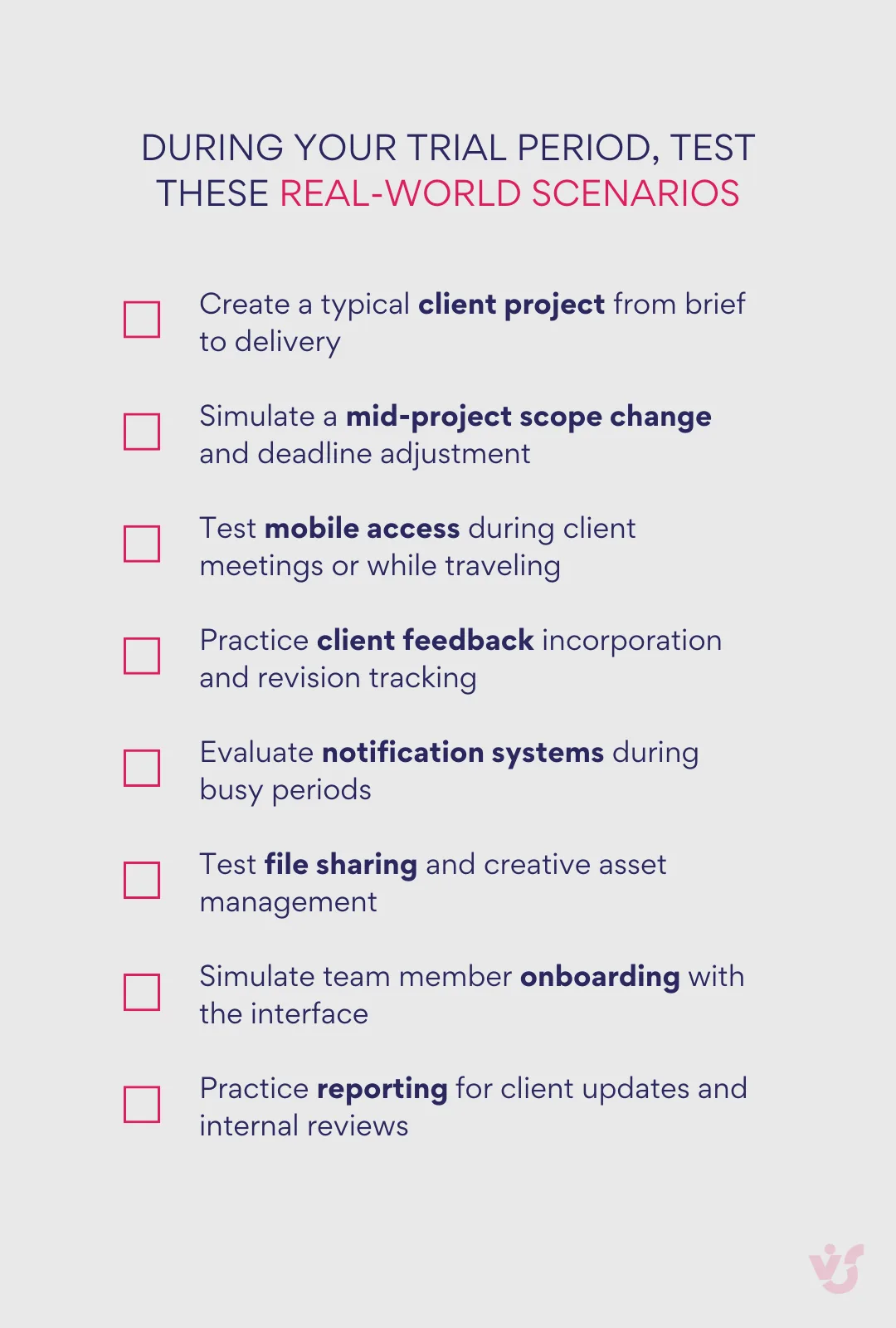
Pay attention to the learning curve during testing. How long does it take new team members to become productive? Can people accomplish basic tasks intuitively, or do they need extensive training? Some complexity is acceptable if it delivers significant value, but tools that require extensive onboarding often struggle with adoption and long-term usage.
Test mobile functionality with your actual mobile usage patterns. If account managers frequently need to check project status while traveling to client meetings, make sure the mobile experience actually supports this workflow rather than just technically existing.
Step 5: Consider scalability and integrations
Even if you’re not planning immediate changes, think about how each tool would handle your team’s likely evolution. Software migration is disruptive and expensive, so choosing a platform that can grow with you often makes sense even if it means paying for features you don’t currently need.
Scalability isn’t just about handling more users—it’s about maintaining usability and performance as complexity increases. Some tools that work beautifully for 5 people become unwieldy at 15 people. Others maintain their core simplicity even as teams and project complexity grow.
Integration considerations go beyond simple technical connectivity. Think about your team’s current workflow patterns and how new software will fit into existing habits. If your designers already live in Adobe Creative Cloud, tools that integrate seamlessly with Creative Suite applications could provide significant workflow benefits. If your account managers rely heavily on email for client communication, platforms that sync well with Gmail or Outlook might reduce friction.
Consider your technical ecosystem holistically. Teams already committed to Microsoft 365 might find tremendous value in tools like Virto that integrate natively with Teams, SharePoint, and Outlook, even if standalone alternatives offer more features. The convenience of working within a unified ecosystem often outweighs the advantages of best-of-breed point solutions.
Practical selection guidelines
Based on team size and complexity, here are some general guidelines to help narrow your initial selection of a creative agency project management tool:
- For small agencies and studios (3-10 people with straightforward project types): Focus on tools that prioritize simplicity and visual clarity. Trello, Notion, and Redbooth often work well because they’re intuitive, quick to implement, and don’t overwhelm small teams with unnecessary complexity. The key is finding something your entire team will actually use consistently rather than the most feature-rich option available.
- For medium and growing agencies (10-25 people with diverse project types): Look for platforms that offer flexibility without sacrificing usability. Asana, ClickUp, and Virto solutions often hit the sweet spot between simplicity and functionality. You need tools that can handle role-based access, multiple project types, and some workflow customization without requiring extensive configuration.
- For large agencies and corporate departments (25+ people with complex approval chains): Prioritize platforms that excel at structure, automation, and reporting. Monday.com, Wrike, and enterprise-focused solutions often work best because they can handle complex organizational requirements while maintaining visibility across large teams. Advanced features like resource management, detailed reporting, and sophisticated approval workflows become essential rather than nice-to-have.
| Team size | Recommended tools | Key benefits | Potential challenges |
| 3-10 people | Trello, Notion, Redbooth | Quick setup, intuitive use, low cost | Limited advanced features |
| 10-25 people | Asana, ClickUp, Virto apps | Balanced features, good scalability | Requires some configuration |
| 25+ people | Monday.com, Wrike, Enterprise Virto | Advanced reporting, role management | Complex setup, higher cost |
| Microsoft 365 Users | Virto Kanban + Calendar | Seamless integration, familiar interface | Limited to Microsoft ecosystem |
The most important factor in any selection process is honest alignment between your team’s actual working style and the tool’s design philosophy. The best project management software is the one your team will use enthusiastically and consistently, not necessarily the one with the most impressive feature list.
Why VirtoSoftware Apps Are a Solid Choice as Creative Agency Project Management Systems
For creative agencies already working within the Microsoft 365 ecosystem, switching between different platforms for project management can disrupt the natural flow of creative work. When your team lives in Teams for communication, stores files in OneDrive and SharePoint, and manages email through Outlook, adding external project management tools creates unnecessary friction and forces people to constantly switch contexts.
This is exactly where VirtoSoftware’s suite of Microsoft-native applications excels. Rather than requiring your team to learn yet another platform or maintain parallel workflows, VirtoSoftware apps integrate seamlessly into the environment your creative team already knows and trusts. The result is project management that feels like a natural extension of your existing workspace rather than an additional burden to manage.
Try VirtoSoftware Apps Today

Virto Shared Calendar
Virto Shared Calendar is a standalone web app and Microsoft Teams-integrated solution designed for simple event management with tagging, color-coding, and anonymous sharing.

Virto Calendar App
Maximize efficiency with this calendar app, featuring comprehensive scheduling and customizable views.

Virto Kanban Board
Boost team productivity with Virto Kanban for Teams: a seamless, efficient task & project management tool.
Virto Kanban Board App

The Virto Kanban Board App transforms creative project management by bringing visual workflow organization directly into your Microsoft 365 environment. For creative teams, this integration means never having to leave the familiar Teams or SharePoint interface to check project status, update task progress, or collaborate on deliverables.
- Perfect for creative workflows: The app’s visual approach aligns naturally with how creative professionals think and work. Design projects flow seamlessly from concept boards through development stages to client review, with each task represented as a visual card that can hold creative briefs, asset attachments, and stakeholder feedback. The drag-and-drop functionality makes it intuitive to move projects through creative phases—from initial brainstorming through multiple revision cycles to final approval.
- Built for creative collaboration: The collaborative features support the iterative nature of creative work perfectly. Account managers can assign tasks to designers and copywriters, creative directors can review and approve concepts directly within task cards, and clients can be given controlled access to provide feedback without disrupting internal workflows. The notification system keeps everyone informed about project progress without overwhelming team members with unnecessary alerts.
- Manages creative complexity: Unlike generic Kanban tools, Virto Kanban Board App handles the complexity that creative projects often require. Swimlanes can separate different client projects or creative disciplines, color coding can distinguish between project types or priority levels, and custom fields can track creative-specific information like brand guidelines, style preferences, or asset specifications. The statistical charts and workflow analysis features help creative teams understand their productivity patterns and identify bottlenecks that might be slowing down creative output.
- Seamless Microsoft integration: Because the app operates natively within Microsoft 365, creative assets stored in OneDrive or SharePoint can be attached directly to tasks, Teams conversations can reference specific project cards, and calendar integration ensures deadlines align with everyone’s existing scheduling systems. This integration eliminates the data silos that often plague creative teams using multiple disconnected tools.
Virto Calendar App

Creative agencies operate on complex schedules that involve coordinating internal creative work with external client commitments, managing multiple project timelines simultaneously, and balancing resource allocation across different creative disciplines. The Virto Calendar App provides sophisticated calendar management that handles this complexity while maintaining the simplicity that creative teams need to stay focused on their work.
- Unified project scheduling: The calendar overlay functionality allows creative teams to see how different projects interact and compete for resources. A marketing agency can overlay client campaign launch dates with internal creative deadlines, resource availability, and team vacation schedules to get a complete picture of their creative capacity. This comprehensive view helps prevent the scheduling conflicts that can derail creative projects and disappoint clients.
- Enhanced creative planning: Multiple view options—day, week, month, year, and task-based displays—provide flexibility for different types of creative planning. Daily views help designers and copywriters understand their immediate priorities, weekly views help account managers coordinate with clients, and monthly views help creative directors plan resource allocation and project timelines strategically.
- Client coordination made simple: The app’s integration with Exchange, Outlook, and Google Calendar means that client meetings, presentation deadlines, and approval sessions can be coordinated seamlessly regardless of what calendar systems external stakeholders prefer. Color-coded events make it easy to distinguish between different clients, project types, or internal activities at a glance.
- Resource and capacity planning: For creative agencies, understanding team availability is crucial for accepting new projects and setting realistic deadlines. The calendar’s resource management features help creative directors see when designers are overbooked, when account managers have capacity for new client relationships, and when the entire team might be available for large collaborative projects.
Virto Shared Calendar

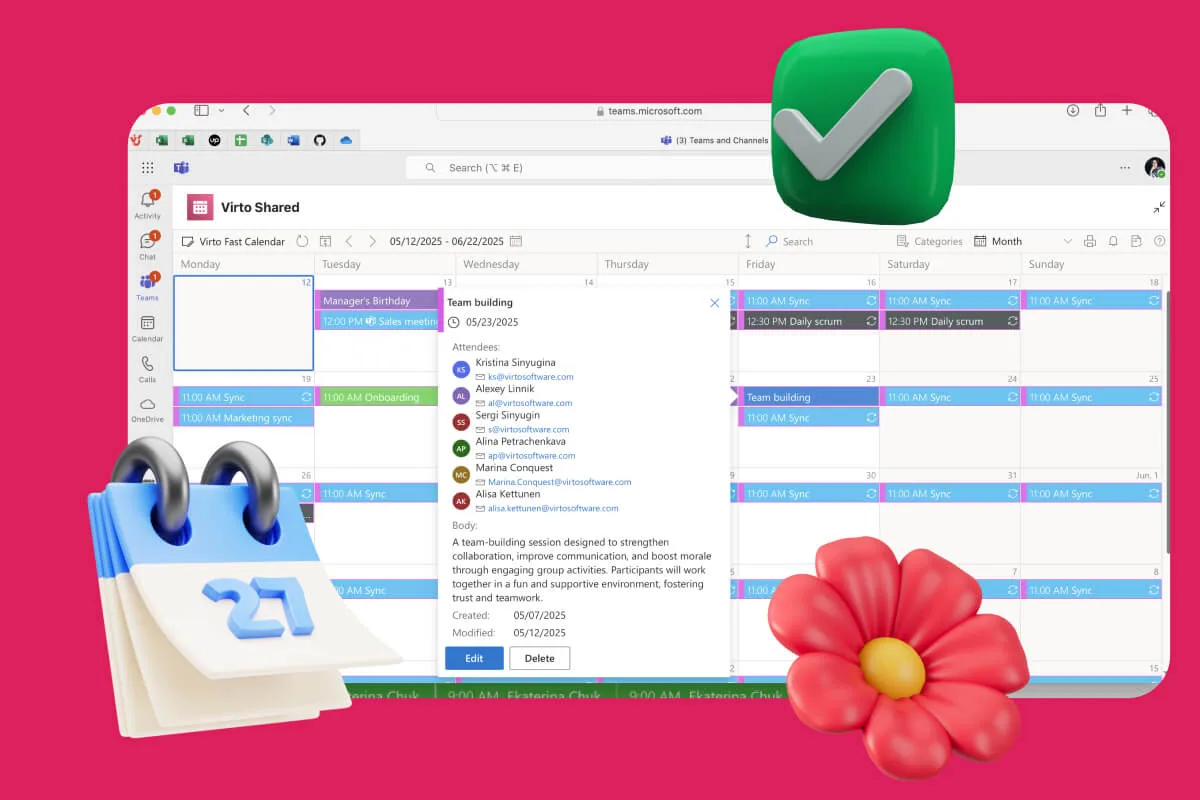
The newest addition to VirtoSoftware’s suite addresses a common challenge in creative agencies: sharing project timelines and milestones with external stakeholders who don’t have access to internal Microsoft 365 environments. The Virto Shared Calendar provides a lightweight, accessible solution for client collaboration and external coordination.
- Client-friendly collaboration: Creative agencies often need to share project schedules with clients, external vendors, or freelance collaborators who don’t have Microsoft accounts. Virto Shared Calendar’s anonymous access feature eliminates the friction of account creation while maintaining professional presentation of project timelines. Clients can view campaign launch dates, review milestones, and understand project dependencies without requiring special software or login credentials.
- Simplified event management: The streamlined interface focuses on essential calendar functionality without the complexity of calendar overlays or advanced integrations. This simplicity makes it perfect for sharing specific project schedules, event planning timelines, or campaign calendars with external stakeholders who need visibility but not full project management access.
- Cross-platform accessibility: Whether team members are working in Microsoft Teams or need to access schedules through web browsers while traveling, Virto Shared Calendar maintains consistency and real-time updates across all platforms. This flexibility supports the mobile nature of creative work, where inspiration and client feedback can happen anywhere.
The ecosystem advantage
What makes VirtoSoftware project management tools for creative agencies particularly valuable isn’t just the functionality of individual tools—it’s how they work together as a unified ecosystem within Microsoft 365. When your Kanban boards, calendars, and shared schedules all operate within the same environment, information flows naturally between different aspects of project management.
- Unified workflow management: A creative project can begin as tasks on a Kanban board, have its milestones tracked in the calendar system, and be shared with external stakeholders through the shared calendar—all without requiring data export, platform switching, or manual synchronization. This seamless integration maintains the creative momentum that’s essential for producing exceptional work.
- Consistent user experience: Creative professionals don’t need to learn different interface conventions or navigation patterns for different project management functions. The consistent Microsoft 365 design language and interaction patterns mean that adopting new project management capabilities feels familiar rather than disruptive.
- Enterprise-grade reliability: For creative agencies working with high-profile clients or handling sensitive brand information, the security and compliance features of Microsoft 365 extend naturally to project management activities. Creative assets, client communications, and project documentation all benefit from the same enterprise-level protection that agencies already rely on for their core business operations.
- Scalable implementation: Whether you’re a boutique design studio just getting started with structured project management or a full-service agency looking to optimize complex multi-client workflows, VirtoSoftware apps can scale to match your needs. Small teams can start with basic Kanban workflow organization and gradually add calendar management and external sharing capabilities as their needs evolve.
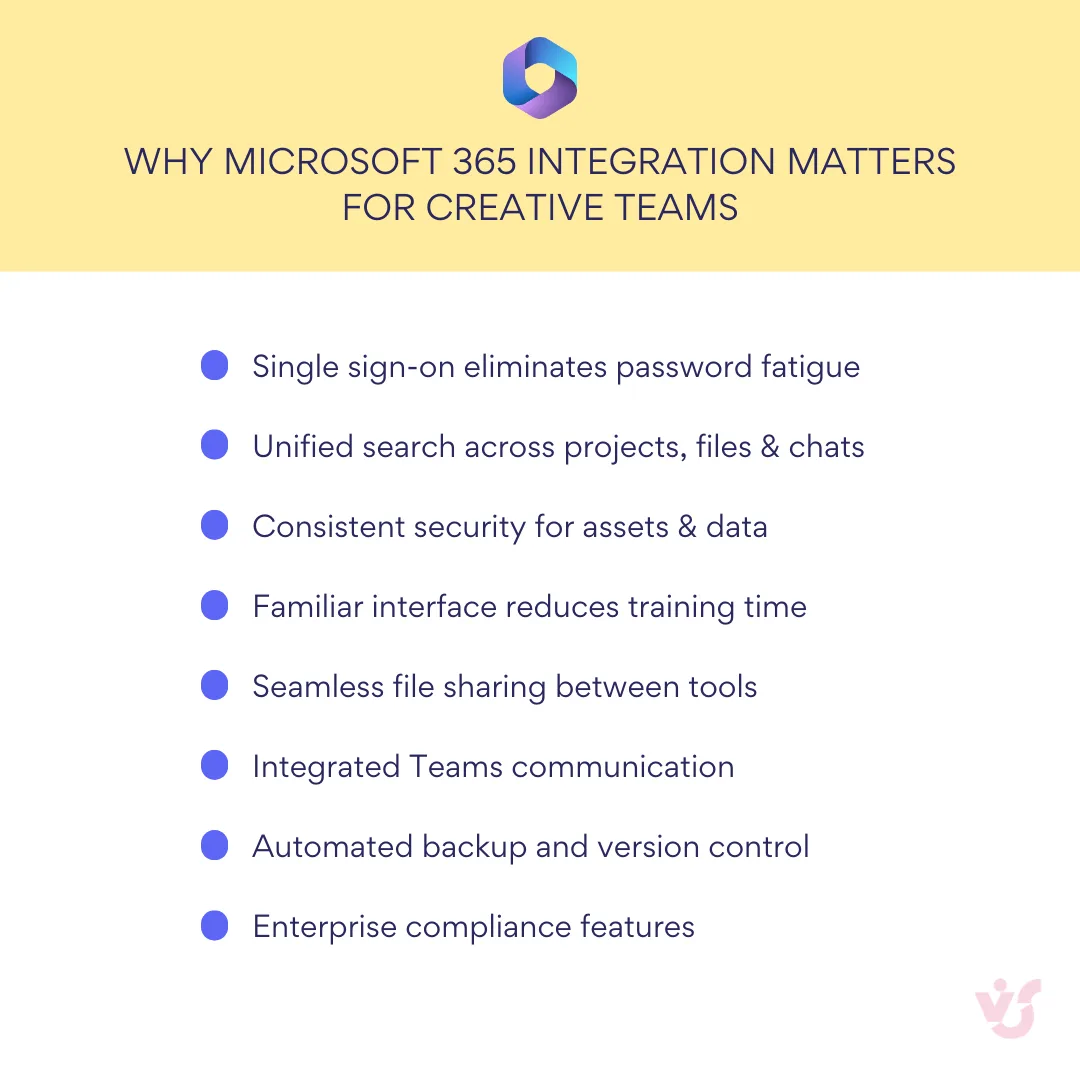
The combination of native Microsoft 365 integration, creative-friendly functionality, and seamless tool interoperability makes VirtoSoftware apps uniquely positioned to support creative agencies that want powerful project management without abandoning the collaborative environment that already supports their best work. For teams committed to the Microsoft ecosystem, Virto provides a path to better project organization that enhances rather than disrupts their existing creative processes.
Why not Check Out Related Use Cases?

Conclusion on Creative Agency Project Management Software
Creative agencies face a unique challenge: they need project management tools that provide structure and accountability without stifling the creative process that drives their success. The solution isn’t to impose rigid workflows borrowed from other industries, but to find software that understands and supports the iterative, collaborative, and inherently visual nature of creative work.
The best project management software for creative agency we’ve explored—from the simple elegance of Trello to the comprehensive capabilities of VirtoSoftware apps—each offer different approaches to this challenge. The right choice for your agency depends not on which tool has the most features, but on which one aligns most naturally with how your team actually works and wants to work.
Remember that great project management software becomes invisible—it removes friction rather than adding complexity, it enhances collaboration rather than complicating it, and it supports creativity rather than constraining it. The best tools fade into the background, allowing your team to focus on what they do best: creating exceptional work that exceeds client expectations and drives business results.
Whether you choose the visual simplicity of Kanban boards, the comprehensive scheduling of advanced calendar systems, or the seamless integration of Microsoft-native solutions, the goal remains the same: creating an environment where creative excellence can flourish within realistic deadlines and sustainable workflows.
For agencies already working within the Microsoft 365 ecosystem, Virto Kanban Board App, Virto Calendar App, and Virto Shared Calendar offer a particularly compelling combination of familiar functionality and creative-specific features. These tools provide a path to better project organization without requiring your team to abandon the collaborative environment that already supports their most important work.
The best way to understand how these tools can enhance your team’s workflow is to experience them firsthand. Schedule a personalized demo to see how VirtoSoftware apps can be configured for your specific creative workflows, or download the free trials directly from the site and start organizing your next campaign today. Your creative team deserves project management tools that enhance their natural working style rather than fighting against it.
Explore specialized creative management resources on our blog to dive deeper into specific creative challenges and solutions: