If you’ve ever tried to manage multiple projects across different departments using basic project management tools, you know the frustration of hitting their limits pretty quickly. The reality is that regular project management software, while great for individual projects or small teams, simply can’t handle the complexity that comes with enterprise-level operations. When you’re dealing with dozens of parallel projects, hundreds of team members across different departments, and the need to align everything with your company’s strategic goals, you need something much more robust.
That’s where enterprise project management (EPM) software comes in. Think of it as the difference between managing a small restaurant and running a multinational food chain—the basic principles are the same, but the scale, complexity, and coordination requirements are on an entirely different level.
In this comprehensive guide, we’ll walk you through everything you need to know about enterprise project management systems. You’ll discover what makes EPM tools different from regular project management solutions, why growing businesses absolutely need them, and how to choose the right platform for your organization’s unique needs.
We’ll also dive deep into the key features that separate good EPM software from great ones, review the top tools currently dominating the market, and provide you with a step-by-step framework for making an informed decision. Plus, we’ll show you how specialized tools like Virto Calendar App, Virto Kanban App, and Virto Gantt Chart App can seamlessly integrate into your Microsoft 365 ecosystem to supercharge your project management capabilities.
What Is Enterprise Project Management Software, and Why Do You Need One?
With the rise of global teams and multi-million-dollar initiatives, the limitations of spreadsheets and emails are more apparent than ever. Enterprise project management software addresses these gaps, providing real-time oversight and seamless collaboration. Here’s what it actually is, what it involves, and how it’s making a measurable impact on business.

What is enterprise project management software?
Enterprise Project Management Software is specialized software that helps companies manage multiple projects simultaneously, providing transparency, control, and alignment with strategic business goals. Unlike basic project tools that focus on individual projects, EPM software operates at an organizational level, giving leadership the visibility and control they need to orchestrate complex initiatives across the entire company.
Think of it as the difference between managing a single construction site versus overseeing the development of an entire city. EPM software provides the aerial view, the ground-level details, and everything in between.
This software covers all levels of corporate project management:
- Tracking a large number of projects within a portfolio—Instead of opening 50 different spreadsheets, you get a unified dashboard showing the status, health, and interdependencies of every project in your organization. Whether it’s product launches, IT implementations, or facility expansions, everything lives in one centralized system.
- Managing resource allocation between projects—People, time, equipment, and finances are finite resources. EPM software helps you see who’s overloaded, which projects are understaffed, and where you can reallocate resources for maximum impact. It prevents the common scenario where one team is drowning while another has capacity to spare.
- Controlling deadlines, budgets, and progress—Real-time tracking means no more surprise budget overruns discovered during quarterly reviews. You’ll spot delays and cost creep as they happen, not months later when it’s too late to course-correct.
- Supporting collaboration between different teams and departments—Marketing needs input from legal, IT requires specifications from operations, and everyone needs approval from finance. EPM software breaks down silos by providing shared workspaces, clear communication channels, and transparent workflows.
- Integration with other systems—Your EPM doesn’t exist in isolation. It connects with your ERP for financial data, CRM for customer insights, calendars for scheduling, and BI tools for advanced analytics. This integration eliminates duplicate data entry and ensures everyone works from the same source of truth.
- Analytics, dashboards, and automated reports for top management—Leadership gets executive dashboards showing portfolio health, resource utilization, ROI metrics, and strategic alignment—all updated in real-time. No more scrambling to prepare status reports for board meetings.
Why businesses need to use a project management enterprise software
For large and medium-sized companies with dozens of parallel projects, having a centralized system that ensures consistency and efficiency isn’t just nice to have—it’s essential for survival in competitive markets. Without it, organizations often find themselves flying blind, making decisions based on outdated information and hoping for the best.
Here are the key reasons why businesses turn to EPM systems:
- Unified strategy and prioritization—An EPM system allows you to tie projects directly to corporate strategy, which is especially important for companies with limited resources that need to choose which projects to launch first. When every project clearly links to strategic objectives, it’s easier to make tough decisions about what to fund, what to delay, and what to cancel. You move from gut-feel prioritization to data-driven decision making.
- Coordination between teams and departments—Marketing, sales, development, and support teams often work on the same program without realizing how their actions impact each other. EPM allows you to synchronize their schedules and tasks, creating a choreographed effort instead of a free-for-all. Dependencies become visible, handoffs get smoother, and the left hand finally knows what the right hand is doing.
- Centralization of data and communications—All tasks, documents, files, reports, and updates are collected in one system, which eliminates information loss and chaos when transferring tasks between departments. No more searching through email threads, shared drives, and chat messages to piece together project status. Everything you need is in one place, with a complete audit trail.
- Transparency and control—Management receives a single dashboard with key metrics: project status, budget, deviations, risks, and team workload. This transparency extends throughout the organization, allowing team members to understand how their work fits into the bigger picture while giving executives the oversight they need for governance and compliance.
- Risk reduction—Timely identification of bottlenecks and problematic tasks helps minimize deadline misses and budget overruns. EPM systems often include risk registers, early warning systems, and predictive analytics that highlight potential issues before they become crises. You shift from reactive firefighting to proactive risk management.
Differences between enterprise project management solutions and regular project management software
The distinction between project management software and enterprise project management software isn’t just about scale—it’s about fundamental capabilities and organizational impact. Here’s how they compare:
| Parameter | Project management software | Enterprise project management software |
| Scale | One project or a small group of projects | Many projects and programs across the entire organization |
| Goal | Completion of a specific project | Achieving the company’s strategic goals through coordinated project execution |
| Resource management | Within one project | Centralized between projects with conflict resolution and optimization |
| Reporting | Reports on tasks, deadlines | Dashboards, BI integration, strategic KPIs, executive summaries |
| Integration with other systems | Limited | Deep: ERP, CRM, BI, Teams, etc. |
| Departmental coordination | Absent or minimal | Full synchronization across all departments |
| Scalability and security | Not always suitable for large businesses | Designed for enterprise level with role-based access, encryption, and compliance |
The difference becomes clear when you consider real-world scenarios. A regular project management tool might tell you that Project A is on track. But EPM software reveals that Project A’s success is draining resources from Projects B and C, potentially jeopardizing strategic initiatives worth millions more. It’s this level of insight and control that makes EPM software indispensable for organizations managing complex project portfolios.
Key Features of Enterprise Project Management Tools
Enterprise project management tools distinguish themselves through sophisticated capabilities that go far beyond simple task tracking. These features work together to create a comprehensive management ecosystem that can handle the complexity, scale, and strategic importance of enterprise-level initiatives. Let’s explore the essential features that make these tools indispensable for large organizations.
| Feature category | Small enterprise (100-500 employees) | Medium enterprise (500-2000 employees) | Large enterprise (2000+ employees) |
| Portfolio management | Medium priority | High priority | Critical |
| Resource planning | High priority | Critical | Critical |
| Team coordination | Critical | Critical | Critical |
| System integration | Medium priority | High priority | Critical |
| Advanced reporting | Low priority | Medium priority | High priority |
| Access controls | Medium priority | High priority | Critical |
| Process automation | Low priority | Medium priority | High priority |
| Multi-methodology support | Medium priority | High priority | Critical |
Project portfolio management
Project portfolio management (PPM) is the cornerstone of enterprise project management, transforming how organizations view and manage their initiatives.
- Tracks not one, but dozens and hundreds of projects within a single system—Imagine having 150 active projects across your organization. With PPM capabilities, you’re not drowning in separate project files. Instead, you have a unified view where every project’s status, health score, and progress is visible at a glance. This bird’s-eye view reveals patterns and insights impossible to see when projects are managed in isolation.
- Groups projects by areas, regions, priorities or programs—Organization is everything at scale. PPM features let you slice and dice your portfolio in ways that make sense for your business. View all Asian market expansions together, group IT modernization initiatives, or filter by strategic priority. This flexibility helps different stakeholders focus on what matters most to them while maintaining the complete picture.
- Aligns project initiatives with business goals—Every project should advance your strategic objectives, but without PPM, this alignment often exists only in theory. These tools create explicit connections between projects and corporate goals, making it clear how each initiative contributes to larger objectives like revenue growth, market expansion, or digital transformation.
- Provides tools for assessing priorities and risks for resource reallocation—When a critical project hits a snag, PPM capabilities help you quickly identify which lower-priority initiatives can spare resources. Built-in scoring mechanisms and risk assessments guide these decisions with data rather than politics or guesswork.
Resource and budget planning
Resource and budget planning features prevent the all-too-common scenario where projects fail not from poor execution, but from inadequate or misallocated resources.
- Provides centralized control over available resources—People, equipment, and finances are tracked in one place. You’ll know that Sarah from IT is booked at 120% capacity next month, the testing lab is available after the 15th, and the innovation budget has $2.3 million remaining. This centralized view prevents double-booking and resource conflicts before they happen.
- Provides tools for assessing team workloads, marginal costs and available reserves—Visual heat maps show which teams are overwhelmed and which have capacity. You can see the true cost of adding “just one more feature” to a project, including the ripple effects on other initiatives. Reserve tracking ensures you always have buffer capacity for emergencies.
- Plans budgets taking into account the cross-use of resources between projects—When the same design team works on five different projects, traditional budgeting breaks down. EPM tools accurately allocate shared resource costs, giving you true project profitability metrics and preventing the hidden cost overruns that plague matrix organizations.
- Supports cost forecasting and early detection of cost overruns—Predictive analytics examine burn rates, resource consumption patterns, and historical data to forecast whether projects will stay within budget. Early warning systems alert managers when spending trajectories indicate future overruns, allowing for course correction while options still exist.
Coordination of teams and tasks
In large organizations, coordination failures cause more project disasters than technical challenges. These features ensure everyone moves in synchronized harmony.
- Ensures the creation of unified workspaces for all project participants—Instead of scattered email threads and disconnected tools, teams get dedicated digital workspaces. These spaces include everything needed for collaboration: task lists, discussions, files, and progress tracking. It’s like giving each project its own mission control center.
- Supports the distribution of tasks between departments and regions with reference to deadlines and roles—Global projects require careful orchestration. These tools manage hand-offs between the design team in London and the development team in Bangalore, ensuring nothing falls through the cracks due to time zones or departmental boundaries. Clear role definitions prevent the “I thought you were handling that” syndrome.
- Simplifies communication—Comments, notifications, and integrations with messengers and email keep conversations in context. Discuss a specific task right where the work happens, with automatic notifications ensuring the right people see important updates. No more hunting through email to find that crucial decision from three weeks ago.
- Tracks dependencies between tasks in different teams—When Team A’s delay impacts Team B’s timeline, everyone knows immediately. Visual dependency mapping shows how tasks interconnect across departments, highlighting critical paths and potential bottlenecks. This visibility transforms finger-pointing into proactive problem-solving.
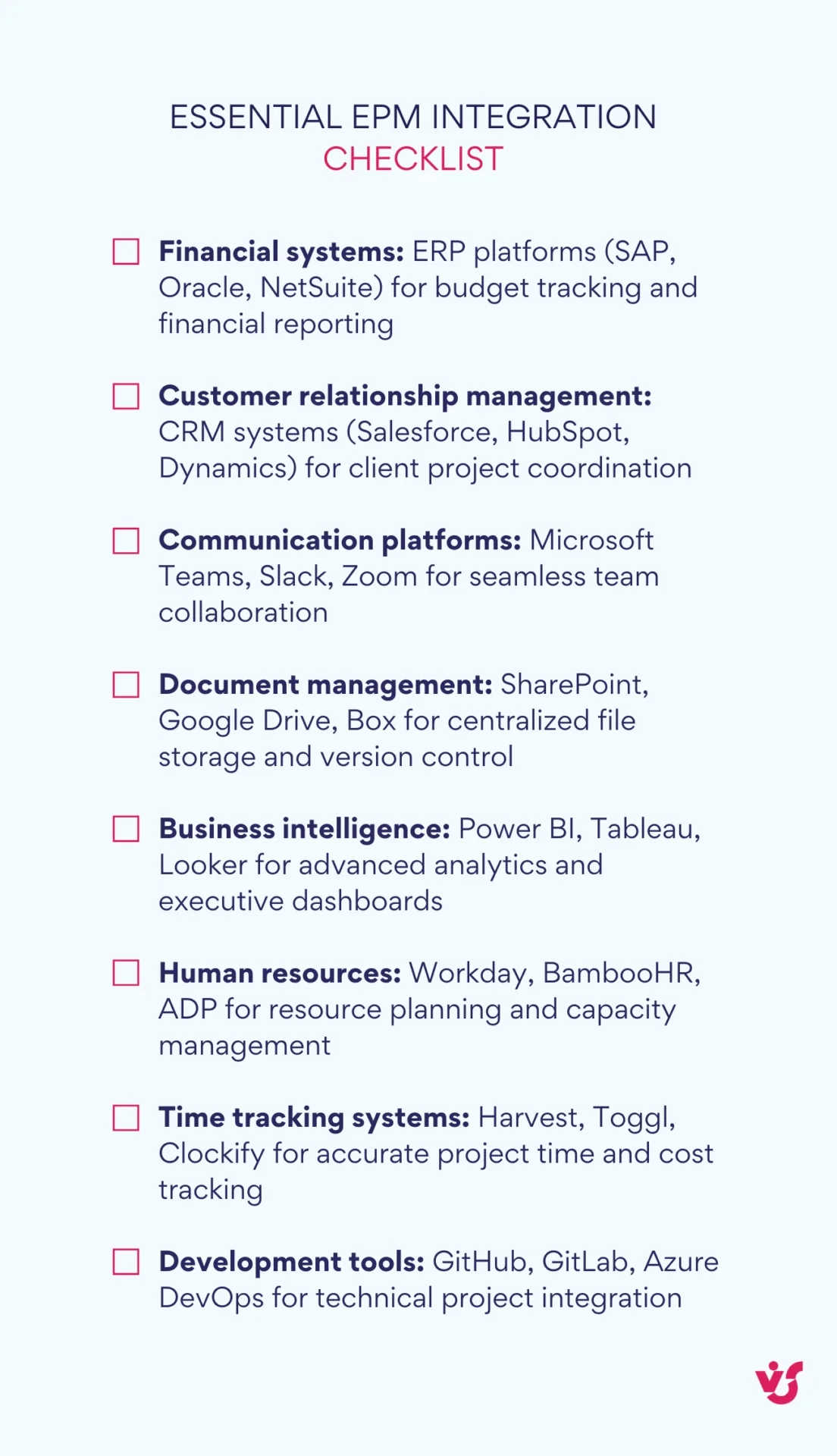
Integration with other systems
Modern enterprises run on interconnected software ecosystems. EPM tools must play nicely with everything else.
- Support for integrations via API and ready-made connectors—Whether it’s SAP for enterprise resource planning, Salesforce for customer relationships, or Oracle for financials, EPM tools connect seamlessly. Pre-built connectors eliminate months of custom development, while robust APIs enable unique integrations for specialized systems.
- Integration with Microsoft 365, Outlook, Teams, Google Workspace and corporate calendars—Your EPM system becomes part of daily workflow when it integrates with familiar tools. See project tasks in Outlook, discuss milestones in Teams, and have deadlines automatically appear in corporate calendars. This integration drives adoption by meeting users where they already work.
- Synchronization with document management systems, repositories and file storage — Documents stay synchronized across systems. Update a specification in SharePoint, and the project task automatically reflects the new version. This eliminates version control nightmares and ensures everyone works from current information.
- Ability to simultaneously work with external contractors through secure channels—Modern projects often involve external partners. EPM tools provide secure, controlled access for contractors and vendors, allowing collaboration without compromising internal security. Set exactly what external parties can see and do, maintaining confidentiality while enabling productivity.
Control of deadlines and progress
Visibility into project timelines transforms wishful thinking into realistic planning.
- Visualization of project progress through Gantt charts, calendars and Kanban boards—Different stakeholders prefer different views. Executives might want Gantt charts showing multi-year initiatives, while development teams prefer Kanban boards for sprint work. Great EPM tools provide multiple visualization options, letting each user choose their preferred perspective.
- Support for dependency and critical path management—Complex projects have complex dependencies. These tools automatically calculate critical paths, showing which tasks directly impact project completion dates. When delays occur, impact analysis reveals exactly which other tasks and projects are affected.
- Setting up reminders, deadlines and alerts—Automated notifications prevent tasks from slipping through cracks. Set alerts for approaching deadlines, overdue tasks, or budget thresholds. Smart notification systems avoid alert fatigue by prioritizing what truly needs attention.
- Ability to instantly assess deviations from the plan and take corrective measures—Real-time variance analysis shows where projects deviate from baselines. Traffic light systems (red, yellow, green) provide instant visual feedback on project health. When issues arise, drill down to understand root causes and implement corrections before small problems become major crises.
Setting up access rights and workspaces
Security and organization become paramount when hundreds of users access sensitive project information.
- Multi-level system of rights: from administrator to external observer—Granular permission systems ensure people see only what they need. Executives get portfolio overviews, project managers see their full projects, team members access their tasks, and auditors get read-only views. This precision prevents information overload while maintaining security.
- Ability to isolate workspaces for individual teams, departments or projects—Create Chinese walls between sensitive projects. The merger acquisition team’s workspace stays completely separate from regular operations, while still rolling up to executive dashboards. This isolation is crucial for compliance and confidentiality.
- Control over access to confidential information and financial data—Financial projections, salary information, and strategic plans require extra protection. Advanced EPM tools provide additional security layers for sensitive data, including encryption, audit trails, and approval workflows for access requests.
- Flexible customization of interfaces and dashboards for tasks of specific roles—The CFO needs financial dashboards, the CTO wants technical metrics, and project managers require operational details. Role-based interfaces present relevant information without clutter, improving both usability and decision-making speed.
Automation of approval processes
Manual approval processes kill project momentum. Automation features keep things moving while maintaining necessary controls.
- Configuration of business logic—Define approval chains that match your organization’s hierarchy and policies. Set thresholds where small changes auto-approve while major modifications route to senior management. Build in delegation rules for when approvers are unavailable.
- Implementation of templates for typical processes—Common scenarios like budget approvals, project initiations, and stage gates get templatized. This standardization reduces setup time for new projects while ensuring consistent governance across the organization.
- Reduction of time for manual administration and document flow—Automated workflows eliminate the drain of chasing approvals. Documents route automatically to the right people in the correct sequence, with built-in escalation for delays. What once took weeks now happens in days or hours.
- Integration with corporate document flow and electronic signature systems—Connect with DocuSign, Adobe Sign, or internal e-signature systems for legally binding approvals. This integration creates complete audit trails while eliminating the print-sign-scan cycle that slows traditional processes.
Generation of reports and analytics in real time
Data drives decisions, but only when it’s timely, accurate, and accessible.
- Built-in dashboards on project status, resource loading, deadlines, budget, risks—Executive dashboards update continuously, showing real-time project health. Drill down from portfolio views to individual task details. Visual indicators highlight areas needing attention, enabling management by exception rather than micromanagement.
- Instant data export for management—Board meeting in an hour? Generate polished reports in PowerPoint, Excel, PDF, or direct integration with BI systems. These aren’t just data dumps but presentation-ready materials with charts, insights, and executive summaries.
- Ability to build custom reports by any parameters—Every organization has unique reporting needs. Advanced report builders let you create custom views combining any data points. Track innovation project ROI, measure time-to-market improvements, or analyze resource utilization by skill set—if you can imagine it, you can report on it.
- Support for performance metrics and trend visualization—Track KPIs, ROI, and OKR progress over time. Trend analysis reveals whether you’re improving or declining, while predictive analytics forecast future performance based on current trajectories. These insights transform reactive management into proactive leadership.
Review of the Best Enterprise Project Management Tools
With so many enterprise project management solutions available, choosing the right one can feel overwhelming. To help you navigate this landscape, we’ve compiled a comprehensive review of the top tools currently dominating the market. Each platform has its own strengths and ideal use cases, so understanding these differences will help you identify which solution aligns best with your organization’s needs.
Principles for choosing enterprise project management software
Before diving into specific tools, it’s crucial to understand what makes one EPM solution better than another for your organization. The “best” tool isn’t necessarily the most feature-rich or expensive—it’s the one that aligns with your company’s unique needs, culture, and strategic direction.
- Integration with the current IT infrastructure should be your starting point. The platform must seamlessly integrate with the ERP, CRM, HRM and BI systems already in use. There’s nothing worse than implementing a powerful EPM tool only to discover it creates data silos because it can’t talk to your SAP system or pulls outdated information from Salesforce. Evaluate not just current integrations but the vendor’s track record of adding new connections as the market evolves.
- Customization becomes critical at the enterprise level. You need flexible interface settings, business processes, access rights and reporting forms that match how your organization actually works. Cookie-cutter solutions that force you to change established processes rarely succeed. Look for platforms that adapt to you, not the other way around.
- Scalability isn’t just about handling more users—it’s about growing complexity. The system should support the growth of teams, projects, and business geography without loss of productivity. What works for 100 users and 50 projects must still perform when you reach 1,000 users managing 500 projects across 20 countries. Ask vendors about their largest deployments and performance benchmarks.
- Support for hybrid methodologies reflects modern project reality. The ability to combine the Waterfall approach at the strategic planning level and Agile methodology in individual teams is important. Your marketing team might run sprints while facilities follows traditional project phases. The EPM tool should accommodate both without forcing square pegs into round holes.
- Multi-team work capabilities separate enterprise tools from departmental solutions. The platform should allow synchronization of efforts of different departments, assignment of dependencies between tasks and coordination of cross-functional interaction. When legal, IT, and marketing collaborate on a product launch, their work should flow together naturally.
Review of popular enterprise project management tools
Let’s examine the leading EPM solutions, understanding their strengths, limitations, and ideal use cases. This analysis draws from real-world implementations and user feedback to provide honest insights beyond marketing claims.
Microsoft Project for Enterprise
Microsoft Project for Enterprise is a comprehensive project portfolio management solution designed for organizations needing robust on-premises control with strong governance features. The platform combines traditional project management capabilities with advanced portfolio oversight, making it particularly valuable for large corporations and regulated industries that require extensive control over their project data and processes.
Recent updates: Project for the web has been integrated into Microsoft Planner, maintaining familiar features under a new name for seamless project management. The Project Server Subscription Edition now offers flexible on-premises deployment options that provide enhanced enterprise control over project portfolio management and daily operations.
Pros: Flexible project portfolio management with anywhere access, easy administration through PowerShell scripting, strong collaboration via SharePoint integration, data-driven decision making with Business Intelligence tools, robust financial and resource management capabilities, and extensive support from Microsoft Partners.
Cons: Incompatible with previous Project Server versions, requires separate SharePoint licensing for full functionality, and has limited browser compatibility (restricted to older versions like Internet Explorer 8-10 and Firefox 10).
Best for: Organizations needing on-premises project portfolio management with strong governance controls, particularly enterprises already invested in Microsoft ecosystems, though additional licenses may be required for full functionality.
Asana Enterprise
Asana Enterprise is a collaborative work management platform that excels in AI-powered workflow automation and cross-departmental coordination. The platform connects strategy, planning, and execution within a single, intuitive interface while providing enterprise-grade security and extensive integration capabilities.
Recent updates: AI-powered workflows now automate repetitive tasks, connect work to goals, and streamline campaign workflows including triaging requests, assigning tasks, and reporting progress. The platform has been recognized as a Leader in the 2024 Gartner® Magic Quadrant™ for Collaborative Work Management for the second consecutive year.
Pros: Increases team velocity by 54% and triples output according to user reports, robust security features including SAML, SCIM, audit logs, and data loss prevention, meets global privacy standards, offers priority support and comprehensive training through Asana Academy, and provides hundreds of integrations with tools like PowerBI, Tableau, and Okta.
Cons: The extensive feature set may require significant training investment for full utilization, and the learning curve can be steep for organizations new to comprehensive project management platforms.
Best for: Enterprises needing to unify teams and tools across departments, particularly organizations prioritizing cross-functional collaboration and AI-driven productivity improvements.
Smartsheet Enterprise
Smartsheet Enterprise is an AI-driven, no-code platform for collaborative workflows that combines spreadsheet familiarity with powerful project management functionality. The platform provides extensive customization capabilities while maintaining ease of use for organizations that need flexible workflow solutions.
Recent updates: AI-generated formulas enhance automation capabilities, and the platform has been named a Leader in the 2024 Gartner® Magic Quadrant™ for Collaborative Work Management. Enhanced integration capabilities now support seamless connections with CRM, ERP, ITSM, and collaboration tools.
Pros: Enterprise-grade security with encryption, role-based access, and audit logs, certified for SOC 2, ISO 27001, GDPR, and HIPAA compliance, significant cost savings (Iron Mountain saved $4M annually), dramatic efficiency gains (Johnson & Johnson achieved 95% faster processes), and substantial time savings (Bayer saved 20,000 hours).
Cons: Complex setups may require significant time investment and technical expertise, and the extensive customization options can be overwhelming for teams seeking simpler solutions.
Best for: Enterprises needing highly customizable workflows and comprehensive data visualization capabilities, particularly organizations managing large-scale portfolios across diverse industries.
Wrike Enterprise
Wrike Enterprise offers advanced project management capabilities with extensive integration options and sophisticated workflow customization. The platform provides comprehensive features for complex project environments while maintaining scalability for organizations of all sizes.
Recent updates: Advanced workflows now include over 400 integrations, enhanced custom reporting capabilities, improved project budgeting features, and AI-powered task automation with risk prediction. The platform has been recognized as a Leader in the 2024 Gartner® Magic Quadrant™ for Collaborative Work Management.
Pros: Comprehensive features for complex workflows, extensive integration ecosystem with 400+ options, advanced reporting and analytics capabilities, robust security and admin controls, and suitability for various industries including marketing, IT, and software development.
Cons: Steeper learning curve compared to simpler platforms, notification management can become overwhelming in complex environments, limited time tracking and scheduling capabilities, and storage limits may affect industries working with large files.
Best for: Enterprises requiring advanced project management and collaboration capabilities, particularly organizations in marketing, IT, and software development that need extensive customization options.
Jira Enterprise
Jira Enterprise is the leading project management solution for technical teams, particularly excelling in software development environments. The platform provides comprehensive agile methodology support with advanced security, scalability, and compliance features designed for enterprise-scale technical projects.
Recent updates: Multiple sandboxes per site enable safer change management and parallel testing (currently in BETA), AI-powered workflows enhance productivity, and unified developer data integration with Atlassian Data Lake improves cross-tool insights.
Pros: Advanced security, scalability, analytics, and compliance features, 24/7 support with 30-minute response times for critical issues, out-of-the-box templates and custom analysis capabilities for data visualization, and comprehensive agile methodology support with industry-standard sandboxes.
Cons: Complexity may be challenging for non-technical users, and the extensive feature set can be overwhelming for teams not working in technical environments.
Best for: Technical teams and software development organizations that need robust agile project management capabilities, particularly those requiring advanced security and compliance features.
monday.com Enterprise
monday.com Enterprise provides intuitive, visual project management combined with powerful AI capabilities and extensive collaboration features. The platform excels at improving cross-team coordination while reducing administrative overhead through its no-code, drag-and-drop interface.
Recent updates: AI-powered workflows with monday AI enhance productivity and automation capabilities. The platform has been recognized as a Leader in both the 2024 Gartner® Magic Quadrant™ for Adaptive Project Management and Collaborative Work Management, with Forrester Total Economic Impact™ reporting 346% ROI for Motorola.
Pros: 40% improvement in cross-team collaboration, 50% reduction in meetings and emails, $250k annual savings reported by users, 20% increase in customer satisfaction, 8x ROI with significant account growth, enterprise-grade security with tenant-level encryption, and 24/7 premium support.
Cons: Some advanced features like SSO are exclusive to Enterprise tier, which may limit functionality for lower-tier users, and the platform may lack depth for highly technical project requirements.
Best for: Organizations prioritizing visual, intuitive project management approaches, particularly Fortune 500 companies managing projects across sales, CRM, IT, product development, operations, marketing, HR, and creative tasks.
Adobe Workfront
Adobe Workfront specializes in marketing and creative work management, offering deep integration with Adobe’s creative ecosystem. The platform centralizes marketing operations while providing advanced workflow automation and approval processes specifically designed for creative environments.
Recent updates: Named a Leader in The Forrester Wave™ Collaborative Work Management Tools report (2025), with enhanced native integrations including Adobe Experience Manager, Frame.io, Creative Cloud, and GenStudio for Performance Marketing. Xfinity creative reported tripled target savings and 7x increased project velocity.
Pros: Centralizes operations and enhances visibility across marketing teams, streamlines project management and collaboration for creative workflows, automates repetitive tasks specific to marketing and creative processes, and provides seamless integration with Adobe’s creative ecosystem.
Cons: Focus on marketing and creative workflows may limit versatility for other industries and departments, and the specialized nature may not suit organizations with diverse project management needs.
Best for: Enterprise marketing teams, creative agencies, and cross-functional teams, particularly organizations heavily invested in Adobe’s creative ecosystem.
Virto Calendar App
Virto Calendar App provides enterprise-level calendar management specifically designed for Microsoft 365 environments. The application excels at centralizing calendar planning and resource allocation across multiple projects and departments within familiar Microsoft interfaces.
Recent updates: Enhanced Virto Shared Calendar and Central Scheduling Hub capabilities, improved integration with SharePoint lists, Outlook, Planner, Google Calendar, and iCal, with high-level security through Microsoft 365 native integration. Editor’s Rating of 4.9 based on 60 reviews emphasizes comprehensive calendar integration.
Pros: Easy to use and highly configurable, provides complete dashboard views for comprehensive scheduling oversight, simple multi-data source setup, and strong integration with Teams and Zoom including notifications and intuitive user interface.
Cons: Limited to calendar-focused functionality, which may require additional tools for comprehensive project management, and is specifically designed for Microsoft 365 environments.
Best for: Organizations coordinating team calendars, shifts, schedules, and project milestones within SharePoint Online, particularly suitable for scheduling-focused teams in international environments managing multiple time zones.
Virto Kanban App
Virto Kanban App transforms SharePoint lists into powerful agile project management boards, providing dynamic task management with workflow adaptation capabilities. The platform offers seamless integration with Microsoft Teams and SharePoint environments while supporting advanced agile methodologies.
Recent updates: Enhanced Microsoft 365 ecosystem integration with single license coverage for SharePoint, Teams, and Azure, dynamic task management with improved workflow adaptation, quick board templates for immediate use, and advanced filters, WIP limits, and flexible charts for workflow analysis.
Pros: Easy to learn with 4.9 editor rating and 4.6 rating from 50+ reviews, excellent SharePoint integration capabilities, highly customizable with swimlanes and color-coding options, and responsive support team.
Cons: May require additional tools for comprehensive project management beyond agile task management, and is specifically designed for Microsoft 365 environments.
Best for: Teams needing agile task management integrated with SharePoint, suitable for organizations of all sizes requiring simple, effective agile project management within their existing Microsoft ecosystem.
ClickUp Enterprise
ClickUp Enterprise positions itself as a comprehensive, AI-powered solution designed for organizations of all sizes. The platform combines extensive customization options with artificial intelligence capabilities to provide a complete project management ecosystem.
Recent updates: AI-powered workflows include AI Knowledge Manager™, AI Project Manager™, and AI Writer for Work™, all powered by RapidViews DB™ technology. The platform now offers 99.9% uptime guarantee with AI neural networks connecting tasks, docs, people, and company knowledge.
Pros: 99.9% uptime guarantee with exceptional reliability, comprehensive AI-powered productivity features, extensive reporting and dashboard capabilities, HIPAA, GDPR, and Privacy Shield compliance, and trust from major organizations including Shipt, Cartoon Network, and T-Mobile.
Cons: Extensive feature set may overwhelm smaller teams or organizations with simpler requirements, and the comprehensive nature may require significant training investment.
Best for: Enterprises needing a complete solution for projects, tasks, and collaboration across all team types, particularly organizations that value AI-powered productivity and comprehensive customization options.
Nifty
Nifty offers a streamlined, all-in-one approach to project management with regular AI and feature updates. The platform provides comprehensive project management capabilities without overwhelming complexity, making it accessible for organizations seeking powerful yet intuitive solutions.
Recent updates: Regular AI and feature updates enhance functionality, Nifty Project Management 3.0 provides enhanced user experience, and improved import capabilities from Asana, Basecamp, ClickUp, Jira, Trello, Wrike, CSV, and Excel files.
Pros: Consolidates multiple tools seamlessly, provides beautiful and intuitive design, maintains non-bloated, well-structured functionality, offers reliable and professional performance, and excels in diverse client environments across 20,000+ teams.
Cons: May lack some advanced features compared to larger, more complex platforms, and the streamlined approach might not suit organizations requiring extensive customization options.
Best for: Startups and growing enterprises seeking comprehensive project management capabilities without complexity, particularly suitable for managing technical roadmaps, newsletter strategies, accounting tasks, and client portfolios across diverse industries.
| Tool | Starting price | Deployment options | Implementation time | Best team size |
| Microsoft Project Enterprise | Custom pricing | On-premises, Cloud | 3-6 months | 100-10,000+ |
| Asana Enterprise | $30.49/user/ month | Cloud only | 1-3 months | 50-5,000+ |
| Smartsheet Enterprise | Custom pricing | Cloud, On-premises | 2-4 months | 100-5,000+ |
| Wrike Enterprise | Custom pricing | Cloud only | 2-3 months | 50-2,000+ |
| Jira Enterprise | Custom pricing | Cloud, Server, Data Center | 2-6 months | 20-10,000+ |
| monday.com Enterprise | Custom pricing | Cloud only | 1-2 months | 10-5,000+ |
| Adobe Workfront | Custom pricing | Cloud only | 2-4 months | 50-2,000+ |
| Virto Calendar App | $2,412/year | Microsoft 365(plus a separate On-Premise part) | 1-4 weeks | 10-10,000+ |
| Virto Kanban App | $2/user/month | Microsoft 365 (plus a separate On-Premise part) | 1-2 weeks | 5-5,000+ |
| ClickUp Enterprise | Custom pricing | Cloud only | 1-3 months | 10-10,000+ |
| Nifty | Custom pricing | Cloud only | 2-6 weeks | 5-1,000+ |
Recommendations for selection of enterprise project management software
With all these powerful options available, the natural question becomes: which one should you actually choose? The answer isn’t as straightforward as pointing to a single “winner”—the best EPM platform is the one that aligns perfectly with your organization’s specific context, constraints, and goals.
What is the best project management software for businesses?
The answer depends heavily on your organization’s specific needs, existing technology infrastructure, and process maturity level.
- For regulated businesses like banks, government agencies, and large corporations that require extensive governance and compliance capabilities, Microsoft Project or Adobe Workfront typically provide the robust controls and audit capabilities needed for heavily regulated environments.
- For flexible, product-focused, and IT teams that prioritize agile methodologies and technical integration, Jira or Asana offer the advanced workflow capabilities and technical depth needed for complex development environments.
- For creative agencies and marketing teams that need visual project management with strong collaboration features, monday.com or Wrike provide the intuitive interfaces and creative workflow support that these teams require.
- For organizations deeply integrated with Microsoft 365 that want to enhance their existing environment without implementing heavy, standalone systems, VirtoSoftware tools including Virto Calendar, Virto Kanban, and Virto Gantt Chart apps provide seamless integration with familiar interfaces.
- For organizations requiring extensive customization and unique workflow requirements, Smartsheet or Adobe Workfront offer the flexibility needed to adapt the platform to specific business processes and industry requirements.
The key is to evaluate each platform against your specific requirements, considering factors like integration needs, user adoption challenges, scalability requirements, and long-term strategic goals. The best choice is the one that aligns most closely with your organization’s current state while providing room for future growth and evolution.
How to Choose the Right Enterprise Project Management Tool: Step-by-Step
Selecting an enterprise project management tool is a strategic decision that impacts your entire organization. A systematic approach ensures you make an informed choice that delivers long-term value rather than short-term headaches. Let’s walk through a proven process that helps organizations navigate this critical decision.
| Criteria | Weight (1-5) | Tool A Score | Tool B Score | Tool C Score |
| Ease of use and adoption | 5 | ___ | ___ | ___ |
| Integration with existing systems | 4 | ___ | ___ | ___ |
| Scalability and performance | 4 | ___ | ___ | ___ |
| Project methodology support | 3 | ___ | ___ | ___ |
| Reporting and analytics | 4 | ___ | ___ | ___ |
| Security and compliance | 5 | ___ | ___ | ___ |
| Customization capabilities | 3 | ___ | ___ | ___ |
| Vendor support quality | 3 | ___ | ___ | ___ |
| Total cost of ownership | 4 | ___ | ___ | ___ |
| Implementation timeline | 2 | ___ | ___ | ___ |
| **Weighted Total Score | 37 | ___ | ___ | ___ |
Assess current processes and goals
Before exploring software options, you need crystal clarity on your organization’s project landscape and future direction. This foundational assessment prevents the common mistake of choosing tools that solve the wrong problems.
What types of projects does the company manage?
Start by cataloging your project portfolio. Software development projects require different features than construction initiatives. Marketing campaigns flow differently than regulatory compliance projects. If you’re managing product launches, you’ll need strong gate review processes and cross-functional coordination. Internal IT initiatives might prioritize technical documentation and integration capabilities.
Look for patterns in your project types. If most projects follow similar patterns—like quarterly marketing campaigns or annual product releases—you’ll benefit from robust template support. These templates accelerate project initiation and ensure consistency across teams. However, if every project is unique—perhaps you’re a consulting firm tackling diverse client challenges—flexibility and customization become paramount. The EPM system should adapt to your project diversity, not force standardization where it doesn’t fit.
How many teams work in parallel?
The complexity multiplies when several departments work simultaneously. Consider a product launch involving marketing creating campaigns, finance managing budgets, HR recruiting specialists, and IT building infrastructure. Each team has its own processes, terminology, and success metrics. Your EPM system must support multi-team work while respecting these differences.
Critical features for multi-team environments include granular access rights that let teams see only relevant information, reducing noise and maintaining confidentiality. Workflow customization allows each department to work their way while still contributing to unified goals. Cross-functional dashboards provide visibility into how different teams’ work interconnects. Without these capabilities, you’re just creating sophisticated silos rather than enabling true collaboration.
Do you need a multi-level project hierarchy?
Enterprise projects rarely exist in isolation. A digital transformation initiative might encompass dozens of subprojects, each with multiple workstreams containing hundreds of tasks. This hierarchical reality demands sophisticated support from your EPM tool.
Look for systems supporting unlimited hierarchy levels—programs containing projects containing subprojects containing tasks and subtasks. Parent-child relationships should be clear, with automatic roll-ups of status, budget, and timeline information. Dependencies must work both within and across hierarchy levels. When a subtask delay impacts a program milestone three levels up, your system should surface this immediately.
Grouping capabilities also matter. You might need to view all customer-facing projects together, regardless of their position in the formal hierarchy. Or examine all projects using a specific resource, even if they’re scattered across different programs. Flexible grouping and filtering prevent rigid hierarchies from limiting visibility.
Identify priority features and requirements
With a clear understanding of your project landscape, focus on the features that will deliver the most value. Not every organization needs every feature—prioritize based on your specific pain points and goals.
Do you need task visualization (boards, diagrams)?
Visualization requirements vary dramatically between organizations and even between teams within the same company. If your teams work according to Agile or Kanban methodologies, support for Kanban boards isn’t optional—it’s essential. These boards should support customizable columns, WIP limits, and swimlanes for organizing work. Card customization matters too, displaying the exact information team members need without cluttering the view.
For organizations managing complex timelines and dependencies, Gantt chart functionality becomes crucial. But not all Gantt implementations are equal. Look for interactive charts where you can drag to adjust timelines, visualize critical paths, and see resource allocation overlays. The ability to zoom between daily task details and multi-year program views helps different stakeholders use the same tool effectively.
Modern teams often benefit from multiple visualization options. Developers might prefer Kanban boards for sprint work while executives want Gantt charts for quarterly planning. Calendar views help with resource scheduling, while Matrix views excel at showing cross-functional responsibilities. Solutions like Virto Kanban App and Virto Gantt Chart App for Microsoft 365 provide specialized visualization without requiring a complete platform change.
Do you need project templates?
Templates transform recurring processes from error-prone manual setup into consistent, efficient operations. For typical processes—product launches, employee onboarding, branch openings, audit preparations—templates capture institutional knowledge and best practices. They ensure nothing falls through the cracks while dramatically reducing project initiation time.
Evaluate template sophistication carefully. Basic templates might just include task lists, while advanced ones incorporate resource assignments, approval workflows, document templates, and even pre-configured dashboards. The ability to create and modify templates without IT involvement empowers teams to continuously improve their processes.
Consider template governance too. Who can create official templates? How do you prevent template proliferation while encouraging innovation? Some organizations need strict template control for compliance reasons, while others benefit from team-level flexibility. Your EPM tool should support your governance approach.
Is integration with Microsoft 365 or Google Workspace important?
If your company already uses Microsoft Teams for communication, Outlook for scheduling, and OneDrive for document storage, choosing an EPM tool that fights against this ecosystem creates unnecessary friction. Users shouldn’t need to check multiple systems or manually synchronize information between platforms.
Deep Microsoft 365 integration means project tasks appear in Outlook calendars automatically. Teams conversations link directly to project elements. Documents stored in SharePoint connect to relevant tasks without duplication. Power BI pulls project data for executive dashboards without complex ETL processes. Solutions like Virto Calendar App exemplify this integration, turning Microsoft 365 into a comprehensive project environment rather than requiring a separate system.
Google Workspace users need similar consideration. Can project notifications flow through Gmail? Do project documents sync with Google Drive? Does the mobile experience work well on Android devices? The goal is enhancing your existing digital workplace, not replacing it.
👉 So, what is the best EPM tool? There’s no single “best” EPM tool because the right choice depends entirely on your organization’s specific needs, existing technology stack, and team structure. For organizations deeply integrated with Microsoft 365, VirtoSoftware apps (Virto Calendar, Virto Kanban, and Virto Gantt Chart) offer seamless integration and enterprise-level functionality without the complexity of standalone platforms. For companies needing comprehensive standalone solutions, Microsoft Project Enterprise, Asana Enterprise, and Smartsheet Enterprise consistently rank as top performers across different organizational contexts.
Test solutions and evaluate them in action
Theory and practice often diverge in project management tools. What looks perfect in demos might frustrate users daily. Rigorous testing prevents expensive mistakes.
Free demos and trials
Most enterprise solutions provide 7-30 day trial periods, and you should use every day wisely. Don’t just explore features—run real projects through the system. Import actual project data to test performance with realistic volumes. Have different user types (executives, project managers, team members) use the system for their actual work.
Create a structured evaluation plan. Week one might focus on basic project setup and team adoption. Week two tests advanced features like resource management and reporting. Week three evaluates integrations and administrative functions. Document issues, workarounds, and user feedback throughout. This systematic approach reveals both obvious problems and subtle friction points that accumulate over time.
Pay special attention to mobile experiences if your teams work remotely or travel frequently. Test notification settings to ensure important alerts come through without overwhelming users. Evaluate performance with realistic data volumes—a system that flies with ten projects might crawl with a thousand.
Reviews, comparisons, and cases
While vendor marketing presents rosiest scenarios, peer reviews reveal reality. Platforms like G2, Capterra, and TrustRadius aggregate user experiences across industries and company sizes. Don’t just look at overall ratings—read detailed reviews from organizations similar to yours. A five-star review from a 50-person startup might not reflect enterprise realities.
Pay attention to consistent complaint patterns. If multiple reviews mention slow customer support or difficult upgrades, take these seriously. Conversely, consistent praise for specific features validates vendor claims. Look for reviews mentioning long-term use—tools that impress initially might disappoint after six months.
Seek out detailed case studies matching your industry and scale. How did similar organizations handle implementation? What challenges did they face? What ROI did they actually achieve versus projections? Vendors should provide references willing to discuss their experiences candidly. If they won’t, consider it a red flag.
Scalability
Your chosen system must handle not just today’s needs but tomorrow’s growth. This means more than just supporting additional users—it’s about maintaining performance as complexity increases.
Investigate scaling mechanics. How does pricing change as you add users? Are there tier jumps that suddenly double costs? What about data storage limits—will your historical project data force expensive upgrades? Some vendors price attractively for small deployments but become prohibitively expensive at scale.
Technical scalability matters equally. How many concurrent users can the system support? What about API rate limits if you’re planning integrations? Does report generation slow down with large datasets? Ask vendors for performance benchmarks at scales beyond your current needs. If you have 100 projects today, test with 1,000. If you’re in five countries now, consider requirements for fifty.
Consider administrative scalability too. Adding new users, projects, and teams should remain manageable as you grow. Bulk operations, automated provisioning, and delegated administration prevent IT bottlenecks. The effort to onboard user 1,000 shouldn’t be significantly harder than user 100.
Level of support
Enterprise deployments require enterprise support. Evaluate not just support availability but also quality and scope. Documentation might be comprehensive, but is it searchable and current? Training materials should cover both basic usage and advanced scenarios.
Examine the support structure carefully. Is there 24/7 availability for critical issues? What are guaranteed response times? Can you escalate to senior engineers when needed? Some vendors provide dedicated account managers for enterprise clients—valuable partners who understand your specific configuration and can advocate internally for your needs.
Consider support geography if you’re operating globally. A vendor with only US-based support might leave your Asian teams stranded. Language support matters too—can your French team get help in French? These details significantly impact user satisfaction and adoption.
Training support varies dramatically between vendors. Some offer only self-service videos while others provide customized onsite training. Certification programs help build internal expertise. User communities can be invaluable for peer support and best practice sharing. Evaluate the complete support ecosystem, not just official channels.
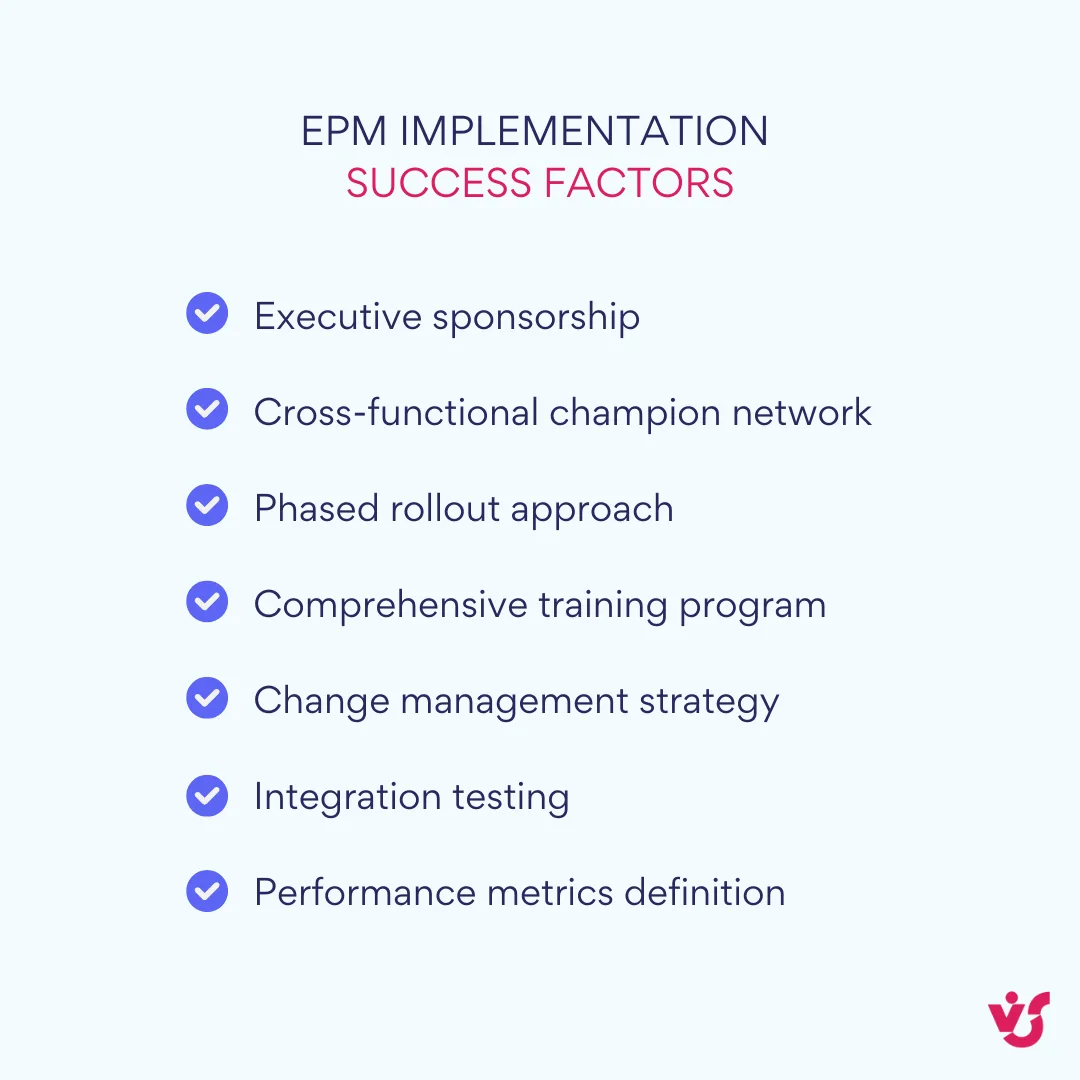
Bottom line: selection and launch of project management software enterprise
After thorough evaluation, it’s time for decision and action. This final phase transforms analysis into organizational change.
Make a final list of requirements and compare it with the capabilities of each tool. Create a structured comparison matrix weighing must-have features, nice-to-have capabilities, and deal-breakers. Score each tool objectively against your criteria. Weight scores based on importance—integration capabilities might matter more than advanced reporting for your organization.
Hold internal sessions with involved departments to select finalists. Don’t make this decision in an executive bubble. Involve representatives from departments that will use the system daily. Their buy-in during selection translates to enthusiasm during implementation. These sessions also reveal department-specific requirements you might have missed.
Justify the choice of the solution that best suits the company’s goals, scale, maturity level, and future growth. Build a compelling business case beyond feature comparisons. Calculate expected ROI through efficiency gains, risk reduction, and strategic enablement. Address change management requirements honestly—a sophisticated tool requiring minimal change might deliver value faster than a perfect tool requiring organizational transformation.
Remember, no decision is permanent, but switching enterprise systems is painful and expensive. Take time to get it right initially. Most importantly, commit fully to your choice. A good tool with excellent implementation beats a perfect tool with half-hearted rollout every time.
The Role of VirtoSoftware Apps in Enterprise Project Management
VirtoSoftware products—Virto Calendar App, Virto Kanban App, and Virto Gantt Chart App—are designed specifically to extend the functionality of Microsoft 365 and Teams in the areas of project, resource, and time management. Unlike standalone EPM solutions that require organizations to abandon their existing Microsoft infrastructure, these apps enhance and expand native capabilities, creating a comprehensive project management ecosystem within the familiar Microsoft environment.
These tools integrate seamlessly into the Microsoft 365 ecosystem, enhancing the organization’s EPM capabilities especially in multi-tier structures with parallel initiatives and distributed teams. With over 8,000 businesses trusting VirtoSoftware and 15 years of project management expertise, these solutions bridge the gap between Microsoft’s collaboration platform and enterprise-grade project management needs.
Explore VirtoSoftware Apps in Detail
Virto Calendar
Consolidate events from SharePoint, Exchange, Google, and more into one calendar view for simplified planning.

Virto Kanban Board
This tool transforms team collaboration through visual task management for consistent stage-by-stage progress.

Gantt Chart
Crafted for clarity and control, it offers a comprehensive timeline view that keeps your project checkpoints aligned.
Virto Calendar App for Microsoft 365: Enterprise-level calendar management
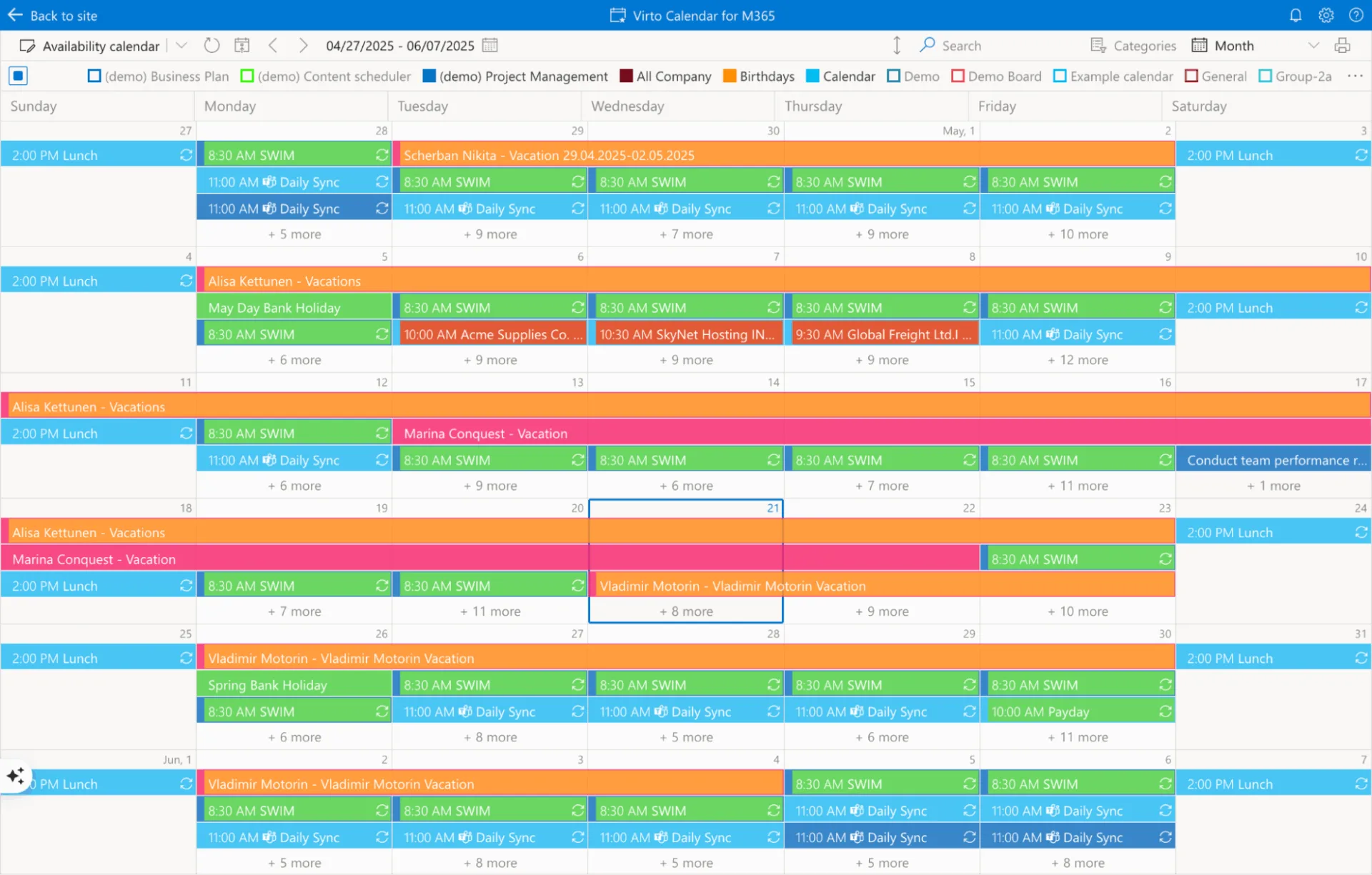
Virto Calendar App provides centralized calendar planning, allowing companies to control deadlines, resource allocation, and workload across all projects at once. This isn’t just another calendar tool—it’s a strategic command center for time-based project coordination at enterprise scale.
The app supports the display of events from multiple sources—project systems, departments, external contractors—in a single calendar, which is critical for cross-functional synchronization. Imagine a global product launch where marketing campaigns in Europe, manufacturing schedules in Asia, and regulatory approvals in North America all converge. Virto Calendar consolidates these diverse timelines into one coherent view, revealing conflicts and opportunities that siloed calendars would miss.
For portfolio management, Virto Calendar provides a visual representation of time intersections between projects, events, and key milestones. Executive dashboards can overlay multiple project calendars, instantly revealing resource conflicts when three major initiatives schedule go-live dates in the same week. This bird’s-eye view transforms reactive scrambling into proactive planning.
The solution allows managers to see conflicts in deadlines and resource allocation, facilitating strategic decision-making. When the same specialized team is double-booked across projects, or when critical dependencies create timeline conflicts, managers can make informed trade-offs rather than discovering problems after commitments are made.
Integration with Microsoft Teams and Outlook makes it a native tool for all project participants without the need to switch between platforms. Project milestones appear in personal Outlook calendars, team meetings schedule directly from project timelines, and Teams channels display relevant project calendars—all without duplicate data entry or synchronization delays.
This integration proves especially useful in international structures where coordinating work across different time zones and regions becomes critical. The app intelligently handles time zone conversions, ensuring a 3 PM deadline in New York displays correctly for teams in London, Mumbai, and Sydney. Holiday calendars for different countries overlay project schedules, preventing the embarrassment of scheduling critical deliveries during regional holidays.
Virto Kanban App for Microsoft 365: Visual task management in the corporate structure
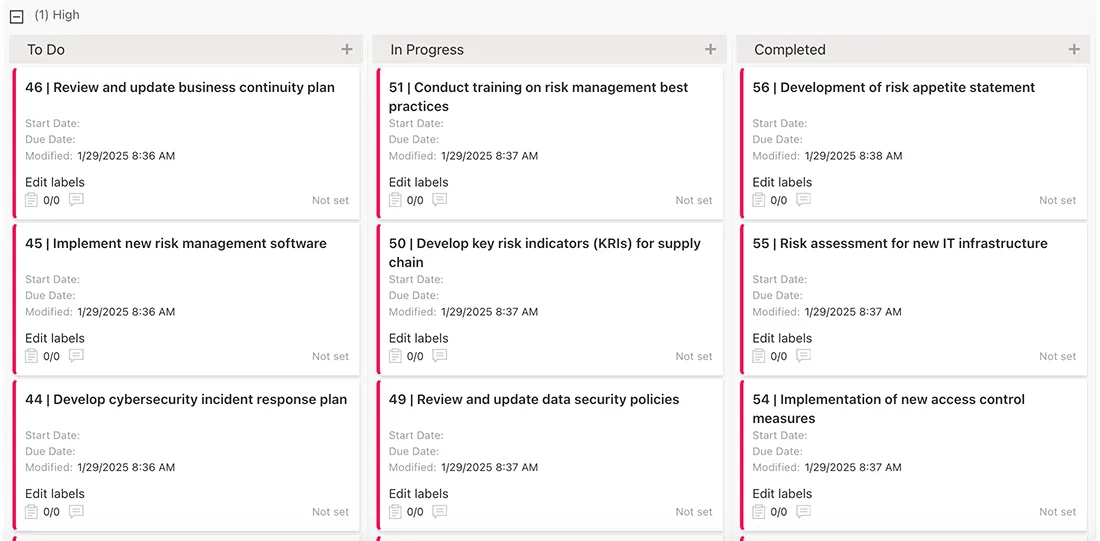
Virto Kanban App transcends simple task boards to become a flexible tool for managing operational activities at the enterprise level. While maintaining the intuitive visual appeal that makes Kanban popular, it adds the sophistication required for complex organizational workflows.
The app allows creation of custom boards for individual projects, departments, or business areas, taking into account process specifics. A legal department might configure boards with stages like “Initial Review,” “Risk Assessment,” “Negotiation,” and “Final Approval,” while IT uses “Backlog,” “In Development,” “Testing,” and “Deployed.” These customizations reflect real workflows rather than forcing standardization where it doesn’t fit.
Multi-team work becomes seamless as several departments can work on one board with access control and filtering. Marketing sees their campaign tasks, development sees technical requirements, and executives see high-level milestones—all on the same board but with views tailored to their needs. Swimlanes organize work by team, project phase, or priority, maintaining clarity even with hundreds of active tasks.
Real-time visualization of workload and progress for each project provides management with tools for assessing efficiency. Color-coded cards might indicate task urgency, while WIP limits prevent team overload. Bottlenecks become immediately visible when tasks pile up in specific columns, triggering intervention before delays cascade.
The platform excels when implementing hybrid methodologies. Development teams can run two-week sprints using Kanban boards for daily work, while program managers track quarterly milestones using traditional phase gates. This flexibility respects team preferences while maintaining enterprise governance.
Organizations use Virto Kanban to build corporate task command centers, ensuring transparency and control over execution. Large displays in project offices show real-time board status, daily stand-ups reference live data, and remote teams stay synchronized through Teams integration. The psychological impact of moving cards from “In Progress” to “Done” motivates teams while providing tangible progress metrics.
Virto Gantt Chart App for Microsoft 365: Strategic planning and dependency management
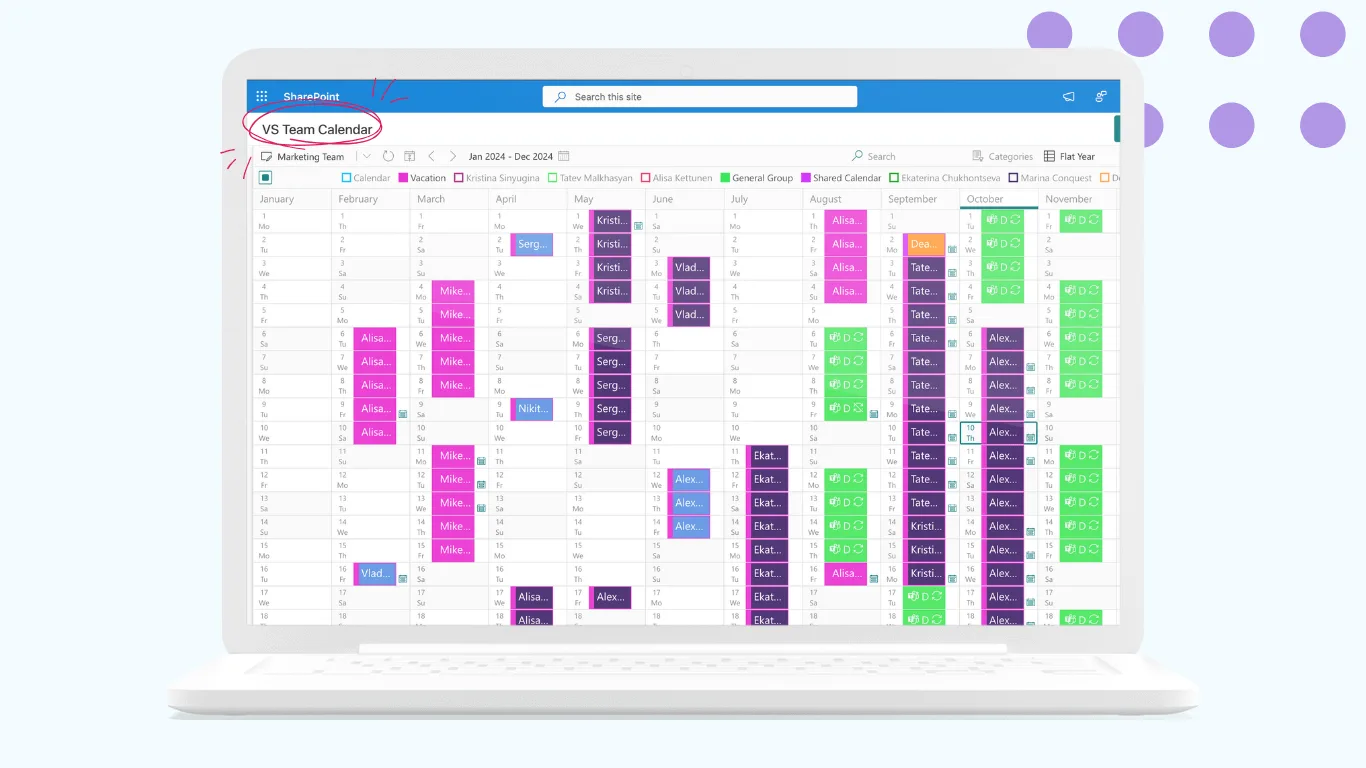
Virto Gantt Chart App provides organizations with a powerful tool for visualizing complex projects, cross-project dependencies, and critical paths. This isn’t just about creating pretty timelines—it’s about understanding how thousands of interconnected tasks create or destroy business value.
The app supports hierarchical projects with multiple stages, relationships, and interdependencies—a typical scenario for enterprise environments. A digital transformation program might contain dozens of projects, each with multiple workstreams, containing hundreds of tasks. Virto Gantt maintains these relationships, automatically calculating how changes ripple through the hierarchy.
Critical path analysis reveals how delays in one stage affect entire projects or programs, enabling timely adjustments. When a vendor delays component delivery by two weeks, the system instantly shows which downstream activities are impacted, which have slack time, and what the new project completion date becomes. This insight transforms panic into planning.
For portfolio planning, Virto Gantt helps synchronize strategic initiatives, budget cycles, and operational tasks. Annual planning becomes visual as executives see how initiatives overlap, compete for resources, or create synergies. Budget allocation discussions reference actual timelines rather than wishful thinking.
The platform supports KPI reporting and visual representations for management, with export capabilities for further analytics. Progress against baseline, resource utilization trends, and schedule variance metrics flow directly into PowerBI or Excel for deeper analysis. Board presentations include professional Gantt visualizations that communicate complex programs simply.
Integration with other Microsoft and Virto applications allows building end-to-end processes from strategic planning to execution control. Plans created in Virto Gantt generate tasks in Virto Kanban, which schedule activities in Virto Calendar. Changes in any component reflect across all others, maintaining single-source-of-truth integrity.
Real-world implementation scenarios
Consider how these tools work together in practice:
- Global product launch scenario: The Virto Gantt Chart maps the entire 18-month program from concept to market, showing dependencies between design, manufacturing, regulatory approval, and marketing. Virto Kanban boards track daily activities for each regional team, with swimlanes for different markets. Virto Calendar overlays all critical milestones, team meetings, and regulatory deadlines, automatically adjusting for time zones and regional holidays.
- IT infrastructure modernization: Multiple technology upgrades run in parallel, each affecting different business units. Virto Gantt visualizes the complete transformation roadmap, highlighting when legacy system shutdowns create dependencies. Virto Kanban boards for each project team show current sprint work, blockers, and completed migrations. Virto Calendar ensures no critical business periods conflict with major cutovers.
- Merger integration program: Two companies becoming one requires hundreds of coordinated projects. Virto Gantt provides executive visibility into the overall integration timeline. Virto Kanban boards for each workstream (HR, IT, Finance, Operations) track specific integration tasks. Virto Calendar consolidates important dates from both organizations, preventing conflicts and ensuring smooth transitions.
The true power of VirtoSoftware’s approach lies not in replacing existing systems but in enhancing them. Organizations already invested in Microsoft 365 gain enterprise project management capabilities without abandoning familiar tools, reducing training requirements and accelerating adoption. With pricing starting at just $2 per user per month and scaling to full enterprise deployments, these solutions make sophisticated project management accessible to organizations of all sizes.
By building on the Microsoft platform teams already use daily, VirtoSoftware eliminates the friction that dooms many EPM implementations. The result is project management that actually gets used, delivering the visibility, control, and strategic alignment that modern enterprises require.
Explore VirtoSoftware Related Use Cases


Conclusion on Best Enterprise Project Management Software
Enterprise project management system represents a fundamental shift in how organizations approach project coordination and strategic execution. As we’ve explored throughout this guide, these powerful platforms help organizations manage complex project portfolios, improve coordination across departments and teams, and achieve strategic goals through better visibility, control, and alignment.
The transformation that effective EPM software can bring to your organization goes far beyond simple task management. When implemented correctly, these tools create a unified ecosystem where strategic planning flows seamlessly into tactical execution, where resource allocation decisions are based on real-time data rather than guesswork, and where teams across different departments can collaborate effectively toward common objectives.
However, as we’ve emphasized throughout this discussion, there’s no universal solution that works for every organization. The choice of tool depends heavily on your company’s specific needs, operational scale, existing processes, and the digital ecosystem you’ve already built. A startup with 50 employees has fundamentally different requirements than a multinational corporation with thousands of team members across multiple regions and regulatory environments.
Your evaluation process should consider not just the features that look impressive in demonstrations, but the practical realities of how these tools will fit into your existing workflows, technology infrastructure, and organizational culture. The most sophisticated EPM platform in the world won’t deliver value if your teams can’t or won’t adopt it effectively.
For organizations that have invested heavily in Microsoft 365 and want to enhance their project management capabilities without the complexity and disruption of implementing entirely new systems, we strongly recommend exploring Virto Calendar App, Virto Kanban App, and Virto Gantt Chart App. These specialized tools provide enterprise-level project management functionality while working seamlessly within the familiar Microsoft environment your teams already know and use daily.
The beauty of the VirtoSoftware approach lies in its ability to deliver sophisticated project management capabilities—from strategic portfolio planning through tactical execution—while building on your existing technology investments and user expertise. Instead of forcing your organization to adapt to entirely new systems and workflows, VirtoSoftware apps enhance what you’re already doing well while addressing the gaps that may be limiting your project management effectiveness.
Whether you need better calendar coordination across complex project portfolios, more effective agile task management within SharePoint environments, or comprehensive Gantt chart capabilities for strategic planning and dependency management, the VirtoSoftware suite provides flexible, powerful tools that scale with your organizational needs.
We encourage you to take the next step and experience these tools firsthand. Schedule a personalized demo to see how Virto Calendar App, Virto Kanban App, and Virto Gantt Chart App can address your specific organizational challenges, or install free trial versions directly from our website to test the functionality with your own projects and teams.
We also encourage you to explore our comprehensive resources that provide additional insights into maximizing your project management effectiveness: