Introduction
Nowadays, companies deal with a constantly growing number of regulatory requirements, internal audits, licenses, and other obligations. Missing deadlines or failing to comply with these requirements can lead to penalties and serious reputational damage.
Managing compliance obligations manually—through Excel spreadsheets, email reminders, or Outlook calendars—is increasingly ineffective and risky. As businesses expand and regulations change, relying on manual methods simply cannot guarantee real-time control and accuracy.
That’s why many companies are now turning to compliance tracking software— digital tools, created to automate the monitoring of compliance deadlines, notifications, and reporting tasks. A modern regulatory compliance tracking software provides centralized visibility and reduces the chance of human error thanks to its automated reminders and dashboards.
This article explores what compliance tracking software is, the main types of compliance tracking tools available on the market, and how such systems help organizations maintain reliable regulatory compliance tracking. We will also explain why Virto’s solutions for Microsoft 365 and SharePoint offer a secure, user-friendly, and scalable option for managing corporate compliance effectively.
What Is Compliance Tracking Software?
Compliance tracking software is a solution built to help organizations manage regulatory, legal, and internal policy compliance. It helps businesses to monitor deadlines, track the status of compliance requirements, and make sure that all obligations to regulators and auditors are fulfilled correctly and in time.
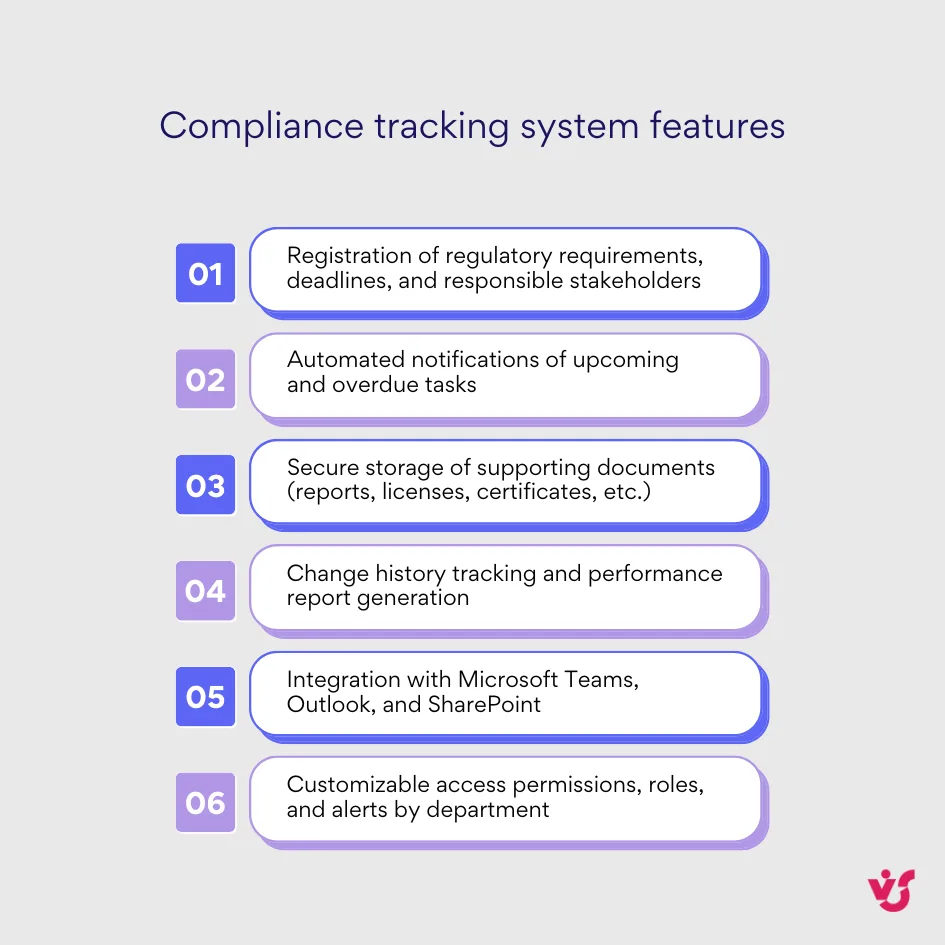
Modern regulatory compliance tracking software covers the full compliance management lifecycle — from registering regulatory requirements and assigning responsible employees to conducting internal audits, and generating reports for executives or authorities.
The main goal of a compliance tracking tool is to bring transparency and automation into compliance operations. Instead of simply recording obligations, such systems manage them in real time: identifying compliance risks, sending deadline reminders, controlling task progress, and helping in the preparation of audit-ready documentation.
Typical features of a good compliance tracking system include:
With numerous solutions available on the market, organizations are looking for policy compliance tracking software that combines reliability, user-friendliness, and stringent data security standards. The optimal platform ensures that compliance is not just a checkbox exercise but a transparent process aligned with corporate goals.
Popular Compliance Tracking Software
When choosing the right compliance tracking software, you should consider various factors such as company size, the level of industry regulation, and the IT infrastructure already in use. Different solutions fit different needs—from multinational corporations with strict regulatory oversight to medium-sized companies seeking a practical way to manage policies.
The market offers several types of regulatory compliance tracking software:
- Cloud-based GRC (Governance, Risk & Compliance) platforms — comprehensive solutions that combine risk management, policy oversight, audits, and reporting within a single interface.
- Enterprise compliance systems — powerful but complex platforms for large corporations. They allow deep customization but usually require ongoing IT support and dedicated administrators.
- Specialized compliance modules for Microsoft 365 and SharePoint — lightweight yet effective solutions that integrate with existing corporate infrastructure. These tools let organizations manage compliance tasks without buying new systems.
Some well-known enterprise products in this category include NAVEX Global, LogicGate Risk Cloud, Diligent Compliance, SAI360, and Hyperproof.
NAVEX Global
NAVEX Global is one of the leading providers of governance, risk, and compliance (GRC) solutions. Its platform offers tools for policy management, risk assessment, incident reporting, and third-party risk oversight. With powerful analytics and reporting features, NAVEX helps organizations maintain a strong culture of compliance across regulatory environments.
LogicGate Risk Cloud
LogicGate Risk Cloud is a cloud-based GRC platform focused on workflow automation. It allows businesses to design custom compliance processes, assign responsibilities, and visualize risk data in real time. Its modular structure enables organizations to scale from compliance tracking to full enterprise risk management without deploying separate systems.
Diligent Compliance
Diligent Compliance is part of the broader Diligent Governance platform, offering advanced tools for policy tracking, regulatory mapping, and board-level reporting. It emphasizes transparency, and secure collaboration among compliance officers and executives, helping companies align corporate governance with regulatory expectations.
SAI360
SAI360 delivers an integrated risk and compliance management ecosystem, including eLearning, audit management, and reporting dashboards. It supports organizations in achieving operational resilience and continuous compliance through a combination of automation, analytics, and regulatory intelligence that adapts to industry standards.
Hyperproof
Hyperproof is a user-friendly compliance operations platform designed to simplify evidence collection, audit preparation, and control monitoring. It integrates with popular business tools such as Slack, Microsoft Teams, and Jira, making compliance tracking accessible across departments.
Each of these systems provides robust oversight of regulatory risks, advanced analytics, and detailed reporting dashboards. However, they often share a few challenges:
- Complex integration with existing corporate systems
- Longer onboarding and training time for users
- Additional subscription costs that increase total cost of ownership
For companies already using Microsoft 365 and SharePoint, it makes far more sense to opt for solutions built directly within that ecosystem. A compliance tracking tool integrated with Teams, Outlook, and SharePoint offers a secure and familiar environment. It simplifies setup, allows collaboration across departments, and keeps all compliance data within the organization’s IT control—without exposing sensitive information to third-party cloud vendors.
Microsoft 365 and SharePoint — The Ideal Environment for Compliance Tracking
Most organizations already rely on Microsoft 365 and SharePoint for managing documents, reports, workflows, and communication. This makes these platforms a perfect foundation for building a compliance tracking system—one that integrates seamlessly into daily operations.
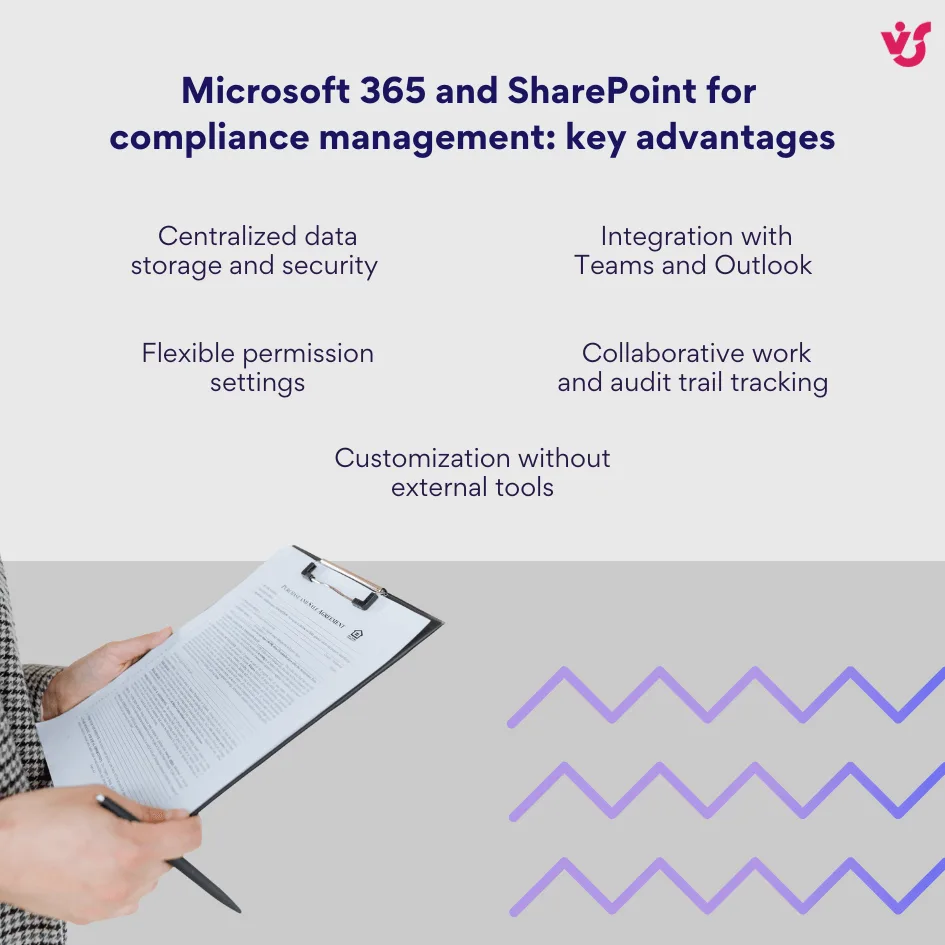
Using Microsoft 365 and SharePoint for compliance management offers several key advantages:
- Centralized data storage and security — All compliance-related information remains within the organization’s Microsoft environment, protected by enterprise-grade security and access control.
- Integration with Teams and Outlook — Users receive reminders and updates directly within familiar communication tools, so that no tasks or deadlines are missed.
- Flexible permission settings — Access rights can be customized for individual departments, teams, or types of regulations to maintain confidentiality.
- Collaborative work and audit trail tracking — Multiple users can edit, approve, and comment on compliance documents at the same time, while SharePoint automatically logs version changes for traceability.
- Customization without external tools — Companies can adapt compliance workflows, task lists, and reporting dashboards without additional software or systems.
Building compliance tracking software within Microsoft 365 minimizes the risk of human error and data leakage. Every process—from recording requirements and setting up task alerts to generating compliance reports—runs within one secure ecosystem. This way you get full control over access, adherence to security standards, and complete visibility into all activities.
How do you keep track of your compliance?
With Microsoft 365, enterprises can centralize the tracking of compliance obligations and monitor their status. By using task reminders, approvals, and dashboards within Teams and SharePoint, businesses create a unified compliance environment that simplifies oversight and allows data-driven decision-making.
Compliance Tracking Software by Virto for Microsoft 365 and SharePoint
Virto offers a suite of specialized tools that turn Microsoft 365 and SharePoint into a powerful and automated compliance tracking system. These solutions are built to improve reminders and centralize the management of compliance obligations while maintaining security and ease of use.
Compliance Tracking with Virto Calendar App for SharePoint Online & Microsoft 365
The Virto Calendar App allows organizations to visualize and manage compliance deadlines directly within SharePoint. It brings structure and clarity to compliance operations by presenting all key dates, audits, and reporting events in a unified calendar interface.
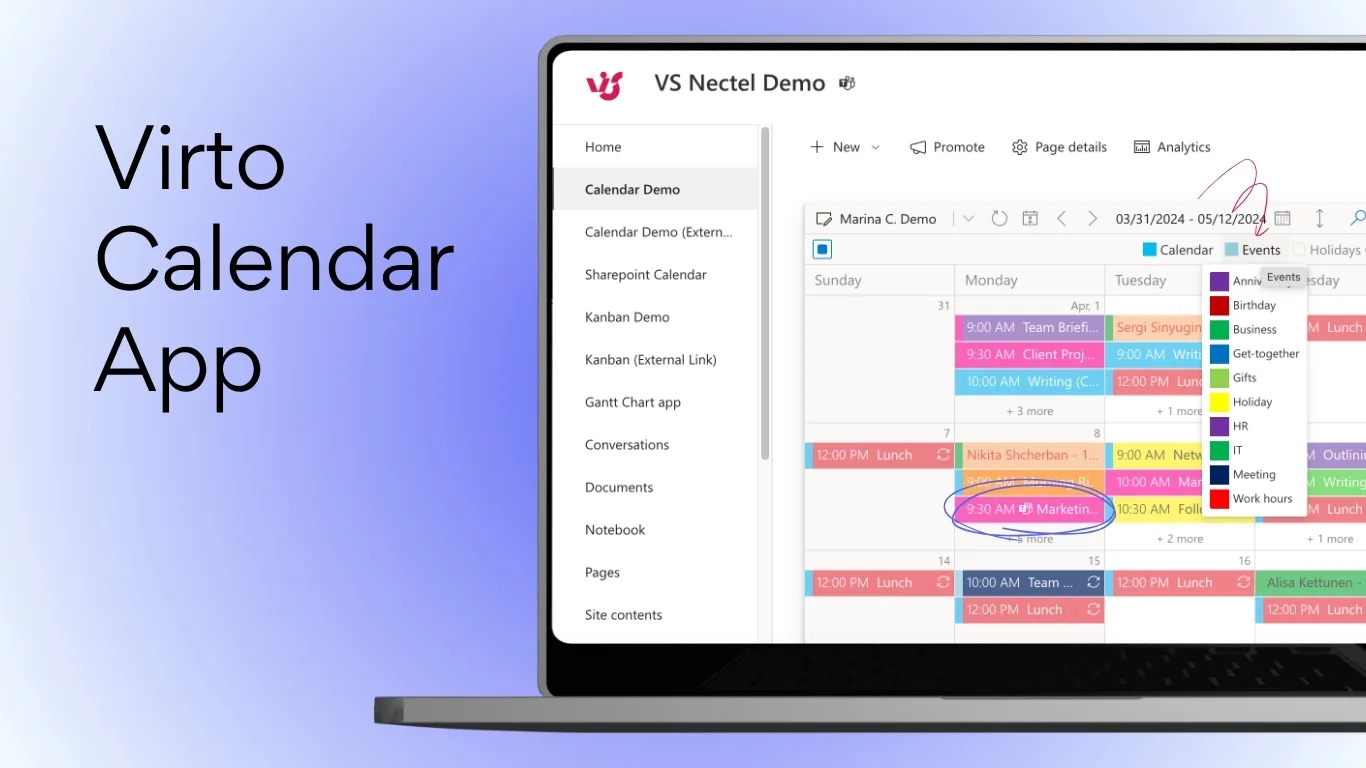
Core features include:
- A color-coded compliance event calendar for quick visual tracking of all obligations
- Advanced filters by obligation type, department, or priority level
- Native integration with Outlook and Teams for automatic event synchronization
- Task grouping and project-based visualization to simplify multi-department tracking
- Flexible permissions for different user roles, such as legal teams, auditors, and managers
This solution is ideal for organizations that need complete visibility into compliance activities across all departments, helping them maintain control through a single SharePoint interface.
👉 Read more about Compliance Calendar >>>
Automating Compliance Reminders with Virto Alerts & Reminder App for Microsoft 365
Reminders are a vital part of any compliance management process. The Virto Alerts & Reminder App automates notifications, so that no critical task or deadline is ever missed.
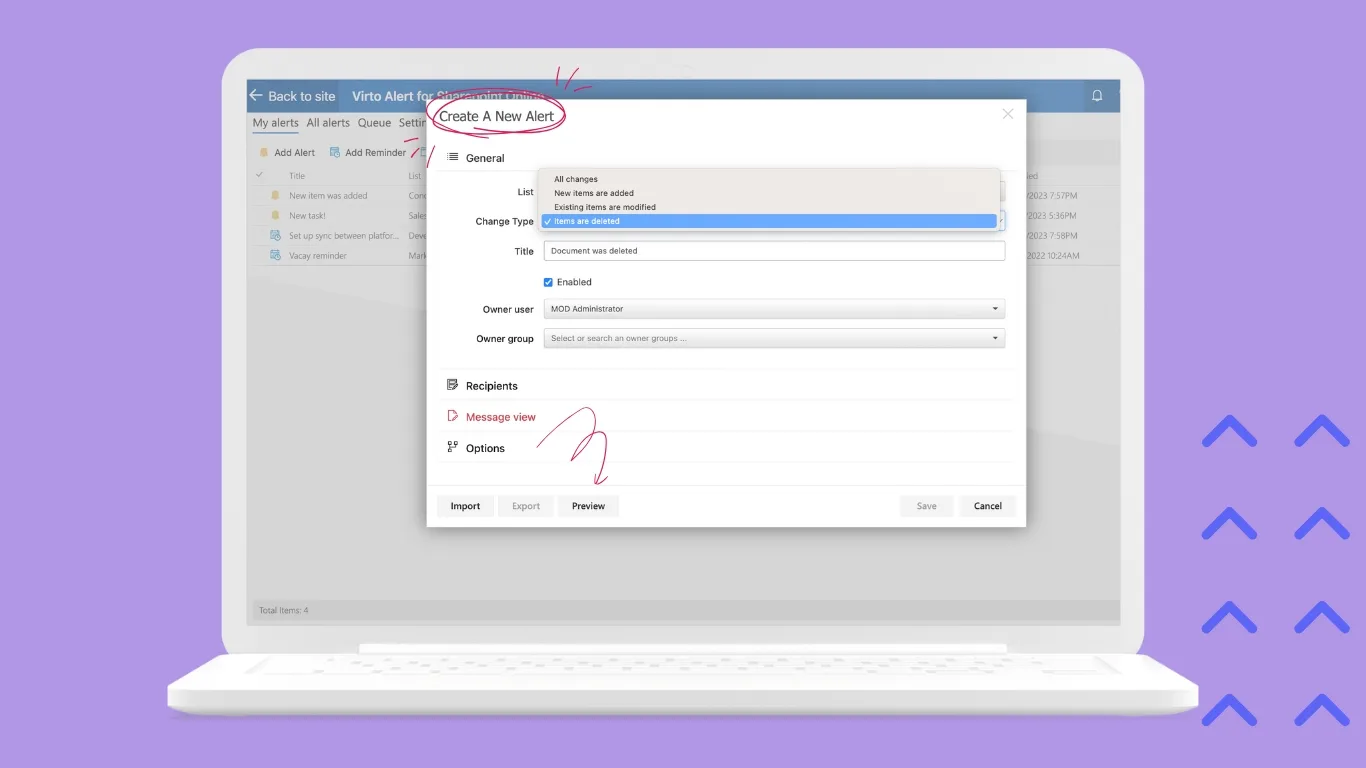
The app’s key features are:
- Early alerts and recurring reminders for upcoming compliance deadlines
- Escalation workflows that notify managers when tasks are overdue
- Notifications delivered through Teams, SharePoint, or email for maximum visibility
- Configurable personal and group-level scenarios for tailored automation
Automating compliance reminders eliminates human error and ensures that every stakeholder remains informed and accountable.
Compliance Tracking for SharePoint On-Premises
For organizations with strict data storage or internal security requirements, Virto offers on-premises solutions that deliver the same capabilities without cloud dependency. Virto Calendar Web Part and Virto Notifications & Alerts Web Part provide visualization, alerting, and tracking features directly within SharePoint On-Premises environments.
These tools allow:
- Visual tracking of all compliance timelines and obligations
- Automated reminders and task monitoring within a secure local infrastructure
- Full control over implementation without migrating to the cloud
For companies operating under tight security or compliance restrictions, these tools provide efficiency and compliance control while adhering to data protection standards.
👉 Discover the secure document management and SharePoint file approval workflow >>>
Explore VirtoSoftware Apps
Virto Multiple File Operations
Execute a wide array of file actions—upload, download, delete, copy, move, check-in, approve, and edit.
Virto Calendar
Merge events from multiple sources like Exchange, Google, and SQL into unified calendar view.
Virto Notifications & Alerts
Craft alerts, reminders, or notifications for any user or group, with options for email, SMS, etc.
Practical Use of Compliance Tracking Systems with Virto Solutions for Microsoft 365 and SharePoint
In real-world settings, Virto’s tools for Microsoft 365 and SharePoint help organizations from different industries automate compliance workflows and make sure that every obligation is completed on time. Below are several scenarios demonstrating how companies can use compliance tracking software from VirtoSoftware to achieve consistent regulatory compliance.
1. Audit and Inspection Management in a Healthcare Organization
A healthcare provider is required to undergo regular internal and external audits to confirm compliance with HIPAA standards and local health regulations. Using the Virto Calendar App, the compliance team visualizes all scheduled audit events, inspection deadlines, and document submissions within SharePoint.
- Virto Alerts & Reminder App automatically sends notifications to responsible staff as audit dates approach.
- Team members receive updates via Outlook and Teams, keeping everyone aligned.
- Reports, certifications, and audit results are stored securely within the organization’s Microsoft 365 environment.
As a result, the organization gains complete control over its compliance timeline, eliminates missed inspections, and improves readiness for regulatory reviews.
2. Managing Regulatory Deadlines in a Financial Institution
A financial services company must submit quarterly regulatory reports and renew operational licenses at specific intervals. Virto’s compliance tracking system centralizes all reporting obligations and renewal dates.
- Each requirement is entered into a shared SharePoint calendar categorized by type and priority.
- Automated alerts remind responsible departments about upcoming submission deadlines.
- The compliance officer receives escalation alerts when deadlines are missed or reports require review.
This approach standardizes reporting, boosts accountability, and ensures the company stays compliant with financial authorities without manual spreadsheet tracking.
3. Policy Compliance Across a Multinational Enterprise
A large corporation with branches in multiple countries uses Virto solutions to coordinate global policy compliance initiatives. Using Virto’s apps for Microsoft 365, they integrate notifications, document histories, and permissions across regions—all within a single compliance dashboard.
- Regional compliance teams maintain localized calendars and alerts while reporting centrally through SharePoint.
- Management can monitor progress, run compliance reports, and assess overall risk readiness from one platform.
Ultimately, the company benefits from a fully transparent compliance landscape, reduced administrative overhead, and consistent adherence to corporate standards worldwide.
4. Environmental Compliance in a Manufacturing Company
A manufacturing enterprise must regularly report environmental performance data—such as emissions, waste management, and energy consumption—to comply with local and international environmental regulations. With Virto Calendar App, all reporting deadlines and inspection schedules are visualized within SharePoint for easy tracking.
- Virto Alerts & Reminder App sends proactive alerts to environmental officers as reporting dates approach.
- All supporting documentation, including environmental certificates and audit findings, is stored securely in SharePoint.
- Escalation alerts notify plant managers if corrective actions are delayed.
This setup helps the company maintain compliance with environmental standards (like ISO 14001) while reducing the administrative burden of reporting and oversight.
Discover VirtoSoftware Use cases


5. Data Protection and GDPR Compliance in an IT Company
An IT service provider handling sensitive client data must comply with GDPR and internal data privacy policies. The compliance team uses Virto Calendar to track privacy audits, training sessions, and documentation updates.
- Regular reviews of data processing registers are automated through recurring reminders.
- Virto Alerts notify officers when consent forms or client data handling policies require updates.
- Managers have a transparent overview of GDPR activities across all departments.
As a result, the organization strengthens customer trust, prevents data breaches, and avoids costly penalties for non-compliance.
6. Safety Protocol Compliance in a Construction Firm
A construction company is obligated to make sure that all worksite teams follow health and safety regulations. Using Virto’s compliance tracking software, project managers log safety training sessions, inspection results, and certification expirations within SharePoint.
- Automatic reminders notify site supervisors before safety certificates or equipment checks expire.
- Teams can attach photos and reports directly to calendar events for audit readiness.
- Escalation workflows keep leadership informed if safety inspections are overdue.
This system creates a culture of proactive safety management and full traceability of compliance actions across multiple construction sites.
7. Supplier and Vendor Compliance in a Retail Chain
A large retail company manages hundreds of suppliers who must meet compliance standards related to quality, documentation, and ethical sourcing. Using Virto Calendar App, the compliance team tracks supplier audit dates, contract renewals, and document submissions.
- Virto Alerts send automated reminders to vendors about upcoming requirements.
- Teams can quickly identify non-compliant partners using SharePoint dashboards.
- Compliance data remains available internally for analysis and strategic planning.
The result is improved supplier reliability, timely renewals, and stronger compliance consistency throughout the supply chain.
8. Educational Accreditation and Policy Tracking in a University
An academic institution must stay compliant with accreditation body standards and internal academic policies. Using Virto’s solutions, administrators manage audit timelines, faculty certifications, and accreditation renewals.
- Calendar visualization helps academic departments plan submissions in advance.
- Automated alerts make sure no renewal or policy review date is missed.
- Documentation and audit materials are centralized in SharePoint for unified reporting.
This digital compliance system ensures institutional readiness for accreditation cycles, reducing paperwork and improving transparency across faculties.
👉 Read more about Alumni Event Coordination Calendar >>>
Conclusion
Compliance tracking software is far more than a deadline management tool—it is a strategic component of modern corporate governance. In a business landscape shaped by complex regulations and constant audits, organizations need reliable systems that excel at fulfilling every obligation on time and supported by transparent documentation.
Virto’s solutions for Microsoft 365 and SharePoint automate the entire compliance process—from registering and categorizing regulatory obligations to managing reminders, escalations, and performance reports. By combining calendar-based visualization with intelligent automation, companies gain full oversight and control within their existing Microsoft environment.
Implementing Virto Calendar and Virto Alerts & Reminder provides businesses with exceptional levels of compliance visibility, accuracy, and security—all while minimizing the costs of deployment and employee training.
For organizations that rely on Microsoft 365 and SharePoint, Virto’s compliance tracking ecosystem is the optimal choice—an integrated, scalable, and secure solution for managing corporate compliance systematically and effectively.