Managing personal or business finances well doesn’t happen by accident. Financial success depends on having a clear, organized system that keeps you ahead of your obligations rather than scrambling to catch up.
Budget planners offer exactly this kind of structured foundation. These straightforward tools combine the familiar format of a calendar with essential financial tracking, allowing you to map out income, expenses, savings goals, and critical payment dates all in one visual space. Think of them as your financial command center, where every dollar has a date and every deadline gets the attention it deserves.
The calendar approach transforms abstract numbers into concrete, time-bound events you can actually see coming. Instead of wondering when that quarterly insurance payment is due or whether you’ve budgeted enough for next month’s contractor fees, you’ll have everything laid out chronologically. This visibility lets you spot potential cash flow gaps weeks in advance, reschedule conflicting expenses, and ensure that important payments never catch you off guard.
Budget calendars work particularly well because they mirror how we naturally think about time and money. You already know that rent is due on the first, payroll runs every other Friday, and that big conference registration needs to happen before the early-bird deadline expires. A budget calendar simply captures this knowledge in an organized format that multiple people can access, update, and rely on.
This guide walks you through everything you need to know about budget calendars: what they are, why they work so effectively, and how to choose and implement the right solution for your situation.
What Is a Budget Calendar, and How Does a Budgeting Calendar Work?
A budget calendar is a financial planning tool that structures your income and expenses along a timeline, giving you a clear picture of when money flows in and out of your accounts. Rather than tracking expenses after they happen, this approach lets you map out financial events before they occur, turning budgeting from a reactive process into a proactive strategy.
The calendar method works by plotting all your key financial events onto specific dates: payday, bill payments, rent or mortgage, loan installments, planned purchases, subscription renewals, and any other recurring or one-time expenses. When you can see these events spread across weeks and months, patterns emerge that aren’t obvious when you’re just looking at categories or totals.
You can implement budget calendars in several ways, depending on your preferences and technical comfort level. Manual options include paper planners, wall calendars, or printed templates where you handwrite amounts and dates. Semi-automated approaches use Excel or Google Sheets with formulas and templates that handle calculations for you. Digital solutions offer the most sophisticated features: online applications with calendar views, automatic reminders, device synchronization, and shared access for teams or families.
| Calendar type | Setup complexity | Cost | Best for | Examples |
| Manual | Low | Free | Individuals, simple tracking | Paper planners, wall calendars, printed templates |
| Semi-automated | Medium | Free to Low | Small teams, moderate complexity | Excel/Google Sheets with formulas |
| Digital/Online | Medium to High | Free to Premium | Teams, businesses, advanced features | Specialized apps with sync, reminders, sharing |
The main purpose remains consistent across all formats: displaying financial actions in a calendar structure makes budget management more visual and organized. You stop wondering whether you have enough money for next week’s expenses because you can literally see what’s coming up and plan accordingly.
For businesses, budget calendars create a clear, structured system of financial control that goes far beyond day-to-day planning. This approach helps build more predictable and sustainable financial strategies by connecting immediate decisions to longer-term goals.
Key benefits of the calendar approach
Budget calendars offer several advantages that traditional budgeting methods often miss:
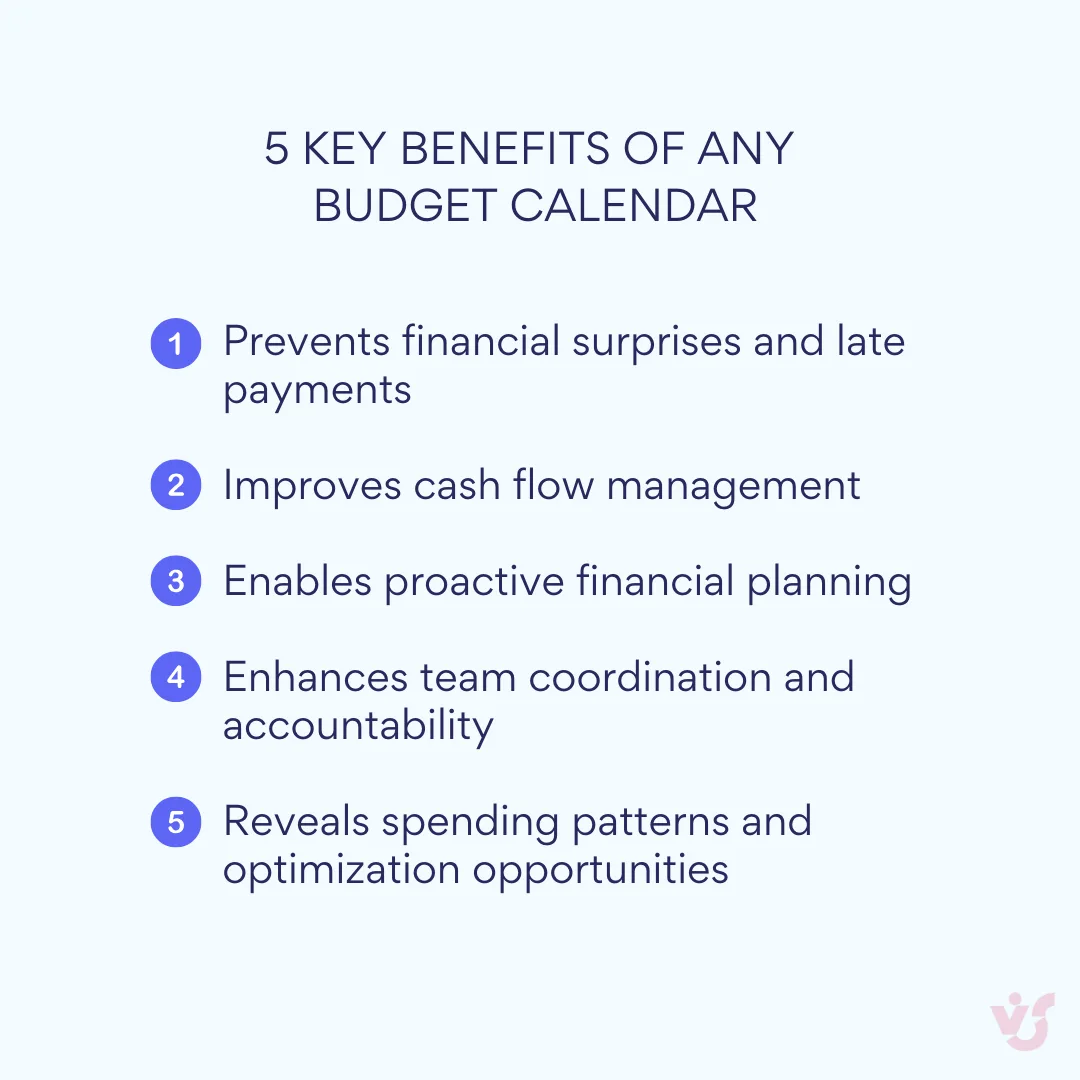
Prevents missed payments and penalties. Built-in reminders and visual displays give you early warnings about upcoming obligations. This proves especially valuable when working with contractors, landlords, government agencies, and suppliers where late payments can damage relationships or trigger fees.
Accounts for seasonal and irregular expenses. The calendar format excels at capturing periodic costs that traditional monthly budgets often overlook: quarterly taxes, annual insurance premiums, holiday campaigns, conference attendance, or equipment replacements. By spreading these expenses across the year, you avoid budget shocks and can build reserves in advance.
Reveals spending patterns and optimization opportunities. Regular calendar use helps identify recurring themes: which periods see spending spikes, which budget categories consistently run over, and where estimates need adjustment. This insight drives smarter cost allocation and more realistic planning.
Provides transparency across teams and departments. When multiple people need visibility into financial plans, calendars offer an intuitive format that doesn’t require financial expertise to understand. Department heads, project managers, and team members can quickly grasp what expenses and income are expected this week, month, or quarter.
Enables better period-to-period comparisons. Calendar data makes it easy to track budget dynamics over time: comparing monthly expenses, identifying peak and slow periods, and understanding the causes of overspending or savings. This historical perspective becomes the foundation for more accurate future budgets.
What Is a Budgeting Calendar Used For?
Budget calendars solve specific financial challenges that traditional budgeting approaches often handle poorly. Understanding these use cases helps you determine whether a calendar approach fits your situation and how to implement it most effectively.
Managing regular business expenses
The calendar excels at tracking all your planned payments in advance: rent, payroll, software subscriptions, supplier invoices, taxes, marketing expenses, and equipment purchases. This comprehensive view ensures budget transparency for months or quarters ahead, helps distribute expenses evenly across time periods, and prevents cash flow gaps that could trigger late payment penalties.
When you mark exact dates for each payment obligation, you can see how financial burdens distribute throughout the month. If cash flow gets tight, you have options: negotiate payment deadline adjustments with suppliers, realign your payment schedule to smooth out peaks, or improve the overall manageability of your financial obligations.
Optimizing cash flow timing
Budget calendars help synchronize revenue receipt dates with expense schedules. For businesses with contract-based income, this means aligning client payment terms with your own obligations. The result is better visibility into balance changes over time, early identification of potential shortfalls or surplus periods, and informed decisions about financing needs or investment opportunities.
This timing optimization proves particularly valuable for seasonal businesses, project-based work, or any situation where income arrives irregularly while expenses remain steady.
Preparing for seasonal costs and major investments
Calendar planning shines when handling expenses that don’t fit neatly into monthly budgets. Marketing campaigns need advance planning and budget allocation. Trade show participation, product launches, and business development trips require coordination across multiple expense categories. Equipment purchases, software implementations, and consulting engagements often involve significant upfront costs that need careful timing.
By plotting these expenses across extended time periods, you can create reserves gradually rather than scrambling for funds at the last minute. You can also distribute large costs across multiple budget periods to avoid overwhelming any single month or quarter.
Supporting project and departmental coordination
In larger organizations, budget calendars can segment by departments, teams, or projects. Marketing departments mark campaign payment schedules and media buy deadlines. Purchasing teams track contract payment dates and supplier commitments. Finance departments coordinate tax periods, audit requirements, and regulatory payments.
This segmentation facilitates cross-functional coordination and helps prevent budget conflicts between departments. When everyone can see the organization’s financial commitments in context, decision-making improves and resource allocation becomes more strategic.
Tracking progress toward financial goals
Whether you’re building emergency reserves, targeting specific ROI metrics, or working toward expense reduction goals, calendars help visualize milestones and track execution by dates. Instead of abstract targets, you get concrete checkpoints tied to real calendar dates.
This approach works equally well for debt reduction plans, savings goals, or revenue targets. You can see exactly when you should hit specific benchmarks and respond quickly if progress falls behind schedule.
Synchronizing financial and operational planning
Budget calendars connect financial planning with other business processes in ways that traditional budgets often miss. Product launches require budget preparations months in advance, with expenses flowing through research, development, marketing, and distribution phases. Seasonal revenue changes in one department might necessitate expense timing adjustments in another. Project delays can cascade through multiple budget categories and time periods.
The calendar approach makes these connections visible and manageable, helping you coordinate financial decisions with operational realities rather than treating them as separate planning exercises.
For individuals managing both personal and business finances, budget calendars prove especially valuable for synchronizing household expenses with entrepreneurial income, freelance project payments, or small business cash flows. The visual timeline helps balance personal financial goals with business investment needs and irregular income patterns.
Key Features of a Good Budgeting Calendar
When choosing a budget calendar for business use, basic event scheduling isn’t enough. You need functionality that helps teams and departments manage finances transparently, accurately, and predictably. The right features can transform a simple calendar into a powerful financial coordination tool.
Payment reminders and milestone tracking
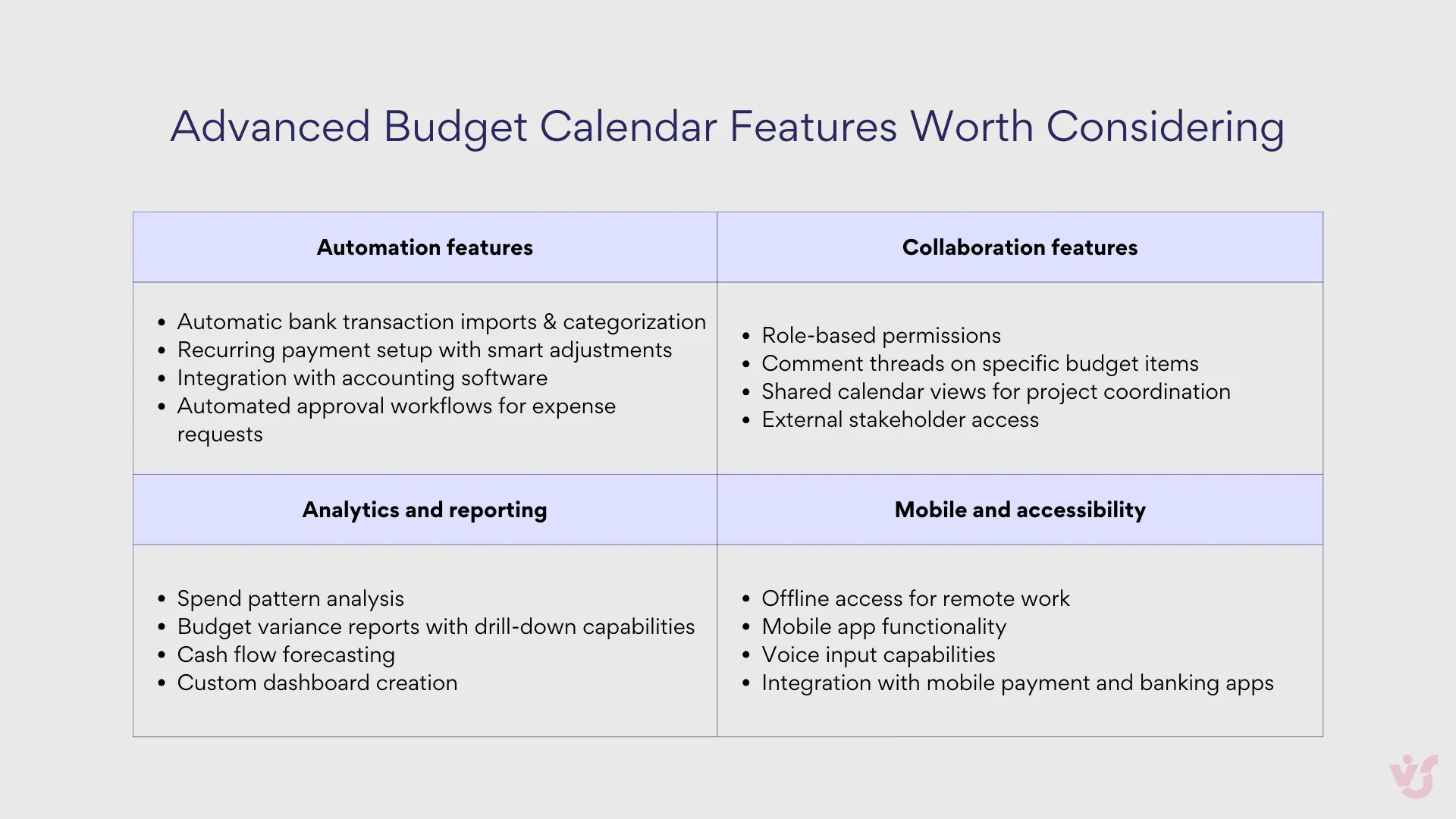
Automatic reminders prevent late payments on rent, contractor agreements, vendor invoices, and recurring subscriptions. The best systems let you customize notifications by event type, responsible employee, and timeline. For example, you might want five business days’ notice before major payments but same-day reminders for routine transactions.
Milestone tracking extends beyond individual payments to include budget reviews, approval deadlines, expense request cutoffs, and financial reporting periods. These checkpoints help maintain budget discipline and ensure that financial processes stay on schedule.
Flexible time perspectives
Financial planning in organizations requires different time horizons for different purposes. Monthly views work best for budget approval and tracking regular expenses like salaries, rent, and software subscriptions. Weekly perspectives help manage short-term costs and project-specific activities. Daily views become essential for approving individual transactions, processing invoices, and handling immediate financial decisions.
This flexibility lets you control both strategic budget planning and day-to-day operational expenses from the same system. You can zoom out to see quarterly patterns or drill down to today’s specific obligations without losing context.
Visual categorization and coding
Color coding becomes particularly powerful in team environments. Consider a system where green represents expected income from client payments, red marks mandatory expenses, blue indicates investment or growth spending, yellow flags internal expense requests, and gray shows items awaiting approval.
This visual approach lets anyone quickly assess budget load and upcoming financial activity by department or category. Team members can scan the calendar and immediately understand their financial environment without diving into detailed spreadsheets or reports.
Recurring events and template support
Most business expenses repeat on predictable schedules: monthly rent, quarterly taxes, annual insurance premiums, weekly contractor payments. Quality budget calendars handle recurring events automatically and offer transaction templates that minimize manual input while reducing errors.
Template functionality becomes especially valuable for organizations with standardized expense categories or approval processes. Instead of recreating similar entries repeatedly, you can establish patterns that new team members can easily follow.
Integration capabilities
Modern budget calendars should connect with your existing business systems rather than creating additional data silos. Email integration with platforms like Outlook can pull events from approval workflows and vendor communications. Connections to ERP and accounting systems like QuickBooks, SAP, or Dynamics provide real-time account status updates.
Banking integration offers automatic transaction verification and balance monitoring. These connections ensure that your budget calendar reflects actual financial reality rather than just planned activity.
Collaborative access and permission controls
Budget calendars work best as team tools, which requires sophisticated access management. Different users need different capabilities: department managers might enter their own events and view related information, while CFOs need calendar-wide visibility and control. Some users require full editing rights, others need approval authority, and many should have view-only access.
Security becomes crucial when dealing with sensitive financial information. Look for systems that offer granular permission controls and maintain audit trails of who made what changes when.
Cross-platform synchronization
Distributed teams need access to budget information regardless of location or device. Your calendar should work seamlessly across browsers, desktop applications, and mobile devices with real-time synchronization. Integration with existing corporate platforms like Microsoft 365 or Google Workspace ensures that budget information fits naturally into existing workflows.
Cloud-based synchronization means that updates made by one team member immediately appear for everyone else, preventing the confusion and errors that arise from outdated information.
System integration and workflow automation
The most effective budget calendars integrate smoothly with your organization’s existing technology infrastructure. This might include connections to Microsoft Teams for collaborative budget discussions, synchronization with corporate Outlook calendars, or links to project management systems like Jira, Planner, or Asana.
These integrations reduce duplicate data entry and help ensure that budget events appear in context with related projects and deadlines. When financial planning connects directly to operational planning, both become more accurate and useful.
Reporting and analysis capabilities
Beyond displaying events, effective budget calendars should help you analyze spending patterns and track financial performance. Look for systems that can break down expenses by category, project, or time period, compare planned versus actual spending, and export data for use in spreadsheets or business intelligence tools.
These analytical features transform your calendar from a simple scheduling tool into a foundation for strategic financial decision-making. You can identify trends, spot problems early, and make data-driven adjustments to improve budget performance over time.
Creating a Budget Calendar: How Do You Create a Budget Calendar?
Building an effective budget calendar requires more than just picking dates and entering amounts. The process involves strategic planning, system setup, and ongoing management practices that ensure your calendar becomes a reliable financial tool rather than another task to maintain.
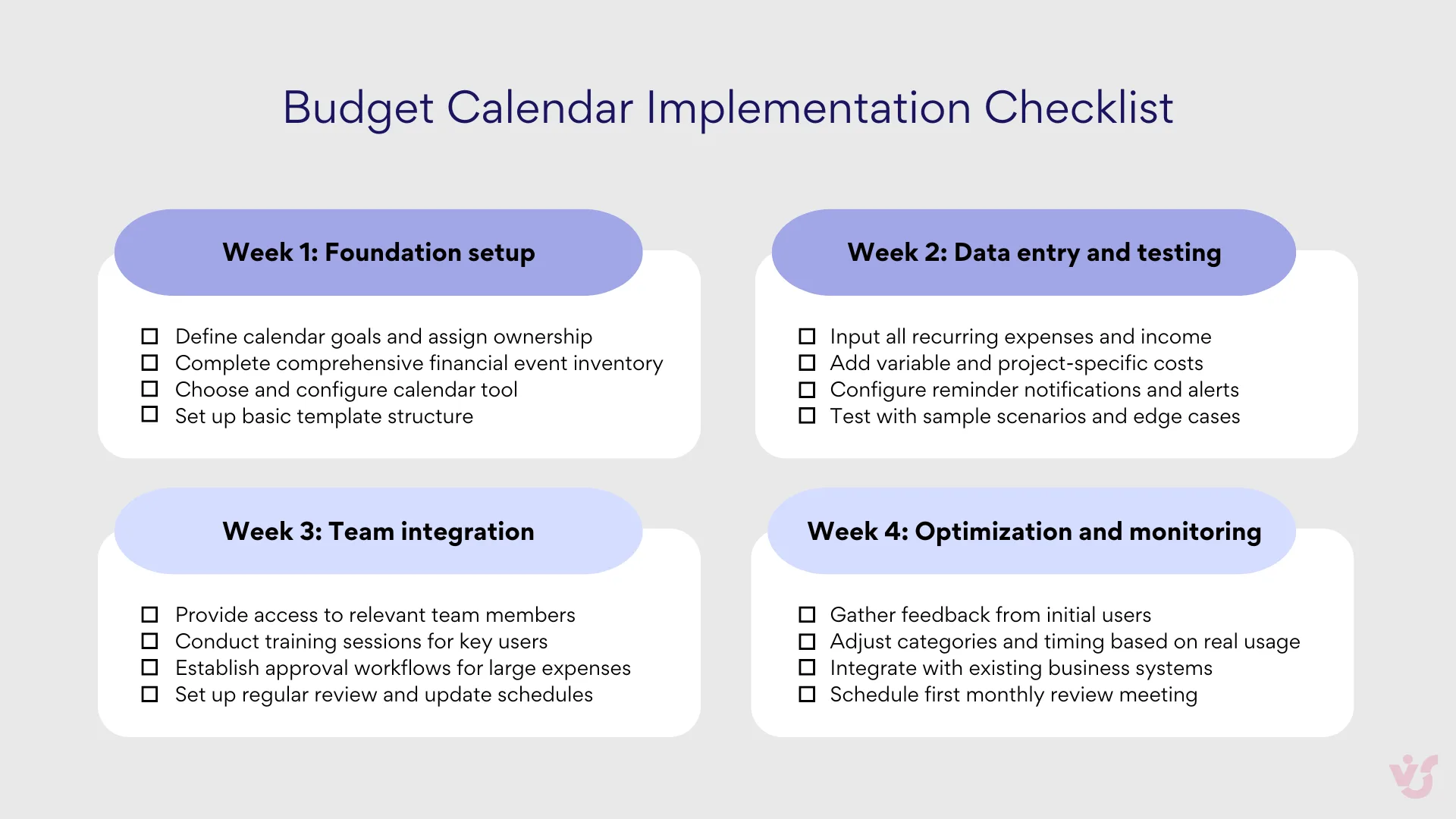
Define goals and assign ownership
Start by clarifying exactly what your calendar needs to accomplish. Are you managing an overall department budget, planning project-specific expenses, coordinating regular payment obligations like rent and contracts, or tracking plan-versus-actual performance across expense categories? Different goals require different approaches to structure and detail.
Assign clear ownership for calendar maintenance. This might be a financial manager for organizational budgets, a project manager for campaign-specific planning, or an operations specialist for routine payment coordination. Having one person responsible for updates and accuracy prevents the calendar from becoming outdated or inconsistent.
The owner should understand both the financial details and the broader business context. They need authority to make decisions about categorization, timing adjustments, and access permissions.
Catalog your financial events
Create a comprehensive list of all financial activities that should appear on your calendar. Fixed expenses include rent, salaries, insurance premiums, loan payments, and subscription services. Variable costs might cover marketing campaigns, travel expenses, equipment purchases, and special events.
| Fixed expenses (Recurring) | Variable expenses (Project-based) | Income streams (where applicable) |
| – Rent/mortgage payments – Salary and payroll obligations – Insurance premiums (monthly/quarterly/annual) – Loan payments and debt obligations – Software subscriptions and licenses – Utility bills and service contracts | – Marketing campaigns and advertising spend – Travel and conference expenses – Equipment purchases and upgrades – Contractor and freelancer payments – Special events and entertainment – Professional development and training | – Client payment schedules and milestones – Contract deliverable payments – Recurring revenue and subscriptions – Seasonal income variations – Grant funding and investment rounds |
Don’t forget income streams where relevant: client payment schedules, contract milestones, recurring revenue, and seasonal income patterns. For businesses with complex cash flow, understanding when money arrives becomes just as important as tracking when it goes out.
Be thorough during this initial inventory. Missing categories or forgetting recurring expenses undermines the calendar’s reliability and forces you to make reactive adjustments later.
Design your time structure
Choose calendar formats that match how your organization thinks about financial planning. Monthly views work well for organizations with regular billing cycles and predictable expense patterns. Quarterly perspectives suit businesses with seasonal variations or project-based work. Weekly detail becomes necessary for operations with frequent transactions or tight cash flow management.
Consider using visual design elements strategically. Color coding by expense type helps teams quickly understand financial priorities. Separate calendars for different departments or projects can be consolidated for executive overview while maintaining detailed operational control.
The structure should feel intuitive to the people who will use it most frequently. If your team already thinks in terms of weekly sprints, monthly reporting cycles, or quarterly reviews, align your calendar format with these existing rhythms.
Select appropriate tools
Choose digital solutions that support collaboration and integrate with your existing business systems. For Microsoft-centric organizations, tools like Outlook provide basic calendar functionality, while specialized solutions like Virto Calendar App offer advanced budget planning features within the Microsoft 365 ecosystem. Virto Shared Calendar App works particularly well for smaller teams that need straightforward shared access.
Ensure your chosen tool supports essential requirements: synchronization with other business systems, customizable reminders and notifications, filtering and categorization options, and collaborative editing capabilities. The tool should feel like a natural extension of your existing workflow rather than a separate system to maintain.
Consider scalability during tool selection. A solution that works for a five-person team might not handle the complexity of a fifty-person organization. Think about future needs as well as current requirements.
Establish template standards
Develop consistent formats for calendar entries, especially in larger organizations where multiple people will be adding information. Create templates that include standard fields: date, amount, expense type, responsible person, approval status, and any relevant project or department codes.
Standardization becomes particularly important when you need to aggregate data across departments or projects. Consistent formatting makes reporting easier and reduces errors that arise from different people using different conventions.
Document your template standards and provide training for anyone who will be updating the calendar. Clear guidelines prevent confusion and ensure that everyone contributes information in useful, consistent ways.
Configure notifications and checkpoints
Set up reminder systems that give appropriate advance notice for different types of financial events. Large payments might need several weeks’ warning to ensure adequate cash flow, while routine expenses might only require a few days’ notice.
Build in regular checkpoint events for budget reviews, plan-versus-actual analysis, and reserve fund assessments. These scheduled reviews help maintain budget discipline and catch problems before they become serious.
Consider implementing approval workflows for significant expenses. Automatic notifications can alert appropriate managers when large payments are scheduled, ensuring that spending decisions receive proper oversight.
Ensure transparency and regular maintenance
Provide calendar access to key stakeholders: finance team members, department managers, project leads, and anyone else who needs visibility into financial planning. Balance transparency with security by using appropriate permission levels for different user types.
Establish regular update schedules and assign responsibility for keeping information current. Weekly or monthly review sessions help identify changes, catch errors, and adjust plans based on new information.
Regular analysis sessions should examine what was planned versus what actually happened, which expenses were postponed or changed, and where significant deviations occurred. This review process becomes the foundation for more accurate future planning and better budget performance over time.
Overview of Popular Budget Calendar Tools and Budget Calendar Apps
The budget calendar landscape offers solutions ranging from flexible DIY platforms to specialized financial applications. Understanding each option’s strengths and limitations helps you choose tools that match your specific needs, technical comfort level, and organizational context.
Notion with custom tables and calendars
Notion provides a flexible foundation for building custom budget tracking systems using its database and calendar features. The platform offers numerous free budget templates, including 2025-specific options like annual budget trackers and monthly expense calendars with automatic calculations for remaining budgets.
Strengths: Highly customizable interface lets you adapt templates to specific needs. Integration with other Notion tools creates unified workflows for teams already using the platform. Aesthetically appealing designs enhance user engagement. Free templates make it accessible for individuals and small businesses.
Limitations: Advanced features may require paid templates or significant customization work. Manual data entry can become time-consuming without external integrations. May be too simple for complex financial tracking needs.
Best for: Individuals and small businesses wanting flexible, visually appealing budget solutions. Particularly suitable for freelancers tracking project budgets or families managing household expenses who value customization over automation.
Google Calendar with budget templates
This approach combines Google Calendar’s scheduling capabilities with Google Sheets budget templates. Solutions like monthly budget calendars from Tiller and GooDocs let you set spending targets, track daily expenses, and visualize financial activity in calendar format.
Strengths: Completely free and easily accessible. Highly customizable through Google Sheets editing. Supports real-time collaboration for shared budgeting. Integrates naturally with other Google services.
Limitations: Requires manual input unless connected to paid services like Tiller. Lacks specialized financial features compared to dedicated apps. Setup may intimidate users unfamiliar with spreadsheet functions.
Best for: Teams already using Google Workspace who need collaborative budget planning. Suitable for organizations wanting customizable solutions without additional software costs.
Calendar.com (CalendarBudget)
CalendarBudget specializes in visual financial planning, letting users see income, expenses, and account balances projected into future dates. The platform emphasizes long-term planning and financial goal visualization.
Strengths: Excellent for visualizing spending patterns over time. Helps avoid financial penalties through advance planning. Effective for long-term savings and debt reduction goals. User testimonials highlight significant financial improvements.
Limitations: Limited information available about advanced features. May lack integration capabilities compared to more comprehensive platforms.
Best for: Individuals focused on long-term financial planning and debt management. Particularly useful for people transitioning to financial independence or managing irregular income.
EveryDollar
Developed by Dave Ramsey’s team, EveryDollar implements zero-based budgeting where every dollar gets assigned a specific purpose. The platform offers both free manual entry and premium automated transaction import.
Strengths: Based on proven zero-based budgeting methodology. Offers both free and premium tiers. Strong focus on debt reduction and savings goals. Simple interface designed for budgeting beginners.
Limitations: Free version requires manual transaction entry. Premium subscription costs $79.99 annually. Philosophy may not suit users who prefer different budgeting approaches.
Best for: Individuals following Dave Ramsey’s financial principles or preferring zero-based budgeting. Suitable for users prioritizing debt reduction and disciplined spending control.
Virto Shared Calendar App for Microsoft 365
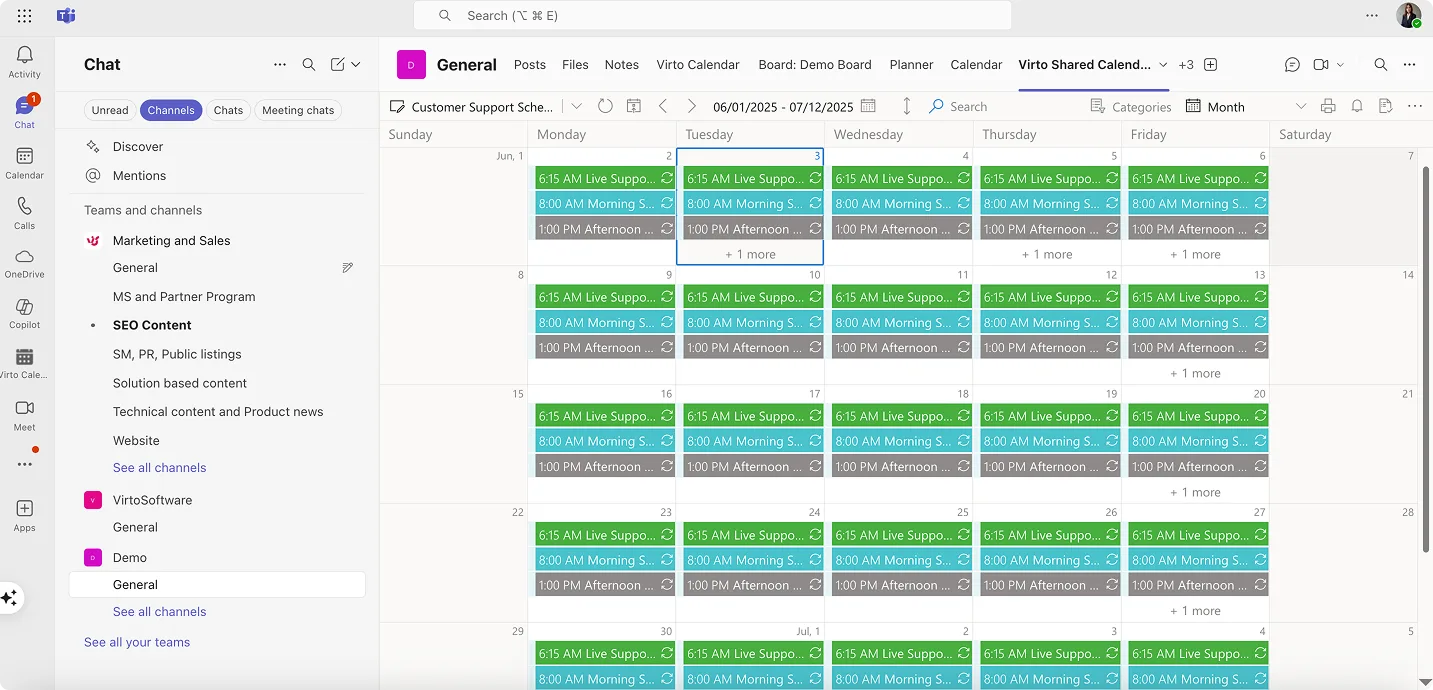
This lightweight solution simplifies team event management within the Microsoft ecosystem. Features include quick event creation, color-coded tagging, and anonymous sharing for external collaboration.
Strengths: Simple setup with minimal learning curve. Seamless Microsoft 365 integration. Real-time synchronization across platforms. Enterprise-grade security. Ideal for small team collaboration.
Limitations: Limited to basic calendar functionality. May raise privacy concerns due to internet data transmission. Not specifically designed for detailed financial tracking.
Best for: Small teams using Microsoft 365 who need straightforward shared calendar functionality for project timelines and event coordination.
Virto Calendar App for Microsoft 365 and Outlook
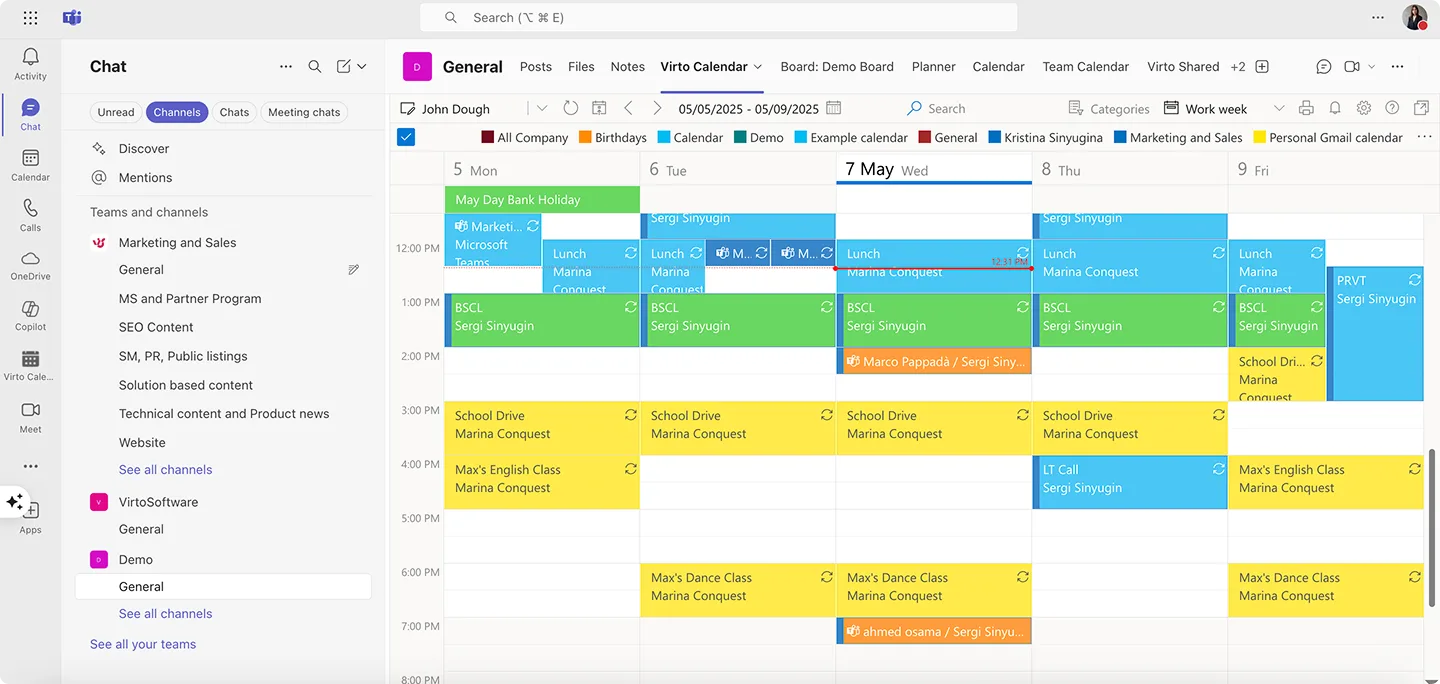
The comprehensive Virto Calendar App integrates multiple calendar sources into unified views within SharePoint, Teams, and Outlook. It handles calendars from various platforms including Google Calendar and iCal sources.
Strengths: Comprehensive calendar integration from multiple sources. Versatile and adaptable for various scheduling scenarios. Trusted by major organizations including Warner Bros, Disney, and NASA. High security standards suitable for enterprise use.
Limitations: Higher cost structure, especially for enterprise plans. Setup complexity may require technical support.
Best for: Organizations needing centralized calendar management from multiple sources. Suitable for corporate event coordination, educational institutions, and large teams requiring robust scheduling infrastructure.
YNAB (You Need A Budget)
YNAB implements zero-based budgeting with emphasis on proactive money management. While not primarily a calendar app, it supports scheduled transactions and future planning features relevant to calendar-based budgeting.
Strengths: Comprehensive budgeting methodology with educational resources. Detailed tracking and goal-setting capabilities. Available across multiple platforms. Strong user community and support.
Limitations: Subscription-based pricing around $99 annually. Steep learning curve for new users. Hands-on approach may overwhelm casual budgeters.
Best for: Serious budgeters willing to invest time learning the YNAB methodology. Ideal for users wanting detailed financial control and comprehensive money management education.
Simplifi by Quicken
Simplifi offers modern budgeting with comprehensive financial tracking including spending, savings, and investments. The platform provides personalized spending plans and real-time account balance updates.
Strengths: Comprehensive financial overview including investments and net worth. User-friendly interface despite powerful features. Strong goal-setting and progress tracking capabilities.
Limitations: Requires paid subscription. May provide more detail than casual budgeters need. Fewer educational resources compared to YNAB.
Best for: Users wanting complete financial picture including investment tracking. Suitable for technology-comfortable individuals seeking powerful yet accessible money management tools.
How to Choose the Right Online Budget Calendar
Selecting the best budgeting calendar app requires matching tool capabilities with your specific organizational needs and existing technology infrastructure. Rather than choosing based on features alone, focus on how well each budget calendar online integrates with your current processes and supports your actual financial planning workflow.
Define your goals and use cases
Begin by clarifying your primary objectives for implementing a budget calendar. Business applications might include financial planning across multiple projects and departments, controlling payment timing for rent, contractors, and license renewals, coordinating budget responsibilities between financial directors, accounting teams, and project managers, ensuring transparency in budget allocation decisions, or preparing accurate cash flow forecasts tied to specific timeframes.
For personal or small team needs, goals often center on tracking household expenses and savings progress, planning major purchases or investments, or coordinating financial responsibilities across family members or business partners.
Clear goal definition helps eliminate solutions that offer impressive features you won’t actually use while ensuring you don’t overlook tools that excel at your specific requirements.
Assess user numbers and access requirements
Consider who needs calendar access and what level of interaction each person requires. Individual users need straightforward input and viewing capabilities. Small teams benefit from shared editing access and basic collaboration features. Larger organizations require sophisticated access rights management, the ability to comment and assign responsibilities, coordination capabilities for multiple simultaneous users, and role-based notifications that alert specific people about relevant events.
Corporate implementations should support differentiated permissions where accountants receive payment reminders, project managers get budget approval notifications, and executives access comprehensive overviews without being overwhelmed by operational details.
Identify essential functionality
Determine which features are absolutely necessary for your calendar budget tool versus those that would be nice to have. Critical capabilities might include automatic reminders and alerts for upcoming events, recurring event support for monthly rent, quarterly taxes, and subscription renewals, visual coding through colors or labels for quick categorization, integration with existing business systems like Microsoft 365, Outlook, Excel, banking applications, or CRM platforms.
Additional valuable features include device synchronization and cloud storage access, the ability to attach supporting documents like invoices or contracts, and export capabilities for reporting and analysis purposes.
Focus on features that solve actual problems you face rather than impressive capabilities that sound useful but don’t address your specific challenges.
Test compatibility and usability
Take advantage of free trials and demo periods to evaluate how well each solution works in your actual environment. Test user interface intuitiveness and how quickly new team members can learn the system. Examine flexibility in settings, permissions, and customization options. Verify mobile functionality if team members need access outside the office.
For larger organizations, involve IT departments or information security teams to assess compatibility, privacy implications, and integration complexity with existing systems.
Evaluate ecosystem integration
Budget calendars work best when they connect seamlessly with your current digital infrastructure. Microsoft 365 users should prioritize solutions with native integration like Virto Calendar App or Virto Shared Calendar App that work directly within Teams, Outlook, and SharePoint. Google Workspace organizations benefit from tools that leverage Gmail, Google Docs, and existing Google Calendar implementations.
Creative teams using flexible platforms like ClickUp, Notion, or Trello need budget solutions that match their project management approach. Organizations with established financial systems should ensure calendar tools can connect with existing banking applications, accounting software, or ERP platforms.
Consider organizational context and scale
Different organizational sizes and types require different approaches to budget calendar implementation.
Students, freelancers, and sole proprietors often succeed with simple, free solutions like Google Sheets templates, Notion budget trackers, or basic Excel calendars. These options provide necessary functionality without complexity or ongoing costs.
Families and small businesses benefit from applications supporting sharing and collaboration like EveryDollar, Calendar.com, or shared Google Calendar implementations. These tools help coordinate spending across multiple users while tracking shared financial goals.
Teams and enterprise users need systems providing access control, scalability, and workflow integration. Solutions should offer granular permission management, easy scaling as teams grow, and integration with existing business processes.
For Microsoft-centric organizations, Virto Shared Calendar App works well for team collaboration and shared budget coordination within Microsoft 365, while Virto Calendar App provides comprehensive budget planning with task integration and enterprise-level features.
| Organization type | Recommended tools | Key features needed | Typical budget |
| Students/Freelancers | Google Sheets, Notion, Excel | Simple, free, flexible | $0-$25/month |
| Small teams (2-10) | EveryDollar, Calendar.com, Virto Shared | Collaboration, sharing, reminders | $15-$100/month |
| Medium business (11-50) | YNAB, Simplifi, Virto Calendar App | Integration, permissions, reporting | $100-$500/month |
| Enterprise (50+) | Virto Calendar App, Custom Solutions | Security, compliance, multi-department | $500+/month |
Factor in cost and long-term sustainability
Consider both immediate costs and long-term financial implications. Free solutions may seem attractive initially but could require significant time investment for setup and maintenance. Paid applications might offer better automation and support, potentially saving time and reducing errors.
Evaluate subscription costs against the value provided, especially for business applications where improved financial coordination can generate savings that exceed software expenses. Consider whether cost structures scale appropriately as your organization grows.
Some solutions offer educational discounts, non-profit pricing, or volume licensing that could affect the total cost of ownership for qualifying organizations.
| Common mistake | Why it happens | Solution | Prevention |
| Over-categorizing | Trying to track every expense type | Use 5-8 main categories max | Start simple, add detail later |
| Ignoring irregular expenses | Focus only on monthly costs | Plan for quarterly/annual items | Include all payment frequencies |
| No buffer time | Scheduling payments too tight | Add 2-3 day payment buffers | Build in processing delays |
| Single person dependency | Only one person knows the system | Train multiple team members | Document processes clearly |
| Tool complexity overload | Choosing features over usability | Pick tools matching actual needs | Test before committing |
Calendar Templates for Budgeting
Budget calendar templates provide ready-made structures that accelerate implementation while ensuring you don’t overlook important financial categories. Rather than building everything from scratch, templates give you proven frameworks that you can customize for your specific situation.
Why templates matter for budget planning
Templates significantly reduce setup time by providing pre-configured structures that only need adaptation to your context rather than complete reconstruction. They serve as comprehensive checklists, including typical expense categories like salaries, rent, taxes, subscriptions, and supplier payments that might otherwise be forgotten during initial planning.
Templates also create consistency across departments or projects within organizations. When everyone uses similar formats, data aggregation becomes easier and budget oversight more effective. For new team members, structured templates make the budgeting system intuitive and reduce the learning curve significantly.
Essential template categories
Different budget calendar templates serve different planning needs. Understanding the main categories helps you select or create templates that match your specific requirements.
Monthly calendars with income and expenses work well for organizations with regular billing cycles and predictable cash flow patterns. These templates typically include recurring revenue, fixed expenses, variable costs, and payment due dates organized by week.
Annual calendars for savings and financial goals help with long-term planning by breaking larger objectives into monthly or quarterly milestones. These formats work particularly well for capital expenditure planning, debt reduction strategies, or building emergency reserves.
Project and department expense calendars support organizations where budget responsibility is distributed across teams. These templates allow each group to manage their specific budget while providing summary views for executive oversight.
Weekly calendars for startups and project-based work accommodate situations where financial activity happens frequently and cash flow requires close monitoring. These detailed templates help coordinate invoice payments, contractor fees, and operational expenses.
Sample budget calendar templates
Here are three practical templates that illustrate different approaches to budget calendar organization:
Monthly business expense calendar
| Date | Expense Category | Amount | Responsible | Status | Notes |
| 1st | Office Rent | $4,500 | Operations | Scheduled | Annual lease renewal due Q4 |
| 1st | Software Subscriptions | $890 | IT | Scheduled | Microsoft 365, design tools |
| 5th | Contractor Payment | $3,200 | Project Mgr | Pending | Web development milestone |
| 15th | Payroll | $18,500 | HR | Scheduled | Bi-weekly payroll cycle |
| 15th | Marketing Campaign | $2,800 | Marketing | Approved | Social media advertising |
| 20th | Equipment Purchase | $1,200 | IT | Requested | New laptops for team |
| 25th | Quarterly Taxes | $6,750 | Finance | Scheduled | Q3 estimated payments |
| 30th | Client Payment | +$12,000 | Sales | Expected | Project delivery milestone |
Annual financial goal tracking
| Quarter | Goal Category | Target Amount | Monthly Target | Progress | Next Milestone |
| Q1 | Emergency Fund | $15,000 | $5,000 | $3,800 | Mar 31: $5,000 |
| Q1-Q2 | Equipment Upgrade | $8,000 | $1,333 | $1,800 | Jun 30: $4,000 |
| Q2 | Conference & Training | $4,500 | $1,500 | $500 | May 15: Registration |
| Q3 | Debt Reduction | $12,000 | $4,000 | $2,200 | Sep 30: $8,000 |
| Q4 | Tax Preparation | $3,600 | $300 | $600 | Dec 31: Full reserve |
| Ongoing | Marketing ROI | 3.5x return | Track monthly | 2.8x current | Monthly review |
Weekly project expense tracker
| Week | Monday | Tuesday | Wednesday | Thursday | Friday | Weekly Total |
| Week 1 | Design tools: $120 | Travel: $180 | Materials: $340 | Contractor: $800 | Review meeting: $0 | $1,440 |
| Week 2 | Software license: $200 | Client dinner: $95 | Equipment: $450 | Freelancer: $600 | Documentation: $0 | $1,345 |
| Week 3 | Research: $150 | Printing: $45 | Consulting: $750 | Travel: $220 | Client review: $0 | $1,165 |
| Week 4 | Final delivery: $0 | Celebration: $180 | Wrap-up: $100 | Archive: $0 | Project close: $0 | $280 |
Monthly budget calendar review template
| Review category | Questions to ask | Action items | Success metrics |
| Accuracy | Did planned vs. actual match? | Update categories, adjust timing | <10% variance in major categories |
| Coverage | Any missed expenses or income? | Add overlooked items, improve processes | Zero surprise expenses |
| Efficiency | Is the team using the calendar? | Training, workflow improvements | 80%+ team adoption rate |
| Integration | Working with other business tools? | Fix broken connections, optimize data flow | Seamless daily usage |
| Goals | Progress toward financial objectives? | Adjust targets, reallocate resources | Measurable goal advancement |
Where to find and customize templates
Different platforms offer various template options depending on your technical preferences and organizational needs.
- Notion provides extensive custom template libraries for personal, team, and project planning, including comprehensive budgeting frameworks. The platform’s flexibility allows significant customization while maintaining user-friendly interfaces.
- Google Sheets offers popular templates for creating responsive spreadsheets with calendar integration. These templates work particularly well for organizations already using Google Workspace and needing collaborative editing capabilities.
- ClickUp provides task and calendar management templates broken down by project milestones and financial goals. These work well for teams that integrate budget planning with project management workflows.
- Virto Calendar App enables creating custom calendar templates within Microsoft 365 that can be duplicated across teams, projects, or budget cycles. This approach works particularly well for organizations needing standardized budget formats that integrate with existing Microsoft infrastructure.
Adapting templates to your needs
Successful template implementation requires customization that reflects your actual financial patterns and organizational structure. Start with a template that closely matches your situation, then modify categories, timing, and detail levels based on your specific requirements.
Consider your reporting needs when customizing templates. If you need monthly summaries for executive review, ensure your template captures data in formats that support easy aggregation. If different departments need different detail levels, create template variations that provide appropriate information for each user group.
Test templates with actual data before rolling them out organization-wide. This testing helps identify missing categories, awkward workflows, or integration issues that could undermine adoption and effectiveness.
Budget Planning Based on VirtoSoftware Products
For organizations already using Microsoft 365, VirtoSoftware offers two specialized calendar solutions designed to integrate seamlessly with existing workflows while providing powerful budget planning capabilities. These tools leverage your current Microsoft infrastructure to create comprehensive financial coordination systems.
Check Out VirtoSoftware Scheduling Apps

Virto Shared Calendar
Virto Shared Calendar is a standalone web app and Microsoft Teams-integrated solution designed for simple event management with tagging, color-coding, and anonymous sharing.

Virto Calendar App
Maximize efficiency with this calendar app, featuring comprehensive scheduling and customizable views.

Virto Calendar
Consolidate events from SharePoint, Exchange, Google, and more into one calendar view for simplified planning.
Comprehensive calendar for budgeting for large teams and corporations: Virto Calendar App
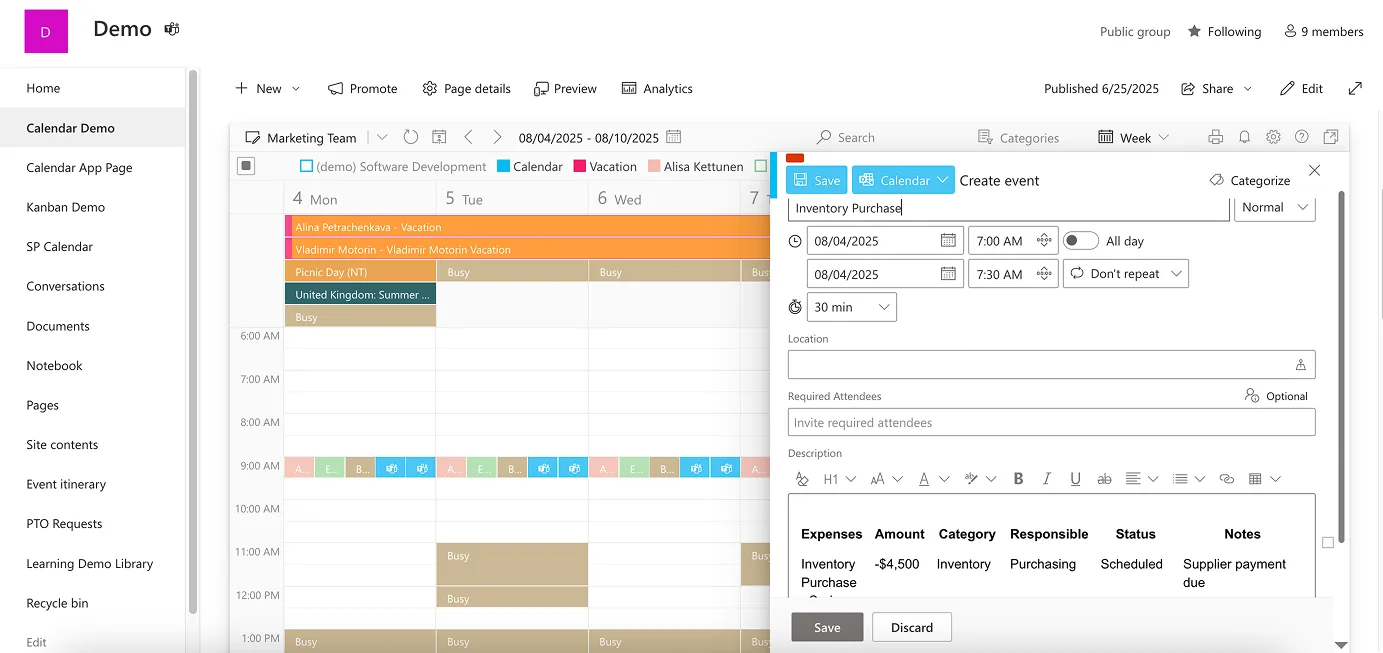
Virto Calendar App provides enterprise-level budget planning within Microsoft 365 and SharePoint environments. The solution creates a centralized scheduling hub that simplifies planning and coordination across projects, departments, and financial obligations.
The app excels at merging multiple calendar sources into unified views, pulling data from SharePoint lists, Outlook calendars, Microsoft Planner, Google Calendar, iCal feeds, and Apple Calendars. This comprehensive integration means your budget events appear alongside operational schedules, project milestones, and team commitments, providing complete visibility into organizational activities.
Key features for budget planning include:
Diverse calendar views and time perspectives. Choose from day, week, month, year, task, and multi-source views depending on your financial planning needs. Monthly views work well for routine budget oversight, while weekly perspectives help coordinate project-specific expenses and daily approvals.
Color-coded categorization systems. Organize budget events by expense type, department, project, or approval status using intuitive color coding. Teams can quickly assess financial priorities and upcoming obligations without diving into detailed spreadsheets.
Enterprise-grade security and access control. The platform maintains Microsoft 365-level security standards, making it suitable for sensitive financial information across any industry. Granular permissions ensure that different team members see appropriate levels of detail.
Project and departmental coordination. Display budget events like equipment purchases, contractor payments, and project expenses in calendar format, distributed among responsible team members. Marketing departments can track campaign payment schedules, purchasing teams can coordinate supplier commitments, and finance departments can manage tax periods and regulatory requirements.
Integration with Microsoft ecosystem. Native connections to Teams, SharePoint, and Outlook mean budget calendars work within existing workflows rather than requiring separate systems. Financial planning connects directly to operational planning, improving accuracy and adoption.
The enterprise solution supports organizations with complex budget coordination needs, multiple departments, and requirements for comprehensive calendar integration. Pricing starts at $2 per user monthly for up to 30 users, with enterprise plans available for larger organizations requiring advanced features and dedicated support.
Budget calendar planner for small teams: Virto Shared Calendar App

Virto Shared Calendar App offers a streamlined approach to collaborative budget planning, focusing on simplicity and universal accessibility rather than complex integrations. This lightweight solution works particularly well for small teams, project groups, and organizations needing straightforward shared financial coordination.
Budget-relevant capabilities include:
Simplified event creation and sharing. Quick setup for payment dates, budget deadlines, and financial milestones with color-coded tags for easy categorization. The intuitive interface requires minimal training, allowing teams to start using the system immediately.
Anonymous access for external collaboration. Share budget timelines with contractors, vendors, and clients without requiring Microsoft accounts. This feature proves valuable for coordinating payment schedules, project budgets, and external financial commitments.
Cross-platform synchronization. Use the calendar natively within Microsoft Teams or access it through standalone web applications. Real-time updates ensure everyone sees current information regardless of how they access the system.
Universal accessibility and cost-effectiveness. The platform costs $15 monthly for teams under 20 users, with unlimited users available for $299 annually. This pricing structure makes it accessible for small businesses and project teams without large software budgets.
Example implementation for marketing agencies: A small marketing team can use Shared Calendar to plan advertising budget expenditures across multiple client campaigns. Payment dates for media buys, contractor fees, and campaign milestones appear on a shared calendar that both internal team members and clients can access. Color coding distinguishes between different clients and expense types, while anonymous sharing allows client input without security complications.
Project budget coordination: Construction teams, consulting firms, and other project-based organizations can coordinate expense timing, payment schedules, and budget milestones. External stakeholders like subcontractors and suppliers can view relevant portions of the budget calendar without accessing sensitive internal information.
Integration advantages within Microsoft 365
Both VirtoSoftware calendar budget planners leverage Microsoft 365’s existing infrastructure, providing several advantages for budget planning:
Unified workflow integration. Budget events appear within Teams channels, SharePoint sites, and Outlook calendars where teams already work. Financial planning becomes part of daily operations rather than a separate activity requiring different tools.
Consistent security and compliance. Organizations maintain their existing Microsoft 365 security policies, user management, and compliance standards without introducing additional risk vectors or administrative overhead.
Existing user familiarity. Teams already comfortable with Microsoft tools can adopt Virto solutions with minimal learning curves, improving implementation success and user adoption rates.
Scalable architecture. Organizations can start with Shared Calendar for simple needs and upgrade to Calendar App as requirements become more complex, maintaining consistency in user experience and data formats.
Choosing between VirtoSoftware budget planning calendars
Select Virto Calendar App when your organization needs comprehensive calendar integration, supports multiple departments with different access requirements, manages complex project portfolios with varied stakeholders, or requires enterprise-level security and support capabilities.
Choose Virto Shared Calendar App for small teams prioritizing simplicity over advanced features, frequent collaboration with external partners or clients, budget-conscious organizations needing cost-effective solutions, or project-based work requiring straightforward shared scheduling.
Both solutions offer 14-day free trials, allowing organizations to test functionality with actual budget data before committing to subscriptions. This trial period helps determine which features provide the most value for specific use cases and organizational structures.
Check Out Related VirtoSoftware Use Cases

Conclusion on Calendar Budget
A solid calendar for budgeting represents far more than simple expense lists or financial tracking spreadsheets. They function as visual planning tools that transform abstract financial goals into concrete, time-bound actions you can see, coordinate, and achieve.
The most effective budget calendar solution depends entirely on your specific context and requirements. Individual users and families often succeed with flexible, customizable platforms like Notion or Google Calendar templates that accommodate personal financial patterns without unnecessary complexity. Small businesses and project teams benefit from collaborative tools like EveryDollar or Calendar.com that support shared responsibility and external coordination. Larger organizations typically require enterprise-grade solutions that integrate with existing business systems while providing sophisticated access controls and reporting capabilities.
For organizations already invested in the Microsoft 365 ecosystem, Virto Calendar App and Virto Shared Calendar App offer particularly compelling advantages. These solutions enable flexible and effective budget planning directly within your existing Teams, SharePoint, and Outlook infrastructure. Rather than managing financial planning through separate systems, you can coordinate budget events alongside operational schedules, project milestones, and team commitments. This integration creates more accurate financial planning while reducing the administrative overhead of maintaining multiple tools.
The best way to understand how budget calendars can improve your financial planning is to experience them with your actual data and workflows. We invite you to schedule a demo call where you can ask specific questions about capabilities, discuss your unique requirements, and see how both the Virto Calendar App and the Virto Shared Calendar App might fit your situation.
Alternatively, you can install free trial versions of either application from the site and test functionality with your current budget information.
For deeper insights into calendar-based financial planning and scheduling solutions, explore these helpful resources on our blog:
Financial planning and compliance:
Team coordination and scheduling:
These resources provide practical examples, implementation strategies, and detailed guidance for specific use cases that can help you design and optimize your budget calendar approach.