Managing people effectively requires mastering two distinct but interconnected processes: staffing and scheduling. While staffing ensures you have the right talent in the right roles, scheduling determines when and how that talent gets deployed. Get either one wrong, and you’ll face operational bottlenecks, frustrated employees, and mounting costs.
The distinction matters more than you might think. Companies that fail to coordinate these processes face turnover rates up to 174% higher due to scheduling errors alone. Meanwhile, replacing a single employee can cost between 50% to 200% of their annual salary, making staffing decisions particularly consequential.
This guide examines what staffing and scheduling are, how they differ and complement each other, their measurable benefits, the tools that support them, and practical strategies for improving both processes.
What are Staffing and Scheduling
Before diving into optimization strategies, you need to understand what each process entails and why both demand equal attention.
What is staffing?: Recruiting and assigning personnel
Staffing encompasses the full lifecycle of building and maintaining your workforce. This means identifying personnel needs, recruiting qualified candidates, assigning employees to appropriate roles, managing career development, and retaining key specialists. The primary goal: ensure your organization has the right talent with the necessary skills over the long term, creating a reliable pool of competent professionals.
Think of staffing as the foundation of workforce management. Without proper staffing, even the most sophisticated scheduling system becomes useless.
Key elements of staffing include:
- Analyzing business personnel needs based on current operations and future growth projections
- Recruiting and hiring qualified candidates who match both skill requirements and cultural fit
- Assigning roles and responsibilities that align with employee capabilities and business objectives
- Staff retention and development through training programs, career paths, and engagement initiatives
- Maintaining a balance of competencies and numbers across departments and skill levels
- Monitoring employee availability and engagement to identify potential retention risks early
- Managing changes in team composition during periods of growth, restructuring, layoffs, or promotions
What is scheduling?: Planning work time
Scheduling focuses on the tactical distribution of work hours, shifts, breaks, and time off. The primary goal: allocate available labor resources to specific tasks and time periods, optimizing workload distribution while meeting operational requirements.
Where staffing answers “who” and “why,” scheduling answers “when” and “how much.” This distinction proves critical when organizations attempt to solve staffing problems with scheduling tools, or vice versa.
Key elements of scheduling include:
- Planning shifts, vacations, and breaks across daily, weekly, or monthly timeframes
- Accounting for employee availability including approved time off, sick leave, and personal constraints
- Monitoring actual versus scheduled time to identify patterns and improve future planning
- Balancing workload between employees to prevent burnout and maintain fairness
- Considering employee preferences alongside production needs and service requirements
- Responding to unexpected changes such as call-outs, emergency coverage needs, or sudden demand shifts
- Visualizing schedules in accessible formats through calendars and workforce management systems
What is the difference between staffing and scheduling?
The fundamental distinction lies in timeframe and scope:
- Staffing operates as a long-term strategic function concerned with building and maintaining your talent pool. It involves months-long recruitment cycles, career development planning, and retention strategies that span years.
- Scheduling functions as a short-term operational process focused on daily and weekly logistics. Decisions typically involve immediate concerns: which nurse covers the night shift tonight, who handles the retail floor during tomorrow’s lunch rush, or how to redistribute tasks when someone calls in sick.
| Dimension | Staffing | Scheduling |
| Primary question | Who and why | When and how much |
| Time horizon | Medium–long term (months/years) | Short term (days/weeks) |
| Main owner | HR/talent & functional leaders | Operations/managers |
| Key inputs | Skills, headcount plan, demand forecast | Availability, demand by hour/day, rules |
| Outputs | Hires, role assignments, development plans | Shifts, breaks, leave, on-call |
| Core KPIs | Fill time, quality of hire, retention | Coverage vs demand, overtime, schedule changes |
| Typical risks | Skill gaps, mis-hiring | Under/overstaffing, burnout, compliance misses |
Another key difference: staffing determines capacity while scheduling determines utilization. You might have adequate staff on paper (capacity), but poor scheduling can leave you understaffed during peak hours and overstaffed during slow periods (utilization).
Consider this practical example: A warehouse hires five new employees (staffing decision) and then assigns them to morning, afternoon, and night shifts based on order volume patterns and employee preferences (scheduling decision). The staffing decision took six weeks from job posting to final offer. The scheduling decision happens weekly and adjusts based on real-time operational data.
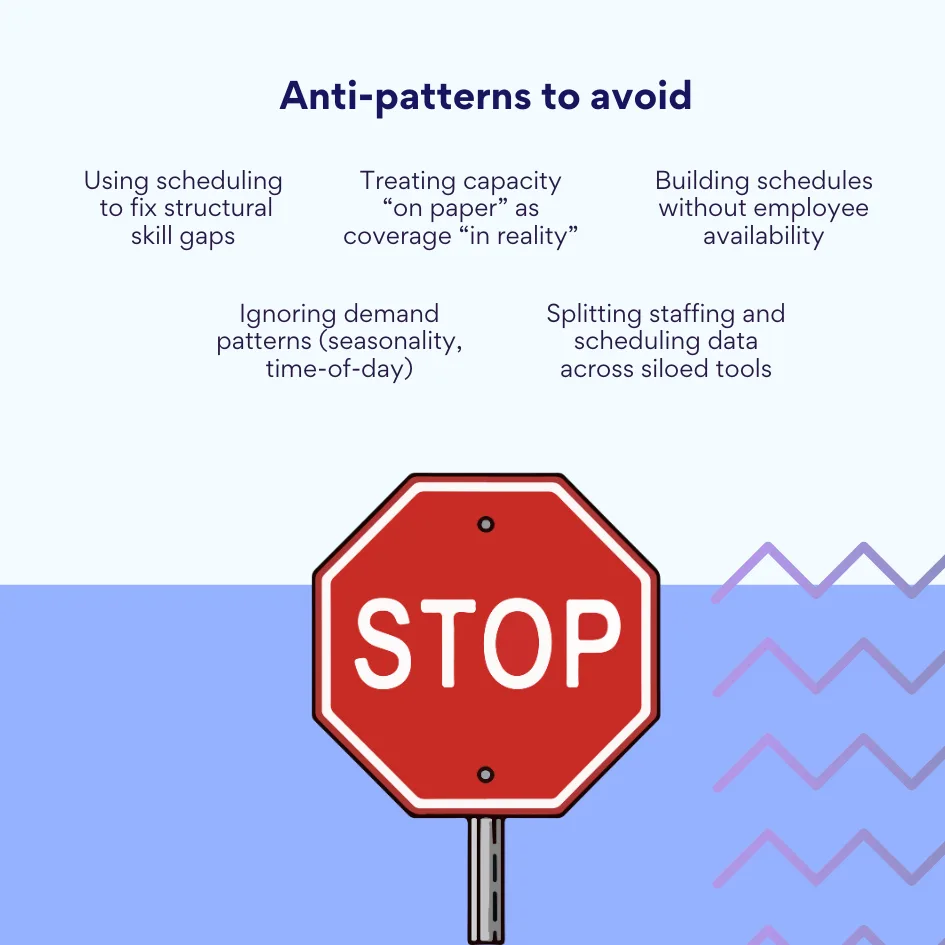
👉 What is staffing scheduling, and is there any difference between just staffing and just scheduling? Staffing scheduling usually refers to the combined process of planning headcount and skills, then turning that capacity into day-to-day rosters. “Staffing” on its own sets who you have and why—hiring, role assignments, and capability over months. “Scheduling” on its own sets when work happens—shifts, breaks, and coverage week to week based on demand and rules.
How Staffing and Scheduling Work Together
Neither process delivers optimal results in isolation. Their relationship determines whether your workforce operates efficiently or struggles with constant friction.
Proper staffing creates the foundation for effective scheduling. When you hire employees with complementary skills and appropriate experience levels, creating balanced schedules becomes straightforward. Conversely, well-designed schedules help retain employees, reduce burnout, and optimize performance, which directly supports your staffing goals by lowering turnover.
Consider these interconnected scenarios:
- Retail example: A store manager completes the staffing process by hiring three experienced cashiers and two stockroom associates. Now scheduling begins: the cashiers receive primary coverage during peak shopping hours (11 AM-7 PM), while stockroom associates work early mornings (6 AM-2 PM) when shipments arrive and foot traffic remains light. The staffing decisions enabled this efficient schedule; the efficient schedule keeps employees satisfied and reduces turnover.
- Healthcare example: A clinic staffs positions with two physicians, three nurses, and one medical assistant. Scheduling distributes this team across morning and afternoon shifts, ensuring proper coverage ratios (one physician with 1.5 nurses per shift). Without accurate scheduling, even perfectly selected staff becomes ineffective. Overworked employees provide substandard care and eventually leave.
- Manufacturing example: A production line requires workers with specific machinery certifications. Staffing ensures adequate numbers of certified employees. Scheduling then assigns these workers across three shifts, balancing certification requirements, seniority, and individual preferences while maintaining production quotas.
| Industry | Staffing decision | Scheduling decision | If misaligned… | If aligned… |
| Retail | Hire cashiers + stock associates | Cover peak shopping; early stock shifts | Long queues; idle back-room time | Faster checkout; fewer call-outs |
| Healthcare | Mix of physicians, nurses, assistants | Ratios by shift; weekends/nights | Overload, safety risks | Consistent care; lower burnout |
| Manufacturing | Certified operators per line | 3-shift coverage; breaks without stoppage | Bottlenecks; downtime | Smooth handoffs; quota met |
The consequences of poor coordination reveal themselves quickly: You hire qualified people but fail to plan their work properly (chaos), or you create perfect schedules but lack the necessary skills on your team (failure). Research from Gallup shows that 62% of U.S. employees don’t have high-quality work schedules, leading to decreased productivity and higher turnover regardless of how well-staffed their organizations are.
Benefits and Importance of Staffing and Scheduling
Understanding these processes matters less than understanding their tangible business impact. Both represent strategic investments that directly affect efficiency, employee loyalty, and customer satisfaction.
Organizations that establish and automate these processes effectively enjoy greater flexibility, sustainability, and operational control. The data supports this conclusion unequivocally.
Staffing: Benefits
Effective staffing forms the cornerstone of human capital strategy. Poor staffing decisions cascade into every aspect of operations, from project delays to customer complaints to knowledge loss.
An effective staffing approach delivers these benefits:
- Ensuring necessary resources to accomplish tasks: Recruiting and assigning employees correctly allows businesses to achieve goals with appropriate workforce quantity and quality. Projects launch on schedule, service levels meet expectations, and growth initiatives receive adequate support.
- Increased team resilience: Balanced teams with the right specialist mix cope with peak workloads and adapt quickly to market changes. When demand spikes, strong teams scale up without breaking. When circumstances shift, diverse skill sets enable pivoting without massive rehiring.
- Reduced turnover: When employees feel their skills match their assignments and see development opportunities, they stay longer. Turnover costs U.S. businesses $1.8 trillion annually in lost productivity, making retention a financial imperative rather than merely an HR metric.
- Quick adaptation to business changes: Well-designed staffing processes enable rapid response to market shifts. Companies can scale teams during growth phases or effectively redistribute personnel during contractions without destroying institutional knowledge or team cohesion.
Scheduling: Benefits
The scheduling process determines whether your staffing investments pay off or get squandered through inefficient deployment.
Key benefits of effective scheduling include:
- Improved operational efficiency: Proper schedules ensure even workload distribution and optimize resource utilization. Coverage remains adequate during busy periods without expensive overstaffing during slower times.
- Reduced overtime and burnout: Automated time management and workload balance controls help avoid chronic overtime and associated problems. Businesses lose ~150–260 hours per manager each year on manual scheduling and related time management and experience significantly higher turnover from scheduling errors.
- Timely completion of shifts and tasks: Reliable schedules ensure uninterrupted operations. Every employee knows their working hours and responsibilities, eliminating confusion and reducing no-shows.
- Improved employee satisfaction through transparency: Clear scheduling and consideration of personal preferences create fairness and trust within teams. Improving scheduling predictability lowers turnover among hourly service workers and white-collar employees alike—and in retail, stable scheduling has been shown to cut labor hours while lifting sales and productivity.
| Cadence | Metric | Definition | Owner | Why it matters |
| Weekly | Coverage vs demand | % of intervals correctly staffed | Ops | Avoids lost sales/overpay |
| Weekly | Overtime rate | OT hours as % of total hours | Ops/Finance | Cost & fatigue signal |
| Monthly | Schedule stability | Changes made <24h before shift | Ops/HR | Predictability/retention |
| Monthly | Voluntary turnover | Exits initiated by employees | HR | Health of staffing decisions |
| Quarterly | Time-to-fill critical roles | Days to hire for key roles | HR | Capability/capacity risk |
Benefits of an integrated approach
The combined use of staffing and scheduling capabilities unlocks advantages neither process can achieve alone.
An integrated approach enables:
- Forming balanced teams based on skills, availability, and schedules: Organizations achieve optimal combinations of expertise, experience, and availability aligned with predetermined work schedules. Nobody gets assigned to tasks outside their capabilities or scheduled when they’re unavailable.
- Minimizing conflicts and scheduling issues: Timely shift assignments based on roles and competencies prevent both staff shortages and redundant coverage. Systems automatically flag potential problems before they impact operations.
- Ensuring balanced workloads and preventing bottlenecks: Automated optimization of task and time allocation reduces the risk of overloading individual employees. Work distributes evenly rather than concentrating on a few team members.
- Improving payroll accuracy and operational efficiency: Accurate time planning, shift tracking, overtime monitoring, and vacation accounting minimize calculation errors. Finance departments spend less time correcting payroll mistakes.
- Making informed decisions based on data: Staffing and scheduling systems collect statistics supporting management decisions, from hiring forecasts to vacation policy modifications. Companies using data-driven approaches can demonstrate clear ROI from their workforce management investments.

Why are staffing and scheduling important for business?
These processes directly determine productivity, employee satisfaction, and customer service quality. Organizations that neglect either one face predictable consequences.
Automation proves especially critical for modern hybrid teams working across locations and time zones. Manual scheduling that worked for 20 co-located employees fails spectacularly when managing 100 distributed workers.
| Failure mode | What it looks like | Business impact | Fast mitigation |
| Missed breaks/OT errors | Manual edits, retro pay | Fines, back wages | Automate rules, audit weekly |
| Peak-hour understaffing | Long waits, lost sales | Lower CSAT/revenue | Demand-based templates |
| Unpredictable shifts | Short notice changes | Turnover, no-shows | Preference capture; swap flows |
| Siloed systems | HR ≠ WFM ≠ Payroll | Rework, disputes | Integrate time/payroll feeds |
| Skill mismatch | Wrong people on tasks | Quality drops | Skills matrix in staffing plan |
The negative consequences of ineffective staffing and scheduling include:
- Regulatory violations and fines from improper break scheduling or overtime miscalculations
- Turnover averaging 13.5% according to recent surveys, with retail and wholesale hitting 24.9%
- Reduced service quality when understaffing meets customer demand spikes
- Reputational damage visible in online reviews mentioning wait times or service inconsistency
- Replacement costs reaching up to 213% of annual salary for executive positions
Popular Tools for Staffing and Scheduling
This section gives you a practical survey of widely-used scheduling and staffing software. For each tool you’ll get a plain-English description, key features, benefits, drawbacks, best-fit use cases, and—where vendors publish them—current list prices. We finish with a simple comparison table you can scan at a glance.
Scheduling tools
Before we dive into individual products, here’s what this category covers and why it matters. Scheduling tools help managers build and adjust rotas, track availability and leave, handle shift swaps, and notify staff when plans change. Some focus on shift-based operations in retail, hospitality, and manufacturing; others centre on shared calendars for meeting-heavy teams; a few add AI forecasting, overtime controls, and compliance rules. When you’re shortlisting, weigh five things: how fast it is to create and edit schedules, how well it captures availability and time off, the quality of mobile apps and notifications, integrations with payroll/HR and calendars, and the pricing model (per user vs per location). The tools below span lightweight options for a single shop to enterprise-grade platforms for multi-site operations—so you can pick the level of automation and control you actually need.
| Work pattern | Team size/complexity | Compliance load | Best-fit category | Example tools in your list |
| Shift-based, 1–2 sites | Small/medium | Low–moderate | Lightweight scheduler | Homebase, When I Work |
| Shift-based, multi-site | Large | High (breaks/OT/union) | Enterprise WFM | UKG, Dayforce, Shiftboard, Quinyx |
| Meeting-heavy/hybrid | Any | Low | Shared calendars | Outlook, Google Calendar |
| Microsoft 365-centric | Any | Moderate | Calendar overlay in Teams | Virto Calendar App |
| Project/billable hours | Small/medium | Low | Time tracking + calendar | Timely (with Outlook/Google) |
Deputy (shift scheduling & time tracking)
A workforce management platform for hourly teams. Core strengths are shift scheduling, time clocks, leave/availability, and compliance.
- Key features: Drag-and-drop schedules, templates, time & attendance with mobile clock-in, break compliance, leave/availability, POS/payroll integrations; UK pricing and add-ons visible publicly.
- Benefits: Quick schedule building; strong compliance controls for multi-site retail/hospitality; broad integration ecosystem.
- Cons: Advanced HR features are add-ons; enterprise reporting often requires configuration. (Vendor-acknowledged modular pricing.)
- Best for: Multi-location retail, restaurants, hospitality and light manufacturing with hourly staff.
- Pricing (published): Typically ~$4.50–$6.50 per user/month (quote-based). Pricing varies.
When I Work (shift scheduling + time clock)
Popular shift scheduling and attendance app for single or multi-location teams.
- Key features: Fast schedule builder, mobile time clock, time-off/availability, shift swaps, team messaging, payroll integrations (e.g., Rippling).
- Benefits: Very low entry price; clean UI; easy to roll out for frontline teams.
- Cons: Advanced features (rules/automation/attendance) sit on higher tiers; larger orgs may outgrow analytics.
- Best for: Small to midsize shift-based businesses—retail, cafes, quick-service restaurants, clinics—especially with one to a few locations.
- Pricing (published): $2.50/user/month (Essentials), $5.00 (Pro), $8.00 (Premium). 14-day trial.
Homebase (scheduling for SMBs, plus HR/payroll add-ons)
All-in-one app aimed at small businesses with hourly teams; generous free tier for tiny teams.
- Key features: Scheduling, time clock, messaging; PTO, departments/permissions on higher tiers; optional payroll add-on.
- Benefits: Free plan for one location (up to 10 employees) lowers barrier to entry; flat per-location pricing on paid tiers favours large part-time staffs.
- Cons: Payroll is a separate add-on; advanced features require Plus/All-in-One.
- Best for: Single-location shops, cafes, salons, local services; owners who want one app for scheduling, messaging and basic HR.
- Pricing (published): Basic $0 (1 location, up to 10 employees), Essentials $30/location/mo, Plus $70/location/mo, All-in-One $120/location/mo; Payroll $39 base + $6/employee/mo.
UKG (formerly Kronos) — forecasting & scheduling
Enterprise-grade workforce management (WFM) used across retail, manufacturing, logistics and more. Kronos merged with Ultimate Software to form UKG.
- Key features: Forecasting & scheduling, time/attendance, labour compliance, multi-site capacity planning; AI-assisted forecasting/scheduling in current UKG suites.
- Benefits: Scales to complex, unionised or highly regulated environments; deep compliance and optimisation.
- Cons: Requires implementation; pricing is not public; overkill for small teams.
- Best for: Enterprises with thousands of hourly workers; industries with volatile demand and strict rules.
- Pricing: ~$27–$37 per employee/month (UKG Pro, quote-based)
Ceridian Dayforce (WFM + payroll)
Dayforce (now branded Dayforce under Ceridian) combines scheduling, time, pay and compliance in a single data model.
- Key features: Demand-driven scheduling, time/attendance, compliance tools, payroll and HR on the same platform.
- Benefits: Single system reduces reconciliation between time and pay; strong compliance framework.
- Cons: Enterprise product with implementation needs; public pricing unavailable.
- Best for: Mid-market to enterprise organisations seeking unified time-to-pay.
- Pricing: Roughly $20–$45 per employee/month (quote-based)
Quinyx (AI workforce management)
Cloud WFM with a strong focus on AI-driven forecasting and auto-scheduling for frontline workforces.
- Key features: AI forecasting, auto-scheduling, labour optimisation, engagement tools; mobile apps for swaps and availability; pricing by sales contact.
- Benefits: Cuts rota build time; improves match of staffing to demand.
- Cons: Pricing not public; best value at scale.
- Best for: Retail, logistics, contact centres needing AI-grade demand forecasting.
- Pricing: quote-based; many deals land around ~$5–$8 per employee/month
Microsoft Outlook calendar (Microsoft 365)
The default calendar in Microsoft 365 with solid sharing and overlay options, widely used by hybrid/remote teams.
- Key features: Multi-calendar overlay, sharing/delegation, organisation-wide sharing policies, Outlook/Teams integration.
- Benefits: No extra cost in Microsoft 365; everyone already has it; works well with Teams.
- Cons: Not a shift scheduler; lacks WFM rules/automation.
- Best for: Knowledge-worker teams, meeting-heavy roles, hybrid setups.
- Pricing: included with Microsoft 365 (e.g., Business Basic $6/user/month; Business Standard $12.50/user/month)
Google calendar (Google Workspace)
Google’s calendar app with appointment scheduling and recent Gemini-powered “Help me schedule” assist.
- Key features: Appointment booking pages, working locations/hours, availability across multiple calendars, Gmail insert for booking links.
- Benefits: Excellent for external bookings; smooth Gmail/Meet integration; strong for distributed teams.
- Cons: Not a shift scheduler; advanced scheduling features tied to Business/Enterprise plans.
- Pricing: included with Google Workspace (Business Starter $6, Standard $12, Plus $18 per user/month)
Virto Calendar App for Microsoft Teams (calendar overlay)
A Microsoft-certified app that overlays unlimited calendars (SharePoint, Outlook/Exchange, room calendars, iCal sources like Google/Apple) into one colour-coded view inside Teams; handy for shifts, PTO, projects and travel.
- Key features: Calendar overlay within Teams/SharePoint, shared calendars, permissions, external iCal, multiple views; AppSource listing and Teams-native UX.
- Benefits: Centralises schedules (availability, leave, milestones) where Teams users already work; reduces tab-hopping.
- Cons: Separate licensing from Microsoft 365; best for Microsoft-centric organisations.
- Best for: Microsoft 365 tenants needing shared visibility across teams, rooms and external calendars.
- Pricing: $2,412 per 100 users; quote-based
Shiftboard (advanced rostering for complex operations)
Scheduling/rostering built for high-volume, rules-heavy environments (manufacturing, logistics, public sector).
- Key features: Demand-based scheduling, compliance rules, candidate finder to recommend qualified staff, mobile app, time & attendance.
- Benefits: Optimises complex shift patterns and eligibility rules; boosts coverage and reduces overtime.
- Cons: UI focuses on function over flash; may be more than SMBs need.
- Best for: Large plants, union environments, corrections/healthcare, field operations.
- Pricing: plan tiers commonly seen at $45 / $120 / $276 per month (team-size caps).
ZoomShift (simple, budget-friendly scheduling)
Lightweight scheduler and time clock for hourly teams, with labour forecasting and conflict alerts.
- Key features: Schedule templates, availability/time-off, overtime conflict alerts, mobile apps, free Essentials tier.
- Benefits: Easy to learn; inexpensive for small teams; helpful alerts.
- Cons: Fewer enterprise features and integrations than bigger suites.
- Best for: Small businesses and franchises that want a basic scheduler with time clock.
- Pricing: free (up to 20 users) then from $2.50 per active team member/month
Timely by Memory (automatic time tracking for knowledge work)
An AI-powered automatic time-tracking tool—great alongside calendar scheduling for agencies/consultancies that bill time.
- Key features: Background “Memory” capture, AI timesheets, project dashboards, capacity planning; integrations with Google Calendar, Outlook, Teams, QuickBooks and more.
- Benefits: Accurate time data with minimal user effort; strong privacy controls; useful for utilisation/capacity.
- Cons: Not a shift scheduler; planning features unlock on higher tiers.
- Pricing: Starter from $9–11/user/mo, Premium ~ $20, Unlimited ~ $22 when billed annually; tiers and caps shown on Timely’s pricing page.
Staffing software
These tools streamline recruiting and HR operations, and many integrate with calendars/time tracking so interviews, onboarding, and shifts flow into one view.
Greenhouse (ATS)
A leading applicant tracking system with structured hiring and new AI-assisted features.
- Automates: Job postings, candidate pipelines, interview kits/scorecards, scheduling via calendar integrations, offers.
- Benefits: Best-practice workflows; rich marketplace of integrations.
- Cons: Pricing isn’t public; total cost scales with size/modules.
- Pricing: Quote-based; third-party estimates often cite mid-four to low-five figures annually for SMEs.
Lever (ATS + CRM)
ATS with built-in candidate relationship management; strong automation and analytics. Lever
Automates: Sourcing, email sequences, pipeline stages, interview coordination, offer approvals; integrates calendars. Lever
Benefits: Unified ATS+CRM; modern UI.
Cons: Pricing is sales-led; can be pricier vs. some SMB-focused ATS. Lever+1
Pricing: Quote-based. Lever
Workable (ATS with transparent SMB pricing)
Full-featured ATS with job advertising, assessments, video and e-signature options.
- Automates: Job board syndication, candidate screening, calendar invites, interview kits, offers.
- Benefits: Clear published pricing; unlimited active jobs on Standard.
- Cons: Cost rises with headcount; some premium tools are add-ons.
- Pricing (published): From $299/month (Standard) and $599/month (Premier) for 1–20 employees; scales by employee band.
BambooHR (HRIS with recruiting add-ons)
HR platform with core HR, time-off, performance, and optional ATS/time tracking.
- Automates: Onboarding packets, e-signatures, PTO, basic applicant tracking (add-on).
- Benefits: Easy for HR teams; broad HR suite.
- Cons: Many modules are add-ons; public pricing limited.
- Pricing: ≤25 employees: flat from $250/month; >25 employees: ~$10–$22 per employee/month (quote-based)
Zoho People (HRIS) + Zoho Recruit (ATS)
Affordable cloud HR for employee records, leave/attendance/shifts and performance (People) plus a modular ATS (Recruit).
- Automates: Onboarding, time-off, shift scheduling, approvals; in Recruit—job posting, candidate pipelines, interview scheduling; integrates across Zoho apps.
- Benefits: Low cost; strong for SMBs and Microsoft/Google-agnostic stacks.
- Cons: Some advanced features are on higher tiers; pricing varies by region/edition.
- Pricing: Zoho People (HRIS) from $1.50 per user/month (annual billing); Zoho Recruit (ATS)—$25–$75 per user/month (tiered).
HiBob (bob) HRIS
Modern HRIS with performance, compensation, and engagement tools—popular with high-growth firms.
- Automates: Onboarding, time-off, workflows, reviews; integrates with payroll/IT.
- Benefits: Strong UX for hybrid teams.
- Cons: Pricing only by quote.
- Pricing: Quote-based.
Rippling (modular HR, IT & finance in one)
A unified workforce platform—HRIS, payroll, benefits, time tracking, device/app management, recruiting—under one roof.
- Automates: Hiring (provisioning accounts/devices on day one), onboarding workflows, time tracking, scheduling (module), payroll; deep integrations.
- Benefits: Single source of truth across HR and IT; powerful automation.
- Cons: Pricing by module; base looks low but total depends on the modules you add.
- Pricing (published/press): Starts “as low as $8 per user/month” (base), with independent reviews confirming entry price; modules add cost.
Anaplan (workforce planning)
Enterprise connected-planning, including workforce demand/capacity and budgeting scenarios.
- Automates: Driver-based forecasts, what-ifs, headcount & cost modelling; integrates with HRIS/finance.
- Benefits: Powerful modelling at scale; cross-functional planning.
- Cons: Implementation/enablement required; pricing not public.
- Pricing: Quote-based.
Workday Adaptive Planning (formerly Adaptive Insights)
What it is: Workday’s planning product for finance and workforce planning; integrates tightly if you also use Workday HCM.
Automates: Headcount plans, capacity & cost modelling, scenario analysis.
Benefits: Strong planning workflows, especially in Workday stacks.
Cons: Pricing not public; enterprise implementation.
Pricing: Quote-based.
📌 Why calendar/time-tracking integrations matter: Interview slots, training, onboarding sessions and first-shift assignments are inherently time-based. Tools like Greenhouse/Lever/Workable push interviews straight into Outlook/Google, and HRIS/WFM suites sync leave and shifts to shared calendars—so managers and employees see one coherent picture (availability, vacations, travel) instead of juggling tabs.
Combined platforms (staffing + scheduling)
Some suites blend recruiting, HR and workforce management—useful if you prefer one vendor.
- Workday — A broad HCM platform spanning recruiting, onboarding, talent, time and planning (Adaptive). Strong if you want one cloud for HR + planning.
- ADP Workforce Now — Unified HR/payroll with recruiting, time, scheduling and benefits in a single SMB/upper-midmarket suite.
- Zoho People + Zoho Recruit — Modular stack for SMBs: HRIS and ATS that plug into each other (and the wider Zoho suite).
- Rippling — Automates hiring, onboarding, scheduling/time tracking, payroll, device/app provisioning in one ecosystem. Great for HR+IT unification.
Comparison table (scheduling & staffing tools)
Below is a quick, side-by-side snapshot of every tool we covered. Scan the stand-out features to see what each product does best, match the “best use cases” to your team, then eyeball the U.S. pricing to gauge fit. “Quote-based” means you’ll need to speak to sales; totals can shift with headcount, modules, and contract length. If you’re comparing apples to apples, note whether pricing is per user or per location.
| Tool | Stand-out features | Best use cases | Pricing (USD) |
| When I Work | Auto-scheduling, multi-location, payroll/POS integrations | Shift-based teams in retail, restaurants, hospitality | Essentials $2.50, Pro $5, Premium $8 per user/month. |
| Homebase | Free plan, AI scheduling, time clock, payroll add-on | Single-location SMBs; growing multi-location teams | Free (1 location, up to 10 staff); Essentials $30/location/mo; Plus $70; All-in-One $120; Payroll +$39 base + $6/employee/mo. |
| Deputy | Demand forecasting, auto-scheduling, labor compliance | Shift work at scale; healthcare, retail, QSR | From about $4.50 per user/month (region varies); min monthly spend $25 applies to some plans. |
| UKG (Kronos) Ready / Pro | End-to-end WFM: time, scheduling, payroll, HR | Mid-market to enterprise with complex labor rules | Quote-based; typical estimate ~$27–$37 PEPM. |
| Ceridian Dayforce | Unified HR + payroll + time + scheduling | Compliance-heavy, multi-state payroll | Quote-based; estimates vary (~$6–$30 PEPM) + possible setup fees. |
| Quinyx | AI scheduling, labor forecasting, compliance | High-volume hourly work (retail, logistics) | Quote-based; many buyers see ~$5–$8 PEPM. |
| Microsoft Outlook Calendar (Microsoft 365) | Team calendars, shared availability, OOO/leave | Microsoft 365 shops; hybrid/remote teams | Included with Microsoft 365: Business Basic from $7.20 user/month (monthly billing). |
| Google Calendar (Google Workspace) | Simple shared calendars, Rooms/Resources | Google Workspace teams; distributed work | Included with Workspace: Business Starter $7 user/month (annual); $8.40 monthly. |
| Virto Calendar App for Microsoft Teams | Overlay M365/SharePoint/Outlook/Planner in Teams | Microsoft 365 orgs needing consolidated views | Calendar App: $2,412-$3,599 per 100 users (3-year agreement). (Virto Shared Calendar from $49-$399/year.) |
| Shiftboard (SchedulePro/ScheduleFlex) | Advanced rule-based scheduling, compliance | Manufacturing, energy, 24/7 operations | Quote-based (contact sales for pricing). |
| ZoomShift | Free tier, auto-scheduling, geofenced time clock | Cost-conscious shift teams (retail, services) | Essentials $0 (to 20 users), Starter $2.50, Premium $5 per active member/month. |
| Timely by Memory | Automatic time tracking, AI timesheets | Agencies/consultancies; project billing | Monthly: Starter $11, Premium $20, Unlimited $28 per user/month (annual: $9/$16/$22). |
| Greenhouse (ATS) | Structured hiring, robust analytics, integrations | Mid-market/enterprise recruiting teams | Quote-based; third-party reports often ~$6k–$70k/year depending on size & plan. |
| Lever (ATS + CRM) | Unified ATS/CRM, candidate self-scheduling, automation | Growth-stage orgs scaling hiring | Quote-based (request a custom quote). |
| Workable | Job posting, templates, assessments, video interviews | SMBs to mid-market hiring | Lite (as-needed) $299/mo; Corporate $599/mo (both “up to 20 employees” plans shown on site). |
| BambooHR | Core HR, PTO, onboarding; payroll add-on | SMBs wanting simple HR suite | Starts at $10 per employee/month (contact for exact quote). |
| Zoho People | Affordable HR suite; PTO/attendance; deep Zoho ties | Price-sensitive SMBs; Zoho ecosystem users | From $1.50 user/month (annual) for Essential HR; higher tiers available. |
| HiBob (bob) | Modern HRIS; engagement & performance modules | Global SMB–mid-market with rapid growth | Quote-based; common range ~$16–$25 PEPM + implementation. |
| Rippling | HR + IT + finance in one; modular add-ons | Fast-growing companies; remote/hybrid work | Starts “as low as $8” per user/month (vendor); many buyers see ~$21–$29 PEPM for core HR. |
| Anaplan | Enterprise planning & modeling across functions | FP&A, workforce planning at large enterprises | Quote-based; entry-level often ~$30k–$50k/year (varies widely). |
| Workday Adaptive Planning | Driver-based planning, workforce/financial models | Mid-market/enterprise FP&A + HR planning | Quote-based; many sources cite ~$25k/year+ minimum. |
| Workday (HCM) | Full HCM suite: HR, talent, payroll, WFM | Enterprise HR transformation | Quote-based (contact Workday). |
| ADP Workforce Now | Unified payroll, HR, time, benefits | U.S. mid-market with payroll complexity | Quote-based; typical ~$23–$30 PEPM (varies by modules & size). |
| Zoho Recruit | Job postings, candidate tracking, automation | SMB recruiting; integrates with Zoho People | Often listed at $25 / $50 / $75 per user/month (per third-party). |
Choosing quickly: a few rules of thumb
Use this as a fast filter before you demo anything. Match your work pattern (shifts vs meetings), team size, and compliance needs to the closest bucket below, then sanity-check pricing and integrations with your existing payroll, HR, and calendars. It won’t pick a vendor for you—but it will narrow the field in minutes.
- Retail/food with one or two locations: Start with Homebase (free/low cost), or When I Work if you prefer per-user pricing.
- Multi-site retail or plants with complex rules: Shortlist UKG, Dayforce, Shiftboard, or Quinyx for compliance and forecasting depth.
- Microsoft 365 shops needing shared visibility (shifts/PTO/travel): Keep Outlook calendar and add Virto calendar for Teams to overlay everything in one tab.
- Recruiting-led stacks: Workable for transparent SMB pricing; Greenhouse or Lever when you need mature workflows and CRM at scale.
- One vendor for HR + scheduling + IT: Rippling is worth a demo for unified automation across HR and IT.
Integration note
Whichever route you take, insist on (a) calendar integrations (Outlook/Google) so interviews, training and PTO land in shared calendars, and (b) time tracking feeds so payroll and job costing are accurate. Most tools above provide these out of the box or via marketplaces.
Best Practices in Staffing and Scheduling
Knowing what these processes are and which tools support them represents only the starting point. Implementation quality determines actual results.
How to improve staffing
Strategic staffing requires moving beyond reactive hiring toward proactive talent pipeline management.
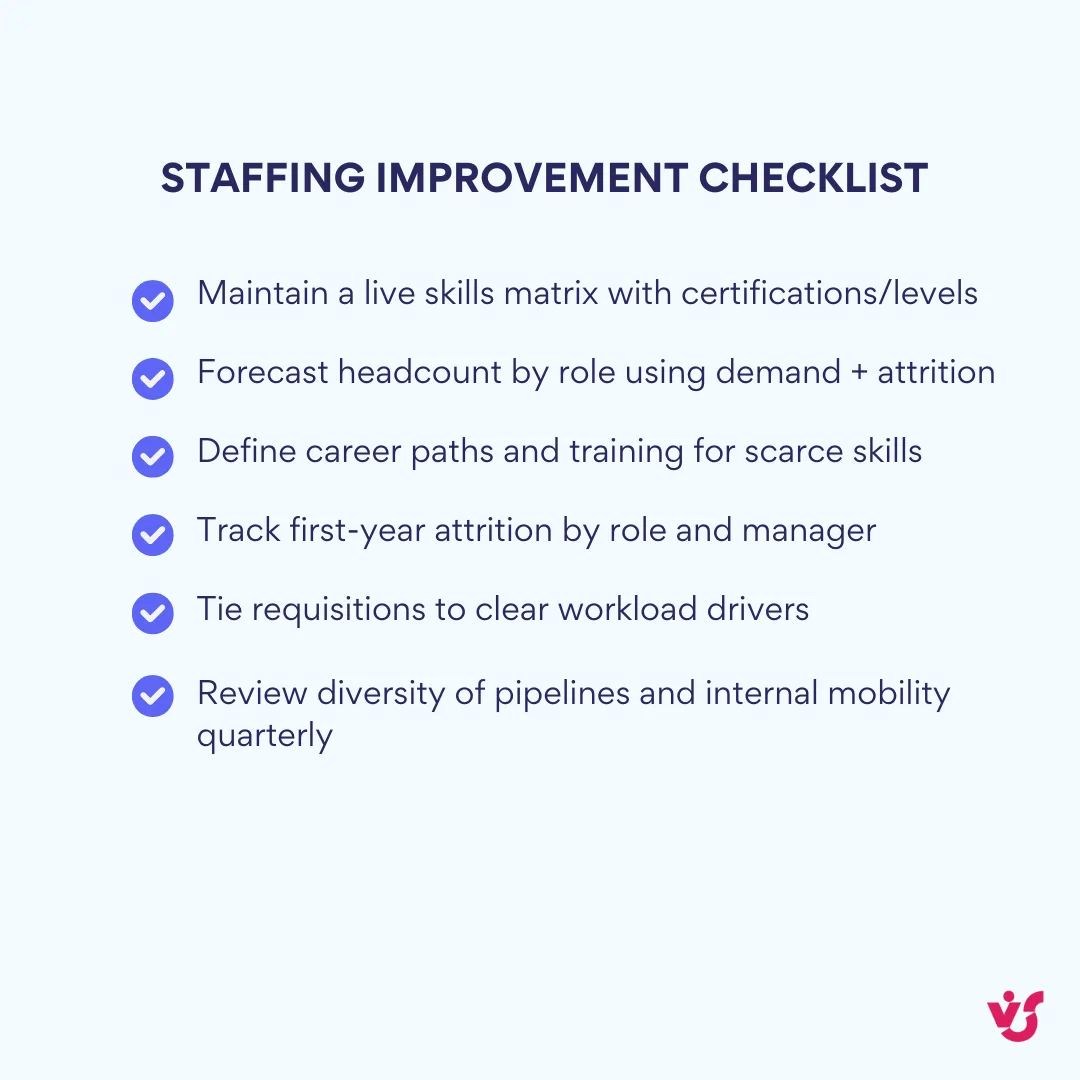
- Use historical and forecast data: Rely on analytics covering peak seasons, staff turnover patterns, and project workload trends. This data helps anticipate where and when resources will be needed, enabling advance recruitment rather than emergency hiring.
- Implement skills-based staffing: Assign employees based on specific competencies, not merely their availability. This improves both productivity and motivation, as people perform better when working within their strengths. Track certifications, specializations, and proficiency levels systematically.
- Deploy digital recruitment and management tools: Staffing software automates assignment workflows, analyzes skills inventories, and tracks turnover and engagement metrics. The efficiency gains compound over time as your data becomes more comprehensive.
- Collect feedback from managers and employees: Regular surveys and structured discussions identify workload imbalances, staffing gaps, and dissatisfaction with task distribution. This qualitative data catches problems that quantitative metrics miss.
How to improve scheduling
Scheduling optimization requires balancing multiple competing priorities: business needs, employee preferences, regulatory compliance, and cost control.
- Consider individual employee availability and preferences: This increases satisfaction and reduces scheduling conflicts, particularly important in hybrid and shift workflows. When employees have input into their schedules, they demonstrate higher engagement and lower absenteeism.
- Use templates and automation for routine tasks: Set up automatic shift creation, alerts, reminders, and substitution workflows. This saves time and reduces error likelihood, freeing managers to focus on exceptions rather than routine scheduling.
- Focus on real demand data and seasonality: Forecast workload based on customer demand, order volumes, time of year, and other capacity-affecting factors. Historical data reveals patterns that manual planning overlooks.
- Balance workload between employees: Avoid overworking some while underutilizing others. This reduces burnout and improves team engagement. Track hours worked, task complexity, and stress indicators across team members.
- Maintain schedule transparency: Real-time schedule access with commenting capabilities, shift request options, and visible substitutions builds trust and flexibility. Employees who understand scheduling logic feel treated more fairly.
- Integrate schedules with calendars and messaging apps: Connecting to Outlook, Teams, or Slack automates notifications and simplifies scheduling communication. Employees receive updates where they already work rather than needing to check separate systems.

👉 How to improve staffing and scheduling? Improve staffing by using historical data and forecasts to anticipate demand, adopting skills-based assignment so people work where they’re strongest, automating recruiting workflows, and closing gaps with regular manager and employee feedback. For scheduling, plan around individual availability and preferences, automate routine patterns with templates, and shape rosters from real demand and seasonality while keeping schedules transparent with real-time access and clear communications. The biggest gains come when both run on a unified platform that links workforce planning to time allocation so hiring, assignments, and shifts stay in sync.
General recommendations for both processes
Several principles apply equally to staffing and schedule optimization.
- Combine staffing and scheduling in a unified approach: Using a single platform for task assignment and scheduling helps align workforce and time management, providing holistic visibility. Separate systems create integration headaches and data inconsistencies.
- Implement transparent communication: Explain to employees how schedules form and why changes occur. This builds trust and reduces resistance. Mystery breeds resentment; clarity builds buy-in.
- Conduct regular audits and adaptations: Periodically review staffing and scheduling approaches, adapting them to business changes and employee feedback. What worked last year might not work this year.
- Deploy digital tools and analytics: Modern solutions help visualize workloads, identify bottlenecks, and build more accurate forecasts. The investment pays for itself through efficiency gains and reduced errors.
Staffing and scheduling use cases
Different industries face unique workforce management challenges, but the underlying principles of effective staffing and scheduling remain consistent.
- Retail
Staffing: Recruiting personnel based on seasonal peaks (holiday shopping, back-to-school, summer sales), and assigning staff to specific store locations based on expected foot traffic and sales targets.
Scheduling: Creating shift schedules for salespeople, cashiers, and warehouse workers that match customer shopping patterns. Automating substitutions and notifications when employees call out or swap shifts.
Benefits: Minimizing staff shortages during rushes, reducing unnecessary overtime costs, improving customer service response times through adequate coverage.
- Manufacturing
Staffing: Ensuring required numbers of workers and technicians for production lines based on shift patterns and skill level requirements. Maintaining adequate coverage for specialized roles like quality control and machine maintenance.
Scheduling: Hourly shift planning that monitors both equipment utilization and employee workload. Coordinating breaks to maintain continuous line operation without exceeding regulatory limits.
Benefits: Continuous process management without production stoppages, reduced equipment downtime, optimized resource utilization through precise shift handoffs.
- Healthcare
Staffing: Recruiting doctors, nurses, and support medical personnel with required qualifications and specializations. Managing certification renewals and continuing education requirements.
Scheduling: Flexible shift assignments including night shifts, weekend coverage, vacation accounting, and emergency substitutions. Maintaining proper nurse-to-patient ratios across all shifts.
Benefits: Maintaining high service levels and patient safety, reducing burnout in high-stress roles, monitoring compliance with healthcare working time regulations. Replacing a single nurse costs upwards of $52,000, making retention through proper scheduling financially critical.
- IT companies and digital teams
Staffing: Forming cross-functional teams organized by specialty areas (development, QA, DevOps, analytics). Balancing senior and junior engineers for knowledge transfer.
Scheduling: Coordinating work for hybrid and remote employees across multiple time zones. Planning sprint schedules, on-call rotations, and project deadlines that respect work-life boundaries.
Benefits: Team synchronicity despite geographic distribution, availability transparency that prevents communication bottlenecks, reduced scheduling conflicts through automated coordination tools.
How Virto Helps Organize Schedules and Notifications
Organizations already operating within the Microsoft 365 ecosystem can extend their existing infrastructure with purpose-built scheduling and notification tools.
Virto Calendar App: Visual scheduling and schedule management
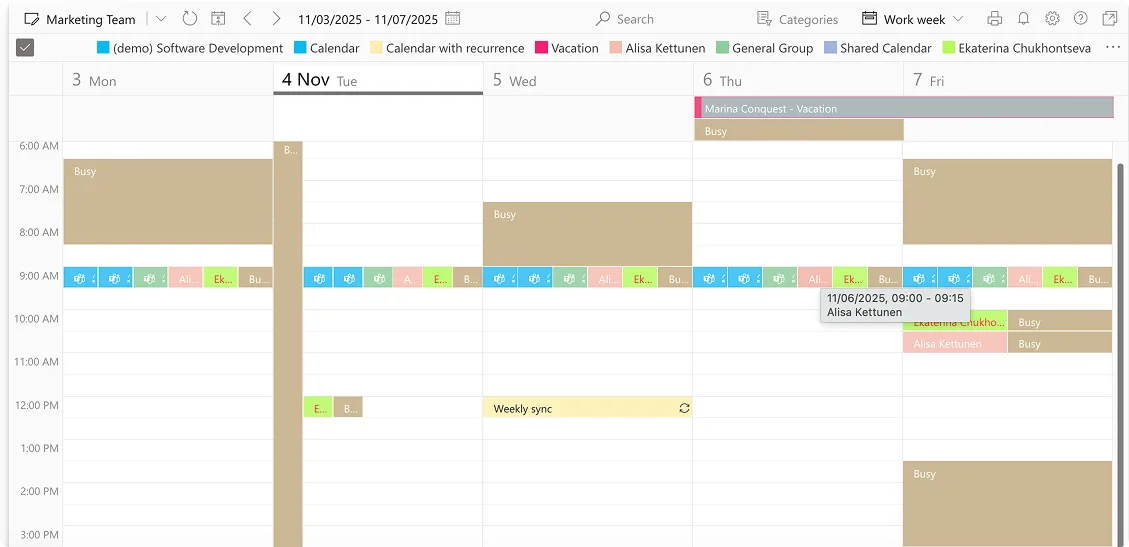
The Virto Calendar App functions as a multifunctional scheduling tool designed specifically for Microsoft environments, providing capabilities that native Microsoft calendars don’t offer.
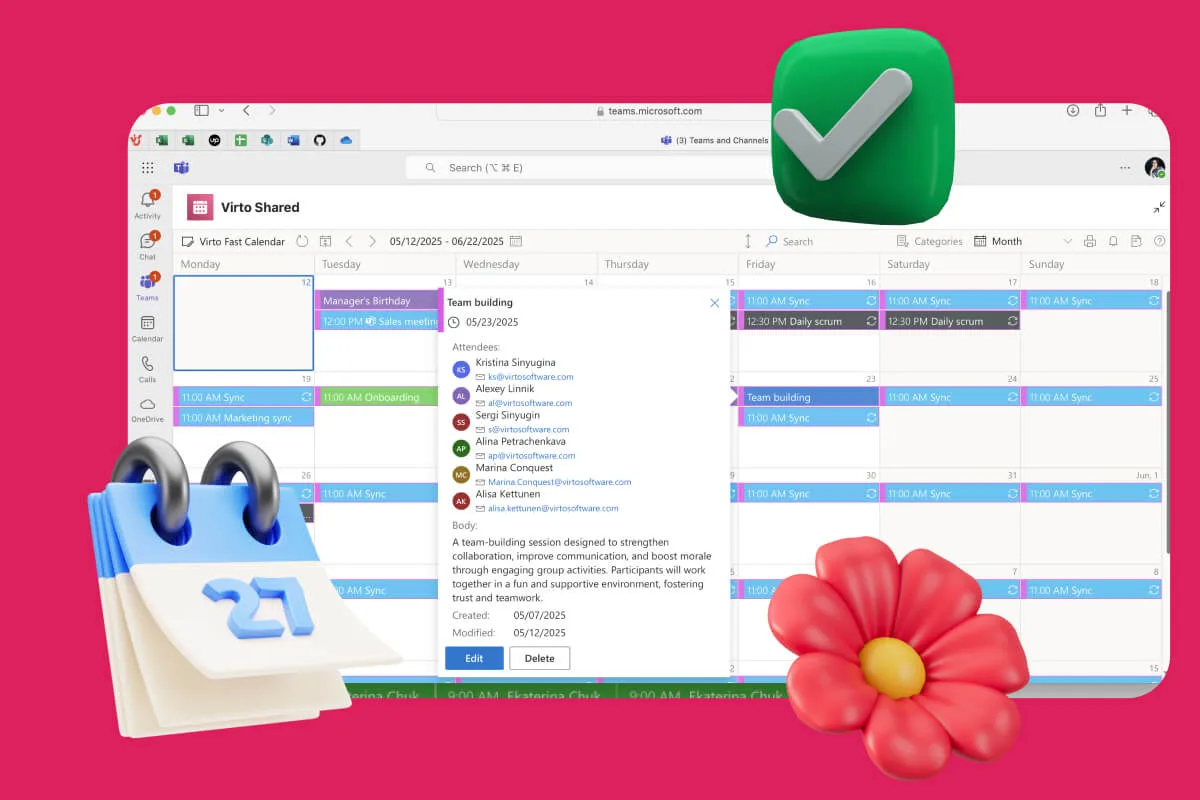
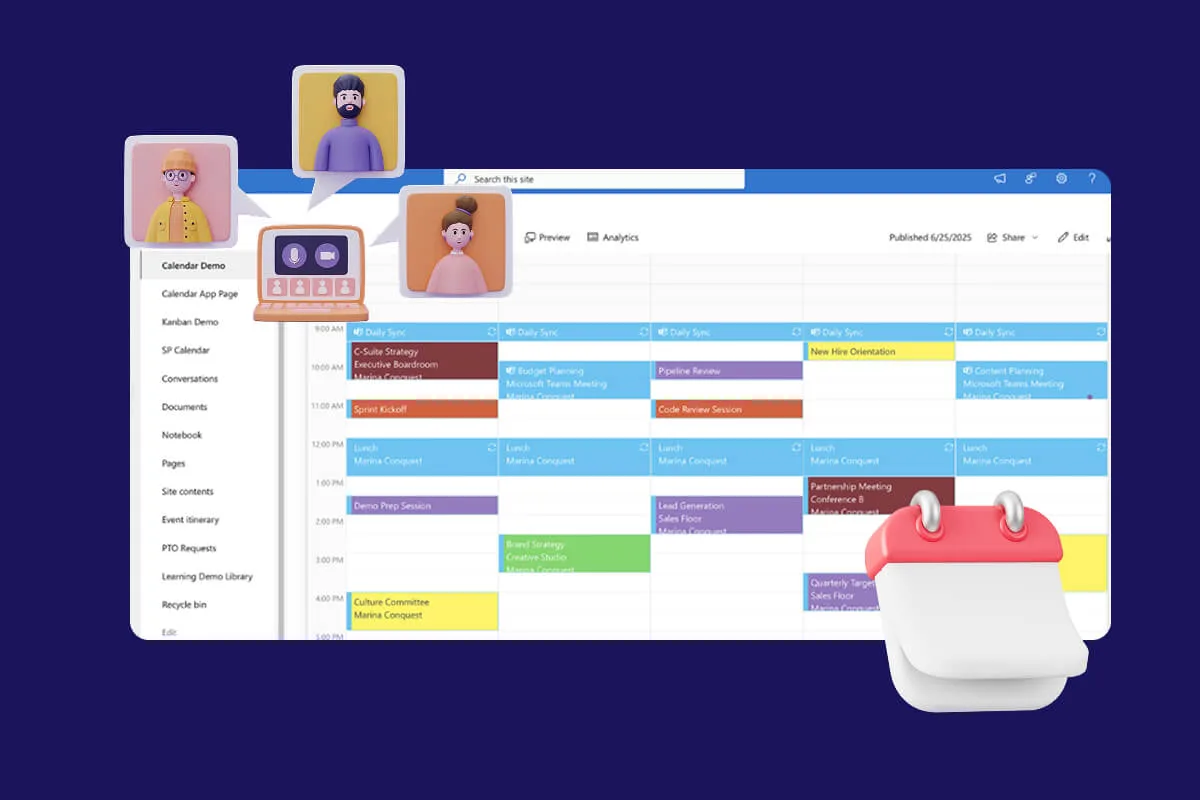
- Visual display of employee and shift availability: Teams see who’s working when, who’s on vacation or sick leave, and can plan future periods in a unified calendar view. The interface supports daily, weekly, and monthly formats for different planning needs.
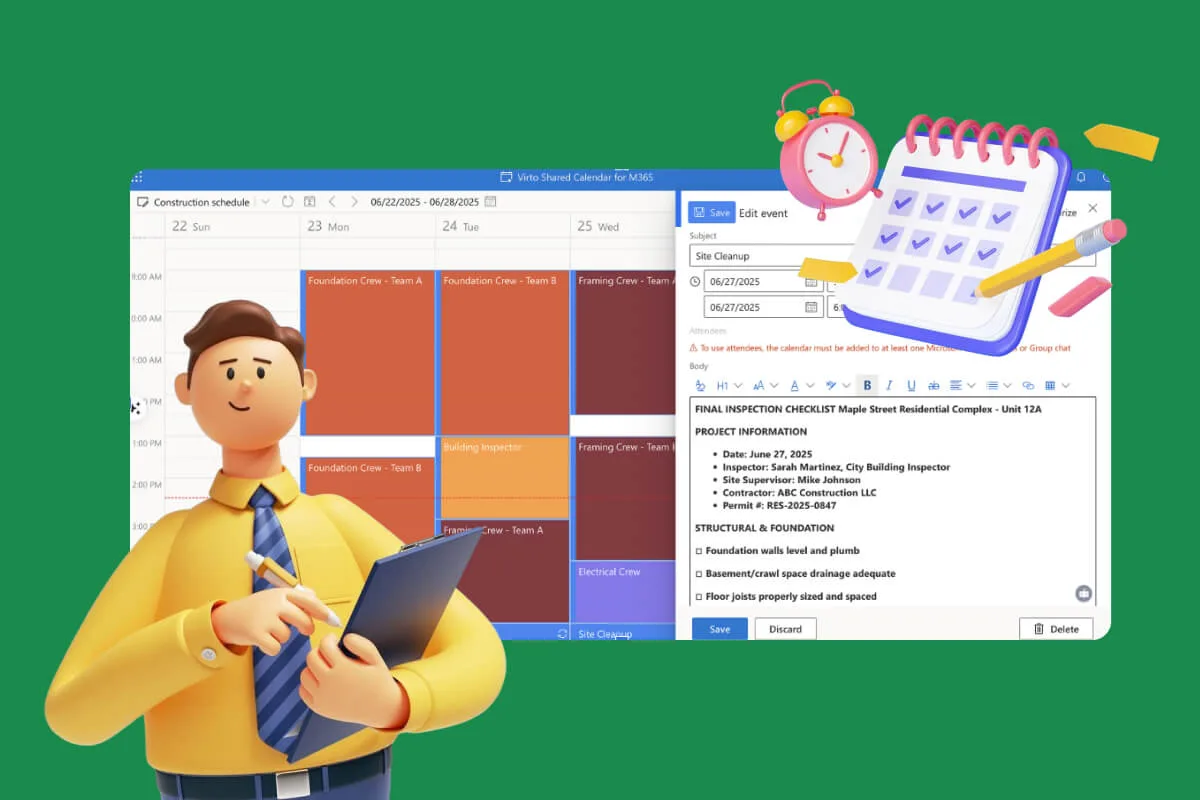
- Flexible and shift schedule management: The system accommodates both flexible and project-based schedules, suitable for organizations ranging from shift work to knowledge work. Custom schedules account automatically for weekends and work shifts without manual configuration.
- Coordination of distributed teams: The calendar proves particularly valuable for global and remote teams, allowing coordination of working hours across different time zones. Teams can visualize overlap periods for meetings and collaborative work without scheduling conflicts.
- Collaborative planning within Microsoft Teams: The calendar integrates directly with Teams, providing schedule access within work chat environments. This makes planning part of everyday processes rather than a separate system requiring context switching.
The platform consolidates multiple calendar sources including SharePoint lists, Outlook and Exchange calendars, Google Calendar, iCalendar feeds, and Apple Calendars. This unified view eliminates the need to check multiple locations for scheduling information.
Explore VirtoSoftware Apps

Virto Shared Calendar
Virto Shared Calendar is a standalone web app and Microsoft Teams-integrated solution designed for simple event management with tagging, color-coding, and anonymous sharing.

Virto Calendar
Consolidate events from SharePoint, Exchange, Google, and more into one calendar view for simplified planning.
Virto Alerts & Reminder
Integrated within your daily tools like Microsoft Teams, the app ensures you stay ahead of all tasks and meetings.
Virto Alerts & Reminders App: Automate notifications and reminders
Scheduling proves worthless if employees don’t receive timely notifications about shifts, changes, or upcoming responsibilities. The Virto Alerts & Reminders App addresses this gap.

- Automatic notifications about shifts, days off, and substitutions: Employees receive reminders in advance: “Your shift starts at 10:00 today,” “Tomorrow you’re covering for a colleague,” “The day after tomorrow is your scheduled day off.” This reduces forgotten shifts and late arrivals.
- Personalized reminders within Microsoft Teams and Outlook: HR specialists and managers can configure various reminder types based on specific scenarios, from approaching vacation dates to overtime alerts. Notifications reach employees through their preferred communication channels, increasing engagement.
- Simplified work for HR departments and coordinators: The system relieves administrators from manual reminder burden, helping maintain discipline and control without micromanagement. Automation handles routine notifications while humans focus on exceptions.
The app supports date-based reminders with versatile scheduling options, targeting specific users or groups within Microsoft 365. Organizations can create reminders using HTML-based templates incorporating text styles, images, tables, and links for professional communication.
Scenario examples demonstrate practical applications:
- An employee’s “Out of Office” date in a SharePoint HR list is three days away, triggering reminders via email and Teams to both the employee and their backup coverage, ensuring smooth handovers
- A “Contract Expiry Date” in a vendor list reaches 30 days out, sending an email to procurement and a Teams alert to the legal team
- A “Training Date” in a SharePoint learning list is one day away, notifying attendees via email and Teams with links to pre-read materials
Explore VirtoSoftware Use Cases
Easy integration and scalability
Both tools operate as native Microsoft 365 add-ins rather than requiring separate infrastructure:
- Easy integration into the Microsoft 365 ecosystem including Teams, Outlook, and SharePoint
- No separate infrastructure required, applications function as add-ins leveraging existing authentication and security
- Suitable for any organization size, from small teams to large distributed organizations spanning multiple locations and time zones
Conclusion on Schedule Staffing
Staffing and scheduling represent two interconnected but distinct processes, both vital for successful team management. Staffing determines who works for your organization and in what capacity. Scheduling determines when and how that work gets done.
Optimizing these processes increases productivity, reduces waste, and improves employee engagement. The data proves this conclusively: organizations with high-quality schedules show measurably lower turnover, organizations with strategic staffing practices scale more effectively, and organizations combining both approaches outperform competitors lacking either one.
Integrating staffing and scheduling processes helps create resilient, adaptive, and productive teams where each employee engages at the optimal time in the right role. This integration requires both strategic thinking (staffing) and operational discipline (scheduling), supported by appropriate tools and clear processes.
For organizations operating within Microsoft 365 environments, tools like the Virto Calendar App and Virto Alerts & Reminders App simplify scheduling and automate employee interactions without requiring additional infrastructure investments. These solutions leverage existing Microsoft investments while addressing specific workforce management needs.
Schedule a demo and install free trial versions of these apps from the VirtoSoftware website to experience the benefits firsthand.
Additional resources
Explore these related topics for deeper insights into workforce management: