Every government agency, from federal departments to municipal offices, deals with an overwhelming volume of cases. Citizen requests, legal matters, internal orders, contract oversight, compliance documentation—these files demand meticulous tracking, coordination between departments, and adherence to strict timelines. The alternative to proper case management isn’t just inefficiency; it’s a breakdown in public trust.
Government case management software provides the digital infrastructure needed to handle this complexity. These systems centralize case information, automate workflows, track deadlines, and maintain comprehensive audit trails. When implemented effectively, they reduce bureaucratic friction, accelerate processing times, and ensure agencies meet their compliance obligations without drowning staff in manual work.
What Is Government Case Management?
At its core, government case management software functions as a digital command center for tracking and resolving any formal matter that requires agency attention. The “case” might be a citizen’s permit application, a legal dispute, a procurement contract, or an internal investigation. Regardless of type, each case follows a lifecycle: intake, assignment, processing, resolution, and documentation.

Unlike general-purpose project management tools, case management systems for government include specialized functions like case intake systems, workflow automation for routing and assignment, reporting capabilities for compliance oversight, and security controls to protect sensitive constituent data. These platforms address challenges unique to the public sector, where disconnected systems make information difficult to access, case resolution depends heavily on individual agent knowledge, and strict data privacy regulations govern every interaction.
The scope varies considerably depending on agency function. Cases range from judicial court matters and law enforcement investigations to immigration processing, social services coordination, human resources concerns, and constituent requests including Freedom of Information Act submissions. What unifies these diverse applications is the need for structured tracking, accountability, and compliance with both internal policies and external regulations.
Government organizations frequently build these systems on Microsoft 365 or SharePoint foundations. These platforms come with security certifications that meet stringent data protection requirements—GDPR compliance for international agencies, FedRAMP authorization for U.S. federal entities, and ISO standards across the board. Data within Microsoft 365 GCC remains within the United States and is subject to U.S. laws and regulations, with enhanced security measures protecting sensitive government data through advanced threat protection, data loss prevention, and encryption. For agencies already invested in the Microsoft ecosystem, this means case management capabilities can be deployed without introducing new security vulnerabilities or compliance gaps.
Key Objectives of a Government Case Management System
Before diving into specific solutions, it’s worth establishing what these systems actually accomplish. Government case management isn’t about digitizing paperwork for its own sake. The goal is to establish reliable processes that prevent cases from falling through administrative cracks:
- First, these platforms create a single source of truth for case information. Rather than hunting through email threads, shared drives, and individual desks, staff access a centralized repository where every document, communication, and status update lives. This consolidation eliminates the common scenario where different departments work from different versions of the same file or duplicate efforts because they’re unaware of each other’s work.
- Second, effective systems distribute tasks with clarity. When a new case arrives, the software routes it to the appropriate person or department based on predefined criteria. This automated assignment removes bottlenecks where cases sit in queues awaiting manual distribution. Staff know what they’re responsible for, managers can see workload distribution across teams, and cases move forward without delays caused by confusion over ownership.
- Third, deadline management becomes systematic rather than heroic. Every case carries time constraints—statutory requirements, service level agreements, or internal processing standards. The system tracks these deadlines, flags approaching due dates, and escalates overdue items. This shifts responsibility from individual memory or manual calendar management to automated oversight that doesn’t forget or get distracted.
- Fourth, approval workflows run without constant manual intervention. Many government processes require sequential sign-offs from multiple parties. Case management software orchestrates these approval chains, notifying each participant when action is needed and automatically advancing to the next step once approval is granted. Workflow automation handles case routing and assignment, data entry, and push notifications, reducing the manual tasks that slow down case resolution.
- Fifth, comprehensive change histories provide accountability. Every modification to a case—status updates, document additions, reassignments, communications—gets logged with timestamps and user attribution. This audit trail satisfies internal oversight requirements and provides evidence during disputes or investigations.
- Finally, reporting and analytics give leadership visibility into operations. Rather than requesting status updates from each department manually, administrators generate reports showing case volumes, processing times, bottlenecks, and trends. This data enables resource allocation decisions based on actual workload patterns rather than assumptions.
| Objective | Supporting feature set | What it delivers |
| Single source of truth | Centralized case repository; versioning | Fewer duplicates, consistent records |
| Clear ownership | Automated routing & assignment | Balanced workloads, fewer bottlenecks |
| Deadline control | SLA timers; reminders & escalations | Fewer missed statutory deadlines |
| Streamlined approvals | Sequential workflows; notifications | Faster throughput with auditability |
| Accountability | Full change history/audit trail | Traceability for reviews and audits |
| Operational visibility | Reporting & analytics dashboards | Data-driven resourcing and trends |
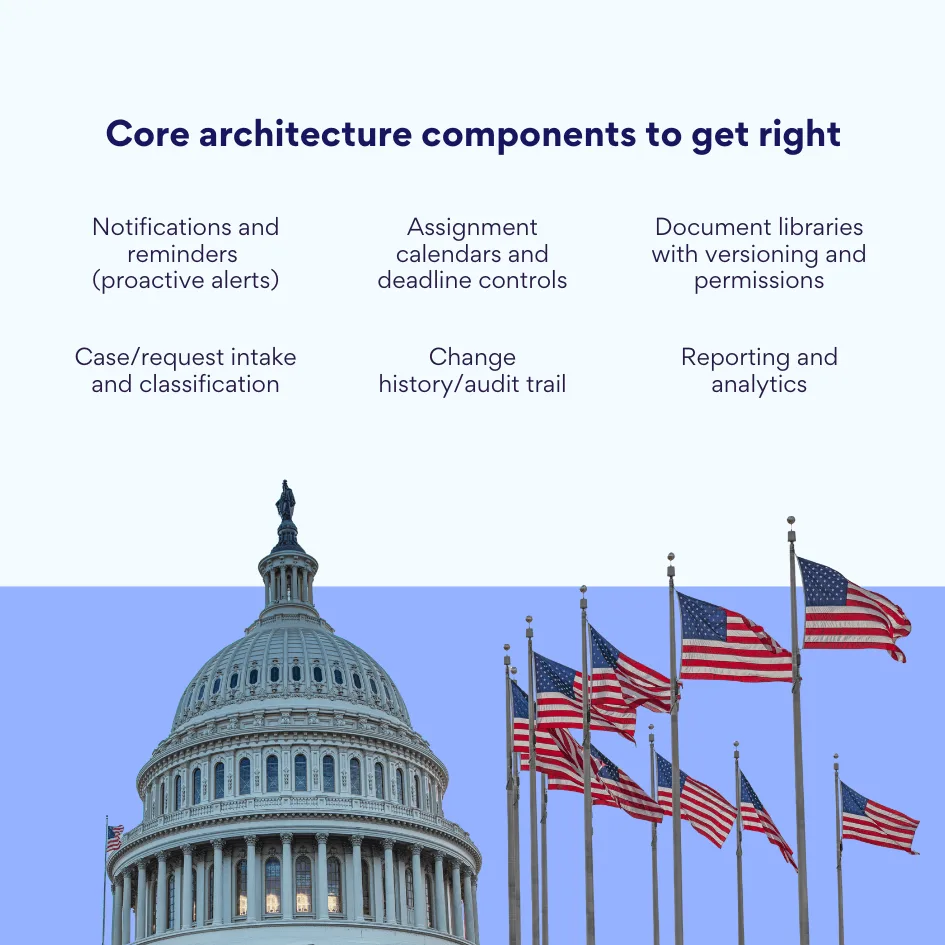
The functional architecture supporting these objectives typically includes:
- Case and request management modules that standardize how cases enter the system, get classified, and move through processing stages. These often include customizable fields to capture case-specific information and flexible categorization to accommodate different case types within a single platform.
- Assignment calendars and deadline control mechanisms that distribute work and maintain visibility into time-sensitive obligations. These tools prevent the common problem where urgent cases get buried under routine work because there’s no systematic prioritization.
- Document and template storage that keeps all case-related files accessible to authorized parties. Version control ensures everyone works from the current document, while permissions prevent unauthorized access to sensitive information.
- Notification and reminder systems that proactively alert staff to required actions. These are detailed in depth later, as they represent one of the most critical yet frequently underimplemented aspects of case management.
- Change history tracking that maintains complete records of all case modifications for compliance and dispute resolution purposes.
When these components work together properly, the benefits cascade through the organization. Improved operational efficiencies lead to streamlined communication and collaboration within teams, spurring increased productivity, which enables better case resolution and enhanced customer satisfaction.
Transparency improves because stakeholders can see case status without making inquiries. Accountability increases because responsibilities are clearly assigned and tracked. Interdepartmental communication becomes more efficient when everyone accesses the same information. Processing times for citizen inquiries drop as automation handles routine steps. And compliance with audit requirements and regulatory standards becomes demonstrable through comprehensive documentation.
Government Case Management Solutions: What Project Management Software Does the Government Use?
The market offers several approaches to case management, each with distinct advantages for different agency contexts. Understanding these options helps organizations make informed decisions rather than defaulting to the first solution they encounter.
| Approach | Strengths | Drawbacks | Best for |
| General-purpose platforms (e.g., Microsoft Dynamics 365, Salesforce, Microsoft 365/SharePoint) | Broad capability, native integration, familiar tools | Needs configuration; performance/fit can vary without skilled admins | Agencies already in Microsoft ecosystem seeking configurable workflows |
| Industry-specific solutions (e.g., Tyler, Granicus, Accela, OPEXUS FOIAXpress & eCASE) | Purpose-built workflows, faster time-to-value, shared best practices | Less flexible; higher licensing costs | Departments with standard, repeatable processes (FOIA, permitting, courts) |
| Custom development (SAP/Oracle/low-code) | Exact fit; deep IT integration | High time/cost; long timelines; ongoing maintenance | Large agencies with unique, complex needs and dedicated IT budgets |
General-purpose platforms
Microsoft Dynamics 365 continues to be one of the favorite choices for agencies seeking customizable, secure, and easily scalable case management software that fits into existing toolkits. These platforms weren’t built exclusively for government use, but their flexibility allows configuration to meet public sector requirements. Salesforce similarly offers government case management capabilities, though implementation requires substantial customization to address the unique workflows of government operations.
Microsoft 365 and SharePoint occupy a particularly interesting position. While they’re productivity platforms rather than purpose-built case management systems, their widespread adoption in government creates opportunities. Organizations including the United States Postal Service, State of California, U.S. Courts, United States Marine Corps, NASA, and the Commonwealth of Massachusetts have used SharePoint-based solutions for managing government projects. The familiarity factor matters: staff already know how to use Outlook, Teams, and SharePoint, reducing training overhead for case management implementations built on these foundations.
The advantage of general-purpose platforms lies in their breadth:
- One system can handle document management, communication, task tracking, and reporting.
- Integration between components is native rather than requiring third-party connections.
However, this flexibility comes at a cost. The platform serves two purposes at once, and while flexibility is a strength, it can be challenging to tailor the solution and achieve the best performance for most government requirements, especially if the government lacks IT support personnel who understand the intricacies of the software.
Industry-specific solutions
Specialized government software addresses this gap. Tyler Technologies, Granicus, and Accela offer tools built specifically for municipal, judicial, and administrative processes. OPEXUS’s suite includes FOIAXpress, used by 78% of federal government agencies, and eCASE Correspondence for case management. These products come configured for common government workflows, include features aligned with public sector needs, and often require less customization than general platforms.
Because government customers don’t compete, specialized vendors sit at the center of a powerful network of best practice sharing, meaning when one client highlights an emerging need, everyone benefits. This collaborative improvement model can accelerate feature development compared to commercial software where competitive advantage discourages sharing.
The drawback is inflexibility. Industry-specific solutions excel at their designed purpose but struggle when agencies need to adapt processes or integrate with other systems. They also tend to carry higher licensing costs than general platforms, justified by their specialized development but sometimes difficult to defend during budget reviews.
Custom development of case management software for government
Some large agencies build proprietary systems on platforms like SAP or Oracle. These implementations can be precisely tailored to organizational requirements and integrate deeply with existing IT infrastructure. According to Gartner’s 2023 Market Guide for Government Low-Code Application Platforms, in 2025, approximately 75% of government IT leaders are expected to adopt low-code development tools to modernize their case management processes and enhance operational efficiency.
Custom development offers maximum control but requires significant resources. Development timelines extend over months or years. Ongoing maintenance demands dedicated IT staff. Updates and feature additions compete with other IT priorities. For agencies with complex, unique requirements and the budget to support sustained development efforts, this approach can deliver optimal results. For most organizations, the time and cost make it impractical.
Why SharePoint and Microsoft 365 are Suitable for Government Case Management Systems
The prevalence of Microsoft platforms in government isn’t accidental. Several factors make SharePoint and Microsoft 365 particularly well-suited for public sector case management implementations.
Security and compliance form the foundation. Microsoft 365 GCC is built on Azure infrastructure with additional security and compliance features required to meet strict regulatory requirements of government agencies, including multi-factor authentication, data loss prevention, advanced threat protection, and encryption to protect sensitive government data. Federal agencies can deploy solutions that meet FedRAMP High authorization. State and local governments find CJIS compliance for law enforcement data. International agencies access GDPR-compliant infrastructure.
| Requirement | Capability in Microsoft 365/SharePoint | Notes for government |
| FedRAMP High | Supported in GCC | Meets U.S. federal security baselines |
| CJIS | Available for qualifying workloads | Critical for law enforcement data |
| GDPR | Supported | For international/public sector bodies |
| ISO certifications | Portfolio of ISO standards | Eases procurement/security reviews |
| Data residency | U.S.-only storage in Office 365 Government | Exchange, SharePoint, files at rest in U.S. |
| Controls | MFA, DLP, ATP, encryption | Reduces risk of data leakage |
The certification portfolio matters because government IT procurement requires demonstrable compliance. Rather than conducting lengthy security assessments of vendor solutions, agencies can reference Microsoft’s existing authorizations. This accelerates approval processes and reduces the risk of deploying systems that fail compliance audits.
Data residency requirements get addressed through dedicated government cloud environments. Office 365 Government services are provided from datacenters physically located in the United States, with customer content stored at rest in datacenters physically located only in the U.S.A., including Exchange Online mailbox content, SharePoint Online site content, and the files stored within those sites. For agencies handling controlled unclassified information or other sensitive data, this geographic restriction prevents compliance violations.
Beyond security, the integrated nature of Microsoft 365 reduces complexity. A case management implementation can leverage SharePoint for document storage, Teams for communication, Outlook for email integration, Power Automate for workflow automation, and Power BI for reporting—all within a single ecosystem. Staff use familiar interfaces. Data flows between components without requiring custom integrations. IT manages one platform rather than multiple vendor relationships.
Many agencies already use SharePoint for basic document management. This existing deployment provides a foundation for expansion. Rather than replacing systems, organizations enhance what they have. The incremental approach reduces disruption and allows phased implementation where departments adopt case management capabilities as they’re ready rather than in a disruptive big-bang deployment.
Flexibility proves crucial for government operations where requirements change as legislation passes or policies update. SharePoint’s structure—lists, libraries, calendars, workflows—can be reconfigured without requiring developer intervention for many modifications. Departments can customize views, fields, and processes to match their specific needs while still working within a standardized platform.
💡 For detailed information on enterprise document management capabilities, see VirtoSoftware’s guide to enterprise document management solutions.
The ability to operate on-premises, in the cloud, or in hybrid configurations addresses diverse agency requirements. Some organizations need air-gapped on-premises deployments for security. Others want the operational simplicity of cloud-hosted systems. Many require hybrid approaches where sensitive systems stay on-premises while less critical applications move to the cloud. Microsoft 365 supports all three models.
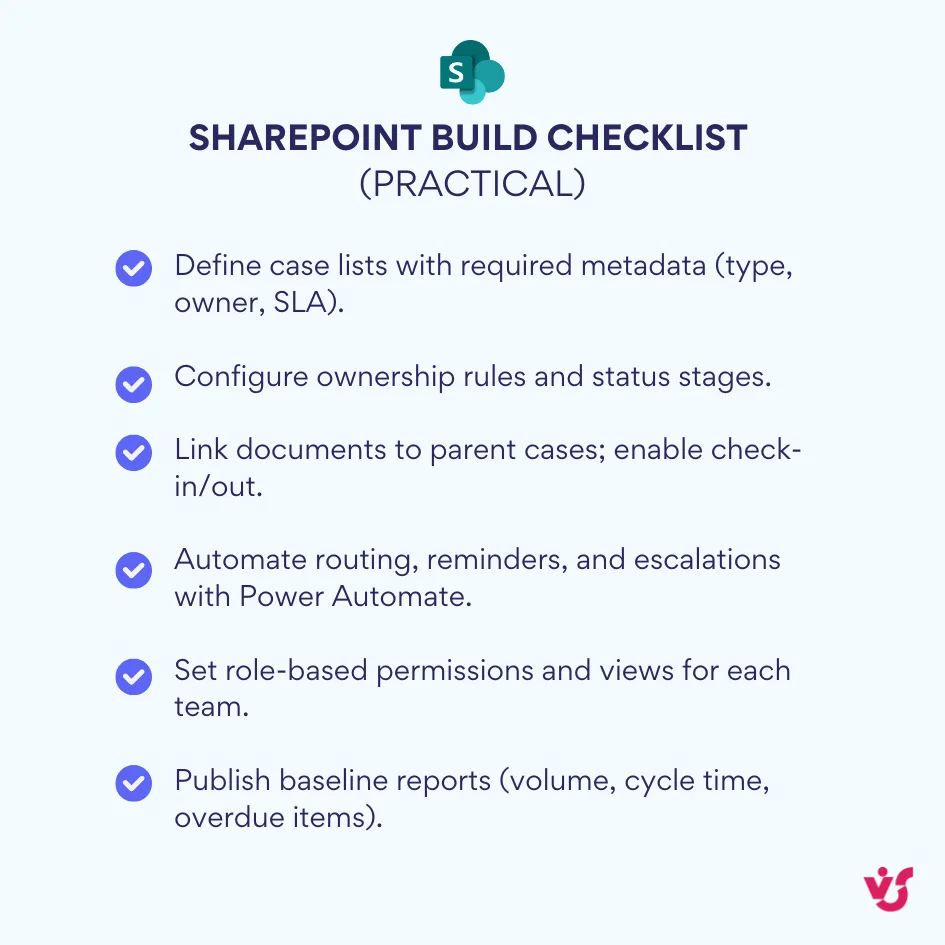
Creating a functional case management system on SharePoint involves several components:
- Case lists organize individual cases with customizable fields for case-specific information. These can track citizen requests, contracts, legal matters, or any other case type. Metadata enables sorting, filtering, and reporting without requiring rigid database structures.
- Responsibility assignment and status tracking ensure each case has clear ownership and visible progress. SharePoint’s permission system controls who can view or modify cases. Status fields enable workflow progression through defined stages.
- Document libraries store all case-related files with version control and check-in/check-out capabilities. Each document can be linked to its parent case, creating complete case files accessible to authorized staff. Email integration allows correspondence to be captured directly into the case file.
- Workflow automation handles routine processes. Power Automate can trigger when cases enter the system, route them to appropriate queues, send notifications when action is required, and escalate overdue items. More sophisticated workflows manage multi-step approval processes without manual intervention.
The advantage over proprietary solutions is customizability. Organizations aren’t constrained by how a vendor thinks government should work. They can configure systems to match actual processes rather than forcing processes to fit software limitations. This flexibility becomes particularly valuable for specialized agencies whose workflows don’t align with industry-standard templates.
Scalability accommodates growth without platform changes. Small departments can start with basic implementations and expand as needs evolve. Large agencies can support thousands of users accessing millions of cases without performance degradation, assuming proper infrastructure sizing.
The Problem of Notifications and Deadline Control in Government Case Management Software
Here’s where many case management implementations stumble: they excel at storing information but fail at keeping people informed about that information.
The fundamental issue isn’t data scarcity. Government agencies have plenty of data. Cases are documented. Deadlines are recorded. Responsibilities are assigned. The problem is that this information sits passively in databases while the people who need to act on it remain unaware until they actively check the system.
| Failure mode | What it looks like | Impact | Typical workaround | Better fix |
| Passive queues | Cases sit until someone checks | Idle backlog; uneven service | Personal calendars/Excel | Event-driven reminders + escalations |
| Email overload | Alerts buried in inbox | Missed actions | Filters/folders | Multi-channel alerts (Teams/email/digest) |
| Cross-dept handoffs | Files “stuck” awaiting next team | Hidden delays | Manual nudges | Routed notifications with time-based triggers |
| Staff turnover | Reassignment gaps | Lost ownership | Manual case audits | Dynamic recipient rules tied to case fields |
| Special handling missed | Expedited cases blend in | SLA breaches | Sticky notes | Priority-aware alerts + templated messages |
Consider the typical scenario. A case enters the system and gets assigned to an employee who’s already managing dozens of other cases. The assignment appears in the case management system. The employee logs in that morning, reviews their queue, notes the new case, and plans to address it after handling three urgent matters. By the time those urgent issues are resolved, the new case has mentally faded. Unless the employee checks the queue again, the case sits idle.
Multiply this across hundreds of employees managing thousands of cases. Some check their queues religiously. Others only look when prompted. High performers never miss a case. Overwhelmed staff let things slip. The system variation defeats attempts at standardization and creates unpredictable service quality.
Deadline management becomes particularly problematic. Statutory requirements don’t care about workload. A Freedom of Information request must be processed within the legally mandated timeframe regardless of how many other cases arrived that same week. Relying on staff to manually track deadlines in personal calendars or Excel spreadsheets introduces unacceptable risk. One forgotten entry means a missed deadline, potential legal liability, and damage to public trust.
Large agencies face compounding challenges. When hundreds of tasks, instructions, requests, and reports are created daily, important notifications drown in email floods. A staff member might receive fifty emails per day. If three contain time-sensitive case actions, there’s no guarantee they’ll be identified and prioritized correctly. Email filters help but require careful management and still miss edge cases.
Responsibility chains break when work crosses departmental boundaries. A case requires input from legal, finance, and operations. Legal completes their review and sends the file to finance. Finance’s notification arrives during a busy period and gets overlooked. Operations waits for finance to complete their portion. No one realizes the case has stalled until a citizen calls to check status. There’s no unified system tracking the chain of custody or flagging where delays occur.
Manual deadline tracking fails at scale. Excel spreadsheets require someone to maintain them. Personal Outlook calendars work until that person is out sick or leaves the organization. Shared calendars become cluttered and difficult to parse when they contain every deadline for an entire department. None of these approaches provide automated escalation when deadlines approach or pass.
Employee transitions create notification gaps. When staff leave or transfer, their cases must be reassigned. This often happens through manual processes: a manager identifies all cases owned by the departing employee and redistributes them. Cases can be missed during this transition. Even when reassignment succeeds, the new owner might not receive notifications about approaching deadlines because those were configured for the previous assignee’s email address.
High workload and repetitive tasks diminish responsiveness. When processing routine cases all day, staff develop patterns and can miss variations that require special handling. A case flagged for expedited processing looks identical to standard cases unless the system actively highlights the distinction. Without proactive notifications calling attention to exceptions, they get processed at normal speed and miss their accelerated deadlines.
The result is bureaucratic bottlenecks where cases pile up awaiting action, slower document processing as steps take longer than necessary, and decreased overall efficiency as employees spend time manually tracking work they should be doing instead of tracking. More critically, compliance failures occur when regulatory deadlines pass unnoticed and public trust erodes when citizen inquiries face unpredictable processing times.
A case management system without effective notifications is like a filing cabinet: it stores information but does nothing to ensure timely action. The system knows a deadline approaches in three days. It knows an approval has been pending for two weeks. It knows a case has been transferred but not yet opened by the new owner. Without notifications, this knowledge remains trapped in the database while opportunities to prevent problems slip past.
📍 This is precisely where regulatory compliance software and compliance management solutions become essential for maintaining accountability in government operations.
How VirtoSoftware Solutions Solve Notifications for Government Case Management
The notification gap represents a real barrier to effective case management. Fortunately, solutions exist specifically designed to bridge this gap for SharePoint and Microsoft 365 environments.
VirtoSoftware provides notification automation tools tailored to government and enterprise needs. These aren’t workarounds or makeshift solutions. They’re purpose-built applications that integrate with existing SharePoint and Microsoft 365 infrastructure to create comprehensive alerting systems.
| Capability | SharePoint On-Prem (Virto Alerts & Reminders Web Part) | Microsoft 365 (Virto Alerts & Notifications App) |
| Trigger sources | SharePoint lists/libraries | SharePoint Online lists, M365 calendars |
| Delivery channels | Email, SMS, Clickatell | Email, Teams, scheduled digests |
| Targeting | Users, SharePoint groups, DLs | Users, groups, Teams channels |
| Conditions & logic | Rich rules; status/priority-based | Rich rules; date-based; list changes |
| Templates | HTML messages with case details/links | HTML messages; centralized management |
| Escalations & reporting | Time-in-status, overdue routing | Supervisor escalations; summary reports |
For SharePoint On-Premise: Virto Alerts & Reminders Web Part
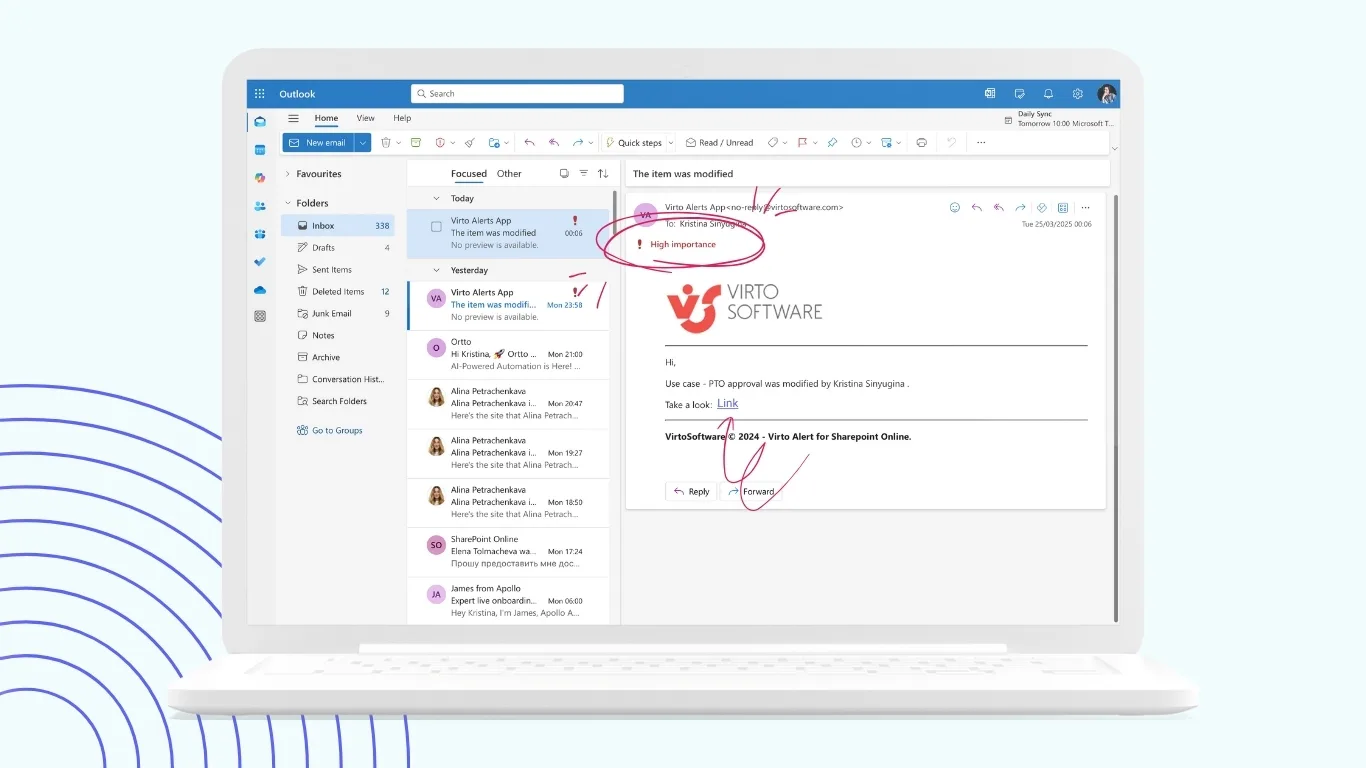
The Virto Alerts & Reminders Web Part for SharePoint On-Premise enables organizations to craft alerts, reminders, or notifications for any user or group, with options for email, SMS, or Clickatell delivery. Organizations still operating on-premises SharePoint deployments gain enterprise-grade notification capabilities without migrating to the cloud.
The web part monitors SharePoint lists and libraries for specified conditions. When a case status changes, when an assignment deadline approaches, when a document requires review—any event in the list can trigger notifications. Administrators customize alert schedules and combine multiple notifications into one, simplifying communication while offering reminders for key SharePoint events with customizable email messages.
Condition logic provides sophistication beyond simple alerts. Agencies can configure notifications that fire only when specific criteria are met. For instance, send alerts when high-priority cases are assigned, but use a different notification template for routine cases. Trigger escalations when cases remain in a status for longer than acceptable periods. Different templates for different case types ensure recipients get contextually relevant information.
Message templates support HTML formatting, allowing agencies to create branded, professional communications that include case details, action links, and relevant context. Organizations can incorporate text styles, images, tabs, and links in HTML-based templates. Rather than generic “You have a new task” messages, notifications can specify exactly what case needs attention, what action is required, and what deadline applies.
Recipient configuration handles complex organizational structures. Notifications can go to individual users, SharePoint groups, or distribution lists. Dynamic recipient selection based on case attributes ensures the right people receive each alert. When a legal case requires attorney review, it routes to the legal department group. When a facilities request needs approval, it goes to facilities management.
Scheduling flexibility accommodates different urgency levels. Immediate notifications for critical cases. Daily digests for routine updates. Weekly summaries for informational items. The system can batch multiple alerts into consolidated messages to reduce email volume while still ensuring timely delivery of urgent matters.
💡 For government agencies concerned about alert processing schedules and managing the retirement of classic SharePoint alerts, VirtoSoftware provides guidance on SharePoint alerts retirement and transitioning to modern solutions.
Improve Your Management with VirtoSoftware
Virto Alerts & Reminder
Integrated within your daily tools like Microsoft Teams, the app ensures you stay ahead of all tasks and meetings.
Alerts & Reminders
Elevate Microsoft Teams with an app for direct notifications and reminders, ensuring team alignment.

Virto Notifications & Alerts
Craft alerts, reminders, or notifications for any user or group, with options for email, SMS, etc.
For Microsoft 365: Virto Alerts and Notifications App

Organizations using Microsoft 365 can deploy the Virto Alerts and Reminder App, which automates SharePoint notification emails for changes in M365 calendar events or in SharePoint lists, with date-based reminders and versatile scheduling options targeting specific users or groups.
This cloud-based solution extends notification capabilities throughout the Microsoft 365 ecosystem. The app integrates with SharePoint Online, Microsoft Teams, and Microsoft 365, tracking changes in SharePoint lists, managing calendar events, and setting up custom reminders.
Teams integration proves particularly valuable for organizations that have adopted Teams as their primary communication platform. Notifications can be sent directly into Teams channels, reaching staff where they already work rather than adding to email overload. A case requires urgent review? The notification appears in the relevant Teams channel where the responsible team can see it immediately.
The centralized management interface gives administrators visibility into all configured notifications across the organization. Rather than scattered alert configurations maintained by individual departments, IT can view, audit, and modify the complete notification ecosystem. This oversight helps prevent notification spam while ensuring critical alerts remain active.
Escalation and reporting capabilities address management needs. When cases approach deadlines without resolution, escalation notifications automatically inform supervisors. Managers receive summary reports showing case volumes, processing times, and potential bottlenecks. This visibility enables proactive intervention before problems become crises.
Practical implementation scenario
Consider a municipal department processing citizen service requests that must be resolved within ten business days per city ordinance. Without automated notifications, compliance depends on staff manually tracking deadlines.
With Virto Alerts implemented, the system works proactively:
Day 1: Citizen submits a service request through the city portal. The request enters the SharePoint list. Virto Alerts detects the new item and sends an email to the department supervisor showing the request details and ten-day deadline.
Day 2: The supervisor assigns the request to a staff member. Virto Alerts sends that employee a notification including request specifics, assigned deadline, and a link directly to the case in SharePoint.
Day 8: Two days before the deadline, Virto Alerts sends a reminder to the assigned employee. The case status shows “In Progress” but not yet resolved.
Day 10: The deadline arrives. If the case remains unresolved, Virto Alerts escalates by notifying both the employee and their supervisor. The notification includes case age and deadline information.
Day 12: The case is now overdue. A second escalation notification goes to department leadership showing all overdue cases requiring attention.
This automated oversight ensures deadlines are visible without requiring employees to maintain manual tracking systems. The organization can demonstrate compliance with service standards, and citizens receive timely responses to their requests.
💡 For government scheduling and coordination needs, explore government scheduling software solutions that integrate with notification systems.
Explore VirtoSoftware Use Cases


Benefits of implementing VirtoSoftware solutions
The advantages extend beyond technical capabilities. Implementation impacts organizational culture and operational effectiveness.
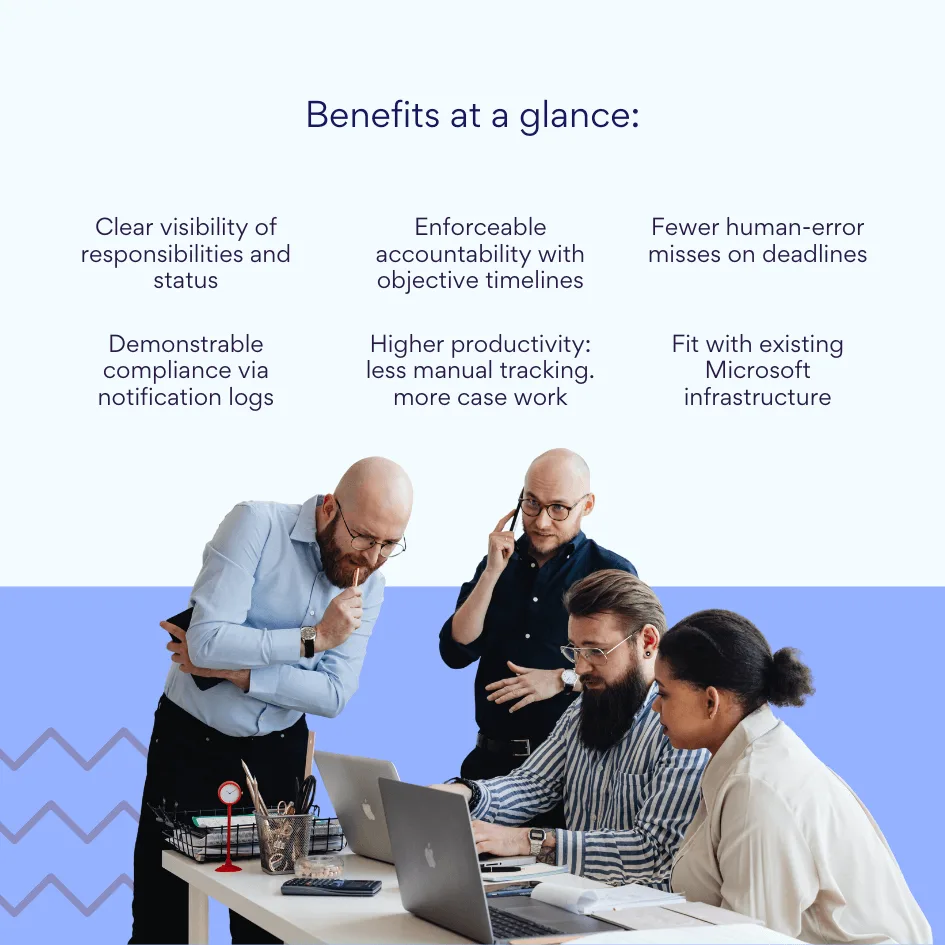
- Process transparency improves dramatically when everyone receives appropriate notifications. Staff know what they’re responsible for and when action is required. Managers can see workload distribution without constantly requesting status updates. Citizens experience more predictable service because cases move through processing stages on schedule rather than languishing until someone remembers to check the queue.
- Accountability becomes enforceable rather than aspirational. When deadlines are tracked automatically and escalations occur when they’re missed, there’s no ambiguity about expectations. Performance discussions can reference objective data about response times rather than relying on impressions or anecdotes.
- Human error diminishes as a failure mode. Even diligent employees occasionally miss deadlines when relying on manual tracking. Automated systems don’t forget. They don’t get distracted. They don’t assume someone else handled an issue. The consistency reduces variation in service quality across different staff members and time periods.
- Compliance with internal SLAs and regulatory requirements becomes demonstrable. Audit requests for evidence of timely processing can be satisfied with notification logs showing when alerts were sent, to whom, and regarding which cases. This documentation proves due diligence even when occasional cases still miss deadlines due to legitimate resource constraints rather than oversight.
- Employee productivity increases without adding workload. Staff spend less time checking queues and tracking deadlines manually. They can focus on case work rather than case management. The reduction in administrative overhead means existing staff can handle higher case volumes or can redirect time to more complex cases requiring expert attention.
- Compatibility with existing infrastructure matters for agencies with limited IT budgets or restricted implementation windows. VirtoSoftware apps can be deployed directly within your existing Azure subscription linked to Microsoft 365, giving organizations full control over the application environment and data storage, with data staying entirely within their infrastructure to ensure compliance and data security. There’s no need for development from scratch, no requirement to learn new systems, and no disruption to current operations.
The notification automation capabilities specifically address one of the most persistent challenges in government case management. Data storage and workflow tracking are solved problems. Multiple platforms handle them adequately. But keeping people informed about what needs their attention when it needs their attention—that problem persists across organizations and represents a genuine barrier to effective operations.
📍 Organizations can also leverage these notification capabilities for broader file management and notifications automation across various enterprise compliance scenarios.
Conclusion on Case Management Software for Government
Modern government case management requires more than information storage. Data sitting in databases serves no purpose if the people who need to act on it remain unaware of their responsibilities until problems arise.
The most sophisticated case management platform fails if staff don’t receive timely notifications about approaching deadlines, status changes, or required approvals. Conversely, even basic systems become significantly more effective when paired with reliable alerting mechanisms that proactively drive action rather than waiting for employees to check their queues.
Microsoft 365 and SharePoint provide strong foundations for government case management implementations. Their security certifications, compliance capabilities, and integration across productivity tools make them practical choices for public sector agencies. The widespread existing deployment in government reduces implementation barriers and training requirements. Organizations can build on infrastructure they already own and staff already know how to use.
The notification gap represents the difference between a filing system and an action management system. Virto Alerts & Reminders Web Part for SharePoint On-Premise and Virto Alerts and Notifications App for Microsoft 365 bridge that gap by providing enterprise-grade notification automation specifically designed for SharePoint environments.
These solutions help government organizations improve process transparency through consistent communication about case status and requirements. They increase efficiency by reducing the time staff spend manually tracking work instead of doing work. They ensure compliance with internal standards and regulatory requirements through systematic deadline monitoring and automated escalation. And they accomplish these improvements by enhancing existing infrastructure rather than requiring wholesale platform replacement.
For government agencies evaluating case management options or looking to improve existing implementations, notification automation deserves serious consideration. The technical challenge of storing and tracking cases has been solved. The human challenge of keeping people informed and engaged with their responsibilities remains the frontier where significant improvement is still possible.
Exploring VirtoSoftware solutions represents a practical approach to optimizing processes, increasing control, and improving transparency in government operations. The investment in reliable notification systems pays dividends through more consistent service delivery, reduced compliance risk, and better use of staff time and expertise:
- Schedule a demo of VirtoSoftware solutions today
- Install a free trial from our site and test functionality in your environment
While you’re evaluating your choices or scheduling a demo, peruse additional resources for more info on the related topics:
- Enterprise Document Management Software and Systems Guide
- SharePoint Alerts Retirement: Impact, Risks & Alternatives
- Regulatory Compliance Management Software: Overview, Functions, and Selection Guide
- Exploring Compliance Management: Systems, Features, and Use Cases
- Enterprise Document Management Software and Systems Guide
- Government Scheduling Software: Benefits and Use Cases
- Government Project Management: Strategies for Success