Introduction
Every missed patient appointment is more than a simple scheduling issue — it’s lost time for the doctor, lost revenue for the clinic, and, most importantly, a potential risk to a person’s health. Despite the best efforts of administrators, manual phone calls and handwritten notes often fail to provide consistent communication between a clinic and patients.
Automated reminder solutions replace chaotic manual calls with a reliable system that notifies patients by SMS, email, or voice messages about upcoming visits. Using a patient appointment reminder system not only reduces no-shows but also helps healthcare providers focus on care instead of coordination.
In this piece, we’ll explore how automated patient appointment reminders improve daily clinical workflow, what types of patient reminder software exist, and how to choose the best option for your healthcare practice. We’ll also discuss key compliance factors — especially for clinics using SharePoint or other integrated digital environments — to make sure your medical appointment reminder software aligns with data protection standards.
Why Medical Institutions Need Automated Appointment Reminders
Implementing a medical appointment reminder service brings significant benefits for both clinics and patients. One of the primary advantages is a significant reduction in no-shows. Studies show that these automated reminders decrease missed appointments by about 29% to 38%, freeing up slots that would otherwise go unused. For example, clinics using automated reminders report 4 in 10 fewer missed appointments, directly influencing revenue.
Another important advantage is that it saves time for administrative staff. Traditional reminder methods like manual phone calls consume considerable resources; automating this process lets staff focus on meaningful tasks such as patient care coordination and handling complex scheduling needs. Automated patient appointment reminder systems take care of routine calls, which cuts down the workload and lowers operational costs, while providing patients with timely communication.
Improved patient experience and loyalty are additional advantages. Patients appreciate reminders via SMS, email, or voice messages that help them remember appointments without inconvenient phone calls. This leads to better patient engagement. Automated reminders also allow patients to confirm or reschedule appointments on their own, improving satisfaction.
Finally, automated reminders optimize doctor schedules and clinic capacity. When reducing no-shows and late cancellations, clinics can accommodate more patients. This helps clinics increase healthcare access without increasing resources.
Real-world cases emphasize these advantages:
- For instance, Adelante Healthcare reduced its no-show rate by an average of 35%, thanks to email reminders.
- Markham Family Health Team (Markham FHT) integrated the Accuro Appointment Reminder service, achieving a no-show rate of less than 0.01%. The automated reminders helped keep physician schedules full and significantly improved operational efficiency by freeing staff from manual reminder calls.
- Victor Thompson, a clinical psychologist, implemented WriteUpp’s automated patient appointment reminder system. This change led to a notable reduction in missed appointments, increased revenue, and better time management, allowing more focus on patient care.
- El Rio Health, a federally qualified health center in Arizona, used AI-powered appointment reminders that cut no-show rates by 32% and boosted monthly revenue by approximately $100,000. Their hybrid AI-human approach also helped maintain compliance and protect patient experience.
- Broomfield Family Practice, an independent family practice in Colorado, reduced no-shows by 42% after deploying an automated appointment reminder software. This improvement allowed better patient care services across the lifespan, from birth to end of life.
- A medical practice showcased by AdvitalMD saw dramatic reductions in no-shows and scheduling conflicts by implementing an automated appointment scheduling and reminder system. Staff shifted from hours on manual calls to more meaningful patient interaction while patients benefited from easier booking and timely reminders.
How Medical Appointment Reminder Systems Work
In general, patient appointment reminder systems operate by integrating with the clinic’s scheduling software or calendar. When an appointment is scheduled, the system triggers automated notifications to be sent to the patient in advance. These reminders ask patients to confirm, reschedule, or cancel the appointment.
Communication Channels and Their Uses
| Communication Channel | Pros | Cons | Ideal for |
| SMS message 📲 | Highest open rate up to 98%, instant delivery, no internet needed, supports interactive buttons | Limited message length, fee per message | Short, urgent reminders sent 24 hours before appointment |
| Email notification 📧 | Can include detailed info (maps, instructions, payment links), free to send | Lower open rates, risk of spam | Early reminders 3 days in advance with detailed info |
| Voice calls and Interactive Voice Response (IVR) 📞 | Effective for older patients, detailed explanations possible | More costly, time-consuming for patients | Important procedures requiring explanation |
| Push notifications ⚠️ | Free, instant, attention-grabbing | Only works if patient has clinic’s app installed | Clinics with apps aiming to boost patient loyalty |
How to Remind a Patient of Appointments and Make an Appointment Reminder
Integrating automated reminder systems with your existing scheduling infrastructure is vital for seamless operation. Most patient appointment reminder software synchronizes directly with your calendar tools—whether that’s Google Calendar, Outlook, or a specialized Medical Information System (MIS)—to capture appointments automatically. This eliminates the need for manual entry and makes sure no appointment is overlooked.
Modern platforms often come with customizable templates for different appointment types and allow for easy adjustments without IT support. Some also include CRM functionalities to manage patient relationships and integrate billing or telehealth features.
Step-by-step algorithm for using an automated system:
- Choose and configure the appropriate software solution that fits your clinic’s workflow.
- Integrate the reminder system with your appointment calendar, whether it’s Google Calendar, Outlook, or your MIS. This way, the system can automatically access appointments without manual input.
- Create and approve message templates for different types of visits (initial consultation, follow-up, procedure). Make sure messages are polite and contain all necessary information such as date, time, location, and preparation details.
- Set up the schedule for sending reminders. Decide how far in advance and through which channels (SMS, email, voice calls, push notifications) reminders will be sent. Typically, 2 to 3 reminders of varying types improve compliance.
- Run a test mode by sending trial messages internally to staff to verify message formatting and delivery accuracy.
- Activate the system for all patients, ideally starting with new appointment bookings for smooth onboarding.
- Monitor reporting dashboards. Analyze how many patients confirm or reschedule appointments, which messages get better responses, and adjust settings to improve effectiveness.
Security and HIPAA Compliance in Appointment Reminders
Any communication with patients in the medical field involves handling their confidential data. Even something as simple as sending an SMS or email reminder is not just a routine action—it constitutes the transmission of legally protected information.
Violating these regulations can lead to fines and severe reputational damage for a clinic. Protecting patient data is paramount:
- Any breach of Protected Health Information (PHI) can result in legal repercussions and substantial penalties.
- Reminders are often sent through external channels like SMS and email, which increases the risks of interception.
- Even “innocent” details (such as the doctor’s name and procedure type) may reveal sensitive information about a patient’s health condition.
Are Appointment Reminders Allowed Under HIPAA?
Appointment reminders are allowed as part of “healthcare operations” under HIPAA, provided clinics use the minimum necessary information. However, when reminders are promotional or include any marketing content, extra restrictions apply, and written patient consent may be required.
👉 Discover appointment reminder software >>>
Key HIPAA Requirements for Appointment Reminders
- Data encryption: All messages (SMS, email) must be transmitted from the clinic’s servers to the patient through encrypted channels (using HTTPS/TLS protocols). Think of this as sending sensitive information inside a locked safe rather than on a postcard.
- Minimum necessary information: Only include what is strictly required—for example: patient’s name, date, time, clinic name, and location, but not the diagnosis or treatment details.
- Patient consent: Before sending reminders, clinics should obtain explicit patient consent, ideally in writing, either as part of the service agreement or within an informed consent form.
- Audit trails: The system should automatically log who received each message, when it was sent, and patient responses for full traceability.
Examples of Correct and Incorrect SMS Reminders

Ready-Made Templates and Best Practices
How to Write an Appointment Reminder Text?
Effective appointment reminder messages should be clear and patient-friendly. Here are examples tailored to common reminder timings:
📲 SMS sent 24 hours before the appointment:
“Reminder: Your appointment at [Clinic Name] is scheduled for [Date] at [Time]. Please reply YES to confirm or call [Phone Number] to reschedule.”
📧Email with visit details and preparation instructions (sent 48 hours prior):
Subject: Your Upcoming Appointment at [Clinic Name]
Body:
“Dear [Patient Name],
This is a reminder for your appointment on [Date] at [Time] with [Doctor Name]. Please arrive 10 minutes early and bring your insurance card. For [Procedure Name], please follow these preparation instructions: [Instructions]. If you need to reschedule, click here: [Link] or call us at [Phone Number].”
⚠️ Reminder sent 2 hours before appointment for final confirmation:
“Hi [Patient Name], this is your final reminder for your [Date] appointment at [Clinic Name]. Please reply CONFIRM to check in or CANCEL to reschedule.”
Sample Templates and Why They Work
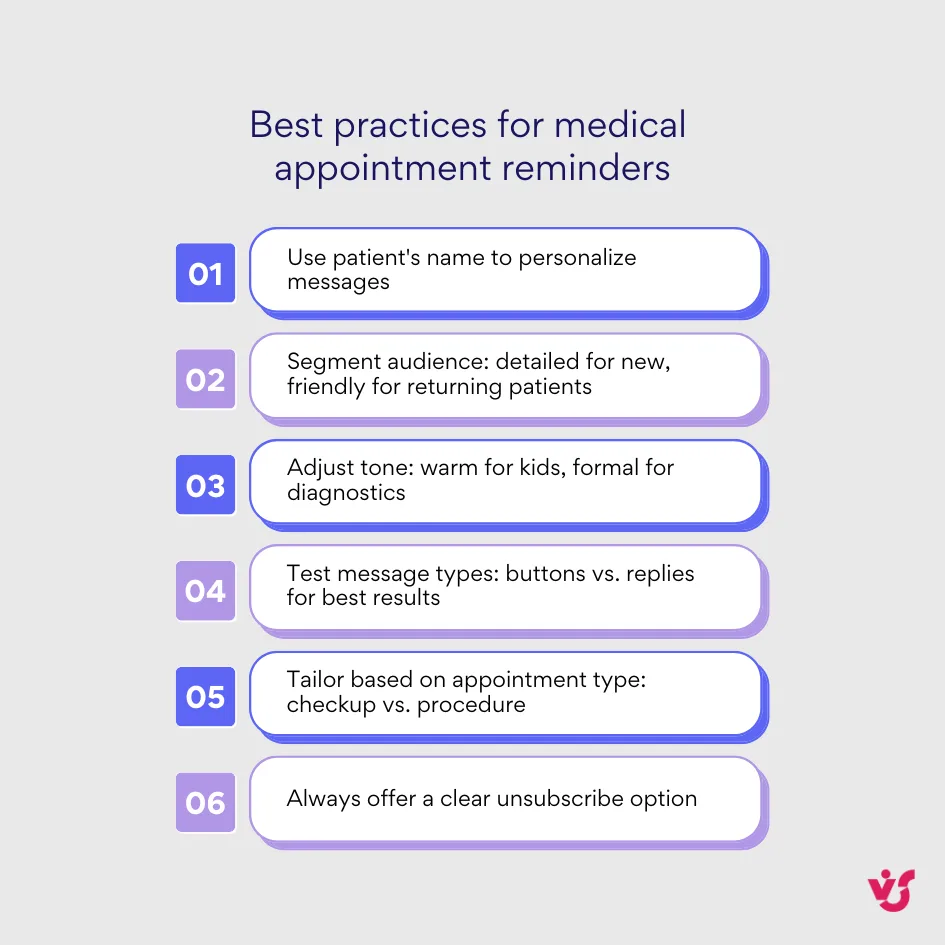
- Personalization: Using the patient’s name immediately turns bulk messaging into a personal communication, increasing engagement.
- Clarity: Including clear date, time, provider, and location details prevents confusion.
- Actionable: Providing easy options to confirm, reschedule, or cancel empowers patients and reduces no-shows.
- Politeness: Polite language builds a positive tone without being pushy.
- Compliance: Adding opt-out instructions respects patient rights and legal requirements.
Best Practices for Personalizing and Optimizing Templates
Overview of Solutions for Medical Institutions
When deciding on a medical appointment reminder service, clinics must consider platform types, features, and fit for their size, budget, and IT infrastructure.
Specialized Medical Services
- Examples: Solutionreach, Luma Health, WELL Health
- Pros: These platforms are purpose-built for healthcare settings, providing compliance with healthcare regulations like HIPAA. Features often include rich patient engagement dashboards, two-way HIPAA-compliant messaging, automated appointment and recall reminders, and seamless integration with Electronic Health Records (EHR) or practice management software. They typically support workflows across multiple clinics and locations.
- Cons: These systems can carry a higher price tag, and staff may require training to fully leverage their capabilities. They are best suited for medium to large clinics with complex scheduling and patient communication needs. Some users report occasional interface complexity and integration delays with certain EHRs.
- Example: Solutionreach is praised for powerful automation and patient retention tools but sometimes seen as costly or complex. Luma Health boasts an intuitive user interface and strong patient-centric features like online bill pay but may have limited customization and higher pricing concerns for smaller practices.

Universal Messaging Systems
- Examples: Mailchimp, Sendsay, Twilio
- Pros: These platforms offer flexible, cost-effective messaging solutions ideal for clinics seeking straightforward SMS, email, voice, or push notification reminders. They scale easily and provide robust analytics, branding, and automation features.
- Cons: They are not specialized for healthcare, so compliance with HIPAA and clinical integration requires additional customization. Integration with Electronic Health Records or Medical Information Systems is limited without extra development work.

Corporate Solutions Based on SharePoint / Microsoft 365
- Pros: Clinics that already operate within the Microsoft 365 ecosystem benefit from seamless integration with SharePoint, Outlook calendars, and Power Automate workflows. Enhanced security features and enterprise-grade data protection align well with healthcare compliance demands. They offer customizable solutions adapted to existing corporate intranets and document management needs.
- Cons: These solutions typically require internal IT expertise for setup and maintenance and may lack out-of-the-box healthcare-specific features such as patient portals or EHR integration. They are best suited for larger healthcare organizations with established Microsoft infrastructures.
👉 Learn more about healthcare workflow automation >>>
What Is the Best Appointment Reminder Software?
The best choice depends on your clinic’s size, budget, and IT infrastructure. Smaller clinics may prefer easy-to-use messaging platforms, while larger health systems benefit from specialized medical services or corporate Microsoft-based solutions.
Checklist for Comparing Medical Appointment Reminder Systems
✅ Cost and Pricing Models
- Pricing can vary from free basic plans to premium enterprise subscriptions.
- Look for transparent pricing including fees per user, per message, or flat monthly rates.
- Consider if there are additional costs for integrations, premium features, or message volume overages.
- Trial periods and free demos help evaluate value before commitment.
✅ Supported Communication Channels
- Verify support for SMS, email, voice calls, and push notifications.
- Multichannel options allow reaching patients via their preferred method, improving engagement.
- Consider features like two-way messaging, interactive buttons, or callback options.
✅ Integration Capabilities with Medical Information Systems (MIS) or EHR
- Essential for automating reminders without manual entry.
- Check compatibility with your existing MIS/EHR like Epic, Cerner, Meditech, or custom systems.
- Look for real-time synchronization and bi-directional updates (e.g. patient response updates schedules).
✅ Compliance with Healthcare Data Privacy Laws (e.g., HIPAA)
- Confirm provider’s HIPAA compliance status and willingness to sign Business Associate Agreements (BAA).
- Tools must support encryption and secure data handling consistent with healthcare regulations.
✅ Message Customization and Automation Features
- Ability to create templates tailored for appointment types.
- Automated scheduling of reminder timing (e.g. 48 hours and 2 hours before appointment).
- Personalization using patient name, provider information, and visit details.
✅ Security Measures Including Encryption and Access Controls
- End-to-end encryption of all message transmissions (HTTPS, TLS).
- Secure storage of patient data with encryption at rest.
- Robust user authentication such as two-factor authentication for staff access.
✅ Patient Consent Management and Opt-Out Capabilities
- Systems should document patient consent to receive reminders.
- Easy opt-out methods (e.g., reply STOP to SMS) must be available and respected.
- The system should retain audit trails of consent and opt-out records.
✅ Reporting and Analytics Transparency
- Detailed delivery reports showing sent messages, deliveries, read/response status.
- Alerts for delivery failures or spikes in undelivered messages to catch issues early.
- Analytics dashboards to track appointment confirmation rates and no-show reduction.
✅ Local Data Protection Laws Compliance (like GDPR) for International Operations
- For clinics serving patients internationally, compliance with local laws such as GDPR is critical.
- Verify data residency options and regional compliance certifications.
- Ensure appropriate data handling policies for sensitive patient categories.
Recommendations for Choosing a Secure Solution
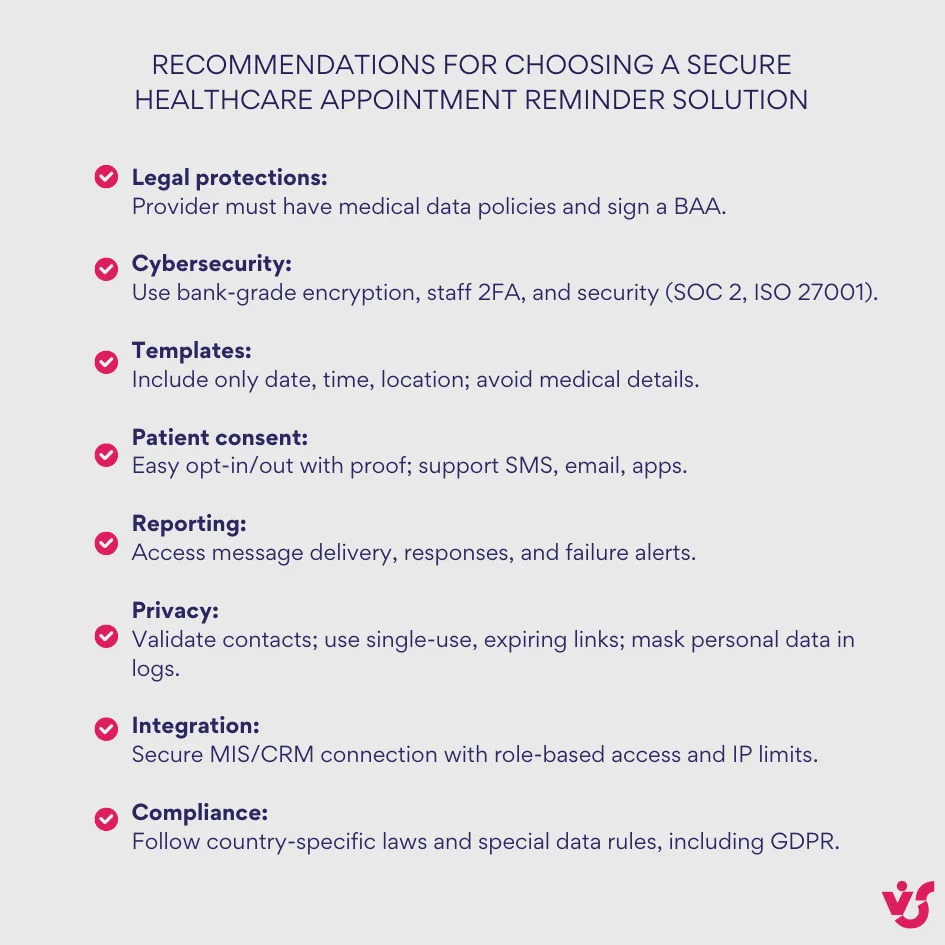
- Legal protections: The provider must have clear policies for handling medical data and be ready to sign a Business Associate Agreement (BAA). Documentation about data breach protocols and record retention is essential.
- Basic cybersecurity: Data transmission should be secured with bank-grade encryption, and stored encrypted. Look for independent certifications like SOC 2 or ISO 27001. Staff access must involve two-factor authentication.
- Message templates without sensitive medical details: Systems must allow configuring messages to include only necessary data — date, time, location, and contact info — avoiding diagnoses or treatment details. Personalized touches like patient and clinic names are appropriate but done carefully.
- Patient consent and easy management: Patients should easily opt in/out of reminders (e.g., replying STOP to SMS). The service must keep proof of consent and support multiple channels like SMS, email, or messaging apps.
- Transparent reporting: You need access to reports showing who received which message, delivery success, response rates, and alerts on delivery failures or spikes in undelivered messages.
- Delivery control and privacy: The system should validate recipient numbers before sending. Links in messages should be single-use and expire quickly to prevent misuse. Personal data must be masked in logs and reports.
- Secure integration with your system: The service should connect securely to your MIS/CRM with limited, role-based access, IP restrictions, and separate authentication keys to minimize overreach risk.
- Compliance with country-specific and special data rules: If working with sensitive patient categories (e.g., substance dependency), making sure the provider respects additional regulations. International clinics require compliance with local laws like GDPR.
Following these guidelines will help your healthcare organization select a trustworthy medical appointment reminder software that protects patient privacy while improving communication.
Solutions for Clinics Based on SharePoint
Many medical institutions already use Microsoft 365 and SharePoint in their daily operations—for document storage, maintaining internal databases, and facilitating teamwork.
For such institutions, there is an opportunity to deploy appointment reminder systems directly inside this familiar and secure environment, avoiding complicated integrations with third-party services.
Advantages for Clinics Using SharePoint
✔️Unified ecosystem and security: No need to create new staff accounts or transfer patient data to external clouds. All data stays within your protected Microsoft tenant, which already meets high security standards.
✔️ Integration with schedules and patient documents: The system can “read” data directly from SharePoint lists your institution already uses, such as appointment schedules, patient databases, or doctor calendars.
✔️ Flexible customization to clinic processes: Users are not limited to template scenarios—notifications can be triggered based on any data changes. For example, a nurse can receive reminders if new test results in the patient’s record indicate preparation is needed for a visit.
Virtosoftware Products for Medical Institutions
For clinics using Microsoft 365 and SharePoint, Virtosoftware offers solutions created to automate medical appointment reminders and other critical notifications within this secure ecosystem.
For Cloud Solutions (SharePoint Online / Microsoft 365):
Virto Alerts & Reminder App
- Automates email alerts and reminders triggered by changes in SharePoint lists or Microsoft 365 calendar events.
- Features flexible scheduling options allowing notifications from immediate alerts to customizable schedules.
- Supports rich HTML templates including text, images, and links to create engaging messages.
- Allows targeting specific users or groups for notifications for communication precision.
- Dynamic alert conditions enable triggers based on specific list item changes, such as new patient records or appointment updates.
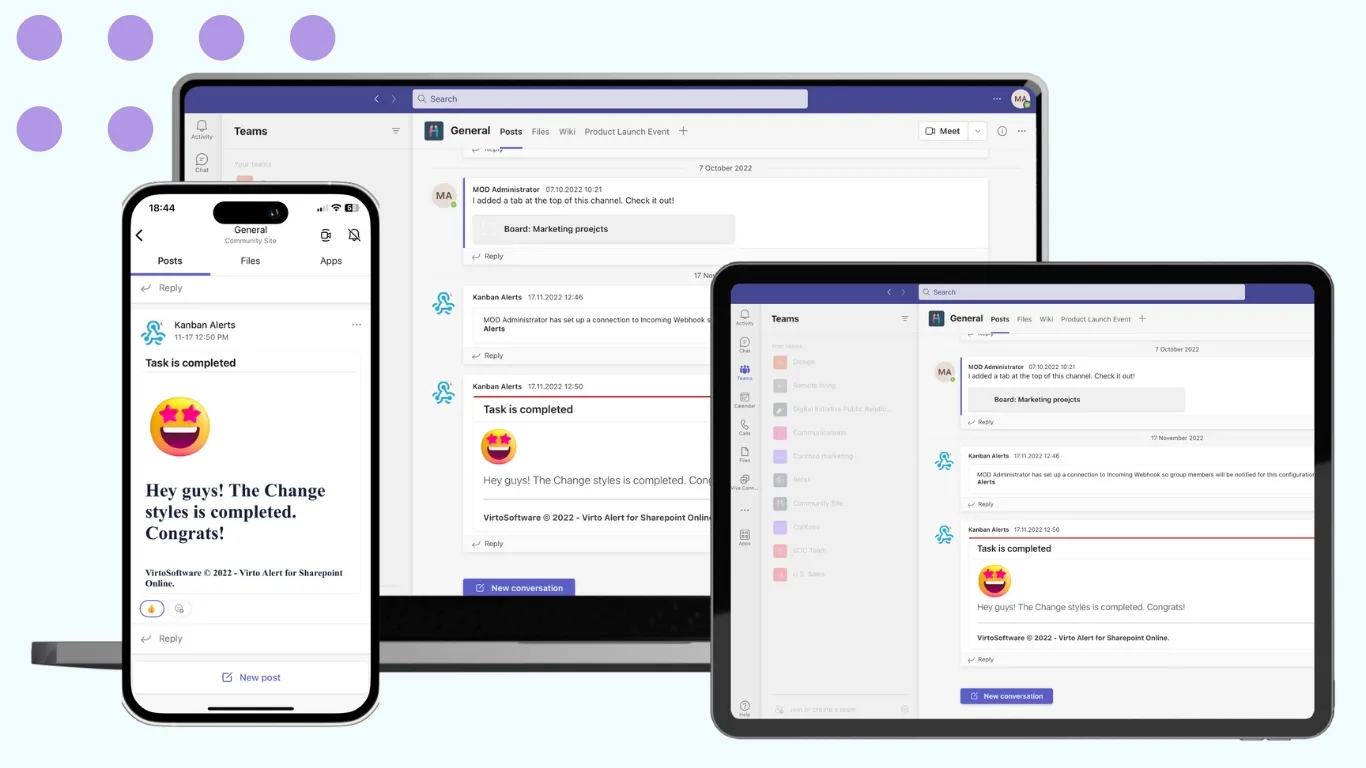
- Integrates seamlessly with Microsoft Teams, sending alerts directly to dedicated Teams channels.
For On-Premises Solutions (SharePoint On-Premises):
Virto Notifications & Alerts Web Part
- Designed to operate in localized environments, so that data remains within internal hospital infrastructure.
- Offers deep integration with medical workflows allowing customization of notifications based on patient’s records and appointment scheduling data.
- Ensures compliance with strict internal security policies, addressing hospital-grade privacy requirements.
- Allows flexibility to build tailored alert scenarios that support complex clinical processes and task assignments.
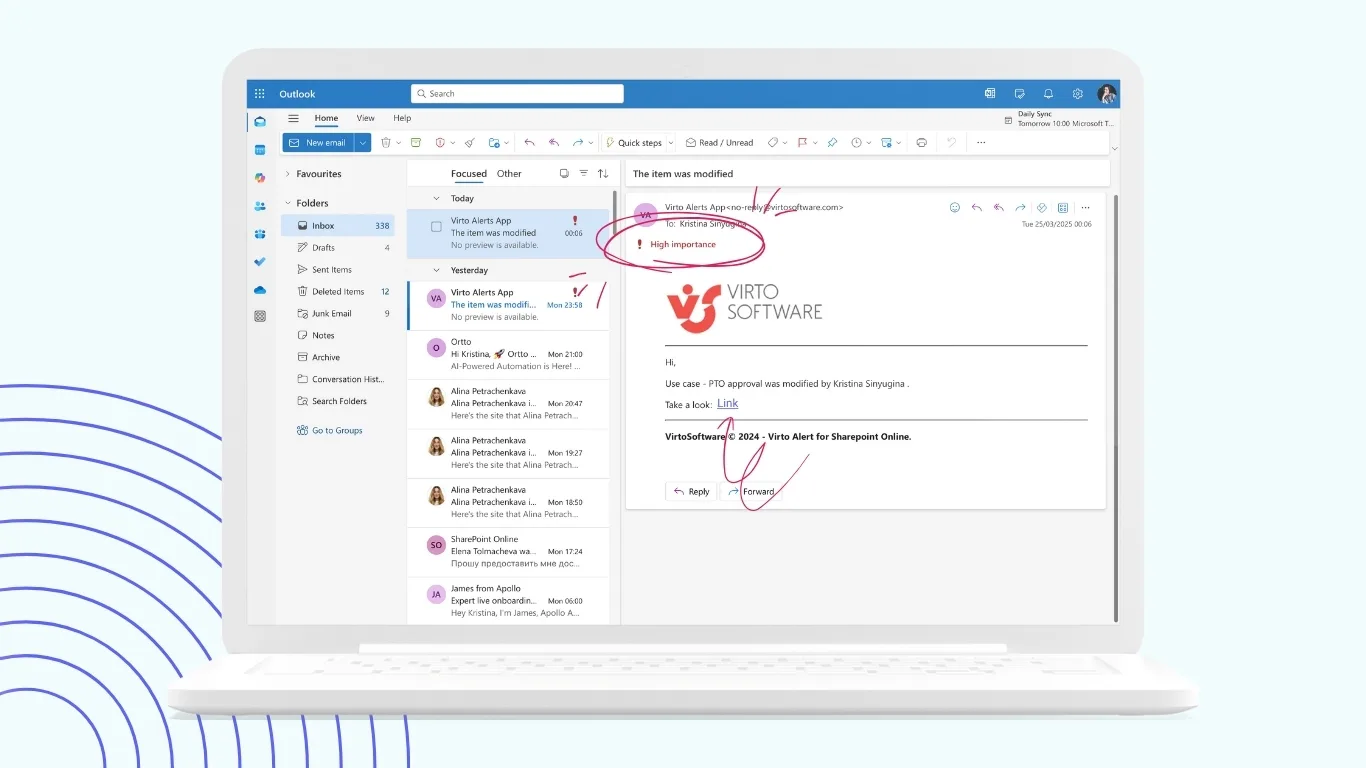
These products empower medical institutions to use their existing SharePoint environments by embedding compliant and customizable reminder systems right where clinical data resides. For healthcare providers already invested in Microsoft infrastructure, Virtosoftware’s solutions represent an optimal balance of integration, security, and flexibility not matched by generic systems.
What Is the Best App to Keep Track of Medical Appointments?
For medical institutions using the Microsoft ecosystem, SharePoint-based solutions like Virto Alerts & Reminder App are among the best options to keep track of medical appointments. They provide seamless integration with existing SharePoint data and processes, for maximum security within the trusted Microsoft 365 environment. These solutions offer customizable notifications, flexible scheduling, and direct integration with Microsoft Teams. This level of integration and security is difficult to match with many generic services, making Virto Alerts & Reminder App an optimal choice for healthcare providers using Microsoft infrastructure.
Conclusion
Using automated appointment reminders in healthcare is strongly recommended as it significantly improves service quality and operational efficiency. Research shows these reminders reduce no-shows by approximately 30% to 50%, freeing up staff time. Clinics save costs compared to manual reminder methods, allowing personnel to focus on patient care rather than repetitive tasks. Selecting a HIPAA-compliant and secure solution not only avoids legal penalties but builds long-term trust with patients.
For medical institutions already invested in Microsoft infrastructure, SharePoint-based systems such as Virto Alerts & Reminder App and Virto Notifications & Alerts Web Part offer integration, high security, and customization flexibility not commonly found in generic reminder services. Starting with a pilot implementation in one department and gradually expanding allows clinics to test and scale efficiently.
Overall, automated reminders are a proven technology transforming healthcare operations by improving patient engagement, reducing missed appointments, and supporting better workflows. They represent a vital step toward a patient-centered medical service.