Introduction
Missed appointments can be a serious setback for any business that relies on scheduling, from healthcare to service providers. Each no-show translates into lost revenue and inefficient use of staff time. The causes are different— clients forget appointments, mix up times, or overlook reminders sent through less effective channels.
When administrative staff depend on manual calls or messages to send reminders, they often find the process time-consuming. Also, calls can be missed, messages go unsent, and details sometimes slip through the cracks. Automated appointment reminder software and systems offer a simple yet powerful solution, eliminating much of the human error and freeing up staff for more valuable work.
Healthcare and therapy professionals frequently discuss their needs and share recommendations for appointment reminder services on platforms like Reddit—for example, see this thread where therapists exchange experiences and suggestions for software that sends automated reminders.
This article will explain how automated appointment reminder services operate, outline their main advantages, and offer clear guidance for choosing the most suitable tool. Our goal is to help businesses put an end to costly no-shows and manage schedules with confidence. We’ll also look at integration options for organizations already using SharePoint in their daily operations.
Section 1: Appointment Reminder Software – Purpose, Features, and Benefits
1.1 Why Businesses Need Appointment Reminder Software
Appointment reminder software is a digital solution that automatically notifies employees or clients about upcoming meetings, bookings, or sessions. It works through multiple channels such as SMS, email, or voice calls, and allows recipients to confirm, cancel, or reschedule an appointment in seconds. This type of system removes the need for manual follow-ups and keeps schedules accurate and up to date.
Here’s how an appointment reminder system typically works:
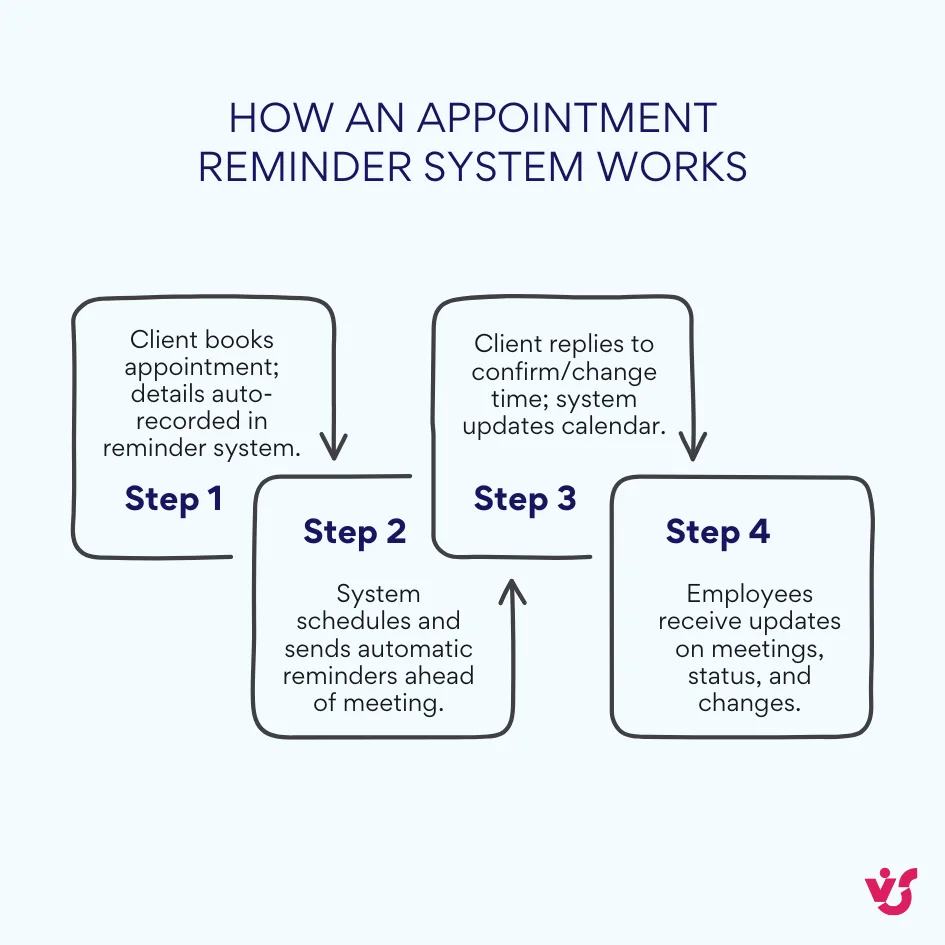
This appointment reminder process helps both clients and staff stay informed and efficient. For organizations handling large volumes of appointments — such as healthcare providers, therapists, or service businesses — automated appointment reminder software is a vital part of daily operations.
1.2 Key Features and Advantages of Appointment Reminders
What makes automated appointment reminder systems truly effective is their combination of intelligency, flexible settings, and integration with scheduling tools.
Basic features include:
- Two-way communication: Clients can confirm, cancel, or reschedule with a simple reply, such as “Reply 1 to confirm, 2 to reschedule.”
- Customizable templates: You can easily edit message content to match service types, departments, or brand tone.
- Calendar integration: Automatic sync with Google Calendar, Outlook, or Microsoft 365 ensures no duplicate entries or missed updates.
Advanced capabilities:
- Personalized messaging: The system inserts client names, appointment times, and staff details automatically.
- Time zone awareness: Reminders are sent at the correct local time, which is useful for international clients.
- Flexible scheduling: You can set up multiple reminder intervals — for example, three days, one day, and one hour before — and automate follow-ups for unconfirmed visits.
Administrative and data protection features:
- Blacklist management: Option to block numbers or emails that misuse reminder services.
- Data privacy and compliance: Conformance with regulations such as GDPR or HIPAA, with secure encryption of all personal data.
- Reporting and analytics: Detailed tracking of metrics such as confirmed visits, cancellations, and changes in no-show rates, helping managers evaluate the effectiveness of their appointment reminder services.
The benefits businesses gain from automated reminders:
- Reduced no-shows and late arrivals, resulting in higher productivity and predictable schedules.
- Saved administrative time, as staff no longer need to send manual reminders.
- Improved customer satisfaction and stronger loyalty through consistent communication.
1.3 How Automated Appointment Reminder Systems Work
An automated appointment reminder system is designed to make scheduling and communication almost entirely hands-free. The process usually follows a simple sequence. An employee adds a meeting or booking to the calendar; the system automatically sends a reminder one or two days before the appointment; the client confirms or reschedules in response.
Automated appointment reminder software can send notifications through multiple channels, depending on customer preferences:
- SMS reminders: The most immediate and widely used method. Clients receive short text messages with appointment details and confirmation options.
- Email notifications: Used for longer messages or additional information such as location maps or preparation instructions.
- Voice calls: Helpful for older audiences or high-value appointments where personal communication matters.
- Messengers and chat platforms: Integration with WhatsApp, Telegram, or Facebook Messenger allows instant confirmations.
Many users often ask, “How to make an appointment reminder?” Modern automated appointment reminder software makes this task surprisingly simple. Setting up a reminder usually takes only a few clicks—no programming or IT support required. You can pick the time, channel, and content of reminders based on the type of appointment. For example, consultations might require a 24-hour reminder, while recurring sessions can follow a weekly reminder pattern.
The strength of automation lies in reliability. Once configured, the system makes sure that every message is delivered on time and contains all the necessary details — appointment date, time, location, and instructions.
1.4 Examples of Automated Appointment Reminder Processes
To illustrate how appointment reminders software functions in different industries, let’s explore three common use cases.
Customer Service or Beauty Salon Scenario
A client books a service online or at the reception. The appointment reminder software schedules two notifications — an SMS and an email. Two days before the visit, the client receives both messages containing appointment details and a direct link to confirm or reschedule. The appointment reminder system records confirmations, updates the day’s schedule, and provides a report showing which clients have confirmed, canceled, or not replied.
Small Clinic or Dental Practice Scenario
When a patient’s visit is registered, the system sends an email with instructions for the appointment, including required documents or preparation reminders. A day before the visit, an automated appointment reminder is sent via SMS. If the system doesn’t receive a reply, an automated call is made. Administrators can monitor confirmations and cancellations in real time while maintaining full compliance with GDPR or HIPAA.
👉 Learn more about clinic scheduling >>>
B2B Meetings or Demo Sessions Scenario
A company schedules a client demo or meeting through the appointment reminder system, which triggers automated email invitations with calendar links for Outlook or Google Calendar. Clients receive follow-up reminders via SMS and email. Multi-channel communication allows quick rescheduling through a link in the message, speeding up the coordination process between sales teams and clients.
Across all these scenarios, automated appointment reminder systems guarantee consistent communication and punctuality. They adapt easily to different business contexts — from individual consultants to large organizations — helping teams maintain an organized calendar without constant manual effort.
2.1 Overview and Comparison
Google Appointment Schedule
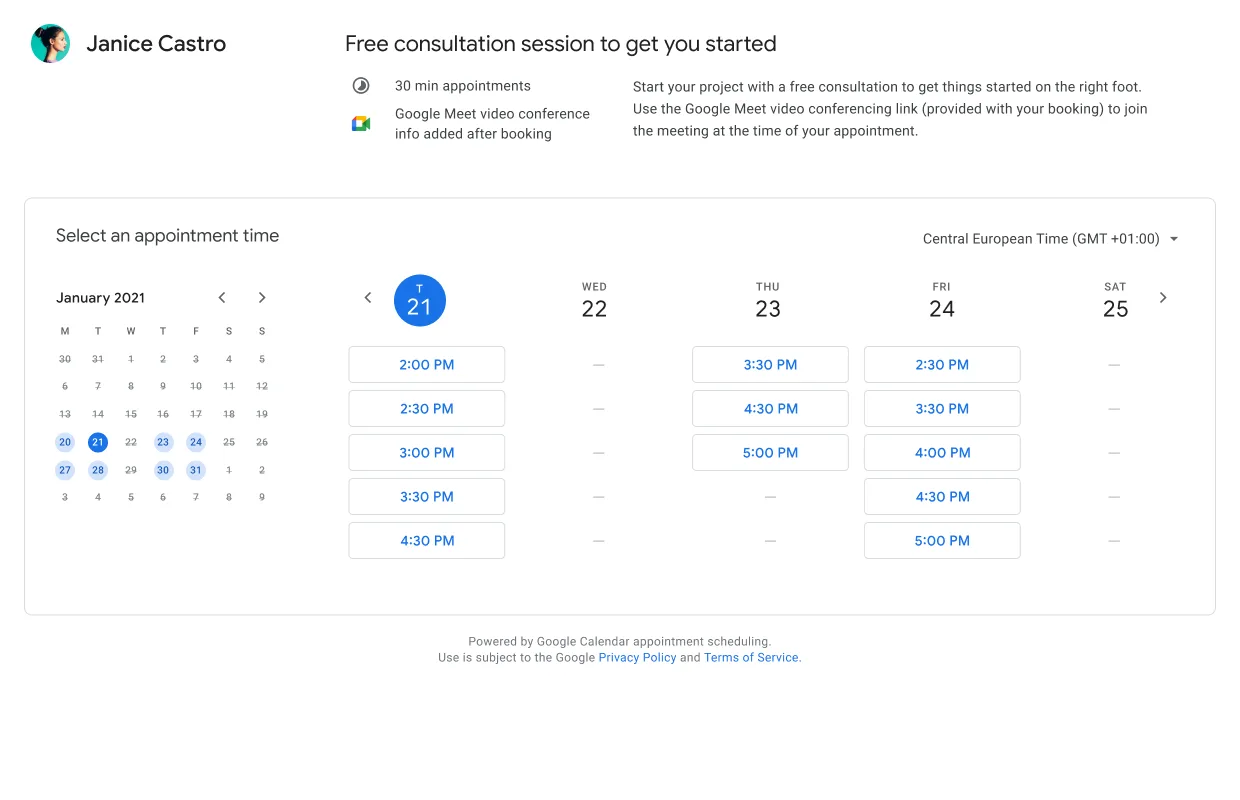
Google Appointment Schedule is a feature built directly into Google Calendar, designed to allow users within Google Workspace to easily create bookable time slots that others can reserve based on their availability. It’s especially useful for professionals who want seamless scheduling without extra software, offering features like customizable booking pages, calendar integration, and email confirmations.
- Advantages:
- Deep integration with Google Workspace and Google Calendar
- Easy to set up and use without technical skills
- Free for Google Workspace users
- Supports customization of booking page and appointment details
- Disadvantages:
- Mainly supports email notifications; lacks support for SMS or multi-channel reminders
- No built-in two-way communication for confirmations or rescheduling
Zoho Calendar
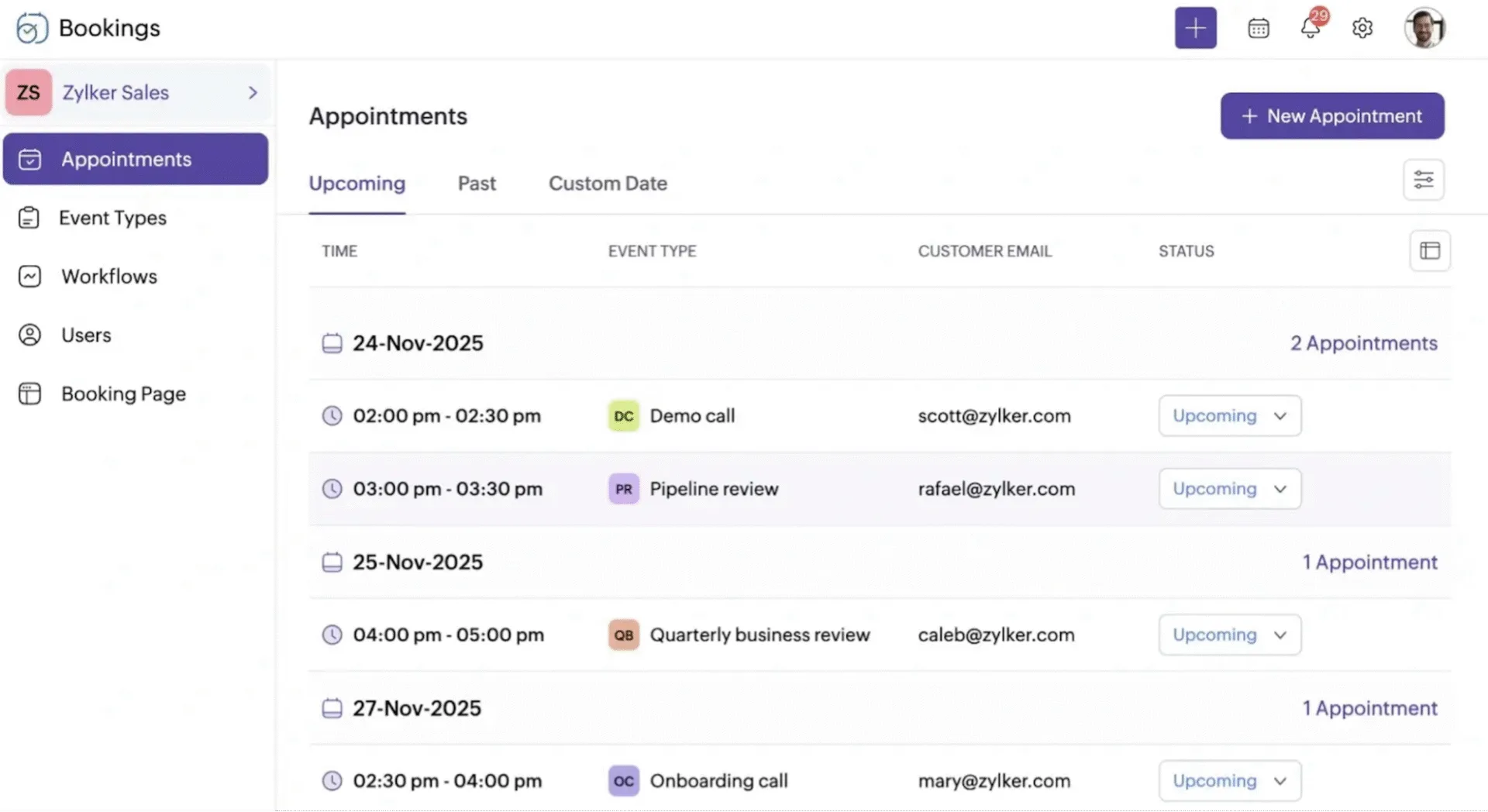
Zoho Calendar is part of the comprehensive Zoho suite, offering powerful appointment scheduling functionality. It supports multiple notification channels, calendar sharing, and synchronization with Zoho CRM and other systems, making it suitable for businesses requiring robust scheduling features and workflow automation.
- Advantages:
- Supports SMS, email, and two-way communication for appointment confirmations
- Integrates well with popular calendars and Zoho CRM
- Offers customizable reminder templates and detailed reporting
- Disadvantages:
- Some key features available only in paid plans
- Setup may require more time and training
Calendly
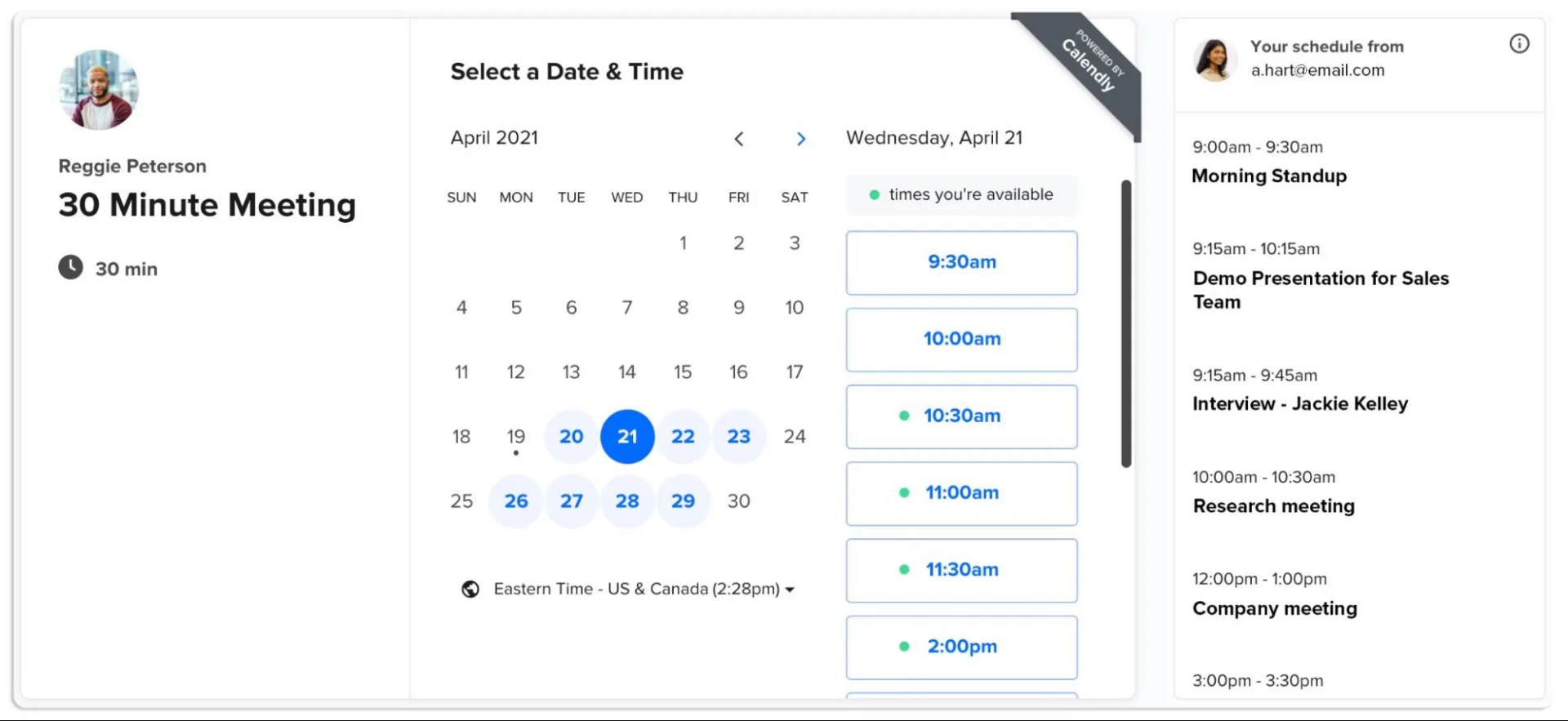
Calendly is a popular appointment scheduling application known for its intuitive interface and wide adoption. It allows for multi-channel reminders including email and SMS (advanced notifications require premium plans), supports timezone detection, and integrates with Google Calendar, Outlook, and Microsoft Teams.
- Advantages:
- User-friendly interface ideal for individual professionals and teams
- Multi-channel reminders with timezone support
- Integrates with major calendar platforms and video conferencing tools
- Disadvantages:
- Free tier limits features
- Some notification options require paid subscription
SimplyBook.me
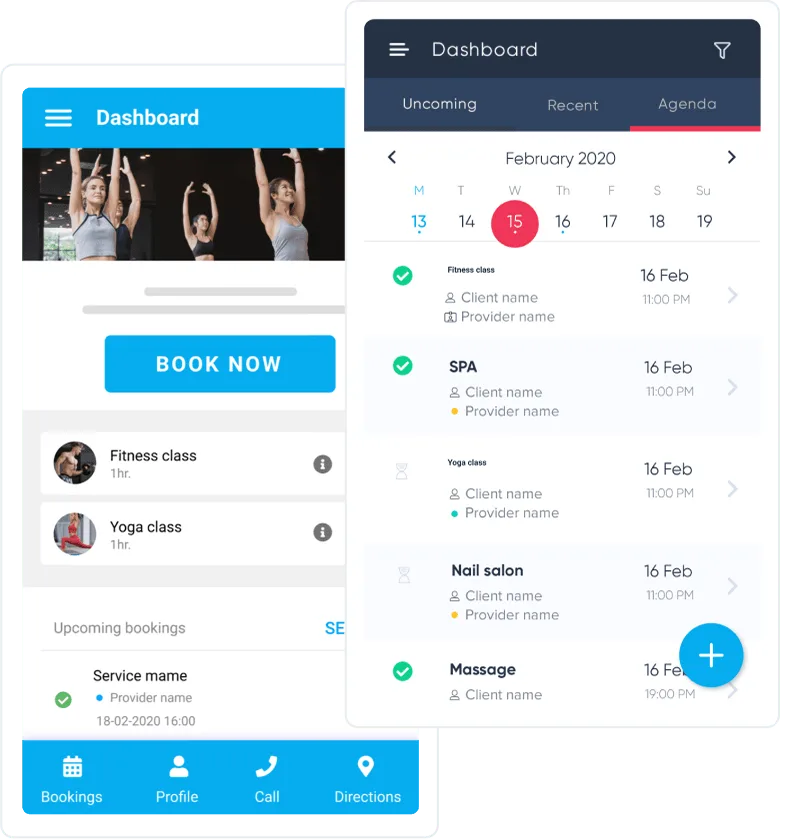
SimplyBook.me caters especially to small businesses and health and wellness sectors, providing customizable booking pages and robust notification options, including SMS and email reminders. It also integrates with payment gateways, making it a good choice for service-based businesses requiring full client management.
- Advantages:
- Highly customizable booking and reminder templates
- Supports SMS and email reminders with flexible scheduling
- Integrates with payment systems like PayPal and Stripe
- Suitable for niche markets like clinics and salons
- Disadvantages:
- User interface can feel outdated compared to competitors
- Some advanced features require premium plans
Specialized appointment reminder software tailored for industries such as healthcare and beauty salons includes features beyond standard scheduling and reminders. Healthcare solutions focus heavily on regulatory compliance, such as HIPAA in the US or GDPR in the EU, so that all patient communications, including automated reminders, are secure. These systems often provide document preparation reminders, automated voice calls for those less comfortable with texts, and deep integration with electronic health records (EHR) and practice management software.
👉 Read more about nurse scheduling software >>>
In contrast, appointment reminder tools designed for the beauty industry and other service businesses emphasize customer convenience. They commonly provide easy booking links, promotional messaging, and integrations with payment systems to facilitate prepaid appointments.
When selecting an appointment reminder system, several criteria should guide your decision:
- Convenience and ease of use: The system should be intuitive for staff and clients, minimizing training time.
- Pricing model: Consider whether pricing is subscription-based or per notification, and the transparency of these costs.
- Supported communication channels: Systems that offer SMS, email, voice calls, and messenger notifications provide flexibility.
- Two-way interaction capabilities: The ability for clients to confirm, cancel, or reschedule directly via reply messages is extremely convenient.
- Template customization and branding: Custom messages aligned with company style improve professionalism.
- Calendar and CRM integration: Smooth syncing with existing tools prevents double entries and keeps data consistent.
- Reporting and analytics: Insight into reminders sent, responses, cancellations, and no-show rates helps with resource optimization.
- Customer support and data security compliance: Reliable assistance and assurance that the system meets industry regulations, especially important in healthcare contexts.
2.2 How to Choose the Best Appointment Reminder System
Picking the right appointment reminder software can really help keep your schedule on track, cut down on missed appointments, and make your clients happier. Here is a clear step-by-step plan to guide your decision:
- Assess Your Needs
Begin by estimating how many appointments you handle each month. Identify the communication channels your clients prefer—whether SMS, email, voice calls, or instant messengers. Knowing these needs will help you choose a system that supports the right volume and communication mix. - Integration Capabilities
Check how easily the reminder system integrates with your existing tools. It should sync with your CRM, calendar (Google Calendar, Outlook, SharePoint), or any other appointment systems you use. Good integration reduces manual data entry. - Cost Structure
Compare pricing models: some systems charge monthly subscriptions, while others bill per message or reminder sent. Clear pricing with no hidden fees is essential to avoid budget surprises. Consider the cost-benefit balance for your expected usage. - Ease of Use
The software should have a user-friendly interface so your administrative staff can manage reminders without a long learning curve. - Trial Availability
It’s strongly recommended to test the system during a free trial period. This way you can verify if the features meet your needs and if the system fits your workflow before committing.
Best appointment reminder software typically offers multiple communication channels to suit different preferences, including SMS, emails, calls, and messenger apps.
👉 Discover attendance management >>>
Universal Systems vs. Industry-Specific Solutions
Universal appointment reminder systems serve a wide range of businesses with flexible features and integrations. They are often cost-effective and easy to adopt for small to medium-sized businesses. Examples include Google Appointment Schedule, Calendly, and Zoho Calendar, which provide essential tools for most appointment-based services.
Industry-specific solutions cater to particular market requirements where advanced compliance, data security, and workflows are critical. For instance:
- Healthcare providers require strict data privacy (HIPAA, GDPR), secure messaging, voice call reminders, and integration with Electronic Health Records (EHR).
- Small businesses and salons prioritize simplicity, ease-of-use, and lower costs with options for promotions and payment integrations.
Section 3: Tools and Custom Alerts in SharePoint/Microsoft 365
If your organization uses SharePoint, especially the online Microsoft 365 version, you can customize alert systems directly within SharePoint to notify users about tasks or changes in lists that may be used to track appointments or other records. This allows creating simple reminders or alerts without any separate software.
However, Microsoft has announced plans to retire the classic SharePoint alert system by June 2026.
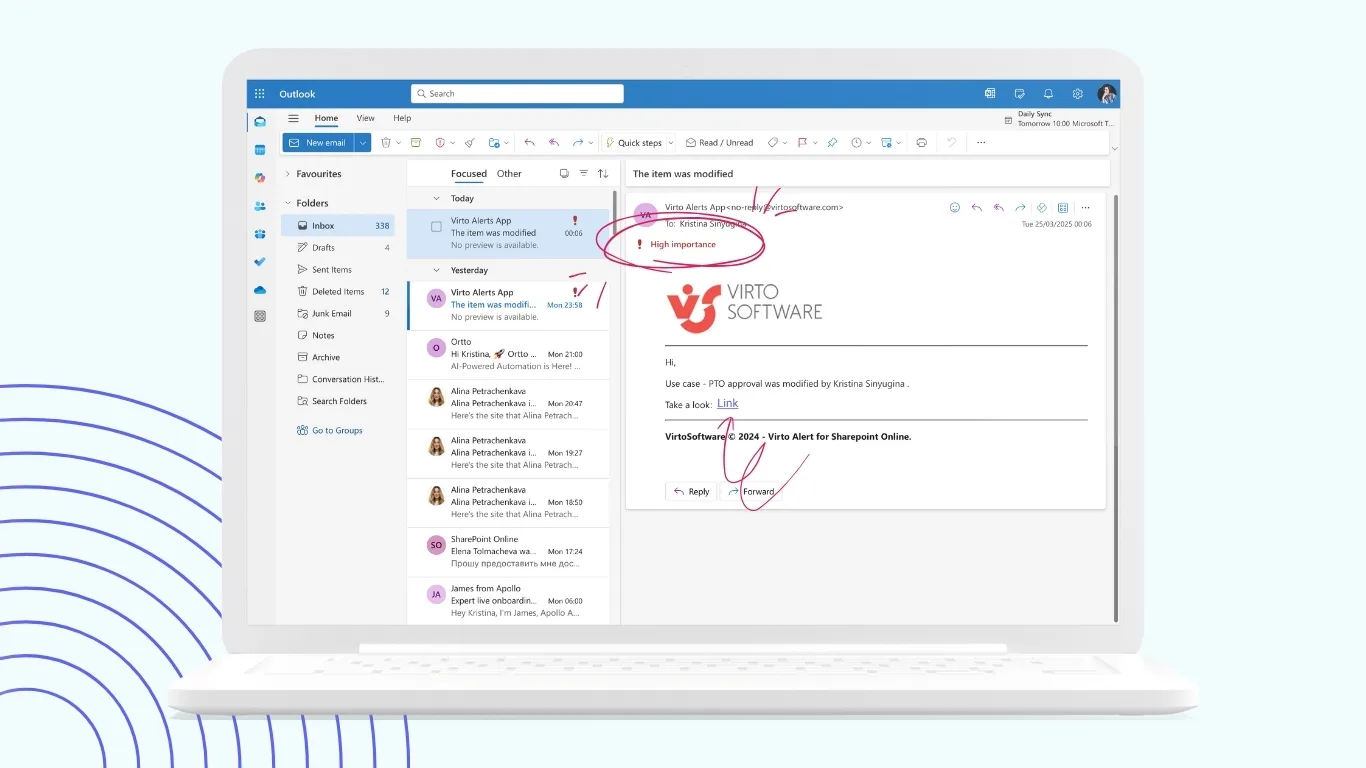
As a perfect alternative that preserves existing alert functionalities and allows the creation of more flexible and powerful notifications, you can use Virto Alerts & Reminder App for SharePoint Online & Microsoft 365. This tool creates alerts and reminders based on any SharePoint data, supports flexible notification scenarios, and integrates seamlessly with existing business processes.
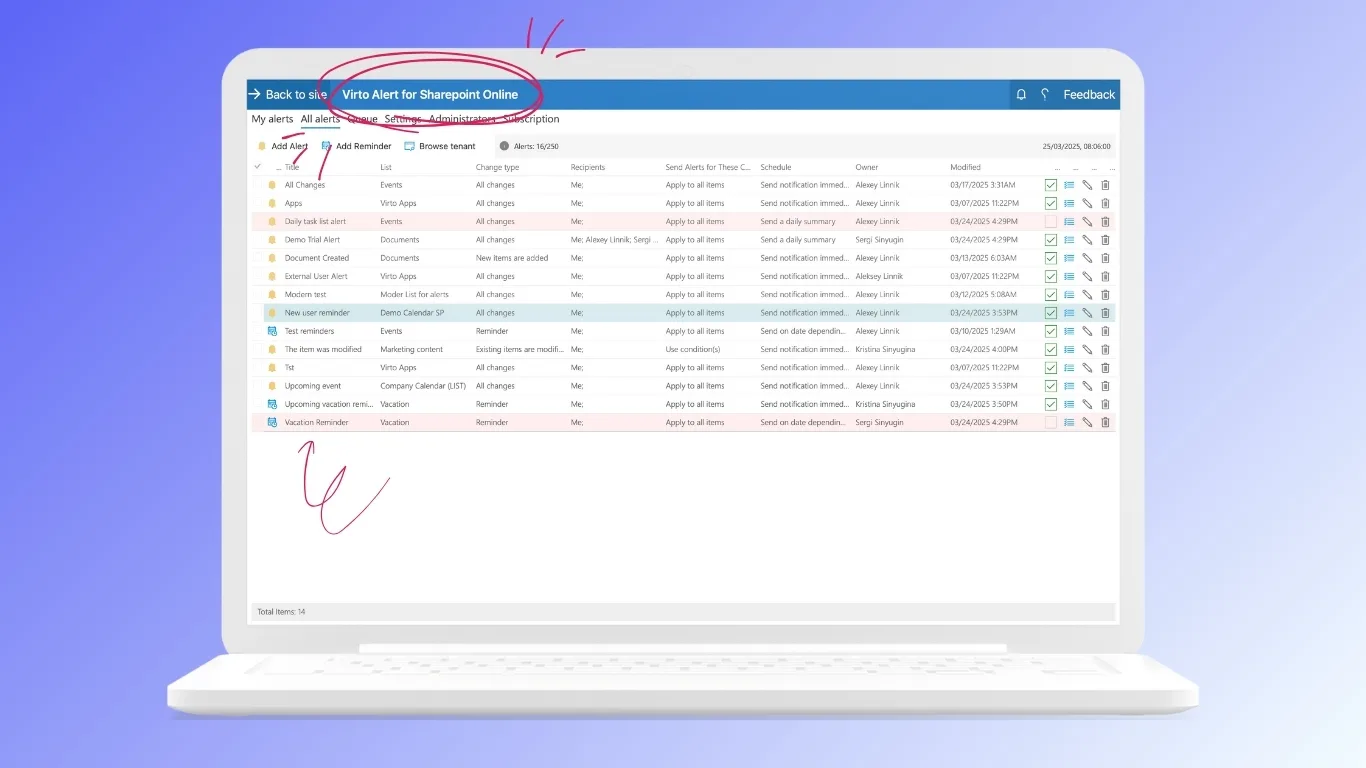
One significant advantage of Virto Alerts & Reminder is the ability to set complex conditional reminders — for example, “Send SMS if an appointment is not confirmed within 3 hours” — functionality often missing from basic SharePoint settings.
A practical example: organizations can automate reminders to clients about upcoming meetings saved in a SharePoint list named “appointments” for timely notifications without manual follow-up.
For those using SharePoint On-Premises, the Virto Notifications & Alerts Web Part offers similar customizable reminder settings, allowing administrators to tailor alerts based on their internal data and workflows, thus improving internal communication and reducing missed deadlines.
Section 4: Industry-Specific Appointment Reminder Solutions
Appointment reminder systems cater to a variety of industries, each with unique requirements:
- Healthcare: This sector demands stringent data privacy and security compliance, including HIPAA in the US and GDPR in Europe. Appointment reminders in healthcare often include notifications about upcoming consultations, preparation instructions, and follow-up messages. Such systems must set encrypted communication with patient data protection as a top priority. For a detailed article on this topic, see our [medical appointment reminder article].
- Beauty Salons and Fitness Studios: Here the focus is on customer engagement and brand reinforcement. Reminder messages frequently include branded SMS with promotional offers, appointment confirmations, and reminders to repeat visits. These solutions often integrate with booking and payment systems for fast client management.
- Consulting and Financial Services: Integration with tools for online meetings such as Zoom or Microsoft Teams is crucial, along with calendar sync. Appointment reminders in this sector often provide direct links to virtual meetings and allow easy rescheduling through calendar invites.
- Small Businesses: Simplicity and affordability are key. Small businesses benefit from ready-made templates, easy subscription models, and integration with popular calendars like Google Calendar or Microsoft Outlook. The focus lies on quick setup and reliable reminders without complex features.
- Additional Sectors: Other industries, such as real estate, education, and service maintenance, also make use of tailored reminders to improve client communication and reduce missed appointments.
Each industry’s demands influence the choice and configuration of appointment reminder software, balancing compliance and operational efficiency.
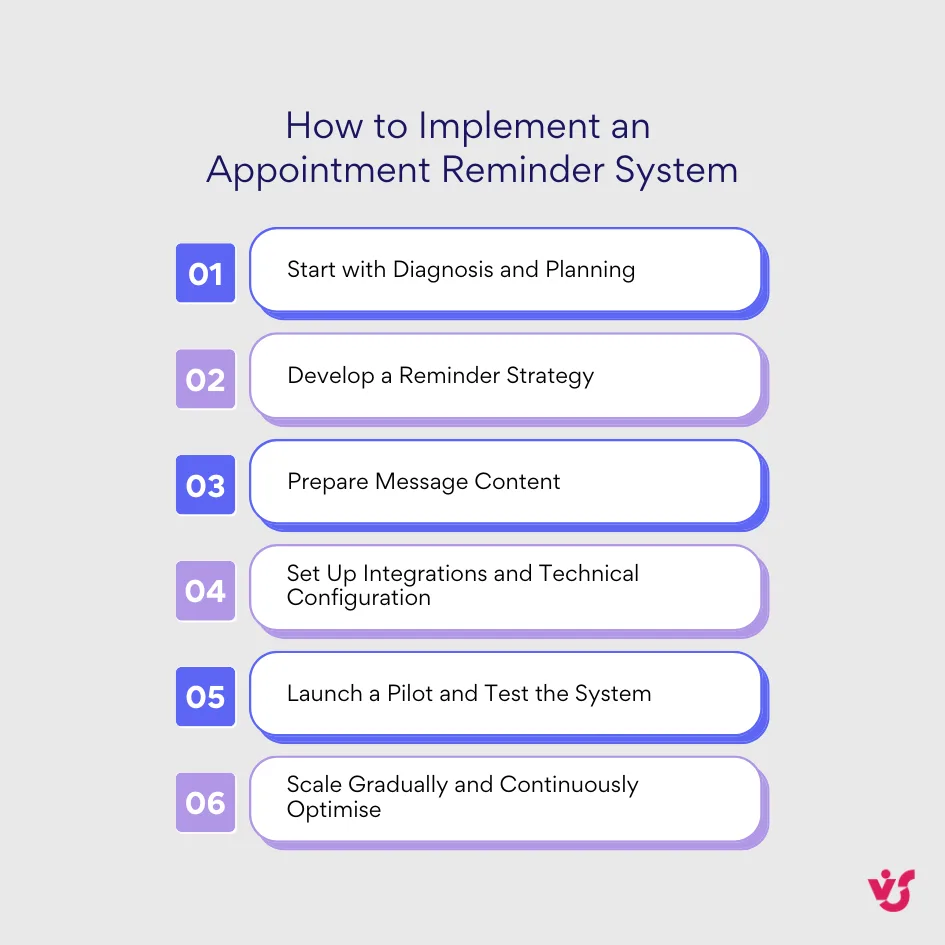
Section 5: How to Implement an Appointment Reminder System in Your Business
- Start with Diagnosis and Planning
Begin by analyzing your current appointment management processes. Understand how many meetings are missed monthly, what communication channels you use, and whether templates for messages exist. Collect key operational details — work schedules, cancellation and rescheduling policies, and client preferences — to build a foundation for your reminder strategy. - Develop a Reminder Strategy
Create two or three core notification sequences tailored to your needs. For example:- 48 hours before the appointment, send a detailed email outlining the meeting details.
- 24 hours before, dispatch an SMS with interactive options like “Confirm” or “Reschedule.”
- 2 hours prior, send a follow-up SMS to clients who haven’t confirmed yet.
For high-priority appointments, consider adding escalation steps such as automated voice calls if there is no response.
- Prepare Message Content
Craft clear and polite messages that contain the main information such as the client’s name, appointment date and time, location or meeting link, and simple response options like “Confirm,” “Reschedule,” or “Cancel.” - Set Up Integrations and Technical Configuration
Connect your appointment reminder software with your existing calendars (Google Calendar or Microsoft Outlook) to keep schedules synchronized. Further integrate with CRM or booking platforms to automate the flow of client and appointment data. Proper integration eliminates manual data entry errors and provides real-time updates. - Launch a Pilot and Test the System
Launch the system with a limited client group or specific business segment to monitor its effectiveness and gather feedback. Run the pilot for 3-4 weeks, tracking confirmation rates, reduction in no-shows, and client satisfaction. Use this data to fine-tune notification timing, content, and escalation rules before a full rollout. - Gradual Scaling and Continuous Optimization
After a successful pilot, expand the reminder system across all areas of your business. Start with simple reminder chains and gradually set up advanced rules to address diverse scenarios. Continuously evaluate system performance using analytics and adjust workflows for top customer experience.
Conclusion
Appointment reminder software is much more than just a convenience — it’s a cost-effective tool that significantly optimizes workflows. By automating reminders and confirmations, businesses reduce no-shows and free up valuable staff time for higher-priority tasks.
When selecting an appointment reminder system, consider factors such as whether to choose a versatile universal solution or an industry-specific tool for your sector’s needs. Pay close attention to supported notification channels, pricing options, ease of use, level of integration with your existing systems, and compliance with regulatory standards if needed.
Exploring and adopting flexible and reliable reminder systems empowers businesses to reduce costly scheduling errors and predictably boost revenue.
For organizations already invested in Microsoft 365 environments, it is wise to explore customizable alert and reminder tools such as the Virto Alerts & Reminder App for SharePoint Online & Microsoft 365. This solution offers superior flexibility, preparing your business for Microsoft’s planned retirement of the classic SharePoint alert system in mid-2026. Employing such advanced tools helps maintain seamless operations, improve communication workflows, and maximize the value of your Microsoft ecosystem.
In summary, investing time and resources in proper appointment reminder solutions will not only improve your scheduling efficiency but also elevate overall business success.