


Due Dates That Remind, Overdue Tasks That Report
Every task in a SharePoint list has an assignee and a due date. Virto Alerts & Reminder App emails the assignee three days before the date and sends the manager one table of everything overdue each morning.



Trusted by Industry Leaders


and over 8,000 businesses worldwide
A Reminder Before the Date, a Table After It
One task list and three rules: the assignee hears three days before a task is due, the manager gets a table of what is overdue and still open, and once a week one table shows what is due next.
The reminder
Three days before the due date, the assignee gets an email
Recipient from the Assigned to column
The To line is filled from the task itself, so one rule reminds every assignee about their own tasks.
Finished tasks are left out
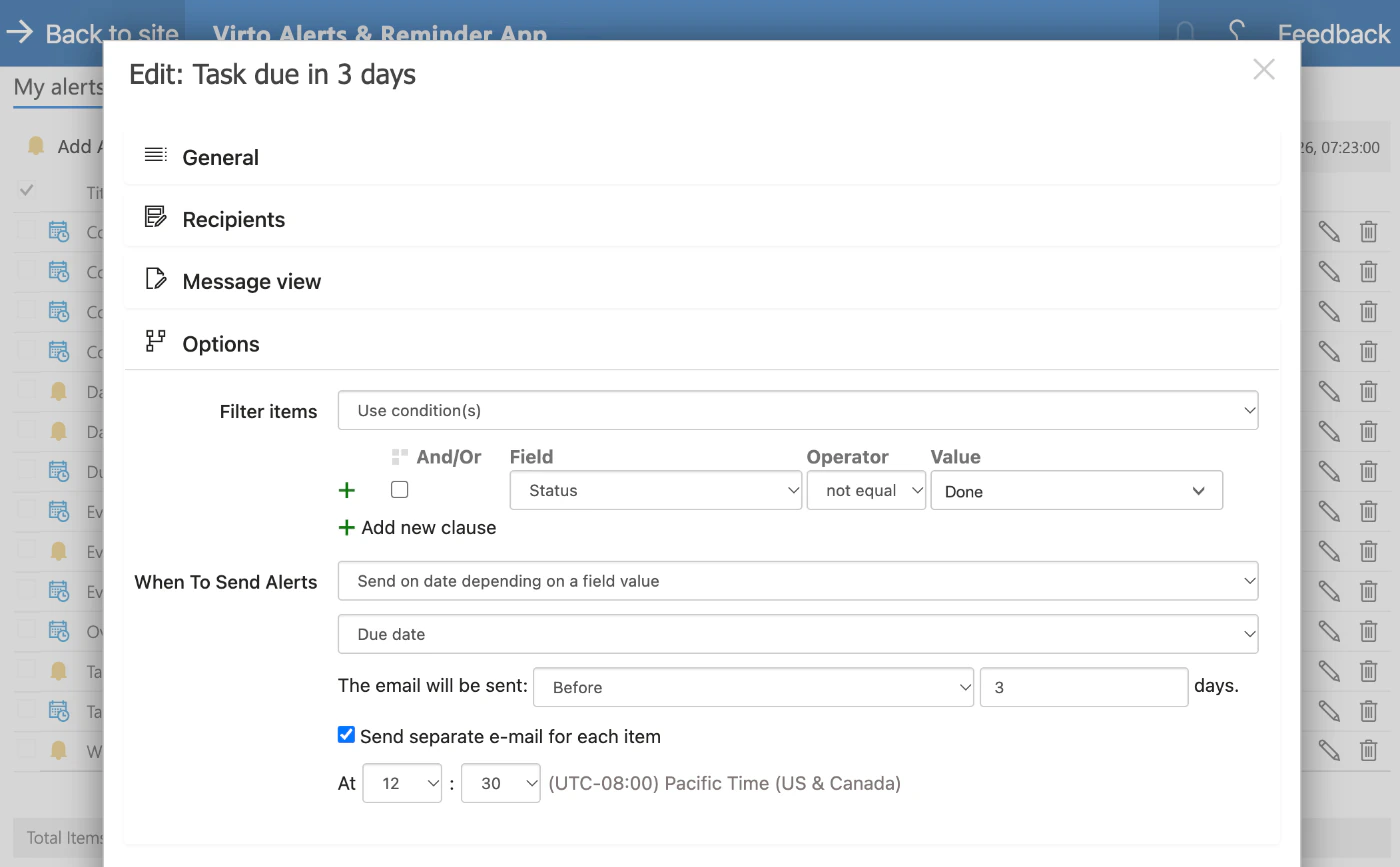
The condition Status not equal Done keeps completed tasks out of the reminder.
Set the rule up ahead
Each rule sends at its own hour, in the time zone of the app settings. A new rule does not send on the day it is created.
The email
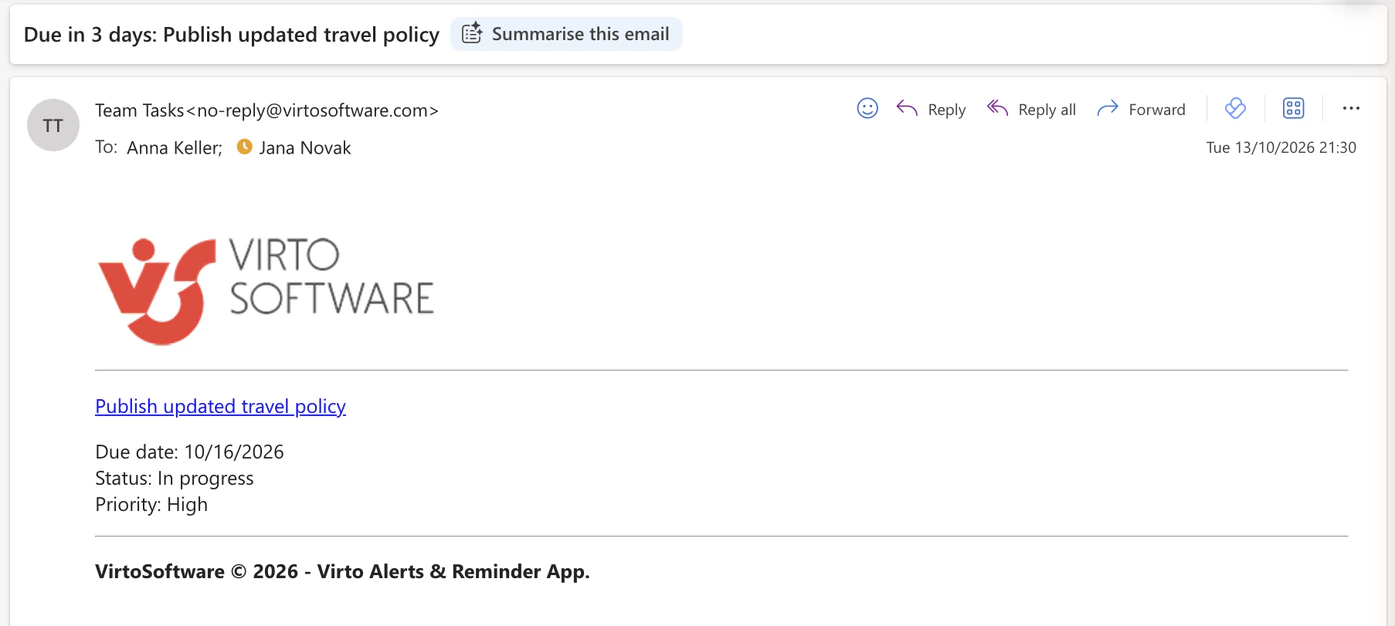
One email per task, with the date and a link
The subject names the task
Due in 3 days and the task title: the assignee knows what it is about before opening the message.
New tasks are included
A task added after the rule was saved gets its reminder as well. The rule does not have to be saved again.
The overdue table
Each morning the manager gets what is overdue
Before today and not done
Two conditions define overdue: Due date is earlier than today, and Status is not Done. The filter is counted from the current date each time the summary goes out.
One table instead of a chase
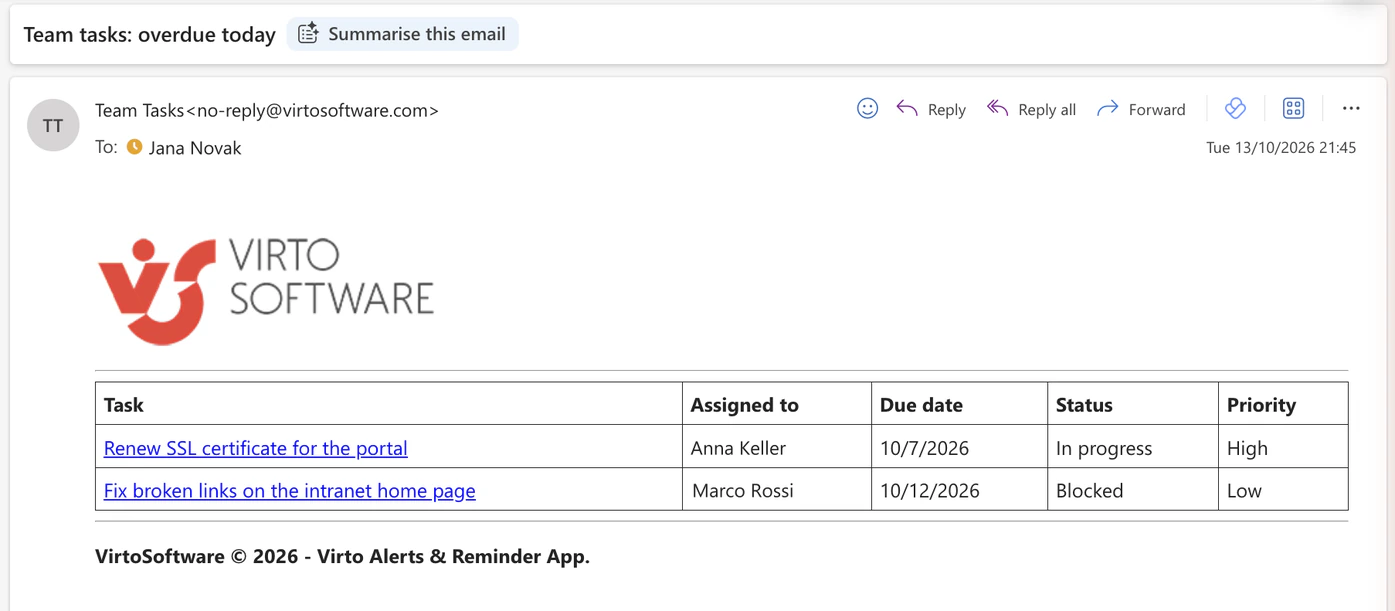
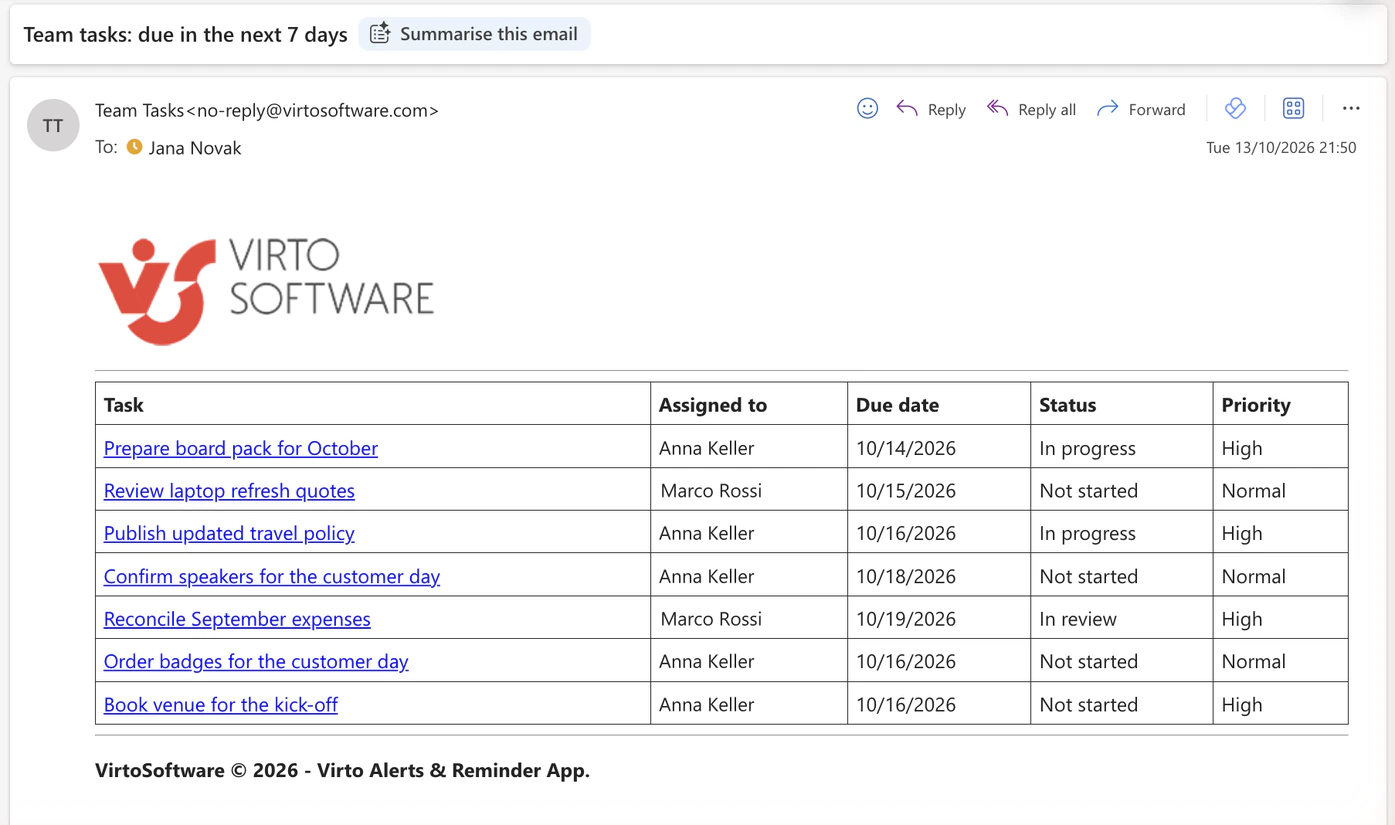
The open overdue tasks arrive as rows of one email — task, assignee, due date, status, priority — each linked to its item.
Working days only
The summary goes out on the weekdays you tick.
![Options section of the reminder Overdue tasks: Filter items set to Use condition(s) with Due date less than [Today]+0 and Status not equal Done; When To Send Alerts set to Send a daily summary at 12:45, Pacific Time, Monday to Friday](/images/use-cases/task-deadline-reminders/overdue-options.webp)
The overdue email
The table lists only what is late and still open
Closed that morning, gone from the table
A third task was overdue and was set to Done before the summary went out. It is not listed: the conditions are checked when the email is sent.
Late since yesterday, listed today
The task due on 12 October is in the table of 13 October, the first summary after its date.
The week ahead
Once a week, everything due in the next seven days
A third rule on the same list
The weekly table is one more reminder rule: tasks whose Due date falls in the next seven days and whose Status is not Done, sent on the weekday you choose.
Rows in the order of the list
Tasks appear in the order they were created, not sorted by date: the two at the bottom were added to the list last.
Key benefits

Reminders for a team, not for one person
Set a reminder in Microsoft Lists emails the person who set it. Here the recipient comes from the Assigned to column of each task.
Overdue in one table
The manager reads one email with the open overdue tasks instead of sorting the list by date.
Done means quiet
A condition on Status keeps finished tasks out of both the reminder and the table.
As many date rules as the list needs
SharePoint's built-in rules allow two "a date approaches" rules on a list or library. A reminder, an overdue table and a weekly table are three rules on one list here.
Every rule in one place
My alerts lists each rule with its list, recipients and schedule, and the Queue tab shows what has been sent and what is due to go next.
The list stays where it is
The tasks remain an ordinary SharePoint list in your Microsoft 365 tenant, with the permissions and version history it already has.
Which reminder fits which task list
Tasks live in a SharePoint list; each has an assignee and a due date.

One rule emails each assignee a set number of days before their task is due.
Nobody should have to open the list and sort it by date every morning.
A daily table lists the tasks that are past their date and not done. This replaces a chain of follow-up emails; it is a report, not an escalation workflow.
Planner emails the assignee when a task is due soon or late. Virto Alerts & Reminder App works with SharePoint lists and libraries.
It is built in and emails the person who set it, which suits a personal follow-up rather than a team list.
Virto Alerts & Reminder App
Give every due date in your task list a reminder


Related use cases
Discover our range of use cases to take your planning and coordination to another level
Change Digest for SharePoint Lists
Several people edit one SharePoint list; the project manager gets one email a day with every change in a table, and a separate email within minutes when a task is blocked.
Learn more about Change Digest for SharePoint Lists
Expiration & Renewal Reminders
Each owner gets an email 90, 60 and 30 days before a contract, certificate or licence ends, and the team lead gets one weekly table — from the SharePoint list you already keep.
Learn more about Expiration & Renewal Reminders
Project Management
Leverage Virto's advanced tools to masterfully manage projects—breaking down complexities, optimizing timelines, and empowering agile methodology.
Learn more about Project Management