


Updated for SharePoint Online & Microsoft 365 (2026). If your practice runs dozens of projects across multiple studios and offices, the calendar built into SharePoint was never designed for what you are asking it to do. This guide shows how multidisciplinary architecture and engineering firms unify project phases, studio schedules, resource availability, and client coordination into a single Microsoft 365 calendar view — without leaving the tenant you already trust.
Why architecture firms outgrow the native SharePoint calendar
SharePoint and the native Microsoft 365 calendar were built around a simple assumption: one list, one calendar, one team looking at it. That assumption holds for a small department tracking a handful of events. It collapses the moment a firm starts running real project delivery.
An architecture practice does not run one schedule. It runs many — concurrently, across disciplines, and across offices. Every project carries its own phase timeline. Every studio carries its own staffing and milestones. Every office carries its own meeting rooms and local deadlines. The native calendar shows you one of these at a time, in one color, with no way to lay them over each other.
The result is a familiar set of frustrations: deadlines scattered across separate SharePoint lists and personal Outlook calendars, no single view that a principal can open to see the whole firm, and studio schedules that stay siloed until something slips. People rebuild the same picture by hand in spreadsheets, then watch it go stale within a week. The calendar is not the single source of truth — it is one more place to check.
What architecture firms actually need is a way to see every project, studio, and office in one place, color-coded and filterable, while keeping the underlying data exactly where it already lives in Microsoft 365. That gap — between a single-list calendar and a multi-project practice — is the problem this guide addresses.
The scheduling reality inside a multi-studio practice
Consider a representative firm: a multidisciplinary practice with offices across several cities and studios spanning architecture, engineering, interiors, lighting, and planning. (We are describing a profile here, not naming a specific client.) On any given week, that firm is not coordinating a calendar — it is coordinating a dozen overlapping calendars that no one ever consolidated.
Walk through the surfaces a single project touches. There are project-phase milestones — schematic design, design development, construction documents, bidding, and construction administration (SD / DD / CD / bidding / CA) — each with its own dates that shift as the project moves. There are submittal and permit deadlines driven by external authorities. There is staff utilization: who is allocated where, and who is actually free. There is meeting-room booking, multiplied across offices. And there is external coordination — clients, general contractors, and structural and MEP consulting engineers who all need to see milestones but live outside your tenant.
No single person owns all of this, which is exactly why it fragments. The table below maps the common calendar needs in a multi-studio firm against who typically owns each one today — and where the pain shows up.
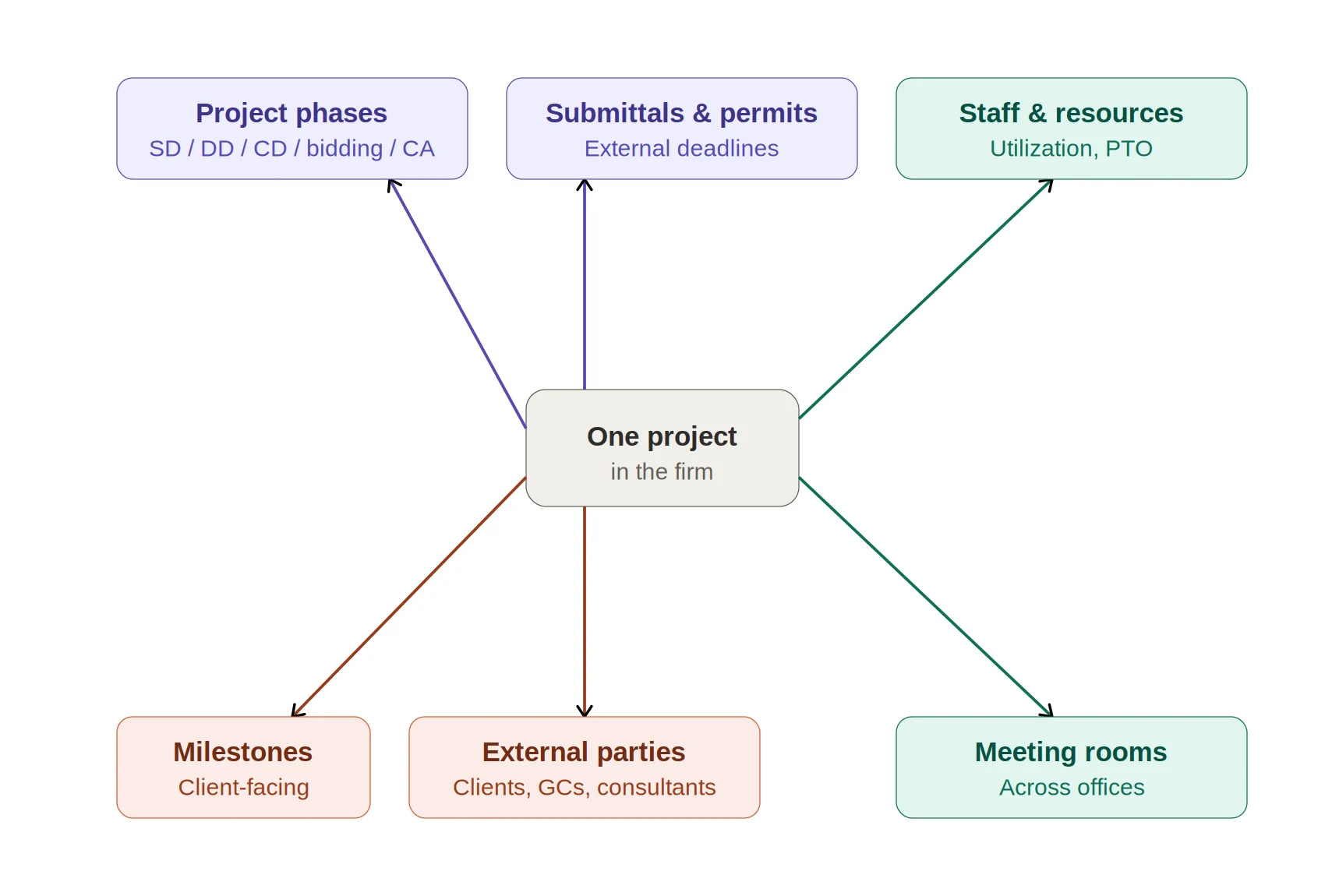
A diagram of the calendar surfaces a single project touches.
| Calendar need | Who owns it today | Today’s pain |
|---|---|---|
| Project-phase milestones (SD/DD/CD/bidding/CA) | Project architect / PM | Lives in a per-project list; invisible firm-wide |
| Submittal & permit deadlines | PM / project coordinator | Tracked off-calendar in spreadsheets; easy to miss |
| Staff utilization & availability | Studio director / PMO | No overlay onto project timelines before committing dates |
| Meeting-room booking | Office admin (per office) | Separate per office; no cross-office view |
| External milestone coordination | Project architect | Clients & consultants can’t see the schedule without access |
If that table looks like your firm, the rest of this guide is about collapsing those rows into a single, color-coded view.
One overlay view for every project, studio, and office
The core answer is the Virto Calendar App for Microsoft 365. Instead of forcing you to pick one calendar at a time, it layers many calendar sources into a single SharePoint Online view — each project, studio, or office in its own color, all visible at once.
For an architecture firm, the feature set maps almost one-to-one onto the problems above:
- Color-coded multi-source overlay — give every project or studio its own color, then toggle sources on and off to focus a view for a principal, a studio, or a client review.
- Eight view modes, including a Gantt view — see project-phase timelines as bars, not just dots on a month grid, so SD/DD/CD/CA reads at a glance.
- Drag-and-drop rescheduling — when a milestone slips, move it on the calendar and the underlying source updates.
- Microsoft Planner task overlay — pull deliverables and task due dates onto the same calendar as project milestones.
- Exchange and meeting-room overlay — surface room and resource bookings beside project work.
- Multi-site SharePoint list aggregation — combine calendars from different sites and offices into one pane, instead of hopping between site collections.
Practically, this becomes the firm’s single pane of glass. A principal opens one view and sees every active project across every studio, color-coded, with phase timelines in Gantt and room/resource bookings layered in. Nothing is migrated; the data stays in the SharePoint lists, Planner plans, and Exchange calendars it already lives in.
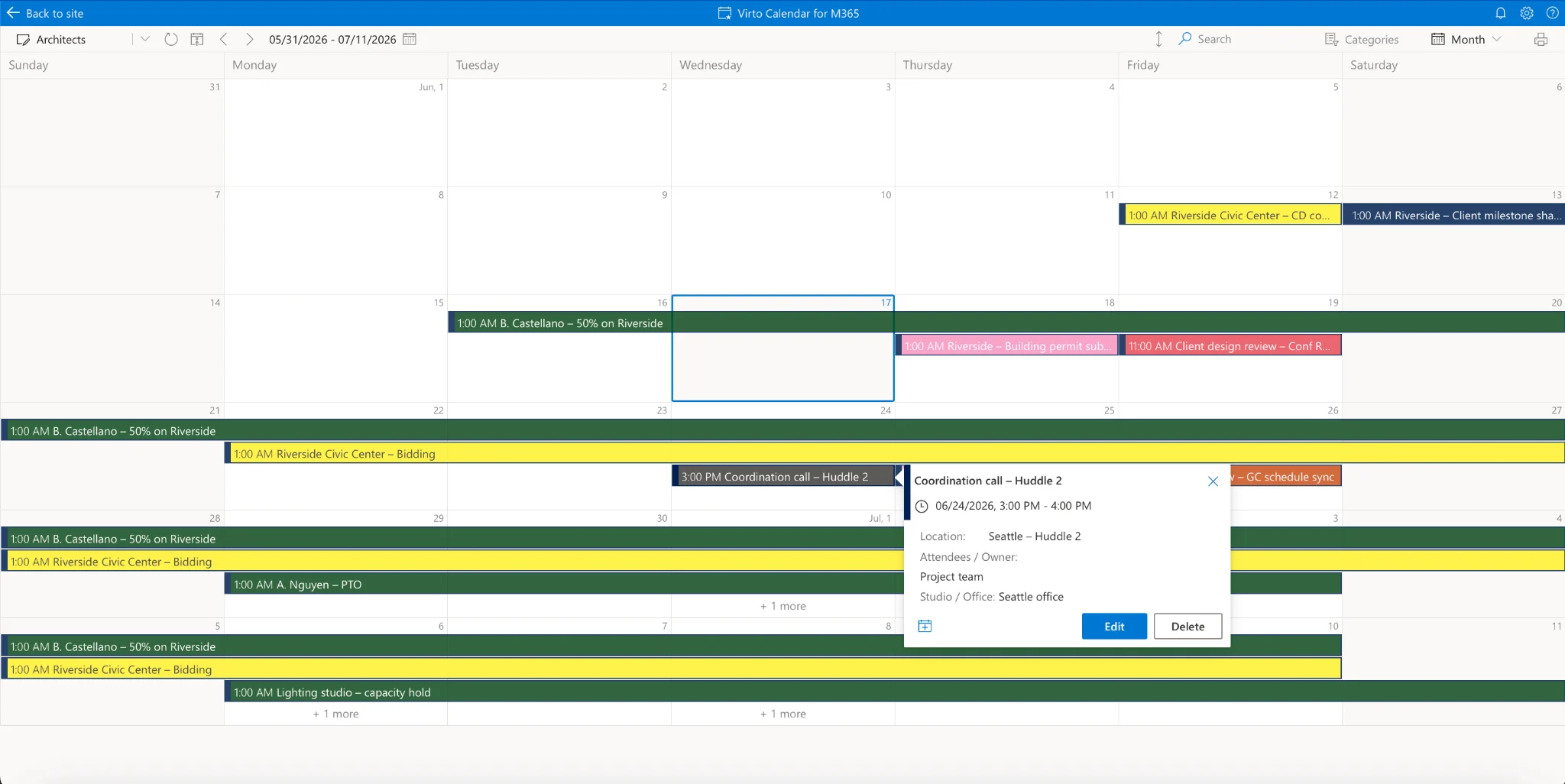
Color-coded multi-source overlay (month view).
Coordinating with clients, contractors, and consultants
Internal visibility solves half the problem. The other half is everyone outside your tenant — the client, the general contractor, the structural and MEP consultants — who need to see milestones but should never get a seat inside your Microsoft 365 environment.
This is where Virto Shared Calendar comes in. It lets you share a calendar without a Microsoft account — a client or contractor opens a read-only milestone calendar through an anonymous link, no login, no license, no guest account to provision. For partner firms, it also supports cross-tenant sharing without setting up federation.
For project delivery, this closes a gap that horizontal PM tools handle clumsily. You publish a client-facing milestone calendar that shows exactly the dates the external party should see — and nothing else. When the schedule changes internally, the shared view reflects it. The recurring “can you re-send us the updated schedule?” email simply stops.
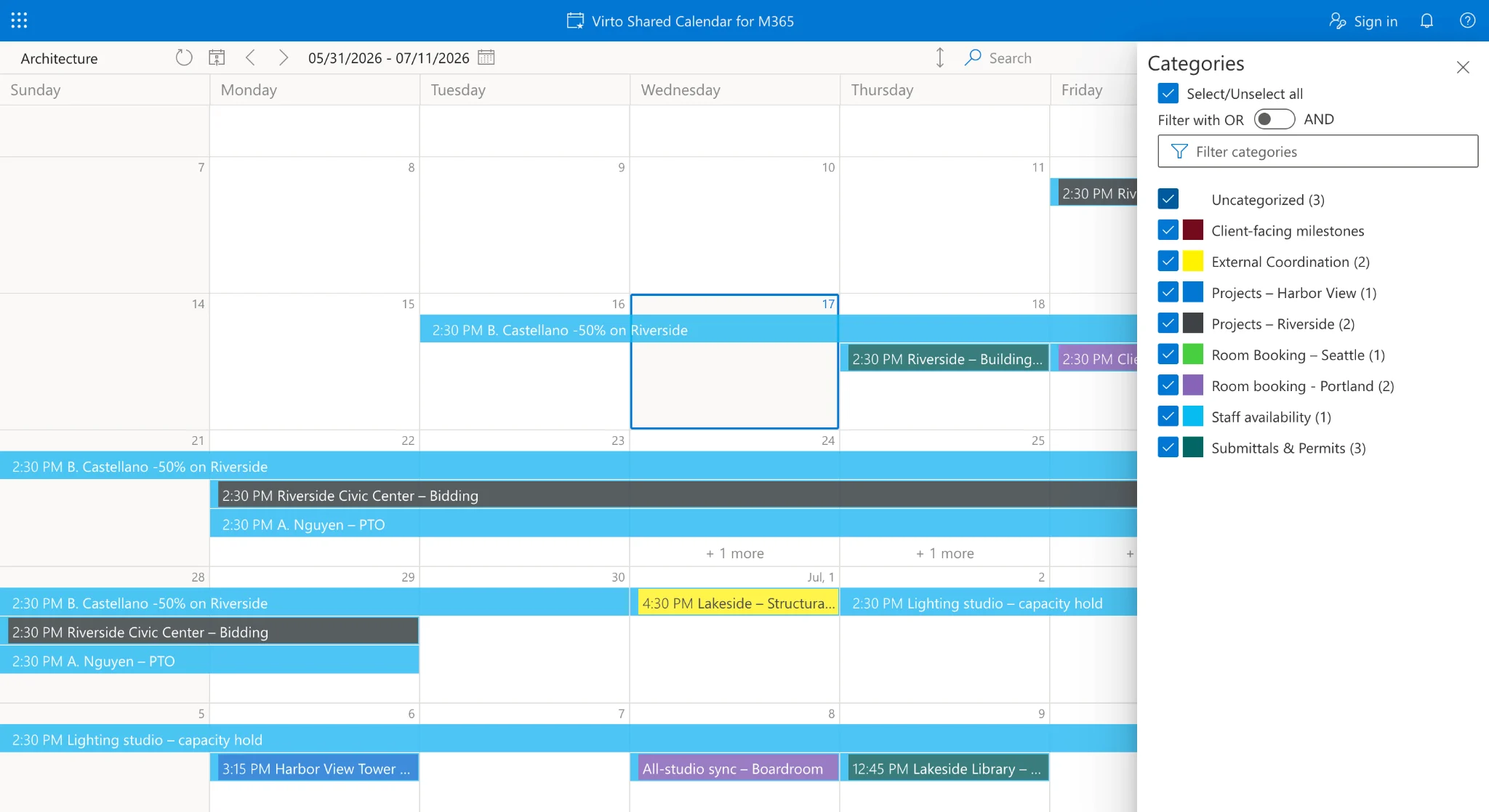
Client-facing shared milestone calendar opened via an anonymous read-only link (no Microsoft 365 login).
Resource and staff scheduling across offices
Beyond projects, the question principals and PMO leads ask most often is simply: who is free? Committing to a deadline without knowing real availability is how firms quietly overcommit a studio.
By overlaying studio availability, PTO, and current staffing onto the same timeline as project phases, the calendar answers that question before a date is promised. A studio director can see, in one view, which staff are allocated to which projects through a given phase, where the gaps are, and who can absorb the next pursuit. Meeting-room and resource overlays extend the same picture across offices, so a multi-city firm coordinates space the same way it coordinates people.
For an operations or PMO lead, this is the difference between resource planning as a monthly spreadsheet exercise and resource planning as a live layer on the calendar everyone already uses.
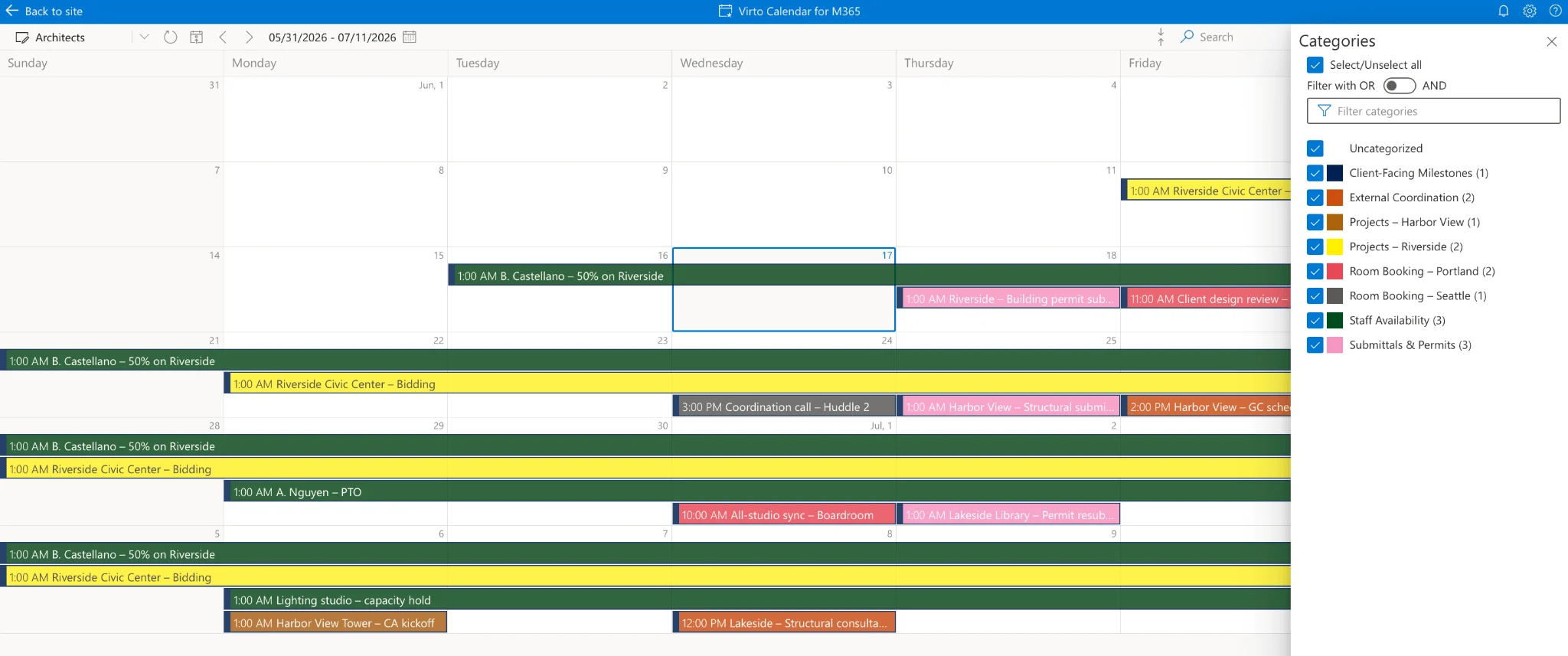
Resource/staff availability (allocation + PTO) overlaid on a project-phase timeline across offices.
Deployment, data sovereignty, and pricing
For the IT or M365 admin signing off, the deployment model matters as much as the features. The Virto Calendar App supports a self-hosted Azure deployment, which means calendar data stays inside the firm’s own Azure tenant — a meaningful point for practices serving government, institutional, or otherwise security-sensitive clients who ask where project data lives.
The app is available through Microsoft AppSource with a 30-day free trial. Pricing is $2,412 per 100 users per year with a 3-year agreement (100 users and up), with a Virto Productivity Kit bundle for firms standardizing on several Virto tools. Firms still running SharePoint Server on-premises can use the Virto Calendar Web Part (with SQL and Gantt support) as an on-prem fallback rather than changing their infrastructure to adopt the calendar.
Pricing shown reflects published rates at the time of writing and should be confirmed on the product page before purchase.
Which Virto calendar fits your firm?
Most firms start with the Virto Calendar App and add Virto Shared Calendar for the external layer. The table below maps each scenario to the right product.
| Your situation | Best fit | Why |
|---|---|---|
| Multi-project, multi-studio firm on M365 / SharePoint Online | Virto Calendar App | Color-coded multi-source overlay + Gantt in one pane |
| Teams-first studios wanting channel-level project calendars | Virto Calendar App for Teams | Brings the overlay into Teams channels |
| Sharing milestones with clients, GCs & consultants | Virto Shared Calendar | Anonymous link & cross-tenant sharing, no MS account |
| Still on SharePoint Server (on-prem) | Virto Calendar Web Part | On-prem deployment with SQL & Gantt |
Get started: Try the Virto Calendar App free for 30 days, or book a demo to see a multi-studio overlay built around your firm’s projects.
Frequently asked questions
Can I overlay multiple project calendars in SharePoint Online?
Yes. The Virto Calendar App aggregates multiple SharePoint lists, Planner plans, and Exchange calendars into a single color-coded view, including across different sites and offices — which is the core reason multi-project firms adopt it over the native calendar.
Can architecture clients view our schedule without a Microsoft 365 login?
Yes. With Virto Shared Calendar you can publish a read-only milestone calendar through an anonymous link, so a client, general contractor, or consultant can view the schedule with no Microsoft account, license, or guest access.
Does it show a Gantt chart for project phases?
Yes. The Virto Calendar App includes a Gantt view among its eleven view modes, so project phases (SD / DD / CD / bidding / CA) display as timeline bars rather than isolated calendar entries.
Can we keep calendar data inside our own Azure tenant?
Yes. A self-hosted Azure deployment keeps calendar data within the firm’s own tenant, which is relevant for practices with government or institutional clients and stricter data-sovereignty requirements.