


How law firms use Microsoft 365 — Teams, Word, SharePoint and Virto Calendar App for secure case collaboration, scheduling and compliance. Updated 2026.
Quick answer: is Microsoft 365 right for law firms?
Microsoft 365 for law firms is a cloud productivity and security suite — Teams, Word, SharePoint, Outlook and OneDrive — that lets legal teams draft documents, run secure case channels and manage matters under one compliance umbrella. Yes, Office 365 is safe for lawyers: it offers encryption in transit and at rest, multi-factor authentication, data loss prevention, eDiscovery and legal hold, and contractual support for GDPR and HIPAA obligations. For most firms the practical question is not whether to adopt it, but which plan tier delivers the compliance depth their matters require.
This guide explains how a modern law practice actually uses Microsoft 365 day to day — from a litigation team co-editing a brief in Word, to a partner overlaying court dates and filing deadlines on a shared calendar. It is written for solo practitioners, small firms and large legal entities evaluating, rolling out or tightening their Microsoft 365 deployment in 2026. If you are comparing dedicated scheduling tools, see our legal practice management solution for the commercial side; this page focuses on the platform itself.
Microsoft 365 tools every law firm uses
Office 365 for law firms is less a set of apps than a connected workspace. Each tool removes a specific source of friction in legal work — version chaos, scattered email, missed deadlines, insecure file sharing. The core components below are the ones legal teams lean on most.
- Microsoft Word — the drafting engine for contracts, briefs, motions and pleadings, with track changes, cross-referencing and legal templates.
- Microsoft Teams — the collaboration hub where each matter gets its own channel for chat, calls, meetings and documents.
- SharePoint Online — the document management backbone: matter libraries, version control, retention policies and granular permissions.
- Outlook (Exchange Online) — encrypted, archived email with conflict-of-interest checks and journaling for the record.
- OneDrive for Business — secure personal and mobile access to working files from court, home or a client site.
- Power Automate — automation for routine workflows such as engagement-letter approvals, intake routing and matter closing checklists.
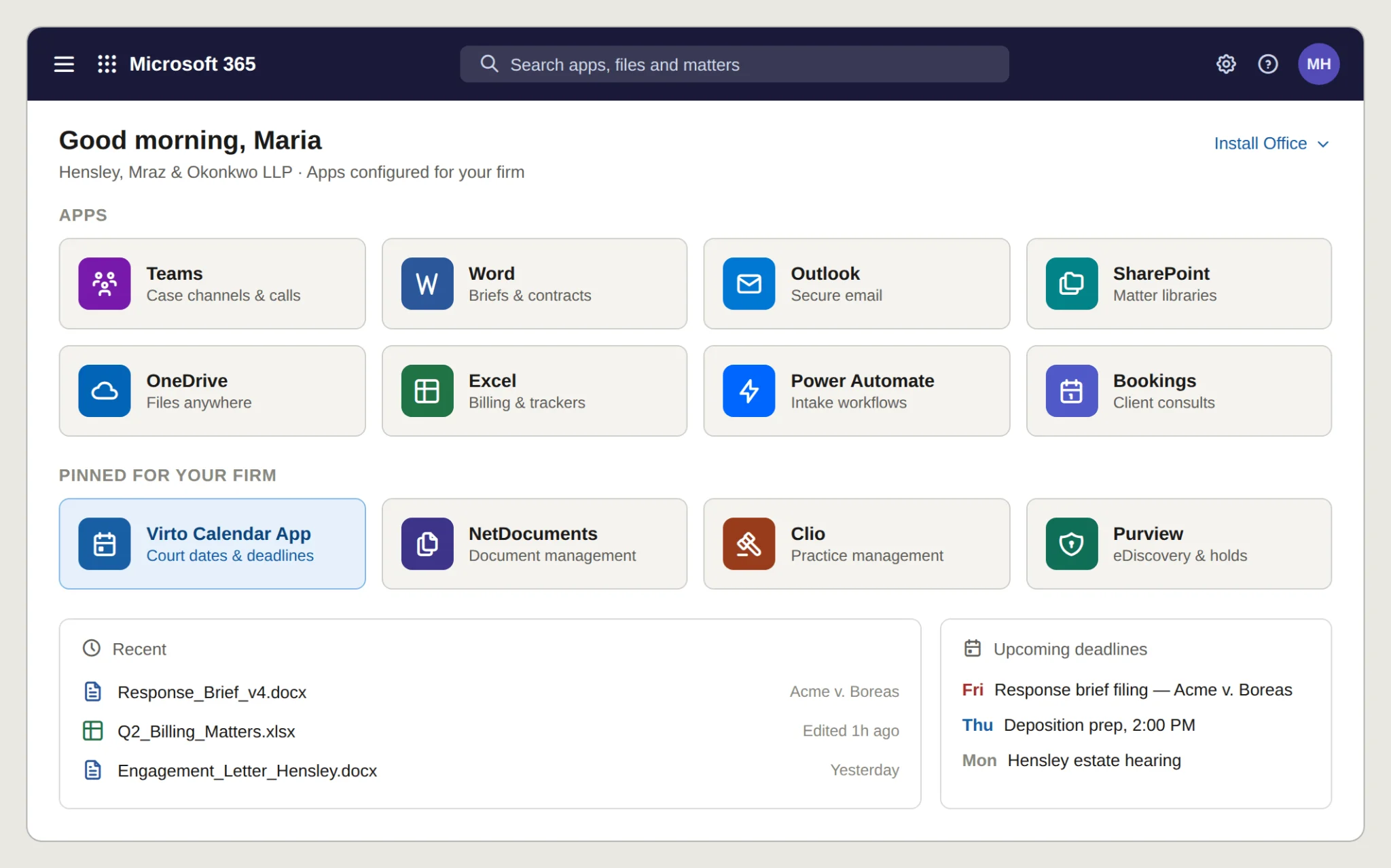
M365 app suite for legal
Microsoft Teams for law firms (case channels)
Microsoft Teams for law firms turns collaboration from an inbox problem into an organized, auditable space. The pattern most firms settle on is one channel per matter — every conversation, file, meeting and decision for that case lives in one place and stays there for the life of the matter.
- Per-case channels: dedicated channels for each matter keep discussions, filings and meetings together, so a lawyer picking up a case sees its full history at a glance.
- Client portals: private channels and secure guest access let clients share documents and join video calls without exposing internal firm conversations.
- Practice-area structure: separate teams or channels for family law, corporate, IP and civil litigation keep cross-department work tidy while still allowing joint sessions on complex matters.
- Integrations: Teams connects to legal-specific systems including NetDocuments, iManage, Westlaw, LexisNexis, Clio and PracticePanther — so document management, research and billing surface inside the same workspace.
In practice: a multi-specialty firm sets up channels per department and uses Teams meeting scheduling to coordinate joint sessions on matters that need several practice areas. A boutique IP firm runs one channel per client, giving each client a secure space for documents, video conferences and a complete record of communications and document versions for case tracking.
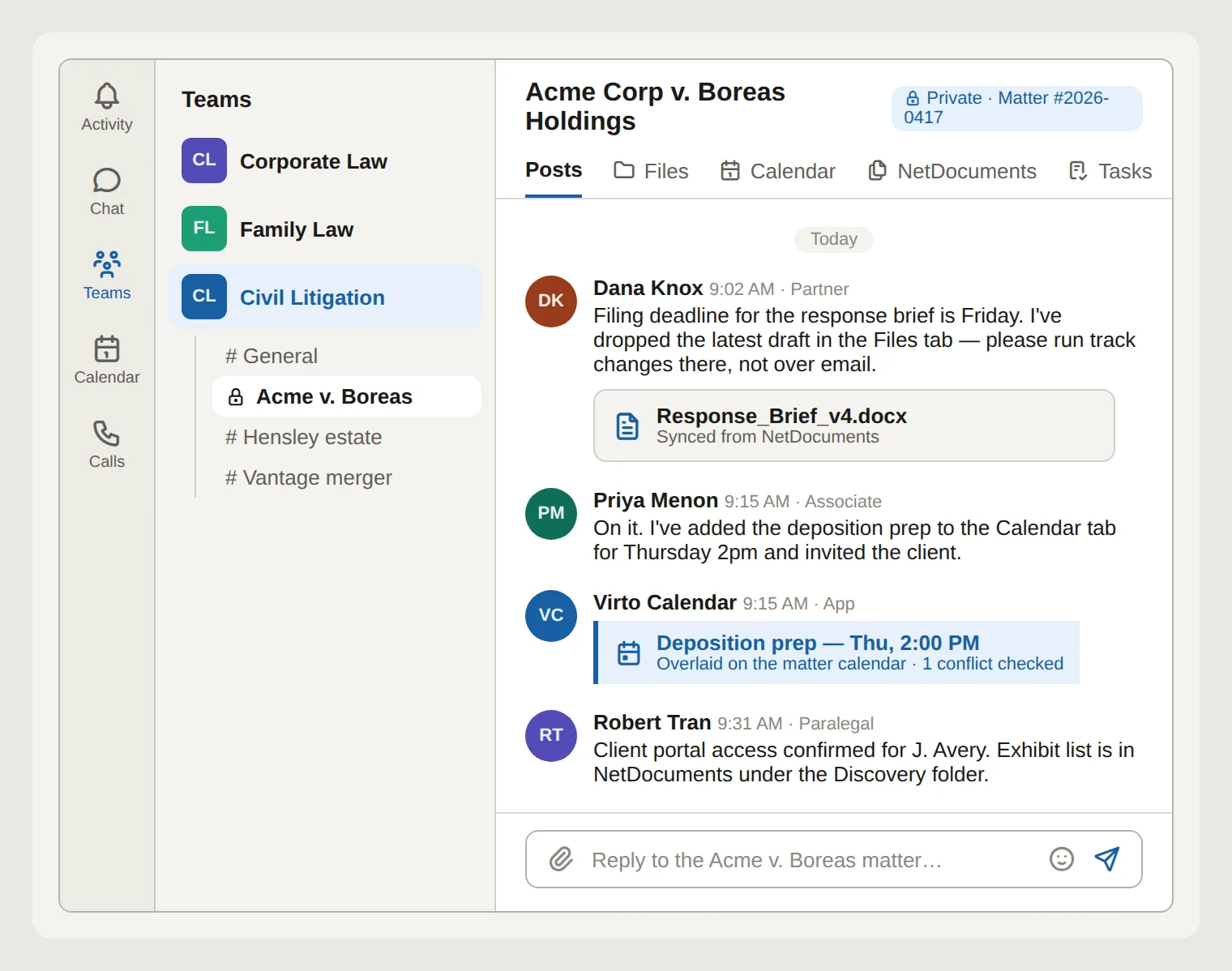
Teams case channel for a legal matter
Microsoft Word for legal professionals
Microsoft Word for legal professionals is the same familiar tool tuned to the demands of legal drafting: long documents, exact formatting, multiple reviewers and a defensible edit history. These are the features that earn its place in the legal workflow.
- Advanced formatting: automatic paragraph numbering, cross-referencing and table-of-contents generation keep long contracts, briefs and motions consistent and navigable.
- Legal templates and styles: reusable templates for contracts, briefs and motions give every document a compliant, standardized starting point.
- Track changes: multiple reviewers edit and comment while Word records who changed what — essential for defensible collaboration on legal documents.
- Macros and shortcuts: custom macros for frequently used clauses and formatting tasks cut drafting time significantly.
- Citation and research integration: insert citations and references directly into a document for accurate, standards-compliant legal writing.
- Confidentiality controls: password protection and restricted editing limit who can view or change sensitive documents.
Tips for getting more out of Word
- Use Quick Parts to store frequently used clauses and boilerplate.
- Master keyboard shortcuts for saving, formatting and navigation.
- Keep legal templates current with the latest filing and formatting requirements.
- Use the Navigation Pane to jump between sections of long documents.
- Use the Comments feature for clear, threaded revision discussions with colleagues.
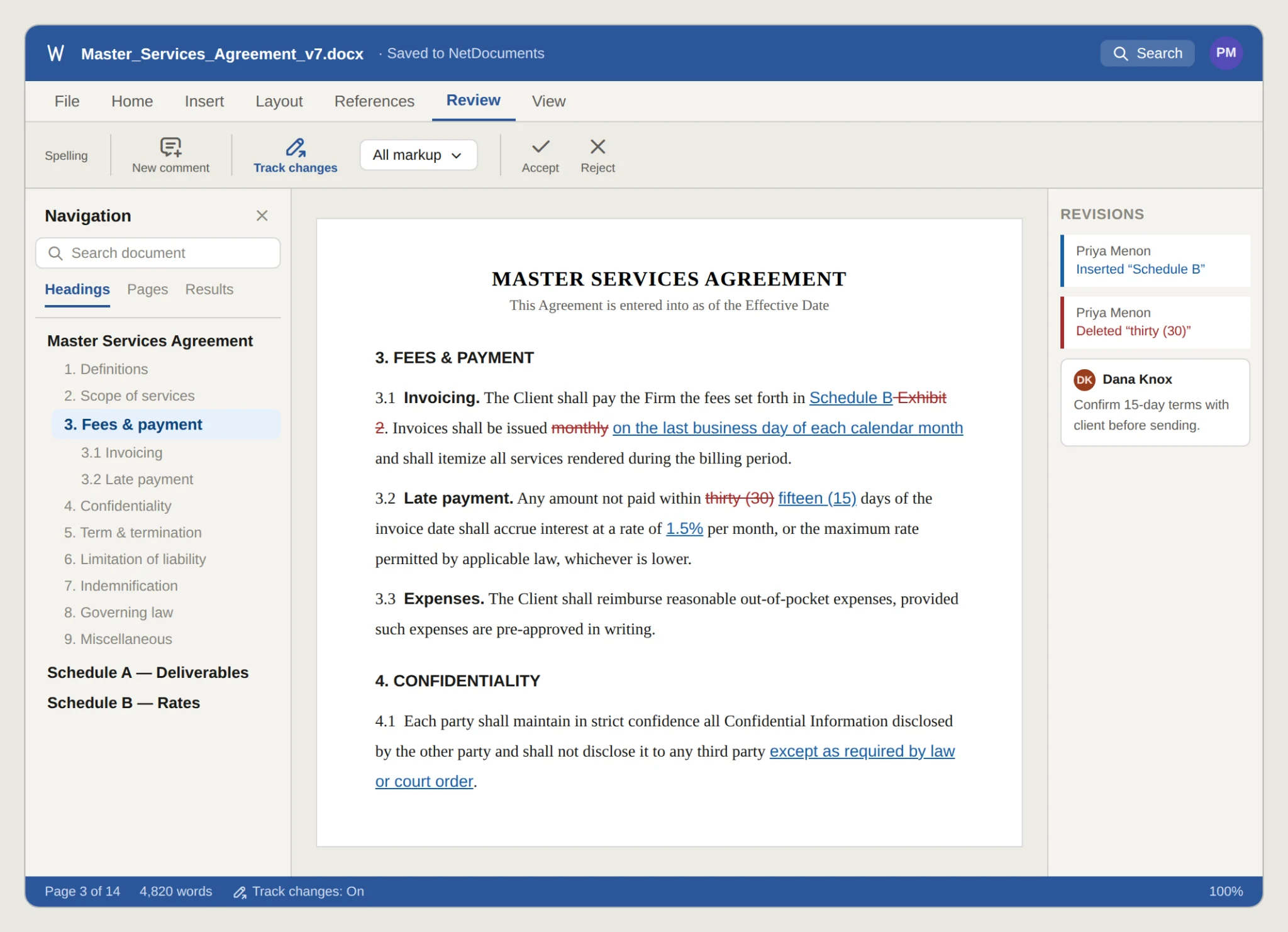
Word with legal contract template
Security & compliance for legal data
Client confidentiality and data security are non-negotiable in legal practice, which is why “is Office 365 safe for lawyers?” is one of the first questions firms ask. The short answer is yes — Microsoft 365 ships the controls a regulated practice needs, provided the firm chooses a tier that includes them and configures them correctly.
- Robust data protection: encryption in transit and at rest protects documents and client data against unauthorized access.
- Regulatory compliance: Microsoft 365 supports obligations under GDPR, HIPAA and other regimes relevant to legal work.
- Secure client communication: Defender for Office 365 and data loss prevention policies guard email against breaches and phishing.
- Controlled access: multi-factor authentication and conditional access policies protect accounts and sensitive matter data.
- Audit and reporting: audit trails and compliance reporting show how data is accessed and handled — valuable in litigation and for ethics obligations.
- Ongoing updates: Microsoft continuously ships security patches, so protections keep pace with evolving threats.
Microsoft 365 security features at a glance
| Category | Security features |
|---|---|
| Identity and access management | Multi-Factor Authentication (MFA); Microsoft Entra ID; Conditional Access policies; Single Sign-On (SSO) |
| Data protection and encryption | Data Loss Prevention (DLP); Information Rights Management (IRM); encryption at rest and in transit; data classification |
| Threat protection | Exchange Online Protection (EOP); Microsoft Defender for Office 365; threat intelligence; Safe Attachments and Safe Links |
| Security management and compliance | Microsoft Purview compliance portal; audit and activity logs; GDPR/HIPAA compliance solutions; Microsoft Secure Score |
Note: feature availability depends on the plan tier — advanced DLP, legal hold and eDiscovery require E5 (see the plan table below).
M365 plans for law firms (which to choose)
Microsoft 365 plans split into Business tiers (capped at 300 users, built for smaller firms) and Enterprise E-series tiers (no user cap, deeper security and compliance). For legal work the deciding factor is usually compliance depth: legal hold, advanced eDiscovery and information protection live in the E5 tier.
Pricing note (verify before publishing): figures below reflect Microsoft’s list prices effective July 1, 2026 (USD, per user/month, annual commitment; monthly commitment runs ~20% higher). Microsoft adjusts pricing periodically and by region — re-confirm against the official Microsoft 365 pricing page at publish time.
| Feature | Business Basic | Business Premium | Microsoft 365 E3 | Microsoft 365 E5 |
|---|---|---|---|---|
| Email hosting (Exchange Online) | ✓ | ✓ | ✓ | ✓ |
| Office apps (web) | ✓ | ✓ | ✓ | ✓ |
| Office apps (desktop) | ✗ | ✓ | ✓ | ✓ |
| OneDrive & SharePoint Online | ✓ | ✓ | ✓ | ✓ |
| Microsoft Teams | ✓ | ✓ | ✓ | ✓ |
| Data Loss Prevention (DLP) | ✗ | ✓ | ✓ | ✓ |
| Defender for Office 365 | ✗ | ✓ (P1) | ✓ (P1) | ✓ (P2) |
| Information Protection (advanced) | ✗ | ✗ | Partial | ✓ |
| Legal Hold & advanced eDiscovery | ✗ | ✗ | ✗ | ✓ |
| Insider Risk & Communication Compliance | ✗ | ✗ | ✗ | ✓ |
| Price (per user/month, from Jul 1 2026) | $7 | $22 | $39 | $60 |
Which tier fits a law firm?
- Solo / very small practice: Business Premium is the value pick — desktop Office, DLP and Defender P1 without an enterprise contract; its price held flat in the 2026 increase.
- Mid-size firm, standard needs: Microsoft 365 E3 — the enterprise workhorse, now with Defender for Office 365 P1 bundled in.
- Regulated / litigation-heavy firm: Microsoft 365 E5 — the only tier with legal hold, advanced eDiscovery, insider risk and communication compliance, which are table stakes for firms handling sensitive or high-volume litigation.
Scheduling for law firms with Virto Calendar App
Microsoft 365 covers documents, communication and compliance well — but coordinating court dates, client meetings and filing deadlines across a team is where many firms still feel the gap. The Virto Calendar App for Microsoft 365 closes it by letting legal teams overlay multiple calendars into a single, color-coded view inside Microsoft 365 and Teams.
- Unified scheduling: overlay court dates, client meetings and filing deadlines from many calendars into one interface, so nothing slips between systems.
- Team coordination: a shared view of everyone’s schedule reduces double-booking and keeps the whole team aligned.
- Customizable views: display case deadlines, appointments and availability by month, week or day to match how each team works.
- Native integration: built for the Microsoft ecosystem, it sits inside the tools lawyers already use — minimal learning curve, and it works as legal calendars inside Microsoft Teams.
In practice: a corporate-law firm uses the app to coordinate internal and external meetings across complex matters; a family-law practice overlays court appearances and client consultations to avoid conflicts and keep case handling on track.
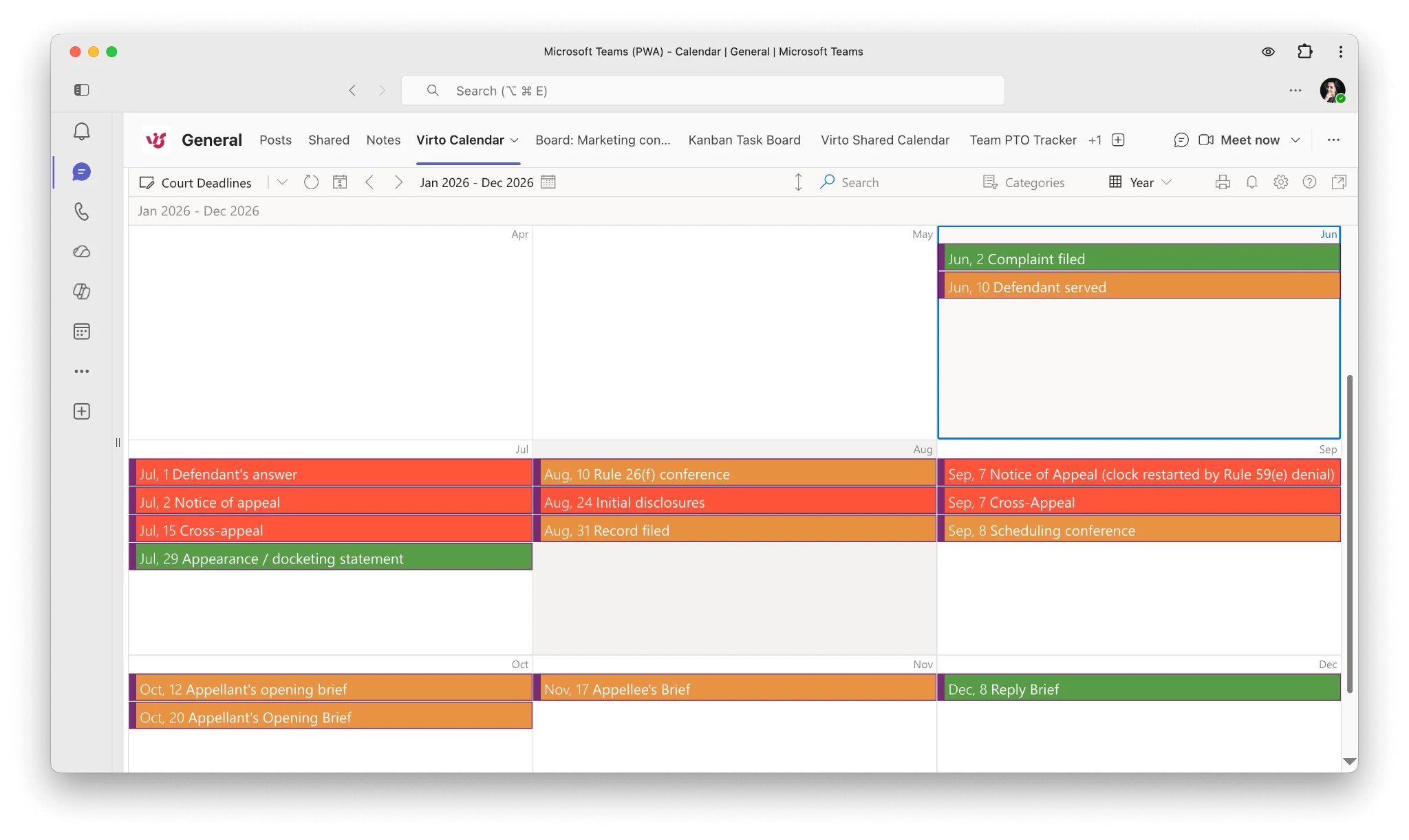
Virto Calendar App overlay (legal)
Ready to take control of your firm’s schedule? Explore the Virto Calendar App with a free trial, or book a demo to see a tailored legal practice management setup. Comparing options first? Read our legal scheduling software overview.
FAQ
Is Office 365 safe for lawyers?
Yes. Office 365 (Microsoft 365) provides encryption in transit and at rest, multi-factor authentication, data loss prevention, and audit logging, and it supports GDPR and HIPAA compliance obligations. Firms handling sensitive litigation should choose the E5 tier for legal hold and advanced eDiscovery, and configure conditional access and DLP policies appropriately.
Can law firms use the Microsoft cloud?
Yes. Law firms can and widely do use Microsoft 365 and Azure. The cloud offers secure remote access to matter files, scalability without on-premise servers, and built-in compliance tooling. Most firms run a fully cloud or hybrid deployment, with security and retention policies set to meet their regulatory obligations.
What Microsoft tools do lawyers use?
The core set is Microsoft Word for drafting, Microsoft Teams for case collaboration, SharePoint for document management, Outlook for secure email, and OneDrive for file access. Many firms add Power Automate for workflow automation and a scheduling layer such as the Virto Calendar App to manage court dates and deadlines.
Which Microsoft 365 plan is best for a law firm?
Small firms get strong value from Business Premium. Mid-size firms typically choose Microsoft 365 E3. Regulated or litigation-heavy firms need Microsoft 365 E5, the only tier that includes legal hold, advanced eDiscovery, insider risk and communication compliance.