What is timeboxing? Timeboxing is a time-management technique where you allocate a fixed, pre-set amount of time — a “box” — to a task or activity, and stop when the time is up, whether or not the task is finished. Because the end time is fixed rather than the outcome, timeboxing limits perfectionism, scope creep and open-ended tasks.
How it works in three moves: (1) pick a task, (2) give it a start and end time in your calendar, (3) stop when the box closes and review what got done.
Timeboxing vs time blocking: Time blocking reserves calendar slots for categories of work and lets you run over; timeboxing sets a hard limit on one specific task and stops when it ends.
Timeboxing is one of the few productivity habits that survives contact with a real workweek. It needs no app, no methodology certificate and no buy-in from your manager — just a calendar and the willingness to stop. This guide covers what timeboxing is, the evidence behind it, how to start in seven steps, how it differs from time blocking and focus time, and which tools are worth using in 2026.
What is timeboxing?
Timeboxing means assigning a fixed, non-negotiable slot to an activity in advance, then working on that activity — and only that activity — until the slot closes. The defining feature is that the time is fixed and the output is variable. Most of us work the other way round: we fix the output (“finish the report”) and let the time expand to whatever it takes. Timeboxing inverts that.
What is a “time box”? A time box is a scheduled chunk of uninterrupted time dedicated to one activity, with a defined start and end. Boxes come in two flavours:
- Hard timeboxes — the cutoff is absolute. When the box closes, you stop, ship what you have, and move on. Best for tasks that could otherwise run forever: inbox triage, research, tidying, polishing.
- Soft timeboxes — the cutoff is a strong signal rather than a wall. If you are two minutes from finishing, you finish. Best for creative or technical work where breaking flow is expensive.
The technique originated in agile software development, where a fixed-length iteration forces scope to be negotiated instead of deadlines being missed. It moved into general time management because the same logic works on a single person’s Tuesday afternoon.
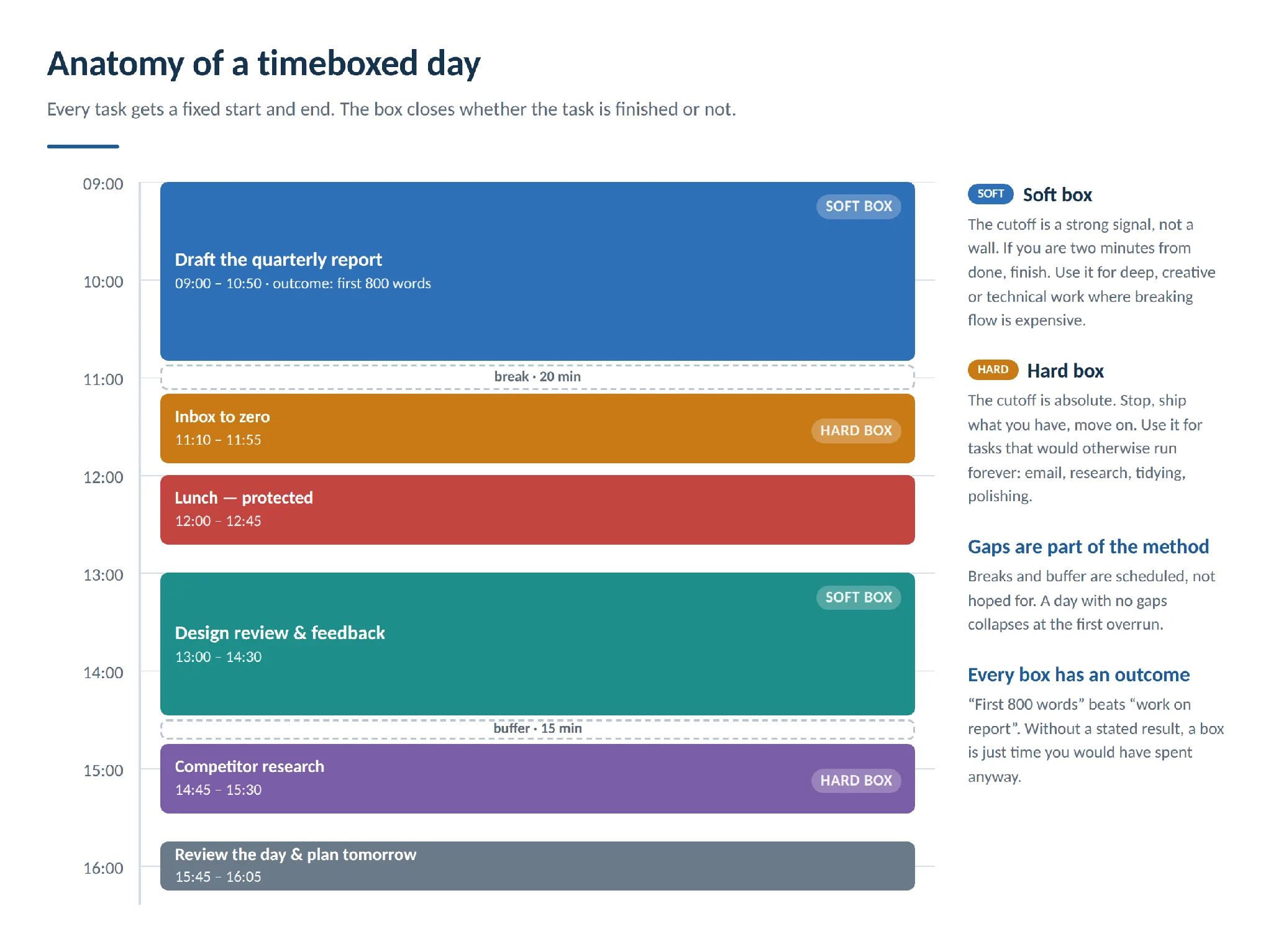
Pic.1. Anatomy of a timeboxed day: hard boxes, soft boxes and the gaps that make them work.
Does timeboxing actually work?
Timeboxing has an unusually good reputation among productivity techniques. In a review of 100 productivity methods, timeboxing — described as migrating to-do lists into a calendar — was ranked the single most useful, a finding its author, Marc Zao-Sanders, wrote up in Harvard Business Review. That was a survey and synthesis of existing advice rather than a controlled trial, so treat it as informed consensus, not proof.
The mechanisms underneath timeboxing, though, do have experimental support:
- Spaced deadlines beat one big deadline. In a classic study by Dan Ariely and Klaus Wertenbroch, students given evenly spaced interim deadlines outperformed those who set their own or faced a single end-of-term deadline — on both quality and lateness (Procrastination, Deadlines, and Performance, 2002). Timeboxing is essentially a machine for generating spaced deadlines.
- Work really does expand to fill the time available. Parkinson’s Law has been demonstrated at the individual level: when participants learned a later task had been cancelled, they slowed down on the task in front of them (Brannon et al., Psychonomic Bulletin & Review, 1999). A closed box removes the slack.
- A deadline changes how you decide. With 25 minutes on the clock, you cannot agonise over a font choice. The constraint does the prioritising for you.
The honest summary: there is no randomised trial of timeboxing as a complete practice. What exists is strong evidence for its two core ingredients — bounded time and frequent deadlines — plus a large body of practitioner experience. That is enough to justify a two-week experiment, which is all the technique really asks of you.
The benefits of timeboxing
Used consistently, timeboxing changes three things: how much you finish, what you choose to work on, and how the day feels.
- More finished work, less drifting. A box is a commitment to one thing. Distractions become visible as violations rather than as a vague sense of a lost afternoon.
- Forced prioritisation. You have a finite number of boxes in a day, so filling them is an explicit choice about what matters. Your calendar stops being a record of meetings and becomes a plan.
- A brake on perfectionism. When the box closes, “good enough” is the only option on offer. This is the benefit people report most often and expect least.
- Unpleasant tasks get done. Fifteen minutes of expense reports is tolerable in a way that “do the expense reports” is not.
- Big projects become approachable. A daunting deliverable becomes a sequence of boxes, each with its own small finish line.
- Realistic estimates, eventually. Because you compare each box against what actually got done, you build a calibrated sense of how long your work takes — one of the most useful professional skills there is.
- A defensible end to the day. Work that has an end time does not bleed into evenings. Boxes for lunch, exercise and family are as legitimate as boxes for work.
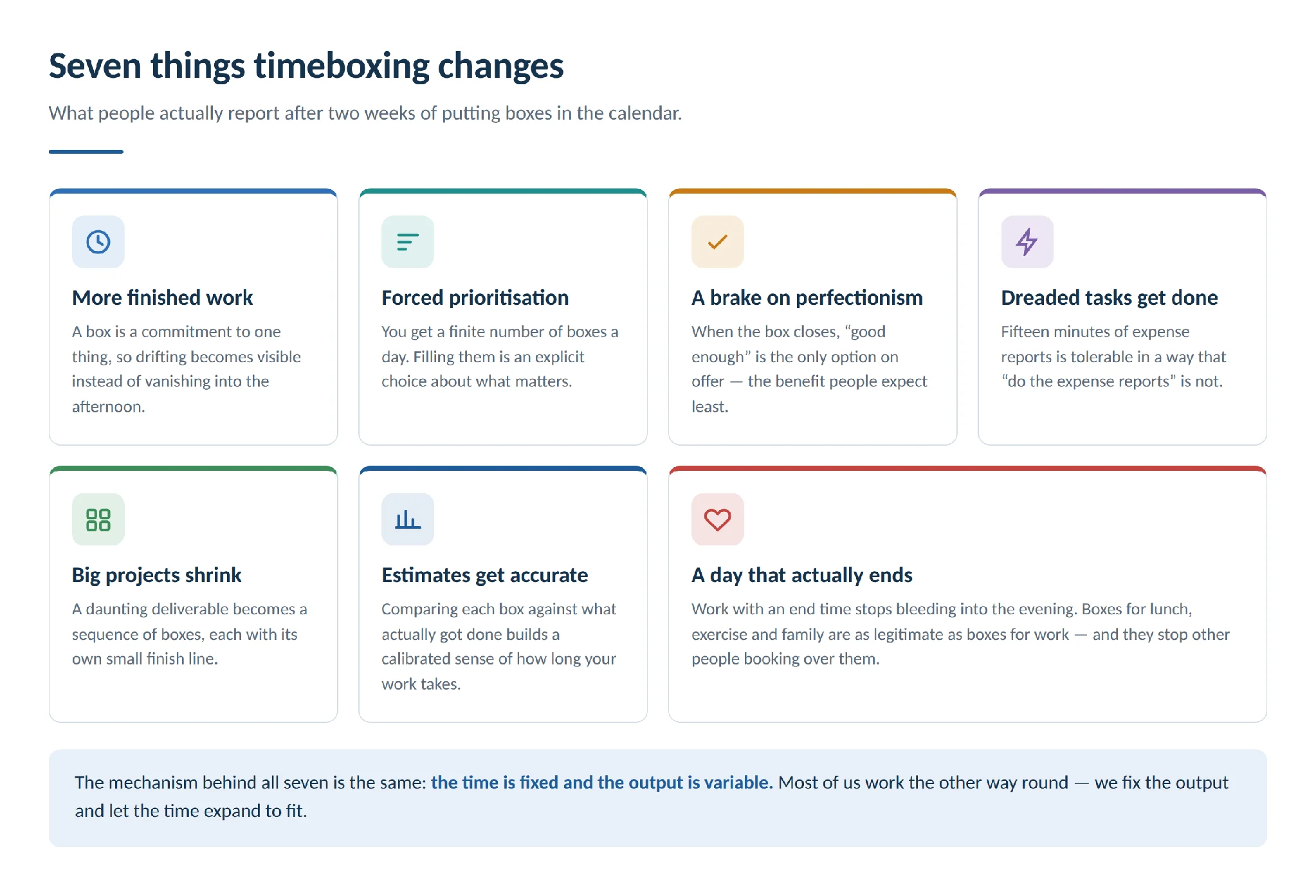
Pic.2. Seven things timeboxing changes.
How to start timeboxing in 7 steps
You can start this afternoon. The steps below are deliberately small — the most common failure mode is building an elaborate system on day one and abandoning it on day three.
Step 1. Pick the right tasks
Timeboxing pays off most on two kinds of work: tasks you keep avoiding (drafting a document, a difficult conversation, a report) and tasks that expand to fill any space you give them (email, research, tidying, “just checking” the dashboard). Do not timebox your whole life yet. Pick two or three tasks for tomorrow.
Step 2. Define what the box is for
Each box needs a stated outcome, even a modest one: “draft the first 400 words”, “clear the inbox to zero”, “review three candidate CVs”. Without an outcome, a box is just a block of time you will spend anyway. If you have a month to write a 10,000-word paper, 400 words a day finishes it in 25 days with room to revise.
Step 3. Choose the duration
Match the box to the work. As a starting point: 15–25 minutes for admin, chores and tasks you are avoiding; 25–50 minutes for focused single tasks; 50–90 minutes for deep work such as writing, coding or design. The Pomodoro rhythm (25 minutes on, 5 off, a longer break after four rounds) is a good default if you have no instinct yet. Schedule demanding work when your energy is highest — for most people that is the morning.
Step 4. Put the box in your calendar
This is the step people skip, and it is the one that makes the technique work. A box that lives only in your head is a wish. A box in your calendar is visible to you, blocks other people from booking over it, and creates a record you can review. Colour-coding your calendar by type of work makes the shape of your day legible at a glance — see also our calendar category ideas.
Step 5. Work the box, then stop
Set a timer. Close the tabs. Work on the one thing. When the timer goes, stop — even mid-sentence. Stopping is the discipline that makes the next box mean something; if boxes routinely overrun, they are no longer boxes.
Step 6. Take the break
Five minutes between boxes, longer after a demanding one. Breaks are not the reward for finishing, they are part of the method: they are what makes the next box viable. Schedule them like anything else.
Step 7. Review and adjust
At the end of the day, spend two minutes on two questions: did the box fit the task, and did the task get the outcome? Then adjust tomorrow’s durations. After two weeks you will estimate far better than you do today. A small reward at the end of a well-run box — a coffee, a walk, a chapter of something — reinforces the habit more than willpower does.
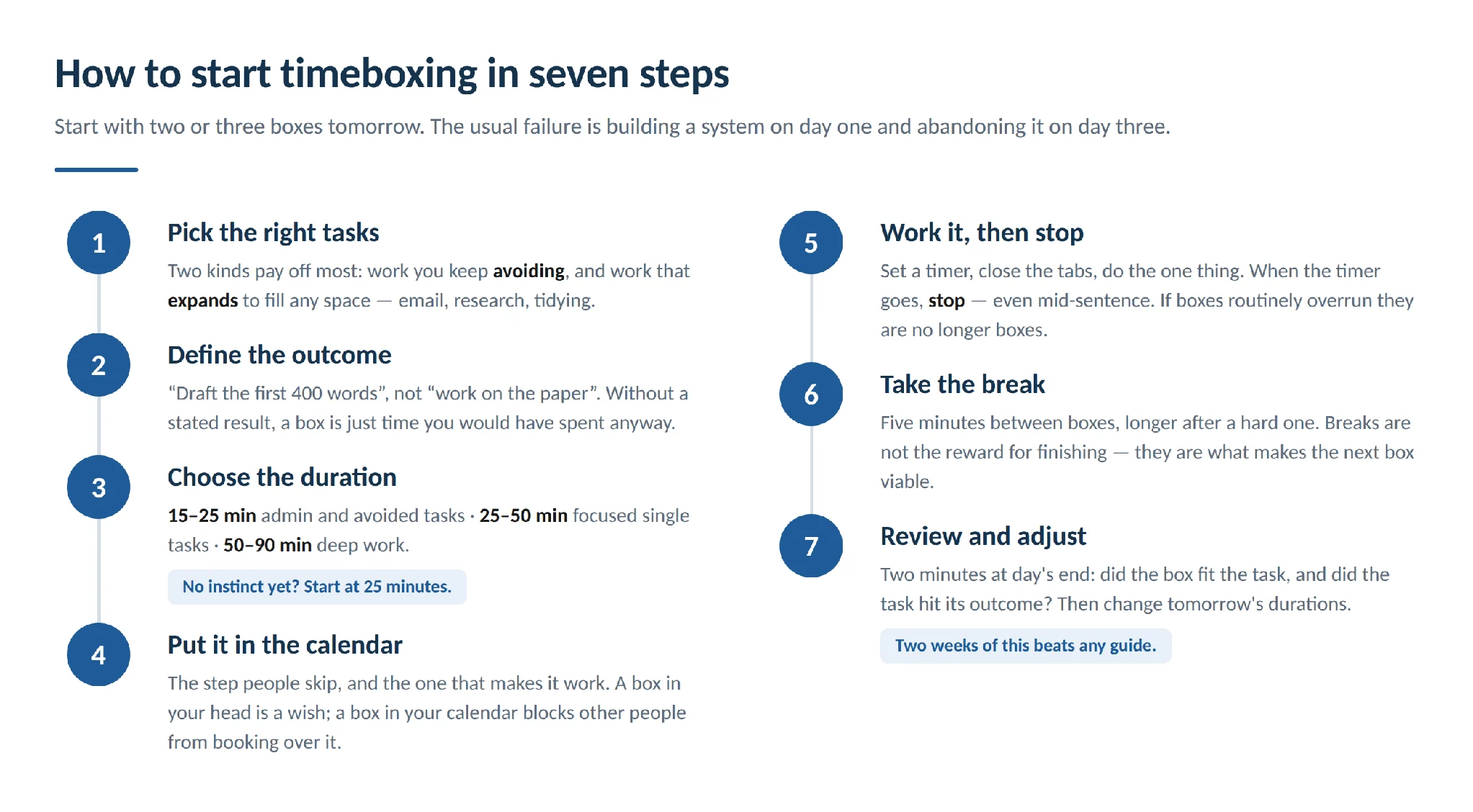
Pic.3. How to start timeboxing in seven steps.
Common timeboxing mistakes
Most people who “tried timeboxing and it did not work” hit one of these:
| Mistake | What to do instead |
|---|---|
| Timeboxing the whole day from day one | Start with two or three boxes a day and add more as the habit sticks. |
| Boxes back to back with no slack | Leave buffer between boxes. A day with no gaps collapses at the first overrun. |
| Treating every box as hard | Use hard boxes for open-ended work, soft boxes for deep work where breaking flow is costly. |
| Making all boxes the same length | Duration should follow the complexity and priority of the task, not a template. |
| No stated outcome for the box | Write the intended result in the calendar entry, not just the task name. |
| Assuming it kills creativity | A protected, distraction-free box is usually better for creative work than an open afternoon. What it limits is unbounded polishing. |
| Abandoning it after a bad day | Overruns are data. Adjust the estimate, keep the habit. |
Timeboxing examples by role
The technique looks different depending on what your day is made of.
Designers and copywriters
- One box for idea generation, uninterrupted, with no evaluation allowed inside it.
- Separate boxes for drafting and for editing — mixing them is why drafts stall.
- A hard box for research, which otherwise becomes an afternoon of open tabs.
- Fixed boxes for client and team review, so feedback does not scatter across the week.
Managers and team leads
- A weekly strategic-thinking box, defended like a client meeting.
- Two email boxes a day instead of continuous triage.
- Timeboxed one-on-ones — 25 minutes with an agenda beats an hour that drifts.
- A daily problem-solving box so escalations have somewhere to go that is not “all day”.
Sales teams
- A prospecting box in the morning, before the day gets loud.
- Outreach batched into calling and emailing blocks.
- A short daily follow-up box — the highest-ROI 20 minutes in most pipelines.
- A weekly training or enablement box for the team.
Developers and technical teams
- A hard box on investigation: one day to scope an unclear ticket, then a decision about whether it deserves more.
- Soft 90-minute boxes for implementation work, protected from meetings.
- Timeboxed code review, daily, so review is never the bottleneck.
Below, a designer’s timeboxed week: three design projects in their own colours, admin and client meetings in others, and lunch in red so nothing gets booked over it. This is the kind of view the Virto Calendar App gives you across every calendar your team uses.
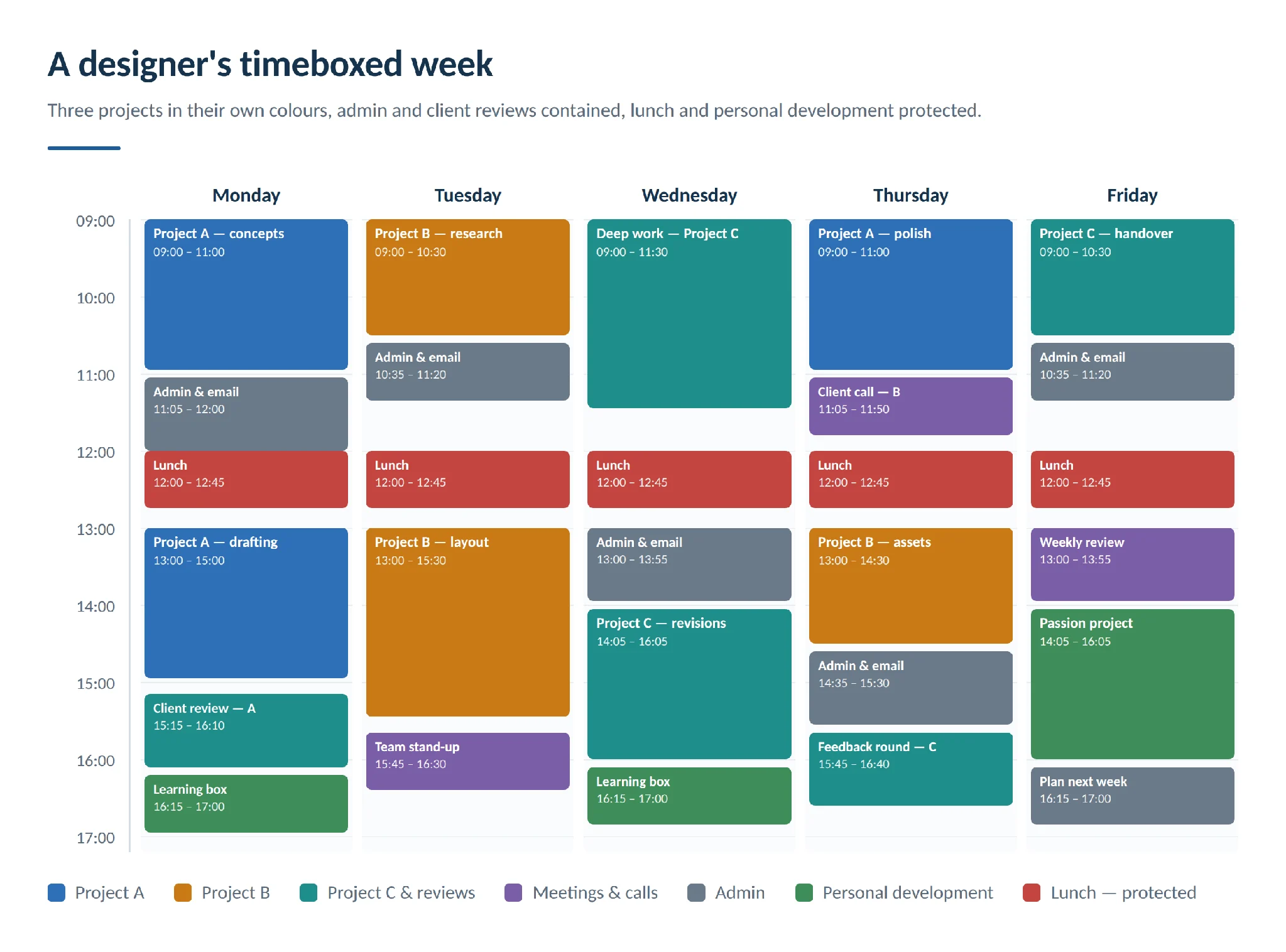
Pic.4. A sample timeboxed week for a designer, colour-coded by project.
Timeboxing in Agile and Scrum
Timeboxing is where agile gets its rhythm. Rather than working until something is finished, agile teams fix the duration and negotiate the scope — the same inversion that makes personal timeboxing work, applied to a team.
In Scrum, essentially every event is timeboxed: the daily stand-up at 15 minutes, sprint planning, the sprint review and the retrospective all have maximum durations. The sprint itself is a timebox of one to four weeks.
Sprints and timeboxes are not the same thing. A sprint is a specific Scrum iteration in which a team turns selected backlog items into a usable increment. A timebox is the general practice of putting a fixed maximum duration on any activity. Sprints are timeboxed; not every timebox is a sprint.
Within a sprint, timeboxing does four jobs:
- Sets the tempo. A fixed cadence makes team velocity measurable and delivery predictable.
- Scopes the work. The team pulls only what fits the box, given what it has historically delivered.
- Contains meetings. Timeboxed ceremonies stay focused because there is no room to wander.
- Makes scope the variable. If work will not fit, scope is renegotiated or the item waits — the date does not move.
Timeboxing vs time blocking, Pomodoro and focus time
These four techniques overlap enough to be confused and differ enough to matter. If you want the full treatment of the others, we have dedicated guides to time blocking and focus time and deep work.
| Timeboxing | Time blocking | Pomodoro | Focus time | |
|---|---|---|---|---|
| Core idea | A fixed slot per task; stop when it ends | Calendar slots reserved for categories of work | Fixed 25/5 work-break cycles | Protected time for deep work, duration open |
| What is fixed | The end time | The slot, loosely | The interval length | The absence of interruption |
| Flexibility | Low — the cutoff is the point | Moderate — blocks can stretch | Low within a cycle | High |
| Best for | Open-ended tasks, deadlines, perfectionism | Structuring a whole day, reducing task-switching | Building focus stamina, beating procrastination | Writing, coding, design, hard problems |
| Main risk | Cutting off good work mid-flow | Blocks quietly expand until the plan is fiction | Arbitrary intervals interrupt deep work | Time disappears with nothing shipped |
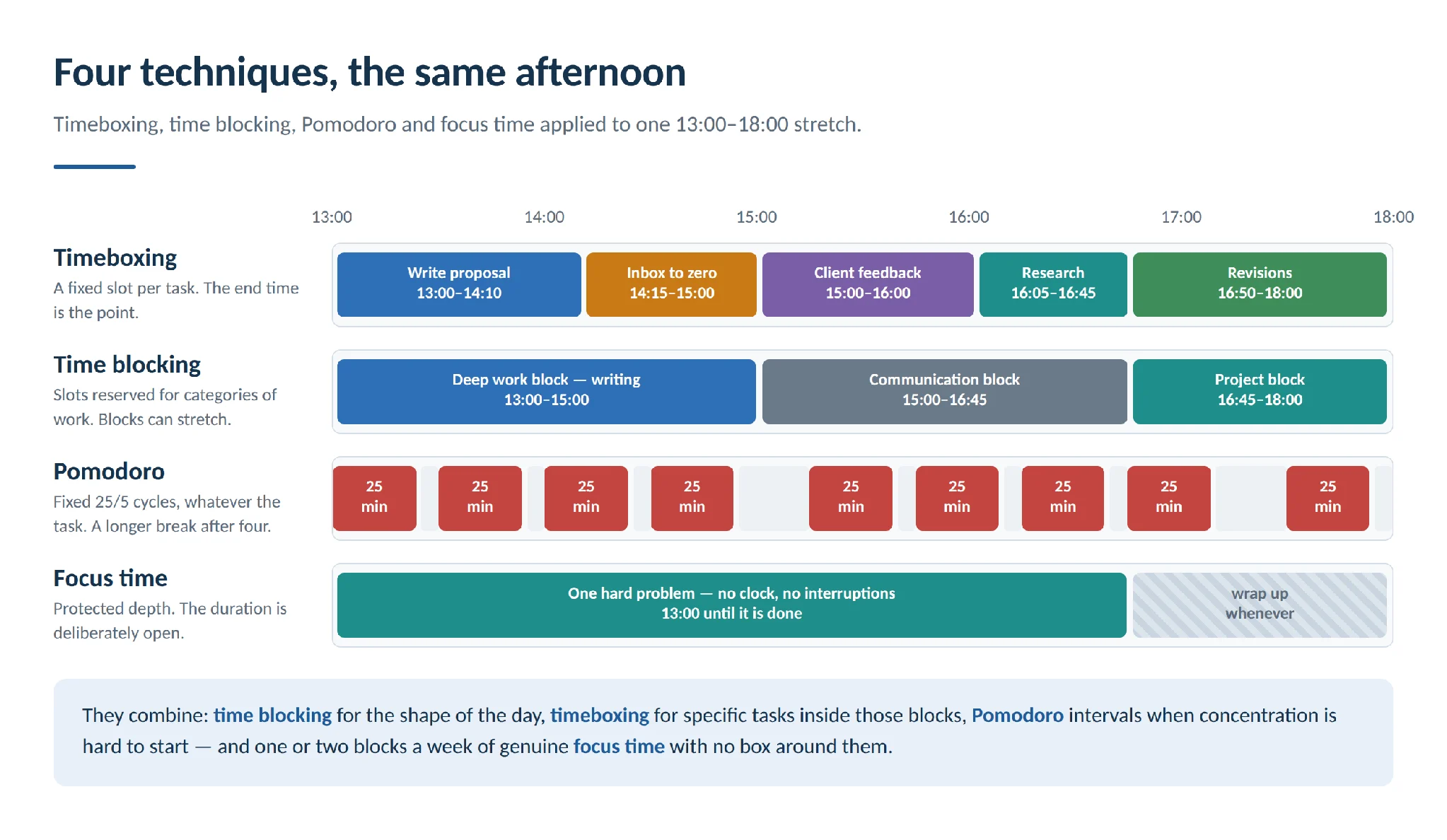
Pic.5. Timeboxing, time blocking, Pomodoro and focus time applied to the same afternoon.
They combine well. The most common working arrangement is time blocking for the shape of the day, timeboxing for specific tasks inside those blocks, and Pomodoro intervals inside a box when concentration is hard to start. Reserve one or two blocks a week as genuine focus time with no box around them, for the work that needs depth more than it needs a deadline.
Watch for the friction points: a hard box can cut off a deep work session at exactly the wrong moment, and stacking blocks back to back leaves no room for the overruns that will happen. If you are unsure which suits you, run an A/B test — a week of timeboxing, a week of time blocking — and compare how much you finished, how accurate your estimates were, and how the weeks felt.
The best timeboxing tools in 2026
You do not need a dedicated timeboxing app. A calendar and a timer will do, and a calendar you already live in beats a better tool you have to remember to open. Still, the right software removes friction. We keep a fuller roundup in our guide to the best time blocking apps, and a broader comparison in best task management software.
Tools worth a look, verified as active in 2026:
| Tool | What it does | Best for | Free tier |
|---|---|---|---|
| Toggl Track | Time tracking, reporting, insights on where time actually goes | Comparing planned vs actual box lengths | Yes, small teams |
| Clockify | Time tracking with team views and billable hours | Teams and freelancers billing time | Yes, up to 5 users |
| RescueTime | Automatic activity tracking and focus sessions | Seeing what really interrupts your boxes | Limited (Lite) |
| RoundPie | Pomodoro timer that plugs into task tools (formerly PomoDone) | Pomodoro intervals inside a box | Yes |
| Be Focused | Customisable focus intervals and light task management | Apple users wanting something simple | Yes, with in-app purchases |
| Time Stream | Pomodoro timer and session tracking (successor to Focus Booster, now closed) | Session history without a heavy tool | Check current plans |
| Forest | Gamified focus — a tree grows while you stay off your phone | Phone-driven distraction | Yes |
| Noisli | Background soundscapes for concentration | Noisy offices and open plans | Yes, limited daily streaming |
| Reclaim.ai | Automatically defends habits and tasks as calendar events | Hands-off box scheduling around meetings | Yes, single user |
| Google Calendar | Free calendar with tasks, reminders and colour categories | Anyone outside the Microsoft stack | Yes |
| Microsoft Outlook | Calendar, email and scheduling in one place | Microsoft 365 users, the default starting point | With a licence |
| Virto Calendar App | Overlays Microsoft 365, Outlook, SharePoint and external calendars into one colour-coded view | Timeboxing across several calendars in Microsoft 365, Teams and SharePoint | 30-day trial |
| Virto Time Blocker App | Reads your Teams calendar and automatically inserts breaks between meetings | Getting recovery time back in a meeting-heavy day | Free |
A note on tools that have moved on: Focus Booster shut down after 15 years and points users to Time Stream; PomoDone now trades as RoundPie; and Focus@Will is in the middle of a move to a successor product, so we no longer recommend starting there. If you are choosing a calendar rather than a timer, our calendar management guide covers the ground properly.
Timeboxing in Microsoft 365 and Teams
If your work already lives in Microsoft 365, the friction is rarely the timer — it is that your commitments are scattered across a personal Outlook calendar, a team calendar, a project calendar and a Teams schedule, so you cannot see the day you are trying to box. Two Virto apps address the two halves of that problem.
Virto Time Blocker App for Microsoft Teams — protecting the boxes
The Virto Time Blocker App (previously known as Virto Scheduler) analyses your Microsoft Teams calendar and automatically creates the gaps a timeboxed day needs. It trims meeting durations by your chosen rule and inserts breaks between them, so back-to-back calls stop consuming the space where your actual work was supposed to happen.
- Intelligent calendar analysis — finds the meetings that are crowding out everything else.
- Automated break scheduling — inserts recovery time between meetings without you asking.
- Configurable rules — set your own break length and meeting-trim behaviour.
- Exclusions — protect the events that must not be touched.
- Native to Teams — changes land in the Teams calendar you already use. The app is free.
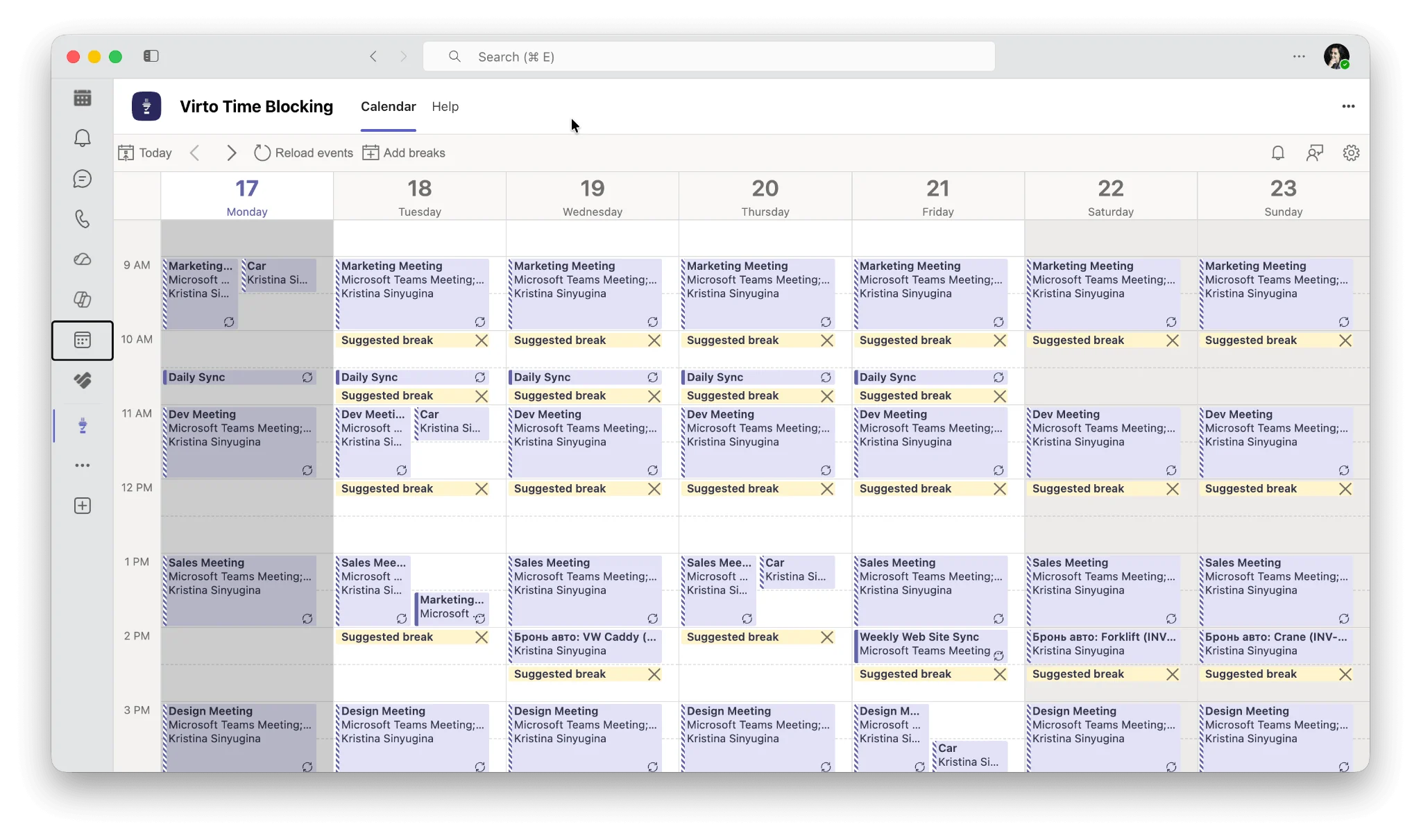
Pic.6. Screenshot of the Virto Time Blocker App with suggested breaks in Microsoft Teams.
Virto Calendar App — seeing the whole day
The Virto Calendar App for Microsoft 365, SharePoint and Microsoft Teams overlays multiple calendar sources into one view. That matters for timeboxing because you cannot honestly box a day you can only see half of.
- Unified view — overlay Microsoft 365 and Exchange calendars, Outlook calendars, SharePoint lists and public internet calendars in one place.
- Colour-coded categories — see at a glance how much of the week is meetings, deep work or admin.
- Multiple views — switch between day, week, month and agenda views as you plan.
- Shared and private calendars together — personal and team commitments in a single picture.
- Enterprise-ready — deploy in your own tenant so calendar data stays under your control.
- Mobile access — check the day from any device.
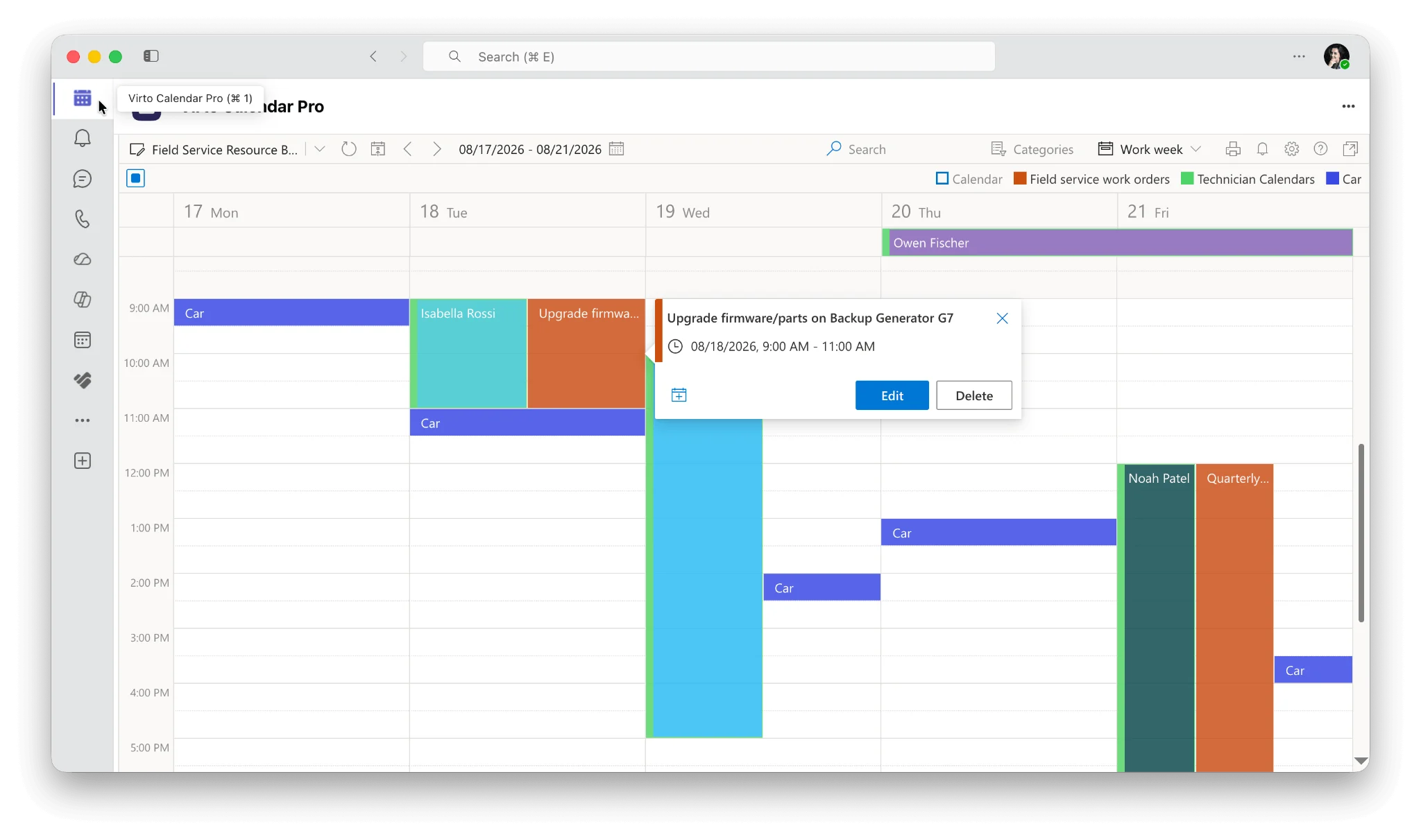
Pic.7. Screenshot of the Virto Calendar App overlaying several calendars in Microsoft 365.
The two work well together: Time Blocker creates and defends the gaps inside Teams, while Virto Calendar shows you the complete schedule those gaps sit in, across every system your team uses. See also our guides to managing multiple Microsoft 365 calendars, combining Outlook, SharePoint and Google calendars in one view and Microsoft Planner.
Try it on your own calendar. The Virto Calendar App comes with a free 30-day trial — no commitment, full functionality. Start your 30-day trial or book a product demo and we will walk you through it.
Timeboxing FAQ
What is timeboxing?
Timeboxing is a time-management technique where you allocate a fixed, pre-set amount of time to a task and stop when that time is up, whether or not the task is finished. Because the duration is fixed rather than the outcome, it limits perfectionism and scope creep.
Does timeboxing really work?
For most people, yes — with a caveat. Timeboxing topped a widely cited review of 100 productivity methods, and its two core mechanisms (frequent, spaced deadlines and bounded time) have solid experimental support. There is no randomised trial of the full practice, so treat it as a well-supported habit worth testing for two weeks rather than a guarantee.
What is the difference between timeboxing and time blocking?
Time blocking reserves calendar slots for categories of work and allows you to extend a block if a task runs over. Timeboxing sets a hard time limit on one specific task and stops when it ends. Time blocking shapes the day; timeboxing constrains the task.
How long should a timebox be?
Match it to the work: 15–25 minutes for admin and tasks you are avoiding, 25–50 minutes for focused single tasks, 50–90 minutes for deep work. If you have no instinct yet, start at 25 minutes and adjust based on what actually happened.
What do I do when the timebox ends and the task is not finished?
Stop, note where you got to, and decide deliberately: schedule another box, cut the scope, or accept what you have. The decision is the point — that is the moment timeboxing turns an open-ended task into a choice instead of a drift.
Is timeboxing the same as Pomodoro?
No. Pomodoro is a fixed rhythm of 25-minute work intervals and 5-minute breaks, applied to whatever you are doing. Timeboxing sets a duration chosen to suit a specific task, which might be 15 minutes or three hours. Many people run Pomodoro intervals inside a longer timebox.
Can I timebox creative work?
Yes, and it often helps — a protected, interruption-free box is usually better for creative work than an open afternoon. Use soft boxes so you are not cut off mid-flow, and separate idea generation from editing into different boxes.
Does timeboxing work for teams?
It is where agile gets its structure: sprints, stand-ups, reviews and retrospectives are all timeboxes. For teams the prerequisite is shared visibility — everyone needs to see when colleagues are in a box and when they are available, which is why a shared, overlaid calendar matters more than any individual timer.
What tools do I need to start timeboxing?
A calendar and a timer. Add tracking (Toggl Track, Clockify, RescueTime) once you want to compare planned against actual, and a calendar overlay such as the Virto Calendar App when your commitments live in more than one place.
Conclusion
Timeboxing is a small idea with a disproportionate effect: give a task a fixed slot, work it, and stop when the slot ends. That single constraint does the work of several habits at once — it forces prioritisation, caps perfectionism, breaks big projects into finishable pieces, and gives the day an end you can defend.
Start tomorrow with two boxes. Put them in your calendar with a stated outcome, work them without switching tabs, and spend two minutes in the evening asking whether the estimate was right. Adjust and repeat. Two weeks of that will tell you more than any guide can.
If your calendar lives in Microsoft 365, Teams or SharePoint, the Virto Calendar App gives you the single view of the day that timeboxing needs, and the free Virto Time Blocker App keeps meetings from eating the gaps. Browse the full range of Virto apps for Microsoft Teams, or if you need something tailored, email us at sales@virtosoftware.com, or book a demo — we will work it out together.