Quick answer: what is a SharePoint hub site?
A SharePoint hub site is a site that links related team and communication sites under shared navigation, a common theme and a single search scope. Instead of nesting sites inside one another, a hub connects them in a flat, flexible structure — the modern architecture that replaced subsites. An administrator registers an existing site as a hub, then associates other sites to it.
SharePoint sites multiply quickly across an organization, which makes it hard for teams to find and share information. Hub sites solve this by connecting related sites in a way that mirrors how your business actually works — grouping content by department, project, division or region so people can move between related sites through one shared navigation bar, one theme and one search experience.
In this 2026 guide we cover what a hub site is and how it fits SharePoint’s site architecture, how to create one step by step, how hubs differ from subsites, their limitations and workarounds, and the best practices that keep a hub useful as it grows.
What is a SharePoint hub site (and how it fits site architecture)?
A SharePoint hub site connects related sites into a single, navigable group. It acts as a central point that links multiple sites based on organizational attributes such as projects, departments, divisions or regions. That connection simplifies navigation, improves collaboration and streamlines management across every associated site — without forcing anyone into a rigid hierarchy.
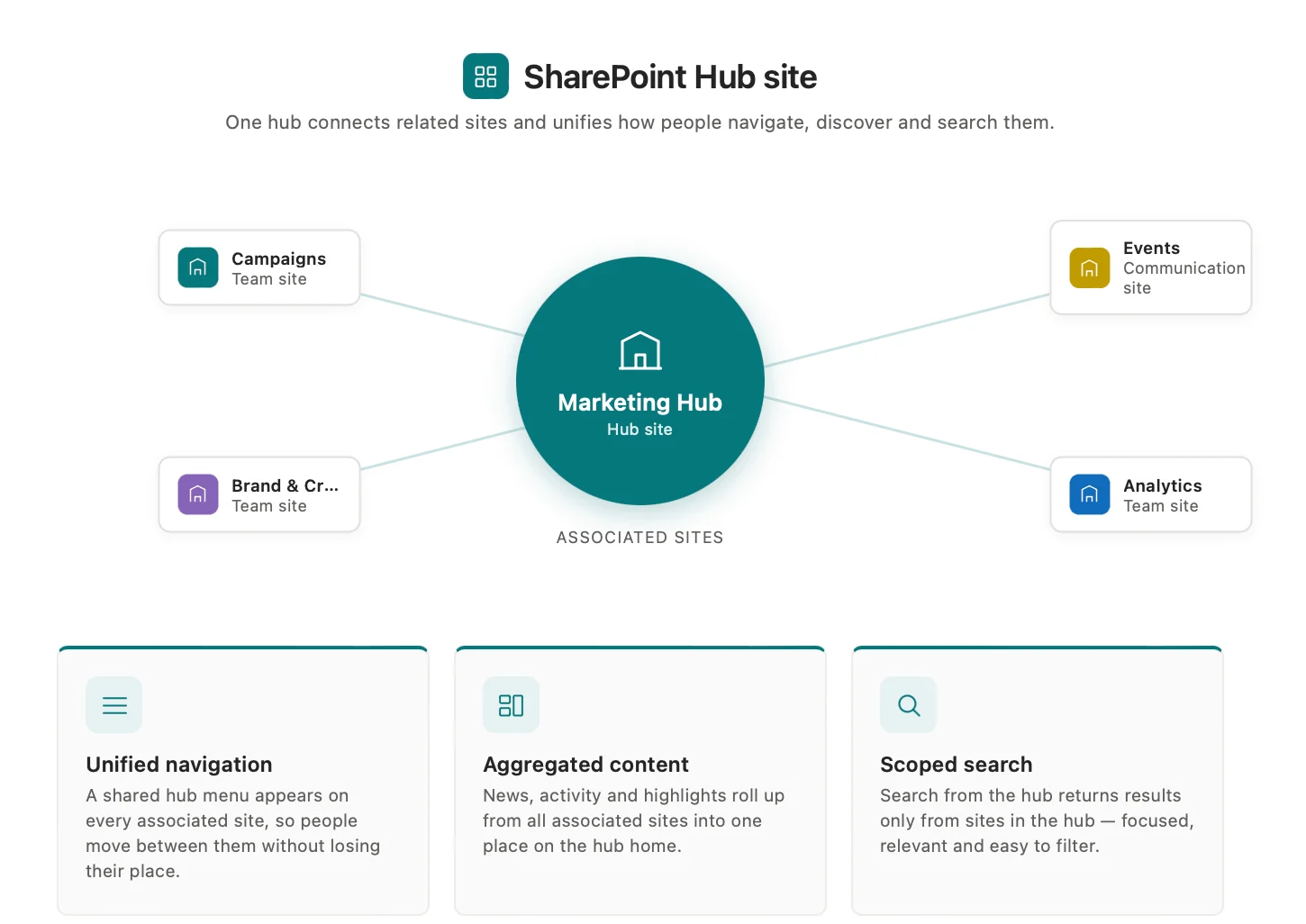
Pic. 1. Hub site features.
The key features and benefits of hub sites are:
- Unified navigation and consistent design: A hub provides a shared navigation bar that appears at the top of every associated site. Associating a site with a hub also applies the hub’s theme, so related sites share a consistent look. Owners can extend this with layouts such as the mega menu.
- Streamlined management: Hubs centralize administration. Admins create hubs (by registering existing sites), set how many hubs the tenant allows, control who can associate sites and can require approval for associations. New sites created from the hub are associated automatically.
- Content aggregation: Web parts roll content up to the hub home page. The News web part pulls updates from linked sites, the Sites web part surfaces the most active ones, and Highlighted Content and Events display relevant activity from across the hub — so users stay informed without visiting each site.
- Targeted search: Searching from a hub scopes results to the hub and all its associated sites, delivering more relevant results than searching the whole tenant. Results always respect each user’s permissions.
- Shared resources and assets: Unified branding and navigation make it natural to reuse libraries, lists, templates and other assets, reducing duplication and keeping associated sites consistent.
- Home destination: A hub becomes the go-to entry point for a project, department or organizational area — the curated home for its information, updates and resources.
Hub site architecture: associated sites, navigation and design
Think of a hub site as a central plaza. Around it sit individual SharePoint sites — like shops in a mall or departments on a campus. The hub is the common ground: the shared navigation point and shared identity for all of them.
When a site joins a hub it does not move or become a subsite. It keeps its own structure, permissions and content and simply becomes associated with the hub. That association lets the hub influence associated sites in three practical ways:
- Shared navigation: a hub navigation bar appears across all associated sites, so users move between related sites regardless of where each one lives.
- Common design: the hub applies a shared theme and logo, creating a unified branding experience.
- Rolled-up content: the hub can surface shared content and web parts from associated sites, promoting consistency and collaboration.
There is one important architectural rule: hubs cannot be nested. A hub site can’t be associated with another hub site — like a city having a single central plaza rather than plazas inside plazas. To connect related hubs, use cross-links between them.
In short, SharePoint hub site architecture is a flat, associative structure. It connects related sites without a strict hierarchy, giving you a flexible, scalable way to organize and navigate your environment. If you’re mapping how hubs sit alongside other structures, see our guide to types of SharePoint sites and building a SharePoint intranet.
Practical applications of hub sites
- Departmental hubs: consolidate Marketing, Sales or HR sites into one cohesive workspace.
- Project management: link individual project team sites, with the hub as the central point for updates and resources.
- Sales hubs: give regional sales and communication sites one home for the latest materials and best practices.
- Cross-departmental collaboration: connect related sites (e.g. Marketing and Sales) for joint initiatives, breaking down silos.
- Communities of practice: connect sites around a shared area of expertise to foster knowledge sharing.
How to create a SharePoint hub site
This section walks through planning, registering a site as a hub, configuring its design and associating related sites — everything you need to set up hub sites effectively.
👉 Classic SharePoint sites can’t be turned into hub sites. Hubs rely on modern SharePoint features, so always start from a modern site — a communication site or a modern team site.
Step 1. Plan your hub strategy
A clear strategy keeps the hub aligned with business goals and user needs.
- Define business outcomes: decide what problem the hub solves — centralizing HR resources, consolidating sales materials, or giving a project one home for documentation and updates.
- Analyze your intranet architecture: consider how the new hub fits alongside existing hubs and site collections so it complements overall navigation.
- Plan content organization: choose a topic-based, departmental or functional structure, and design for the three main find scenarios — known item/known location, known item/unknown location, and open-ended discovery.
- Establish governance: set guidelines for content ownership, approval workflows and who may associate sites with the hub.
- Choose the hub site type: communication sites are usually preferred for hubs thanks to their broadcast focus and layouts.
Step 2. Register the site as a hub
- Select the site: pick a modern communication or team site whose purpose matches the hub.
- Register it in the SharePoint admin center: open the admin center with admin permissions, go to Active sites, select the site, choose Hub → Register as hub site, and enter a clear display name.
- Set association permissions: specify who can associate sites with the hub. Leaving this open lets anyone associate, which invites disorganization.
- Configure navigation and design: apply a consistent theme (it cascades to associated sites), build an intuitive navigation structure, and optionally use site designs to enforce consistent layouts.
Step 3. Associate sites with the hub
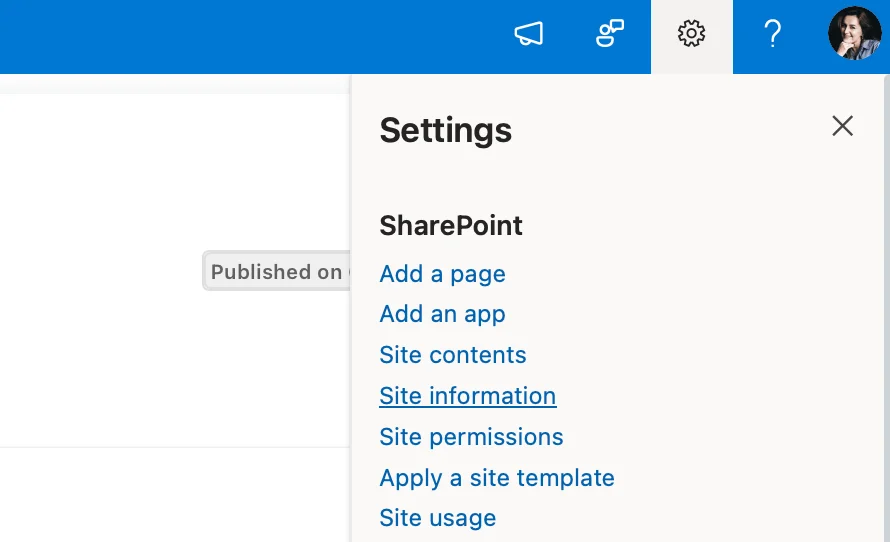
Pic. 2. Opening ‘Site information’ in a site’s settings.
- Go to the site you want to associate.
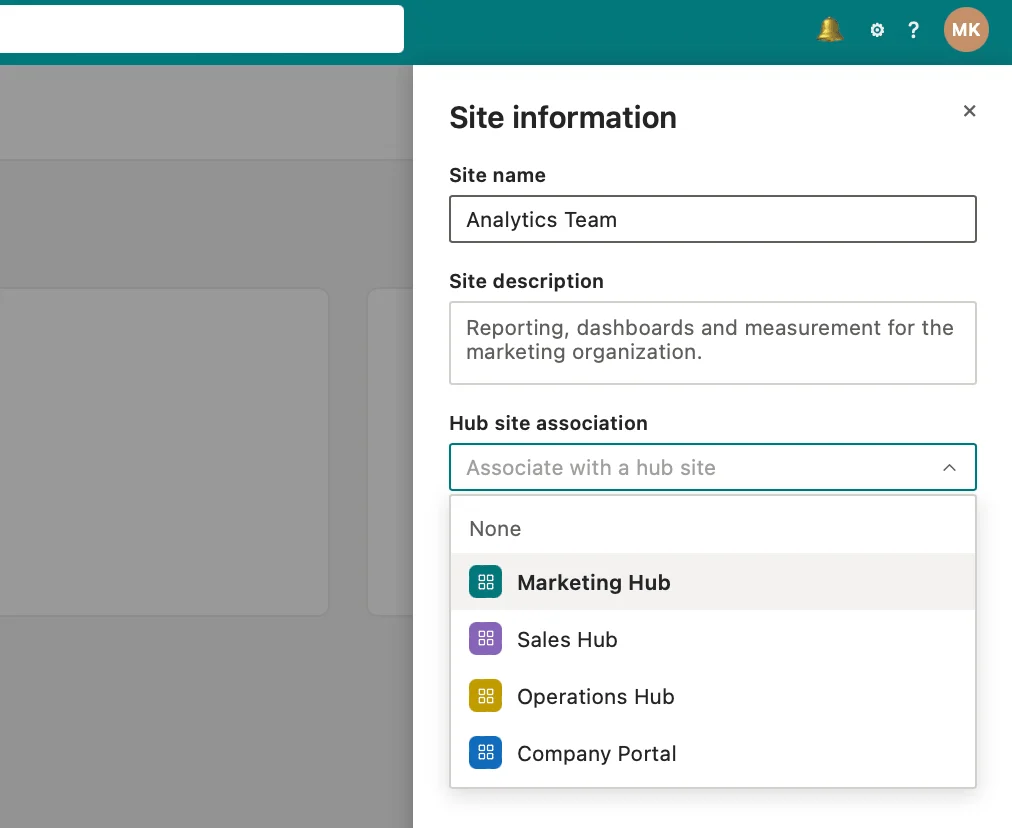
Pic. 3. Choosing ‘Associate with a hub site’ under Site information.
- Associate with the hub: in Site information, select Associate with a hub site and pick the hub from the dropdown. (The option appears only if you have permission.)
- Configure content roll-up: set up News, Events and Highlighted Content web parts to display content from associated sites.
- Use the hub search scope: associated sites automatically join the hub’s search scope.
- Remember one hub per site: a site can be associated with only one hub at a time; use cross-navigation links where a site logically belongs to several.
👉 In short — how do I convert a SharePoint site to a hub site? Open the SharePoint admin center, select a modern site, choose Register as hub site, set its display name and association permissions, then customize navigation and theme. To connect other sites, open each site’s settings and choose Associate with a hub site.
Step 4. Manage the hub over time
- Content management: keep clear processes for creating, reviewing and publishing content so it stays current.
- Governance enforcement: review policies regularly and address any issues with associations or content.
- Hub evolution: adapt structure, navigation and content as business needs change, and gather user feedback.
For Microsoft’s official guidance, see Planning your SharePoint hub sites, Create a hub site in SharePoint, Set up your SharePoint hub site and Create a hub site for your organization.
Hub site vs subsite: why hubs replaced subsites
Subsites were the traditional way to organize SharePoint, usually nested in a hierarchy. That model still has uses, but for larger, changing organizations deep nesting creates complex navigation, heavy permission and management overhead, and siloed information.
Hub sites offer a flatter, more flexible alternative: a central navigation point for associated sites, simpler cross-site management, better collaboration between related sites, and a structure that scales as you grow. Subsites still suit small, focused teams inside a broader hub, while hubs are the better fit for connecting many related sites across departments. For a full comparison of when to use each, see our dedicated guide to SharePoint subsites.
Hub site limitations and how to work around them
Hub sites are powerful, but a few factors are worth planning around.
What are the limitations of hub sites in SharePoint?
- Performance and scalability: there’s no strict cap on associated sites, but excessive associations, pages and web parts can slow things down. Build a cohesive, manageable structure and monitor performance.
- No nested hubs: a hub can’t be associated with another hub. Use cross-navigation links to connect related hubs.
- Automation limits: site scripts and Power Automate handle common tasks, but advanced scenarios (e.g. rule-based auto-association) may need custom development or third-party tools.
- Navigation design: too many links hurt usability and performance; keep hub navigation clear and focused.
- Differences from subsites: each associated site keeps its own permissions and recycle bin, and hubs don’t share libraries and lists the way subsites did — use content types, site scripts and Microsoft Syntex for consistency.
Recommendations for addressing limitations
- Plan proactively: analyze your information architecture and map user journeys before creating hubs, with governance to prevent sprawl.
- Connect hubs with cross-navigation: use links and menus to bridge related hubs since they can’t be nested.
- Optimize performance continuously: monitor regularly, minimize web parts per page, and archive outdated content.
- Extend with automation and tools: use Power Automate and PowerShell for association and approval workflows, and evaluate reputable third-party tools for gaps.
- Maintain and govern: run periodic audits, clean up content, and review navigation against user needs.
- Train users and admins: give both groups the guidance they need to navigate and manage hubs effectively.
Best practices for setting up and using hub sites
Core best practices
- Plan the structure early: map logical groupings — e.g. a Marketing Hub linking Campaigns, Market Research and Analytics.
- Keep structure consistent: use a predictable pattern (Company Hub → Departments → Projects) across hubs.
- Leverage metadata: tag content to improve search and filtering across related sites.
- Use clear names: descriptive labels like “Sales Hub” make hubs easy to identify.
- Use site templates: templates keep associated sites consistent and quick to set up.
- Review regularly: revisit structure and navigation to keep them accurate and relevant.
Enhancing hub sites with Virto tools
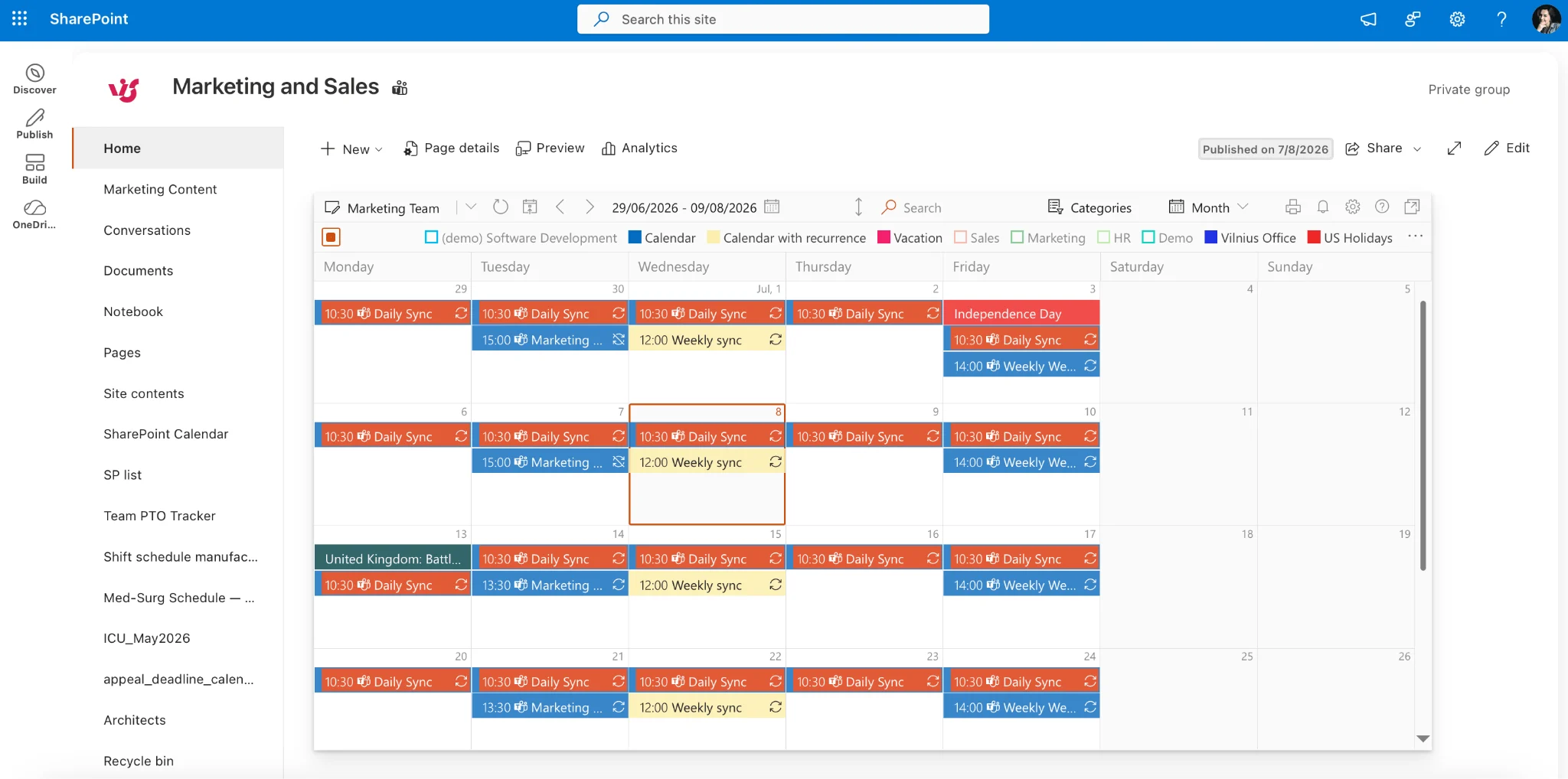
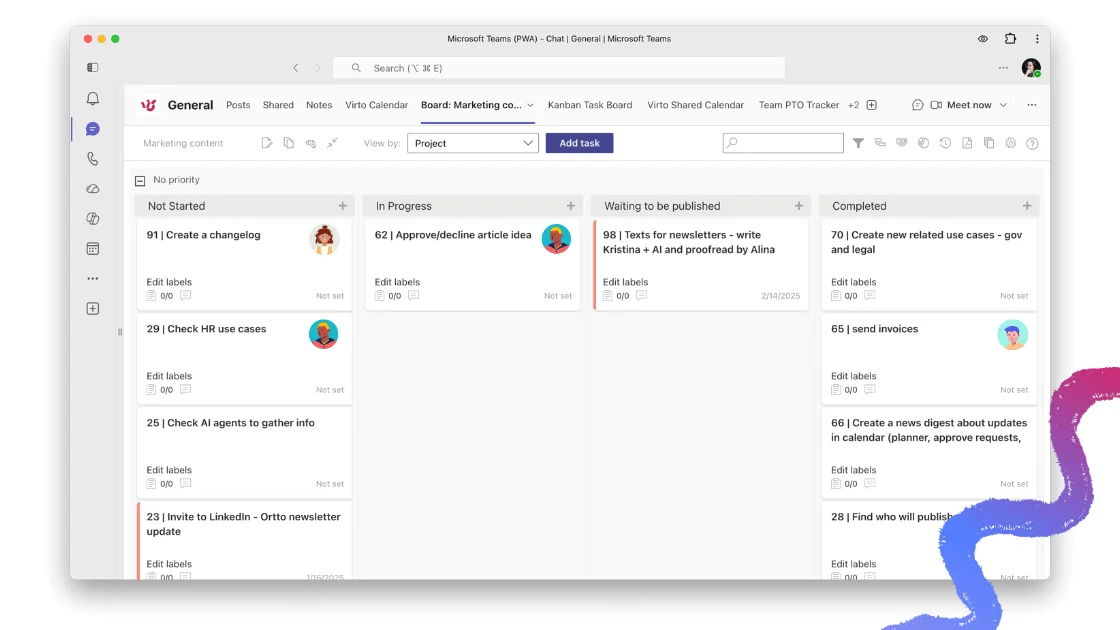
Pic. 4. Virto Calendar App — overlaying multiple calendars across a hub’s associated sites in one view.
Because a hub connects many associated sites, it’s a natural place to surface shared calendars, tasks and dashboards in one view. VirtoSoftware SharePoint web parts and Microsoft 365 & SharePoint Online apps extend hub sites in exactly that direction.
- Unified calendars across the hub: the Virto Calendar App consolidates events from SharePoint lists, Exchange, Google and external iCal feeds into one color-coded, overlaid view — ideal for surfacing schedules from a hub’s associated sites in a single place.
- Visual task management: the Virto Kanban Board App presents tasks as movable cards by status, so teams track progress and spot bottlenecks across sites.
- Automation and alerts: the Virto Alerts & Reminders App notifies users about changes to M365 calendar events and SharePoint lists, and the Virto Workflow Automation Web Part adds 70+ no-code activities on SharePoint on-premises (2013–2019 and SE).
- Security and profiles: the Virto Password Reset & Recovery app adds self-service password management, while Virto Active Directory User Profile Sync keeps AD and SharePoint profiles aligned.
Want to see how teams put these together? Explore the Virto Calendar use cases.
Merge all your calendars in one place. Try the Virto Calendar App to overlay and sync data from every associated site across your hub. Get started.
FAQ
What is a SharePoint hub site?
A hub site connects related team and communication sites under shared navigation, theme and search, giving a flat, flexible architecture that replaced nested subsites.
How many hub sites can I have?
Microsoft has raised the number of hubs allowed per tenant well beyond what most organizations need, so the practical advice is to create a logical, manageable number of hubs that match your structure rather than chasing the ceiling.
What’s the difference between a hub site and a subsite?
A subsite lives inside another site in a hierarchy; a hub connects independent sites side by side. Associated sites keep their own permissions and content, whereas subsites inherit from their parent. Hubs scale better for connecting many related sites — see our SharePoint subsite guide for the full comparison.
How do I create a SharePoint hub site?
A SharePoint admin registers an existing modern site as a hub (in the admin center or via PowerShell), then associates other sites to it and configures the hub navigation.
Conclusion
SharePoint hub sites bring order to a growing intranet. By unifying navigation and design, aggregating content, and scoping search across associated sites, they create a cohesive, user-friendly workspace that scales far better than nested subsites. Plan the architecture up front, govern associations, and revisit the structure as needs change, and a hub becomes the reliable home destination for a department, project or region.
To extend a hub with unified calendars, visual task boards, timelines and automation, tools like Virto Calendar, Kanban and Gantt complement SharePoint’s native features. Schedule a quick demo or browse the VirtoSoftware site to learn more.
Further reading
- What is a SharePoint hub site? (Microsoft)
- SharePoint hub sites overview (Microsoft)
- What is SharePoint — VirtoSoftware
- How to use SharePoint — VirtoSoftware
- Types of SharePoint sites — VirtoSoftware
- SharePoint intranet guide — VirtoSoftware
- SharePoint web parts — VirtoSoftware
- Team site vs communication site — VirtoSoftware