



Quick answer: SharePoint is an enterprise content and document platform inside Microsoft 365; Notion is a flexible all-in-one workspace. SharePoint wins on governance and scale, Notion on speed and simplicity. Plenty of organisations run both — the trick is drawing a clear line between where rough work happens and where the official record lives.
Most teams don’t go looking for another platform. They go looking for a place where work can live, evolve and still meet policy without getting in anyone’s way. Two names dominate that conversation: SharePoint, the backbone of Microsoft 365, and Notion, an all-in-one workspace that has grown well beyond docs and databases.
Both products moved fast over the past eighteen months — and mostly in opposite directions. Notion rebuilt itself around autonomous AI agents. SharePoint doubled down on being the trusted content backbone that Microsoft 365 Copilot grounds its answers in. That has sharpened the division of labour rather than blurred it: SharePoint as system of record and organisational portal, Notion as the operating canvas for teams that think in pages and linked databases.
This guide compares the two on features, collaboration, security, pricing and integration — and covers when it makes sense to run both.
Notion vs SharePoint at a glance
| Notion | SharePoint | |
|---|---|---|
| Best for | Fast-moving team knowledge, wikis, project operations | Records, governed publishing, enterprise document management |
| Deployment | Standalone SaaS workspace | Part of Microsoft 365 (or on-premises) |
| Time to value | Hours | Weeks to months |
| Governance | SAML SSO, SCIM, audit log, granular row permissions, EU data residency, HIPAA on Enterprise with a BAA | Sensitivity labels, retention, eDiscovery, DLP and tenant-wide audit through Microsoft Purview |
| AI in 2026 | Notion Agents, Custom Agents, External Agents | Copilot in SharePoint, SharePoint List Agent, Copilot Studio agents |
| Pricing model | Per-user tiers plus AI credits | Bundled into Microsoft 365 licensing, plus optional add-ons |
| Main weakness | Governance depth; no native Microsoft 365 sync | Complexity, slower to change, steeper learning curve |
Fig. 1. Notion vs SharePoint at a glance.
What Notion and SharePoint Actually Are
Notion
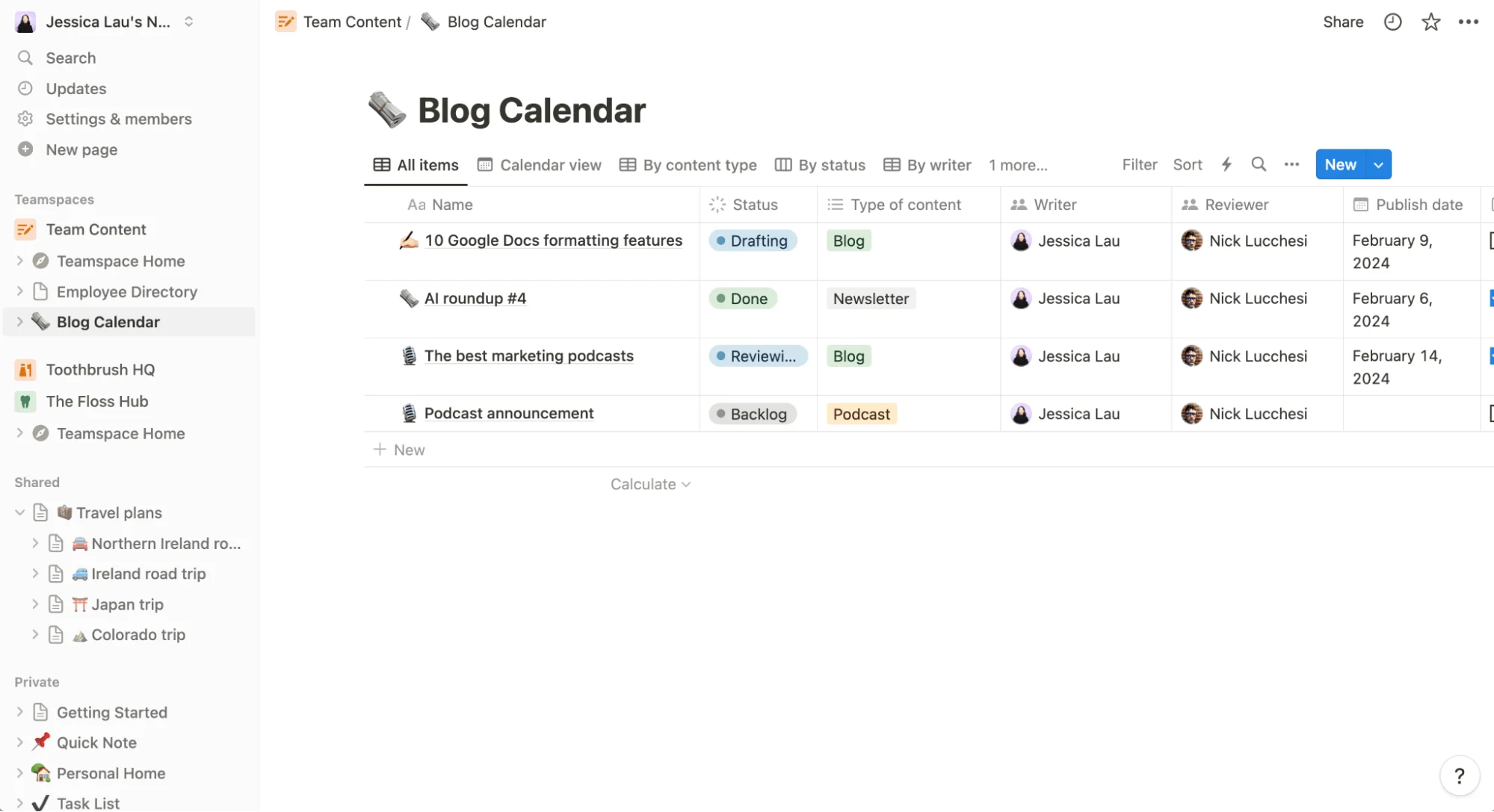
Pic. 1. Notion
Notion is a cloud workspace that merges note-taking, database management, task coordination and project planning into a single block-based surface. Anyone can stand up a workspace and reshape it for a specific workflow without technical expertise or a rollout project. Since 2024 it has added Calendar, Sites (with custom domains), Forms and Charts, pushing it well past docs and databases.
The bigger shift is AI. Notion 3.0 (September 2025) rebuilt the product around autonomous agents that can carry out multi-step work across hundreds of pages. Notion 3.3 (February 2026) added Custom Agents that run on schedules or event triggers and can be shared across a team. Notion 3.6 (July 2026) brought External Agents into the same shared board, plus interactive HTML blocks and agents that can read and write Excel and PowerPoint files.
Worth correcting if you’ve read older comparisons: Notion Mail is being retired on 22 September 2026. It was Gmail-only for its entire life and never supported Outlook, so it was never a route into Microsoft 365 anyway. Notion is steering that use case toward agent-led email instead.
SharePoint
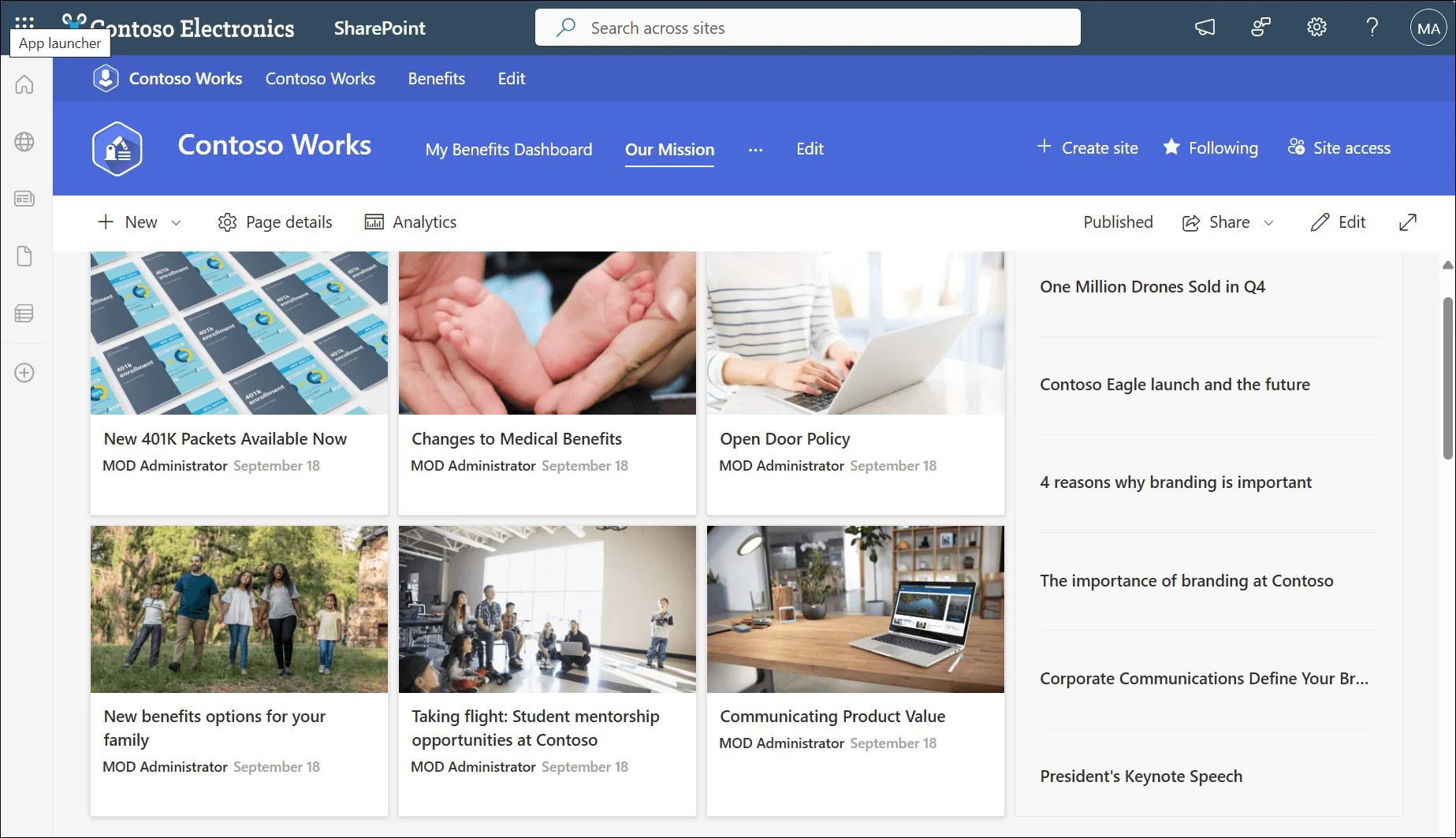
Pic. 2. SharePoint
SharePoint is Microsoft’s enterprise approach to content management and internal portals. It is built for organisations that need structured access control, and it integrates deeply with Microsoft 365 to support document collaboration across Word, Excel and PowerPoint. It handles business process automation and meets the security standards expected by corporations, government agencies and regulated industries.
In 2026 the headline change is also AI. What launched as Knowledge Agent in September 2025 was rebranded as AI in SharePoint and then Copilot in SharePoint, rolling out worldwide from May 2026. It lets people plan and build sites, libraries, pages and lists in plain language, and it automatically extracts and applies metadata so that Copilot and agents elsewhere in Microsoft 365 return accurate answers. April 2026 added a SharePoint List Agent, and SharePoint lists can now ground an agent in Agent Builder with up to 20,000 items of structured data.
Two dates matter if you maintain an older SharePoint estate: SharePoint Embedded reached general availability on 21 May 2024 as a headless, pay-as-you-go service for custom apps built on Microsoft 365 content; and classic SharePoint Add-ins were retired on 2 April 2026, so anything still depending on Azure ACS authentication has stopped working.
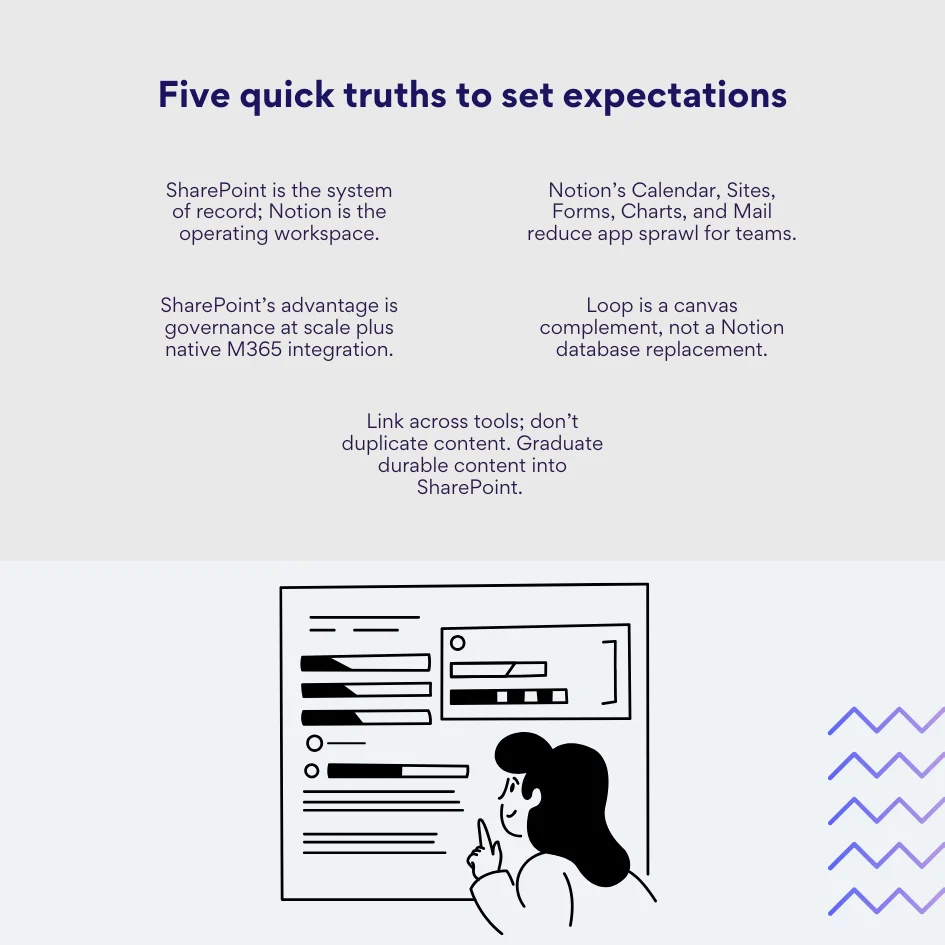
Pic. 3. Five quick truths to set expectations
💡 More SharePoint background: SharePoint site types · SharePoint subsites · SharePoint intranet · SharePoint communication sites · SharePoint hub sites.
Key Features Compared
What Notion does well
- Knowledge bases and wikis: structured internal documentation with easy cross-references, relations and rollups between related content.
- Databases and templates: ready-made templates for project planning and content calendars, plus custom databases that adapt to how a team actually works.
- Boards and task tracking: built-in Kanban, timelines and task databases without a separate tool.
- Real-time collaboration: simultaneous editing, inline comments and page-level sharing with granular permissions — including database row permissions for sensitive data.
- Calendar: connects Google Calendar, shows database pages alongside events and supports conferencing links including Microsoft Teams.
- Sites, Forms and Charts: publish branded pages with basic SEO and a custom domain; native forms write straight into databases; one-click charts visualise any database.
- AI agents: personal, custom and external agents that triage tasks, draft content and run scheduled workflows — with Custom Agent activity now recorded in the Enterprise audit log.
What SharePoint does well
- Enterprise content management: store, organise and search files with permission models that map to complex organisational hierarchies.
- Intranets and portals: corporate sites, departmental workspaces, hub navigation and audience targeting.
- File storage and co-authoring: OneDrive and Teams integration for access and simultaneous editing across the Microsoft ecosystem.
- Process automation: approvals, notifications and task routing through Power Automate, with no custom development required.
- Copilot in SharePoint: natural-language site, page, list and library creation, automatic metadata extraction, and admin insights showing how Copilot reached its answers.
- Governance: sensitivity labels, retention policies, eDiscovery, DLP and tenant-wide audit through Purview; SharePoint Premium (Advanced Management) adds deeper controls.
- SharePoint Embedded: a headless, metered service for building line-of-business and ISV applications on Microsoft 365 content, with Copilot and Purview features included.
| Area | Notion (2025–2026) | SharePoint (2025–2026) | Why it matters |
|---|---|---|---|
| AI | Agents, Custom Agents, External Agents, agent audit logging | Copilot in SharePoint, SharePoint List Agent, lists as agent knowledge source | Notion automates inside its own workspace; SharePoint makes enterprise content usable by Copilot everywhere. |
| Publishing | Public Sites with branding and basic SEO | Intranet hubs and audience targeting inside Microsoft 365 | Sites for lightweight external docs; SharePoint for governed internal portals. |
| Notion Mail retiring 22 Sept 2026 (Gmail-only) | Outlook and Exchange, natively | Microsoft 365 shops never had a Notion email path to begin with. | |
| Governance | SSO, SCIM, row permissions, EU residency, HIPAA (Enterprise + BAA) | Labels, retention, eDiscovery, DLP, tenant-wide audit | Anchor records in SharePoint; let Notion run fast-moving team knowledge. |
Fig. 2. What changed over the last year, at a glance.
👉 Notion vs SharePoint: which is better? Neither is better in the abstract — they solve different problems. Notion wins for creative teams, startups and any group that values speed and flexibility. SharePoint wins when an organisation needs governance, compliance and deep Microsoft 365 integration. The right answer depends on team size, regulatory obligations, existing technology investments, and whether rapid deployment matters more than structured process.
Is there a Microsoft equivalent of Notion?
The closest equivalents are Microsoft Loop — flexible canvases and portable components embedded across Teams, Outlook and Word — and SharePoint for enterprise content and governance. Loop is the nearer analogue to Notion’s page model, but it still lacks Notion’s database depth. SharePoint remains the system of record, which makes it a fundamentally different kind of tool rather than a like-for-like alternative. See our guide to Microsoft Loop for the full picture.
Key Differences Between Notion and SharePoint
Design philosophy
Notion prioritises flexibility. It shines when teams need to create, modify and restructure their information systems quickly — a simple page can become a database, then link out to boards and calendars, with no predetermined workflow and no administrative gatekeeping. SharePoint starts from enterprise standardisation: consistent processes, audit trails and compliance frameworks. Every feature reflects that, from granular permissions to detailed version control.
Ecosystem integration
Notion is an independent SaaS product. That independence enables fast feature development and cross-platform consistency, but it limits how deeply it can embed into corporate infrastructure. SharePoint is a foundational component of Microsoft 365, with native connections to Teams, OneDrive, Outlook, Purview, Power Platform and Copilot. Organisations already invested in Microsoft get immediate value with no integration work.
Scale and user management
Notion scales well for large teams and has closed real gaps — SCIM provisioning, granular row permissions, audit logging. Where it still trails is compliance depth: data loss prevention, retention labels and legal hold remain stronger in Microsoft 365. SharePoint scales from a single department to global organisations with hundreds of thousands of users, accommodating intricate hierarchies and regulatory requirements — at the cost of setup and maintenance complexity.
Implementation and administration
Any Notion user can build a knowledge base, task board or internal portal within hours. That democratic approach accelerates adoption but produces inconsistency at scale without a governance framework. SharePoint requires deliberate planning, professional implementation and ongoing administration — which is exactly what makes it predictable once it is in place.
| Aspect | Notion | SharePoint |
|---|---|---|
| Primary purpose | Flexible workspace and knowledge management | Enterprise content management and portals |
| Document management | Page-based with simple sharing | Advanced versioning, approval workflows, lifecycle management |
| Security and compliance | SAML SSO, SCIM, row permissions, HIPAA with a BAA, EU data residency, page verification | Enterprise-grade security, DLP, retention policies, eDiscovery, Purview audit |
| Interface | Clean, intuitive, block-based editing | Feature-rich but complex; training pays off |
| Integrations | Popular SaaS tools, MCP connectors, Teams conferencing via Calendar | Deep Microsoft 365 integration and extensive enterprise connectivity |
| Cost structure | Predictable per-user pricing plus AI credits | Varies with Microsoft 365 licensing and add-ons |
Fig. 3. Comparison overview: Notion and SharePoint.
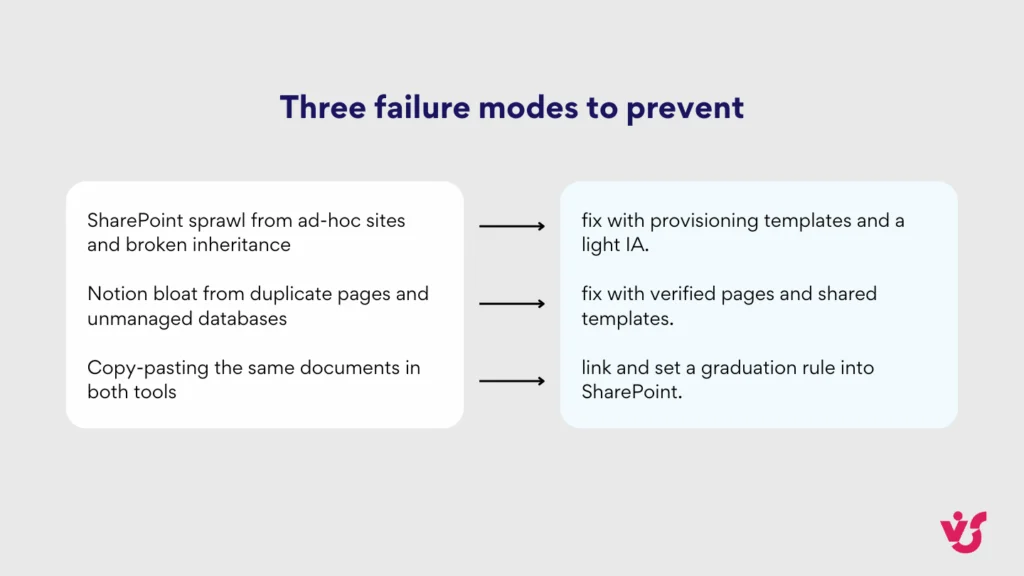
Pic. 4. Three failure modes to prevent
👉 Notion vs SharePoint: what’s the main difference? Notion prioritises flexibility and rapid setup for teams that need to reshape their information systems quickly; SharePoint prioritises governance and standardised process for large organisations. Notion is an independent workspace where users can turn pages into databases without administrative oversight, whereas SharePoint sits inside Microsoft 365 with sophisticated access control and compliance frameworks. The divide comes down to adaptability versus accountability.
Advantages and Disadvantages
Notion: advantages
- Fast adoption. The uncluttered interface means most people are productive in their first session, which cuts onboarding friction sharply.
- Flexible information architecture. Interconnected pages, databases, wikis and boards reshape as project needs change — no admin ticket required.
- One surface for many jobs. Notes, project management, documentation, task lists and content planning live together, so teams switch context less.
- Minimal setup. No specialists, no configuration project — teams collaborate productively within hours.
- Cross-platform consistency. The same experience on web, Windows, macOS, iOS and Android.
- Sites with custom domains. External handbooks and documentation published with branding and a custom URL, without a separate CMS.
- Agentic automation. Custom Agents handle triage, standups and status reports on a schedule, with every run logged and reversible.
Notion: limitations
- Enterprise document management. Complex approval chains, automated retention and lifecycle-grade version control remain outside Notion’s scope.
- Governance depth. Notion has SSO, SCIM, audit logging, verified pages and EU data residency, but DLP, retention labels and legal hold are still stronger in Microsoft 365.
- No native Microsoft 365 sync. There is no native SharePoint synchronisation. Outlook and Office 365 workflows need third-party automation such as Zapier, Make or Power Automate.
- Limited enterprise system integration. Notion connects well to popular SaaS tools but not to complex ERP, CRM or legacy corporate systems.
- AI costs are consumption-based. Custom Agents draw on Notion credits, so heavy automation is a variable line item rather than a flat per-seat cost.
SharePoint: advantages
- Deep customisation. Portals, document libraries and workflows configured to specific business requirements without compromising security.
- Native Microsoft 365 integration. File access, collaboration and communication in one ecosystem, with no integration work.
- Advanced process automation. Approvals, notifications, deadline reminders and task routing through Power Automate.
- Enterprise security and compliance. GDPR and HIPAA alignment, DLP, retention, eDiscovery and detailed audit logging for regulated industries.
- Sophisticated document management. Version control, organisation-level access rights, lifecycle management and automated retention.
- Scale. From a single department to global enterprises with hundreds of thousands of users.
- Copilot grounding. Well-structured SharePoint content is what makes Copilot answers accurate across the rest of Microsoft 365 — a benefit that compounds.
SharePoint: limitations
- Implementation complexity. Full deployment needs planning, expertise and often external consulting. Most organisations underestimate it.
- Higher total cost of ownership. Licensing, implementation, administration and support add up — a real barrier for smaller organisations.
- Interface complexity. The feature set can overwhelm new users without structured training.
- Slower to change. Planning, configuration, testing and training can span months rather than weeks.
- Feature redundancy for small teams. Much of the enterprise capability adds cost and complexity a ten-person team will never use.
| Need | Use Notion when… | Use SharePoint when… |
|---|---|---|
| Knowledge base | You want fast iteration with linked databases and inline context. | You need multilingual hubs, audience targeting and long-term retention. |
| Project execution | Teams work from docs, boards and timelines on one surface. | Workflows must feed Power Automate and Power Apps and inherit labels. |
| External docs | You want branded Sites and simple SEO without a separate CMS. | External access must obey guest policies and conditional access. |
| Compliance | Team-level controls are sufficient (SSO, SCIM, verified pages, EU residency). | You require DLP, legal hold, sensitivity labels and eDiscovery. |
| AI | You want agents that act inside your own workspace. | You want Copilot answers grounded in governed organisational content. |
Fig. 4. Decision matrix: map the need to the right tool.
Notion and SharePoint Use Cases
Where Notion excels
Personal and team knowledge. Interconnected wikis that grow organically, with verified pages marking what is canonical inside larger workspaces.
Creative team collaboration. Campaign briefs, creative assets, feedback cycles and approvals in shared workspaces, with databases driving content calendars and editorial workflows.
Startup and small business operations. Product development, customer feedback, hiring and company handbooks, all before formal enterprise systems become necessary.
External-facing documentation. Customer handbooks, API docs and public knowledge bases published through Notion Sites with custom domains, branding, SEO and analytics.
Agent-driven operations. Scheduled Custom Agents that triage incoming tasks, compile daily standups and generate status reports without anyone opening the board.
Where SharePoint dominates
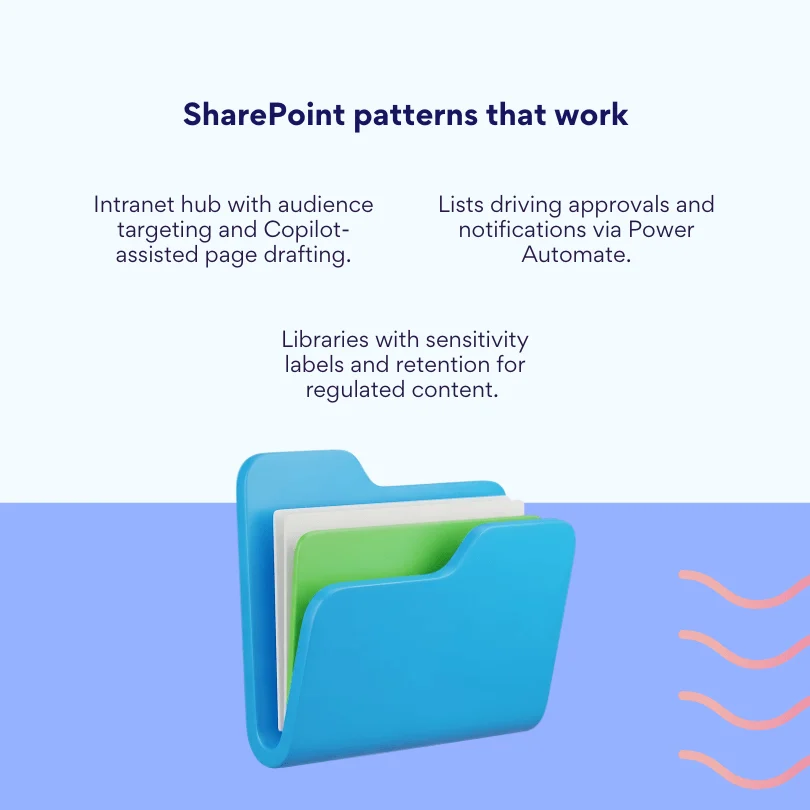
Pic. 5. SharePoint patterns that work
Enterprise content management. Thousands of documents under version control, access rights and retention, with the audit trails regulated industries require. Legal, financial services and healthcare depend on this.
Corporate intranets. Internal portals for employee communications, policy documentation and organisational resources, personalised by department, role and location.
Business process automation. Document approvals, expense processing, onboarding and compliance reporting, chained together through Power Automate.
AI-ready content. Copilot in SharePoint accelerates page and site creation, while automatic metadata extraction improves the quality of every Copilot and agent answer downstream.
Custom applications. SharePoint Embedded supports line-of-business and ISV apps built on Microsoft 365 content, with Copilot and Purview features included and pay-as-you-go pricing.
Pricing: How the Two Compare
The two products price on completely different logic, which makes a straight per-seat comparison misleading.
- Notion sells per-user tiers — a free plan, then Plus and Business, then a custom Enterprise tier. Business includes full AI access. Custom Agents consume Notion credits, purchased as an add-on, so automation-heavy teams carry a variable cost on top of seats.
- SharePoint is bundled into most Microsoft 365 business and enterprise plans, so the marginal cost is often zero if you already pay for Microsoft 365. The real spend sits in add-ons: SharePoint Premium (Advanced Management), Microsoft 365 Copilot licences and metered SharePoint Embedded storage — plus implementation and administration time.
In practice: a ten-person team pays real money for Notion and effectively nothing extra for SharePoint. A five-thousand-person regulated enterprise pays little for Notion seats relative to what it would spend rebuilding SharePoint’s compliance stack elsewhere. Both vendors change pricing regularly, so confirm current figures on their own pages before budgeting.
Integration and Data Migration
| Scenario | Native today | Practical path |
|---|---|---|
| Notion ↔ SharePoint sync | No | Power Automate, Zapier or Make for event-based bridges. Keep one source of truth. |
| Meetings in Notion with Teams links | Yes, via Notion Calendar | Use Calendar conferencing for Teams; store recordings and transcripts in Microsoft 365. |
| Outlook or Exchange mail in Notion | No — Notion Mail was Gmail-only and retires 22 Sept 2026 | Keep Outlook as primary; route notifications through bridges if needed. |
| Teams collaboration with Notion content | Partial — links, embeds and connectors | Link and embed; keep records in SharePoint libraries. |
Fig. 5. Integration reality check.
Can Notion sync with SharePoint?
No. There is no native SharePoint synchronisation, which means documents, metadata and permissions do not move automatically between the two platforms. Notion Calendar can add Microsoft Teams conferencing links, and Notion connectors can reach a growing list of third-party systems, but neither closes the gap. For anything deeper, organisations rely on Power Automate, Zapier or Make to bridge specific events — a new file in a library creating a Notion row, or a completed Notion task triggering a SharePoint approval.
Two limits are worth planning around. Permission structures do not transfer, so access has to be maintained separately in both systems. And user provisioning is only unified as far as your identity provider takes it — SAML SSO covers sign-in, not lifecycle parity between the two platforms.
Practical split: what lives where
- SharePoint as the authoritative document repository; Notion for planning, meeting notes and collaborative drafting.
- Notion Calendar for scheduling with Teams links; official records and recordings in Microsoft 365.
- Power Automate watching SharePoint libraries and creating matching Notion entries — or the reverse.
- Operational documentation and creative briefs in Notion; final deliverables, compliance documents and archives in SharePoint.
Migrating from Notion to SharePoint
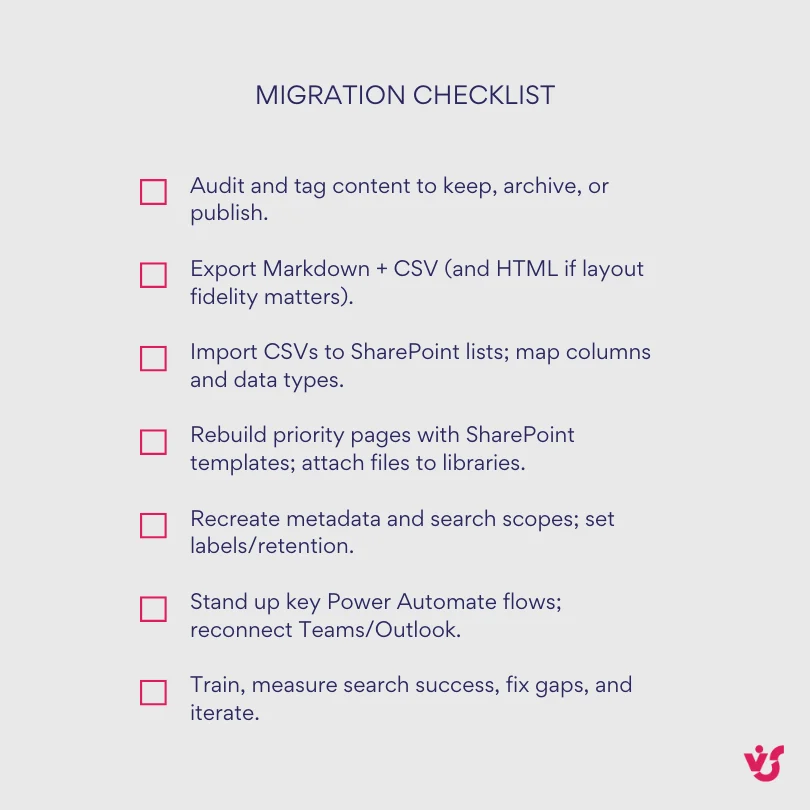
Pic. 6. Migration Checklist
Start by auditing Notion content and deciding what to preserve versus archive. Notion’s built-in export produces Markdown plus CSV, which is the best fit for text and database structures; HTML export preserves page layout but needs more processing on import.
- Libraries and lists. Recreate the structure as SharePoint document libraries, then convert CSV exports into SharePoint lists, mapping Notion properties to columns with matching data types.
- Metadata and search. Rebuild Notion tags as managed metadata terms so migrated content stays findable — and so Copilot can use it properly.
- Permissions. Create SharePoint groups mirroring Notion workspace access, and apply item-level permissions only where Notion had genuinely granular control.
- Workflows. Identify Notion automations and rebuild them in Power Automate; reconnect Teams, Outlook and Planner to restore the collaboration people relied on.
- Notion Sites. Capture SEO metadata, URL structures and analytics separately — SharePoint’s external sharing model works differently, and public-facing content may need a different host entirely.
Going the other way, from SharePoint to Notion, the hard part is accepting what does not travel: retention policies, approval workflows and detailed audit trails have no equivalent in Notion’s simpler architecture. Plan for feature loss rather than feature parity.
👉 How do I choose between SharePoint and Notion? Start with scale, compliance obligations and your existing technology stack rather than a feature checklist. Choose Notion if you are a smaller team, need productivity within hours and can work with team-level security controls. Choose SharePoint if you need HIPAA or GDPR compliance, already run Microsoft 365 and can invest weeks in a proper implementation. If both are true — which is common — run a hybrid where Notion handles operational knowledge and creative work while SharePoint holds official documents and compliance material.
Making SharePoint Feel Less Corporate: Virto Apps for SharePoint
A lot of the reason teams drift toward Notion is not governance — it is the day-to-day experience. SharePoint holds the record beautifully and shows it awkwardly. That gap is where third-party tools earn their place. Virto apps for SharePoint add the visual, everyday layer that SharePoint leaves out, while every document stays inside your tenant under your existing security model. VirtoSoftware ships more than 30 apps and web parts for Microsoft 365 and SharePoint Online as well as SharePoint On-Premises.
For SharePoint Online, Microsoft 365 and Microsoft Teams
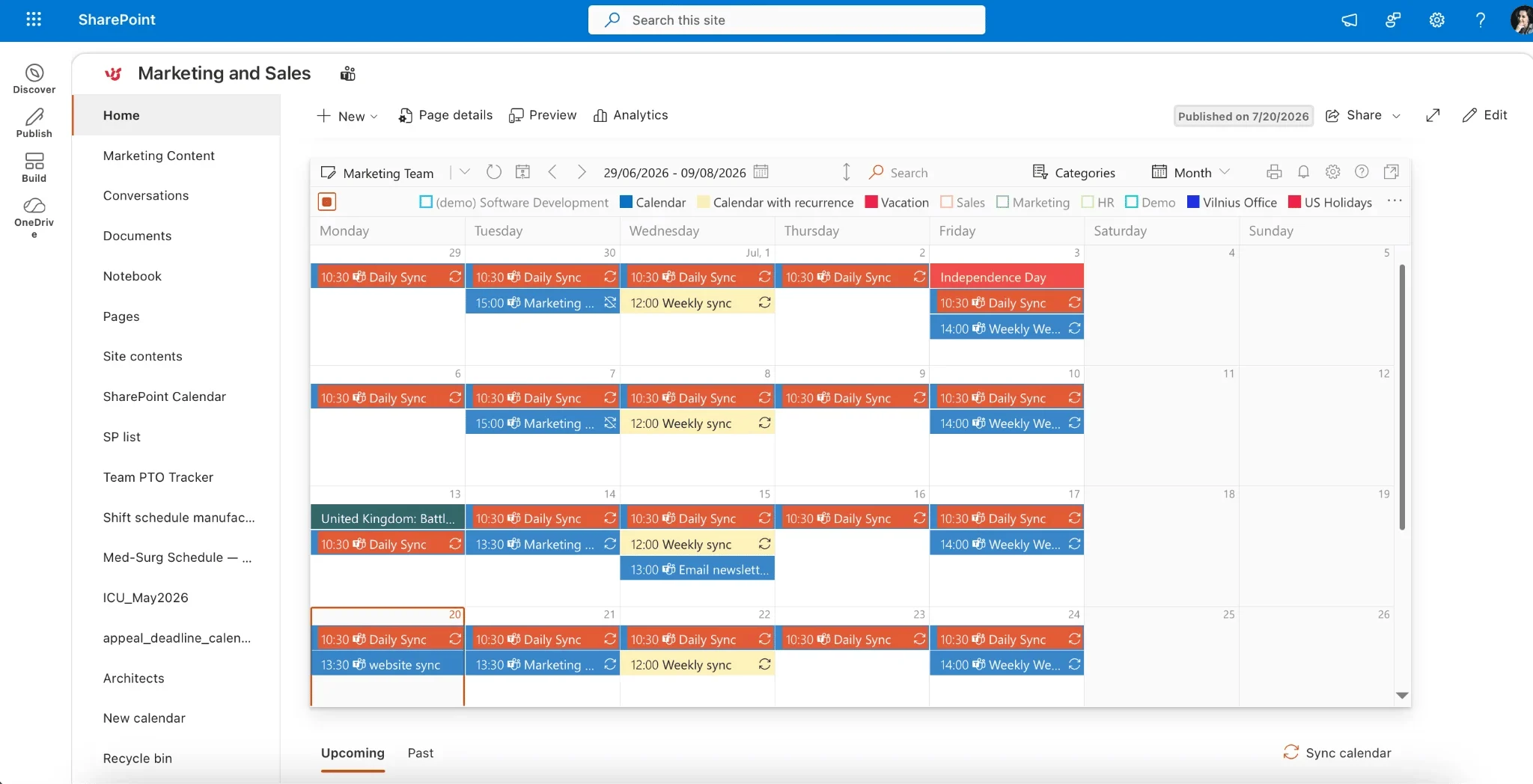
Pic. 7. Example Virto Calendar
Virto Calendar App: merges calendars from SharePoint lists and libraries, Outlook, Exchange, Planner, Google Calendar, iCal and Apple Calendar into one colour-coded overlay. Teams stop checking four places to find a scheduling conflict — the single unified view is the thing Notion users usually say they miss when they move to SharePoint.
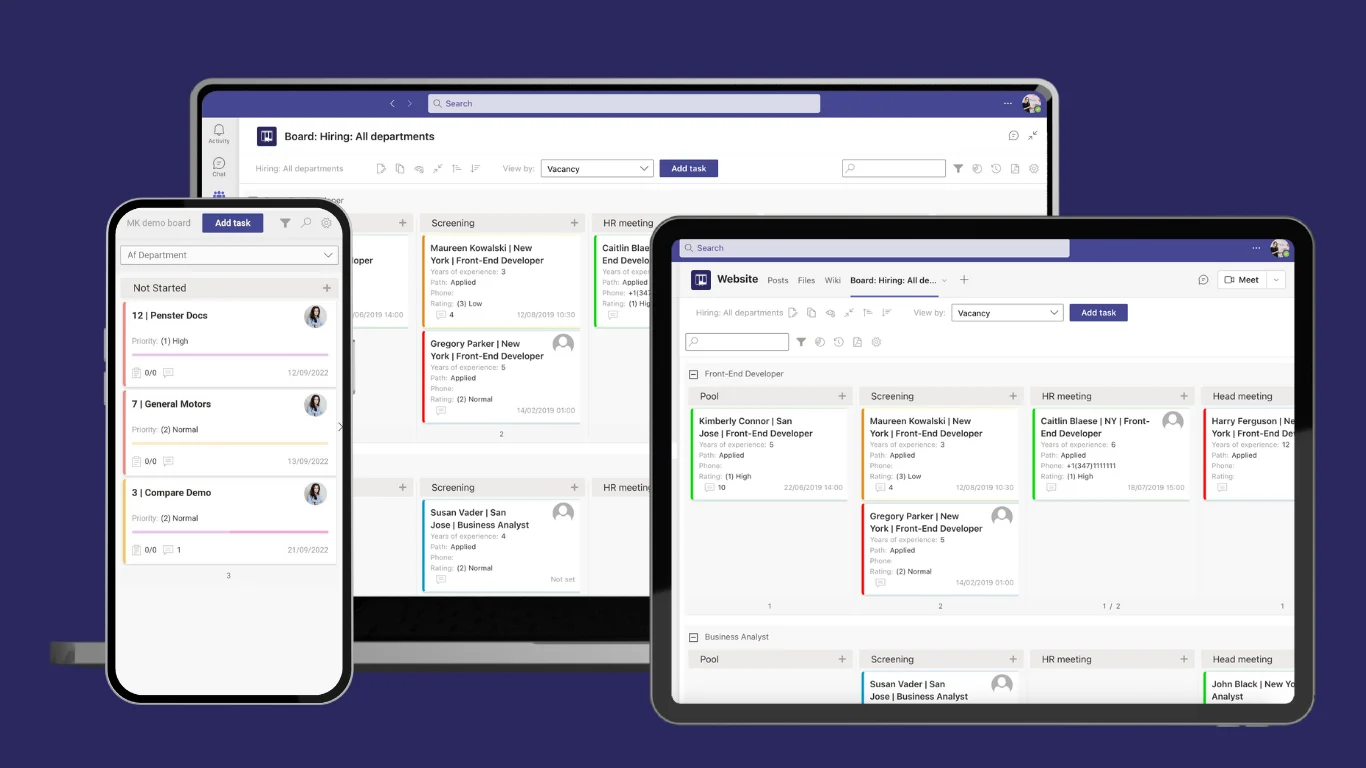
Pic. 8. Example Kanban Board
Virto Kanban Board App: puts drag-and-drop boards directly into Microsoft Teams channel tabs and SharePoint sites, so nobody leaves the tool they already have open. Ready-made templates start a new project in under a minute, and boards support swimlanes, categorisation, colour-coding and subtasks. This is the closest thing to Notion’s board experience that lives natively inside Microsoft 365.
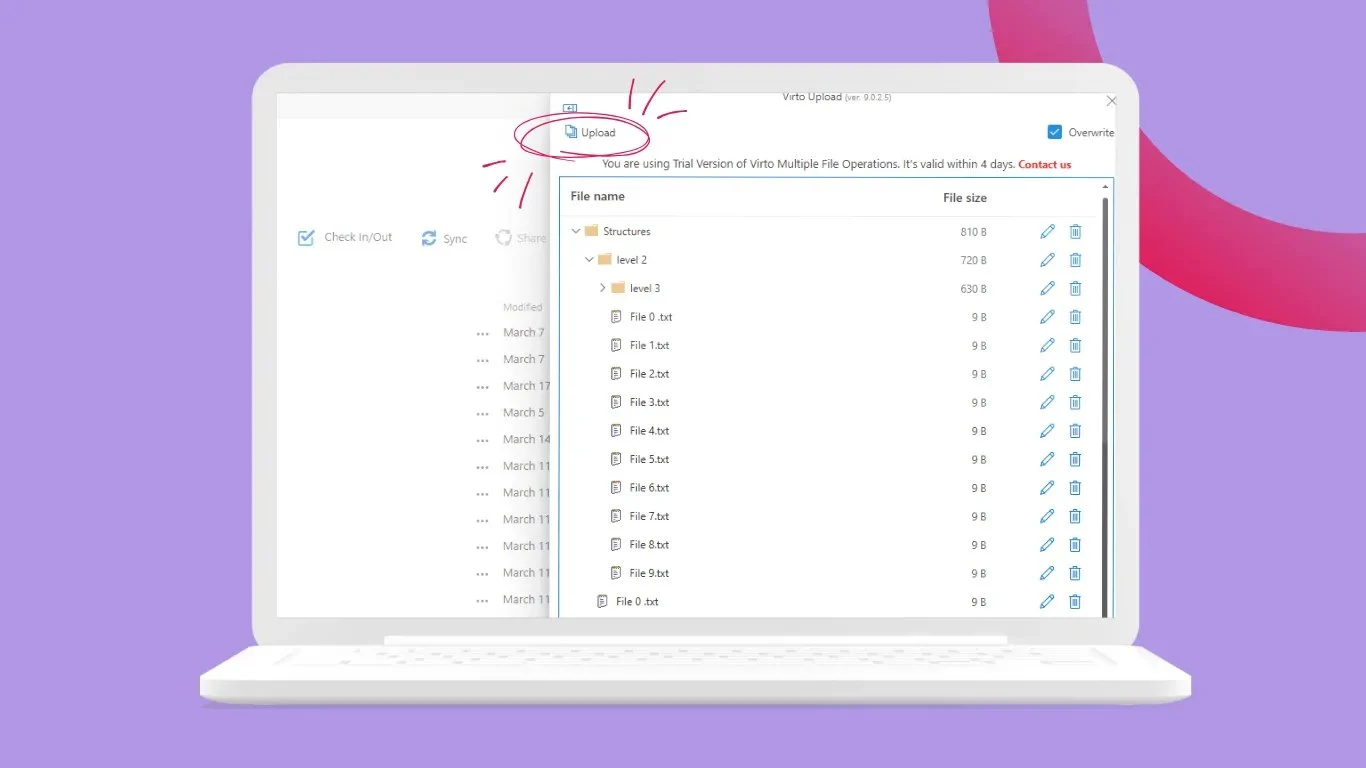
Pic. 9. Virto Multiple Operations
Virto Multiple Operations: bulk upload, manage and delete files and folders in SharePoint with configurable size limits, restricted file types and metadata settings — which turns content migration and routine document work from an afternoon into a few minutes.
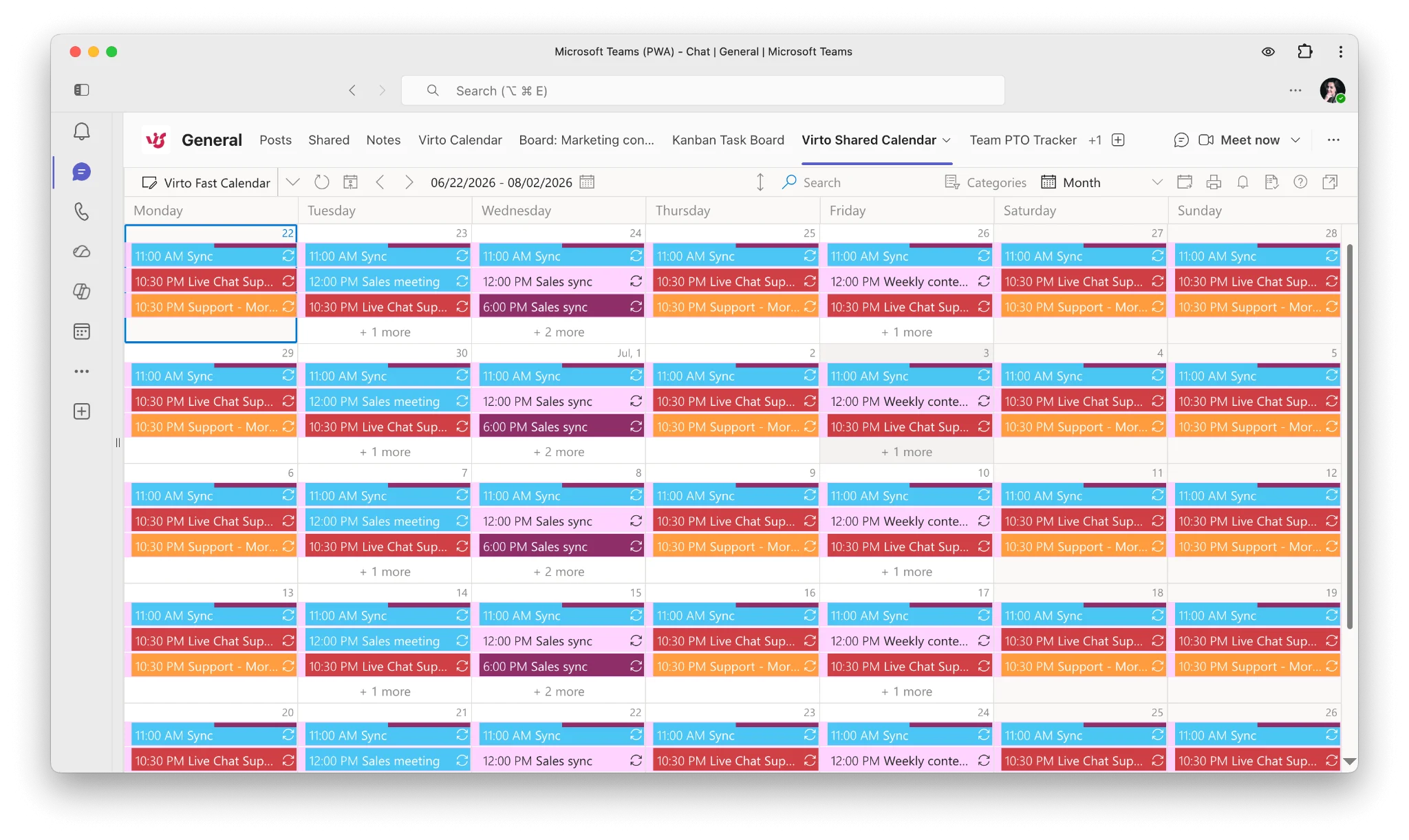
Pic. 10. Example Virto Shared Calendar
Virto Shared Calendar: a lightweight standalone and Microsoft Teams app for simple event management with tagging, colour-coding and anonymous sharing — no extra logins needed, which makes it the easy option for teams that find the full calendar overlay more than they need.
If notifications are the gap, the Virto Alerts and Reminders App covers daily and weekly digest emails for SharePoint list and calendar changes — something native SharePoint rules cannot do since the classic “Alert me” feature was retired.
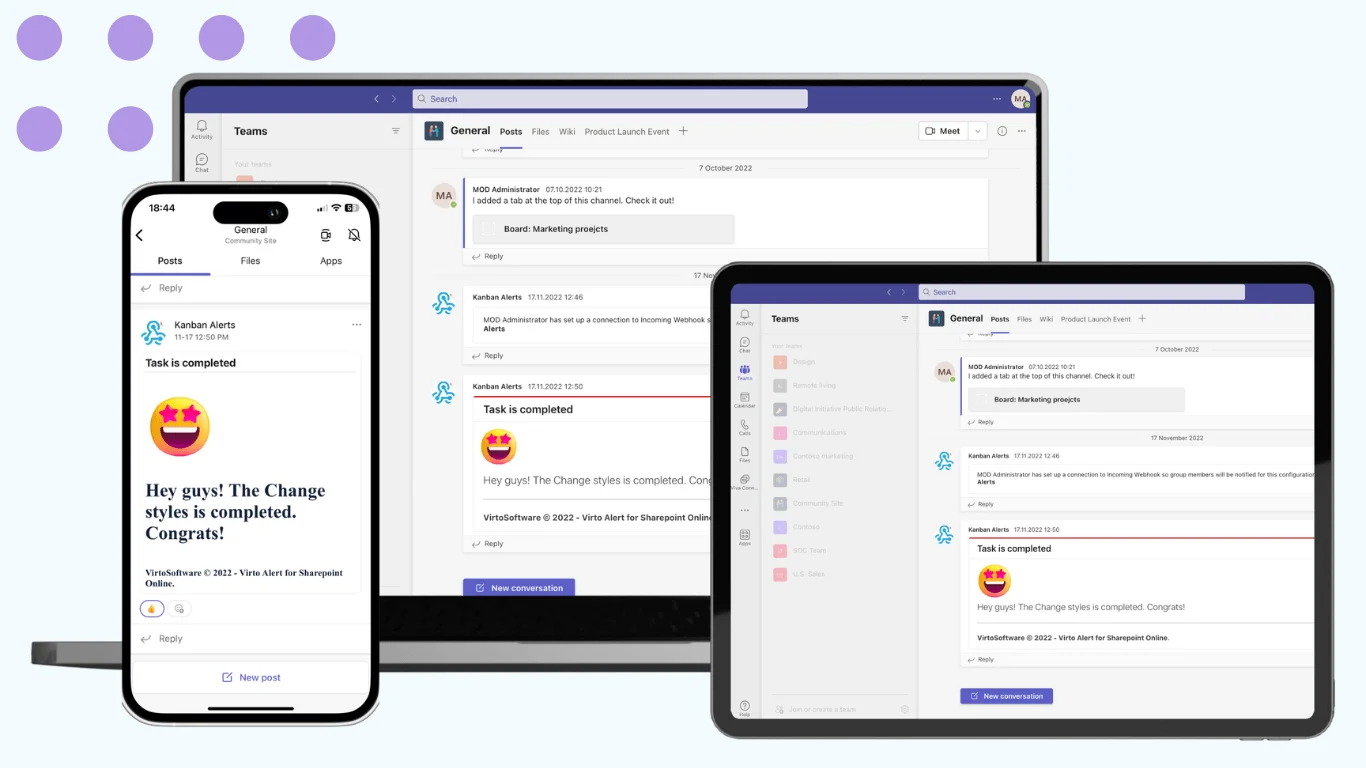
Pic. 11. Virto Alerts & Reminder App
For SharePoint On-Premises

Pic. 12. Virto Calendar Web Part
Virto Calendar Web Part: merges events from Exchange, Google, SQL, XML and iCal into unified day, week, month, year and Gantt views — entirely inside your own SharePoint farm, so no data leaves your infrastructure.
Virto Kanban Board Web Part: turns SharePoint task lists into drag-and-drop boards, merges multiple lists onto one board, and supports subtasks, filtering, sorting and colour-coding.
Virto Multiple File Operations: bulk upload, download, delete, copy, move, check-in, approve and edit — with audit trails and version control preserved.
Why this works alongside, not instead of, Microsoft
- Microsoft-native. The apps are fully SPFx-based, so they were unaffected by the April 2026 SharePoint Add-ins retirement. Security and identity stay inside your tenant.
- Complementary to Copilot. Use SharePoint Premium for governance and Copilot for content acceleration, and Virto apps for the day-to-day experience — calendars, boards, timelines and bulk file work.
- Two-click install and a free 30-day trial. Every Virto product comes with a free 30-day trial, backed by 24/7/365 support from product experts.
- One bundle if you need several. Virto M365 Productivity Kit packages the Microsoft 365 apps into a single purchase with unified support.
👉 How can VirtoSoftware help with Notion and SharePoint? VirtoSoftware does not bridge Notion and SharePoint directly — no third party can, because there is no native sync to build on. What it does is remove the reasons teams reach for Notion in the first place. Virto Calendar consolidates scheduling into one readable view, and Virto Kanban Board brings visual project management into SharePoint and Teams without the enterprise-platform overhead. The effect is that SharePoint feels more collaborative and less corporate, while governance and security stay exactly where they were.
Conclusion
Notion and SharePoint address overlapping problems from opposite ends. Notion excels at flexibility, speed and collaborative knowledge work, which makes it a natural fit for creative teams, startups and organisations that value adaptability over structure. SharePoint dominates enterprise content management, compliance and Microsoft 365 integration, which is why regulated organisations build on it.
For many organisations the answer is both. Notion handles operational knowledge, creative collaboration and flexible project coordination; SharePoint holds official documents, compliance material and anything that has to survive an audit. What makes that work is not the tooling — it is a clear, written rule about when something graduates from a team workspace into the governed repository.
Integration between the two remains limited, and that is unlikely to change. There is no native SharePoint synchronisation, Notion Mail never reached Outlook and is retiring in September 2026, and connectivity beyond calendar links means Power Automate, Zapier or Make. Plan for manual coordination at the boundary rather than hoping for a bridge.
If SharePoint is your system of record and the everyday experience is what holds people back, that is a solvable problem. Book a personalised demo to see how Virto’s calendar, Kanban and project management tools change how teams actually work in SharePoint, or start a free 30-day trial and test them in your own environment. You can also browse VirtoSoftware use cases and pricing.
Keep reading: What is SharePoint · Microsoft Lists explained · SharePoint vs OneDrive · What is Microsoft Loop · SharePoint intranet.
FAQ
Is Notion better than SharePoint?
Neither is better outright. Notion is better for speed, flexibility and small-to-mid-sized teams that need to reshape their systems constantly. SharePoint is better for governance, compliance, scale and any organisation already running Microsoft 365. Match the tool to the requirement rather than looking for a winner.
Can Notion integrate with SharePoint?
Not natively. There is no SharePoint synchronisation, so documents, metadata and permissions do not move automatically. Power Automate, Zapier or Make can bridge specific events, and Notion Calendar can add Microsoft Teams conferencing links, but deep interoperability does not exist.
Is there a Microsoft alternative to Notion?
Microsoft Loop is the closest analogue — flexible canvases and portable components that stay in sync across Teams, Outlook and Word. It lacks Notion’s database depth. SharePoint covers enterprise content and governance, which is a different job entirely.
Can Notion replace SharePoint?
For a small team with no regulatory obligations, often yes. For an organisation that needs retention policies, legal hold, eDiscovery, DLP or detailed audit trails, no — those capabilities have no Notion equivalent, and building them elsewhere costs more than keeping SharePoint.
Does Notion work with Outlook?
Not directly. Notion Mail only ever supported Gmail and is being retired on 22 September 2026. Teams on Microsoft 365 should keep Outlook as their email client and connect the two systems through automation if they need to.
Which is cheaper, Notion or SharePoint?
It depends on what you already pay for. SharePoint is included in most Microsoft 365 business and enterprise plans, so the marginal cost is often nothing; Notion is a separate per-user subscription plus AI credits. Factor in implementation and administration time, which is where SharePoint’s real cost sits.
Can I use both Notion and SharePoint together?
Yes, and many organisations do. The pattern that works is a clear boundary: Notion for fast-moving team knowledge and drafting, SharePoint for the official record. Write the rule down, or you will end up with two sources of truth and no way to tell which is current.