Microsoft 365 Copilot has moved a long way from the launch-day novelty of “AI in Word.” In 2026 it is a licensing decision, an SMB add-on, a free chat tier, a metered agent platform, and — increasingly — the way people build things inside SharePoint. This guide covers what Copilot actually is, what it does in each app, what it costs today and how to roll it out; the SharePoint-specific capabilities have a guide of their own, linked below.
Quick answer: what is Microsoft 365 Copilot?
Microsoft 365 Copilot is an AI assistant built into Microsoft 365 apps — Word, Excel, PowerPoint, Outlook, Teams and SharePoint — that uses your organization’s own content through Microsoft Graph to draft documents, summarize email and meetings, analyze data and answer questions. It runs inside your existing Microsoft 365 tenant, respects the permissions each user already has, and does not use your organizational data to train Microsoft’s models.
Three things distinguish it from a general-purpose chatbot:
- It is grounded in your work data. Copilot can read the documents, emails, chats and meetings the signed-in user already has access to — nothing more.
- It lives where the work happens. Output lands directly in the document, the email draft, the spreadsheet or the SharePoint page rather than in a separate browser tab.
- It inherits your security posture. Entra ID identity, sensitivity labels, DLP policies, retention rules and Purview audit logging all apply automatically.
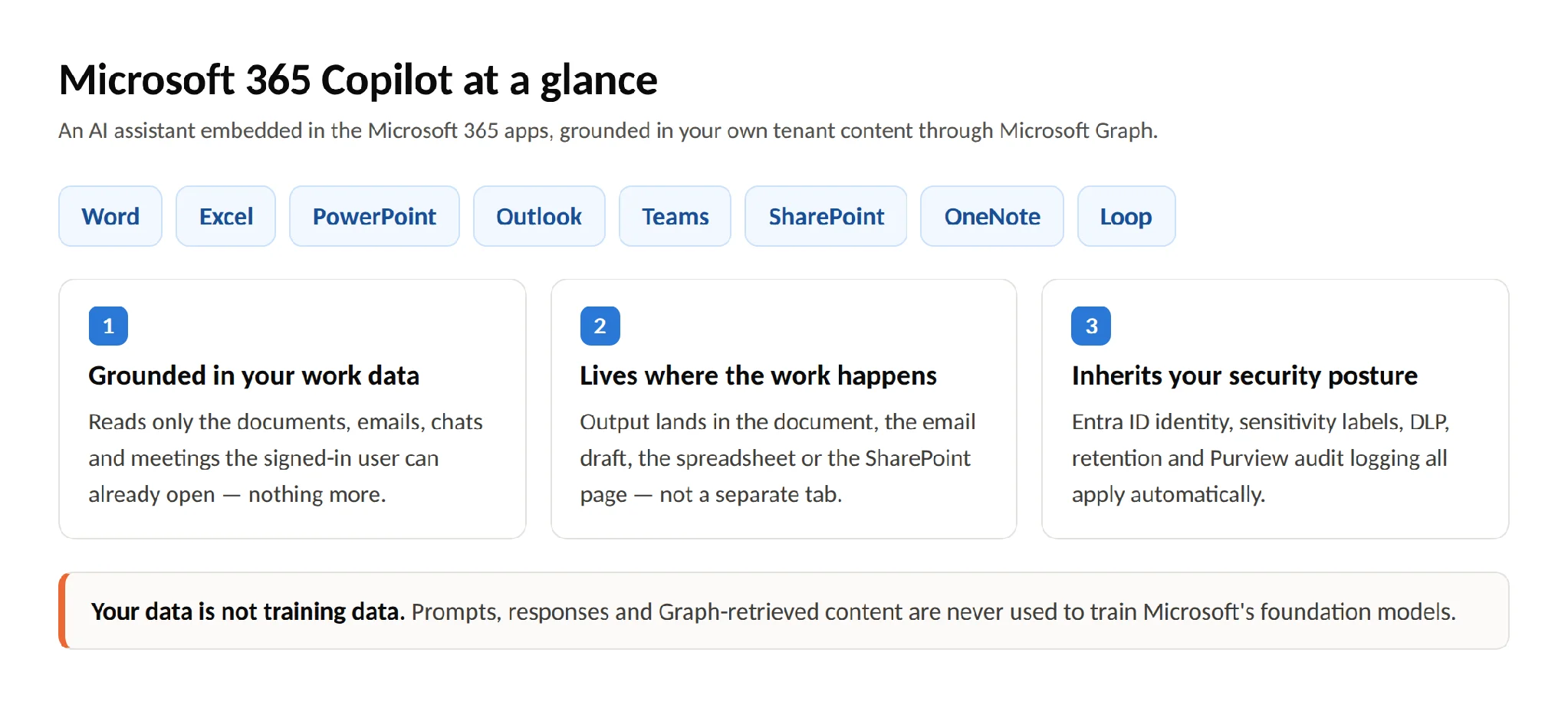
Pic.1. Microsoft 365 Copilot at a glance — what it is, where it runs, and what it can access
What Copilot does: key features by application
Copilot is not one feature; it is a set of app-specific experiences sharing a common engine. Here is what each one does in practice.
Word
- Draft a document from a prompt, a brief, or an existing file (“Draft a project charter based on the discovery notes in this folder”)
- Summarize long documents into an executive-length brief
- Rewrite passages for a different audience or register
- Ask questions about a document without reading it end to end
Excel
- Explain what a dataset shows in plain language
- Generate formulas and, in Python-enabled workbooks, run deeper analysis
- Highlight trends, outliers and correlations
- Build PivotTables and charts from a natural-language description
PowerPoint
- Turn a Word document or set of notes into a first-draft deck
- Apply and enforce brand-consistent design
- Rewrite speaker notes and condense slides
- Restructure an existing deck for a different audience or time slot
Outlook
- Summarize a long thread before you reply
- Draft a response in your usual tone, with adjustable length and formality
- Pull commitments and action items out of a mailbox
- Triage and prioritize a backlog after time away
Teams
- Real-time and post-meeting recaps with decisions and owners
- “What did I miss?” catch-up for late joiners
- Extract action items and unresolved questions
- Search across chat and channel history conversationally
Across everything: Copilot Chat, Pages and Notebooks
Copilot Chat is the conversational front door — web-grounded by default, work-grounded when you have a Copilot license. Copilot Pages turn a chat answer into a persistent, collaborative artifact your colleagues can edit alongside you. Copilot Notebooks let you pin a defined set of files, links and notes as the grounding source for a project, so Copilot answers from that scope rather than searching your whole tenant.
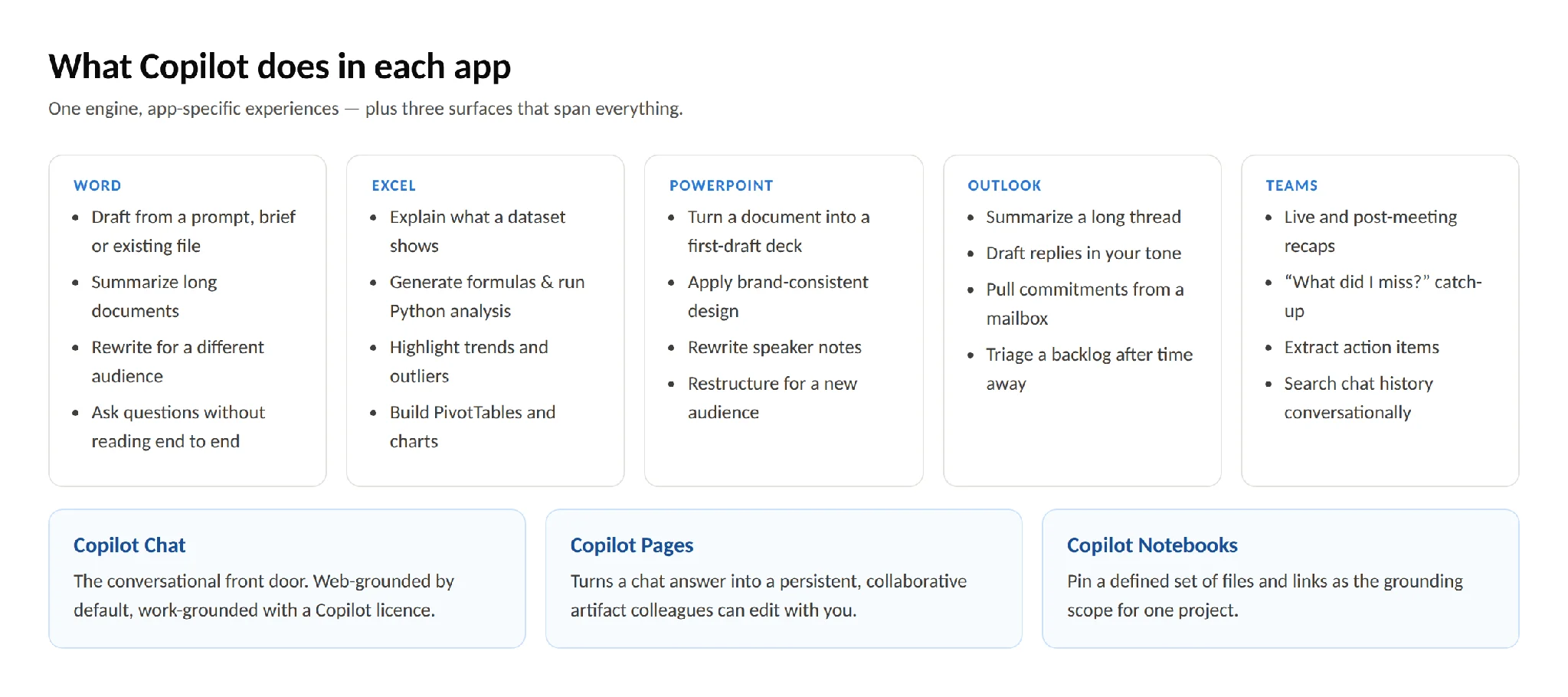
Pic.2. Copilot features mapped across Word, Excel, PowerPoint, Outlook and Teams
How Microsoft 365 Copilot works
Understanding the pipeline matters, because most disappointing Copilot results are data problems rather than model problems.
The four steps behind every response
- You write a prompt in natural language. No syntax, no formulas — but specificity matters enormously (see the prompting section below).
- The request is interpreted and grounded. Copilot works out what you’re asking for, then queries Microsoft Graph and, where relevant, Microsoft Search and the open web.
- Microsoft Graph retrieves context — permission-trimmed. This is the critical control. Graph returns only content the signed-in user could already open. Copilot cannot surface a document you lack rights to. It can, however, surface a document you technically have rights to but forgot existed — which is why oversharing audits matter before rollout.
- The model composes a response inside the app. The result is post-processed, checked against your compliance policies, and rendered in the application you’re working in.
Grounding, and what it means for quality
“Grounding” is the step where Copilot pulls real content into the prompt. It is the difference between an assistant that invents a plausible-sounding quarterly figure and one that quotes yours. It also means Copilot’s usefulness is bounded by your information architecture: if the authoritative version of a policy sits in three places with two different dates, Copilot will reflect that ambiguity back at you.
Writing prompts that work
A good Copilot prompt usually has four parts: goal, context, source, and format.
Weak: “Summarize this.”
Strong: “Summarize the attached vendor contract for our finance lead. Focus on payment terms, termination clauses and liability caps. Output as a bulleted list under three headings, under 300 words.”
Copilot keeps conversational context, so iterate rather than restart: “Make it shorter,” “Add the renewal dates,” “Rewrite for a non-technical reader.”
Data handling and privacy
Microsoft’s commitments here are documented and worth stating plainly: your prompts, your responses and your organizational data accessed through Graph are not used to train the foundation models. Data stays inside your Microsoft 365 service boundary and inherits the tenant’s existing protections — Entra ID authentication, encryption in transit and at rest, sensitivity labels, DLP, eDiscovery and Purview audit logging. Full detail is in Microsoft’s data, privacy and security documentation for Microsoft 365 Copilot.
This is the practical distinction from consumer AI tools: the model is powerful in both cases, but the data boundary and the audit trail are not comparable.
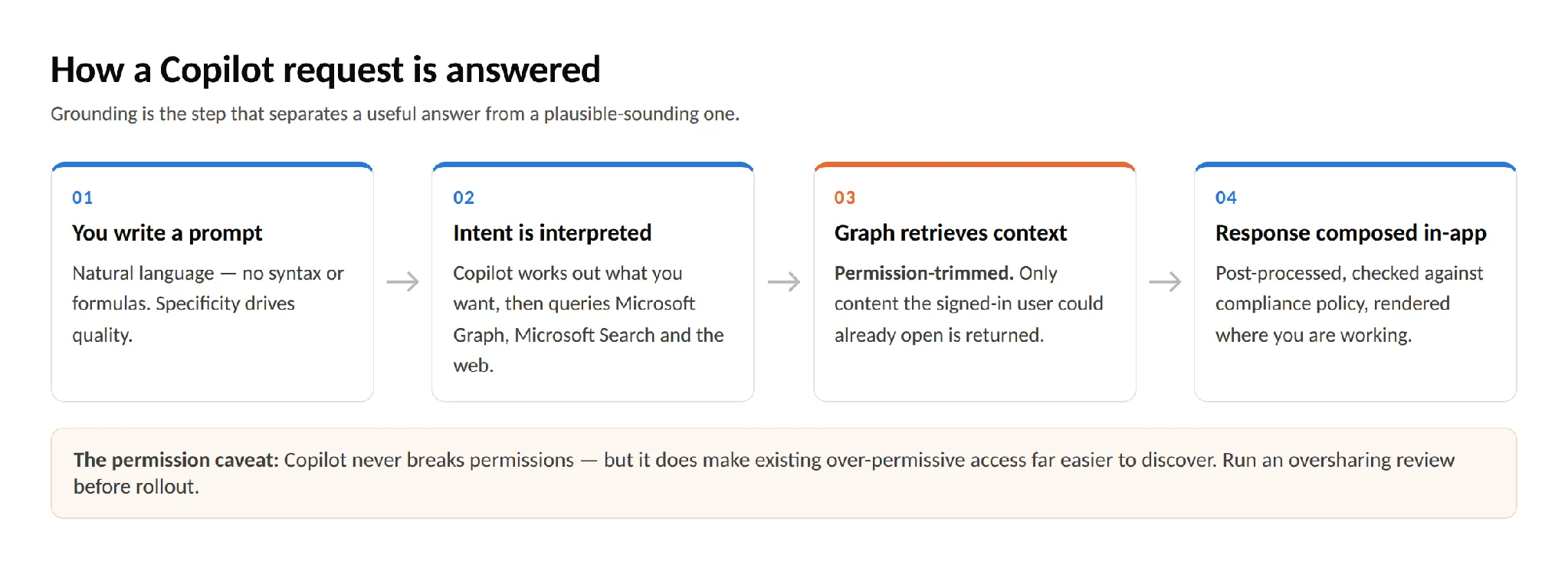
Pic.3. How a Copilot request flows: prompt → intent → Graph grounding → response
Copilot across the Microsoft ecosystem
Copilot’s value compounds where it spans applications. A few integration points worth knowing:
Planner and To Do. Copilot can turn a meeting recap or a chat thread into assigned tasks with owners and due dates, then report on plan status conversationally.
Loop. Copilot drafts Loop components — status tables, decision logs, brainstorm canvases — that stay live across Teams, Outlook and the Loop app.
OneNote. Freeform notes become structured summaries, and Copilot can answer questions across a whole notebook.
Power Automate and Copilot Studio. Describe a workflow in plain language and get a draft flow. Copilot Studio goes further, letting you build custom agents grounded in specific data sources and publish them to Teams, SharePoint or Copilot Chat.
Dynamics 365. Sales and Customer Service surfaces get their own Copilot experiences — opportunity summaries, meeting prep, case deflection, draft responses grounded in case history.
Microsoft Search and Copilot Search. Copilot Search brings AI-ranked, work-grounded search across your tenant and connected line-of-business systems via Microsoft 365 Copilot connectors. Note that Copilot Search is part of the paid Microsoft 365 Copilot license — it is not included in the free Copilot Chat tier.
SharePoint. Every SharePoint site now ships with a ready-made agent, users with edit rights can build custom agents scoped to specific sites, libraries or files, and the Copilot in SharePoint preview adds AI-assisted site, page and library creation. Licensing, agent governance and admin controls are a topic of their own, so we cover them in a dedicated guide: Copilot for SharePoint: agents, site building and licensing.
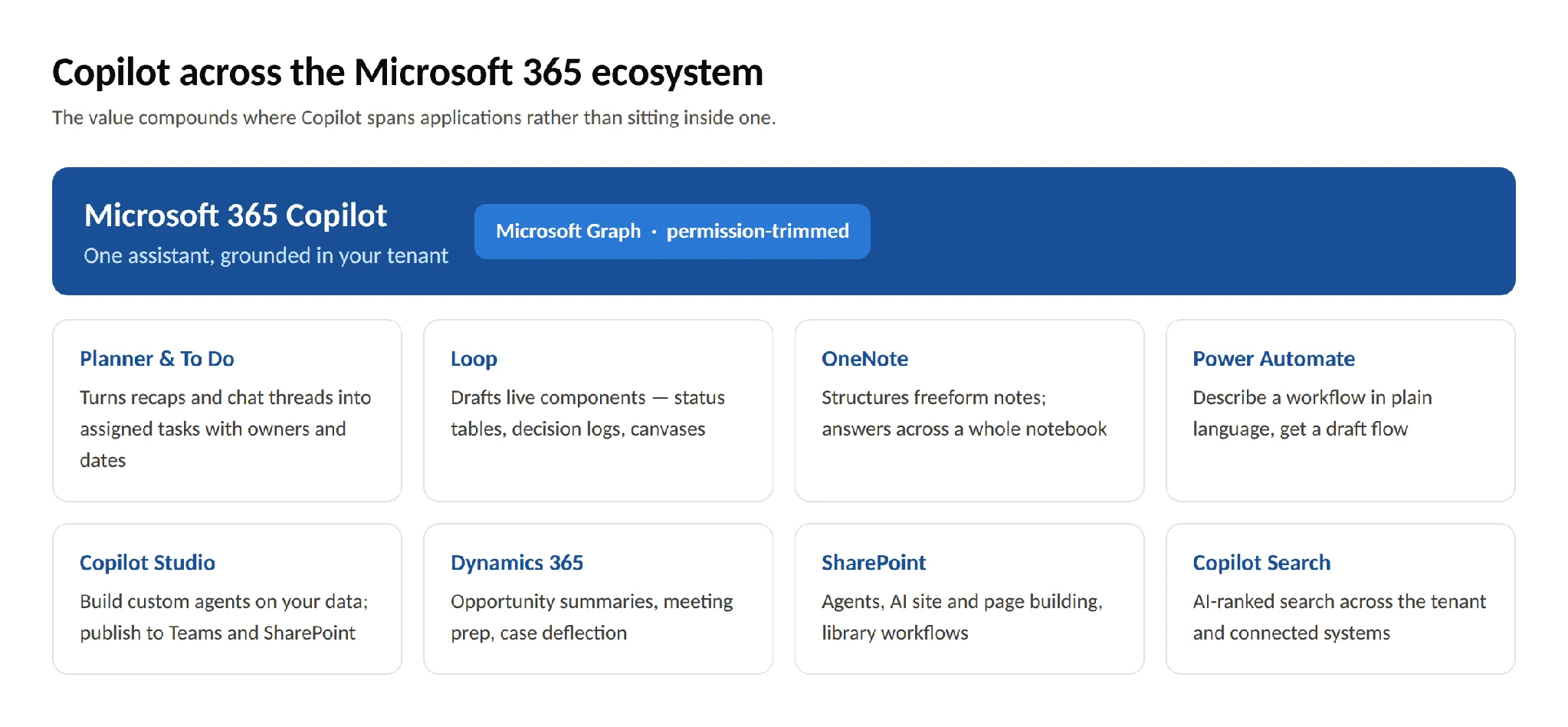
Pic.4. Copilot integration points across the Microsoft 365 ecosystem
Microsoft 365 Copilot pricing and licensing in 2026
Copilot licensing changed substantially on 1 July 2026, and most guides still quote the old structure. Here is the current picture. All figures are US list prices per user per month; verify against Microsoft’s Copilot pricing page for your region and channel.
The Copilot SKUs
| Plan | Annual billing | Monthly billing | Who it’s for |
|---|---|---|---|
| Microsoft 365 Copilot Chat | $0 | — | Included with eligible Microsoft 365 subscriptions |
| Microsoft 365 Copilot Business | $21.00 ($18.00 promo) | $25.20 | SMBs, capped at 300 seats |
| Microsoft 365 Copilot (enterprise add-on) | $30.00 | $31.50 | Any organization, no seat cap |
| Microsoft 365 E7 (Frontier Suite) | $99.00 | — | Copilot included, no add-on needed |
The $18 Copilot Business price is a promotion, available 1 July – 30 September 2026 for existing customers on an eligible Business plan, first year only, annual commitment required, not available on trial subscriptions. The standing list price is $21.
Copilot Business delivers the same capabilities as the enterprise SKU but is hard-capped at 300 seats per tenant; larger organizations must buy Microsoft 365 Copilot. Its qualifying base plans are Microsoft 365 Business Basic, Business Standard, Business Premium and Apps for business.
Base plan prices
Since July 2026, Business Standard and Business Premium are sold as “with Copilot” editions:
| Base plan | Annual price |
|---|---|
| Microsoft 365 Business Basic | $7.00 |
| Microsoft 365 Apps for business | $10.00 |
| Microsoft 365 Business Standard with Copilot | $23.50 |
| Microsoft 365 Business Premium with Copilot | $32.00 |
| Microsoft 365 E3 | $39.00 |
| Microsoft 365 E5 | $60.00 |
| Microsoft 365 E7 (Frontier Suite) | $99.00 |
E7, generally available since 1 May 2026, is a superset of E5 that bundles Microsoft 365 Copilot, Microsoft Entra Suite and Agent 365 — worth modelling against E5 + Copilot add-on if you’re at renewal.
Is Copilot free with Microsoft 365?
Partly, and this is the most useful thing to understand about the current lineup.
Microsoft 365 Copilot Chat is included at no additional cost with eligible Microsoft 365 subscriptions — Business Basic/Standard/Premium, E3/E5/E7, F1/F3, Office 365 plans, Teams SKUs and the education A-series. It gives you web-grounded AI chat on current models, the side-by-side experience in Teams and Outlook, Copilot Pages, file upload, image generation, enterprise data protection and IT controls, plus access to pay-as-you-go agents.
What it does not give you: Copilot inside Word, Excel, PowerPoint and Outlook; work-data grounding through Microsoft Graph; Copilot Search; Copilot in SharePoint; and priority model access — Copilot Chat runs on standard access, subject to available capacity.
That makes Copilot Chat a reasonable way to build familiarity across a whole workforce while licensing the paid seats where the ROI is clearest.
Prerequisites
A qualifying Microsoft 365 base plan is still required — Microsoft has not removed prerequisites. Qualifying plans for Microsoft 365 Copilot include M365 E3/E5/E7, F1/F3, Business Basic/Standard/Premium, Apps for business/enterprise, Office 365 E1/E3/E5/F3, Teams and Exchange/SharePoint/OneDrive standalone plans, plus government and education equivalents. Users also need a Microsoft Entra ID account and a mailbox hosted in Exchange Online — on-premises and hybrid mailboxes aren’t supported for grounding.
Metered agents
Beyond seat licences, agent usage can be paid for as it’s consumed: $0.01 per message via an Azure meter, or $200 per month for a 25,000-credit capacity pack. Consumption varies by action — a classic answer costs 1 credit, a generative answer 2, an agent action 5, tenant graph grounding 10. Agents grounded only in public web content or their own instructions don’t incur charges; agents touching tenant data do. Licensed Copilot users are not metered.
Is there a trial?
Not for the enterprise SKU — Microsoft’s FAQ is explicit that no trial is available for Microsoft 365 Copilot, and points prospects to Copilot Chat instead.
There is one for Copilot Business. The “Copilot in 30” offer provides a 25-user, 30-day trial, delivered through a CSP partner, available to organizations with fewer than 300 employees, running through 31 December 2026.
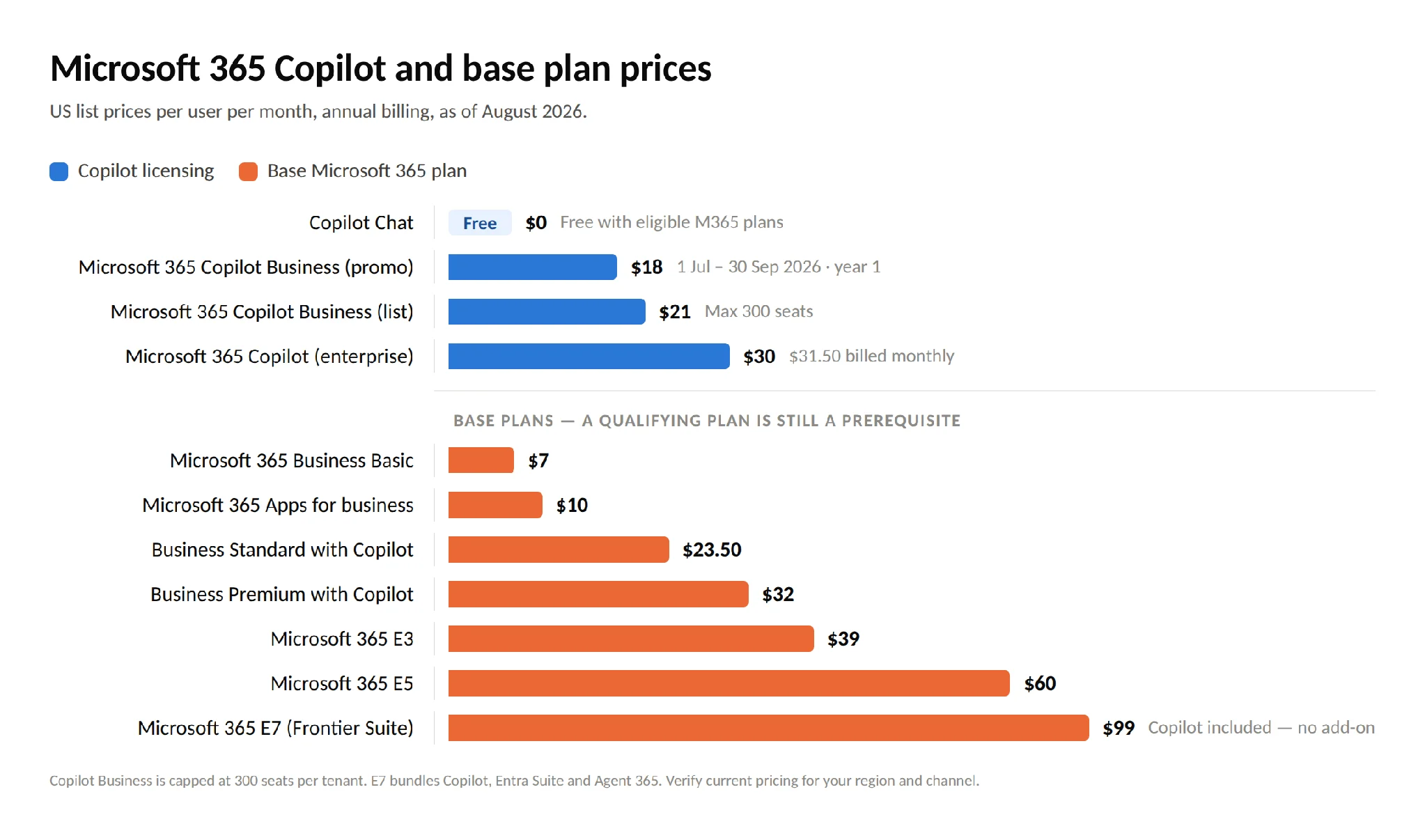
Pic.5. Microsoft 365 Copilot plans and prices, August 2026
How to set up Microsoft 365 Copilot
A Copilot rollout is 20% licensing and 80% data hygiene and change management. Here is a sequence that works.
1. Confirm eligibility and readiness
Check that users hold a qualifying base licence, have Entra ID accounts, and have mailboxes in Exchange Online. Confirm your Microsoft 365 Apps are on a supported update channel and that Teams, OneDrive and SharePoint are actively used — Copilot’s grounding is only as good as the content it can reach.
2. Fix oversharing before you turn anything on
This is the step organizations most often skip and most often regret. Copilot does not break permissions, but it makes existing over-permissive access dramatically more discoverable. Before rollout:
- Run access reviews on SharePoint sites and Teams, especially “Everyone except external users” grants
- Retire or archive stale sites and duplicated document sets
- Apply sensitivity labels to confidential content
- Consider Restricted SharePoint Search as a temporary allow-list, and Restricted Content Discovery (via SharePoint Advanced Management) for specific high-risk sites
- Verify your DLP policies cover AI-assisted scenarios
3. Prepare your content
Clean data produces useful answers. Remove duplicates, archive superseded documents, standardize naming and metadata, consolidate scattered libraries, and make sure there is one obvious authoritative version of key documents.
4. Purchase and assign licences
In the Microsoft 365 admin center, buy Copilot licences and assign them — ideally to security groups rather than individuals, so pilot expansion is a group membership change. Start with the departments where the volume of documents, email and meetings is highest.
5. Configure policy and controls
Set sensitivity label policies, confirm Purview audit logging is capturing Copilot interactions, decide your position on Copilot in SharePoint (Set-SPOTenant -KnowledgeAgentScope), and establish which agents are permitted through the Copilot Control System in the admin center.
6. Pilot, measure, then scale
Run a 4–12 week pilot with a representative group. Define success metrics up front — hours saved per week, cycle time on a specific deliverable, adoption rate — and collect both analytics and qualitative feedback. Copilot Analytics and the adoption dashboards give you usage data; surveys give you the “why.”
Then scale department by department, using pilot users as champions rather than pushing a tenant-wide switch.
7. Train people properly
Adoption is the single biggest determinant of ROI, and prompting is a learnable skill. Run hands-on workshops per department rather than generic demos, build an internal prompt library organized by role, appoint departmental champions, and create a Teams channel for sharing what works. Microsoft’s free Introduction to Microsoft 365 Copilot module and the Copilot Success Kit are solid starting material. Don’t forget admin training — licence management, monitoring, cost control and troubleshooting are their own skill set. Setup guidance is documented in Set up Microsoft 365 Copilot and assign licenses.
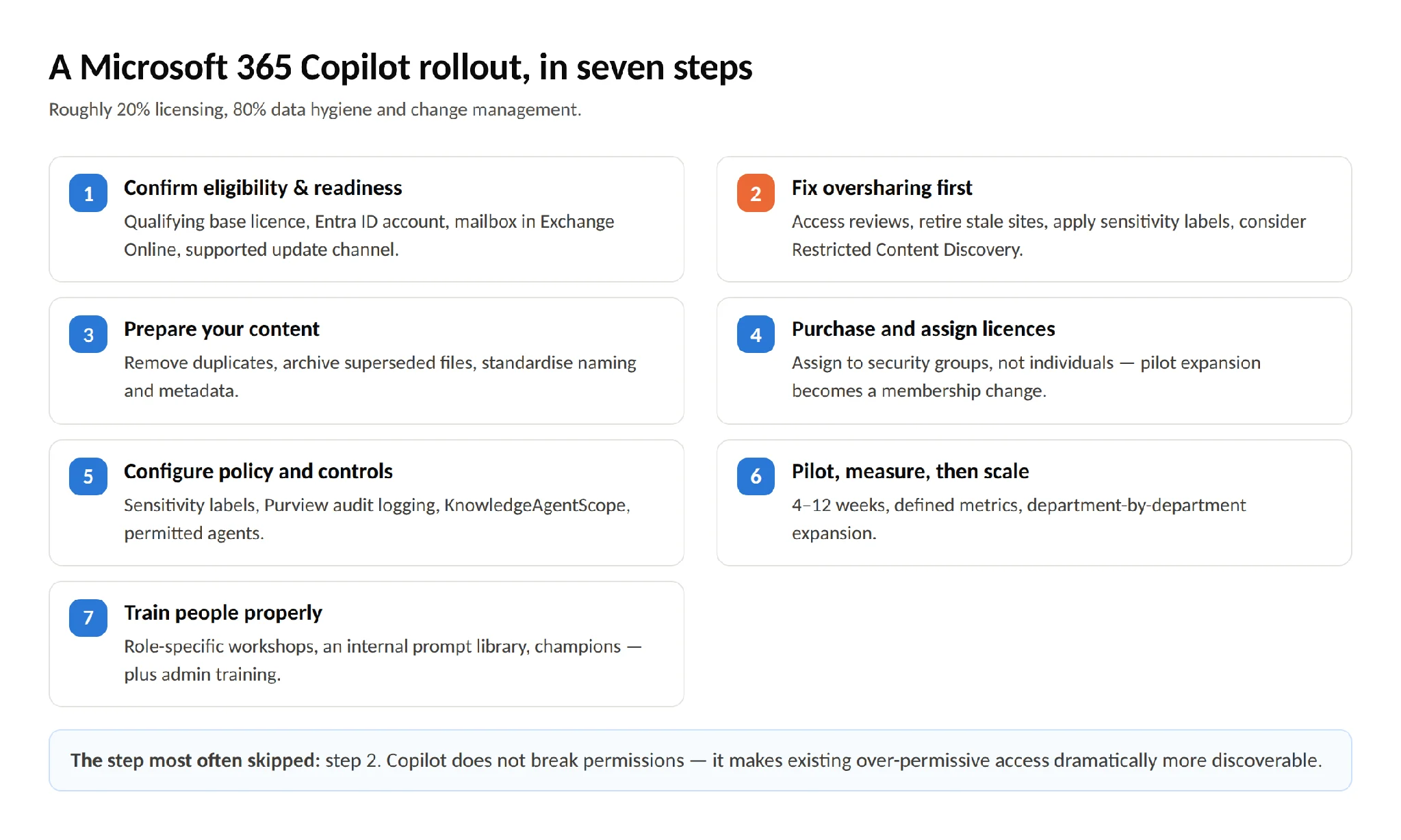
Pic.6. Seven-step Microsoft 365 Copilot rollout sequence
Getting more from Microsoft 365 with Virto
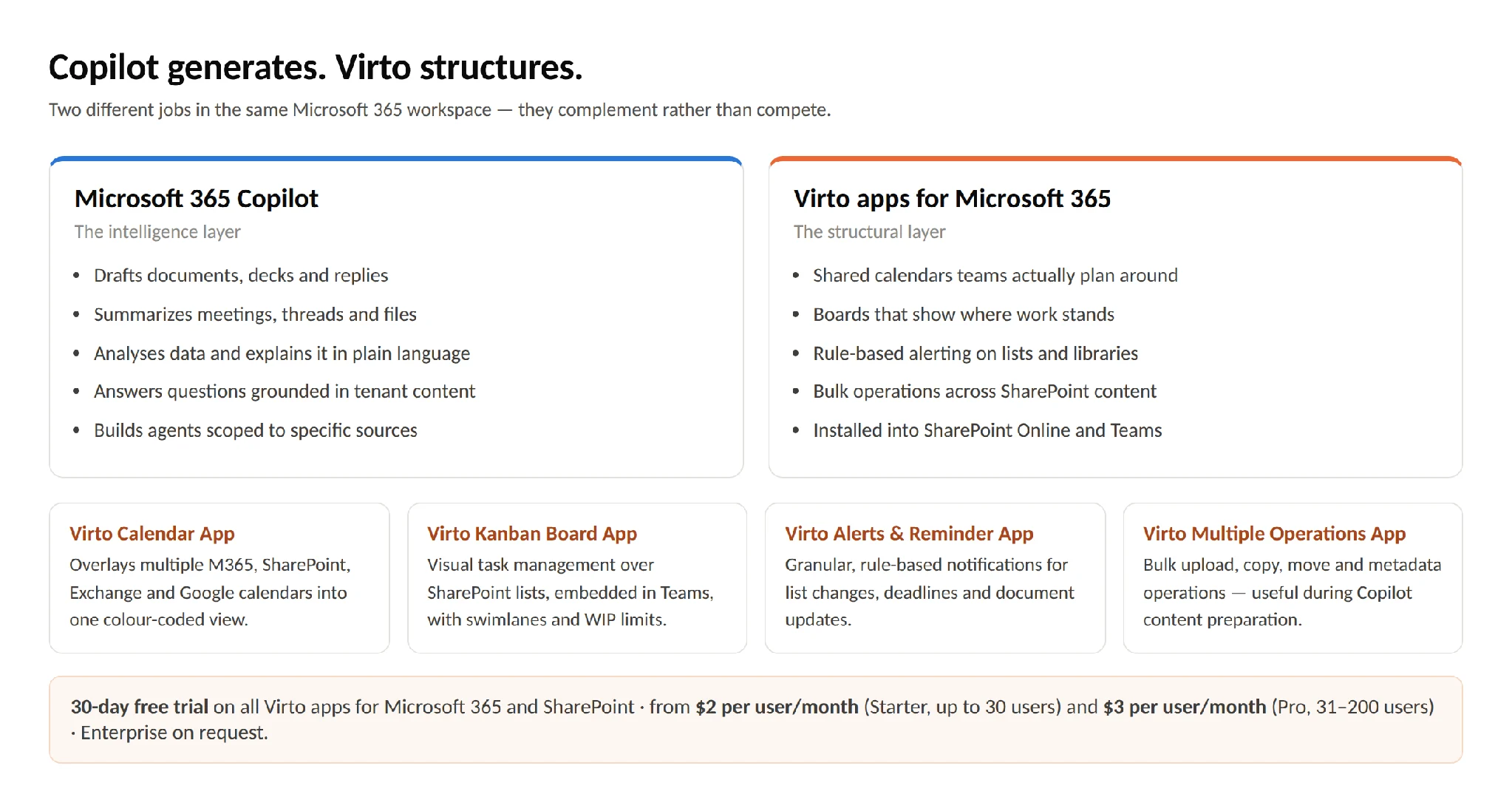
Copilot is very good at generating, summarizing and analyzing. It is not designed to be the structural layer of your workspace — the shared calendar everyone actually plans around, the board that shows where work stands, the alerting rules that fire when a document changes. That’s where purpose-built apps earn their place, and it is what VirtoSoftware’s apps for Microsoft 365 do.
They install into SharePoint Online and Teams and work alongside Copilot rather than competing with it:
- Virto Calendar App — overlays multiple Microsoft 365, SharePoint, Exchange and Google calendars into one view, with colour coding, custom views and resource booking. Copilot can summarize what a meeting decided; the calendar is where the follow-up actually gets scheduled.
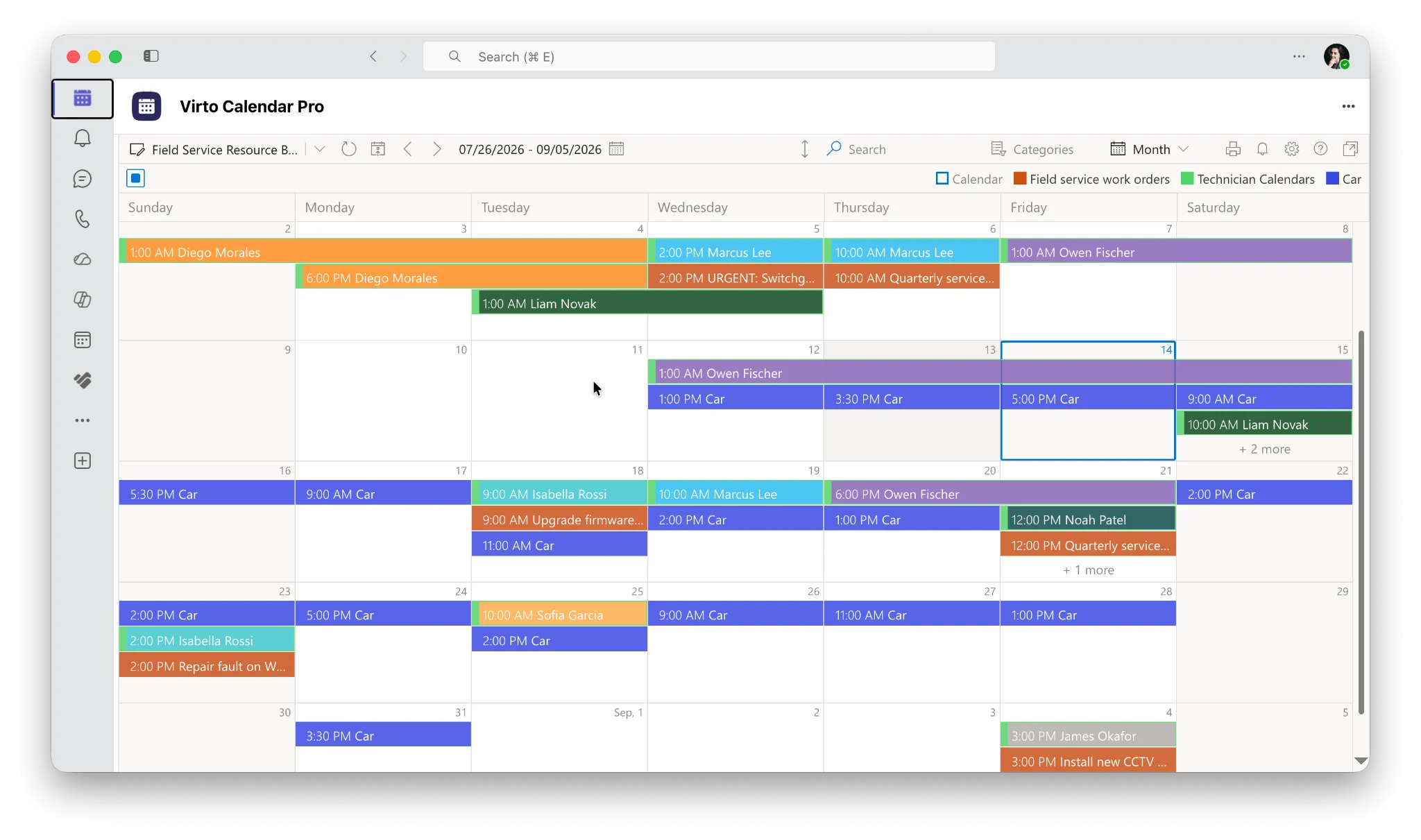
- Virto Kanban Board App — visual task management over SharePoint lists, embedded in Teams, with swimlanes, WIP limits and customizable stages. Copilot can draft a project plan; the board is where the team tracks it.
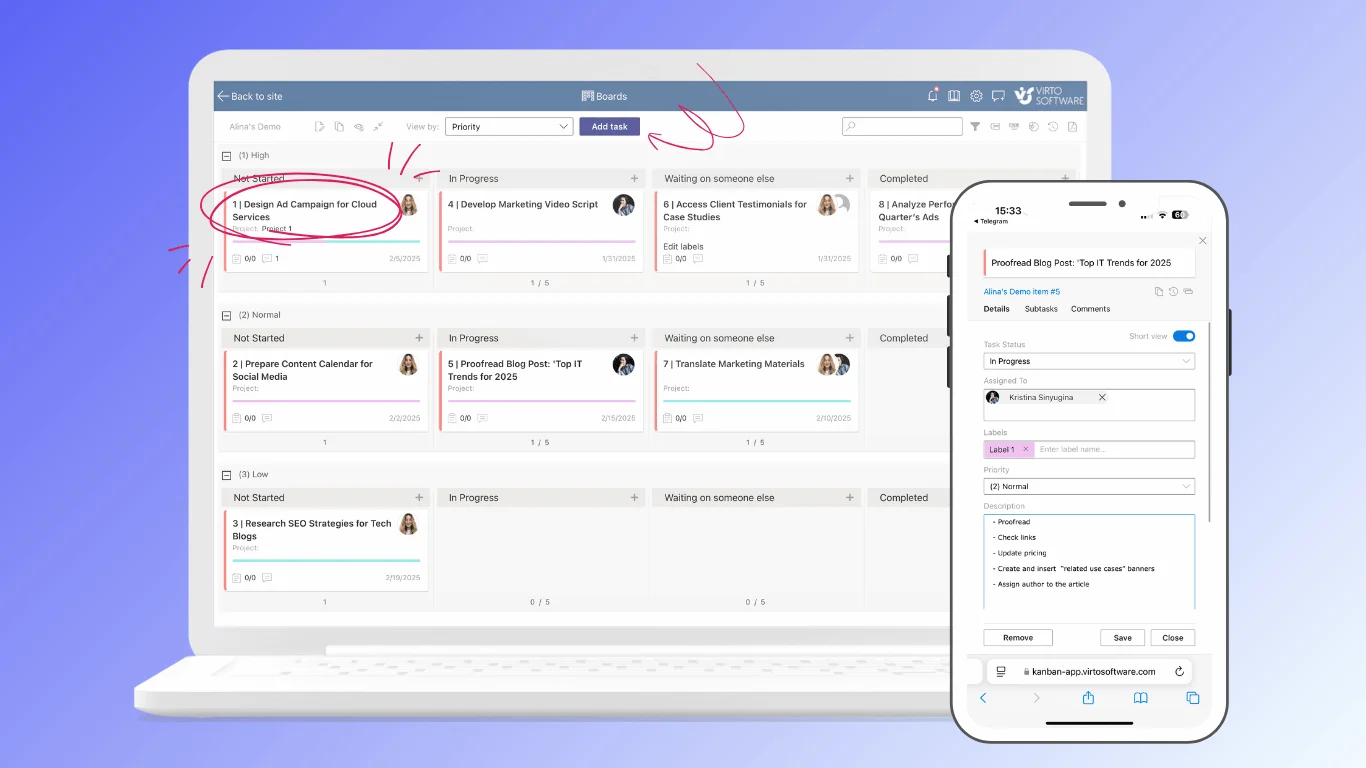
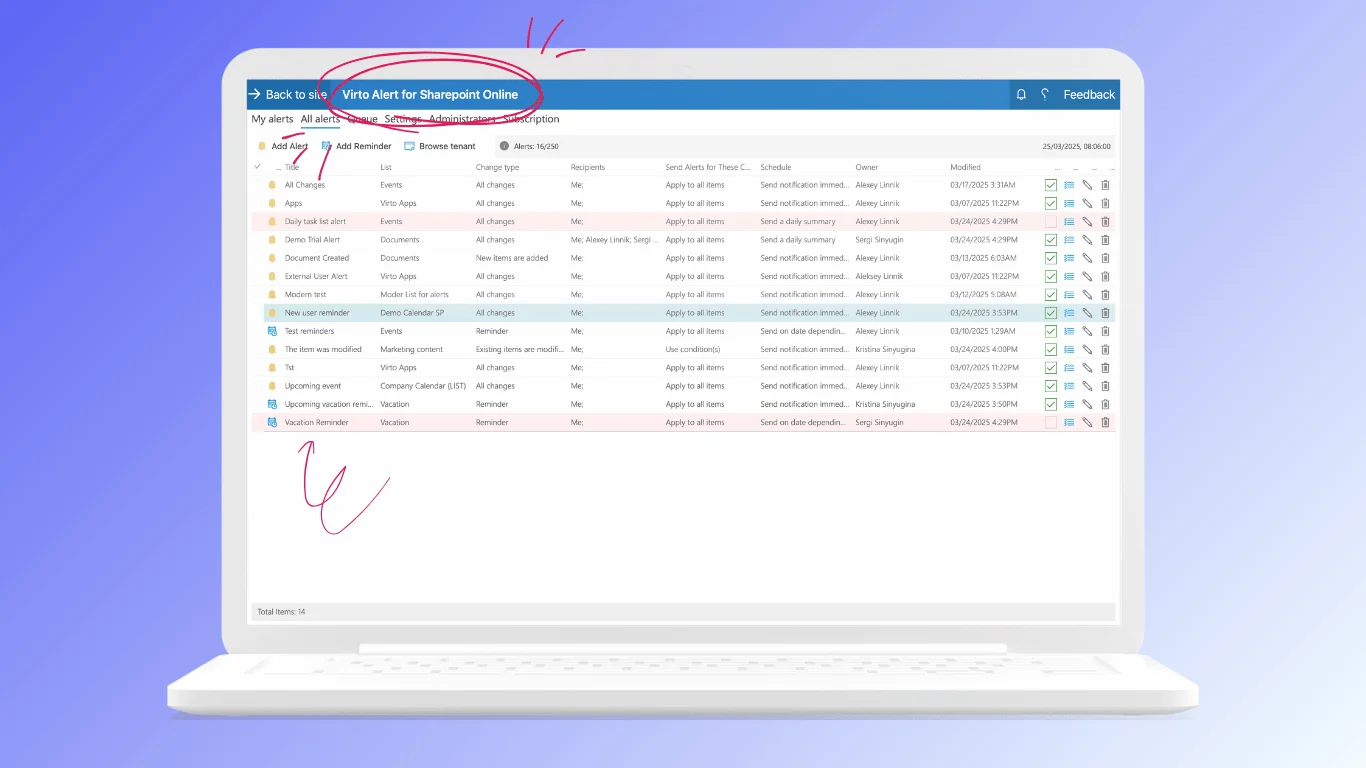
- Virto Alerts & Reminder App — granular, rule-based notifications for list and library changes, approaching deadlines and document updates, delivered where people already are.
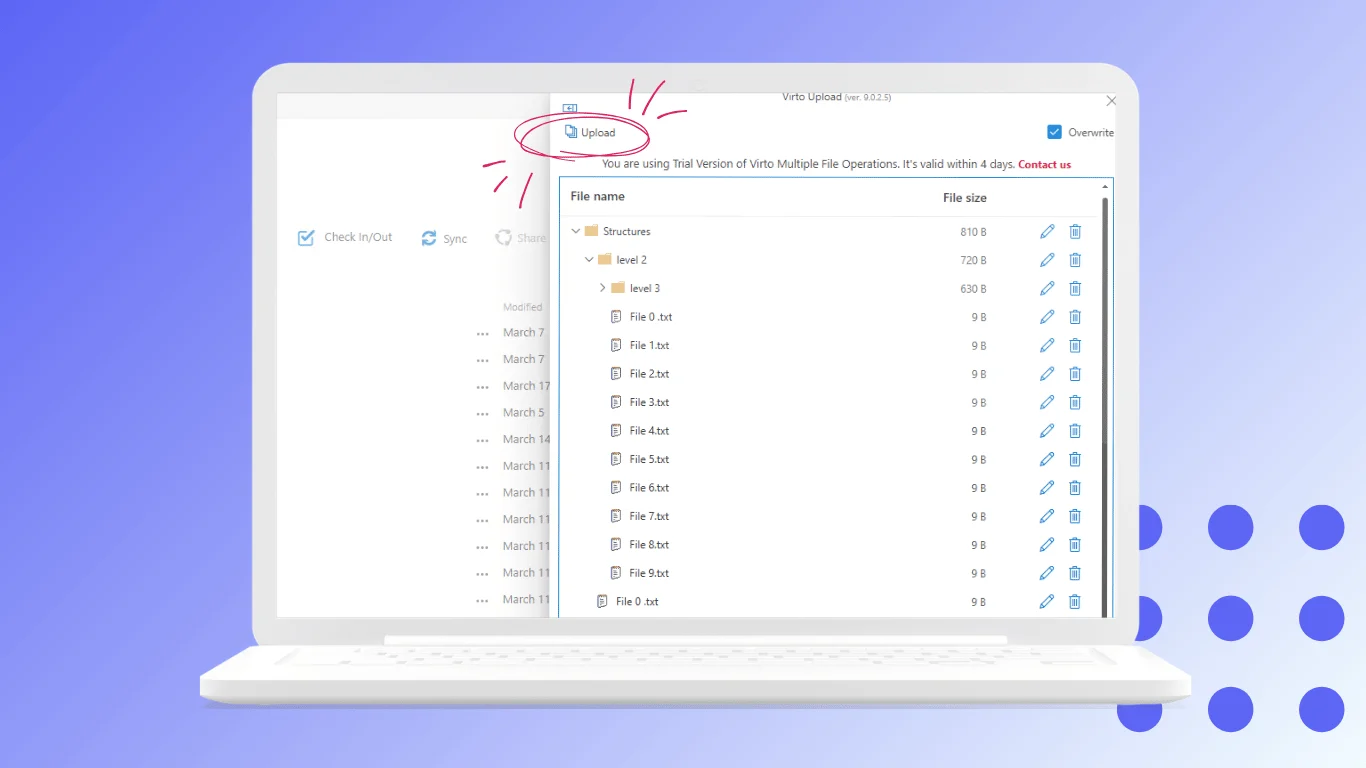
- Virto Multiple Operations App — bulk upload, bulk metadata editing and filtered bulk deletion in SharePoint libraries. Genuinely useful during Copilot preparation, when you’re reorganizing content at scale.
All Virto apps for Microsoft 365 and SharePoint come with a 30-day free trial. Virto Calendar costs $2,412 per 100 users per year with a 3-year agreement (100 users and up), with Enterprise pricing on request. Full details are here: pricing.
If you’re thinking more broadly about AI in delivery work, our guides to AI project management and AI task managers cover the wider tooling landscape.
Pic.7. Virto apps for Microsoft 365 working alongside Copilot
Frequently asked questions
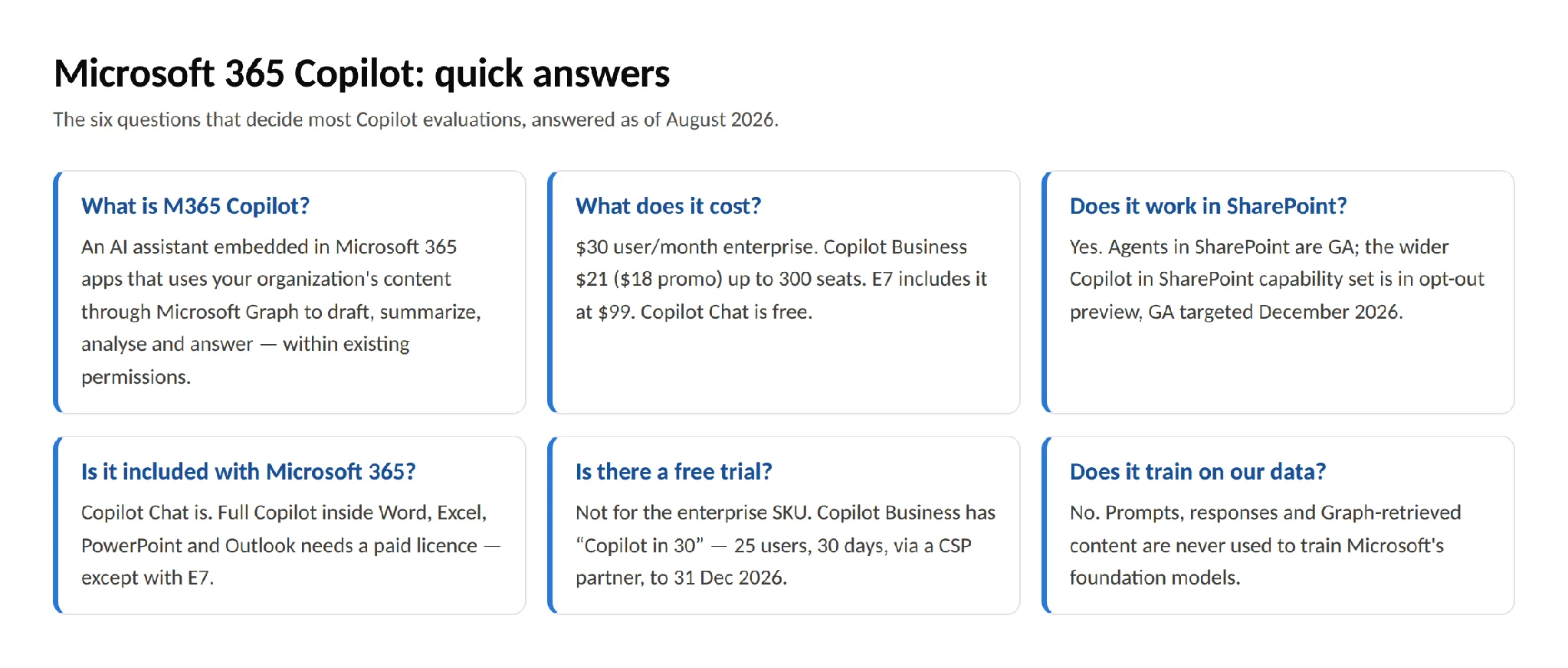
What is M365 Copilot? Microsoft 365 Copilot is an AI assistant embedded in Microsoft 365 apps that uses your organization’s content through Microsoft Graph to draft documents, summarize email and meetings, analyze data and answer questions — within your existing security and permission boundaries.
What does Microsoft 365 Copilot cost? The enterprise add-on is $30 per user/month billed annually ($31.50 monthly). Microsoft 365 Copilot Business, for organizations up to 300 seats, lists at $21 per user/month with an $18 promotional price running 1 July – 30 September 2026. Microsoft 365 E7 includes Copilot in its $99 per user/month price. Copilot Chat is free with eligible Microsoft 365 subscriptions.
Does Copilot work in SharePoint? Yes. Agents in SharePoint are generally available, and the broader Copilot in SharePoint capability set — creating sites, pages, libraries and workflows with AI — is in opt-out preview targeting general availability in December 2026. Our Copilot for SharePoint guide covers agents, site building, licensing and admin controls in detail.
Is Copilot included with Microsoft 365? Copilot Chat is included free with eligible subscriptions. Full Microsoft 365 Copilot — the version that works inside Word, Excel, PowerPoint and Outlook and grounds in your work data — requires a paid licence, except with Microsoft 365 E7, where it’s bundled.
Is there a free trial of Microsoft 365 Copilot? There is no trial for the enterprise SKU. Copilot Business has a “Copilot in 30” offer — 25 users for 30 days, through a CSP partner, for organizations under 300 employees, running to 31 December 2026. Otherwise, Copilot Chat is the free way to evaluate the experience.
Does Copilot train on our company data? No. Prompts, responses and data accessed through Microsoft Graph are not used to train Microsoft’s foundation models, and your data stays within your Microsoft 365 service boundary.
Can Copilot see documents I don’t have access to? No. Every Graph query is permission-trimmed to the signed-in user. Copilot can, however, surface content you have technical access to but weren’t aware of — which is why an oversharing review is an essential pre-rollout step.
How is Copilot different from ChatGPT? ChatGPT is a general-purpose assistant without access to your work context. Microsoft 365 Copilot is grounded in your tenant’s data, runs inside your Microsoft 365 apps, and inherits your organization’s identity, compliance and audit controls. They serve different jobs — open-ended exploration versus work grounded in your own content.
Pic.8. Microsoft 365 Copilot FAQ summary
Conclusion
Microsoft 365 Copilot in 2026 is a more nuanced purchase than it was at launch. There is a free tier worth deploying broadly, an SMB SKU with a real price advantage and a hard seat cap, an enterprise add-on, a bundled E7 option, and a metered agent model for everything in between. Choosing well means matching those to actual usage patterns rather than licensing everyone identically.
The technical work matters just as much. Copilot’s answers are only as good as the content it can reach, and its risk profile is set by permissions you granted years ago. Fix oversharing, clean up your libraries, then pilot with a group that can tell you honestly whether it saved them time.
And remember what Copilot isn’t. It generates and analyzes; it doesn’t structure. Calendars, boards, alerting and bulk operations remain the scaffolding your teams work inside — and pairing a strong AI layer with solid workspace tooling is what turns Copilot from an interesting demo into daily infrastructure.
Sources and further reading
- Microsoft 365 Copilot — official site
- Microsoft 365 Copilot pricing
- Microsoft 365 Copilot licensing requirements
- Set up Microsoft 365 Copilot and assign licenses
- Data, privacy and security for Microsoft 365 Copilot
- Get started with Copilot in SharePoint
- Get started with agents in SharePoint
- Manage access to agents in SharePoint
- Introduction to Microsoft 365 Copilot — Microsoft Learn
- Copilot Success Kit