



Choosing between Confluence and SharePoint depends on your goals: documentation or document control, flexibility or compliance. Explore when to combine both and how Virto solutions make SharePoint even more efficient.
Many organizations eventually face the same crossroad: Confluence vs SharePoint. Both platforms — Confluence and SharePoint — are positioned as collaboration and knowledge management tools, yet they serve very different purposes depending on how your teams work.
While Confluence is often favored for agile documentation, wikis, and lightweight team collaboration, SharePoint stands out as Microsoft’s enterprise-grade solution for structured content management, intranet portals, and secure document workflows. When comparing SharePoint vs Confluence, the question isn’t simply which one is better — it’s which one fits your organization’s ecosystem and strategy.
The right decision in this Confluence vs. SharePoint debate depends on your business goals, industry, security and compliance requirements, scalability expectations, and integration needs within your Microsoft 365 environment.
In this article, we’ll take a deep dive into Confluence versus SharePoint, exploring how each platform is built, what makes them excel, and where their limitations lie. We’ll also share practical recommendations for choosing between Confluence and SharePoint depending on your use case — whether you’re running a development team, managing documentation for cross-departmental projects, or building a full-scale digital workspace.
Confluence vs SharePoint: the quick answer
Confluence is Atlassian’s wiki and knowledge-base tool for documentation and team pages; SharePoint is Microsoft 365’s broader platform for documents, content management and intranets, with deep Office integration. Choose Confluence for lightweight team wikis and documentation, and SharePoint for enterprise content management and intranets inside Microsoft 365. Many organizations use both and integrate them.
Confluence vs SharePoint: comparison table
Here is a side-by-side comparison of Confluence vs SharePoint across the dimensions that matter most when choosing a documentation, wiki, or intranet platform.
| Dimension | Confluence | SharePoint |
|---|---|---|
| Primary purpose | Atlassian’s wiki & knowledge-base tool for documentation and team collaboration | Microsoft 365’s broader content, document and intranet platform |
| Documentation & wiki | Core strength — pages, spaces, templates, real-time co-editing | Supported via pages and wiki libraries, but not its main focus |
| Document management | Basic file attachments; limited versioning and workflows | Advanced — version control, check-in/out, metadata, retention |
| Intranet & portals | Not designed for full intranets | Purpose-built — intranet, hub and communication sites |
| Search | Fast content search across pages and spaces | Enterprise search across sites, documents and metadata |
| Permissions & security | Space- and page-level permissions | Granular site/library/item permissions; Entra ID, GDPR/HIPAA/ISO |
| Integrations | Atlassian stack — Jira, Trello, Bitbucket | Microsoft 365 — Teams, Outlook, OneDrive, Power Platform |
| Automation | Limited native automation | Power Automate and Power Apps for workflows |
| Scalability | Best for small-to-mid teams | Enterprise scale — thousands of users, complex hierarchies |
| Pricing | Free up to 10 users; Standard from $6.40/user/mo; Premium from $12.30/user/mo; Enterprise custom | Included in Microsoft 365 — Business Standard from $12.50/user/mo; standalone SharePoint Online Plan 1 no longer sold to new customers since May 31, 2026 |
| Best for | Team wikis, documentation, agile/DevOps teams | Enterprise content management, intranets, Microsoft-centric orgs |
Pricing verified August 2026. Atlassian and Microsoft list prices change and vary by region and billing term — confirm current rates before publishing. SharePoint capabilities are also bundled into most Microsoft 365 business and enterprise plans.
Comparing SharePoint with other tools? See also Notion vs SharePoint and SharePoint vs OneDrive.
Overview: Confluence and SharePoint
When it comes to Confluence vs SharePoint, the first thing to understand is that they were built for different philosophies of collaboration. Both aim to centralize information and boost productivity — but how they do it reflects the DNA of their creators: Atlassian and Microsoft.
What Is Confluence
Confluence is an Atlassian product originally designed as a wiki-style space for software documentation. Over time, it evolved into a powerful platform for team collaboration, documentation, and knowledge management.
In the Confluence vs SharePoint conversation, Confluence is often praised for its clean, intuitive interface and its ability to make documentation feel collaborative rather than bureaucratic. Teams can create pages, reuse templates, co-edit in real time, and link knowledge across projects with ease.
Typical use cases for Confluence include:
- creating and maintaining internal documentation;
- building structured knowledge bases;
- using templates for reports, retrospectives, or onboarding;
- collaborating on project content across distributed teams.
Confluence tends to shine in IT departments, project offices, and agile-driven teams — any environment where clarity, iteration, and fast information retrieval are key.
What Is SharePoint
SharePoint, on the other hand, is a Microsoft product that’s been shaping enterprise collaboration for more than two decades. It’s much more than a document repository — it’s a comprehensive content management and intranet platform that supports large-scale business operations. (For a primer, see what is SharePoint.)
In the SharePoint vs Confluence debate, SharePoint stands out for its deep integration within the Microsoft 365 ecosystem, working seamlessly with Teams, Outlook, and OneDrive. It’s the backbone of many corporate intranets and document workflows.
Core SharePoint use cases include:
- document and library management with versioning and permissions;
- workflow automation using Power Automate;
- creating collaborative workspaces and corporate intranet portals;
- managing tasks, lists, and projects across departments.
When compared to Confluence, SharePoint is clearly aimed at enterprise-scale governance, compliance, and integration flexibility.
As one experienced user on Reddit put it: “Many people get stuck in the ‘doc library’ think, and sadly use SharePoint like a glorified Windows File Explorer tool. It’s so much more. If your company uses M365, stick with SharePoint — you get all the built-in integrations and can use Power Automate to make low-code apps and workflows.”
Ecosystems and integrations
Here’s where the Confluence and SharePoint comparison becomes even more interesting: each lives inside a different ecosystem.
Confluence is part of the Atlassian stack, working hand-in-hand with tools like Jira, Trello, and Bitbucket — perfect for development teams that thrive on agile workflows.
SharePoint sits inside Microsoft 365, integrating naturally with Teams, OneDrive, Outlook, and Power Platform — ideal for organizations that already live in the Microsoft environment.
👉 Does Microsoft have a Confluence equivalent? It’s a common question. In a way, yes — but with a twist. SharePoint can serve as an alternative to Confluence, but it covers a broader spectrum of enterprise needs. Beyond documentation and knowledge bases, it manages projects, document lifecycles, internal communication, and corporate workflows.
While Confluence focuses on simplicity, speed, and collaborative content editing, SharePoint is built for complex enterprise infrastructure — where permissions, automation, and governance matter as much as collaboration itself.
In short: Confluence versus SharePoint isn’t about which is “better” — it’s about whether you need a flexible documentation hub or a fully integrated digital workplace.
Key Differences Between Confluence and SharePoint
When comparing Confluence vs SharePoint, it quickly becomes clear that these platforms serve different purposes, even though both aim to streamline collaboration and knowledge management. Below are the major contrasts that define how teams use and experience each tool.
Focus and core purpose
Confluence centers on documentation, team knowledge, and collaborative content creation. It’s the go-to space for project and IT teams that need a transparent, flexible environment for writing, editing, and organizing internal information. Whether you’re documenting APIs, running sprint retrospectives, or building onboarding guides — Confluence makes it simple.
SharePoint, in contrast, focuses on enterprise content management, document workflows, and business process automation. It’s part of a larger corporate infrastructure — a full-fledged digital workplace where teams manage projects, internal portals, and communication under one roof.
In short, Confluence vs. SharePoint often comes down to this:
- Confluence = collaboration and documentation hub.
- SharePoint = enterprise content and process platform.
Ecosystem
The Confluence and SharePoint ecosystems are built around different technological cores.
Confluence lives inside the Atlassian stack, integrating naturally with Jira, Trello, and Bitbucket — ideal for development teams that work in agile frameworks and track everything in Jira boards.
SharePoint is part of Microsoft 365, seamlessly connected to Teams, OneDrive, Outlook, Power BI, and Power Automate. This makes it the natural choice for organizations already committed to Microsoft’s ecosystem.
So when considering SharePoint vs Confluence, the deciding factor often isn’t the feature set — it’s where your company’s digital DNA already resides.
Customization and flexibility
Confluence offers straightforward customization — teams can easily adjust templates, create page hierarchies, and structure content. However, deep customization (like complex workflows or interface-level changes) is limited. It’s perfect for documentation-heavy scenarios, but not designed for complex automation.
SharePoint, on the other hand, takes customization to another level. You can build custom document libraries, automate processes with Power Automate, design pages with web parts, and extend functionality through third-party apps like Virto Apps. This flexibility makes SharePoint both more powerful and more complex, often requiring admin or developer expertise.
Scalability
When we talk about Confluence vs SharePoint scalability, the difference is clear.
Confluence works great for small to mid-sized teams, providing speed and simplicity. But as organizations grow, they often need to integrate additional Atlassian apps or implement custom solutions to handle more users and content volume.
SharePoint, in contrast, was built for the enterprise from day one. It supports thousands of users, complex permission hierarchies, and large-scale intranet structures — without losing performance or manageability.
Confluence vs SharePoint: quick verdict
👉 Is Confluence better than SharePoint? That depends entirely on what your organization needs.
If your primary goal is knowledge sharing, documentation, and fast collaboration, then Confluence is likely the better fit — it’s simpler, more intuitive, and ready to use out of the box.
If your organization needs a comprehensive platform for document management, project governance, corporate portals, and automated workflows, then SharePoint wins. It offers enterprise-level scalability and seamless integration within the Microsoft 365 ecosystem.
Many companies don’t see it as Confluence vs. SharePoint, but rather Confluence and SharePoint — using both together. Documentation lives in Confluence, while SharePoint manages projects, intranet content, and business processes. In the end, the most effective strategy might not be to choose one — but to combine the strengths of both.
Advantages and Disadvantages of Confluence and SharePoint
When analyzing Confluence vs SharePoint, it’s not enough to compare features — it’s about how each platform performs in real-world scenarios. Both shine in their own ways, but they also come with trade-offs. Let’s break down the pros and cons of each to help you see where they truly excel.
Advantages of Confluence
✅ Effortless knowledge base organization. One of Confluence’s biggest strengths is its simplicity in building and structuring knowledge bases. It allows teams to quickly create, link, and organize wiki pages with intuitive navigation. For IT documentation, project records, or internal manuals, Confluence offers a straightforward and clean environment where information doesn’t get lost.
✅ Intuitive interface for documentation and collaboration. Confluence was designed for humans, not just techies. Its interface is intuitive and user-friendly, even for non-technical employees. Real-time co-editing, inline comments, and page history make teamwork on content easy and transparent.
✅ Tight integration with Jira and the Atlassian ecosystem. If your team already uses Jira to manage sprints, epics, and tasks, Confluence becomes the natural extension of your workflow. You can link documentation directly to Jira tickets, track project progress, and maintain synchronized records across both tools — a big win for agile and dev teams.
✅ Flexible wiki pages and templates. Confluence’s ready-to-use templates save time and bring consistency to documentation. From meeting notes to postmortems and product specs, you can start quickly and then customize pages to fit your company’s standards.
A Reddit user commented: “The biggest advantage Confluence has over SharePoint is its limitations. It’s much easier for a typical user to jump in and start documenting things. SharePoint, with all its power, can be quite overwhelming or confusing.”
Disadvantages of Confluence
🚫 Limited document management and workflow capabilities. While great for documentation, Confluence isn’t built for full-scale document management. It lacks advanced file permissions, document lifecycle automation, and approval workflows.
🚫 Scaling challenges in large organizations. As your Confluence space grows, navigation and search can become less efficient. Managing thousands of pages, permissions, and user roles may require additional plugins or administrative overhead.
🚫 Limited integration with Microsoft 365. If your company relies on Microsoft Teams, Outlook, or SharePoint, Confluence may feel like a separate island. There’s no deep native integration, and syncing workflows between Confluence and SharePoint requires connectors or third-party tools.
👉 What are the disadvantages of Confluence? In short, Confluence struggles with complex document workflows, can be hard to scale efficiently in large enterprises, and doesn’t natively integrate well outside the Atlassian ecosystem — especially with Microsoft 365 tools.
Advantages of SharePoint
✅ Advanced access control and customization. SharePoint is built for flexibility. It allows administrators to define permissions at every level — from sites and libraries down to individual files. You can design intricate data structures, customize layouts, and adapt the platform to meet your business logic.
✅ Deep integration with Microsoft 365 and Teams. SharePoint sits at the core of Microsoft’s collaboration ecosystem. It works natively with Teams, Outlook, OneDrive, Power BI, and Power Automate, creating a seamless digital workspace. Upload a document, discuss it in Teams, automate approvals, and track performance in Power BI — all within one connected environment.
✅ Automation and corporate portal capabilities. With SharePoint, you can automate business processes — from document routing and notifications to CRM and ERP integrations. Many companies use SharePoint as the foundation for intranet portals and enterprise collaboration hubs.
✅ Enterprise-level security and compliance. Security is one of SharePoint’s strongest pillars. It supports multi-layer encryption, compliance with GDPR, ISO, and HIPAA, and integrates with Microsoft Entra ID (Azure AD) for advanced identity management. For industries with strict compliance needs, SharePoint provides the level of governance Confluence simply doesn’t match.
Disadvantages of SharePoint
🚫 Complex implementation and administration. SharePoint is not a plug-and-play solution. It requires careful setup, governance planning, and often dedicated administrators. Without proper expertise, organizations risk building disorganized or underperforming environments.
🚫 Training and support requirements. While SharePoint offers tremendous power, it also comes with a learning curve. Both users and IT admins may need training to take full advantage of the platform’s capabilities — which increases onboarding and maintenance costs.
🚫 Potentially overloaded interface. Because of its wide range of features, SharePoint can feel dense or unintuitive at first, especially for newcomers used to Confluence’s simplicity. Proper design and customization can mitigate this, but it’s a valid consideration.
👉 Is SharePoint more secure than Confluence? In most cases, yes — SharePoint offers a broader and more robust security toolkit than Confluence. Its compliance with global enterprise standards, integration with Microsoft security infrastructure, and granular control make it the stronger option for data-sensitive environments. However, the actual security level always depends on how the system is configured. A poorly managed SharePoint environment can be less secure than a well-administered Confluence site.
Summary
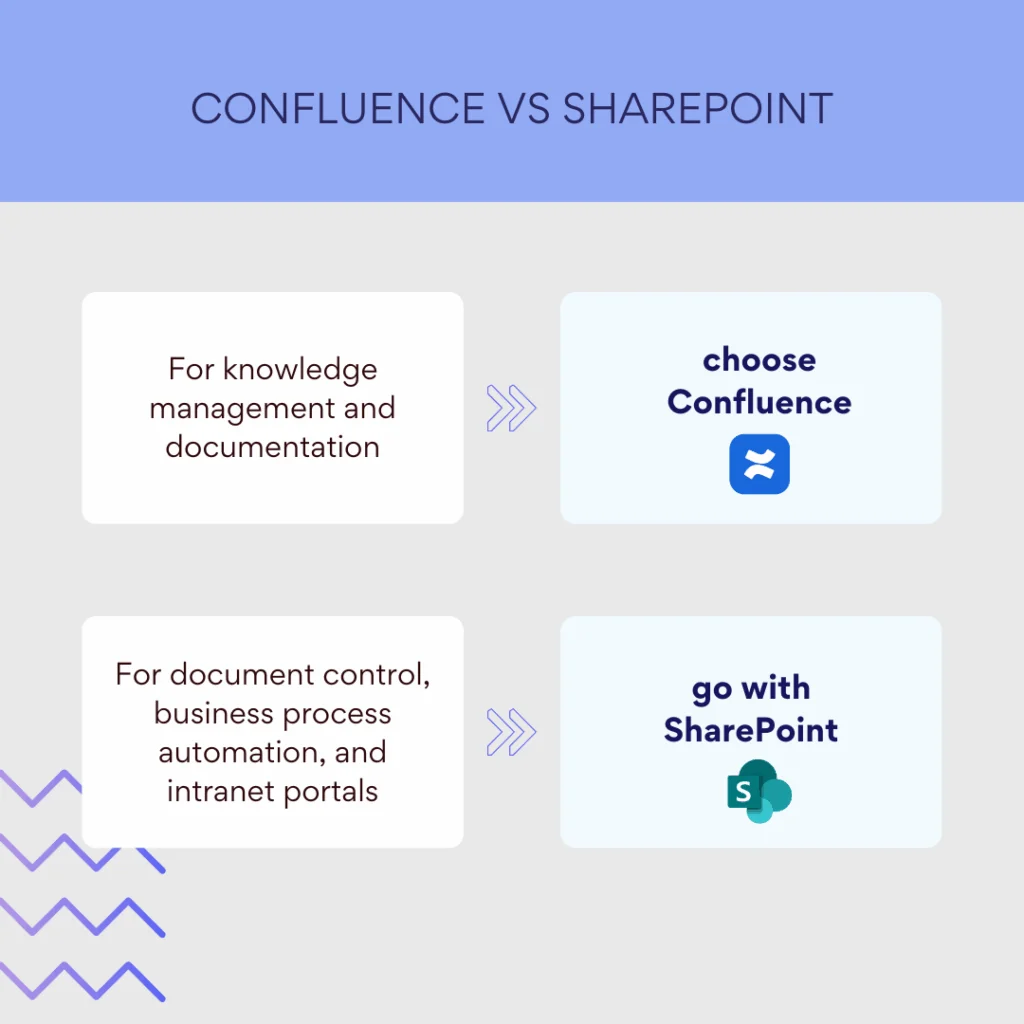
Pic. 1. Confluence vs SharePoint
In summary, both Confluence and SharePoint have their strengths:
- Confluence is ideal for agile teams that need fast, collaborative documentation.
- SharePoint is the powerhouse for enterprises that require complex workflows, compliance, and integration with Microsoft tools.
Choosing between Confluence vs. SharePoint isn’t about finding the “better” tool — it’s about aligning with your organization’s workflow, ecosystem, and long-term digital strategy.
Use Cases for Confluence and SharePoint
Understanding Confluence vs SharePoint isn’t just about features — it’s about knowing when each platform truly shines. Here’s a practical breakdown.
When to use Confluence
What is Confluence best used for? Confluence excels when the goal is documentation, knowledge sharing, and collaborative content creation. Key scenarios include:
- Building knowledge bases and wiki pages. Confluence is perfect for documenting processes, instructions, and corporate knowledge. A support team can maintain a centralized knowledge base, while developers store technical documentation and coding standards.
- Project and product documentation. Teams use Confluence to document project goals, requirements, and final reports. Product teams track roadmaps, describe features, and capture ideas — all in one easily navigable space.
- Integration with Jira for IT and DevOps teams. Paired with Jira, Confluence becomes a powerful tool: Jira handles task tracking and sprint management, while Confluence stores technical specs, sprint reports, and retrospectives.
- Collaboration for small teams. Confluence is intuitive and lightweight. Even small startups or teams with limited training resources can quickly adopt it for day-to-day collaboration, without heavy IT overhead.
Practical examples:
- A software startup uses Confluence for sprint documentation, backlog notes, and product specs.
- A support department creates a searchable wiki for FAQs and troubleshooting guides.
- Marketing teams maintain content guidelines, campaign reports, and shared calendars.
When to use SharePoint
SharePoint is the platform of choice when enterprise-level document management, workflow automation, and internal communication are priorities. Typical use cases include:
- Corporate content and document management. SharePoint handles large volumes of data with version control, permissions, and structured storage. It’s ideal for organizations needing robust governance across documents and records.
- Intranet portals and workspaces. Many companies use SharePoint as an internal portal: employees access company news, policies, templates, and services, while departments get dedicated workspaces for collaboration.
- Business process automation. SharePoint, integrated with Power Automate and Power Apps, enables document approvals, request routing, reminders, and notifications. Workflows can be customized to streamline repetitive tasks.
- Secure data storage and compliance. For regulated industries — finance, healthcare, or government — SharePoint provides enterprise-level security, GDPR/HIPAA compliance, and controlled access to sensitive information.
- Large-scale projects in big organizations. SharePoint scales effortlessly for thousands of users. It supports complex data structures, third-party apps, and enterprise workflows, making it suitable for global companies.
Practical examples:
- A multinational bank uses SharePoint to manage policies, regulatory documents, and internal approvals.
- A hospital stores patient-related forms, standard operating procedures, and training manuals on SharePoint portals.
- A global consulting firm builds department-specific workspaces for project management and document collaboration.
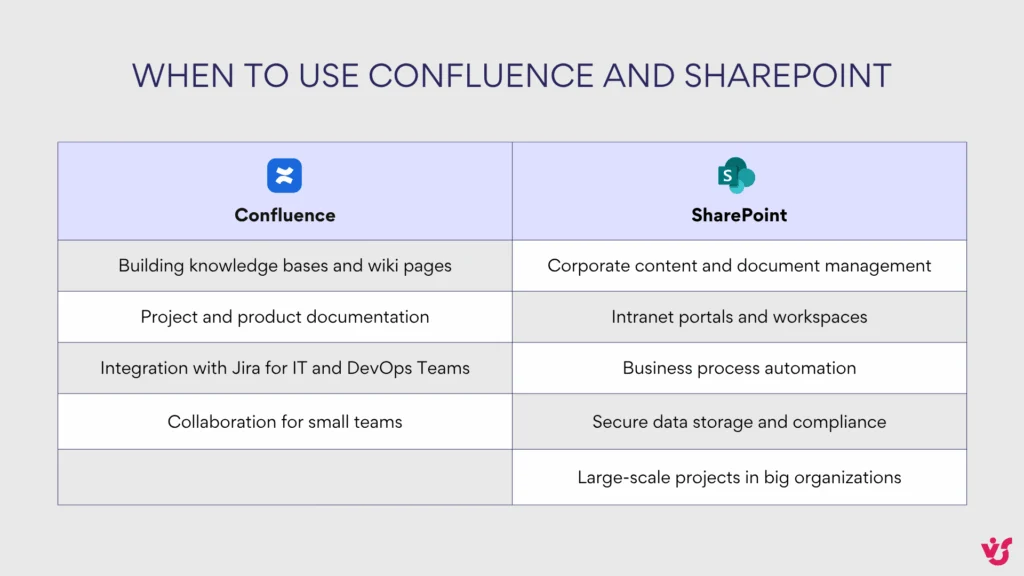
Pic. 2. When to use Confluence and when to use SharePoint.
In summary, Confluence and SharePoint serve complementary purposes:
- Use Confluence for fast, flexible, team-focused documentation and knowledge sharing.
- Use SharePoint for enterprise-scale document management, workflow automation, and secure intranet portals.
Some companies even adopt Confluence and SharePoint together, leveraging Confluence for team-level collaboration and SharePoint for corporate governance, workflows, and data compliance.
Confluence vs Teams: a quick note
A closely related question is how Confluence compares with Microsoft Teams. In short, Teams is a chat-and-meeting hub for real-time communication, while Confluence is a structured space for long-lived documentation and knowledge — they solve different problems. Use Teams for conversations and calls, and Confluence (or SharePoint) for the content those conversations produce. Because Teams stores its shared files in SharePoint under the hood, files you share in a Teams channel already live in SharePoint. For a deeper look at how Teams and SharePoint relate, see our MS Teams vs SharePoint guide.
Using Confluence and SharePoint Together
When thinking about Confluence vs SharePoint, it’s important to note that these platforms aren’t direct competitors — and they don’t have to be mutually exclusive. Many organizations discover that one platform alone isn’t enough, and the optimal solution is to leverage both.
Why use Confluence and SharePoint together
Companies often combine Confluence and SharePoint to take advantage of each platform’s strengths. Some common scenarios include:
- Confluence for knowledge bases, SharePoint for document management. Confluence stores wiki pages, project documentation, and team knowledge, while SharePoint handles centralized file storage, version control, and access rights.
- Confluence for project documentation, SharePoint for portals and workspaces. Teams capture technical requirements, project descriptions, retrospectives, and reports in Confluence. Meanwhile, SharePoint serves as a corporate portal where employees access documents, news, and essential tools.
- Confluence for IT/DevOps teams, SharePoint for business processes. Confluence integrates with Jira, supporting IT teams in managing development projects. SharePoint automates approvals, requests, and cross-departmental workflows (HR, finance, legal, etc.).
- Confluence for active knowledge, SharePoint for long-term storage and compliance. Confluence is ideal for ongoing work, discussions, and collaborative content. SharePoint provides secure, compliant storage with enterprise-level access control — perfect for regulatory requirements and long-term retention.
Integrating Confluence and SharePoint
Proper integration of Confluence and SharePoint unlocks the benefits of both platforms without duplicating work. Connections can be established via APIs and third-party connectors, enabling scenarios such as:
- Storing documentation in Confluence while attaching and storing files in SharePoint.
- Enabling unified search across both systems, so users can find pages and documents in a single query.
- Displaying SharePoint data directly within Confluence pages for seamless context and reporting.
By combining Confluence and SharePoint, organizations create a hybrid environment where Confluence handles collaborative, team-focused content while SharePoint manages structured, enterprise-grade document workflows and compliance.
Recommendations for Choosing a Platform
Choosing between Confluence vs SharePoint isn’t just a matter of features — it’s about aligning the platform with your team’s workflows, scale, and ecosystem. Here’s a detailed guide.
When to choose Confluence
Confluence is the go-to choice when your organization prioritizes documentation and knowledge management. Consider it if:
- The main goal is creating and maintaining a knowledge base. Confluence lets teams quickly build articles, instructions, and technical documents, linking them into a cohesive system.
- Your team works in Agile or DevOps and actively uses Jira. Confluence naturally complements Jira by connecting tasks, sprints, and project documentation.
- Ease of implementation is important. Confluence requires minimal setup and is ideal for small to medium teams.
- You need fast, collaborative tools for small groups to manage project notes, retrospectives, or ad hoc documentation.
When to choose SharePoint
SharePoint is suited for organizations that need enterprise-grade content management, workflows, and compliance. Choose SharePoint if:
- Your priority is document and content management, including versioning, granular access control, and corporate policies.
- You need a centralized internal portal where employees can access news, documents, reports, and internal policies.
- Business process automation is important. SharePoint integrates with Power Automate and Microsoft 365 apps to streamline approvals, notifications, and workflows.
- Your organization operates in regulated industries (finance, healthcare, government), where compliance with GDPR, HIPAA, or other standards is mandatory.
- The company is large and distributed, as SharePoint scales to thousands of users and complex structures with ease.
When to use both systems
In many cases, the most effective approach is to combine Confluence and SharePoint, leveraging the strengths of each:
- Use Confluence for knowledge bases and project documentation — a dynamic, team-focused environment.
- Use SharePoint for file management, corporate portals, and complex workflows — ensuring security, compliance, and structured storage.
- Combine Confluence + Jira for Agile and DevOps processes, and SharePoint + Teams for enterprise collaboration and document governance.
- Separate operational documentation (Confluence) from long-term storage and compliance (SharePoint).
Factors that influence the choice
The decision between Confluence vs. SharePoint depends on several key factors:
- Company size — small businesses often find Confluence sufficient, whereas large corporations benefit from SharePoint’s scalability.
- Existing ecosystem — if the organization already uses the Atlassian stack, Confluence is logical; if Microsoft 365 dominates, SharePoint is the natural choice.
- Budget — Confluence is easier and cheaper to implement; SharePoint requires higher investment but offers broader enterprise capabilities.
- Integrations — the choice should consider existing tools like Teams, Jira, CRM, or ERP to ensure seamless workflows.
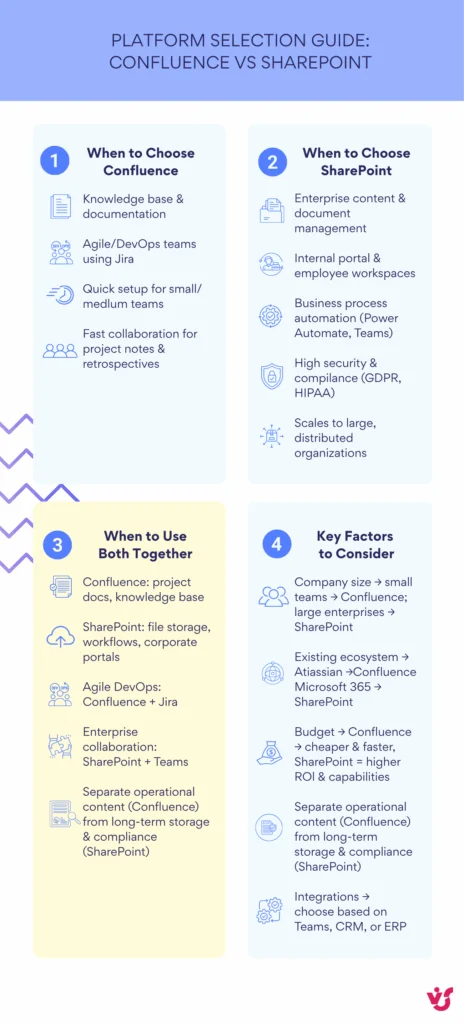
Pic. 3. Platform selection guide: Confluence vs SharePoint.
Enhancing SharePoint with Virto Solutions
Before diving into specific tools, it’s worth highlighting why SharePoint remains at the heart of enterprise collaboration. Its real power comes from flexibility — the ability to evolve from a simple document library into a connected ecosystem that unites content, people, and processes. Yet, to unlock that full potential, SharePoint often needs the right enhancements. That’s where VirtoSoftware steps in — extending native SharePoint capabilities with smarter apps that bring automation, visibility, and control into everyday workflows. Explore the full range of Virto apps for SharePoint to extend collaboration and knowledge management across your Microsoft 365 environment.
SharePoint as an ecosystem
When we talk about SharePoint, we’re no longer talking about a simple document storage tool — it’s a powerful, modular ecosystem. SharePoint is designed to grow with your business, and while its native functionality covers most basic needs, real efficiency often comes from specialized add-ons.
That’s where VirtoSoftware steps in. Virto’s suite of SharePoint extensions enhances usability, automates workflows, and fills functional gaps — helping organizations adapt SharePoint to real-world business challenges. Whether you use SharePoint Online or SharePoint On-Premise, Virto’s solutions take collaboration, productivity, and control to the next level.
Virto products for SharePoint Online
Let’s explore how Virto apps for SharePoint Online extend Microsoft 365 capabilities and simplify daily operations:
🗓 Virto Calendar App. A visual, color-coded calendar for planning meetings, events, and projects directly within SharePoint Online.
- Integrates with other Microsoft 365 calendars (Outlook, Teams)
- Supports filtering, categories, and shared views
- Perfect for corporate event scheduling, vacation tracking, or resource planning
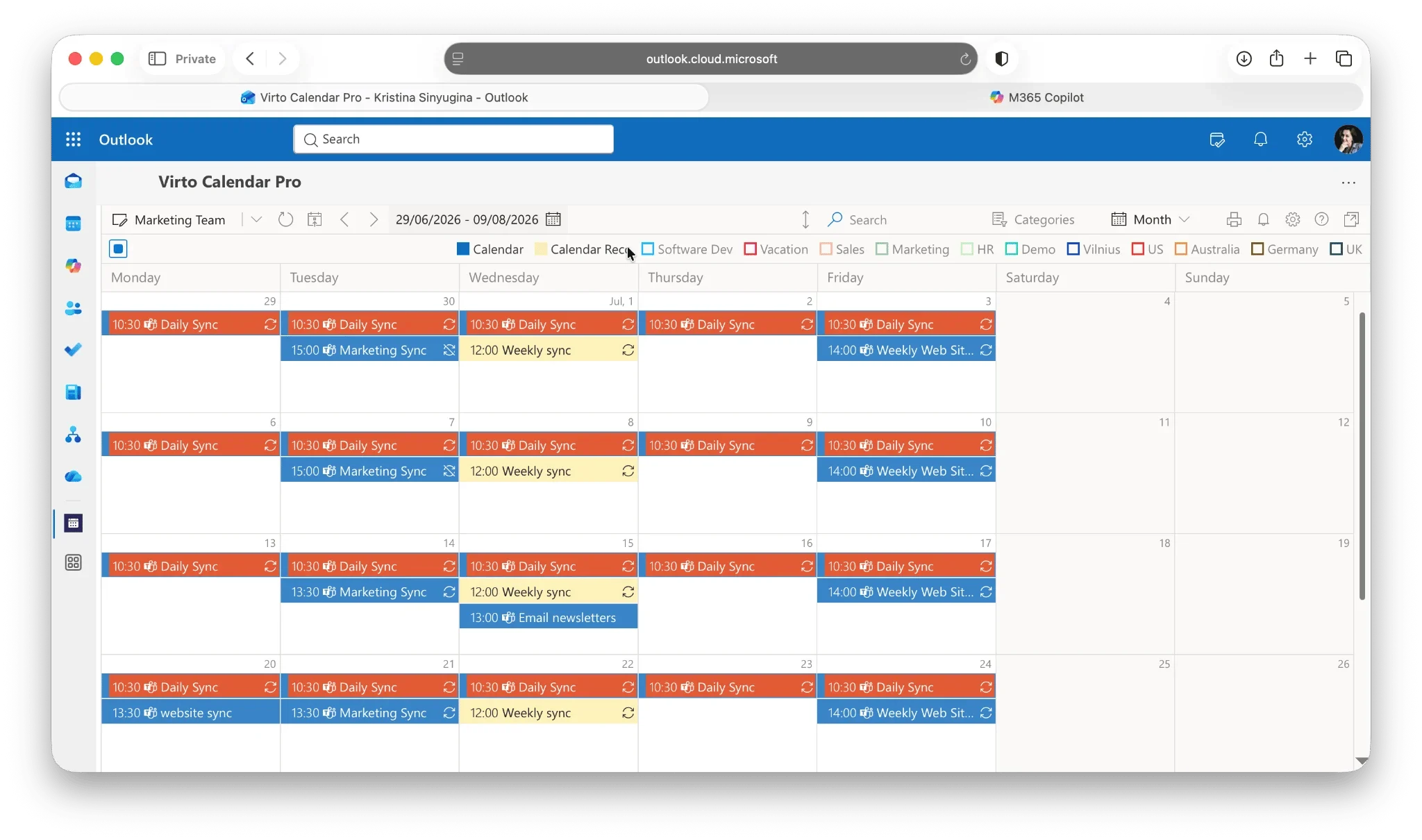
Pic. 4. Virto Calendar App for SharePoint Online.
📋 Virto Kanban Board App. Transforms task management in SharePoint into a visual, drag-and-drop experience.
- Track project progress and task status in real time
- Enhance team transparency and accountability
- Ideal for Agile workflows, project oversight, and workload visualization
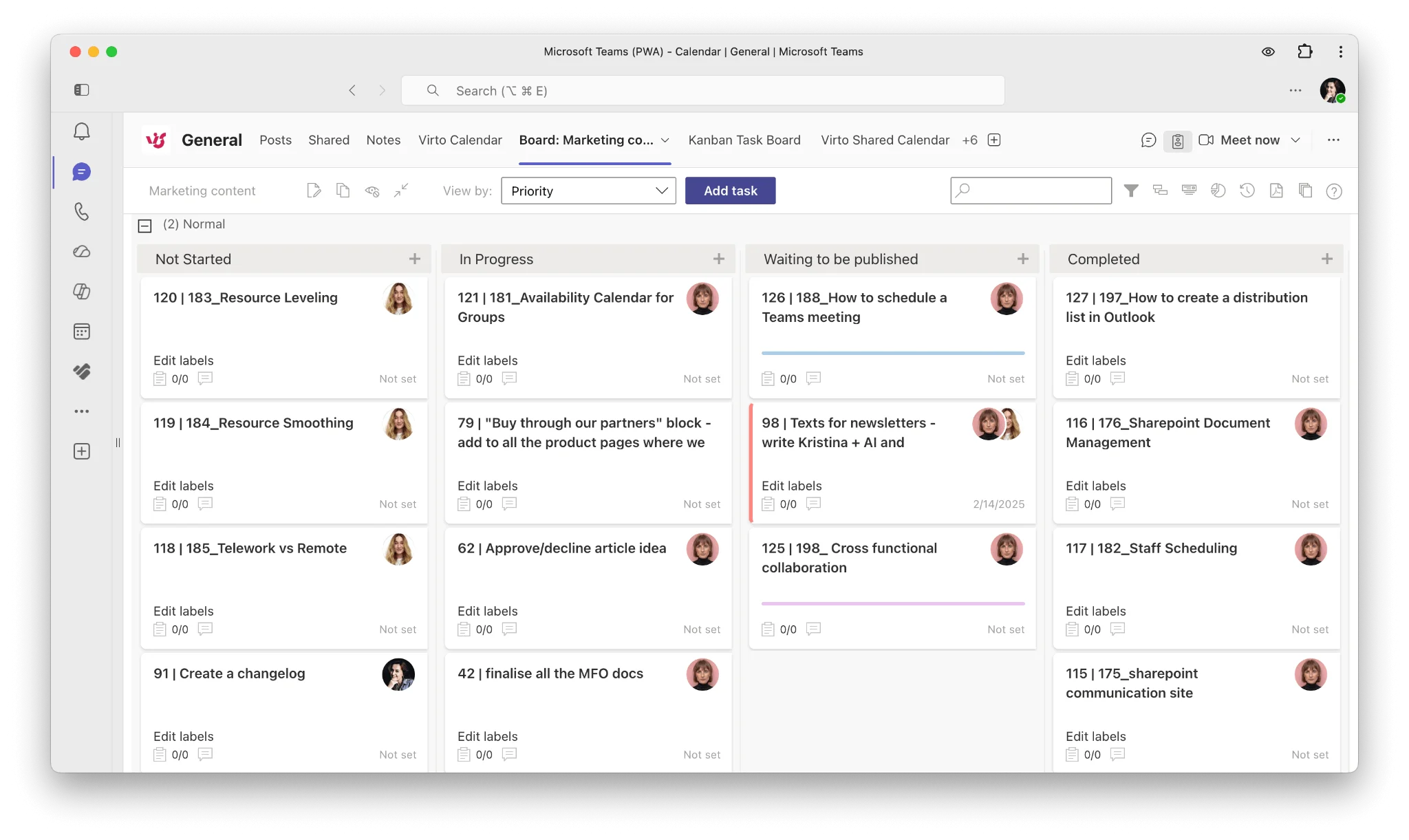
Pic. 5. Sample Virto Kanban Board App.
📂 Virto Multiple Operations for Microsoft 365. Streamlines document management in SharePoint Online with bulk uploading, deleting, and editing of files and folder structures.
- Upload hundreds of files/folders at once via drag-and-drop — fast and error-free, with metadata tagging
- Bulk delete filtered items (moved to Recycle Bin) and edit properties across multiples
- Eliminate repetitive manual tasks
- Great for data migrations, cleanups, report submissions, or handling large datasets
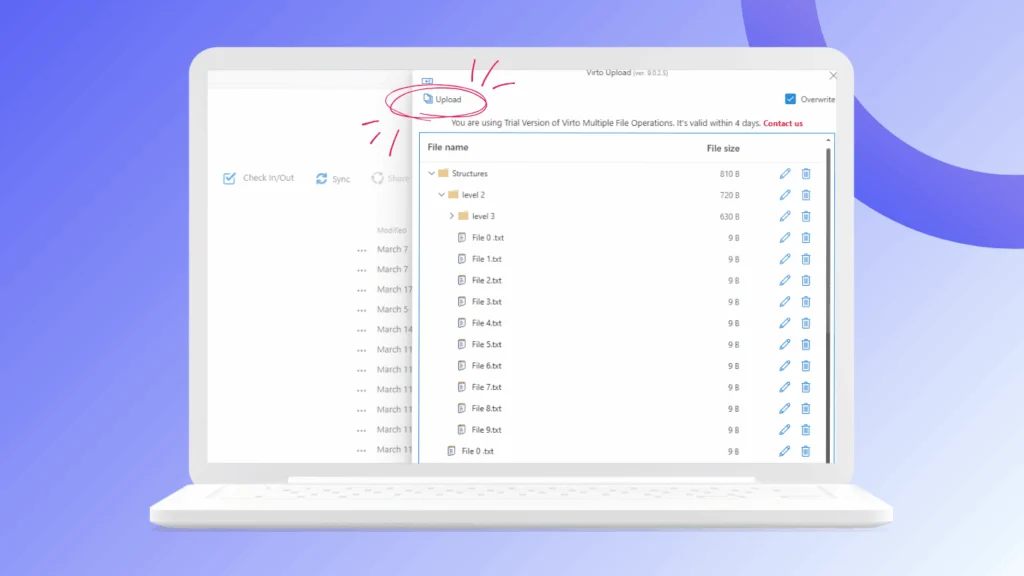
Pic. 6. Virto Multiple Operations for Microsoft 365.
Virto products for SharePoint On-Premise
For organizations running SharePoint On-Premise, Virto offers feature-rich Web Parts that extend native capabilities and modernize on-prem environments:
🗓 Virto Calendar Web Part. Brings an interactive, color-coded calendar to local SharePoint installations — you can manage corporate schedules, team events, and milestones in one place.
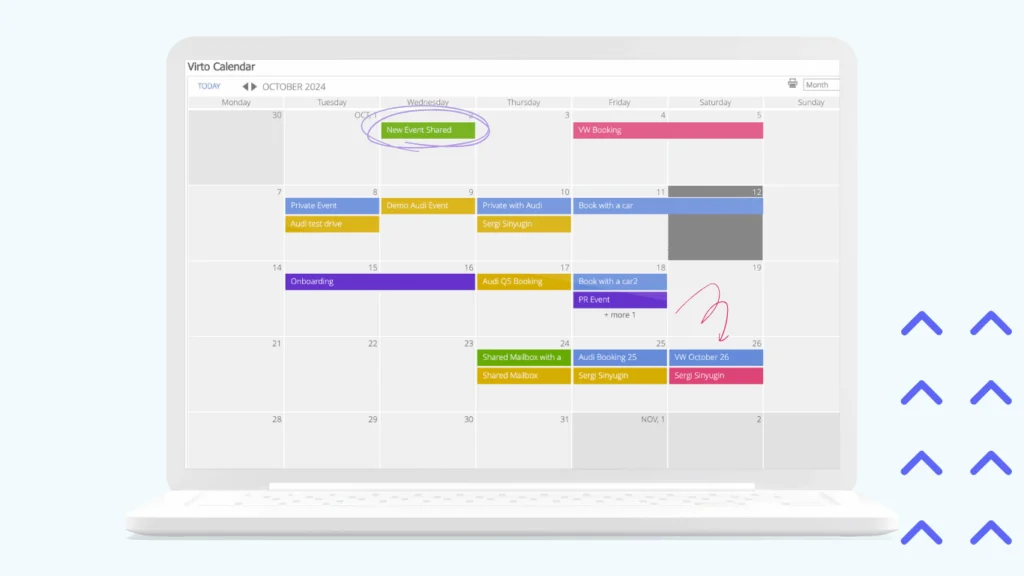
Pic. 7. Virto Calendar Web Part.
📋 Virto Kanban Board Web Part. Adds Agile-style visualization to SharePoint On-Premise — you can manage workflows, assign responsibilities, and track project phases effortlessly.
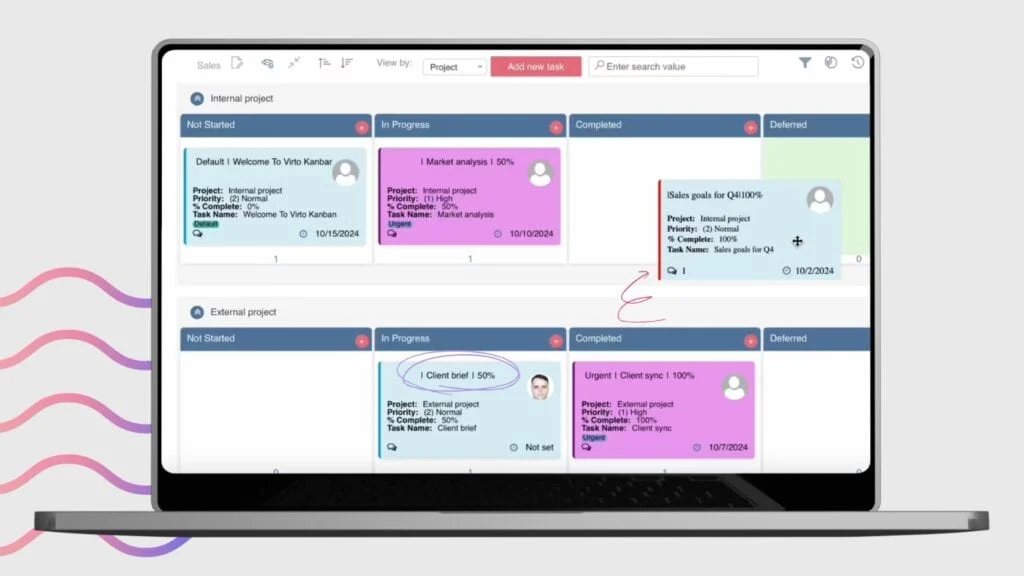
Pic. 8. Virto Kanban Board Web Part.
📁 Virto Multiple File Operations. Expands SharePoint’s file management capabilities.
- Perform mass actions: copy, move, delete, or rename multiple documents
- Simplify administration and reduce routine workload
Advantages of implementing Virto Solutions
Integrating VirtoSoftware tools into your SharePoint environment unlocks measurable benefits:
- ⚙️ Automation of routine processes — from approvals and uploads to workflow synchronization.
- 💡 Enhanced visualization and usability — intuitive calendars, Kanban boards, and Gantt charts make collaboration easier.
- ⌛ Time savings and fewer errors — optimized UI and automation cut down on repetitive manual work.
- 🔗 Flexible integration — Virto apps work seamlessly within Microsoft 365 and On-Premise environments, scaling with your organization.
Virto apps start from $2/user/month (Starter, up to 30 users) and $3/user/month (Pro, 31–200 users), with Enterprise pricing available on request. Every app comes with a free 30-day trial, so you can test the full functionality in your own SharePoint environment before you buy.
FAQ: Confluence vs SharePoint
What’s the difference between Confluence and SharePoint?
Confluence is Atlassian’s wiki and knowledge-base tool focused on documentation and team pages; SharePoint is Microsoft 365’s broader platform for documents, content management and intranets, with deep Office integration.
Should I use Confluence or SharePoint?
Choose Confluence for lightweight team wikis and documentation, SharePoint for enterprise document management and intranets inside Microsoft 365. Many organisations use both and integrate them.
Is SharePoint a wiki?
Not exactly. SharePoint can host wiki-style pages, but it’s a much broader content-management and intranet platform. If a focused team wiki is all you need, Confluence is more streamlined; if you also need document management, portals, and workflows, SharePoint covers far more ground.
Can Confluence and SharePoint integrate?
Yes. Using APIs and third-party connectors, you can store files in SharePoint while documenting in Confluence, enable unified search across both systems, and surface SharePoint data directly inside Confluence pages.
Conclusion: Confluence vs SharePoint — Choosing the Right Tool for the Right Job
When it comes to Confluence vs SharePoint, the key differences come down to purpose and approach. Confluence excels at documentation, team collaboration, and building structured knowledge bases — perfect for Agile or DevOps teams already using Jira. SharePoint, on the other hand, is a full-fledged enterprise platform built for managing corporate content, automating workflows, and maintaining compliance across large organizations.
- For knowledge management and documentation — choose Confluence.
- For document control, business process automation, and intranet portals — go with SharePoint.
However, this doesn’t have to be an either/or decision. Many companies benefit from using Confluence and SharePoint together — Confluence for living documentation and collaboration, and SharePoint for secure storage, automation, and enterprise-scale management.
To unlock even greater productivity, enhance your SharePoint environment with VirtoSoftware’s solutions — from Kanban boards and Gantt charts to advanced calendars and bulk file management tools. Virto’s apps expand standard SharePoint functionality, turning it into a powerful, user-friendly ecosystem that adapts to real business needs.
In the end, it’s not just Confluence versus SharePoint — it’s about finding the right balance between collaboration, structure, and automation. And with Virto, SharePoint becomes the platform that truly works for your team.