Virto Tab Navigationfor SharePoint On-Premises
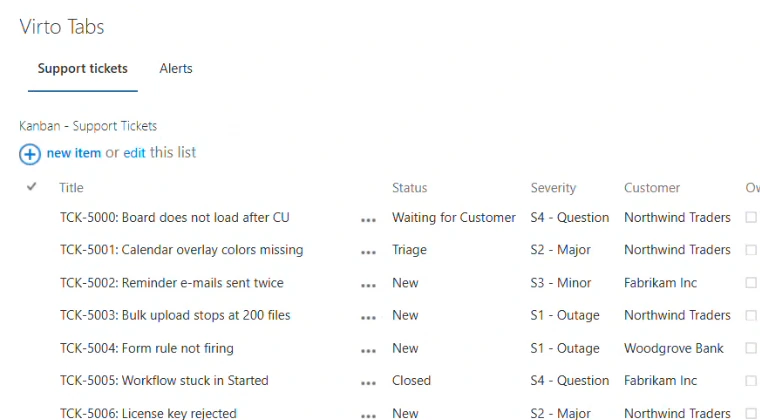
Group the web parts on a SharePoint page into named tabs. Instead of scrolling through a long page, users open the tab they need and see at a glance where each piece of content is.
Key features:

Tabs for any web parts
Put the web parts already on a page onto tabs, one or more per tab, picked from the web part zone or the whole page. Visitors see one tab at a time.

Your names, your order
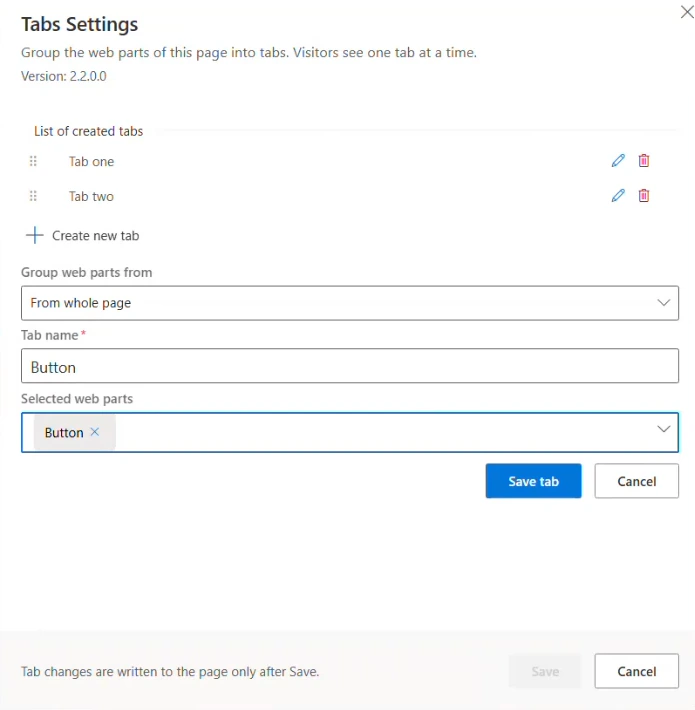
Name each tab after what it holds, such as "File operations" or "AD users", and drag the tabs into the order that suits your readers.

Classic and modern pages
One package for SharePoint Server Subscription Edition, with a classic web part for classic pages and a modern one for modern pages.
Trusted by Industry Leaders


and over 8,000 businesses worldwide
Why use Virto Tab Navigation
A single SharePoint page can easily hold 20 or more web parts. Placed one under another, they turn the page into a long scroll, and finding the web part you need takes time. Virto Tab Navigation places related web parts on separate tabs with names you choose, so the page stays short and organized:
- One tab for document tools, another for the Active Directory user forms, a third for team lists.
- Users open the tab they need instead of searching the whole page.
- All tabs are set up in one Tabs Settings panel, and changes reach the page only when you click Save.
- Several Virto Tab Navigation web parts on one page each keep their own set of tabs.
Sized to fit your business
Pro
For organizations that run content-heavy SharePoint pages and want them short and easy to navigate.
- Help & learning content
- Global web ticketing support
- Up to 72 hours of response time
- One support contact
Good to know
Installation and documentation
Setup steps, video guides, FAQs and troubleshooting articles in our documentation.
Documentation →Your data
The web part runs inside your SharePoint farm; your content stays on your servers.
Trust & Security Center →Discounts and quotes
15% off for education, healthcare and charities; custom quotes for larger organisations.
Talk to sales →
The pricing outlined herein is valid only as to new purchases occurring on or after June 1, 2024. VirtoSoftware reserves the right to adjust its packaging and pricing at any time.
Virto Tab Navigation — FAQ
Any web part on the same page: lists, libraries, forms, other Virto web parts. You choose them either from the web part zone where Virto Tab Navigation sits or from the whole page. The one exception is another Virto Tab Navigation web part, so tabs can’t be nested.
SharePoint Server Subscription Edition, on classic and modern pages. The package installs a classic web part for classic pages and a modern (SPFx) web part for modern pages. A version for SharePoint Server 2019 will be available shortly.
Virto Tab Navigation has no permission settings of its own. SharePoint decides: users see the page and the web parts on its tabs according to their SharePoint permissions.
No. The tabs use a built-in design, and the web part has no styling settings.
Tabs appear only when the page is not in edit mode. In edit mode the web part shows the message “Exit edit page mode to display Tabs”, and every web part stays visible so you can work on it.
Talk to our team
Need clarity on our app's suitability for you? Set up a quick call with us or chat via Microsoft Teams chat to explore its potential for your needs.