


Quick answer: is SharePoint a content management system? Yes. SharePoint is Microsoft 365’s content and enterprise content management (ECM) platform. It manages documents, pages, records and metadata with content types, retention policies and workflows, and it does so across the whole platform rather than in one library. Document management, the part most people know, is one layer of it.
Most organisations meet SharePoint as the place where Teams keeps its files. That is the smallest thing it does. Underneath the libraries sits a full content management system: a way to say what a piece of content is, what describes it, who may see it, how it gets published, how long it has to be kept and what happens when that time is up. This guide explains how SharePoint works as a content management system in 2026, which capabilities matter, how content management differs from document management, how governance and records fit in, and which practices keep the whole thing usable two years after launch. If you are new to the platform itself, start with our overview of what SharePoint is and how it works, then come back here.
What SharePoint content management means
Three acronyms get used for the same platform, and they are not interchangeable. A document management system (DMS) stores and controls files: libraries, version history, check-out, co-authoring, sharing. A content management system (CMS) publishes authored content that people read: intranet pages, news, knowledge articles, media. Enterprise content management (ECM) is the widest term. It covers every kind of content the organisation has to control across its whole lifecycle, and it adds the structural layer that makes control possible at scale: content types, metadata and taxonomy, records and retention, workflow, search, permissions and audit.
SharePoint does all three. Files live in document libraries. Pages and news live in communication and team sites. The ECM layer runs through both, and since Microsoft moved retention and records into Microsoft Purview, that layer also reaches OneDrive, Exchange and Teams. When Microsoft describes enterprise content management in SharePoint, this combined platform is what it means.
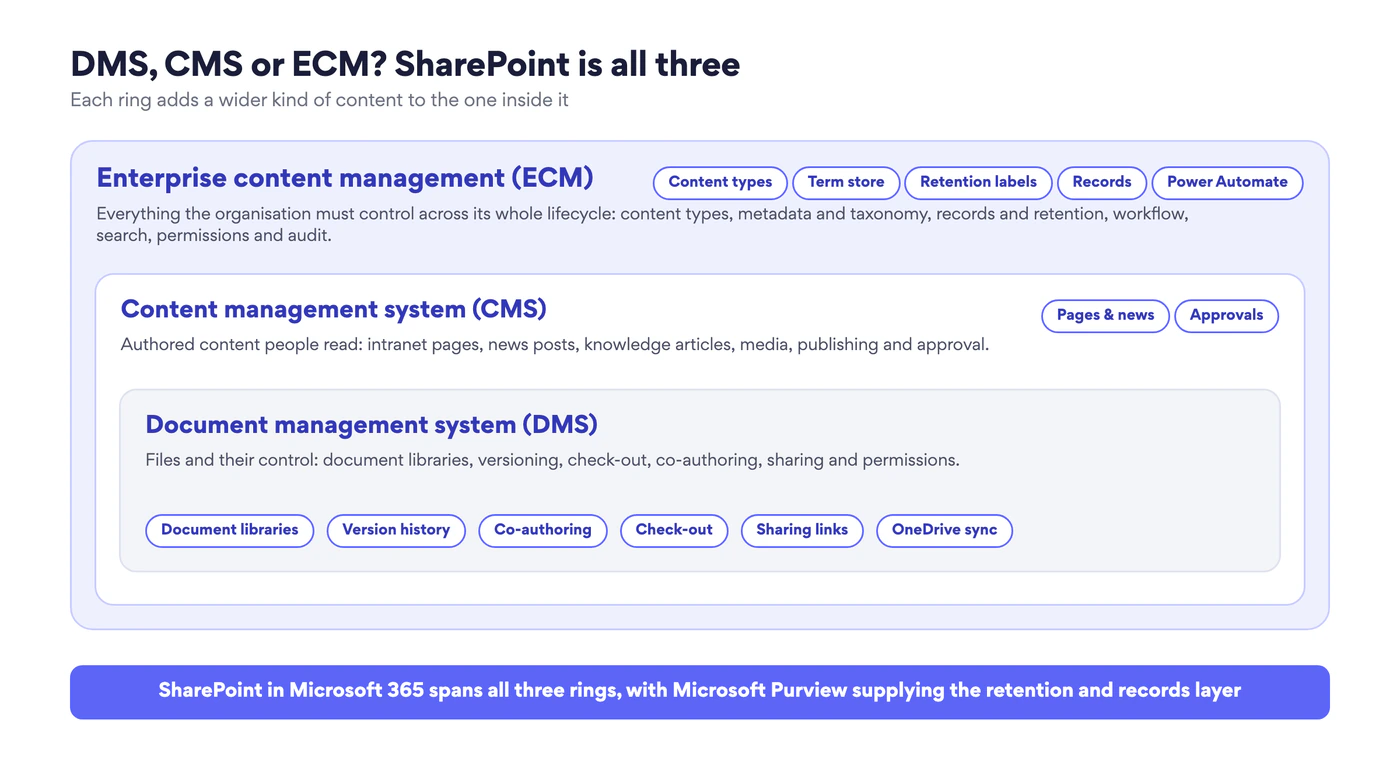
Fig. 1. DMS, CMS and ECM as three rings. SharePoint covers all three, with Microsoft Purview supplying the retention and records layer
The practical consequence: “we store files in SharePoint” and “we run content management on SharePoint” describe two very different deployments. The first is a file share with a web front end. The second has decided what its content types are, which metadata is mandatory, which content becomes a record and how pages get approved before anyone sees them. Everything in this guide is about getting from the first to the second.
Content management vs document management in SharePoint
This is the distinction the term “SharePoint content management” most often blurs, so it is worth being exact. Document management handles files. Its unit of work is the document in a library, and its tools are versioning, check-in and check-out, co-authoring, folders and views, sharing links and the recycle bin. Content management is the broader system. Its unit of work is any content, whether a file, a page, a news post, a list item or a declared record, and its tools are content types, site columns and the term store, retention labels and records declaration, page publishing and approval, and workflow across the platform.
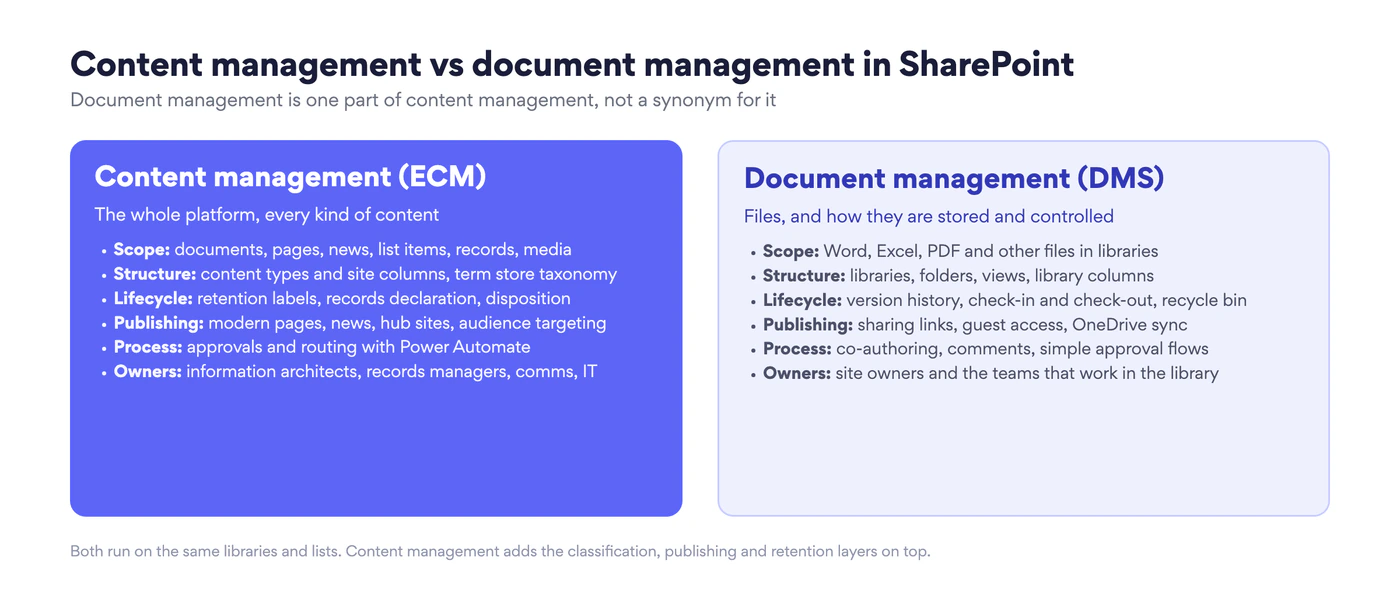
Fig. 2. Content management and document management compared. Both run on the same libraries and lists; content management adds classification, publishing and retention on top
The two overlap in one important way: a document library is where most content management rules are applied. A content type gives the library its columns and template, a retention label applied to the library governs every file in it, and a Power Automate flow triggered by the library runs the approval. So document management is not a rival to content management. It is the layer where content management is felt day to day. For the file-level view, including library design, versioning settings and DMS best practices, see our guide to SharePoint document management. This article stays on the platform-wide layer.
Core capabilities: the five building blocks
SharePoint content management rests on five structures. Get them right and everything else, from search to compliance, follows from them. Get them wrong and no amount of folder discipline compensates.
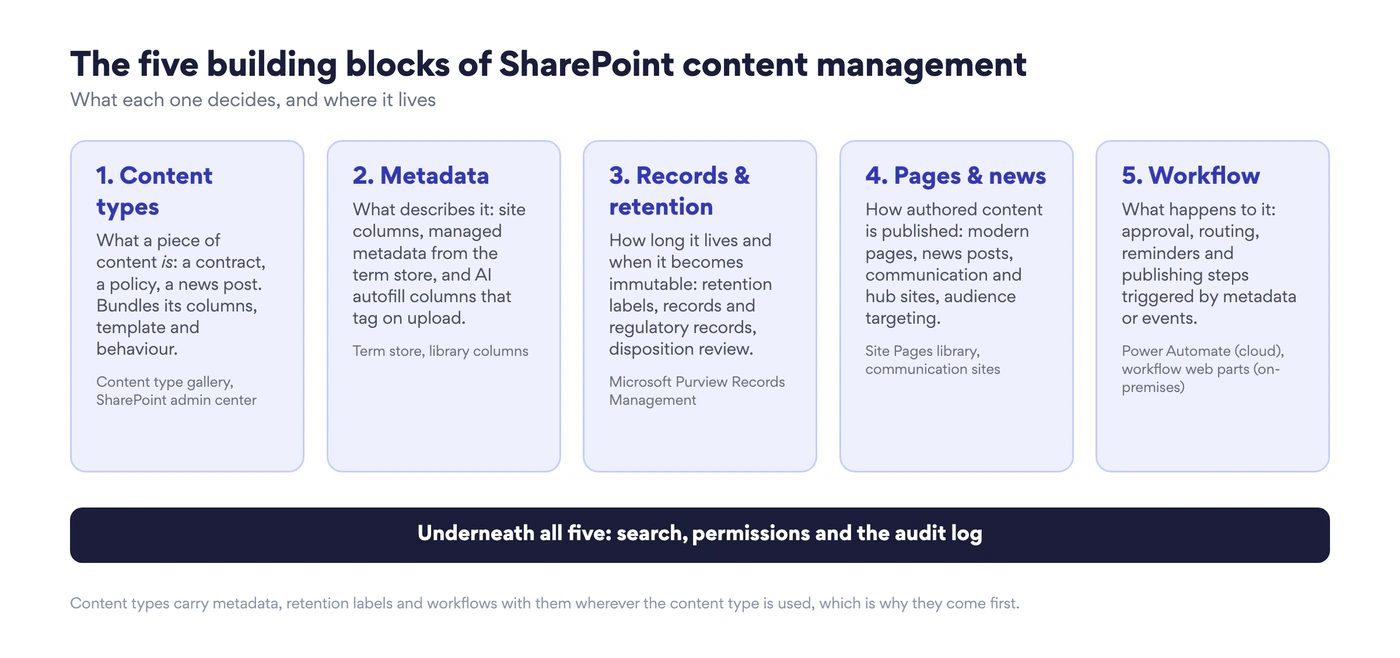
Fig. 3. The five building blocks of SharePoint content management, and the SharePoint or Purview feature each one lives in
1. Content types
A content type is a reusable definition of a kind of content: a contract, a policy, a project report, a news post. It bundles the columns that describe that kind of content, the document template it starts from, and the behaviours attached to it, such as a retention label or a workflow. When a library allows the “Contract” content type, every contract created there carries the same fields and the same rules, whichever site it lives on.
In SharePoint Online, organisation-wide content types are created and published from the content type gallery in the SharePoint admin center, which replaced the old content type hub site as the place to manage them. Published content types can be pushed to sites and lists, and updates to a published type flow down to every site that uses it. Content types are the reason the other four blocks scale: metadata, retention and workflow attached to a content type travel with it, so a rule is defined once rather than per library.
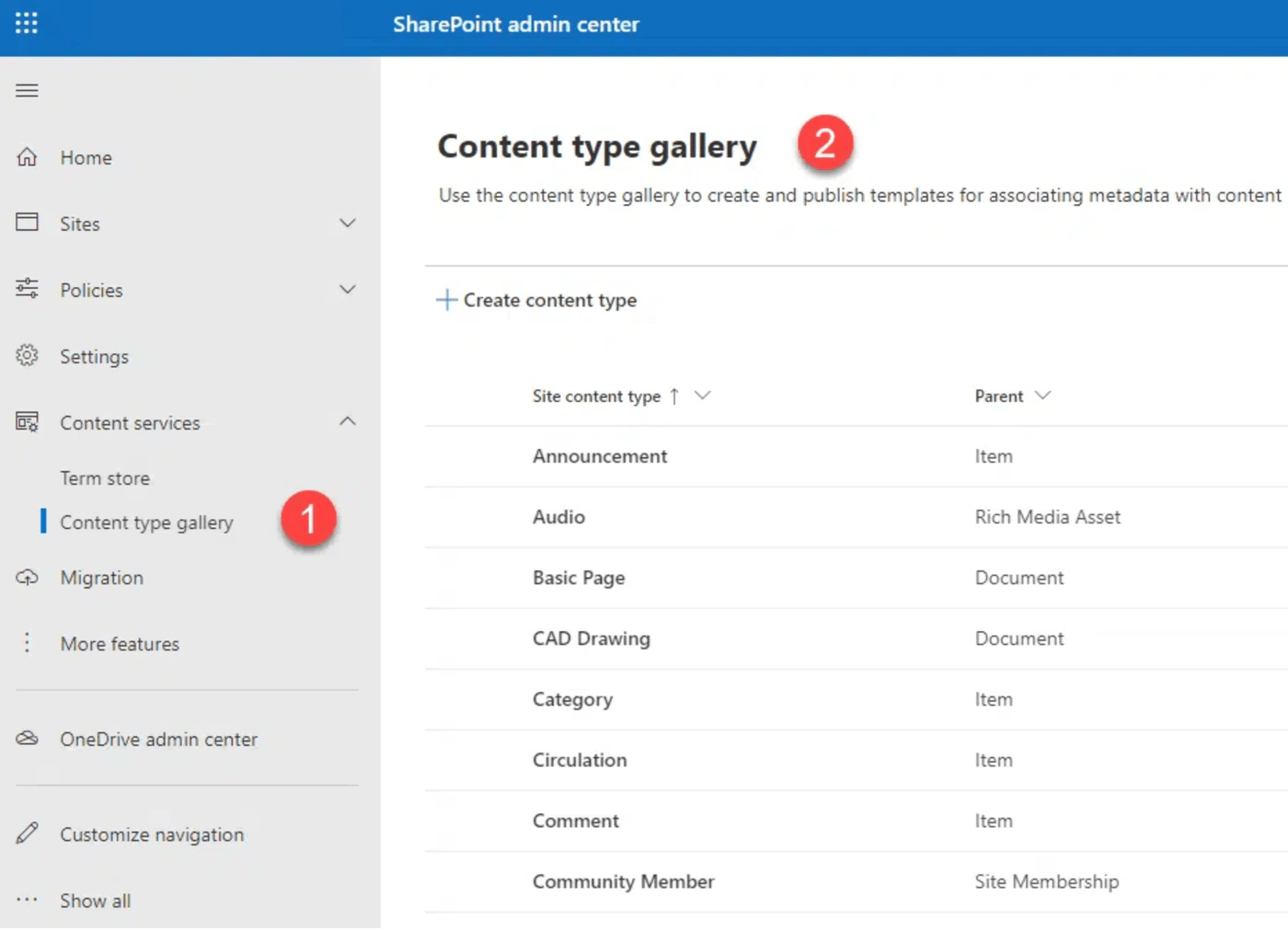
Pic. 1. The content type gallery in the SharePoint admin center
2. Metadata and taxonomy
Metadata is what makes content findable and governable without folders. In SharePoint it comes in three forms. Site columns are fields such as Department, Document status or Review date that can be reused across content types. Managed metadata draws its values from the term store, a central taxonomy of term sets and terms that an administrator maintains, so that “Finance” is spelled one way across the tenant and can be renamed once for every tagged item. Enterprise keywords allow open, folksonomy-style tagging where a fixed vocabulary would be too rigid. Microsoft’s introduction to managed metadata is the reference for how term sets, groups and the term store fit together.
What changed in the last two years is who fills the metadata in. Autofill columns use a prompt to read each uploaded file and write a value into a column, and taxonomy tagging applies term store terms automatically. Both are pay-as-you-go document processing services in Microsoft 365 (the services formerly branded Microsoft Syntex), and Copilot in SharePoint can now propose autofill columns for a library from its first twenty files. Metadata that used to depend on authors remembering to fill in a form can now be generated on upload and corrected by a human, which removes the main reason metadata schemes failed in the past.
3. Records and retention
Content management without a lifecycle is a growing archive. SharePoint’s lifecycle controls now live in Microsoft Purview Records Management and are enforced inside SharePoint and OneDrive. A retention policy applies a keep-or-delete rule to whole locations, such as every SharePoint site. A retention label applies a rule to individual items and can be published for users to apply, applied to a whole library or folder as a default, attached to a content type, or auto-applied by Purview based on sensitive information, keywords or trainable classifiers.
A retention label can also declare an item a record. A record cannot be deleted before its retention period ends, most edits are blocked, and additional activity is logged. A regulatory record goes further: it cannot be edited, its label cannot be removed, and even administrators cannot shorten its retention. When retention ends, a disposition review routes the item to a reviewer before deletion and keeps proof of disposition for auditors. A file plan holds the whole retention schedule with the regulatory citations behind each label. For how deleted-but-retained content is preserved behind the scenes, see our explainer on the preservation hold library.
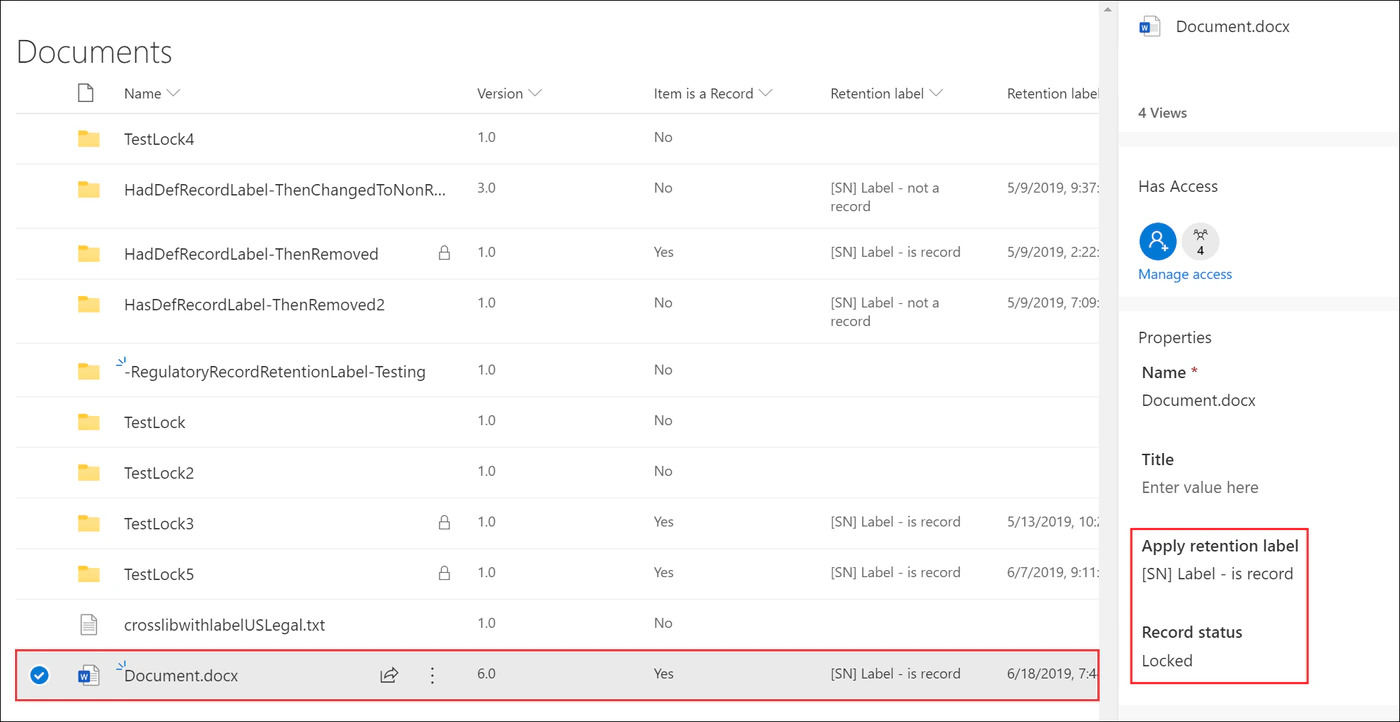
Pic. 2. A retention label declaring a document a record, as seen in the document details pane
4. Pages and news
The CMS ring is where SharePoint publishes what people read. Modern pages are built from web parts on communication and team sites; news posts are pages promoted into news feeds, Teams and the SharePoint start page; hub sites connect related sites and roll up their news and navigation; audience targeting shows a page or a navigation link only to the groups it is meant for. Page approval, scheduling and multilingual pages cover the editorial workflow.
Two dates matter for anyone still running classic publishing. Microsoft has announced that creation of classic user-created pages will be disabled for new tenants from 1 March 2027 and that existing classic pages become read-only for all tenants from 1 October 2028. Content still on classic publishing pages should be planned into modern pages before then. Our guides to SharePoint pages, communication sites and hub sites cover the building side in detail.
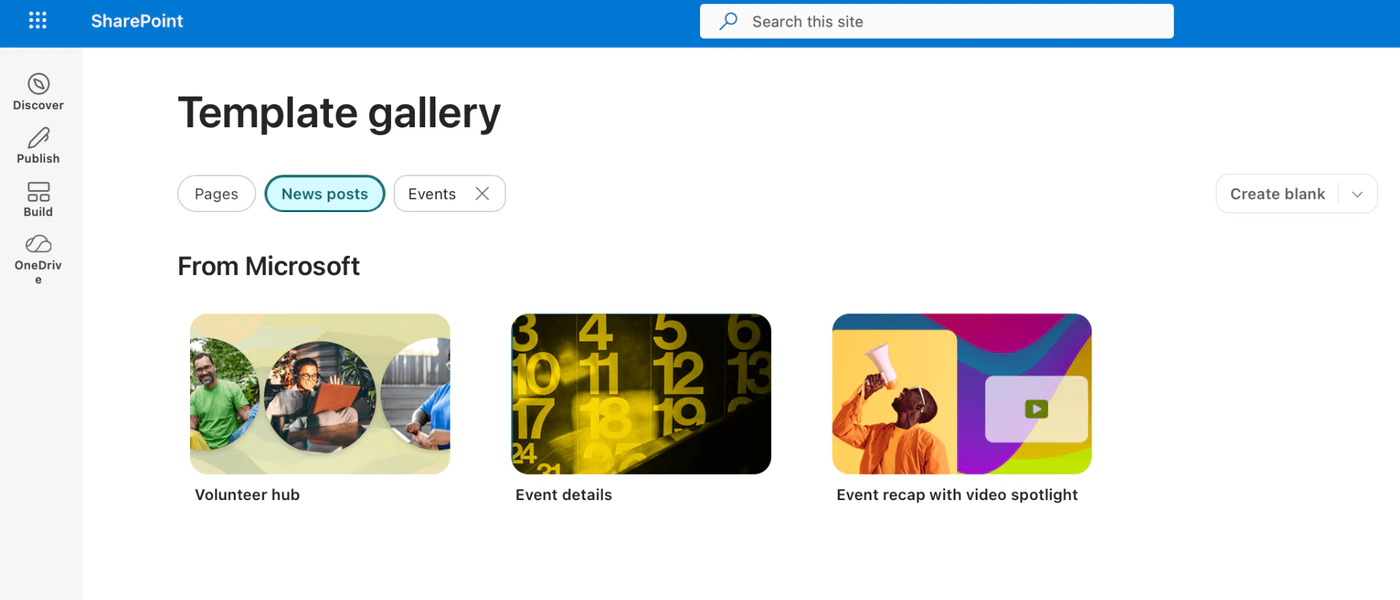
Pic. 3. News post templates in the template gallery of a modern SharePoint site
5. Workflow and automation
Workflow is what turns metadata into action: a document tagged “Awaiting approval” starts an approval; a policy whose review date is thirty days out sends a reminder; a news post with a publish date goes live on schedule. In Microsoft 365 the engine is Power Automate, with SharePoint triggers for created, modified and approved items, and approval, notification and content-routing actions. The SharePoint 2013 workflow platform was retired in SharePoint Online on 2 April 2026, so any flows still on it in the cloud need to be rebuilt in Power Automate. On SharePoint Server the classic workflow engine continues, and third-party activity packs extend it. Our overview of SharePoint automation walks through the common patterns.
Lists, search, permissions and audit
Three more things sit alongside the five blocks. Microsoft Lists is structured content management: items with columns, views, rules and forms, governed by the same content types and retention labels as documents. Search indexes every column, so metadata discipline pays back directly in findability, and it respects permissions, so nobody discovers content they cannot open. Permissions themselves are the control that makes the rest trustworthy; our SharePoint permissions guide covers the model, and the audit log records who did what to which item. For seeing all of this at once, the SharePoint reporting tools comparison covers the built-in and third-party options.
Governance and records: the content lifecycle
Governance is what happens when the five blocks are applied in order to a piece of content over its life. SharePoint controls five stages.
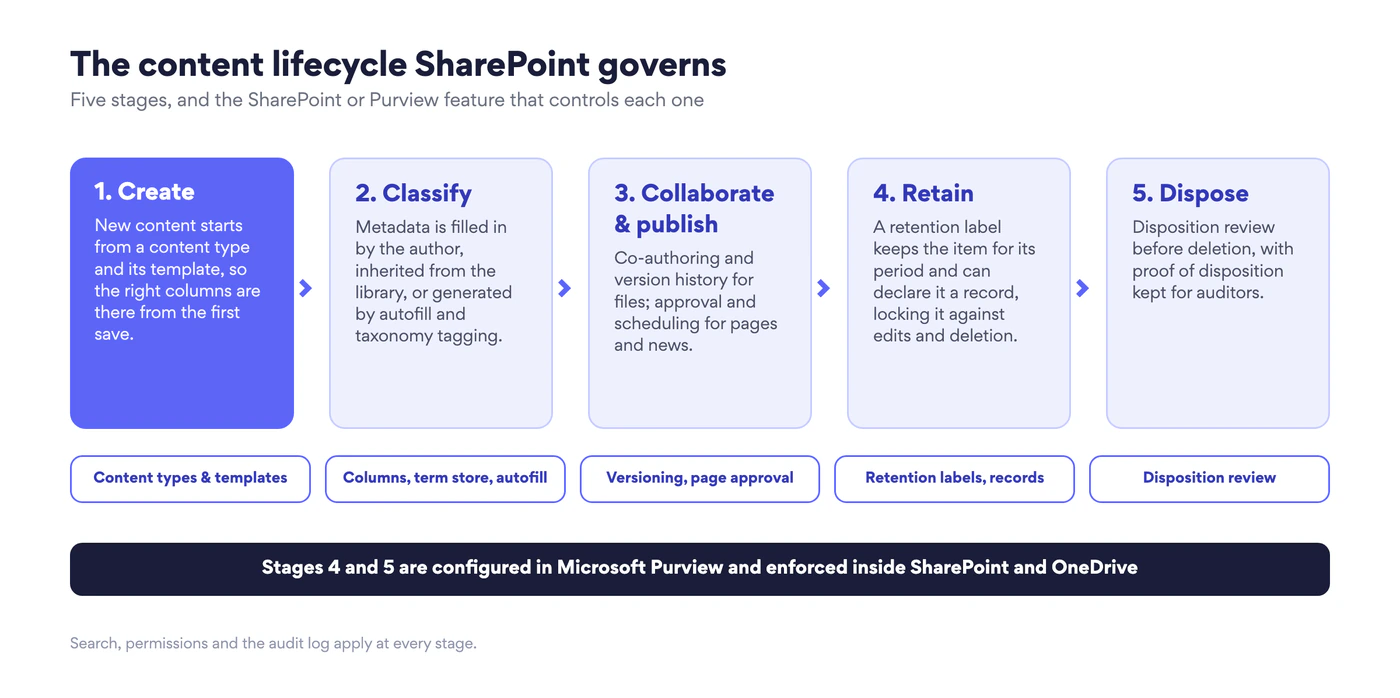
Fig. 4. The content lifecycle SharePoint governs, stage by stage. Stages 4 and 5 are configured in Microsoft Purview and enforced inside SharePoint and OneDrive
- Create. New content starts from a content type and its template, so the right columns exist from the first save and the right retention label is already attached.
- Classify. Metadata is filled in by the author, inherited as a default from the library or folder, or generated by autofill columns and taxonomy tagging. Sensitivity labels, if used, are applied here too.
- Collaborate and publish. Files are co-authored with version history; pages and news go through approval and scheduling. Sharing and external access follow the site’s permission model.
- Retain. The retention label keeps the item for its period, counted from creation, last modification, labelling or a business event such as a contract ending. Where the label declares a record, the item is locked against edits and deletion.
- Dispose. At the end of retention the item is deleted, or routed to a disposition review first. Records keep proof of disposition; everything else follows the recycle bin and preservation hold rules.
A governance plan for SharePoint content management is largely a written answer to those five stages: which content types exist, which columns are mandatory, who approves what, which labels apply where, and who reviews disposition. Microsoft’s retention policies and labels documentation covers the mechanics; the decisions are the organisation’s own. The web content management documentation for SharePoint Server is the equivalent reference for on-premises farms.
Where SharePoint content management is heading
Three shifts define the 2026 platform. First, metadata is becoming automatic: autofill columns, taxonomy tagging, prebuilt document processing models for invoices and contracts, and Copilot in SharePoint creating libraries and columns from a description. Microsoft’s own account of rethinking content management with SharePoint Premium shows the scale this is being used at internally. Second, governance has moved to Purview and is tenant-wide, so a SharePoint records plan is now a Microsoft 365 records plan that covers Teams chats and Exchange mail as well. Third, classic is ending: SharePoint 2013 workflows are gone from the cloud and classic pages are on a published retirement schedule, which forces content that has drifted for a decade to be redesigned rather than migrated as-is.
Best practices for SharePoint content management
- Start with content types, not folders. Decide the ten or so kinds of content the organisation actually produces, define them once in the content type gallery, and publish them. Folders can stay as a convenience; they must not be the classification.
- Keep mandatory metadata to what someone will act on. Three required columns that drive views, search and retention beat twelve that authors fill in with the first option. Let autofill and library defaults do the rest.
- Use the term store for anything that is shared. Departments, locations, product lines and document categories belong in managed term sets so they are spelled once and renamed once.
- Attach retention to content types and libraries, not to people. A label that arrives with the content type or as a library default is applied every time; a label users are expected to pick is applied sometimes.
- Declare records only for what regulation or litigation requires. Records block edits and deletion. Over-declaring turns working libraries into read-only archives and drives people back to email attachments.
- Put page approval on sites the whole organisation reads. News and policy pages need an approval step and a scheduled publish date; project team sites usually do not.
- Design permissions at the site level and audit them quarterly. Item-level permissions and broken inheritance are where governance leaks; the reporting tools above will show you where.
- Retire classic before Microsoft does. Inventory classic pages and 2013-style workflows now and rebuild them on modern pages and Power Automate while the schedule is still yours.
- Pilot with one department, then publish the pattern. A single team’s content types, labels and page templates, tested for a quarter, become the tenant standard with far less resistance than a top-down rollout.
Common use cases
| Scenario | What SharePoint content management provides |
|---|---|
| Corporate intranet and knowledge base | Communication and hub sites, news with audience targeting, page approval, multilingual pages and a searchable knowledge library with metadata navigation. See SharePoint intranet. |
| Policies, procedures and compliance documents | A Policy content type with owner and review-date columns, an approval flow, a retention label that declares the approved version a record, and reminders before each review date. |
| Contracts and financial documents | Contract content type, autofill columns for counterparty, value and end date, event-based retention that starts when the contract expires, regulatory records where the regulator demands them. |
| Project and engineering documentation | Document sets or metadata-driven libraries per project, versioning with major and minor drafts, approval routing, and retention that follows the project’s close-out date. |
| Marketing and brand assets | Media libraries with taxonomy tagging for campaign and asset type, approval before publishing, and controlled sharing with agencies through guest access. |
| Partner and client collaboration | Dedicated sites with external sharing policies, expiring guest links, sensitivity labels on shared content and the same retention as internal material. See SharePoint external sharing. |
Fig. 5. Six common SharePoint content management scenarios and the capabilities each one relies on
Enhance SharePoint content management with Virto
SharePoint provides the structure; what it leaves thin is the day-to-day nudging that keeps a content lifecycle moving, and, on SharePoint Server, the workflow activities that the classic engine never shipped. Virto’s apps for SharePoint and Microsoft 365 fill those gaps without replacing anything described above. Every Virto product comes with a 30-day free trial.
Review dates and approvals that do not get missed: Virto Alerts & Reminder App
Retention labels decide when content is deleted; they do not remind anyone that a policy is due for review or that an approval has sat untouched for a week. The Virto Alerts & Reminder App for SharePoint Online and Microsoft 365 adds that layer: date-based reminders driven by any list or library column, such as Review date or Contract end, immediate or scheduled alerts on changes to SharePoint items and Microsoft 365 calendar events, targeting by user or group, and HTML templates so the reminder carries the item’s metadata and a link straight to it. Reminders arrive by email, from an immediate notification to a weekly summary, or go straight into a Microsoft Teams channel, so the team that owns the content sees the nudge where it already works. For content owners it is the difference between a review date that exists as metadata and a review that actually happens.
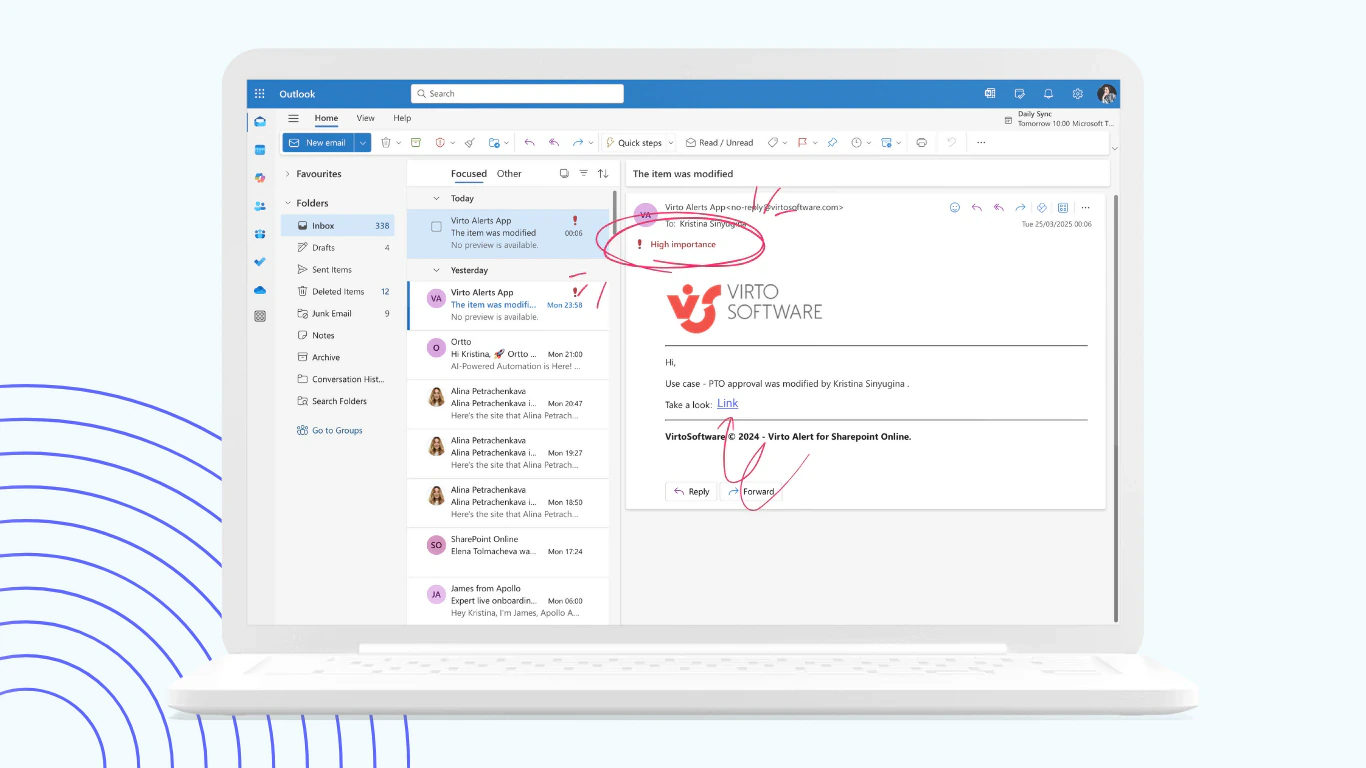
Pic. 4. Virto Alerts & Reminder App: an email alert about a modified SharePoint item, with a link straight to it
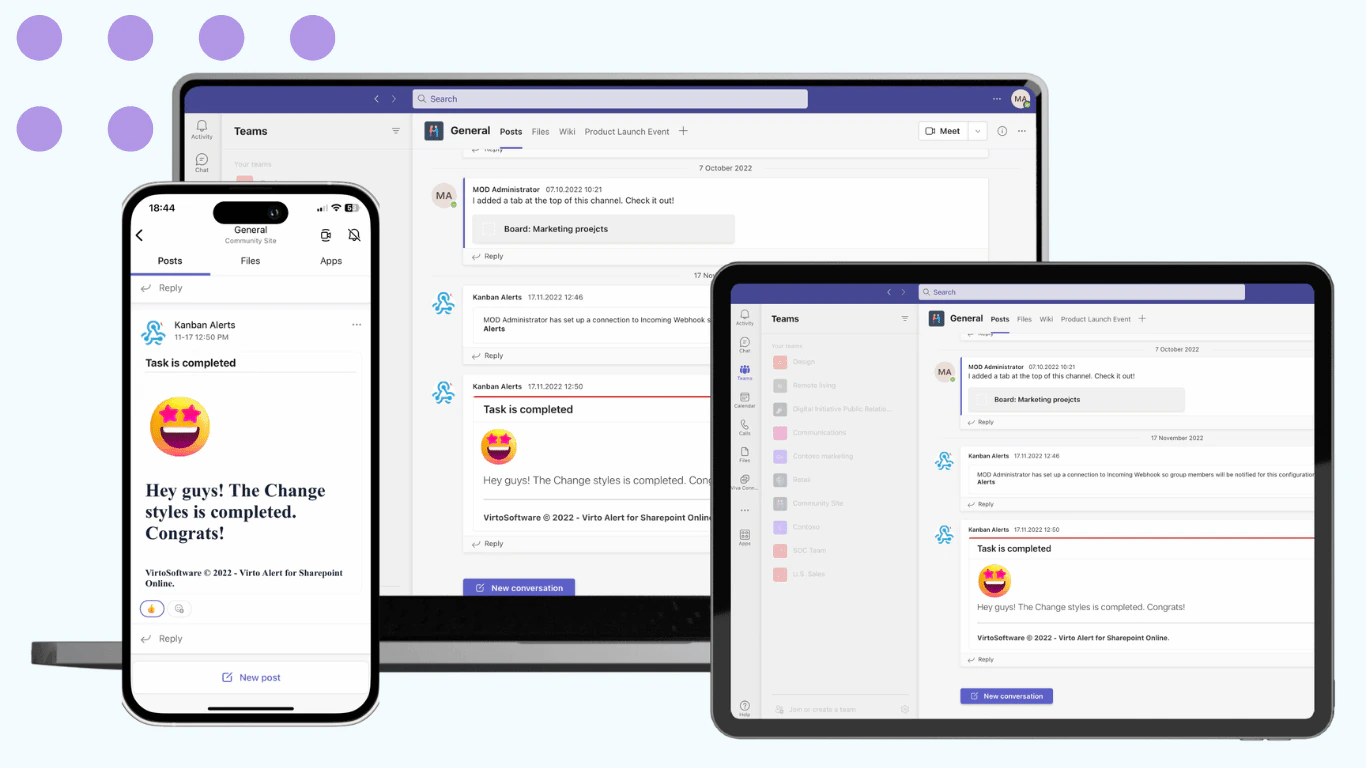
Pic. 5. The same alerts delivered into a Microsoft Teams channel
Approval and routing on SharePoint Server: Virto Workflow Automation
Organisations still on SharePoint Server keep the classic workflow engine, and its stock activity set is narrow. Virto Workflow Automation for SharePoint On-Premises adds more than 70 no-code activities to SharePoint Designer workflows, covering approvals, file and document operations, email, SMS and messaging, task management and 35 SharePoint-specific workflow extensions, so approval routes, publishing steps and compliance tasks can be built without custom code. The same product includes the Workflow Status Monitor, a dashboard that shows every active workflow across a site, site collection or farm with its current status and errors, which is exactly the visibility a content owner needs when a document is stuck “in approval”. It runs on SharePoint Server, where the 2013 workflow platform is unaffected by the SharePoint Online retirement; for Microsoft 365, use Power Automate.
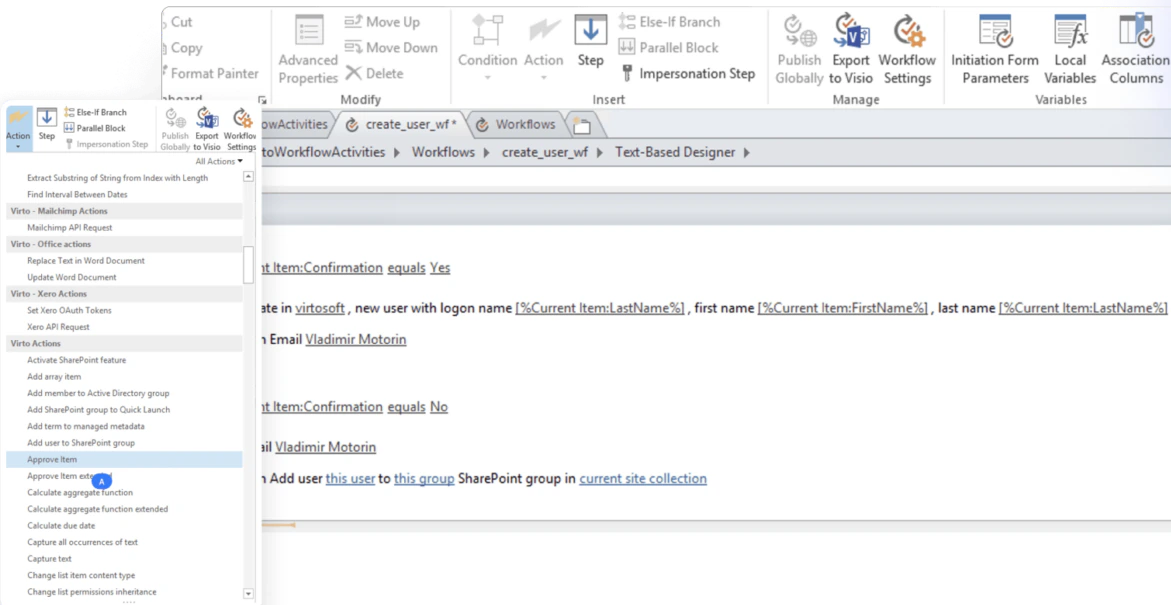
Pic. 6. Virto Workflow Automation: approval and user-management activities with conditions in a SharePoint Designer workflow
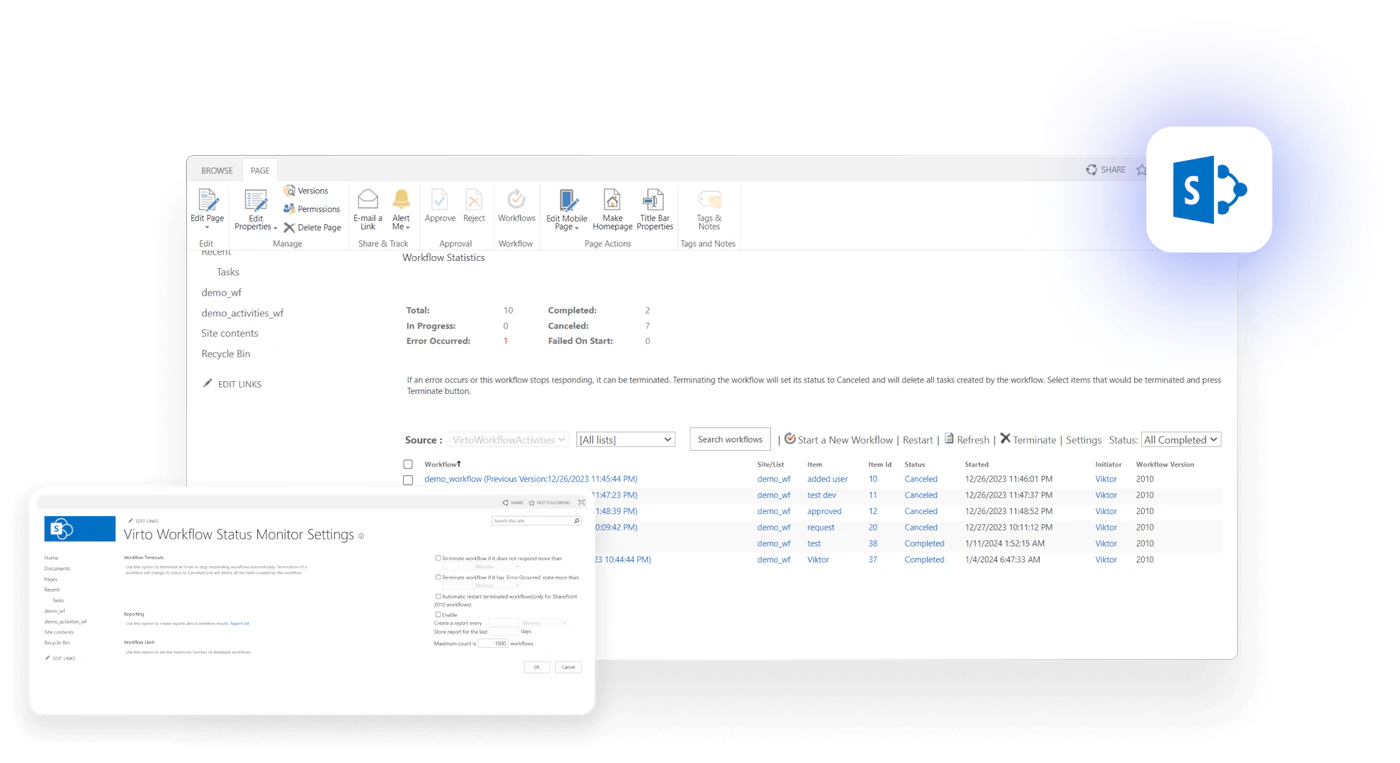
Pic. 7. The Workflow Status Monitor dashboard included with Virto Workflow Automation
An editorial calendar for pages and news: Virto Calendar App
Intranet publishing is a schedule as much as a workflow: news that must not clash, policy releases tied to effective dates, campaign content with a launch week. The Virto Calendar App for Microsoft 365 overlays SharePoint lists, Exchange Online and Microsoft 365 group calendars, Outlook and internet calendars into one colour-coded view, so a content-plan list with a publish-date column becomes an editorial calendar that the communications team, approvers and stakeholders all see in SharePoint and Teams, next to the events and deadlines they already track.
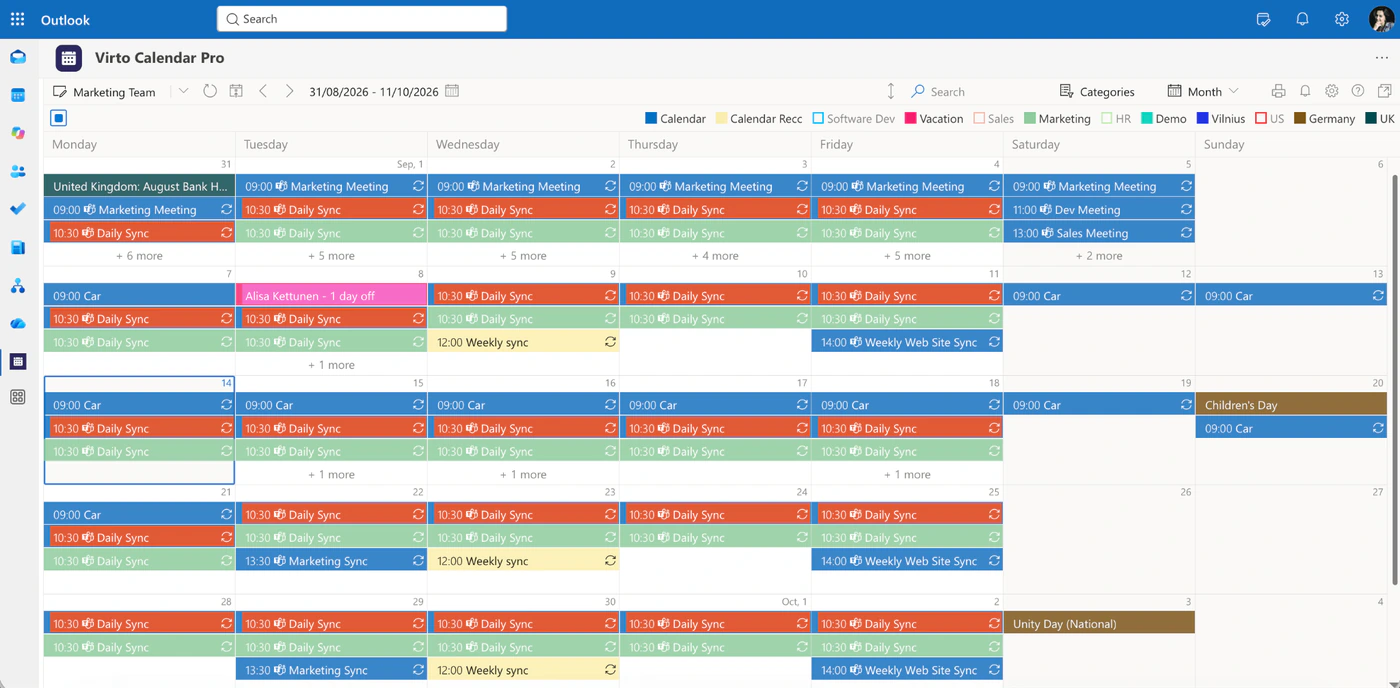
Pic. 8. Virto Calendar overlaying several content and team calendars in one colour-coded view
On SharePoint Server, the same catalogue includes the Virto Cascade Lookup Web Part for metadata that depends on other metadata, such as a product line that narrows the list of document categories, and the Virto Notifications & Alerts Web Part for on-premises reminders. All of them are listed on the SharePoint web parts page.
FAQ
Is SharePoint a content management system?
Yes. SharePoint is Microsoft 365’s content and ECM platform, managing documents, pages, records and metadata with content types, retention policies and workflows. It is also a web content management system for intranets, and a document management system for files.
What is the difference between content management and document management in SharePoint?
Document management handles files: libraries, versioning, check-out, co-authoring and sharing. Content management is the broader system across the whole platform: pages, records, metadata and content types, plus the retention and workflow that govern them. Document management is one layer of content management.
What are content types in SharePoint?
A content type is a reusable definition of a kind of content, such as a contract or a policy. It bundles the columns that describe it, the template it starts from, and the behaviours attached to it, such as a retention label or a workflow. Content types are created and published from the content type gallery in the SharePoint admin center and can be used in any library or list.
Is SharePoint an ECM system?
Yes. Together with Microsoft Purview it provides the enterprise content management functions: classification through content types and managed metadata, records management with retention labels and disposition, publishing through pages and news, workflow through Power Automate, and search, permissions and audit across all of it.
Can SharePoint replace a dedicated records management system?
For most organisations, yes. Microsoft Purview Records Management provides retention labels, records and regulatory records, event-based retention, a file plan, disposition review and proof of disposition, enforced in SharePoint, OneDrive, Exchange and Teams. Organisations with physical records or specialised regulatory schedules sometimes keep a separate system for those and connect it to SharePoint.
What is the difference between a retention policy and a retention label?
A retention policy applies one keep-or-delete rule to whole locations, such as all SharePoint sites. A retention label applies a rule to individual items and can be published to users, set as a library default, attached to a content type or auto-applied. Only labels can declare an item a record.
Conclusion
SharePoint content management is the platform-wide layer that turns a set of libraries and sites into a governed system: content types say what content is, metadata says what describes it, retention and records say how long it lives, pages say how it is published, and workflow says what happens to it along the way. Most of that structure is already licensed in Microsoft 365; the work is deciding how to use it and applying it in order. Where SharePoint stays quiet, in reminding people that a review is due, in routing work on SharePoint Server and in seeing the publishing schedule as a whole, Virto’s apps add the missing motion without changing the model.
To go deeper, Microsoft’s overview of enterprise content management in SharePoint and its records management documentation cover the platform side. On this site, continue with OneDrive vs SharePoint, SharePoint subsites, SharePoint document libraries and SharePoint best practices, or browse all of our SharePoint guides.