Quick answer: is Power Automate the cheap way to replace SharePoint alerts? In licenses, often yes. Flows that use only the standard SharePoint, Outlook and Teams connectors run on Microsoft 365 licenses at no extra charge. The cost sits elsewhere. Every notification becomes a flow that someone builds, tests and owns. Flows run on their owner’s license and connections, so they slow down or fail when that person leaves. Taking people out of the picture means a service principal that an administrator sets up, or Power Automate Process licenses at $150 a month, each covering one flow or a group of up to 25. Virto Alerts & Reminder App is licensed per rule instead: $1,170 a year for up to 30 alert and reminder rules and $2,990 for up to 100, with a 30-day free trial. For a handful of notifications Power Automate costs less. For a hundred, count the hours with the example below.
Microsoft removed SharePoint alerts from SharePoint Online in July 2026 and points customers to SharePoint rules and Power Automate. Rules cover the simple case, one email per change to the people you name, and our guide to the SharePoint alerts retirement compares rules, Power Automate and an app scenario by scenario. This article starts where that comparison ends. You have counted dozens or hundreds of notifications to replace, and “we’ll build them in Power Automate” is the plan on the table.
Below are the license prices, the limits Microsoft documents for flows, and a three-year cost example with every assumption written out, so you can rerun it with your own numbers. We make Virto Alerts & Reminder App, one of the options in the example, and we say where Power Automate is the better choice.
How many flows replace your alerts
Microsoft’s retirement notice gives one Power Automate template for each classic alert scenario: a change to an item, a change by someone else, a change to an item I created, and a new item or file. An alert on “anything changes” has no single template; Microsoft says to combine two of them. Each template becomes a flow bound to one site and one list or library.
Classic alerts were personal subscriptions, so ten people watching one list can often become one flow with ten recipients. The number to estimate is therefore the number of lists times the kinds of notification each list needs, not the number of alerts. To find the alerts that existed, Microsoft recommends the Microsoft 365 Assessment tool: its Power BI Alerts report lists every SharePoint alert defined in the tenant, by site collection and web.
Two common notifications have no template at all and are built from scratch:
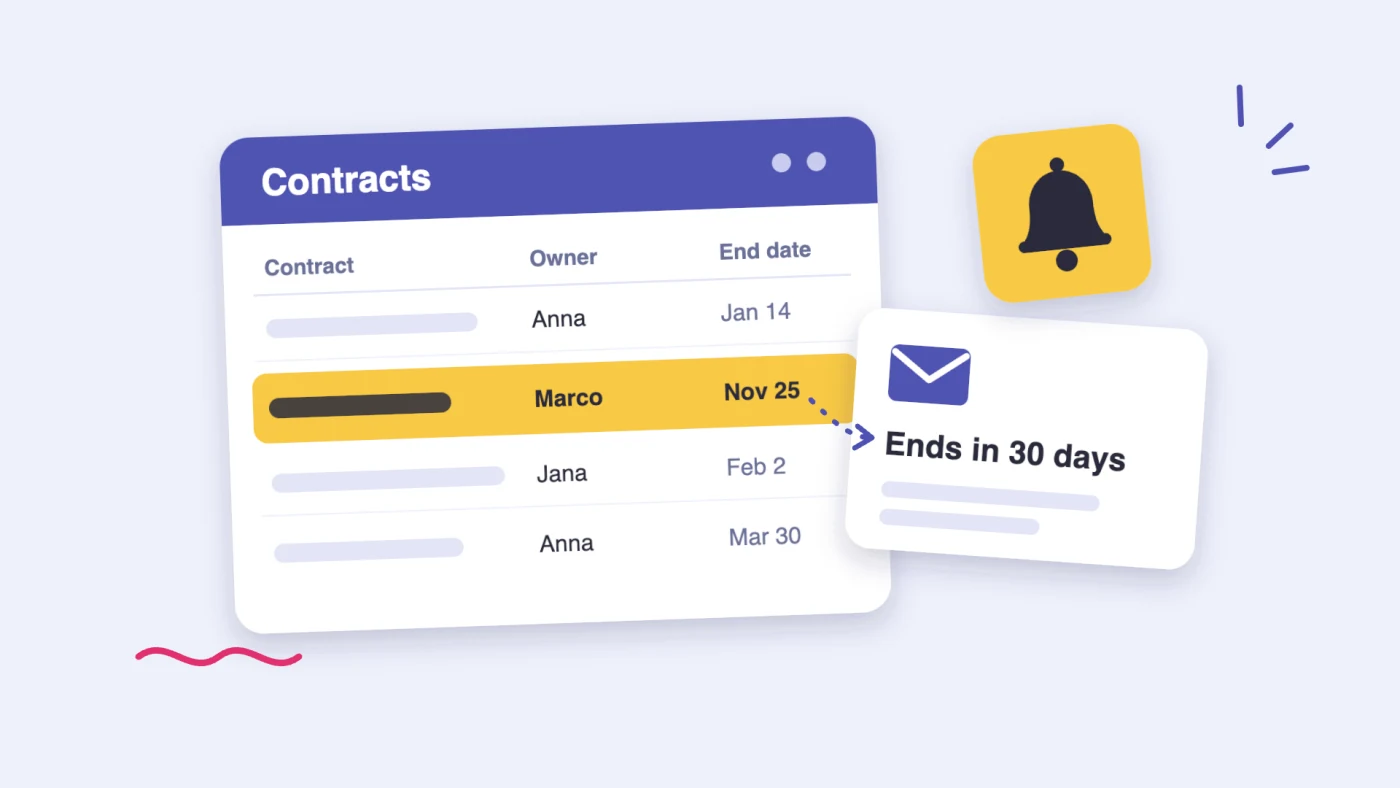
- A reminder before a date, such as a contract end or a task due date. It is a scheduled flow that queries the list every day, with a separate filter for every notice period. Our guide to SharePoint date reminders shows the four steps.
- A daily or weekly summary of what changed or what is due. Microsoft’s own recipe is a scheduled flow that gets the items, then runs Select, Create HTML table and Send an email (V2).
What Power Automate includes, and what it charges for
Users with a Microsoft 365 license can build and run cloud flows with standard connectors, and SharePoint, Office 365 Outlook and Microsoft Teams are standard connectors. A notification flow that reads a list and sends an email or a Teams message therefore needs no extra license.
Two rules decide when that changes. Automated and scheduled flows run in the context of the flow owner, whoever triggers them and whatever connections they use. And a premium connector, such as SQL Server, Salesforce, HTTP or a custom connector, needs a Power Automate Premium license for that owner or a Process license on the flow.
| License | List price | Power Platform requests per 24 hours | What it means for notification flows |
|---|---|---|---|
| Microsoft 365 plan | Included | 6,000 per user | Standard connectors only. Flows run on the owner’s allowance and may be turned off after 90 days without a trigger. |
| Power Automate Premium | $15 per user per month, paid yearly | 40,000 per user | Premium connectors. Flows of an owner with this license are exempt from the 90-day suspension. |
| Power Automate Process | $150 per month, paid yearly | 250,000 per license | Licenses the flow, not a person. One flow, or a flow group of up to 25 flows that are stored in a solution and share the allowance. |
| Service principal as owner | No user license | 25,000 for the whole tenant, standard connectors only | Not tied to any person. Needs flows stored in a solution, an application user and connections shared with it. |
Fig. 1. The Power Automate licenses that matter for notification flows, at Microsoft’s list prices in November 2026
During the current transition period Microsoft applies these limits per flow rather than per user, and at higher levels: 10,000 requests a day for a flow on a Microsoft 365 license, 200,000 on Premium. Microsoft advises designing flows for the per-user figures, which apply once the transition ends.
Four costs that start after the build
Someone builds and tests every flow
A template asks for a site, a list and recipients, and an instant notification is ready quickly. Reminders and summaries take longer. Each one needs a filter on the date and status columns, an HTML table, and a test on real items, and each notice period needs its own filter. A flow that runs on a Microsoft 365 license processes at most 5,000 items in one loop, so a summary over a large list has to filter before it loops.
Flows belong to people
Microsoft’s documentation is direct about what happens when a flow’s owner leaves:
- A cloud flow uses the plan of its owner. If the original owner leaves the organization, the flow falls back to the Low performance profile.
- Actions that use connections belonging to that person may fail until someone updates the credentials.
- If the flow has no active owner left, an administrator has to give it a new one. Administrators find such flows in the Power Platform admin center by looking for flows with no owner listed.
- A flow that isn’t stored in a solution can’t change owner in place, because the owner is part of the flow’s identity. Someone exports and imports it, or saves a copy, and the copy is a new flow.
- For a scheduled or automated flow, a new owner’s license can take up to seven days to apply, unless someone edits and saves the flow.
There is a smaller version of the same issue in every email. Send an email (V2) sends from the mailbox of the account the Outlook connection signs in with. To send from a shared mailbox, the flow needs Send an email from a shared mailbox (V2) and that account needs permission on the mailbox.
Microsoft turns flows off
Three rules in Power Automate’s limits can switch a notification flow off without anyone deciding to:
- A flow whose trigger or actions fail continuously for 14 days is turned off.
- A flow that isn’t triggered for 90 days may be turned off, unless its owner has a premium license or the flow has a Process license. Owners get a notice 30 days before. An instant notification on a list that rarely changes, such as a policy library or a contract register, is exactly the flow that goes 90 days without a trigger.
- A flow that is throttled consistently for 14 days is turned off.
Request limits grow with the number of flows
Every action a flow runs counts as a Power Platform request: a condition that decides not to send, a failed action, a retry and every page of a paginated query. A scheduled summary loops over its items every day. Move a hundred flows to one service account to protect them from staff turnover, and all of them draw on that account’s allowance of 6,000 requests a day. One account can own at most 600 flows in My flows; beyond that, Microsoft points to solutions. The Office 365 Outlook connector accepts 300 calls per 60 seconds per connection, which matters on the morning a scheduled summary emails a long list of people one by one.
What it costs to take people out of the picture
Microsoft documents three ways to keep business-critical flows running when their makers move on. Each one costs something.
- Hand the flows to a colleague. No license cost, and the problem moves to the next person.
- Make a service principal the owner. Microsoft recommends it for mission-critical flows, and it needs no user license. It needs flows stored in a solution, an app registration, an application user in the environment and connections shared with it. All flows owned by service principals that use only standard connectors share one tenant allowance of 25,000 requests a day.
- License the flows themselves. A Process license costs $150 a month, paid yearly, or $1,800 a year. A flow group lets one license cover up to 25 flows stored in a solution, so 100 notification flows need four licenses: $7,200 a year at list price. Process licenses are assigned per environment.
For comparison, Virto Alerts & Reminder App costs $2,990 a year for up to 100 alert and reminder rules. The rules don’t run on anyone’s personal license or connection: the app’s background service reads lists with permissions that a Global Administrator or Privileged Role Administrator grants once for the tenant.
A three-year example: 100 notifications
License prices are facts. Hours are estimates, and they decide the result, so here they are in full. Replace them with your own.
- The workload: 100 notifications on SharePoint lists. Sixty are instant emails when an item changes; forty are date reminders or daily and weekly summaries.
- Building flows: 30 minutes for an instant notification from a template, including the test. Two hours for a reminder or summary flow with its filters and HTML table. That is 110 hours.
- Keeping flows running: 30 minutes per flow per year for renamed columns, new recipients, owner changes, expired connections and failure emails. That is 50 hours a year.
- Setting up the app: 10 minutes per rule to fill in its form, and 10 minutes per rule per year for changes. That is about 17 hours to set up and 17 hours a year after that.
- Internal cost: $60 an hour for the people who do the work.
| Power Automate, flows owned by their makers | Power Automate, flows on Process licenses | Virto Alerts & Reminder App, Standard plan | |
|---|---|---|---|
| Licenses per year | $0 | $7,200 (4 licenses in flow groups) | $2,990 |
| Year 1 | 160 hours = $9,600 | $7,200 + 160 hours = $16,800 | $2,990 + 33 hours = $4,990 |
| Year 2 | 50 hours = $3,000 | $7,200 + 50 hours = $10,200 | $2,990 + 17 hours = $3,990 |
| Year 3 | 50 hours = $3,000 | $7,200 + 50 hours = $10,200 | $2,990 + 17 hours = $3,990 |
| Three years | $15,600 and 260 hours | $37,200 and 260 hours | $12,970 and 67 hours |
Fig. 2. Three-year cost of 100 SharePoint notifications, with the assumptions listed above
What the example shows:
- The first year is the build. 110 hours of flow building is most of the gap, and it is also the time it takes before every list has its notification again.
- From the second year, flows that keep working cost less than the subscription on these assumptions: $3,000 against $3,990. The balance turns at about 40 minutes of upkeep per flow per year. If your flows take more than that, the app costs less every year.
- Licensing the flows themselves costs more than the app at every volume. One Process license covers a flow group of up to 25 flows for $1,800 a year, against $1,170 for up to 30 rules in the app. Four licenses for 100 flows cost $7,200 a year, against $2,990 for up to 100 rules.
- Hundreds of notifications multiply the hours. Three hundred notifications on the same assumptions mean 330 hours to build and 150 hours a year to keep running. The app sells plans of up to 30 and up to 100 rules; larger volumes are on Enterprise terms, priced on request.
When Power Automate is the better choice
- A few notifications. Ten instant notifications from templates take about five hours to build and cost nothing in licenses. The app’s smallest plan, for up to 30 alert and reminder rules, costs $1,170 a year.
- The notification starts a process. Approvals, several steps, waiting for someone, writing data back to another list: only a flow does that. The app sends emails and Teams channel posts; it has no approvals, escalation or read receipts.
- The data is outside SharePoint. The app reads SharePoint Online lists and libraries only. A notification about SQL Server or Salesforce data is a flow with a premium connector.
- A personal message in Teams chat. The app posts to Teams channels through a Workflows webhook, one workflow URL per channel, and doesn’t send one-to-one chat messages.
What the app replaces, and how
Virto Alerts & Reminder App is a SharePoint Framework app from Microsoft Marketplace. It opens from the Virto Alerts command in a modern list or library, and each notification is a rule filled in on one form rather than a flow built from actions:
- What to watch: a whole list, a list view or a library folder, for new, changed or deleted items. Changes arrive through SharePoint list webhooks, and an instant alert goes out within minutes.
- Which items: conditions on field values, including changed values and relative dates such as [Today]+7, grouped with And and Or.
- When: at once, or as a daily or weekly summary that can arrive as one table in one email. Reminders go out a set number of days before or after any date column, at a set hour.
- To whom: users, groups, a person column in the item, and external addresses for users allowed to add them, plus a Teams channel through a Workflows URL.
- What it says: a message template with old and new field values and links to the item.
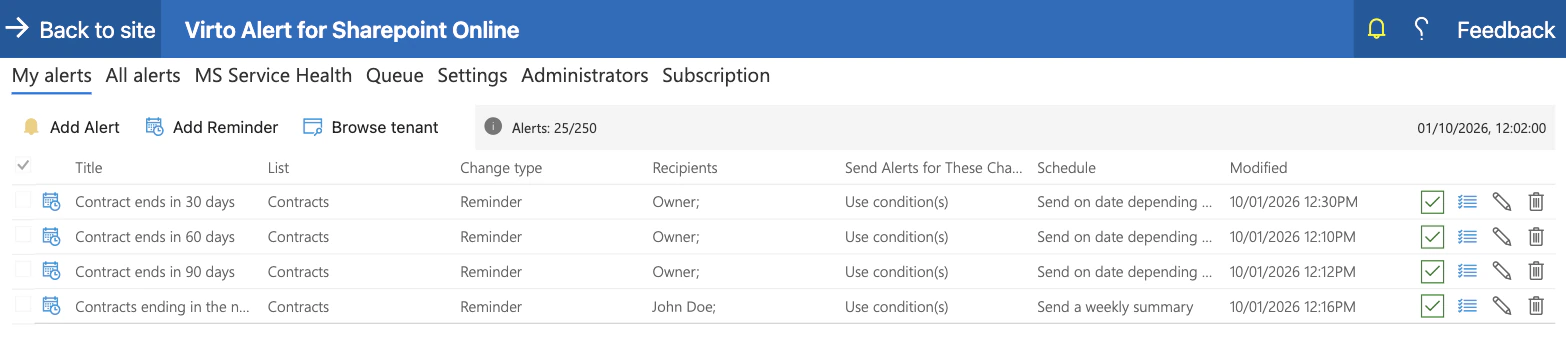
Pic. 1. Several rules on one contract list: reminders at 30, 60 and 90 days to each contract’s owner and a weekly table for the team lead
Three things in the app answer the costs above directly:
- Rolling out to many lists. A rule exports to a JSON file, and the file imports as a template for the next rule, so a second contract register starts from a copy.
- One place for every rule. The All alerts tab shows a tenant administrator the rules that other people created.
- Owners can change. A rule’s owner can be a user or a group. When an owner leaves the organization, the app’s administrator still has access to the rule and can give it a new owner.
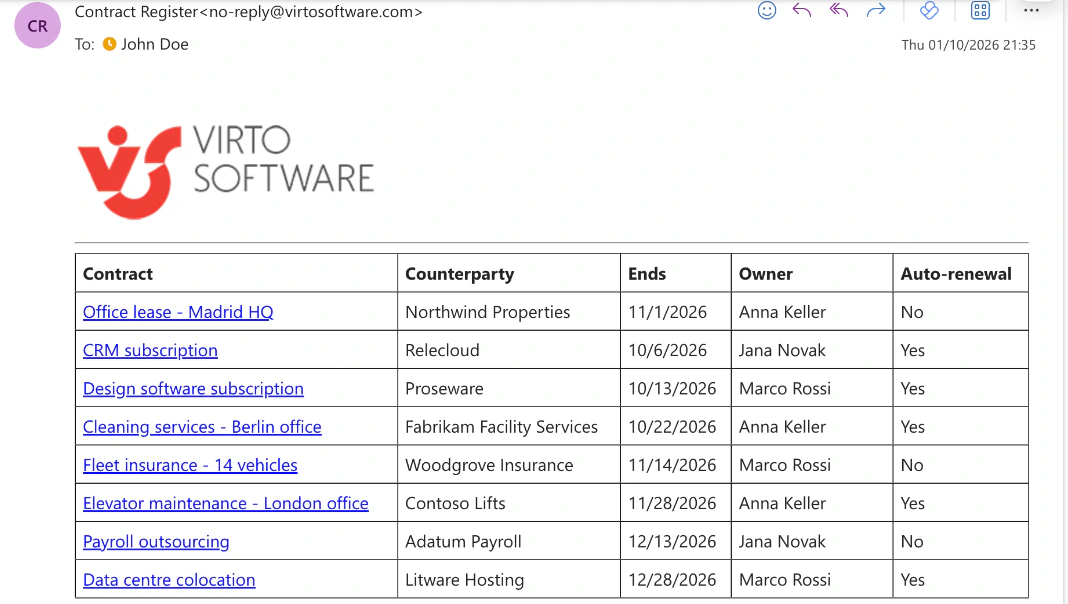
Pic. 2. A weekly summary as it arrives: one table in place of separate emails
The app is licensed by the number of rules, not by users and not by emails sent: up to 30 alert and reminder rules for $1,170 a year, up to 100 for $2,990 a year, and larger volumes on Enterprise terms. A Global Administrator or Privileged Role Administrator approves its permissions once for the tenant, and a site owner adds it to a site. It works in SharePoint Online only; for SharePoint Server, the on-premises product is Virto Notifications & Alerts Web Part. In Microsoft Teams the same product is listed as Virto Notifications & Reminders App.
Typical setups, each shown end to end: a daily summary of SharePoint list changes, due-date and overdue reminders for a task list, and expiration and renewal reminders.
How to decide
- Run the Microsoft 365 Assessment tool, or ask your teams, and list the notifications that matter by list and kind: instant, reminder, summary.
- Give the simple ones on a few lists to SharePoint rules, and anything that starts a process to Power Automate.
- Put your own hours and hourly cost into the example above for what is left.
- Decide who owns the flows when their makers leave, and price that choice: a colleague, a service principal or Process licenses.
- If the app wins on your numbers, try it for 30 days on two or three of your busiest lists before committing.
Many tenants end up with both: rules for a few small lists, a handful of flows for real processes, and an app for the reminders and summaries that would otherwise be dozens of separate flows.
FAQ
Is Power Automate free with Microsoft 365?
Flows that use standard connectors, including SharePoint, Office 365 Outlook and Microsoft Teams, run on Microsoft 365 licenses at no extra cost. A flow with a premium connector needs Power Automate Premium for its owner, $15 per user per month paid yearly, or a Process license on the flow, $150 per month paid yearly.
What happens to a Power Automate flow when its owner leaves the company?
The flow falls back to the Low performance profile, and actions that use the departed person’s connections may fail. If no active owner is left, an administrator assigns a new one in the Power Platform admin center. A flow that isn’t stored in a solution can’t change owner in place: someone has to make a copy, which becomes a new flow.
Why did Microsoft turn off my notification flow?
Power Automate turns off a flow that fails continuously for 14 days or is throttled consistently for 14 days. A flow that isn’t triggered for 90 days may also be turned off unless its owner has a premium license or the flow has a Process license; owners are notified 30 days before.
How many flows can one account own in Power Automate?
Up to 600 flows in My flows. Microsoft points to flows stored in solutions beyond that. All automated and scheduled flows of one owner also share that owner’s daily request allowance: 6,000 requests on a Microsoft 365 license.
How much does Virto Alerts & Reminder App cost?
It is licensed by the number of rules, not by users or emails: up to 30 alert and reminder rules for $1,170 a year and up to 100 for $2,990 a year, with larger volumes on Enterprise terms. A 30-day free trial is available; there is no free plan.
Can we use Power Automate and Virto Alerts & Reminder App together?
Yes. They work on the same lists independently. A common split is flows for approvals and multi-step processes and the app for change emails, date reminders and daily or weekly summaries.
Conclusion
Power Automate replaces SharePoint alerts at no license cost, and for a few notifications it is the right tool. At dozens or hundreds, the cost moves into hours: building a flow for every list and notice period, and keeping each one running through owner changes, expired connections and Microsoft’s 14-day and 90-day rules. Taking people out of the picture costs either an administrator’s work on service principals and solutions, or $1,800 a year per Process license. Count your notifications, put your own hours into the example above, and compare the result with $2,990 a year for 100 rules in Virto Alerts & Reminder App, which you can try free for 30 days.