Quick answer: are SharePoint 2010 workflows still supported? No. Microsoft ended support for SharePoint 2010 workflows on July 14, 2026. On SharePoint Server Subscription Edition, the September 2026 public update turned them off by default, and the public update of July 13, 2027 removes them: after that update, or any later one, workflows that depend on them stop working. On SharePoint Server 2016 and 2019 they still run, but the servers themselves no longer get fixes. In SharePoint Online they were removed in November 2020.
Quick answer: what replaces a SharePoint 2010 workflow? On SharePoint Server, the SharePoint 2013 workflow platform, which stays supported with SharePoint Workflow Manager, or Power Automate through the on-premises data gateway. Both are Microsoft’s recommendations. Moving a workflow from the 2010 to the 2013 platform means rewriting it. If you are leaving SharePoint Server for SharePoint Online, Power Automate is the only option there, and the SharePoint Migration Tool can move SharePoint Designer workflows into it.
This guide is for SharePoint administrators and workflow owners on SharePoint Server. It covers what the July 2027 update changes, how to find every 2010 workflow on a farm, where each one can go, and how to rebuild one on the 2013 platform, step by step. If your workflows use Virto Workflow Automation actions, a section near the end covers them.
SharePoint 2010 workflow retirement timeline
SharePoint 2010 workflows run on the workflow engine that has been part of SharePoint since 2007. SharePoint 2013 added a second platform, the SharePoint 2013 workflow platform, which runs outside SharePoint in Workflow Manager. In SharePoint Online both platforms are gone. On SharePoint Server Subscription Edition the 2010 platform goes in July 2027, and the 2013 platform stays.
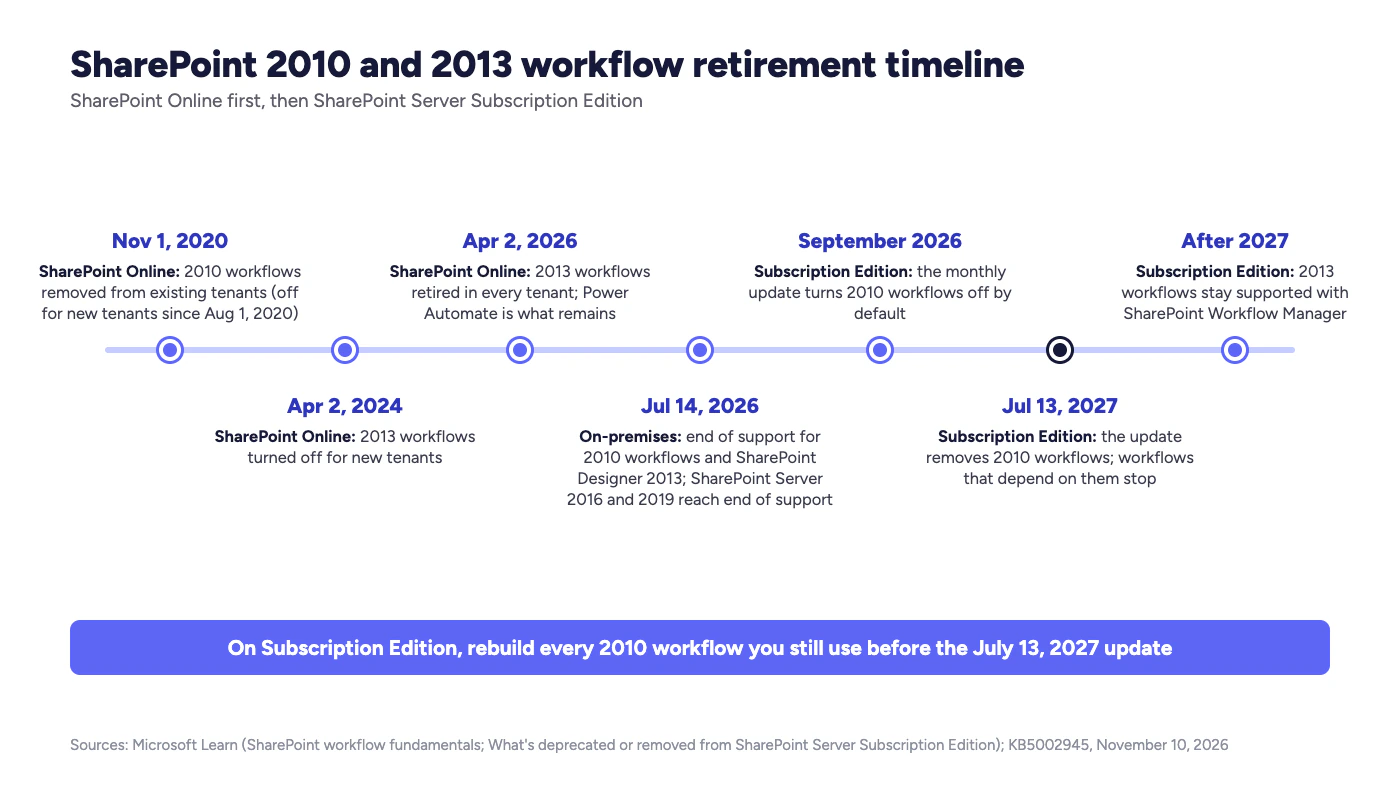
Fig. 1. SharePoint 2010 and 2013 workflow retirement timeline
| Date | What changed | Where |
|---|---|---|
| August 1, 2020 | SharePoint 2010 workflows turned off for new tenants (Microsoft Learn) | SharePoint Online |
| November 1, 2020 | SharePoint 2010 workflows removed from existing tenants | SharePoint Online |
| April 2, 2024 | SharePoint 2013 workflows turned off for new tenants (Microsoft Learn) | SharePoint Online |
| April 2, 2026 | SharePoint 2013 workflows retired for every tenant | SharePoint Online |
| July 14, 2026 | End of support for SharePoint 2010 workflows and SharePoint Designer 2013 (Microsoft Learn). SharePoint Server 2016 and 2019 reach the end of extended support | SharePoint Server 2016, 2019 and Subscription Edition |
| September 2026 | SharePoint 2010 workflows turned off by default by the monthly public update (KB5002945) | SharePoint Server Subscription Edition |
| July 13, 2027 | The public update removes SharePoint 2010 workflows, together with InfoPath Forms Services. Workflows that depend on them stop working (KB5002945) | SharePoint Server Subscription Edition |
“End of support” and “removed” are different things. On SharePoint Server 2016 and 2019, 2010 workflows keep running without fixes. On Subscription Edition they are still installed until July 2027, but switched off by default, and then an update takes them out. The same update removes InfoPath Forms Services: if your 2010 workflows work with InfoPath forms, see our InfoPath end-of-life guide as well.
What happens to your 2010 workflows now: Subscription Edition, 2016 and 2019, SharePoint Online
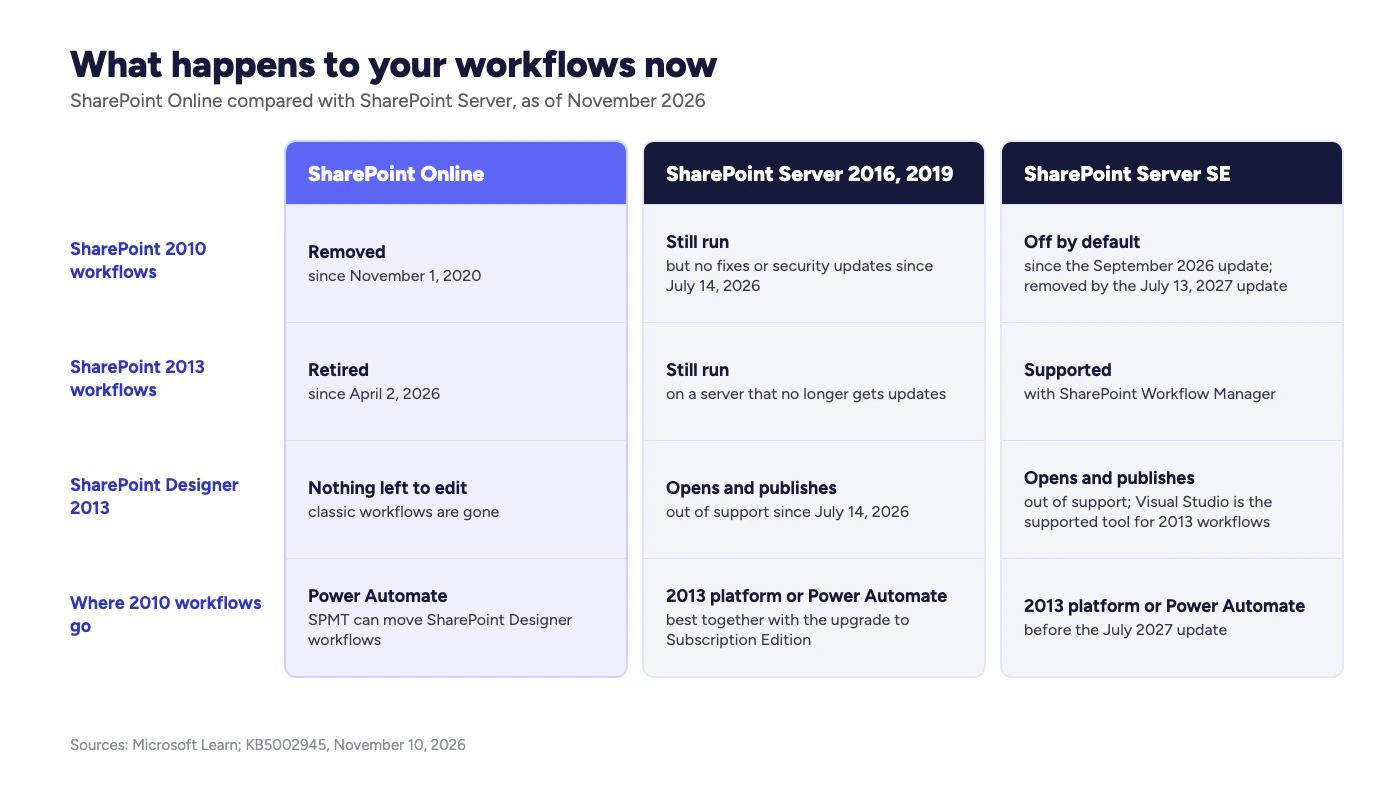
Fig. 2. What happens to your workflows now
On SharePoint Server Subscription Edition
On a farm that installs the monthly public updates, 2010 workflows have been switched off since September 2026. A 2010 workflow that someone starts, or that should start on its own, does not run, and SharePoint says “New instances of this workflow template are currently disallowed”. Enable-SPLegacyWorkflow -Identity <site collection URL> switches the 2010 platform back on for one site collection. We tested this on our own Subscription Edition farm, with workflows moved from SharePoint Server 2019: they ran again. Our Subscription Edition page has the details.
That is time, not a solution. The public update of July 13, 2027 removes the 2010 platform from Subscription Edition, and Microsoft’s notes say that after that update, or any later one, workflows that depend on it stop working. Public updates are cumulative, so holding back the July 2027 update means holding back every security fix after it, for the whole farm.
The 2013 platform stays. It runs on SharePoint Workflow Manager, which Microsoft supports beyond 2026 (Microsoft Learn), and Subscription Edition itself is supported at least until December 31, 2035 (Microsoft Learn). Two notes from KB5002945 matter here: install the SharePoint Workflow Manager update (KB5002799) before the SharePoint update, and if the farm still runs the classic Microsoft Workflow Manager, add the debug flag the KB names to keep using it.
That leaves a gap. SharePoint Designer 2013, the tool most 2010 and 2013 workflows were built with, reached the end of support on July 14, 2026 (Microsoft Learn), and Microsoft announced that no extensions would be offered (Message Center MC1230891). It still opens Subscription Edition sites and publishes workflows, but it gets no fixes. So on Subscription Edition the 2013 workflows themselves are supported through SharePoint Workflow Manager, while no supported no-code tool is left to build them: for 2013 workflows, Microsoft names Visual Studio, a developer tool.
On SharePoint Server 2016 and 2019
Nothing was switched off. 2010 workflows start and run as before. What ended on July 14, 2026 is support for the servers themselves: no fixes and no security updates. No update will remove the 2010 platform there, because no updates come.
The problem arrives with the next move. Microsoft upgrades SharePoint Server 2016 and 2019 to Subscription Edition only by attaching the content databases to a new farm. The 2010 workflows come along in those databases, and on the new farm they are switched off. So plan the rebuild together with the upgrade, not after it. Our Subscription Edition page walks through the upgrade itself.
In SharePoint Online
Both classic platforms are gone: 2010 workflows since November 2020, 2013 workflows since April 2, 2026. Power Automate is what remains. If you are moving from SharePoint Server to SharePoint Online, the SharePoint Migration Tool can migrate SharePoint Server 2010 out-of-the-box workflows and SharePoint Designer 2010 and 2013 workflows to Power Automate (Microsoft Learn). Our guide to SharePoint automation with Power Automate covers what replaces the classic workflows there.
Step 1: find every 2010 workflow on the farm
A 2010 workflow is attached to a list, a list content type or a site as a workflow association. The 2013 platform keeps its workflows in Workflow Manager as subscriptions instead, so a list of associations is a list of your 2010 workflows. This script, run in the SharePoint Management Shell as a farm administrator, writes them all to a CSV file (try it on a staging farm first): where each one is attached, its name, the template it is based on, whether it is enabled and how many instances are running now.
$rows = foreach ($site in Get-SPSite -Limit All) {
  foreach ($web in $site.AllWebs) {
    foreach ($wa in $web.WorkflowAssociations) {
      [pscustomobject]@{ Site = $web.Url; Scope = 'Site'; Target = ''; Workflow = $wa.Name
        Template = $wa.BaseTemplate.Name; Enabled = $wa.Enabled; Running = $wa.RunningInstances }
    }
    foreach ($list in $web.Lists) {
      foreach ($wa in $list.WorkflowAssociations) {
        [pscustomobject]@{ Site = $web.Url; Scope = 'List'; Target = $list.Title; Workflow = $wa.Name
          Template = $wa.BaseTemplate.Name; Enabled = $wa.Enabled; Running = $wa.RunningInstances }
      }
      foreach ($ct in $list.ContentTypes) {
        foreach ($wa in $ct.WorkflowAssociations) {
          [pscustomobject]@{ Site = $web.Url; Scope = 'Content type'; Target = "$($list.Title) / $($ct.Name)"
            Workflow = $wa.Name; Template = $wa.BaseTemplate.Name; Enabled = $wa.Enabled; Running = $wa.RunningInstances }
        }
      }
    }
    $web.Dispose()
  }
  $site.Dispose()
}
$rows | Export-Csv -Path .\sharepoint-2010-workflows.csv -NoTypeInformation -Encoding UTF8
Then go through the list with the people who own the processes and note, for each workflow:
- Is it still used? A workflow with no running instances and nobody who asks for it can simply be removed. That is the cheapest migration.
- Is it built in? Approval, Collect Feedback, Collect Signatures and Publishing Approval are SharePoint 2010 workflows (Microsoft Learn). Publishing sites often use Publishing Approval for page approval without anyone thinking of it as a workflow.
- Was it built in SharePoint Designer? Open it in SharePoint Designer 2013 and write down the start options, the conditions, every action, the variables and the text of each email.
- Does it use third-party actions? Actions that did not come with SharePoint, such as Virto Workflow Automation’s (their categories in SharePoint Designer start with “Virto”), have to exist for the 2013 platform too. Check that before you plan the rebuild.
- Is it attached to a content type? The 2013 platform does not support workflows scoped to a content type (Microsoft Learn). Such a workflow becomes a list workflow on each list that uses the content type.
- Is it started by a 2013 workflow? The 2013 platform can start a 2010 workflow through the workflow interop bridge, which runs it in SharePoint’s 2010 workflow host (Microsoft Learn). When the host goes, that step fails too.
To see which workflows actually run, rather than which are attached, a status view helps. Virto Workflow Status Monitor lists the running and finished workflows of a list, a site or a site collection, 2010 and 2013 together, with the platform of each one. It works one site collection at a time and needs a site collection administrator. Take this inventory, and let running 2010 instances finish, before you install the July 2027 update, not after it.
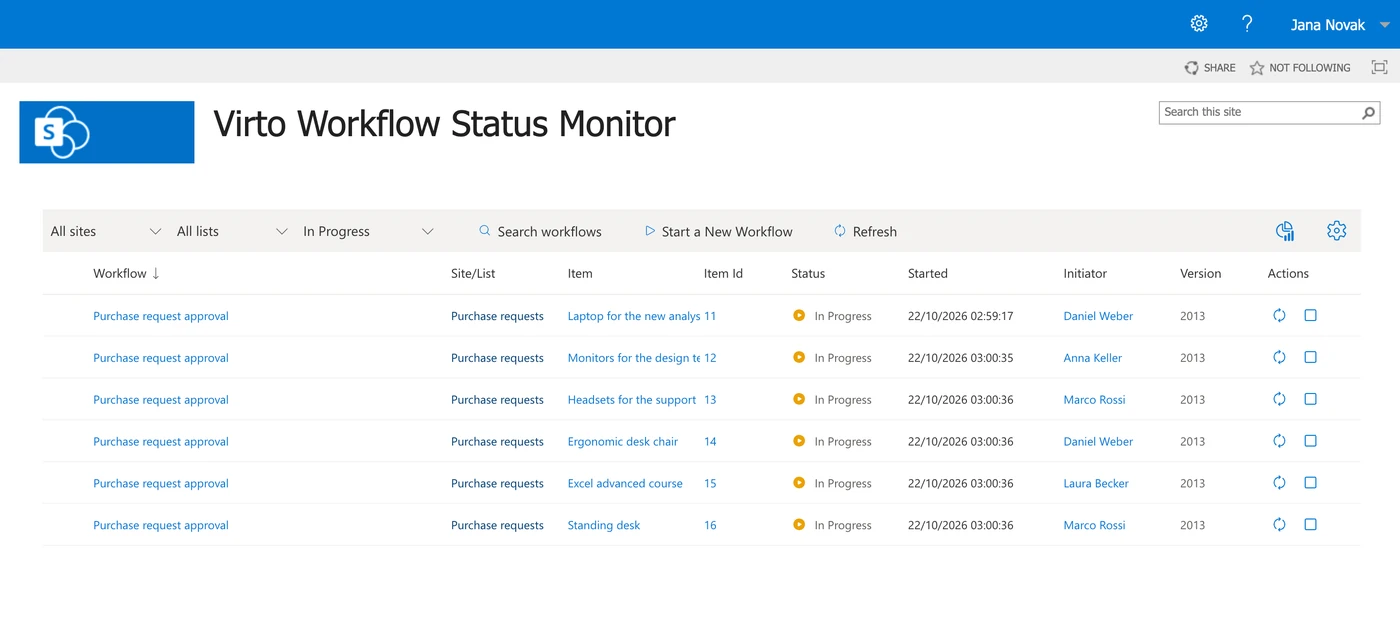
Pic. 1. Virto Workflow Status Monitor lists workflows with their platform (Version column)
Step 2: choose where each workflow goes
Microsoft recommends two destinations for SharePoint 2010 workflows on SharePoint Server: the SharePoint 2013 workflow platform and Power Automate (Microsoft Learn). Moving to SharePoint Online is a third path, but a bigger decision than the workflows.
| SharePoint 2013 workflow platform | Power Automate with the on-premises data gateway | SharePoint Online with Power Automate | |
|---|---|---|---|
| Where the workflow runs | On your servers, in SharePoint Workflow Manager | In Microsoft’s cloud; the gateway connects it to your SharePoint Server | In Microsoft’s cloud |
| What you need | SharePoint Workflow Manager registered with the farm | An on-premises data gateway and a Power Automate license that supports gateways (Microsoft Learn) | Microsoft 365 and a migration of the content |
| Fits best | Approvals and tasks that people complete in SharePoint | Background automation: copying, notifying, syncing with other systems. With SharePoint Server, Microsoft points interactive workflows to the 2013 platform instead (Microsoft Learn) | Organizations that leave SharePoint Server anyway |
| Authoring tool | SharePoint Designer 2013 (support ended July 14, 2026; still works) or Visual Studio (code) | Power Automate in the browser | Power Automate in the browser |
| Watch out for | No supported no-code designer; the 2013 platform has its own, shorter set of actions (Microsoft Learn) | Only part of the SharePoint connector’s triggers and actions work against SharePoint Server (Microsoft Learn); the network has to allow outbound connections to the cloud | 2013 workflows are retired there as well |
The 2013 platform is the one that keeps workflows on your farm, and it comes with a catch: the workflows are supported, the no-code tool to build them is not. Whoever rebuilds them works in SharePoint Designer 2013 without support, or writes them in Visual Studio. Weigh that before you choose, and keep the rebuilt workflows simple enough for the next person to maintain.
In practice, the calls fall like this:
- A workflow nobody uses: remove it.
- An approval or task process that stays on the farm: rebuild it on the 2013 platform. People keep completing tasks in SharePoint, and nothing leaves your network.
- A background job, where a cloud connection is allowed: Power Automate, which also reaches far beyond SharePoint.
- A move to SharePoint Online already planned: migrate the workflows to Power Automate with the SharePoint Migration Tool as part of the move.
Step 3: rebuild a 2010 workflow on the 2013 platform, step by step
Our example is a purchase request approval on our Subscription Edition farm. When someone adds a request, the approver gets an email, the workflow waits for the decision, and the requester gets the result. It is built with SharePoint Designer 2013 and Virto actions for the 2013 platform.
SharePoint Designer 2013 is the tool here because it is the only no-code designer for 2013 workflows, and the only one that shows third-party actions such as Virto’s. Its support ended on July 14, 2026: it works, but Microsoft no longer fixes it. Build and test on a staging farm first.
- Check that Workflow Manager is connected. In SharePoint Designer 2013, open the site, select Workflows and then List Workflow. If SharePoint 2013 Workflow is not offered as the Platform Type, Workflow Manager is not configured for the farm (Microsoft Learn). Fix that first.
- Create the workflow. Pick the list, give the workflow a name, and set Platform Type to SharePoint 2013 Workflow.
- Rebuild the logic in stages. A 2013 workflow is organized in stages, and each stage ends with a Transition to stage. Add the actions from the Action menu. Third-party actions for the 2013 platform appear there in their own categories; Virto’s include Virto List Activities, Virto Email Processing, Virto Permissions Actions and Virto Administration Actions.
- Set the start options. In Workflow Settings, choose whether the workflow starts manually, when an item is created or when it changes, as the 2010 workflow did.
- Publish and test on one item. Check the workflow history: every action writes what it did.
- Retire the 2010 workflow. When the 2013 workflow works, open the list’s Workflow Settings, select the 2010 workflow and set it to No New Instances. Running instances finish, and no new ones start. Remove it once they are done.
- Repoint what depended on it. Schedules that start the old workflow (point them at the new one or create them again), links in pages and emails, and any 2013 workflow that started it through the interop bridge.
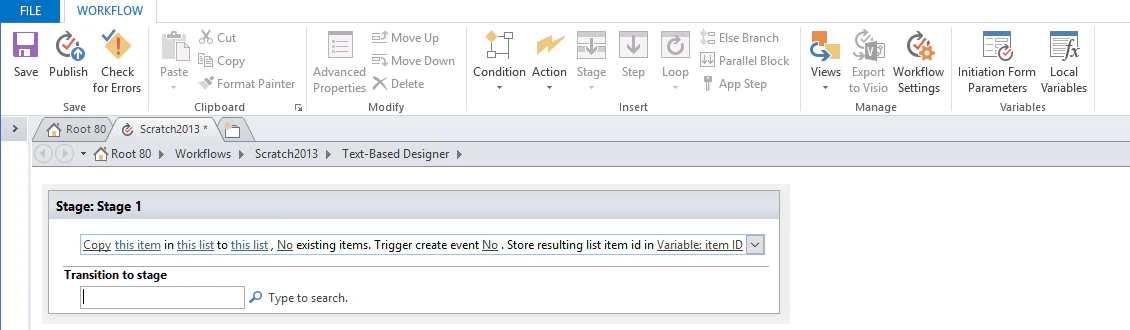
Pic. 2. A Virto action in a SharePoint 2013 workflow stage in SharePoint Designer 2013
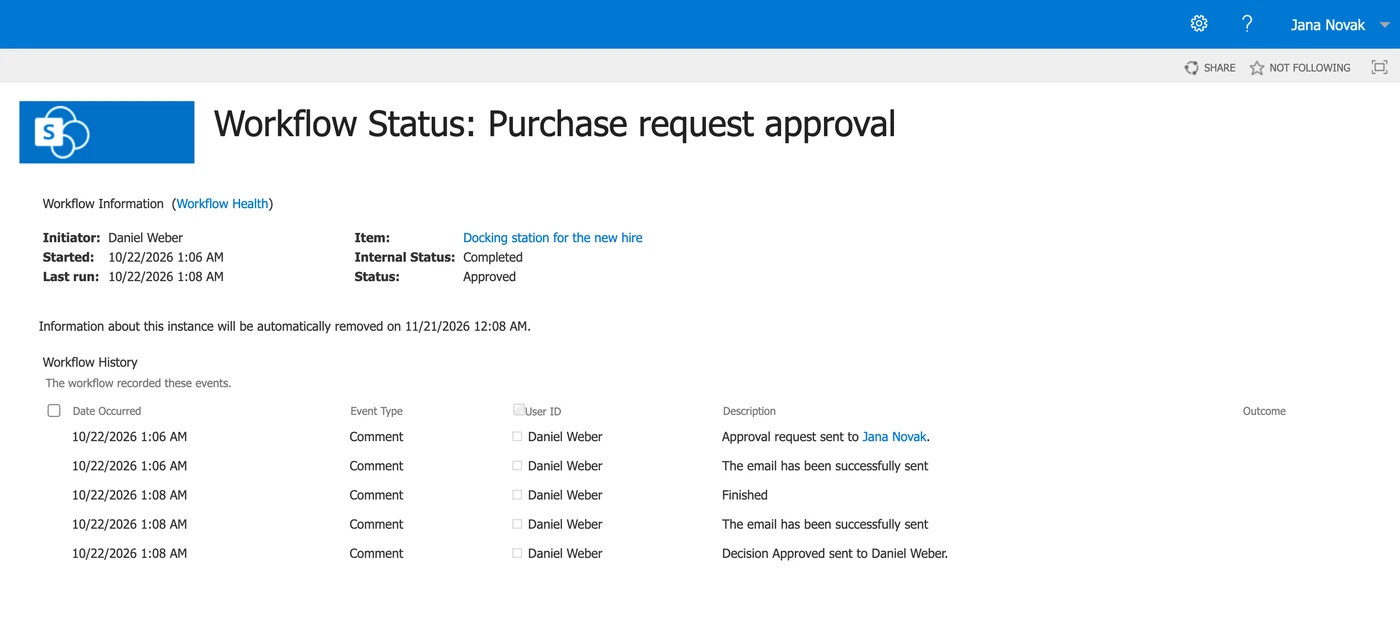
Pic. 3. The workflow history of the rebuilt purchase approval on Subscription Edition
Virto Workflow Automation and the July 2027 update
Virto Workflow Automation adds actions to SharePoint Designer for both workflow platforms, and two tools around them: Workflow Status Monitor, which lists workflows and their state, and Workflow Scheduler, which starts workflows on a schedule. It runs on SharePoint Server 2016, 2019 and Subscription Edition. Everything below is as of version 6.1.13, released in November 2026.
What it adds to 2013 workflows
It does not replace SharePoint Designer: its actions appear in SharePoint Designer 2013, the only tool that shows them, and not in Visual Studio. What it adds is what the 2013 platform lacks without code.
- 49 no-code actions for the 2013 platform. The platform’s own actions cannot set permissions, work with attachments or send an email with attachments, and its Copy Document copies only from the current list (Microsoft Learn). The Virto actions for 2013 set and remove permissions on sites, lists and items; copy and move list items, documents, folders and attachments; create and delete sites, site collections, lists and groups; activate features; start 2013 workflows; and send email with attachments. Without them, each of those steps is a Call HTTP Web Service to the SharePoint REST API or code in Visual Studio.
- Built for the 2013 platform. These actions run in SharePoint Workflow Manager and call Virto services on the farm. They do not depend on the 2010 platform, with one exception: an option in three of them (Create List Item, Update List Item and Copy/Move List Item) that also starts the item’s workflows, 2010 ones included.
- Activated again after SharePoint updates. The Virto actions for 2013 are switched on by a site feature, Virto Workflow Automation - 2013 Actions. Some SharePoint updates bring a new version of SharePoint’s own workflow actions; on our farm, the October 2026 public update did. After it, the workflows built before kept running, but a new 2013 workflow with a Virto action was published and then stopped the moment it started, with the status Suspended and the error “An item with the same key has already been added”. So after SharePoint updates, the feature has to be activated again on the site where you build workflows.
- A view of every workflow, and a schedule. Status Monitor lists 2010 and 2013 workflows together and can cancel both; on our Subscription Edition farm it lists the 2013 purchase approval (Pic. 1). Scheduler starts workflows of either platform; there it starts the purchase approval every week for the pending requests (Pic. 4). Overwrite workflow cancels a running 2013 list workflow before starting a new one, from version 6.1.9.
- A vendor behind the actions. The Virto actions, Status Monitor and Scheduler come with a year of support from VirtoSoftware, and the license is perpetual. Rebuilding a workflow with the actions for 2013 needs no new Virto license. SharePoint Designer itself stays Microsoft’s tool, out of support.
What changes for Virto actions in 2010 workflows
- They stop with the platform on Subscription Edition. The 228 Virto actions and 16 conditions for 2010 workflows run inside SharePoint’s 2010 workflow host, so with the July 13, 2027 update they stop, like every 2010 workflow. Until then they run wherever the 2010 platform is switched on.
- Most of them have no 2013 counterpart. Of the 228 actions for 2010, 37 have a Virto action for 2013 that does the same job, 13 more are covered partly or by combining actions, and 178 have none; of the 16 conditions, 3 have a partial counterpart. Permissions are almost fully covered, sites, groups and features partly. Nothing for 2013 replaces the actions for Active Directory, arrays, managed metadata, SQL, SMS, fax, XMPP and FTP, HTTP requests (Xero and Mailchimp included), InfoPath form fields, or PowerShell and custom code. The 2013 set copies and moves documents and folders, but does not convert or generate them (Word, PDF, reports). For dates and text, the platform’s own utility actions cover part of the ground, and for calls to other services it has Call HTTP Web Service and dictionary variables (Microsoft Learn). The 2013 actions for site properties work with the site’s property bag, so they do not change a site’s title, description or master page, or a group’s owner. “Same job” means where to look, not a one-to-one swap: check every parameter when you rebuild.
- Some Monitor and Scheduler options are 2010-only. Run workflows asynchronously, Auto restart terminated workflows, skipping an item where the workflow is already running, and schedules for workflows attached to a content type work with 2010 workflows only. A schedule that starts a 2010 workflow is pointed at its 2013 replacement or created again.
- Status Monitor and Scheduler on a farm with the July 2027 update can only be tested on that update. Both are switched on by the same site collection feature as the 2010 actions, Virto Workflow Automation - 2010 Actions, Monitor and Scheduler, and both use parts of SharePoint’s own 2010 workflow object model.
- On SharePoint Server 2016 and 2019, nothing removes the 2010 platform, and nothing in Workflow Automation switches its 2010 actions off there: they work as they do now.
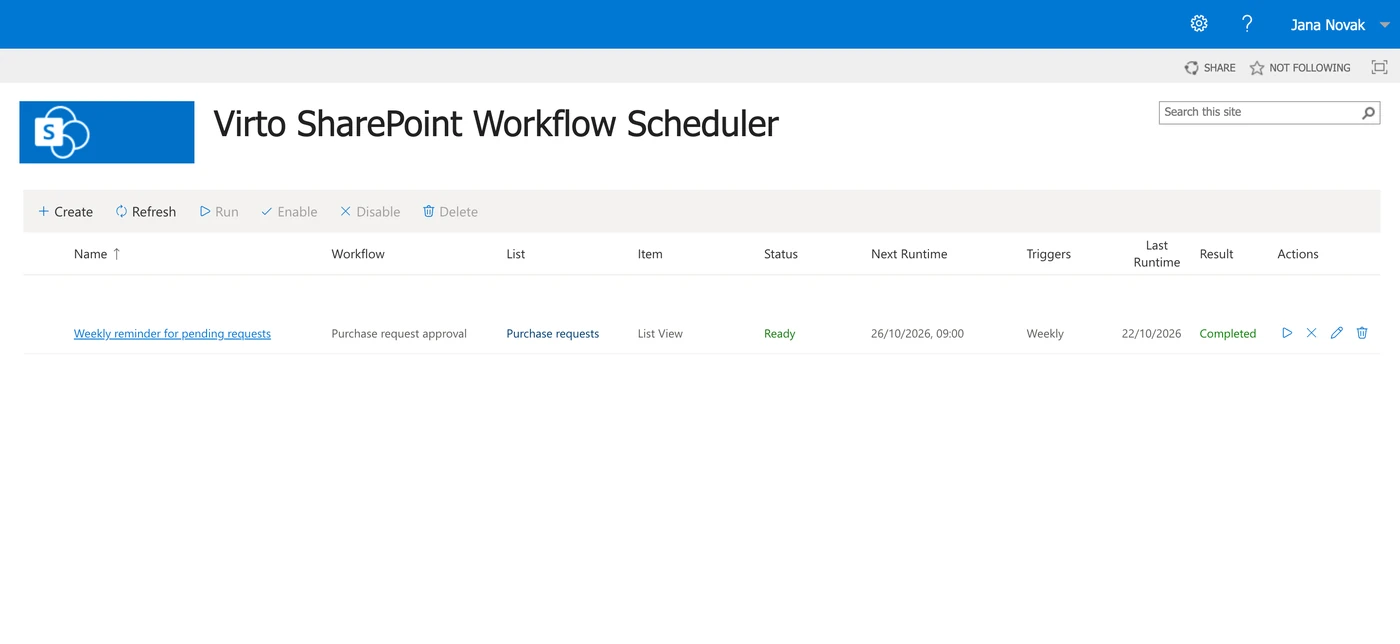
Pic. 4. Virto Workflow Scheduler starts a 2013 workflow on a schedule
Try Virto Workflow Automation on your Subscription Edition farm with its 30-day free trial: full functionality, no key needed. The interactive demo shows the purchase approval above, recorded on our farm.
Common mistakes
- Holding back the July 2027 update. Updates are cumulative, so the farm stops getting security fixes. Rebuild the workflows instead.
- Switching 2010 workflows back on and stopping there.
Enable-SPLegacyWorkflowbuys time until July 13, 2027, and nothing more. - Taking stock after the update. Find your 2010 workflows and let running instances finish while the platform is still there. After the July 2027 update, Microsoft says, workflows that depend on it stop working.
- Forgetting the built-in workflows. Approval, Collect Feedback, Collect Signatures and Publishing Approval are 2010 workflows too, and so is page approval on publishing sites that use Publishing Approval.
- Forgetting the 2013 workflows that start 2010 ones. The interop bridge needs the 2010 host. Rebuild the called workflow too.
- Forgetting InfoPath. The same July 2027 update removes InfoPath Forms Services from Subscription Edition. If your workflows start from InfoPath forms or read them, plan both moves together: see our InfoPath end-of-life guide.
- Updating SharePoint before Workflow Manager. KB5002945 asks for the SharePoint Workflow Manager update (KB5002799) to be installed first. The 2013 platform is where your workflows are moving, so keep it current.
- Forgetting the Virto 2013 actions after a SharePoint update. When a SharePoint update brings a new version of SharePoint’s own workflow actions, as the October 2026 update did on our farm, a new 2013 workflow with a Virto action still publishes, but it is suspended as soon as it starts, with the error “An item with the same key has already been added”. Workflows published before the update keep running. Activate the feature Virto Workflow Automation - 2013 Actions again on the site where you build workflows, as a site collection administrator. Activating it again with the farm account on the server does not help.
- Rebuilding one to one. A 2010 workflow often carries ten years of exceptions. Rebuild what the process needs today, and drop workflows nobody uses.
FAQ
Are SharePoint 2010 workflows still supported?
No. Support ended on July 14, 2026. On Subscription Edition the September 2026 update turned them off by default, and the July 13, 2027 update removes them. On SharePoint Server 2016 and 2019 they still run, without fixes. In SharePoint Online they were removed on November 1, 2020.
Can I keep using SharePoint 2010 workflows on Subscription Edition after July 2027?
No. After the July 13, 2027 public update, or any later one, the 2010 platform is gone and workflows that depend on it stop working. Until then, Enable-SPLegacyWorkflow switches it back on per site collection. Skipping the update to keep them would leave the farm without security fixes.
Do SharePoint 2013 workflows stay on Subscription Edition?
Yes. The SharePoint 2013 workflow platform stays supported on Subscription Edition with SharePoint Workflow Manager, which Microsoft supports beyond 2026. Install its updates before the SharePoint updates, as KB5002945 asks.
Can I still use SharePoint Designer 2013?
Yes, but without support. Support ended on July 14, 2026, with no extensions. Microsoft does not block it: it still opens Subscription Edition sites and publishes workflows. For 2013 workflows, Microsoft names Visual Studio, a developer tool, so no supported no-code designer is left. Third-party actions such as Virto’s appear only in SharePoint Designer.
What happens to Virto actions in my 2010 workflows?
On Subscription Edition they stop with the 2010 platform after the July 13, 2027 update. Rebuild those workflows on the 2013 platform. The 49 Virto actions for 2013 cover list items and documents, permissions, site administration and email with attachments, and run in Workflow Manager. Of the 228 Virto actions for 2010, 37 have a 2013 action that does the same job and 13 are covered partly; the rest, such as the Active Directory and document conversion actions, have none. On SharePoint Server 2016 and 2019 nothing removes the 2010 platform, and the 2010 actions work as they do now.
Conclusion
On Subscription Edition, SharePoint 2010 workflows have a date: July 13, 2027. The 2013 platform and Power Automate are where they go, and both are Microsoft’s own recommendations. The work is the same in every case: find each workflow, decide whether it is still needed, and rebuild the ones that are. Start with the workflows people act on every day, and switch the 2010 versions to No New Instances as their replacements go live.