Microsoft Teams does a lot out of the box — chat, meetings, calls, file storage. But the reason it sits at the centre of so many organisations is the app layer on top: the calendars, boards, whiteboards and bots you pin into a channel so your team never has to leave the window.
This guide is a curated shortlist rather than an exhaustive catalogue. We cover the Teams apps that are actually worth installing in 2026, grouped by the job you’re hiring them for, with a comparison table, current pricing (re-verified in July 2026) and a dedicated section on the best free options and the best Teams apps for project management.
Quick answer: the best Microsoft Teams apps
If you want the short version, here are the picks by category:
- Best for project management: Virto Kanban Board — a full Kanban board that lives inside a Teams tab and syncs with SharePoint lists. Trello and Asana are strong general alternatives; Jira if you’re a dev team.
- Best for calendars and scheduling: Virto Calendar App — overlays SharePoint, Outlook, Google and Exchange calendars into one shared view inside Teams.
- Best for notifications: Virto Alerts & Reminders — rule-based alerts from SharePoint pushed into Teams channels.
- Best whiteboard: Miro (or Microsoft Whiteboard if you want zero extra spend).
- Best for meetings beyond native Teams: Zoom Workplace or Cisco Webex, if your clients live on those platforms.
- Best free picks: Microsoft Planner, Microsoft Whiteboard, Polly, GitHub and Trello’s free tier.
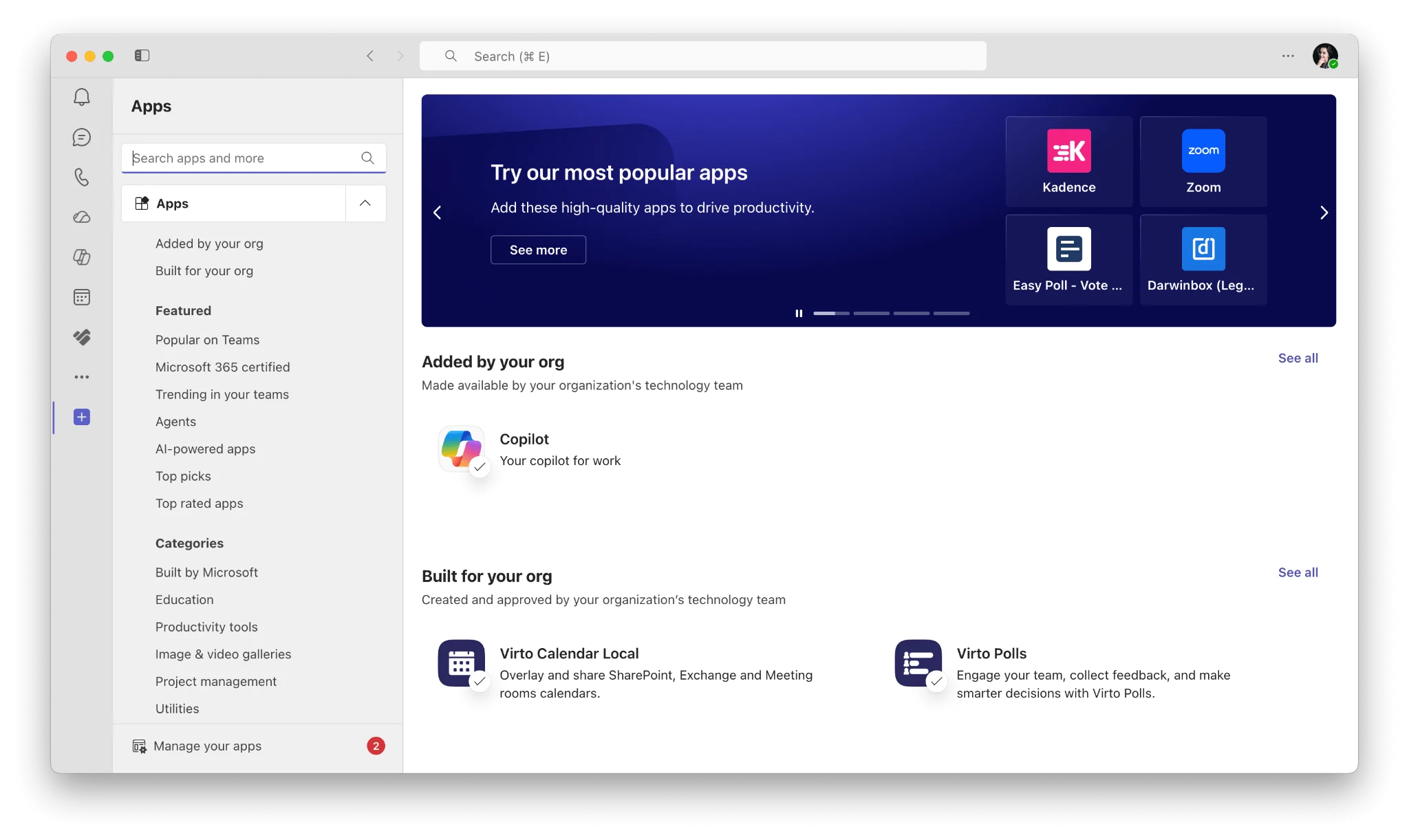
Pic. 1. The Teams app store — where all of these are installed from.
How to add apps to Teams
Adding an app takes about thirty seconds. Open Teams, click Apps in the left-hand rail, search for the app, and select Add. From there you can pin it to a channel as a tab, add it to a chat, or install it personally.
Team owners and admins have more control than most people realise. In the Teams admin centre you can set per-app availability (which apps are allowed at all, and for whom) through app centric management, which replaced app permission policies; set app setup policies (which apps are pinned by default for which users); and manage third-party app purchases and licences centrally.
The mechanics of Teams extensibility — tabs, bots, connectors, message extensions and how they differ — are covered in more depth in our guide to Microsoft Teams integrations. This article stays focused on which apps to pick.
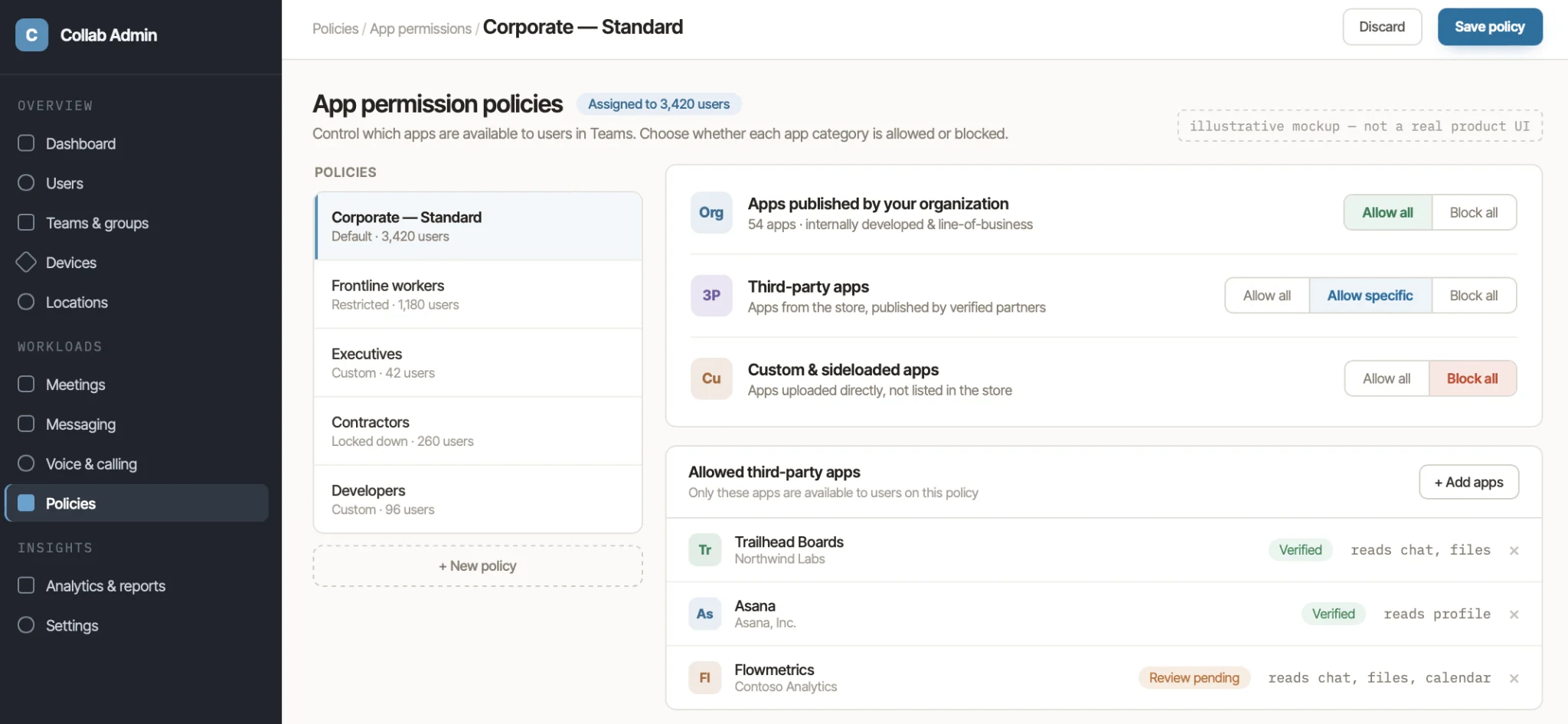
Pic. 2. Virto apps on the Manage apps page of the Teams admin centre. With app centric management, who can use an app is set per app, in the Available to column.
Best Microsoft Teams apps [2026]
Below is the curated list, followed by a comparison table. Prices were re-verified in July 2026 and reflect annual-billing list prices where a vendor publishes them; vendors change pricing often, so always confirm on the vendor’s own page before you buy.
Project management and task tracking
1. Virto Kanban Board App for Microsoft Teams
Virto Kanban turns a SharePoint list into a live Kanban board inside a Teams tab: drag-and-drop cards, swimlanes, WIP limits, sub-tasks, colour coding and filters. Because it reads and writes to the underlying SharePoint list, nothing lives in a separate silo — your data stays in Microsoft 365, which is the main reason IT teams pick it over Trello or Asana. It’s the strongest option if you’re already committed to the Microsoft stack and want board-style project management without another vendor to govern.
Pricing: from $2/user/month (Starter, up to 30 users), $3/user/month (Pro, 31–200 users), Enterprise on request. 30-day free trial.
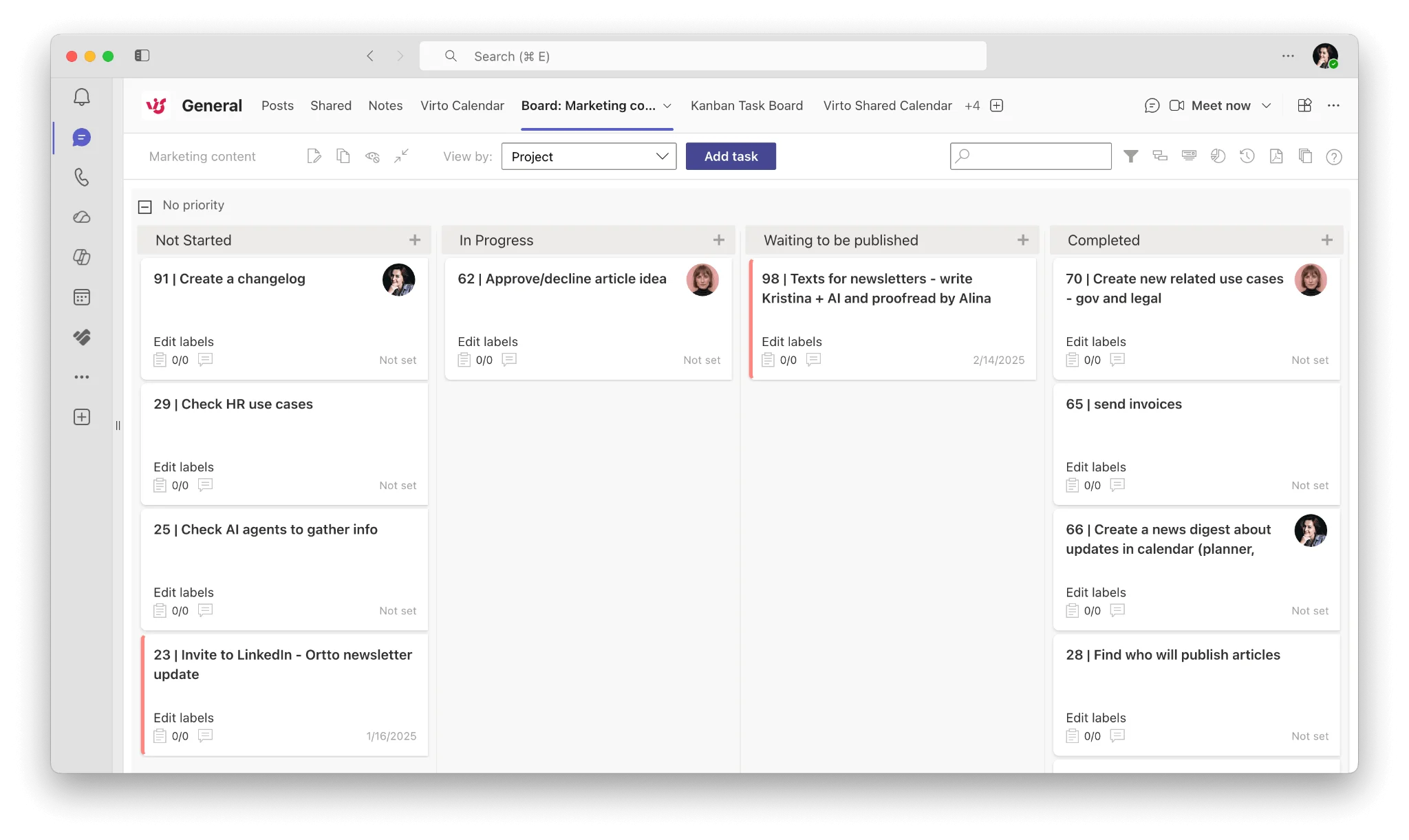
Pic. 3. Virto Kanban Board running as a tab inside a Teams channel.
2. Microsoft Planner
The native option, and now the home for Microsoft To Do and Project for the web as well. Planner is free with most Microsoft 365 business plans, integrates cleanly as a Teams tab, and is good enough for straightforward task lists and simple boards. It gets thin quickly if you need swimlanes, dependencies, or reporting across multiple projects — which is where the third-party boards earn their keep.
3. Trello
Still the most approachable Kanban tool on the market. Boards, lists, cards, Butler automation. The Teams integration lets you attach boards to channels and get card notifications in-line. Best for small teams and anyone who wants zero learning curve.
Pricing: generous free tier; Standard from $5/user/month (annual).
4. Asana
Heavier than Trello and better for cross-functional work: portfolios, goals, workflow builder, multiple views. The Teams app lets you create tasks from messages and see task previews in chat. A good fit for marketing and operations teams running recurring processes.
Pricing: free for up to 10 users; Starter from $10.99/user/month (annual).
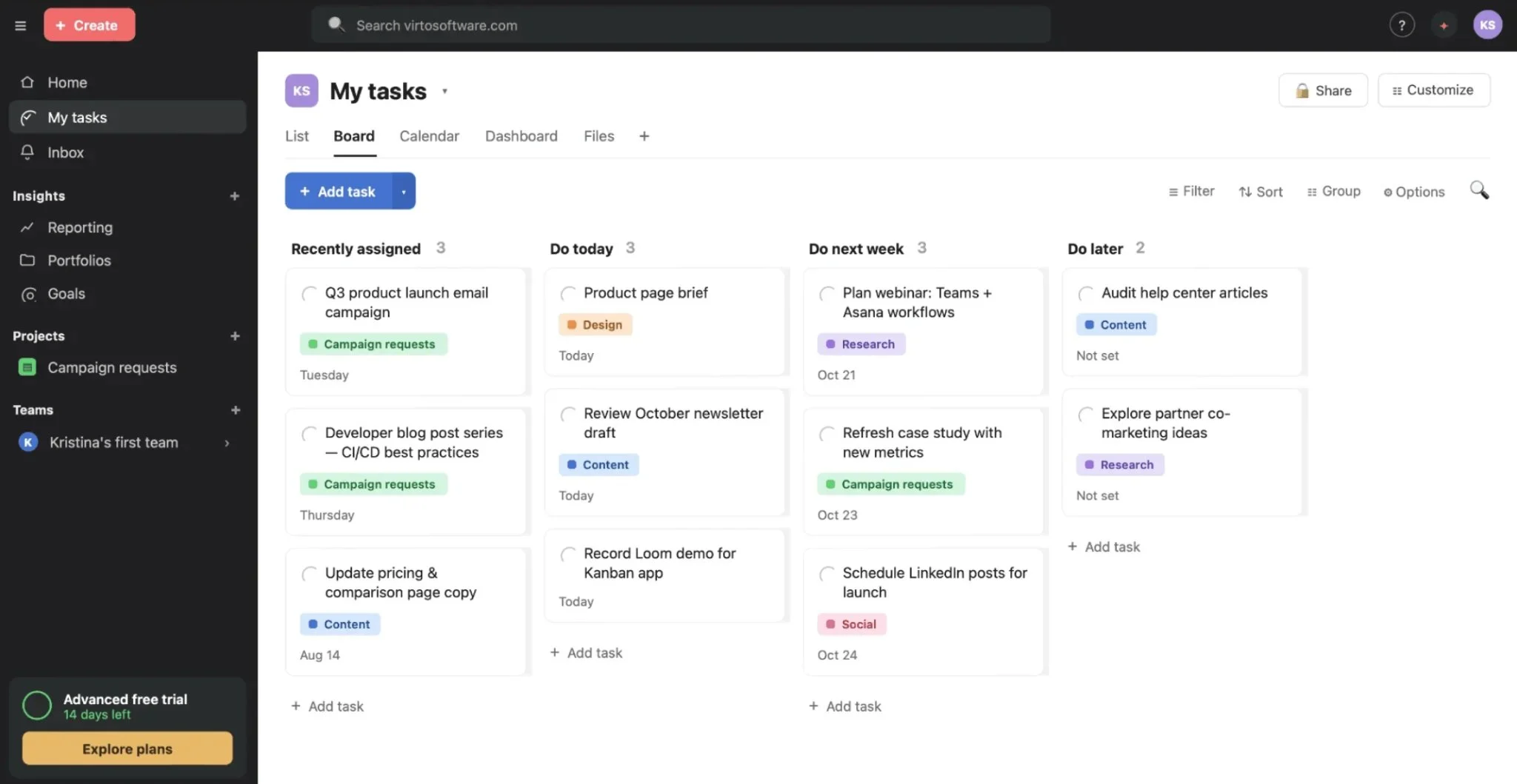
Pic. 4. Asana sample board.
5. Jira
The default for software teams. Scrum and Kanban boards, sprints, backlogs, issue types, and the deepest workflow customisation of anything on this list. The Teams connector surfaces issue updates in channels and lets you create issues without switching apps.
Pricing: free for up to 10 users; Standard from roughly $7.90/user/month (annual, scales with team size).
6. Smartsheet
A spreadsheet-shaped work management platform — Gantt charts, dashboards, automation, resource management. It suits teams migrating off Excel who need structure without abandoning the grid. Note that Smartsheet retired its free plan; you now get a 30-day trial only.
Pricing: Pro from $9/user/month (annual); Business from $19/user/month.
Calendars and scheduling
7. Virto Calendar App for Microsoft Teams
The native Teams calendar shows your Outlook calendar and not much else. Virto Calendar overlays multiple sources — SharePoint lists, Exchange and Outlook calendars, Google Calendar, Teams channel events — into a single colour-coded view pinned as a channel tab. It’s the standard answer to “we need one shared team calendar everyone can actually see”, and it handles the awkward cases: vacation calendars, resource booking, cross-department schedules.
Pricing: $2,412 per 100 users per year with a 3-year agreement (100 users and up). 30-day free trial. Smaller teams can use Virto Shared Calendar, which has a free plan.
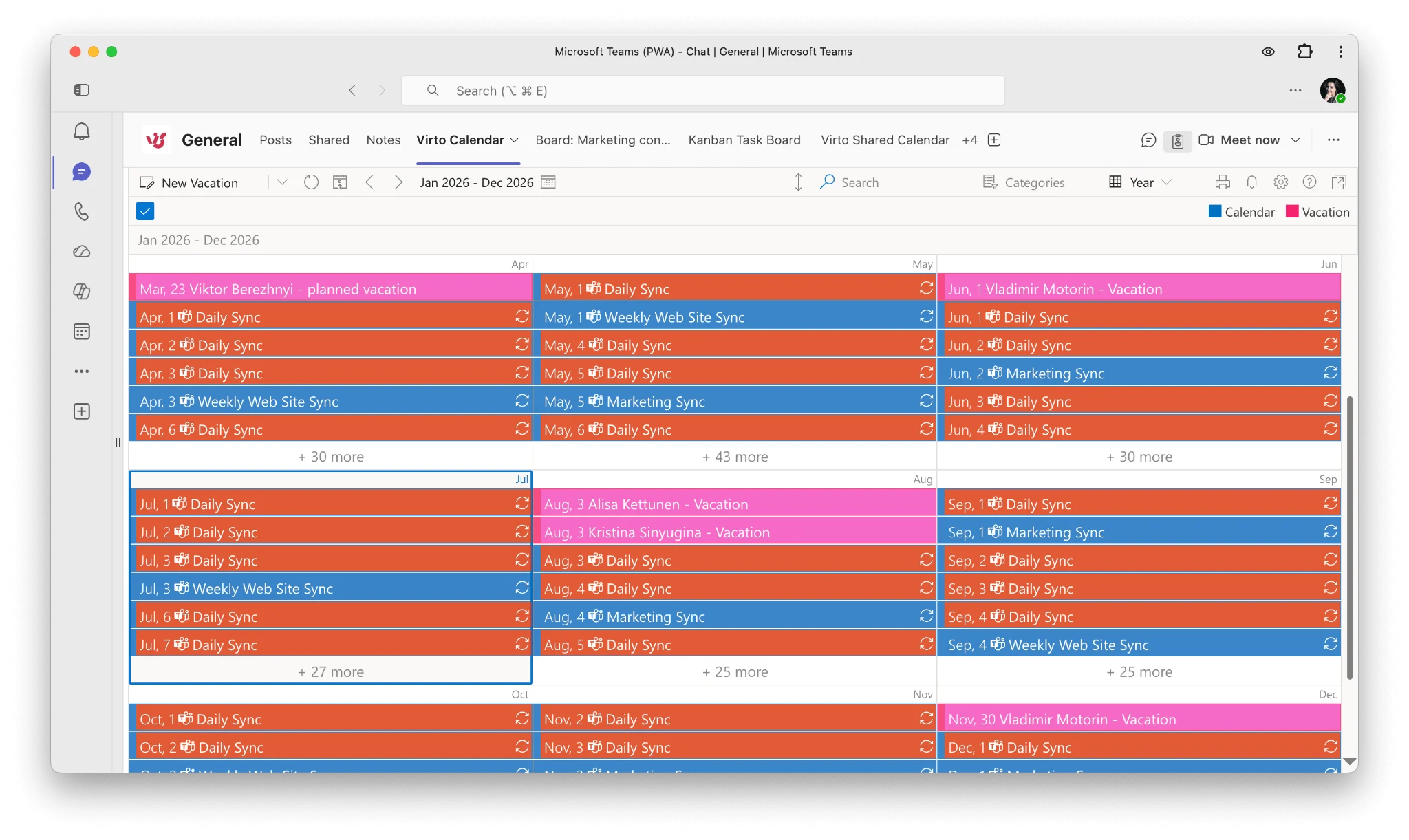
Pic. 5. Multiple calendar sources overlaid in one Teams tab with Virto Calendar.
Notifications and engagement
8. Virto Alerts & Reminders App
Rule-based alerts from SharePoint lists and libraries, delivered into Teams channels or chats. Set conditions (a status changes, a due date approaches, a field is left blank) and Virto Alerts pushes the notification where people already are. It closes the gap that SharePoint’s built-in alerts leave open — which is that nobody reads SharePoint email alerts.
Pricing: $1,170 per year for 30 alerts, $2,990 per year for 100 alerts, Enterprise on request. 30-day free trial.
9. Polly
Polls, pulse surveys and quick check-ins natively inside Teams. Good for standups, retros, and any decision that would otherwise generate forty reply-all messages. The free tier covers most casual use.
Pricing: free tier available; paid plans from around $24/month.
Whiteboards and visual collaboration
10. Miro
The market-leading infinite canvas: sticky notes, voting, timers, templates for retros and design sprints, and a solid Teams app that lets you embed a board directly in a meeting. If you run workshops remotely, this is the safe pick.
Pricing: free tier (3 editable boards); Starter from $8/member/month (annual).
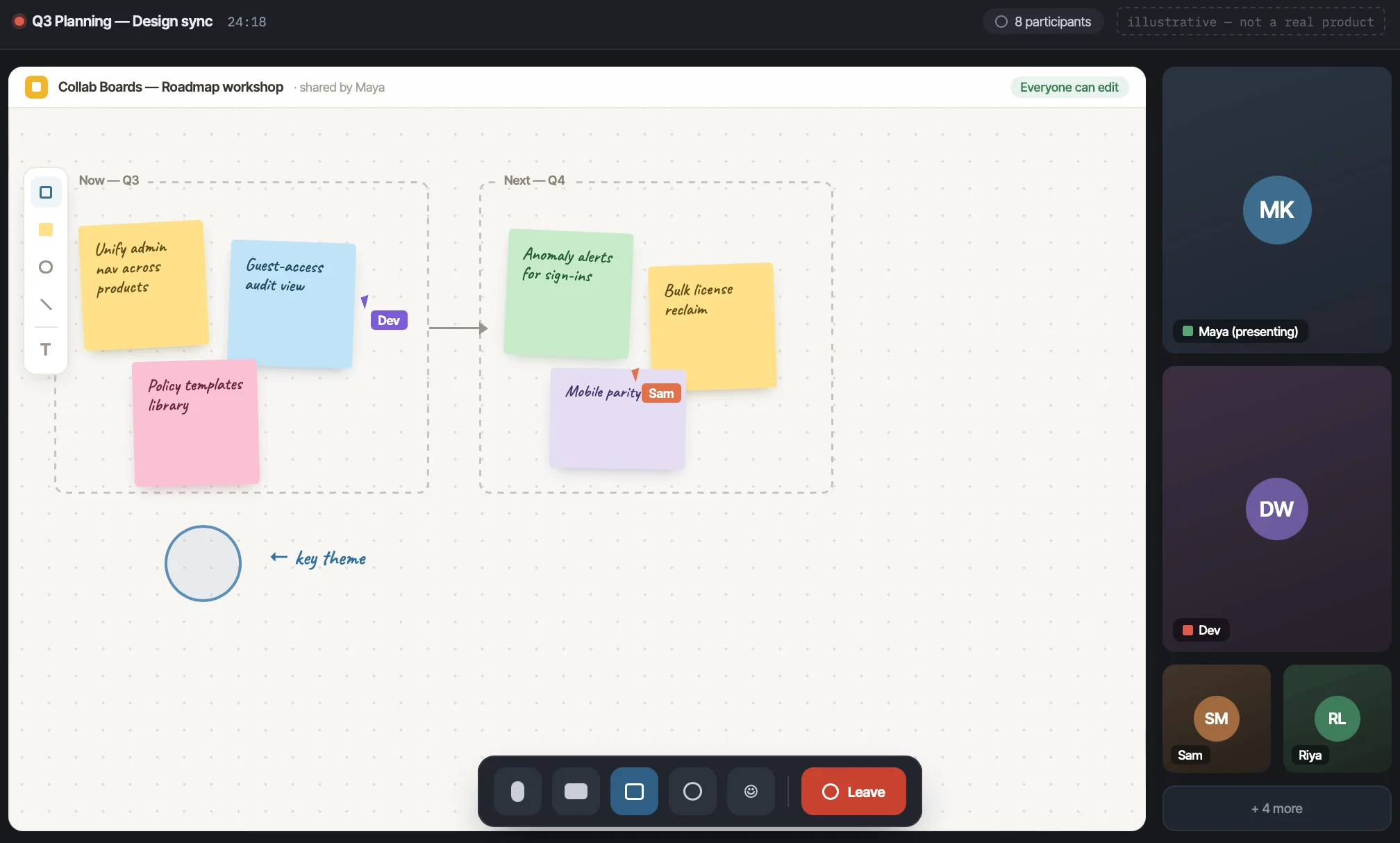
Pic. 6. A Miro board embedded in a Teams meeting.
11. Mural
Miro’s closest rival, more opinionated about facilitation: private mode, timed voting, the ability to summon participants to a spot on the canvas. Choose Mural if your workshops are structured and facilitator-led rather than free-for-all.
Pricing: free tier (3 murals); Team+ from $9.99/member/month (annual); Business from $17.99/member/month.
12. Lucidchart
For structured diagramming rather than brainstorming: flowcharts, ERDs, network diagrams, org charts. The Teams integration lets you embed and co-edit diagrams in a tab. If you need both brainstorming and diagrams, Lucid sells Lucidspark alongside it.
Pricing: free tier (3 documents); Individual from $9/month; Team from $10/user/month (3-user minimum).
Meetings
13. Zoom Workplace
Teams has meetings built in, so the honest reason to add Zoom is external: your clients are on Zoom and you’d rather not make them install anything. The Teams app lets you schedule, start and join Zoom meetings from inside Teams.
Pricing: free Basic plan (40-minute group meeting cap); Pro from $13.33/user/month (annual).
14. Cisco Webex
The same logic as Zoom, for organisations standardised on Webex. Strong meeting controls and screen-sharing options, and an interoperability story with Teams that suits large enterprises running both platforms.
Pricing: free tier available; paid plans from $14.50/licence/month.
Development, automation and support
15. GitHub
Commit, issue and pull-request notifications in your channel; open and comment on issues without leaving Teams. Free for public repos and small teams, which makes it one of the most useful free Teams apps for any engineering org.
Pricing: free tier; Team from $4/user/month.
16. Zapier
The connective tissue between Teams and several thousand other apps. Push a new CRM deal into a channel, create a task from a form submission, post a summary when a deploy finishes. Worth it once you have more than a couple of repetitive handoffs.
Pricing: free tier with limited tasks; team plans from around $69/month.
17. Zendesk
Support ticket notifications and agent collaboration inside Teams — useful when engineering and support need to talk about the same ticket without a context switch.
Pricing: from around $55/agent/month.
18. Dropbox
If your organisation has files in Dropbox and communication in Teams, the Dropbox app closes the gap: browse, share and preview Dropbox files in a Teams tab or chat.
Pricing: free tier (2 GB); business plans from around $12/user/month.
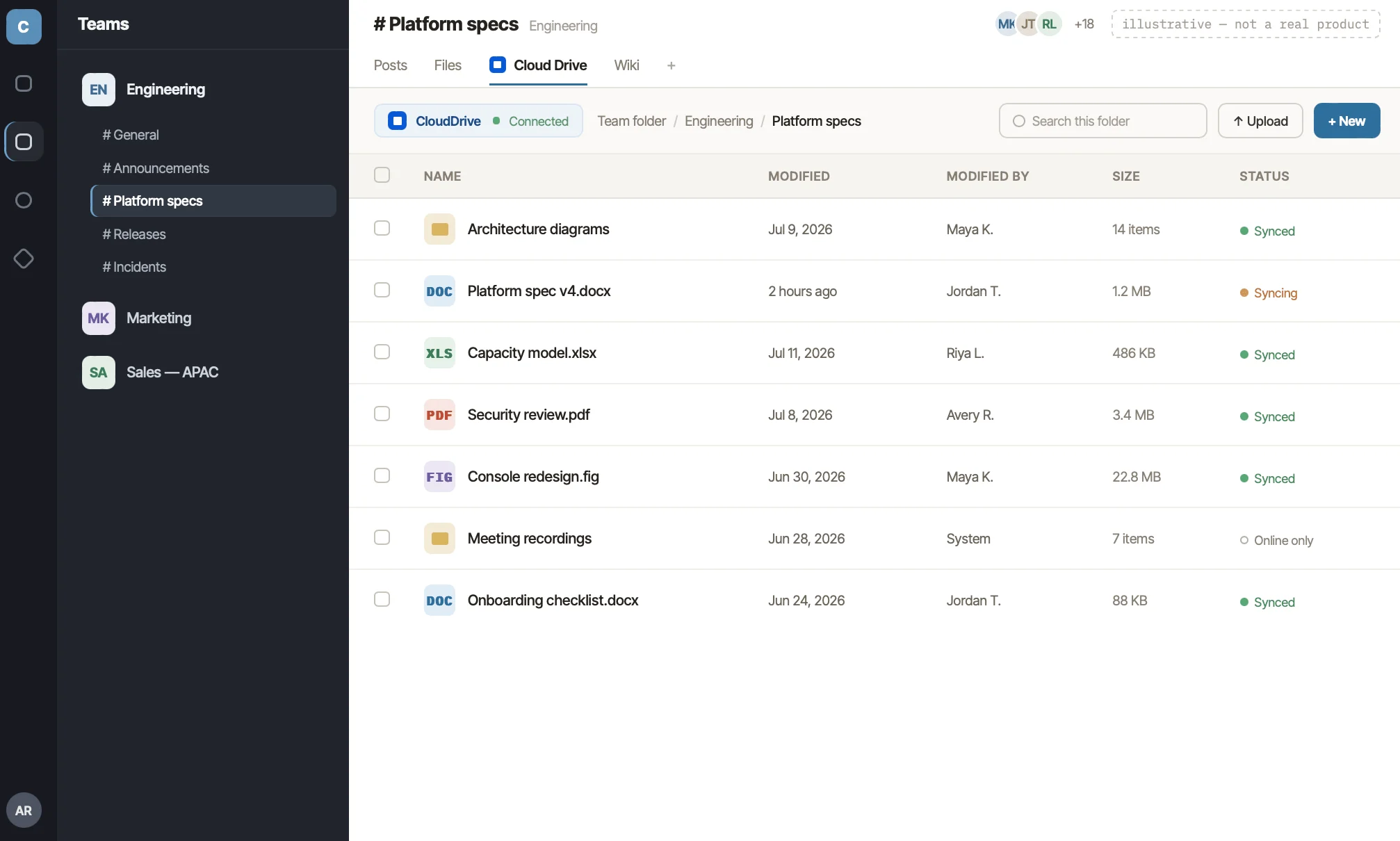
Pic. 7. Dropbox files surfaced in a Teams channel tab.
Microsoft Teams apps compared
Prices below are list prices verified in July 2026, on annual billing where the vendor offers it. Vendors adjust pricing frequently — treat this as a starting point and confirm before purchase.
| App | Category | Free tier | Paid from (verified July 2026) |
|---|---|---|---|
| Virto Calendar App | Calendar / scheduling | 30-day trial | $2,412 / 100 users / year, 3-year agreement |
| Virto Kanban Board App | Project management | 30-day trial | $2/user/mo (Starter, ≤30 users) |
| Virto Alerts & Reminders | Notifications | 30-day trial | $1,170/year (30 alerts) |
| Microsoft Planner | Project management | Included with M365 | Premium via M365 licence |
| Trello | Project management | Yes (unlimited cards) | $5/user/mo (Standard, annual) |
| Asana | Project management | Yes (up to 10 users) | $10.99/user/mo (Starter, annual) |
| Jira | Issue tracking / agile | Yes (up to 10 users) | ≈$7.90/user/mo (Standard, annual) |
| Smartsheet | Work management | 30-day trial only | $9/user/mo (Pro, annual) |
| Miro | Whiteboard | Yes (3 boards) | $8/member/mo (Starter, annual) |
| Mural | Whiteboard / workshops | Yes (3 murals) | $9.99/member/mo (Team+, annual) |
| Lucidchart | Diagramming | Yes (3 documents) | $9/user/mo (Individual) |
| Zoom Workplace | Meetings | Yes (40-min limit) | $13.33/user/mo (Pro, annual) |
| Cisco Webex | Meetings | Yes (40-min limit) | $14.50/licence/mo |
| Polly | Polls / surveys | Yes | Paid tiers from ~$24/mo |
| GitHub | Dev / version control | Yes | $4/user/mo (Team) |
| Zapier | Automation | Yes (limited tasks) | Team plans from ~$69/mo |
| SurveyMonkey | Surveys | Limited free plan | From ~$30/user/mo |
| Dropbox | File storage | Yes (2 GB) | From ~$12/user/mo (business) |
| Zendesk | Customer support | Trial only | From ~$55/agent/mo |
Best free Teams apps
Not everything needs a budget line. These are the apps with free tiers that are genuinely usable rather than a trial in disguise:
- Microsoft Planner — included with most Microsoft 365 business subscriptions. Simple boards and task lists, no extra cost.
- Microsoft Whiteboard — free with a Microsoft 365 licence. Fewer templates than Miro, but it’s already paid for.
- Trello — the free tier gives unlimited cards and up to 10 boards per workspace. Fine for a small team indefinitely.
- Asana — free for up to 10 users, with list, board and calendar views.
- Jira — free for up to 10 users, including agile boards and backlogs.
- GitHub — free for public repositories and small private teams.
- Polly — free tier covers basic polls and check-ins.
- Miro and Mural — both offer free plans capped at three boards, which is enough for occasional workshops.
One caveat worth naming: “free” for a whiteboard or a board tool usually means “free until you hit the board limit”, and that limit arrives faster than you expect. Smartsheet, meanwhile, has removed its free plan entirely and now offers only a 30-day trial.
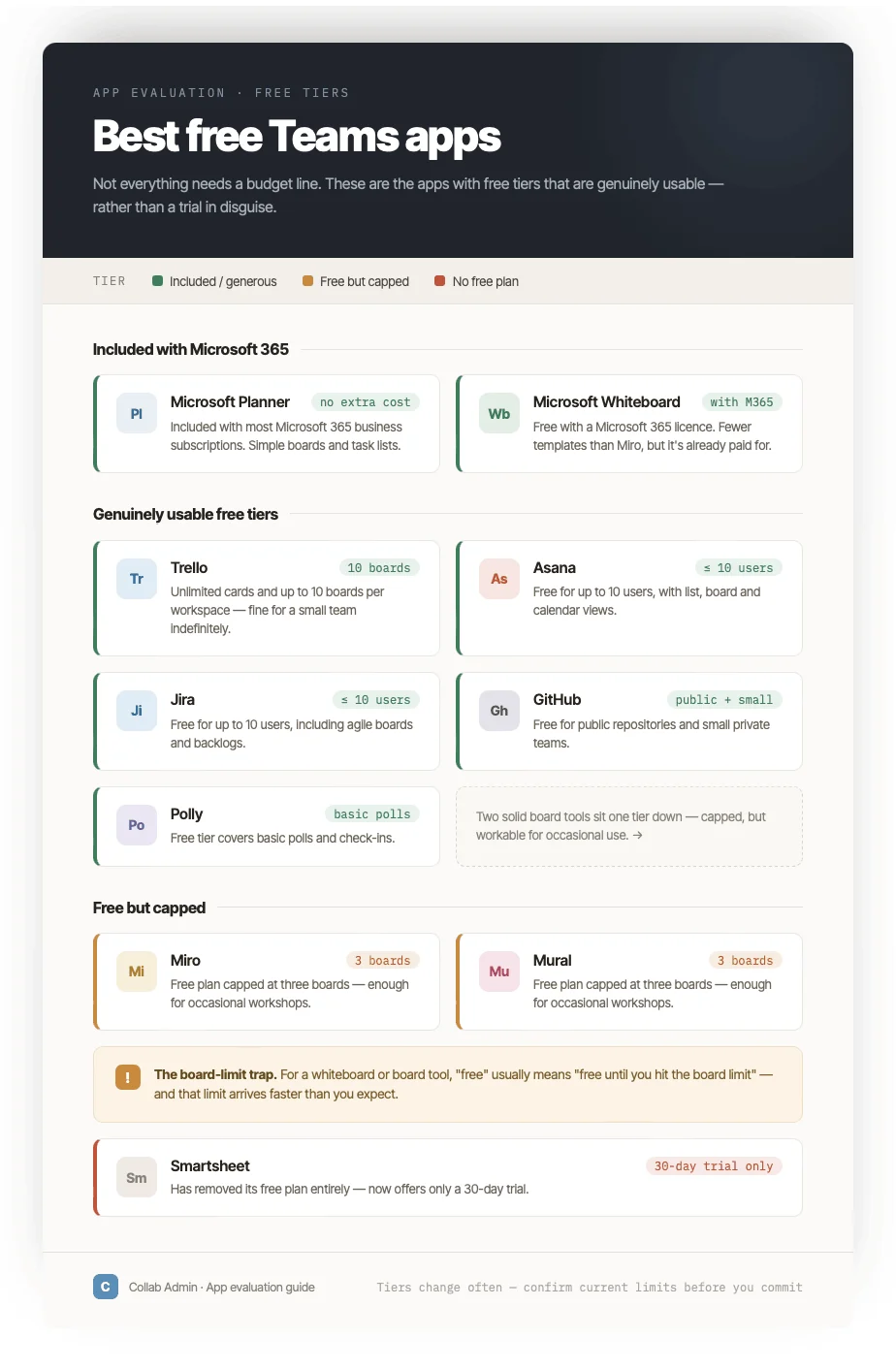
Pic. 8. Free-tier limits across the most common Teams apps.
Best Teams apps for project management
This is the category people most often come to the app store for, so it’s worth breaking down properly. The right Teams app for project management depends on how your data needs to live.
If you want your data to stay in Microsoft 365
Use Virto Kanban Board or Microsoft Planner. Both keep tasks inside your tenant. Planner is free and simple; Virto Kanban adds swimlanes, WIP limits, sub-tasks, filters and colour rules on top of standard SharePoint lists, and works across multiple lists and sites. If you need a timeline view as well, Virto also offers a Gantt chart for Teams. For a deeper comparison of the board options specifically, see our guide to the best Kanban board for Teams, and our breakdown of Microsoft Planner in Teams.
If you’re happy with a separate SaaS platform
Trello for lightweight boards, Asana for cross-functional workflows, Jira for engineering, Smartsheet for spreadsheet-heavy programme management. All four have solid Teams apps; none of them keep your data in your tenant, which matters for some compliance regimes and not at all for others.
What to check before you commit
- Data residency: does the app store your project data in your Microsoft 365 tenant, or in the vendor’s cloud?
- Licensing model: per-user pricing scales linearly and gets expensive fast. Check whether guests and viewers need a paid seat.
- Admin control: can you govern it from the Teams admin centre, or is it a separate admin surface?
- Depth vs adoption: the most configurable tool is not the one your team will actually use. Jira is powerful and Jira is also the tool people quietly stop opening.
How to choose
A short checklist that saves most of the pain:
- Start from the job, not the app. “We keep missing deadlines” and “we can’t see everyone’s schedule” need different tools.
- Count the seats honestly. Per-user pricing across four apps adds up to a real number.
- Check whether it’s already in your licence. Planner and Whiteboard are free with M365 and are often good enough.
- Trial it with the people who’ll use it, not the people who’ll buy it.
- Confirm admin governance before rollout — retrofitting app availability rules after a hundred people have installed something is not fun.
FAQ
What are the best Microsoft Teams apps?
The best picks depend on the job: for project management, apps like Virto Kanban Board, Microsoft Planner, Trello and Asana; for calendars, Virto Calendar App; for whiteboarding, Miro or Mural; for meetings with external clients, Zoom or Webex. The comparison table above sets them side by side by category, free tier and price.
Are there free Microsoft Teams apps?
Yes. Microsoft Planner and Microsoft Whiteboard are included with most Microsoft 365 business plans at no extra cost. Trello, Asana, Jira, GitHub, Polly, Miro and Mural all offer free tiers, though most cap the number of boards, users or tasks.
What are the best Teams apps for project management?
If keeping data inside Microsoft 365 matters, Virto Kanban Board or Microsoft Planner. If you’re comfortable with an external platform, Trello (simple), Asana (cross-functional) or Jira (software teams). Smartsheet suits spreadsheet-driven programme management.
How do I install an app in Microsoft Teams?
Open Teams, select Apps in the left rail, search for the app, and choose Add. You can then pin it as a channel tab, add it to a chat, or install it for personal use. Admins can restrict which apps are available, and to whom, under Teams apps > Manage apps in the Teams admin centre.
Can admins control which Teams apps get installed?
Yes. In the Teams admin centre, app centric management sets per app which users may install it, and app setup policies control which apps are pinned by default. Third-party app licences can also be purchased and assigned centrally.
Useful links
- Virto Apps for Microsoft Teams
- Virto Calendar App for Microsoft Teams
- Virto Kanban Board App for Microsoft Teams
- Virto Notifications and Reminders App for Microsoft Teams
- Best Kanban Board Apps for Microsoft Teams
- Using Gantt Charts in Microsoft Teams
- Microsoft Planner Premium
- Task Management with a Microsoft Teams Kanban Board
- Purchase third-party Teams apps and manage subscriptions and licences (Microsoft Learn)