Quick answer: is Microsoft Teams secure?
Yes. Microsoft Teams is enterprise-grade secure. It encrypts data in transit and at rest, offers optional end-to-end encryption for calls, inherits Microsoft 365 compliance certifications (ISO 27001, SOC 1/2, HIPAA, GDPR, FERPA), and gives administrators granular access, device, and data-loss-prevention controls. The caveat is that Teams security is a shared responsibility: the platform is secure by design, but your actual security posture depends on how correctly you configure it.
Microsoft Teams is the communication hub for over one million organizations, which makes it a high-value target as well as a productivity engine. When a platform carries your contracts, client data, HR discussions, and product roadmaps, its security configuration is a business risk decision, not an IT detail.
The stakes are measurable. According to the IBM Cost of a Data Breach Report, the global average cost of a data breach is USD 4.44 million, while the US average has climbed past USD 10 million. Phishing — a threat that reaches users directly inside collaboration tools like Teams — remains the single most common initial attack vector.
This guide covers what Teams actually protects, which compliance standards it meets, how encryption and end-to-end encryption work, where the real vulnerabilities are, and the configuration practices that close the gaps. VirtoSoftware builds Microsoft-certified apps inside the Microsoft 365 ecosystem, so the perspective here is practical: what to turn on, what to restrict, and what to check.
Overview of Microsoft Teams security
👉 Note: This article summarizes Microsoft Teams security as of 2026. Microsoft updates its platform continuously — always treat the official Microsoft documentation as the definitive source. This guide is a practical companion, not a replacement for it.
Teams security rests on five pillars, all inherited from the wider Microsoft 365 security stack.
- Data encryption. Everything is encrypted in transit using TLS and HTTPS, and at rest using service encryption with AES, BitLocker, and Azure Storage Service Encryption. Customer Key lets you supply your own encryption keys.
- Access control. Administrators control access to teams, channels, chats, and files with granular precision — including guest access, external sharing rules, and archiving for inactive teams.
- Authentication and authorization. Multi-factor authentication (MFA) and Microsoft Entra ID (formerly Azure Active Directory) manage identity, with Conditional Access policies that evaluate user, location, device state, and risk level before granting access.
- Protection against information leaks. Data Loss Prevention (DLP) inspects content and blocks sensitive data from leaving. Information Barriers prevent conflicts of interest by restricting who can communicate with whom.
- Device management. Microsoft Intune and Mobile Device Management let admins enforce policy, and remotely wipe or lock company data on lost, stolen, or personal (BYOD) devices.
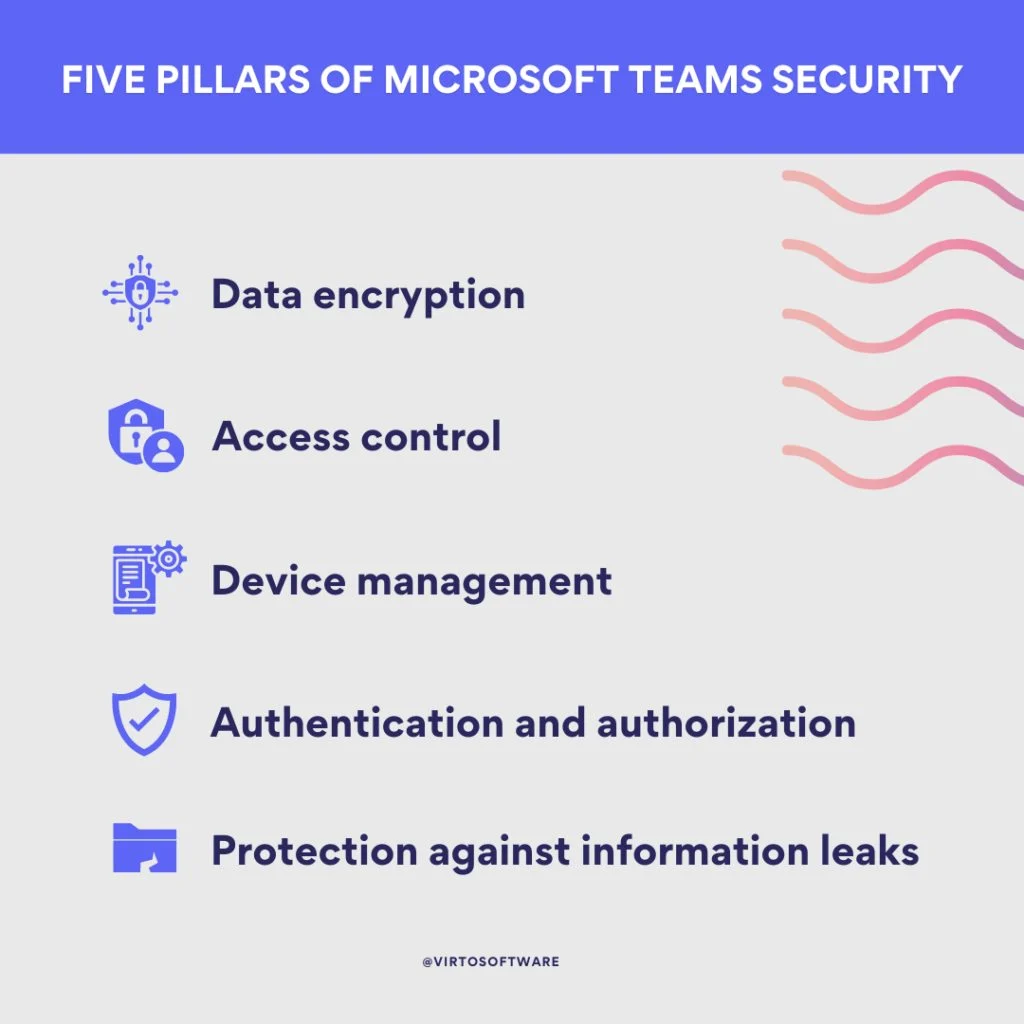
Pic. 1. The five pillars of Microsoft Teams security: encryption, access control, authentication, leak protection, and device management.
Is Teams encrypted?
Yes, on three levels:
- Data in transit. Encrypted between your device and Microsoft data centers using TLS and HTTPS. Real-time media (audio, video, screen sharing) is protected with SRTP.
- Data at rest. Encrypted in Microsoft data centers using BitLocker and Azure Storage Service Encryption.
- End-to-end encryption (E2EE). An optional layer for calls, where only the participants hold the decryption keys — Microsoft itself cannot read the content. Covered in detail below.
Teams also applies message integrity controls, so tampering with a message in transit is detectable.
Can you be monitored through Microsoft Teams?
Yes — and this is by design, not a flaw. Teams is a workplace tool, so your organization’s administrators have legitimate compliance and security reasons to access activity data. Understanding what is visible matters for both employees and admins:
- Messages and chats. Admins can search message content for compliance and eDiscovery purposes.
- Activity feed and analytics. File views, meeting attendance, and call activity are logged and reportable.
- Presence information. Availability status shows when users are active, idle, or away.
- Third-party integrations. Installed apps can extend tracking well beyond Microsoft’s own telemetry — and may not meet the same privacy standards.
Practical takeaway: treat Teams as a corporate record. Keep personal matters on personal channels, and as an admin, publish a clear monitoring policy so employees know where the line sits.
What is the Microsoft Teams privacy policy?
Teams falls under the Microsoft Privacy Statement, which governs the whole Microsoft 365 family. The essentials:
- Microsoft collects data to deliver and improve the service — chat content, files, and meeting recordings live in your tenant.
- Microsoft does not sell your data or share it with third parties without consent, outside narrow legal exceptions.
- You retain control: data can be accessed, exported, or deleted.
- Microsoft complies with applicable data protection law, including GDPR.
- When you use Teams through an employer or school, your administrator controls the account and can access its content.
Microsoft Teams compliance and data residency
For regulated industries, certification is the deciding factor. Teams carries the compliance portfolio of Microsoft 365:
- ISO/IEC 27001. The international standard for information security management systems (ISMS).
- HIPAA. Teams can be used in a HIPAA-compliant manner for protected health information, provided a Business Associate Agreement (BAA) is in place.
- GDPR. Teams supports GDPR obligations for organizations handling EU personal data.
- FERPA. Protects the privacy of student education records for institutions using Teams for Education.
- SOC 1 and SOC 2. Independent audits of internal risk management and operational controls.
- CJIS. Meets the requirements for handling criminal justice information in law enforcement contexts.
Data residency
Where your Teams data physically sits depends on the geography assigned to your tenant. Microsoft operates regional data centers and, through Multi-Geo capabilities, lets multinational organizations pin specific users’ data to specific countries — important if you are subject to data sovereignty rules. Verify your tenant’s data location in the Microsoft 365 admin center rather than assuming it.
👉 Do I need a dedicated security team? Not mandatory — but if you operate in finance, healthcare, or government, dedicated security personnel are effectively a requirement for demonstrating ongoing compliance with GDPR, HIPAA, or SOC 2.
How Teams security compares to alternatives
Teams, Slack, Zoom, and Google Workspace all encrypt data in transit and at rest and all support MFA. The differences show up in depth of administrative control, native DLP, and how tightly identity and device management are integrated.
| Security feature | Microsoft Teams | Slack | Zoom | Google Workspace | |
|---|---|---|---|---|---|
| Encryption (transit + rest) | Yes | Yes | Yes | Yes | TLS; depends on setup |
| End-to-end encryption | Calls (Premium for group) | Enterprise add-on | Meetings | Limited | Rarely |
| Multi-factor authentication | Yes | Yes | Yes | Yes | Varies |
| Access control | Extensive | Extensive | Good | Extensive | Varies |
| Native DLP | Advanced (Purview) | Enterprise Grid | Basic | Advanced | Add-on |
| Device management | Intune integration | MDM support | Basic | Advanced | Varies |
| Audit / eDiscovery | Comprehensive | Good | Good | Comprehensive | Varies |
| HIPAA support | With BAA | Enterprise Grid | HIPAA plan | Certain services | Requires config |
Fig. 1. Comparison of Microsoft Teams security with alternative collaboration platforms.
👉 Is Teams safer than email? Generally, yes. Teams gives you enterprise-grade encryption, MFA, granular access controls, and detailed auditing in one place, and its structured channels reduce the human error that makes email leaks so common. But the real posture always depends on configuration.
End-to-end encryption for Microsoft Teams calls
End-to-end encryption means the data is encrypted on the sender’s device and decrypted only on the recipient’s. No intermediary — not your ISP, not an attacker, not Microsoft — can read the content. Teams offers E2EE for one-to-one calls, with group-call E2EE available in Microsoft Teams Premium.
How to enable end-to-end encryption in Teams
Both participants must have E2EE enabled for it to take effect. In the Teams client:
- Click the ellipsis (…) next to your profile picture and select Settings.
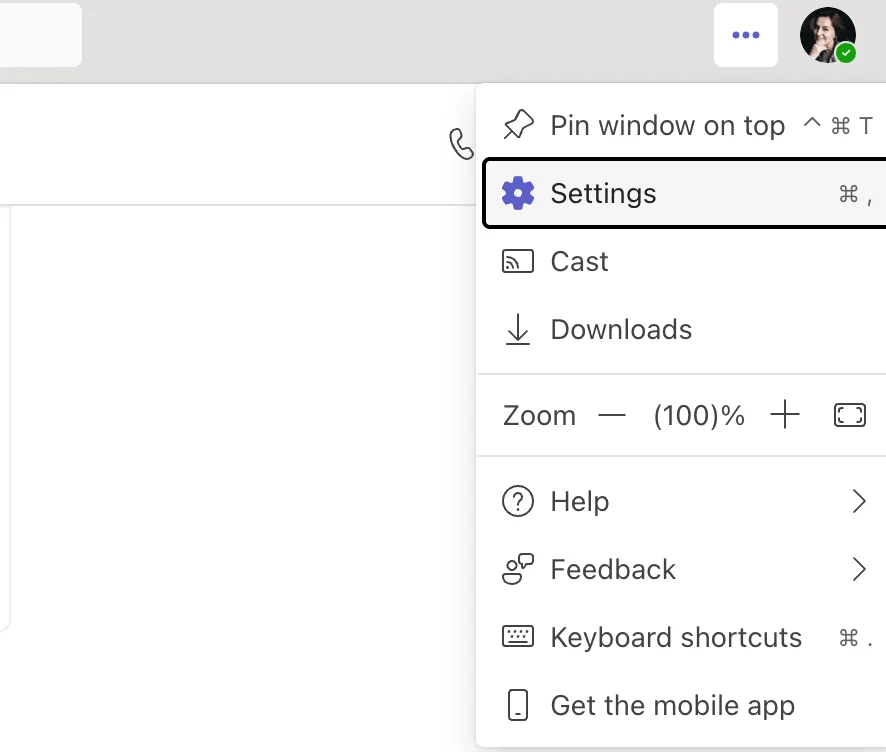
Pic. 2. Open Settings from the ellipsis menu next to your profile picture.
- Choose Privacy in the left sidebar.
- Toggle End-to-end encrypted calls on.
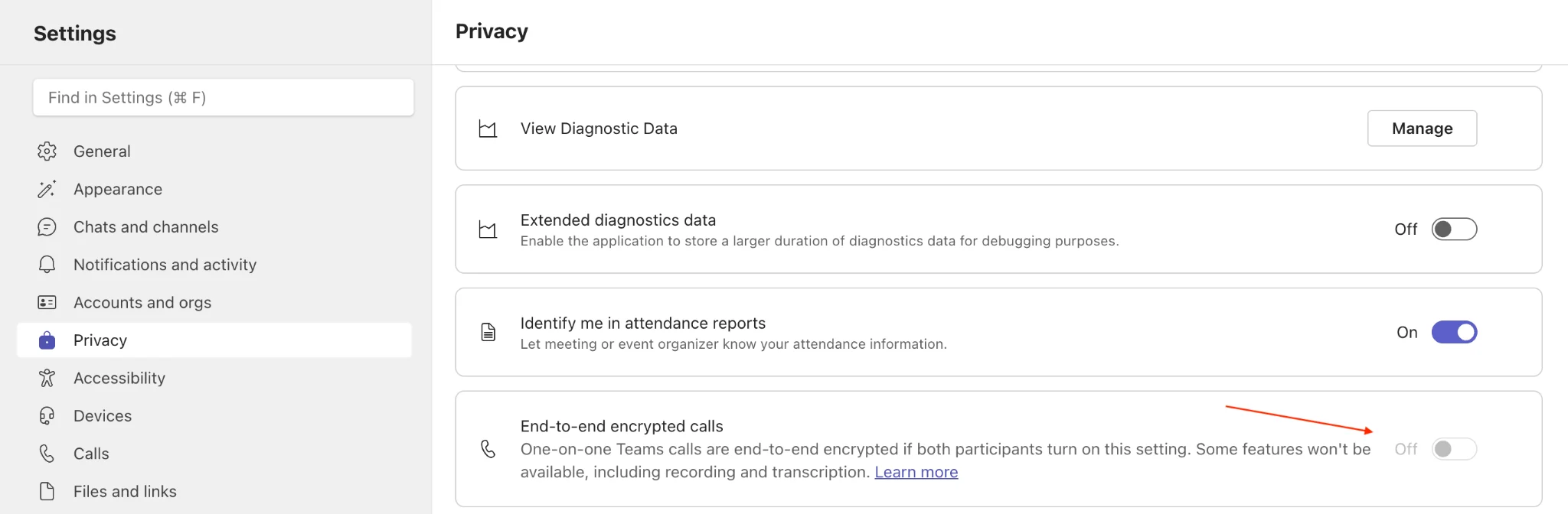
Pic. 3. Toggle the end-to-end encrypted calls switch on in Privacy settings.
If your organization uses compliance recording (enterprise call recording that helps businesses meet specific regulatory requirements), E2EE won’t be available.
To confirm it is active during a call, look for the shield-with-a-lock icon in the top-left of the call window. A shield without a lock means one party has not enabled it.
E2EE limitations to plan around
- Recording, live captions, transcription, call transfer, call merge, call park, and adding participants are unavailable during an E2EE call.
- Compliance recording is not compatible with E2EE — a genuine conflict if your industry mandates call recording.
- Standard E2EE covers 1:1 calls only; group-call E2EE requires Teams Premium.
For the official steps and current limitations, see Microsoft’s guide on using end-to-end encryption for Microsoft Teams calls.
Securing screen sharing and remote control
Giving someone remote control of your desktop in a Teams meeting hands them your session. Treat it accordingly:
- Grant control only to people you have verified, and only when there is a real need.
- Close every document, tab, and application containing sensitive data before you share.
- Watch the session actively and revoke control the moment the task is done.
- If anything looks wrong, disconnect immediately and alert your IT security team.
- Enable logging and auditing of remote-control sessions where your infrastructure supports it.
Running secure Teams meetings
Meeting security is mostly a matter of using the controls that already exist.
Before the meeting:
- Use the lobby to control who enters directly, especially for external guests.
- Restrict who can present to prevent unauthorized screen sharing.
- Send invitations directly — never post meeting links publicly.
- Assign roles deliberately: organizer, presenter, attendee.
During the meeting:
- Admit external participants from the lobby manually.
- Lock the meeting once everyone expected has joined.
- Disable chat, file sharing, or recording if the meeting does not need them.
After the meeting:
- Review the attendance list for anyone unexpected.
- Store recordings with restricted access — a recording is as sensitive as the meeting was.
Microsoft Teams security issues and vulnerabilities
Teams is secure by design, but no complex platform is risk-free. The realistic threat list looks like this:
- Phishing inside Teams. The dominant threat. Attackers send fraudulent messages, files, or meeting invitations — often from a compromised account inside a partner organization, which makes them far more convincing than email phishing. Phishing is the most common initial access vector in breaches overall.
- Compromised and unauthenticated sessions. Stolen tokens or hijacked sessions can expose confidential chats and files without a password ever being cracked.
- Third-party app and integration risk. Every app you install inherits some access to your data. A weak or malicious integration is a side door into an otherwise well-secured tenant.
- Unpatched software. Outdated clients carry known, already-fixed vulnerabilities. Both client and server components need to stay current.
- Misconfiguration and information leaks. The most common real-world cause. Over-permissive guest access, public teams, unmanaged external sharing, and missing DLP policies leak data without any attacker involved.
- Network-level attacks. Credential stuffing, brute-force attempts, and denial-of-service against exposed endpoints.
- Shadow AI and unapproved tools. A newer category: employees pasting sensitive Teams content into unsanctioned AI tools. IBM found unapproved AI use added roughly USD 670,000 to the average breach cost.
How to mitigate these
- Keep the Teams client and all endpoints patched automatically.
- Train users to recognize phishing that arrives via chat, not just email.
- Audit third-party apps and restrict installation to an approved list.
- Enforce MFA and Conditional Access on every account, without exceptions.
- Review guest access and external sharing settings quarterly.
- Deploy endpoint protection and Microsoft Defender for Office 365 to cover Teams messages and links.
- Publish a clear AI usage policy so sensitive content does not leave your tenant through the back door.
Microsoft Teams security best practices
The following measures close most of the gap between “Teams is secure” and “our Teams is secure.”
| Practice | What it does | Who owns it |
|---|---|---|
| Enforce MFA | Blocks account takeover even when a password is compromised. The single highest-impact control. | IT / all users |
| Conditional Access policies | Grants access based on user, device compliance, location, and risk level. | IT |
| Principle of least privilege | Users get access only to the teams, channels, and files their role requires. | IT |
| Restrict guest and external access | Limits who outside your tenant can join teams, chat, and share files. | IT |
| App availability (app centric management) | Allows only vetted third-party apps; blocks unapproved integrations by default. | IT |
| Deploy DLP and sensitivity labels | Detects and blocks sensitive data (PII, PHI, card numbers) leaving Teams. | IT / compliance |
| Retention and eDiscovery policies | Prevents premature deletion and supports legal and regulatory obligations. | Compliance |
| Keep software updated | Removes known, already-patched vulnerabilities from your attack surface. | IT / all users |
| Security awareness training | Teaches users to spot in-chat phishing, verify identities, and report incidents. | All users |
| Monitoring and audit logs | Surfaces anomalous behavior early — the fastest way to reduce breach cost. | IT / security |
| Periodic access reviews | Removes stale permissions, orphaned teams, and departed users. | IT |
| Clear AI and data-sharing policy | Stops sensitive content from being pasted into unapproved external tools. | Leadership / IT |
Fig. 2. Microsoft Teams security best practices and who is responsible for each.
Security is not a project with an end date. Threats change, staff change, and permissions drift. Schedule the reviews rather than reacting to incidents.
How secure are Microsoft Teams integrations?
The Teams app ecosystem is one of its greatest strengths and its widest attack surface. Before installing anything, understand what you are granting.
What third-party apps can access
- Messages. Text, images, and attachments in the chats the app touches — potentially including confidential content.
- Calendars. Reading and sometimes modifying events, which exposes scheduling and attendee information.
- Contacts. Names, email addresses, and phone numbers.
- Profile. Name, photo, job title, and other identity details.
Beyond access, ask where the data goes. Apps may transfer data to sub-processors, store it on servers outside Microsoft Azure, move it across borders into other legal regimes, or hand it to a new owner after an acquisition. Each of those is a potential compliance problem for a regulated organization.
How to vet an integration
- Read the vendor’s privacy policy and security documentation before installing, not after.
- Restrict app permissions to the minimum data the app actually needs.
- Prefer apps distributed through Microsoft AppSource, where listings undergo Microsoft validation.
- Use app centric management in the Teams admin center (Teams apps > Manage apps) to keep unapproved apps unavailable by default.
- Monitor app activity and re-review permissions periodically.
For a deeper look at what Teams integrations can and cannot do, see our guide to Microsoft Teams integrations. For a fuller picture of where the platform stops, see Microsoft Teams limitations, and for the admin-side controls referenced throughout, see the Teams admin center guide.
Why Microsoft-certified apps matter
Microsoft-certified apps — including VirtoSoftware’s Teams apps — have passed Microsoft’s security and data-handling validation. In practice, that means:
- AES-256 encryption. Data handled by Virto apps is encrypted with the same standard Microsoft uses.
- Stringent access protocols. Only authorized users reach your data, and Virto does not share data with third parties.
- Microsoft Azure infrastructure. Virto apps run on Azure, inheriting Microsoft’s physical, network, and compliance controls — so your data never leaves the Microsoft security perimeter.
- ISO/IEC 27001 compliance. A systematic, audited approach to information security management.
- Certified Microsoft partnership. Regular audits confirm continued alignment with Microsoft’s security requirements.
Full details of our security posture, sub-processors, and data handling are published in the VirtoSoftware Trust & Security Center.
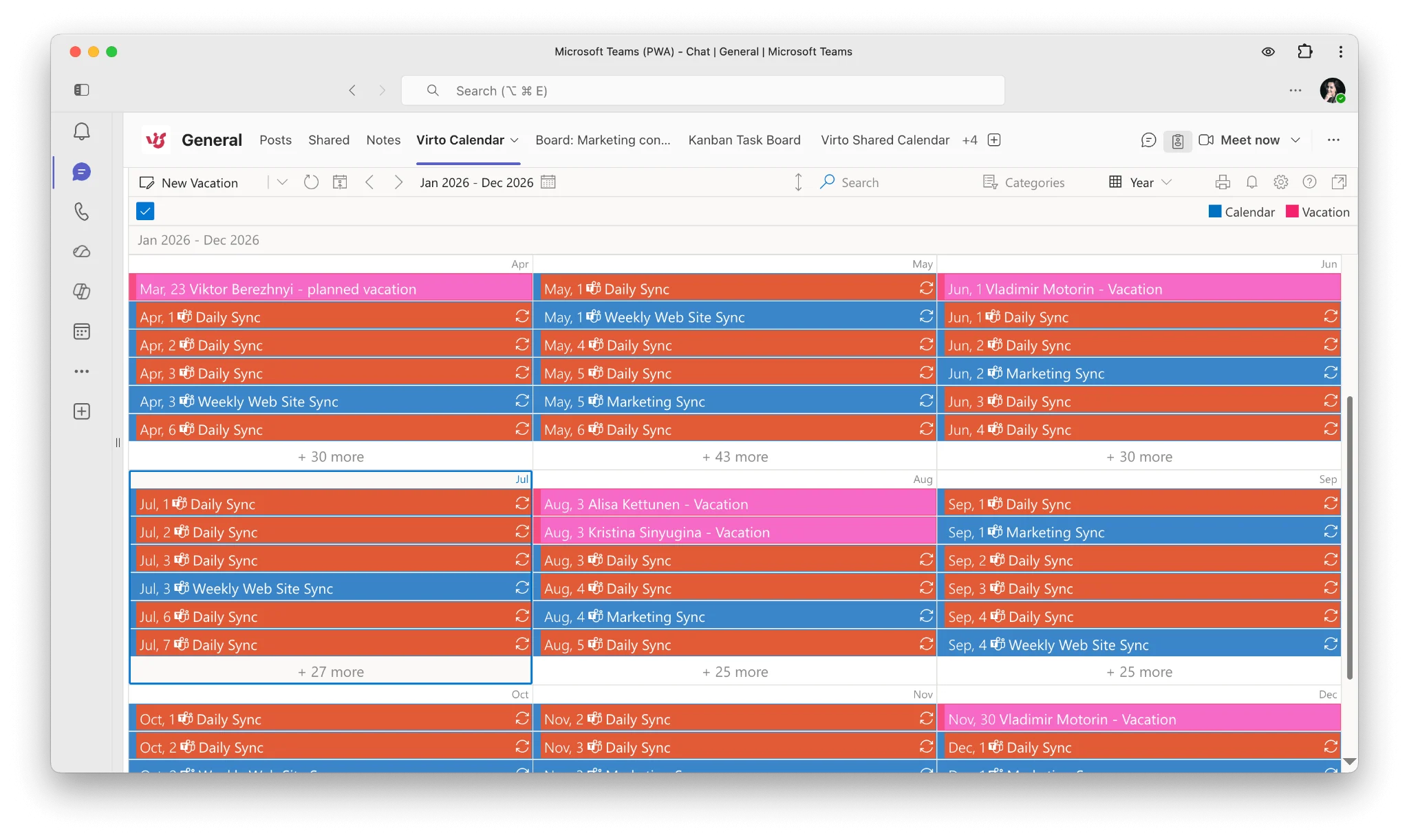
Overlay all your calendars in Teams — securely.
See all your Microsoft 365 calendars in one view, inside a Microsoft-certified app that keeps your data in Azure. Try Virto Calendar for free.
FAQ
Is Microsoft Teams secure?
Yes. Teams encrypts data in transit and at rest, offers optional end-to-end encryption for calls, holds Microsoft 365 compliance certifications, and provides granular admin controls. Its real-world security depends on correct configuration.
Is Microsoft Teams HIPAA compliant?
Teams can be used in a HIPAA-compliant way. Microsoft offers a Business Associate Agreement (BAA) covering Microsoft 365 and Teams, which is required for covered entities. Compliance also depends on how you configure DLP, retention, and access.
Are Teams messages private?
They are private from outsiders, not from your employer. Teams is built for organizational collaboration, so administrators can access message content for compliance, security, and legal purposes. Do not treat Teams as a private channel.
Does Microsoft Teams have end-to-end encryption?
Yes, optionally, for one-to-one calls. Both participants must enable it. End-to-end encryption for group calls requires Microsoft Teams Premium. E2EE disables recording, transcription, and call transfer.
Can my employer read my Teams chats?
Yes, with the appropriate administrative permissions. Compliance and eDiscovery tools allow authorized admins to search chat content. Most organizations restrict this to legal or investigatory contexts, but the technical capability exists.
Is Teams safer than email?
Generally yes. Teams offers stronger built-in encryption, MFA, access controls, and auditing than most email setups, and its structured channels reduce accidental leaks. Both are only as safe as their configuration.
What is the biggest Microsoft Teams security risk?
Misconfiguration and phishing. Over-permissive guest access, unmanaged third-party apps, and in-chat phishing cause far more incidents than flaws in the platform itself.
Where is Microsoft Teams data stored?
In Microsoft data centers, in the geography assigned to your tenant. Multi-Geo capabilities let multinational organizations pin specific users’ data to specific regions. Check your tenant’s data location in the Microsoft 365 admin center.
Conclusion
Microsoft Teams is built on enterprise-grade security: layered encryption, a deep compliance portfolio, and administrative controls that are genuinely comprehensive. The platform is not the weak point.
The weak points are configuration, third-party apps, and people. Over-permissive guest access, an unvetted integration, an unpatched client, or a convincing phishing message in a channel will defeat any amount of platform-level encryption. Securing Teams means enforcing MFA and Conditional Access, restricting external and app access, deploying DLP, training users on in-chat phishing, and reviewing permissions on a schedule rather than after an incident.
VirtoSoftware builds Microsoft-certified apps that live inside the Microsoft security perimeter — AES-256 encryption, Azure infrastructure, ISO/IEC 27001 compliance, and no third-party data sharing. Explore our Microsoft Teams apps or review our security documentation in the Trust & Security Center.
References
(1) IBM Cost of a Data Breach Report — global and US average breach costs, attack vectors, and AI-related risk.
(2) Security guide for Microsoft Teams (Microsoft Learn)
(3) Overview of security and compliance in Microsoft Teams (Microsoft Learn)
(4) Microsoft Teams security, compliance and privacy (Microsoft)
(5) Teams security best practices for safer messaging (Microsoft Learn)