Every Microsoft Teams tenant runs inside a set of hard caps: how many people can join a team, how many channels it can hold, how big a file can be, how long a meeting can run. Most of them you will never hit. A few of them — private channel members, chat size, event capacity — changed significantly in 2026, and a lot of what you will read elsewhere is now wrong.
This guide lists the current Microsoft Teams limits, verified against Microsoft Learn, explains what each one actually means in day-to-day use, and shows where to go when a limit genuinely blocks you.
Quick answer: A Microsoft Teams team holds up to 25,000 members, 100 owners and 1,000 channels (standard, private and shared combined). A private chat holds 250 people; a chat or channel post is capped at roughly 100 KB. Meetings run up to 30 hours with 1,000 interactive participants (300 on Business plans) plus up to 10,000 view-only attendees. Single files can be up to 250 GB, and each tenant gets 1 TB of SharePoint storage plus 10 GB per licensed user.
What Changed in Microsoft Teams Limits in 2026
If you are working from an older reference — or an older version of this article — check these five items first. They are the ones most likely to be out of date.
| What you may have read | What is true in 2026 |
|---|---|
| Private channels are capped at 30 per team | Private channels now count inside the overall 1,000-channel-per-team limit |
| A private channel holds 250 members | A private channel holds 5,000 members; a shared channel holds 5,000 direct members |
| Chat messages are limited to 28 KB | Chat and channel posts are capped at approximately 100 KB per post |
| Teams live events support 20,000 attendees for 16 hours | Teams live events retired on 30 June 2026. Already-scheduled events are honoured until 28 February 2027. Town halls replaced them |
| Large events need a Teams Premium licence | Since 1 April 2026 several event capabilities moved into Teams Enterprise. Capacity above 3,000 engaged attendees now needs an Attendee Capacity Pack add-on |
One more that catches people out: Microsoft 365 Connectors (previously Office 365 Connectors) were retired in May 2026. Incoming webhooks that used them must be rebuilt on the Workflows app or Power Automate.
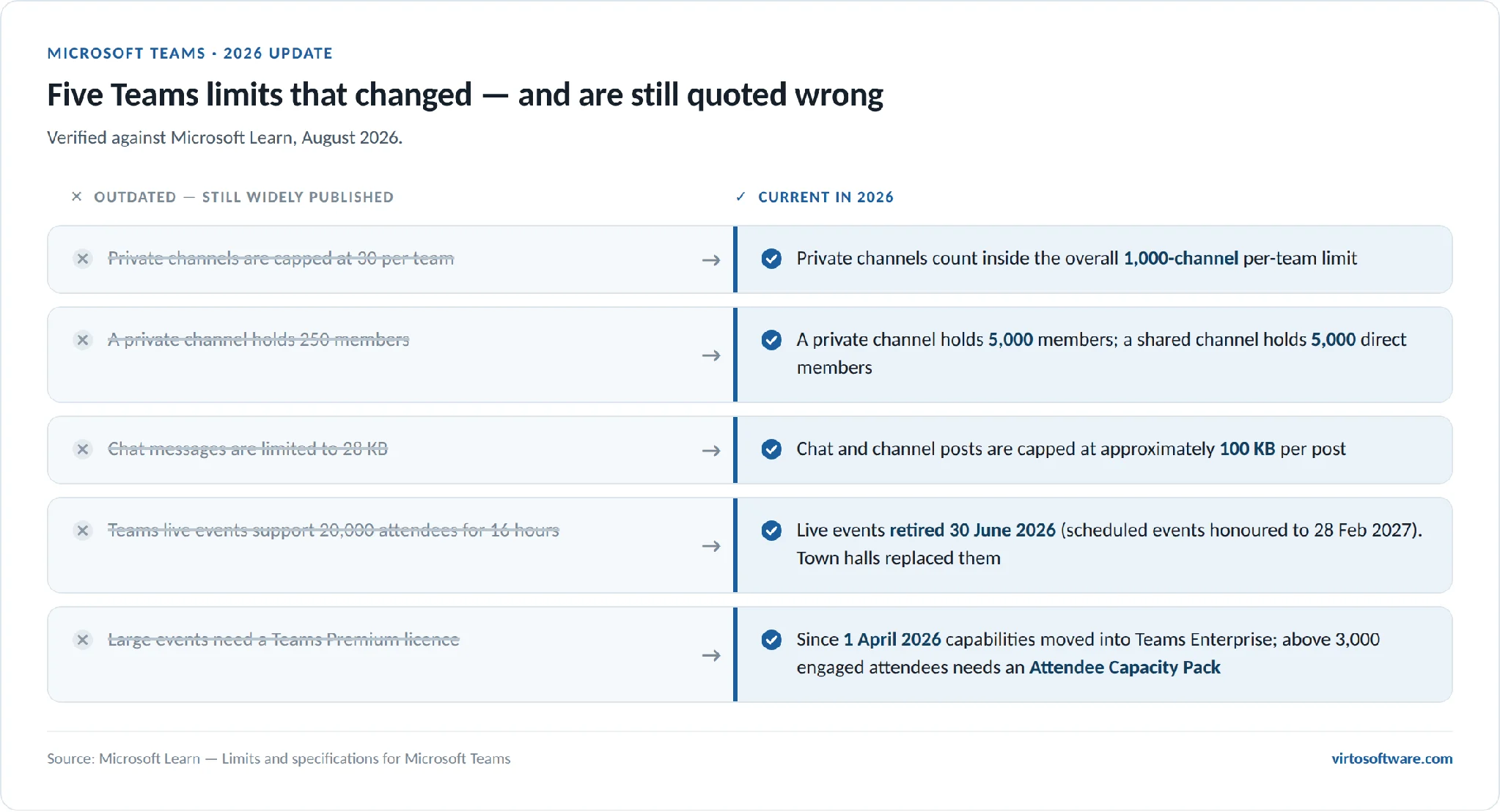
Pic.1. Five Microsoft Teams limits that changed in 2026 — outdated figures still widely published, and what is true now.
What Are the Limitations of Microsoft Teams?
Teams limits fall into six practical groups:
- Structural limits — how many teams, channels, members and owners you can have.
- Messaging limits — chat size, group chat size, email-to-channel rules.
- Meeting and event limits — participants, duration, recording length, event capacity.
- Storage and file limits — inherited from SharePoint Online and OneDrive for Business.
- Technical limits — hardware, operating system and browser requirements.
- App and governance limits — which apps are available, and what admins allow.
Almost every “Teams is blocking me” complaint traces back to one of these six. The tables below give the current numbers for each.
Microsoft Teams Limits: Specifications Table
This is the short version — the numbers people actually search for. Detail and caveats follow underneath.
| Limit | Maximum |
|---|---|
| Members in a team | 25,000 |
| Owners per team | 100 |
| Channels per team | 1,000 (standard + private + shared combined) |
| Members in a private channel | 5,000 |
| Members in a shared channel | 5,000 direct members, shared with up to 50 teams |
| Teams a user can belong to | 1,000 (including archived) |
| Teams per organisation | 500,000 |
| People in a private chat | 250 |
| Chat or channel post size | ~100 KB |
| File attachments in a chat message | 10 (100 MB each) |
| File upload size | 250 GB per file |
| Meeting participants | 300 or 1,000 depending on licence, plus 10,000 view-only |
| Meeting, webinar and town hall duration | 30 hours |
| Meeting recording length | 4 hours or 1.5 GB |
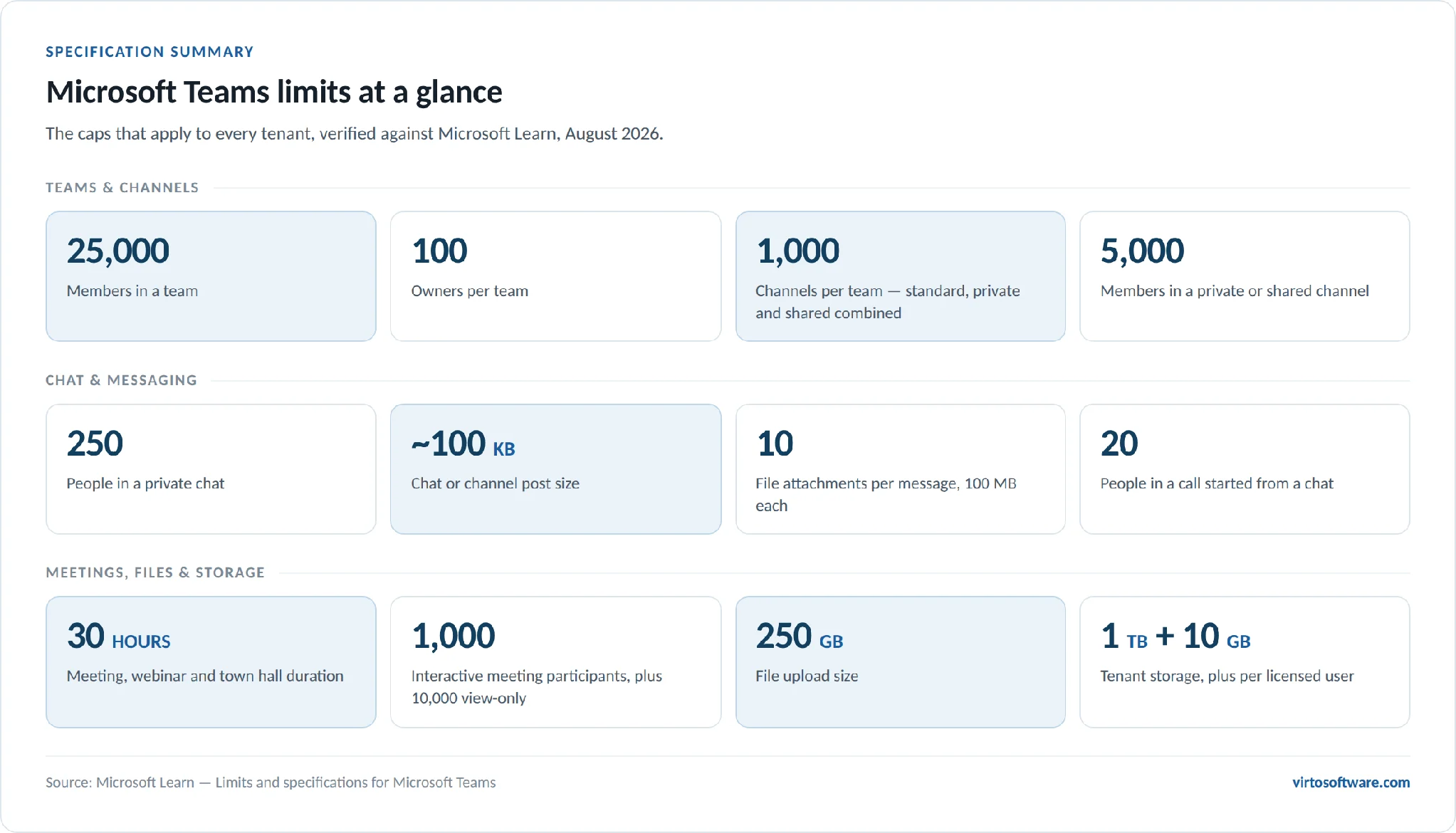
Pic.2. Microsoft Teams limits at a glance — the headline caps for teams, chat, meetings and storage.
Teams, Channels and Member Limits
| Feature | Maximum limit |
|---|---|
| Number of members in a team | 25,000 |
| Number of owners per team | 100 |
| Number of channels per team | 1,000, including deleted channels for 30 days |
| Number of private channels per team | Counted inside the 1,000-channel total |
| Number of members in a private channel | 5,000 |
| Number of teams a user can create | Subject to a 250 directory-object limit |
| Number of teams a user can be a member of | 1,000, including archived teams |
| Org-wide teams per tenant | 5, with up to 10,000 members each |
| Teams per Microsoft 365 organisation | 500,000 |
| Distribution list or group that can be imported into a team | 3,500 |
| Microsoft 365 group that can be converted to a team | 10,000 members |
Three notes worth knowing before you plan a structure:
- Deleted channels keep counting. A channel you delete still occupies a slot in the 1,000 limit for 30 days, until it becomes unrecoverable. Teams that churn through project channels can hit the ceiling with far fewer than 1,000 live channels.
- Above 10,000 members, @team and @channel mentions are blocked. This is deliberate — it stops one post notifying a small city.
- Org-wide teams are capped at 10,000 members, not 25,000. If your organisation is larger than that, an org-wide team is not the right tool; use a communication site or a town hall instead.
Shared channels add their own rules: they support tabs (except Stream, Planner and Forms), but bots, connectors and message extensions do not work in them, and they cannot be used in class teams. A single shared channel can be shared with up to 50 other teams.
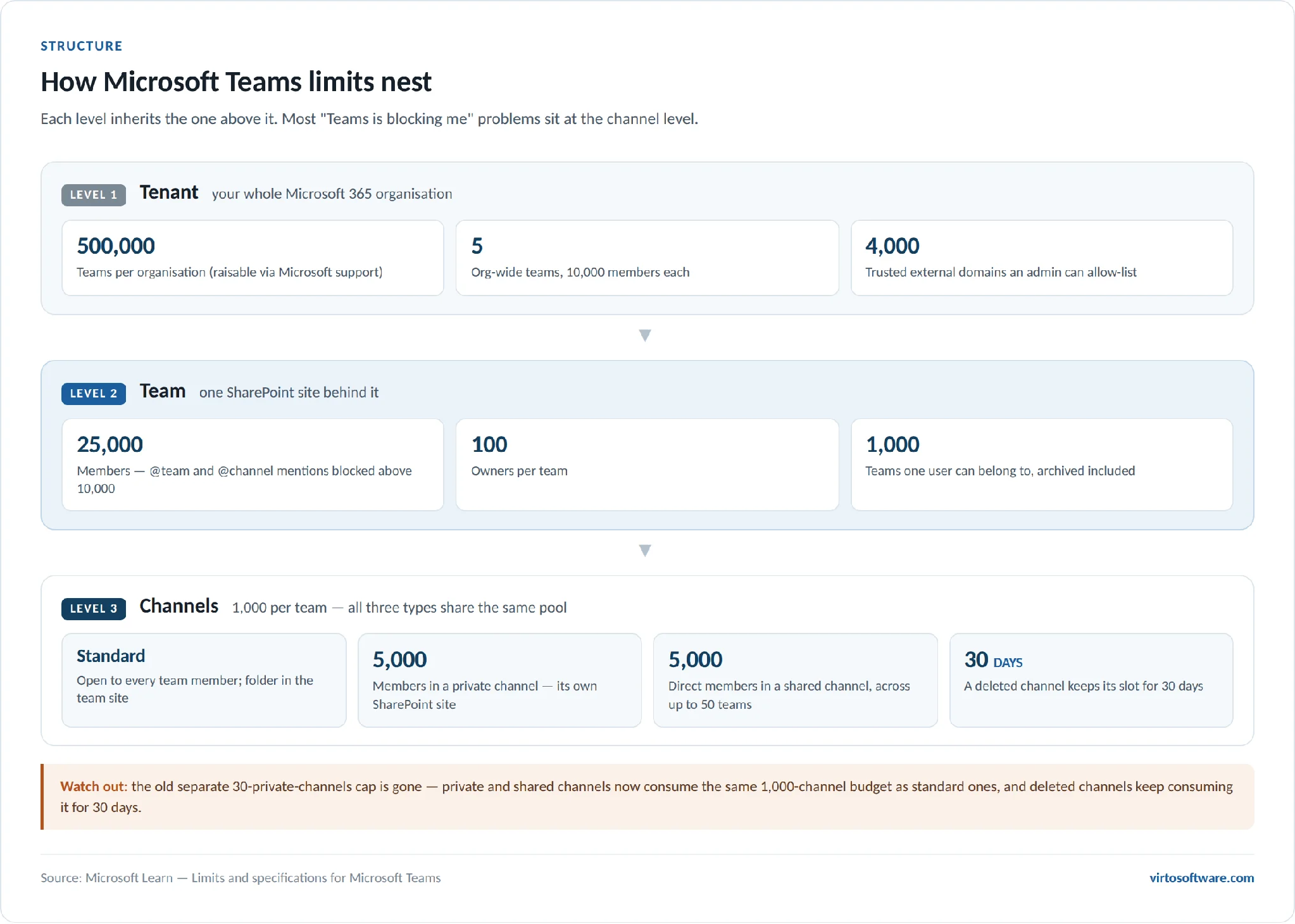
Pic.3. How Microsoft Teams limits nest — tenant, team and channel levels.
Microsoft Teams Message and Chat Limits
| Feature | Maximum limit |
|---|---|
| People in a private chat | 250 (only 200 can be added at once) |
| People in a video or audio call started from chat | 20 |
| File attachments per chat message | 10 |
| File size per chat attachment | 100 MB |
| Chat or channel post size | ~100 KB (keep under 80 KB for reliable delivery) |
| Trusted external domains an admin can allow-list | 4,000 |
The 100 KB post limit is approximate because it counts the text, image links, @-mentions and reactions together — but not base64-encoded images. In practice you will only hit it by pasting a very long formatted document into a post.
The more disruptive threshold is 20 people in a group chat. Cross it and Teams silently switches several features off: typing indicators, read receipts, video and audio calling from the chat, sharing, Teams status messages and Outlook automatic replies. Nothing warns you. If a group chat has quietly stopped showing read receipts, count the members.
Email to a Channel
| Feature | Maximum limit |
|---|---|
| Message size | 24 KB |
| Number of file attachments | 20 |
| Size of each attachment | Less than 10 MB |
| Number of inline images | 50 |
| Throttling | 6 emails per 10 seconds per channel per user; 8 per 10 seconds per tenant per user |
Emails over 24 KB are not rejected — Teams posts a preview and a download link instead. Emailing a channel is not available to GCC, GCC High or DoD organisations.
Microsoft Teams Meeting and Event Limits
| Feature | Maximum limit |
|---|---|
| Meeting participants — Business Basic, Business Standard, Business Premium, Teams Essentials, A1 | 300 |
| Meeting participants — E3, E5, F1, F3, A3, A5, G3, G5, Teams EEA | 1,000 interactive |
| View-only attendees beyond the interactive limit | 10,000 (11,000 total in a meeting) |
| Meeting, webinar and town hall duration | 30 hours |
| Video or audio call from chat | 20 people |
| Breakout rooms | Only in meetings under 300 attendees |
| PowerPoint Live file size | 2 GB |
| Meeting recording length | 4 hours or 1.5 GB, then it restarts automatically |
| Local availability of recordings not uploaded to Stream | 20 days |
Two behaviours behind these numbers matter more than the numbers themselves. First, the view-only overflow is not automatic everywhere — it applies to standard meetings, and only when the organiser’s meeting policy allows it and attendees can bypass the lobby. If either condition fails, extra attendees are simply refused. Second, creating a breakout room in a meeting permanently caps that meeting at 300 attendees, even if you were licensed for 1,000.
Teams Events: The 2026 Model
Teams live events retired on 30 June 2026. Events already scheduled before that date run until 28 February 2027; everything new goes through the Events app, which uses town hall and webinar templates rather than fixed event types.
| Event capacity | What attendees can do |
|---|---|
| Up to 1,000 attendees | Full interaction: microphone, camera, chat, reactions, raise hand, polls, Q&A |
| Up to 3,000 attendees | Large-event chat, reactions, raise hand, polls, Q&A |
| Up to 10,000 attendees | View-only, with Q&A |
| Up to 100,000 attendees | Requires an Attendee Capacity Pack add-on licence |
Attendee Capacity Packs come in 5K, 10K, 20K, 35K, 50K, 75K and 100K sizes, and each organiser can hold one pack at a time. Organisers, co-organisers and presenters do not count against the attendee cap. Across the whole organisation, up to 50 events can run concurrently, and Microsoft recommends its Teams Events Services for anything above 20,000 attendees.
Meetings also expire. A one-off scheduled meeting link stops working 60 days after the meeting time; a recurring series with no end date expires one year after it was last joined or updated. Joining or updating a meeting before it expires adds another 60 days.
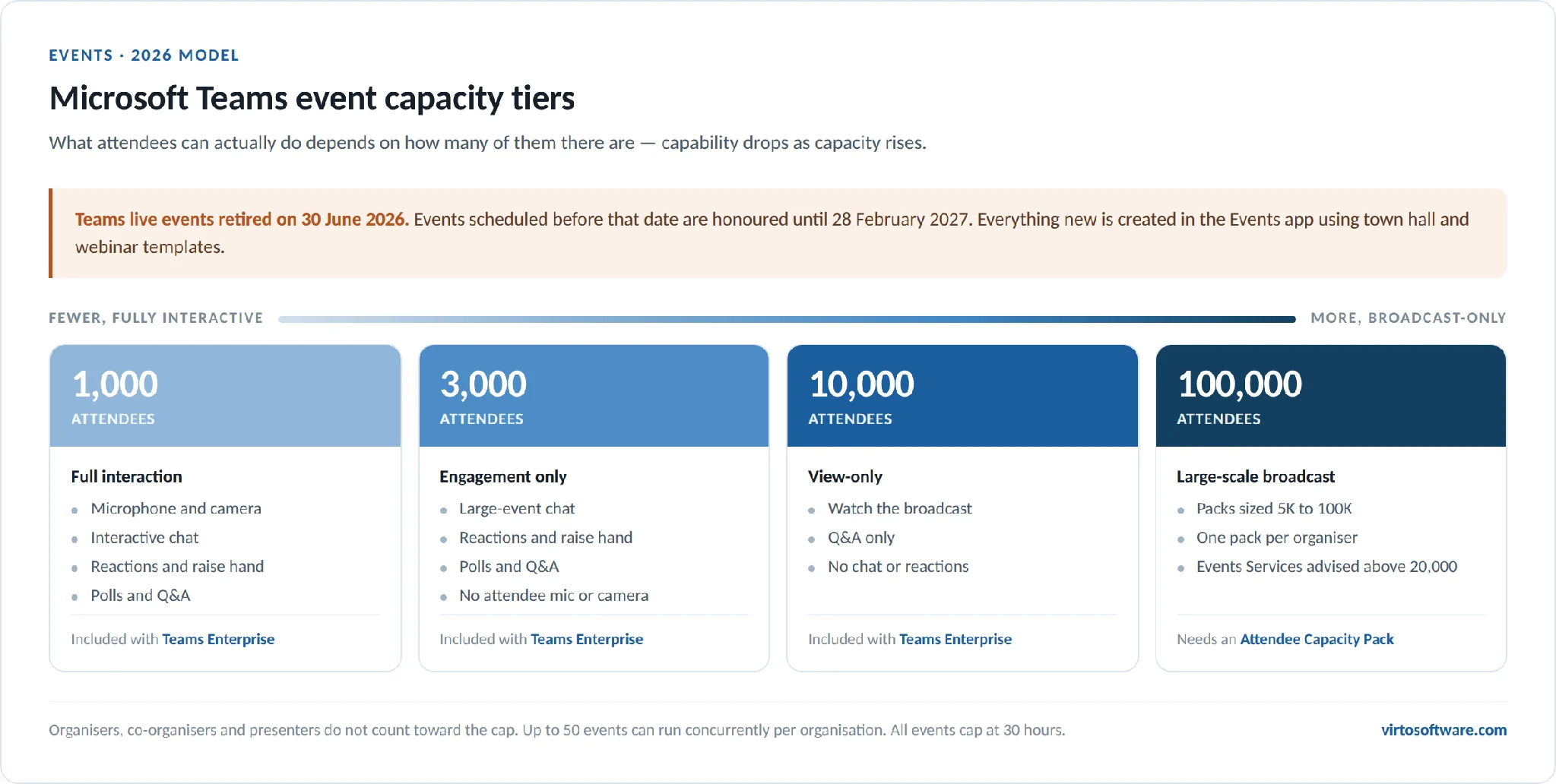
Pic.4. Microsoft Teams event capacity tiers in 2026 — capability drops as capacity rises.
Microsoft Teams File Size and Storage Limits
Teams does not have its own file storage. Channel files live in the team’s SharePoint site, private-channel files live in that channel’s own SharePoint site, and chat files live in the sender’s OneDrive for Business. Every storage limit you hit in Teams is really a SharePoint limit.
| Feature | Limit |
|---|---|
| File upload size | 250 GB per file |
| Tenant storage | 1 TB per organisation plus 10 GB per licensed user |
| Storage per site or group | Up to 25 TB |
| File attachment in a chat message | 100 MB |
| Free plan cloud storage | 5 GB per user |
Office 365 Enterprise F1 is the exception: 1 TB per organisation with no per-licence addition. If you are running out of room, the fix is almost always archiving inactive teams and clearing the SharePoint recycle bins rather than buying storage — deleted files count against your quota for 93 days.
Microsoft Teams Technical Specifications
Minimum requirements for the Teams desktop client:
| Component | Windows | macOS |
|---|---|---|
| Processor | 1.1 GHz or faster, two cores | Dual-core |
| Memory | 4 GB RAM | 4 GB RAM |
| Disk space | 3 GB | 1.5 GB |
| Display | 1024 x 768 | 1200 x 800 |
| Operating system | Windows 10 build 19041 or higher (LTSC not supported) | One of the three most recent macOS versions |
Microsoft’s recommended specifications are higher than the minimums for common scenarios: a four-core processor from 2018 or later for meetings with more than 10 participants, and 8 GB RAM plus a four-core processor for Avatars and Mesh experiences.
Mobile support runs to the two most recent major versions of iOS and the four most recent major versions of Android. Teams for Web is supported on the latest three versions of Edge, Chrome and Firefox, and the latest two versions of Safari — but it is not supported in VDI environments or on mobile browsers, and it needs third-party cookies enabled for some line-of-business apps.
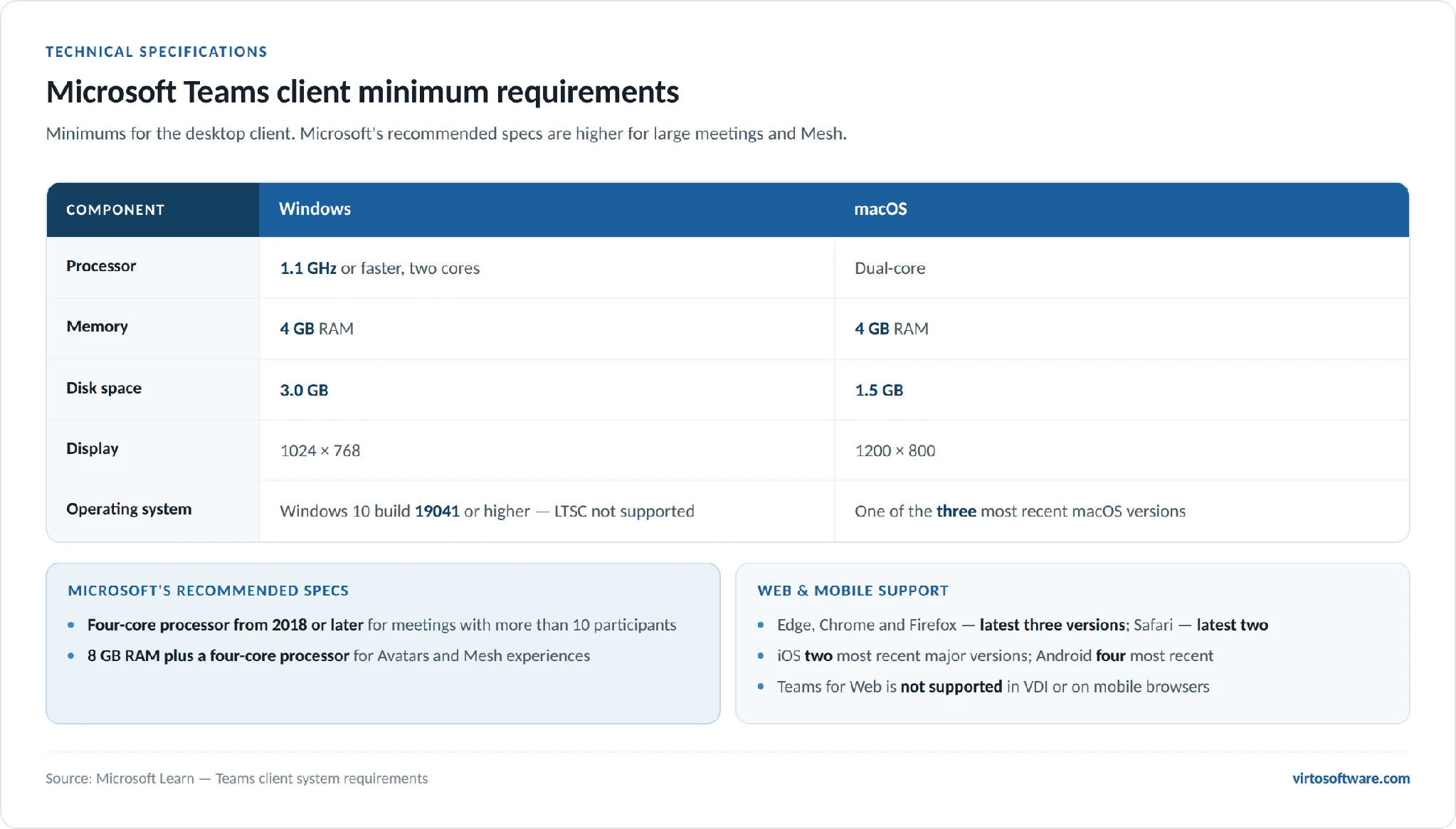
Pic.5. Microsoft Teams client minimum requirements for Windows and macOS.
The Free Plan
Microsoft Teams (free) is a different set of limits again: 100 participants per meeting, 60 minutes for group meetings, 30 hours for one-to-one calls, and 5 GB of cloud storage per user. The 60-minute cap is the one people run into, and it does not apply to paid plans — Teams Essentials and above give you 30 hours and 300 participants.
App and Integration Limits
The number of apps you can add to Teams is not capped in any practical sense, but availability is, and by more than you might expect:
- Licensing. Many apps need their own subscription on top of Microsoft 365.
- Regional availability. Some apps are not published in every market, and GCC, GCC High and DoD tenants have a much smaller catalogue.
- Admin policy. Per-app availability (app centric management) and app setup policies in the Teams admin center decide what your users actually see.
- Certification. Microsoft 365 Certification and Teams app certification are what many organisations gate on before allowing a third-party app.
- Channel type. Shared channels do not support bots, connectors or message extensions, and Stream, Planner and Forms tabs are unavailable in them.
Team templates carry their own caps: 15 channels, 20 tabs per channel and 50 apps per template. You can add more after the team is created — the limit applies to the template, not the finished team.
The biggest recent change here is the retirement of Microsoft 365 Connectors in May 2026. Anything that used an incoming webhook connector to post alerts into a channel now needs to be rebuilt on the Workflows app or Power Automate. For a full walkthrough of what is available and how to choose, see our guides to best Microsoft Teams apps and Microsoft Teams integrations.
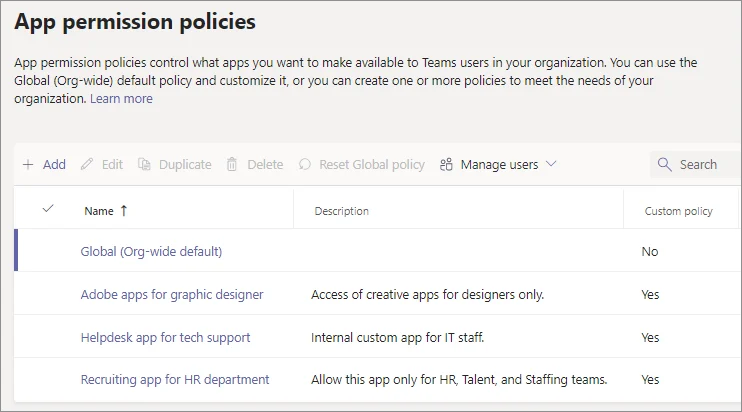
Pic.6. Teams apps > Manage apps in the Microsoft Teams admin center. With app centric management, the Available to column sets who can use each app: everyone, specific users or groups, or no one.
Security and Compliance Constraints
Teams inherits the Microsoft 365 security stack: multi-factor authentication, single sign-on, conditional access, encryption in transit and at rest, and compliance coverage including GDPR, HIPAA and the SOC standards. The constraints that matter for this article are the practical ones — external access is limited to 4,000 allow-listed trusted domains, shared channels accept only Microsoft Entra work or school accounts for external participants, and third-party apps sit outside Microsoft’s compliance boundary unless you have vetted them yourself.
For governance settings, retention policies, guest access and data residency in detail, see our full guide to Microsoft Teams security and data privacy.
Working Around Microsoft Teams Limits
Most limits are worked around by structure rather than by tooling:
- Split by function, not by headcount. Several focused teams are easier to run than one 25,000-member team where mentions are disabled anyway.
- Archive instead of deleting. Archived teams keep their content readable and stop cluttering the sidebar, and deleted channels tie up a slot for 30 days regardless.
- Use shared channels for cross-org work. One shared channel with 50 partner teams beats 50 guest accounts.
- Move broadcasts to town halls. If you are trying to squeeze 3,000 people into a meeting, you want an event, not a meeting.
- Rebuild connector-based alerts on Workflows — connectors stopped posting in May 2026.
Where Teams genuinely has no native answer is aggregation — one view across many calendars, boards or lists. Teams gives each team its own calendar and its own planner, and no built-in way to see them together. That is the gap third-party apps fill.
Virto apps for Teams extend Teams beyond its native limits in exactly that direction. Virto Calendar App overlays multiple Microsoft 365, Exchange, SharePoint and Google calendars into a single colour-coded view inside a Teams tab, so a project spanning six teams stops meaning six calendars. It is not limited to a tab, either: it can be added as an app in Microsoft Teams, in Outlook and in the Microsoft 365 app — including the Teams mobile app — so the same overlay is there wherever you check your schedule. Virto Kanban Board App gives a shared board across SharePoint lists, and Virto Notifications & Reminders App covers the digest and reminder scenarios that native Teams alerts do not — including the ones orphaned by the connector retirement.
All Virto apps come with a 30-day free trial, and you can schedule a live demo if you would rather see them against your own tenant first.
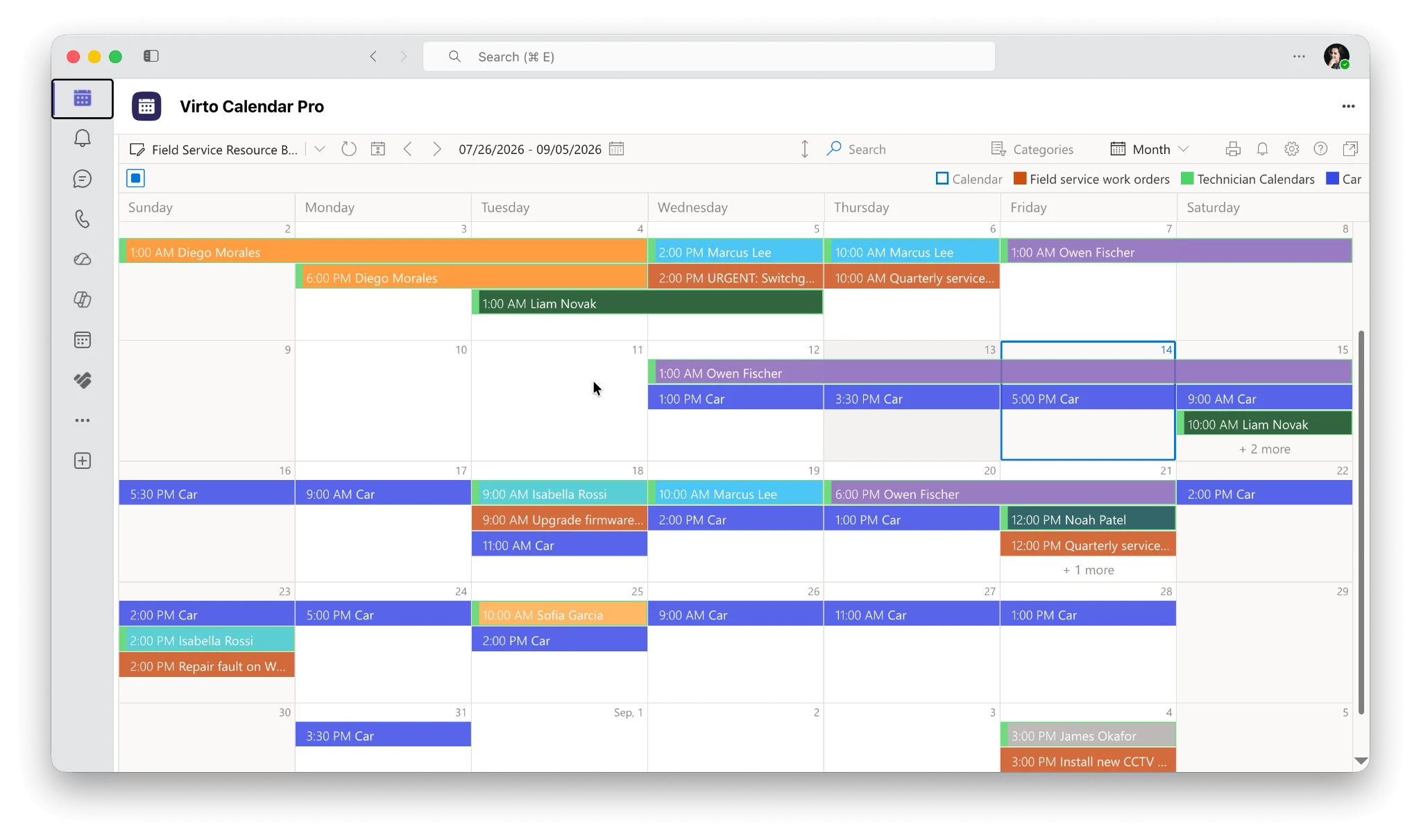
Pic.7. Virto Calendar App overlaying multiple calendars in Microsoft Teams.
FAQ
What are the limits of Microsoft Teams?
A team holds up to 25,000 members, 100 owners and 1,000 channels of any type. A private chat holds 250 people and each post is capped at roughly 100 KB. Meetings support 300 participants on Business plans or 1,000 on Enterprise plans, plus up to 10,000 view-only attendees, and run for up to 30 hours. Files can be up to 250 GB each, within 1 TB of tenant storage plus 10 GB per licensed user.
How many people can be in a Microsoft Teams team?
25,000 members, including anyone joining through a shared channel. Org-wide teams are capped lower, at 10,000. Above 10,000 members, @team and @channel mentions are blocked.
How many channels can a Microsoft Teams team have?
1,000, counting standard, private and shared channels together, and counting deleted channels for 30 days after deletion. The old separate 30-private-channel cap no longer applies.
What is the Microsoft Teams file size limit?
250 GB for a file uploaded to a channel or a team’s SharePoint library. Files attached directly to a chat message are limited to 100 MB, with 10 attachments per message.
Is there a message length limit in Microsoft Teams?
Yes — approximately 100 KB per chat or channel post. That counts the text, links, mentions and reactions, but not base64-encoded images. Microsoft recommends staying under 80 KB for reliable delivery.
Does Microsoft Teams have a meeting time limit?
Paid plans allow 30 hours for meetings, webinars and town halls. The free plan allows 60 minutes for group meetings and 30 hours for one-to-one calls. Meeting recordings stop and restart automatically at 4 hours or 1.5 GB.
How many people can join a Microsoft Teams meeting?
300 on Business Basic, Business Standard, Business Premium, Teams Essentials and A1. 1,000 interactive participants on E3, E5, F1, F3, A3, A5, G3, G5 and Teams EEA plans, with up to 10,000 more in view-only mode where policy allows it.
What happened to Teams live events?
They retired on 30 June 2026. Events scheduled before that date are honoured until 28 February 2027. New large-scale events are created as town halls in the Events app, which support up to 10,000 view-only attendees on Teams Enterprise and up to 100,000 with an Attendee Capacity Pack.
How much storage does Microsoft Teams give you?
1 TB per organisation plus 10 GB per licensed user, with up to 25 TB per team site. The free plan gives 5 GB per user. Storage is SharePoint Online storage — Teams has none of its own.
Can you increase Microsoft Teams limits?
A few of them. The 500,000-teams-per-organisation cap can be raised by contacting Microsoft support for genuine production scenarios, and event capacity can be raised with an Attendee Capacity Pack. Structural limits such as 25,000 members per team and 1,000 channels per team are fixed.
Conclusion
Microsoft Teams limits are generous enough that most organisations never see them — and specific enough that when you do hit one, it is usually a sign the structure needs rethinking rather than the licence needing upgrading. The numbers in this guide are current as of 2026, but Microsoft revises them regularly, so check the official limits and specifications page before making an architectural decision that depends on one.
Where Teams leaves a real gap is in seeing across teams rather than within one. Virto apps for Teams close that gap with overlay calendars, shared boards and richer notifications, all free to trial for 30 days.