


Juggling multiple projects? Kanban could be your project management savior. This expert guide explores how visual workflow management streamlines cross-initiative chaos — one board vs. many, swimlanes, tags, WIP limits, and the best practices that keep every project moving.
Keeping multiple plates spinning without dropping one is every juggler’s nightmare. For project managers, the “plates” are priorities, deadlines, and stakeholder needs across a growing slate of initiatives under their direction. Studies confirm project leaders are no strangers to this act — 85% oversee multiple ongoing efforts (1).
With so much on their plates, project leaders need reliable systems to organize their efforts. An effective management tool is critical when overseeing a variety of initiatives. One solution that has become incredibly popular is Kanban, a visual workflow management method.
Contrary to popular belief, Kanban is not just for small teams. According to a Business Process Management survey, companies with 10,000+ employees constitute the largest group using Kanban practices. Major corporations like Pixar, Spotify, Zara, and Toyota swear by Kanban to optimize their systems. If you’re yet to explore Kanban’s transformative potential, this guide is your gateway to using it for managing multiple projects.
Why trust us? At VirtoSoftware, we have empowered thousands of teams in their project management endeavors over the last 25 years, crafting tools like the Virto Kanban Board and Virto Calendar App, specifically designed for collaborative efforts in the Microsoft ecosystem. With our guidance, you’re in capable hands for mastering project management, particularly within complex, multi-project environments.
Quick answer: can a Kanban board handle multiple projects?
Yes. You can run multiple projects on one Kanban board using swimlanes, tags, and color-coding to keep each project distinct — or you can use one board per project plus a single consolidated overview board. Whichever model you pick, separate projects with swimlanes or tags and enforce WIP limits per stage to keep flow under control.
Challenges of managing multiple projects
Running several projects at once is a complex task that stretches both project managers and the teams executing the work. The most common pain points are:
- Resource allocation conflicts: balancing personnel, equipment, and time across projects without overloading people or colliding schedules.
- Prioritization and focus: with projects running concurrently, attention gets diluted, which hurts quality and on-time delivery.
- Communication overload: more projects mean more teams and stakeholders to coordinate, raising the risk of miscommunication.
- Tracking progress: delays in one project can cascade into others, so managers need a reliable cross-project view.
- Finding the right tools: no single tool fits every project, which pushes teams toward adapting tools or juggling several at once.
👉 For general, tool-agnostic guidance on running several projects at once, see our companion guide: How to Manage Multiple Projects: Expert Advice & Software Tools.
Can one Kanban board hold multiple projects?
A Kanban board visualizes work as it moves through a process: columns are workflow stages, cards are tasks. If you need a refresher on board structure, columns, and core benefits, see our digital Kanban board guide. For multi-project work, the key point is that a single board can show tasks from several projects at once — with swimlanes, tags, and color-coding doing the work of keeping each project distinct.
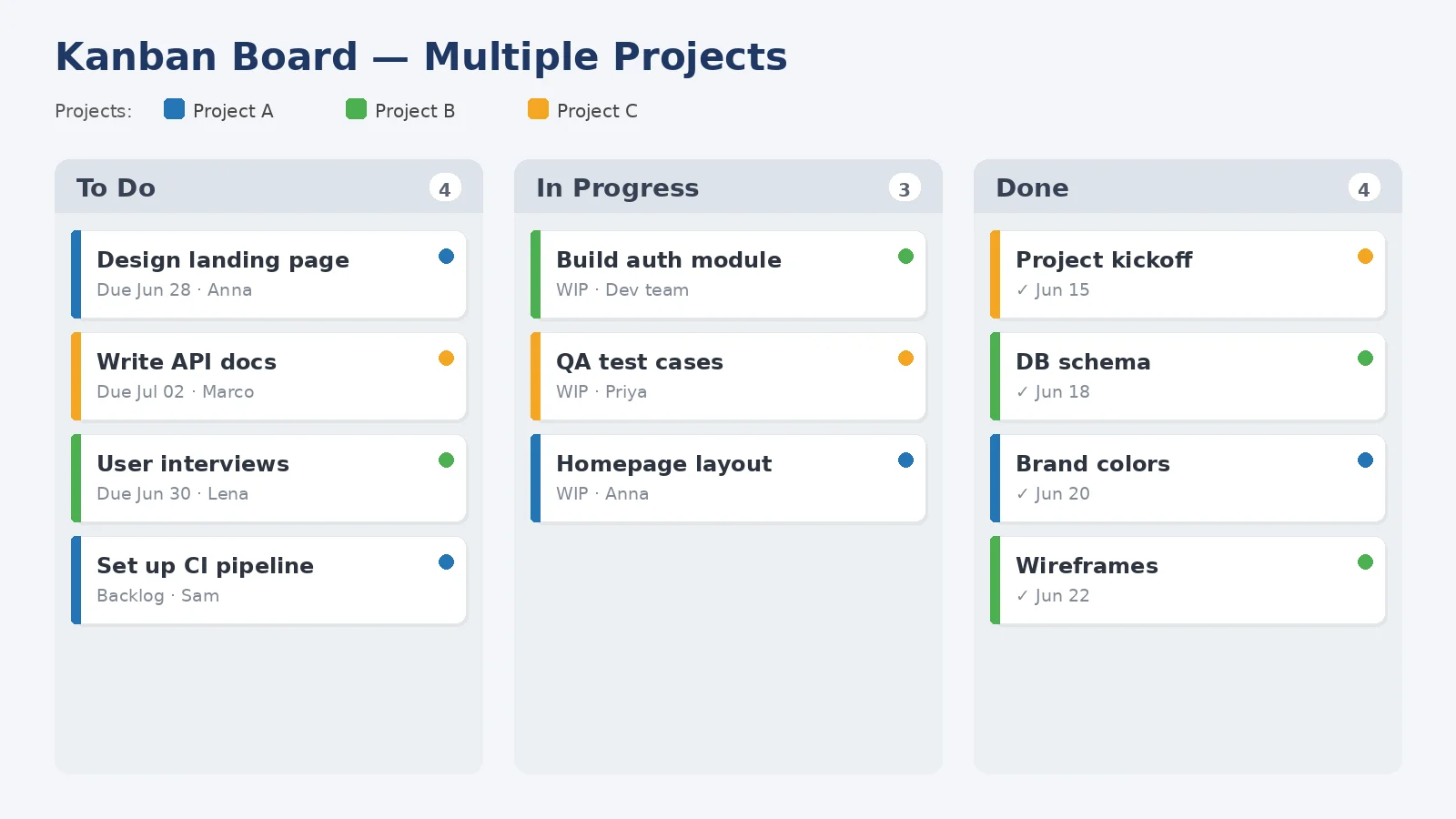
Kanban board example
Can a Kanban board have multiple projects? Yes — either one board with swimlanes, tags, and color-coding per project, or one board per project plus a consolidated overview board.
Ways to run multiple projects on Kanban
This is the core of multi-project Kanban. Below are five proven approaches — with their pros, cons, and best applications. Most teams combine two or three.
1. Organize multiple projects on one board
Managing everything on a single board lets managers and teams see the whole landscape at a glance, which helps with resource allocation and overall awareness. To keep it workable:
- Categorization: use color-coded cards or tags to separate tasks by project.
- Clarity and simplicity: cap the number of visible tasks and use filters to focus on one project at a time.
Can you have multiple projects on one Kanban board? Yes — use color-coding, tags, or swimlanes to differentiate tasks and keep each project clear within a single shared board.
2. Use multiple boards (one per project)
Separate boards give cleaner control over each project’s progress and are ideal when projects differ sharply in nature, scope, or resources. Key benefits:
- Focus and specialization: each board is tailored to one project’s workflow.
- Autonomy: teams own their boards independently, improving efficiency and accountability.
3. Build a consolidated Kanban view
A consolidated view combines tasks from several projects into one shared board — useful when a manager needs to oversee all projects simultaneously. To implement it:
- Integration tools: use software that aggregates multiple project boards into one view without losing per-project detail.
- High-level overview: design the board around milestones and critical tasks across all projects.
How many Kanban boards should I have? It depends on your team’s ability to keep focus: some prefer one board per project for simplicity; others use a single board with sections or swimlanes for multiple projects.
4. Separate projects with swimlanes
Swimlanes are one of the most effective tools for multi-project boards — they segregate tasks by project, team, or priority within the same board. For a step-by-step walkthrough, see our Kanban swimlanes guide. Key advantages:
- Enhanced organization: each lane can represent a different project, so it’s obvious which tasks belong where.
- Customization: lanes can reflect different stages or priorities within each project.
5. Control and analytics across projects
Running multiple projects raises the bar on reporting. Best practices:
- Aggregated reporting: use tools that collect and report data across multiple boards.
- Real-time analytics: dashboards that surface live status across all projects.
- Regular reviews: schedule recurring reviews to adjust strategy based on the data.
In short, Kanban’s visual orientation, WIP limits, and process optimizations let teams pursue several initiatives at once while staying aligned. Pick your framework — one shared board or one per project plus an aggregate — then tune the specifics to your workflow, team, and goals, and track performance regularly.
Top Kanban tools for multi-project work (brief)
Plenty of tools support multi-project Kanban. Popular options include Trello, Asana, monday.com, ClickUp, Jira, and — for Microsoft 365 and Teams users — the Virto Kanban Board App. Each has different strengths around board customization, tagging, filtering, and integrations, so the right pick depends on your stack and workflow.
👉 For full reviews and side-by-side comparisons of the leading online Kanban tools, see our dedicated roundup: Online Kanban Boards: Guide, Examples, and Best Tools.
Real-world approaches: user stories and solutions
Real cases make the trade-offs concrete. In the Stack Exchange project-management forum, a user described managing multiple projects in a startup where tasks and priorities shift constantly across clients and platforms (web, iOS, Android). Pain points included visually tracking moving tasks and aligning deliverables across disparate projects.
Experienced respondents emphasized visual mapping and the right software, suggesting tools that make it easy to differentiate projects, map interdependencies, and optimize flow through agile methods. The takeaway: flexible visualization and workflows, backed by the right tools, underpin effective orchestration of overlapping initiatives.
In a Reddit thread on running multiple projects from a single board, practitioners shared what works:
- Tags and filters: a single board with tags (and quick-link filters in tools like Jira) to separate and view projects.
- Swimlanes: lanes to split projects or priorities while keeping one unified view.
- One board per team with prefixes: prefixes in story titles to clarify which project a card belongs to.
- Multiple boards with aggregation: individual project boards plus an aggregated board that combines them.
- Tool customization: the choice of software (e.g., Jira vs. Trello) shapes how well tagging, filtering, and board customization support multi-project work.
The common thread: customized boards, strategic labelling, and flexible grouping let teams coordinate multiple projects while keeping strong tracking and visibility — adapted to each team’s specific environment.
Best practices for multi-project Kanban
Combining real-world insight with established practice, here are the recommendations that matter most:
- Standardize Kanban practices: consistent naming, color coding, and card formats across boards, plus training so everyone follows the same system.
- Use advanced labelling and tagging: clear, descriptive labels (project, task type, priority) and multi-tagging for tasks that span projects.
- Employ swimlanes effectively: organize lanes by project, or by role/department, to separate work visually on one board.
- Integrate automated tools: automate repetitive moves and notifications, and ensure your board integrates with the rest of your toolset.
- Regularly update and maintain boards: short daily stand-ups to sync, plus periodic clean-up of completed or stale tasks.
- Use visual indicators for prioritization: icons, stars, or card size for priority; progress bars or checklists for task advancement.
- Facilitate cross-project visibility: an overview board capturing milestones from all projects, with transparent access for everyone who needs it.
- Analyze and adapt: regular retrospectives and continuous improvement driven by analytics and team feedback.
- Manage WIP limits: set work-in-progress limits per stage to prevent overload, and adjust them to match current load and capacity.
- Encourage team autonomy: let teams manage their own tasks and adjust board layout to fit each project’s needs.
Virto Kanban Board for multiple projects
No multi-project guide from us would be complete without our own app, the Virto Kanban Board App for Microsoft 365 and Teams. Key features for multi-project work:
- Dynamic task organization: columns that mirror your workflow phases, with easy status updates.
- WIP limits: cap tasks in progress to balance workload across projects.
- Direct assignment: assign tasks to specific members straight from the board.
- Monitoring and reporting: deadlines, real-time tracking, and progress reports.
- Board customization: tailor boards to different projects, teams, or task types.
- Task filtering: filter by priority, project, or other criteria — ideal for cross-project views.
- Integration capabilities: merge tasks from multiple sources into one cohesive board.
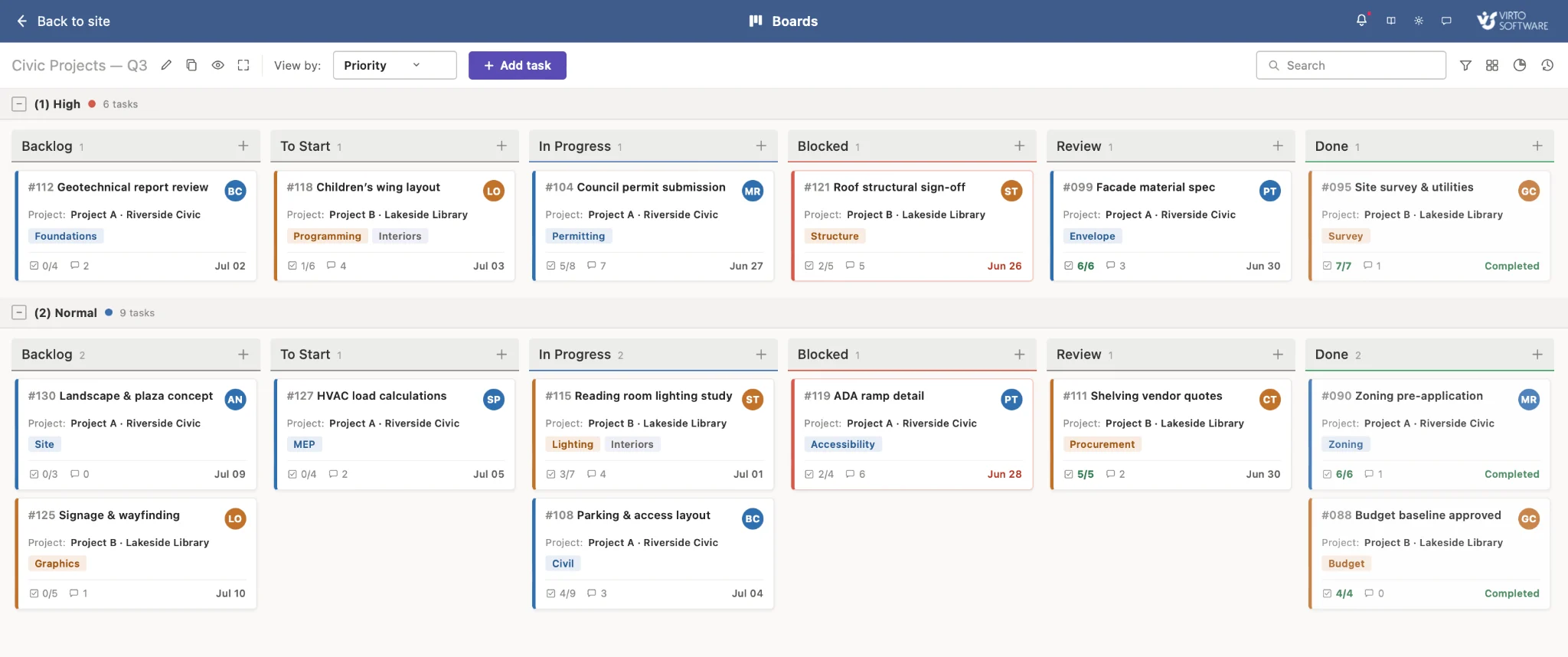
Pic. 1 — An example Virto Kanban board. Tasks move left to right through the workflow, and each card is color-coded by project for easy identification, so the team can see what to start, what’s in progress, and what’s blocked.
Virto Calendar App for cross-project scheduling
The Virto Calendar App pairs naturally with Virto Kanban for multi-project work, merging sources such as Exchange, Outlook, SharePoint, and Google Calendar into one view. Highlights:
- Unified calendar view: combine project, team, and individual calendars into one comprehensive view.
- Resource management: track workloads and catch scheduling conflicts early.
- Tailored displays: filter events by project, department, or other criteria.
- Alerts and notifications: reminders that keep teams ahead of deadlines.
- Task management and reporting: assign tasks from the calendar and generate progress reports.
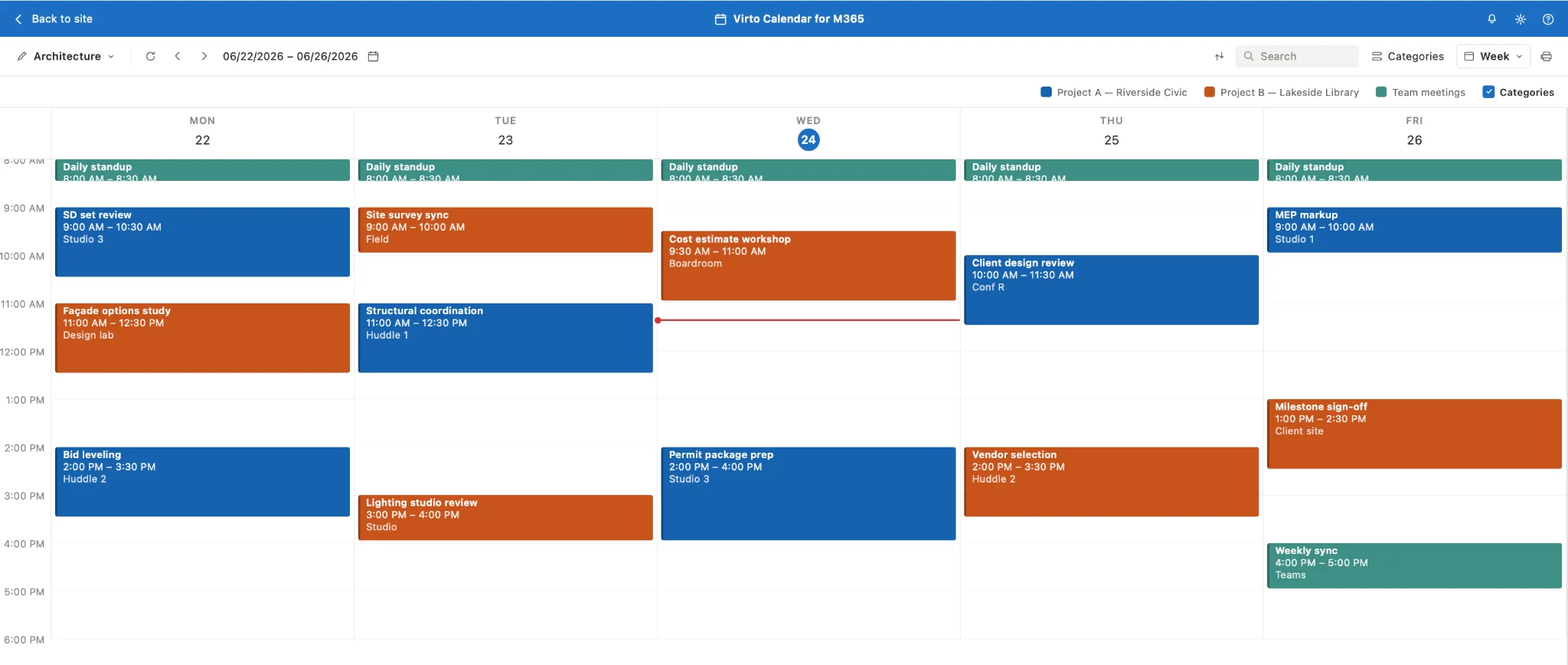
Pic. 2 — An example week in the Virto Calendar App. Each day is split into hourly slots, with color-coded blocks for Project A and Project B working in tandem with the Kanban board.
Customize your workflow with Virto Kanban Board and step up your project management today. Try Kanban Board for free.
FAQ
Can a Kanban board have multiple projects? Yes. Use one board with swimlanes, tags, and color-coding per project, or one board per project plus a consolidated overview board.
One board or many? A single shared board is simpler and great for cross-project visibility; separate boards give cleaner control when projects differ sharply. Many teams use per-project boards plus one aggregated view.
How many Kanban boards should I have? As many as your team can keep focused and clear. Start minimal — one shared board with swimlanes — and split into more boards only when a project’s scope or workflow clearly warrants it.
Conclusion
Handling several projects at once can overwhelm traditional tools and strategies, which is exactly why a flexible, visual system matters. Kanban’s visual structure makes it well suited to tracking multiple projects at different stages — helping managers prioritize, allocate resources, and keep work flowing.
If you want a reliable Kanban tool built for the Microsoft ecosystem, the Virto Kanban Board App offers a polished, easy-to-use interface that boosts oversight across multiple projects and slots into your existing environment. Schedule a demo and we’ll help you get set up.
Explore more
- How to Manage Multiple Projects Effectively
- Mastering Kanban Swimlanes: A Comprehensive Guide
- Online Kanban Boards: Guide, Examples, and Best Tools
- Digital Kanban Board Guide
- Master Project Management with Office 365 Tools
- Project Management in Microsoft Teams: The Complete Guide
References
(1) Stats from RGPM via ExplodingTopics.