


Implementing Kanban metrics can drastically enhance workflow efficiency and productivity by providing clear, data-driven insights. This guide explores Kanban metrics, showcasing how digital tools like the Virto Kanban Board App can boost team performance.
The Kanban project management methodology centers on visualized workflows, incremental progress, and lean principles to boost collaboration. Studies show practices like explicit constraints on work-in-progress can shorten lead times, while smoother flow slashes cycle durations and accelerates delivery (1, 2).
Yet metrics remain imperative to systematically surface inefficiencies for continuous improvement. Tracking key indicators around process times and throughput rates enables fact-based prioritization, scheduling refinements and productivity forecasts.
Fortunately, leveraging the power of Kanban metrics has never been easier thanks to digital Kanban boards like the Virto Kanban Board App. These tools provide real-time data visualization, customizable dashboards, and advanced analytics, making it simple to track, analyze, and improve your team’s performance.
This practical 2026 guide explores Kanban measurement techniques, tools and use cases to help you shift from activity-based to truly data-driven organizations.
Quick answer: what are Kanban metrics?
Kanban metrics are key performance indicators (KPIs) that measure how work flows through a Kanban system. The four core Kanban metrics are Lead time, Cycle time, Throughput, and Work In Progress (WIP). Together they show how fast work moves, how much the team delivers, and where bottlenecks form — enabling data-driven decisions that reduce cycle times and improve quality.
Basic Agile Kanban Metrics & How to Measure Them
In this section, we’ll introduce you to the basic Kanban metrics and explore each of them in more detail.
What are Kanban metrics, and why are they important?
Kanban metrics are key performance indicators (KPIs) used to measure and analyze the flow of work through a Kanban system. These metrics provide insights into how well the team is performing, where bottlenecks might occur, and how processes can be improved. By tracking and analyzing these metrics, teams can make data-driven decisions to enhance productivity, reduce cycle times, and deliver higher-quality work.
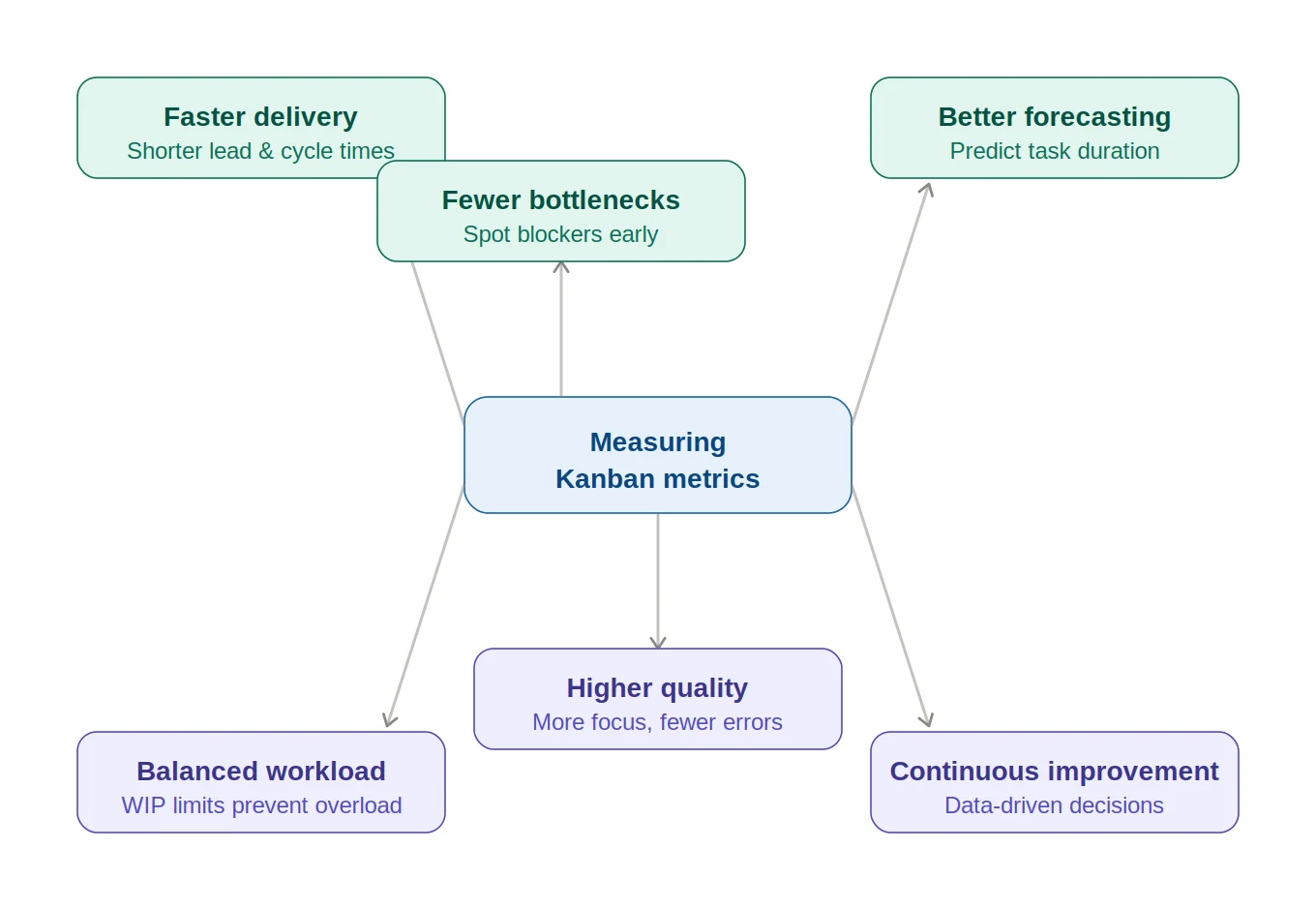
Benefits of measuring Kanban metrics.
What are the 4 metrics of Kanban?
The main four metrics of Kanban include:
- Lead time: the total time it takes for a task to move from the initial request to its final completion. This metric is crucial for understanding the overall efficiency of your process from the customer’s perspective. Shorter lead times typically indicate a more efficient process, allowing for quicker delivery of value to the customer.
- Cycle time: measures the amount of time a task spends in the “in-progress” phase, from when work actually begins until it is completed. This metric helps teams understand how long it takes to perform the work and can be used to identify areas for improvement within the workflow. Reducing cycle time can lead to faster throughput and more predictable delivery schedules.
- Throughput: the number of tasks completed within a given time period. This metric helps teams understand their capacity and how much work they can deliver over time. By analyzing throughput, teams can identify trends, set realistic expectations, and ensure that they are not overcommitting or underutilizing resources.
- Work In Progress (WIP): the number of tasks that are currently being worked on but are not yet completed. Managing WIP is essential for maintaining a smooth and efficient workflow. Too much WIP can lead to bottlenecks, increased cycle time, and reduced quality, while too little WIP may indicate underutilization of resources. Setting WIP limits helps balance the workload and ensures that the team can focus on completing tasks without being overwhelmed.
Now, let’s explore each metric in detail, uncovering practical insights and examples for successful implementation within your own Kanban system.
Lead time
Lead time is a fundamental metric in Kanban and project management that represents the total time taken for a task or work item to move from the initial request to its final completion. In other words, it measures the duration from the moment a task is requested or added to the backlog until it is fully delivered to the customer or stakeholder. Lead time provides a comprehensive view of the entire workflow, encompassing all stages from inception to delivery.
How to measure Lead time
Measuring Lead time involves tracking the time stamps of when a task enters the workflow and when it exits as a completed item. Here’s a step-by-step process to measure Lead time:
- Start time: Record the date and time when a task or work item is requested or added to the backlog. This marks the beginning of Lead time.
- End time: Record the date and time when the task is completed and delivered to the customer or stakeholder. This marks the end of Lead time.
- Calculation: Subtract the Start time from the End time to calculate the total Lead time.
For example, if a task is requested on July 1st at 10:00 AM and completed on July 3rd at 2:00 PM, the Lead time would be:
Lead time = End time − Start time
Lead time = July 3rd, 2:00 PM − July 1st, 10:00 AM
Lead time = 2 days and 4 hours
Examples of using Lead time in project management
Example 1: Software development. Lead time can help measure how quickly new features or bug fixes are delivered to end-users. Suppose a new feature is requested by a product manager on July 1st and released to production on July 10th. The Lead time would be 9 days. By analyzing Lead time across multiple features, the team can identify patterns and areas for improvement, such as delays in specific stages of the development process.
Example 2: Manufacturing. Lead time is crucial for understanding the efficiency of the production process. If an order for a custom product is placed on July 1st and the final product is shipped on July 15th, the Lead time is 15 days. By tracking this metric, managers can identify bottlenecks in the production line — such as delays in procurement of materials or inefficiencies in assembly — and implement strategies to reduce Lead time and improve throughput.
Example 3: Marketing campaigns. Lead time can be used to measure the duration from the initial concept of a campaign to its launch. If a campaign idea is proposed on July 1st and goes live on July 20th, the Lead time is 19 days. Understanding Lead time in this context helps the team plan better and ensure timely launches, which is critical for aligning with market trends and business goals.
By accurately measuring and analyzing Lead time, teams can identify delays, streamline processes, and enhance their ability to deliver value to customers quickly and consistently.
Cycle time
Cycle time is a key metric in Kanban and project management that measures the amount of time a task or work item spends in the “in-progress” phase, from the moment work begins until the task is completed. Unlike Lead time, which encompasses the entire workflow from request to delivery, Cycle time focuses specifically on the active working period. This metric is essential for understanding the efficiency of the work process and identifying areas where improvements can be made to enhance productivity.
How to measure Cycle time
Measuring Cycle time involves tracking the time stamps of when a task starts being worked on and when it is completed. Here’s how to measure Cycle time:
- Start time: Record the date and time when the task moves from the “to-do” or backlog stage to the “in-progress” stage. This marks the beginning of Cycle time.
- End time: Record the date and time when the task is completed and moves to the “done” stage. This marks the end of Cycle time.
- Calculation: Subtract the Start time from the End time to calculate the total Cycle time.
For example, if work on a task begins on July 1st at 9:00 AM and is completed on July 2nd at 5:00 PM, the Cycle time would be:
Cycle time = End time − Start time
Cycle time = July 2nd, 5:00 PM − July 1st, 9:00 AM
Cycle time = 1 day and 8 hours
Examples and practical applications of Cycle time
Example 1: Software development. Cycle time measures how long it takes to complete stages such as coding, testing, and deployment. Suppose a developer starts a bug fix on July 1st and completes it on July 3rd — the Cycle time is 2 days. By tracking Cycle time for different tasks, the team can identify bottlenecks, such as prolonged testing phases, and implement changes that lead to faster releases.
Example 2: Manufacturing. Cycle time is critical for understanding the time taken to produce an item from the start of assembly to its completion. If assembly starts on July 1st and finishes on July 5th, the Cycle time is 4 days. Monitoring this helps managers identify inefficiencies in the production line and optimize processes to increase overall capacity.
Example 3: Customer support. Cycle time can measure the duration from when a support ticket is opened to when it is resolved. If an agent begins a ticket on July 1st and closes it on July 2nd, the Cycle time is 1 day. Analyzing Cycle time across tickets helps the support team identify delays and improve response and resolution times.
By accurately measuring and analyzing Cycle time, teams can pinpoint areas of delay, streamline their processes, and enhance their capacity to deliver work efficiently.
Throughput
Throughput, in the context of Kanban and project management, refers to the number of tasks or work items completed within a given time period. It is a crucial metric for understanding a team’s productivity and capacity. By measuring throughput, teams can gauge how much work they are delivering, identify trends over time, and make informed decisions about resource allocation and process improvements. High throughput typically indicates a well-functioning workflow, while low throughput can signal underlying issues that need to be addressed.
How to measure Throughput
Measuring throughput involves counting the number of tasks completed during a specific time frame. Here’s a step-by-step process:
- Define the time period: Decide on the interval for which you want to measure throughput — daily, weekly, monthly, or whatever makes sense for your workflow.
- Count completed tasks: Track the number of tasks completed within the defined time period.
- Record and analyze: Record the throughput data and analyze it to identify patterns and trends.
For example, if you measure throughput weekly and your team completes 10 tasks in one week and 15 the next, your throughput for those weeks would be 10 and 15, respectively.
Examples of using Throughput to improve performance
Example 1: Software development. Throughput can track the number of features, bug fixes, or user stories completed each sprint. If a team completes 20 user stories in a two-week sprint, monitoring throughput over multiple sprints reveals trends. Declining throughput may indicate technical debt or resource constraints, while a steady increase signals improved efficiency.
Example 2: Manufacturing. Throughput measures the number of units produced within a period. If a factory produces 200 units per day and that drops to 150, managers can investigate causes such as machinery downtime, supply chain issues, or labor shortages and take corrective action.
Example 3: Marketing campaigns. Throughput might represent campaigns launched per quarter. If a team launches 5 in Q1 and 8 in Q2, they can analyze the factors behind the increase — better resource management or more efficient workflows — and double down on what works.
By measuring and analyzing throughput, teams can identify trends, make data-driven decisions, and implement improvements to enhance performance.
Work In Progress (WIP)
Work In Progress (WIP) refers to the number of tasks or work items that are currently being worked on but are not yet completed. In Kanban, managing WIP is crucial because it directly affects the flow of work and the efficiency of the process. By limiting the amount of work in progress, teams can focus on completing tasks rather than juggling multiple tasks simultaneously, which can lead to inefficiencies and delays. Properly managing WIP helps maintain a smooth workflow, reduce cycle times, and improve overall productivity and quality.
How to control and measure WIP
Controlling and measuring WIP involves setting limits on the number of tasks that can be in progress at any given time and regularly monitoring those limits. Here’s a step-by-step process:
- Set WIP limits: Define WIP limits for each stage of your workflow based on the team’s capacity and the nature of the work. For instance, you might set a limit of 3 tasks for development and 2 for testing.
- Visualize WIP: Use a Kanban board to visualize WIP. Each column represents a stage, and tasks move through columns as they progress. The board should clearly display the WIP limits for each stage.
- Monitor WIP regularly: Review the board to ensure WIP limits are respected. If any stage exceeds its limit, investigate the cause and take corrective action.
- Adjust WIP limits as needed: Based on feedback and performance data, adjust limits to optimize flow — increasing them as capacity grows or decreasing them when bottlenecks appear.
The impact of WIP on team performance
Improved focus and quality. Limiting WIP helps teams concentrate on fewer tasks at a time, enhancing focus and quality. When team members aren’t overwhelmed, they dedicate more attention to each task, leading to fewer errors and higher-quality outcomes.
Reduced Cycle time. With fewer tasks in progress, work moves more quickly through the workflow, reducing cycle time and helping teams meet deadlines more reliably.
Identification of bottlenecks. If a particular stage consistently exceeds its WIP limit, it signals a problem — such as resource constraints or process inefficiencies — that needs to be addressed.
Enhanced predictability. When flow is steady and controlled, it becomes easier to forecast how long tasks will take and to plan future work accurately — valuable for setting realistic expectations with stakeholders.
Understanding and managing WIP is essential for maintaining a smooth and productive workflow.
What Are the Leading Metrics in Kanban?
While Kanban promises immense productivity gains through visual workflows and incremental progress, quantitative tracking proves critical for maximizing impact. Among the key leading metrics for Kanban teams, cycle time, throughput and work-in-progress limits offer uniquely actionable insights. Let’s briefly revisit those basic indicators as the most impactful before showcasing additional leading metrics:
- Cycle time: Measures the time taken for a task to move from “in-progress” to “done”.
- Importance: a predictor of how long future tasks will take, helping teams set realistic deadlines and manage expectations.
- Example: a development team tracks Cycle time to eliminate delays in the coding phase, leading to faster delivery.
- Throughput: The number of tasks completed within a given time period.
- Importance: helps in understanding the team’s capacity and productivity, allowing better planning and resource allocation.
- Example: a marketing team uses throughput to measure campaigns launched each quarter.
- Work In Progress (WIP): The number of tasks currently being worked on but not yet completed.
- Importance: controlling WIP prevents bottlenecks and ensures a smooth flow of tasks.
- Example: a support team limits WIP so agents focus on resolving tickets efficiently, reducing response times.
Which metric is the most important one in Kanban?
Among these leading metrics, Cycle time is often considered the most important. Here’s why:
- Predictive power: Cycle time provides a clear picture of how long it takes to complete tasks, enabling more accurate forecasting and planning.
- Process improvement: By analyzing Cycle time, teams can identify stages that cause delays and implement changes to streamline processes.
- Customer satisfaction: Faster Cycle times lead to quicker delivery of products and services, enhancing satisfaction and competitiveness.
To illustrate: a software development team noticed their Cycle time for bug fixes was increasing. By analyzing the data, they identified the testing phase as the cause and introduced automated testing tools, which reduced testing time and overall Cycle time. This led to more timely releases and better product quality — highlighting the critical role of Cycle time in optimizing workflows.
👉 What are Kanban developer metrics? Kanban developer metrics are specific measurements used to track and analyze the efficiency and effectiveness of software development processes within a Kanban framework. Apart from the basic indicators discussed, other metrics might include Defect rate, Deployment frequency, Code review time, and Commit-to-deploy time, among others.
Other leading Kanban indicators & metrics to track
In addition to Cycle time, Throughput, WIP, and Lead time, there are several other valuable agile Kanban metrics that teams can use to gain deeper insights into their workflow and efficiency:
- Cumulative Flow Diagram (CFD): A visual tool that shows the number of tasks in each stage of the workflow over time. It helps teams visualize flow, identify bottlenecks, and understand how tasks progress — for example, revealing that tasks are piling up in the testing stage.
- Blocker clustering: Analyzes the frequency and duration of blockers. Understanding blockers helps teams address root causes — for instance, streamlining an approval process that frequently stalls tasks.
- Flow efficiency: The ratio of active work time to total elapsed time (including waits). Low flow efficiency suggests tasks spend too long waiting, prompting investigation into resource availability or bottlenecks.
- Queue length: The number of tasks waiting to be started in a particular stage. Long queues can indicate bottlenecks — a long queue in design might mean designers are overwhelmed.
- Aging Work In Progress: Tracks the age of tasks currently in progress. Tasks in progress significantly longer than the average Cycle time may indicate complexity or lack of clarity, prompting a review.
- Lead time distribution: Analyzes how often tasks are completed within certain time ranges, helping teams understand the variability and predictability of their workflow and investigate outliers.
- Throughput histogram: A visual representation of the frequency distribution of throughput. Wide fluctuations prompt investigation into factors such as changes in team size or task complexity.
- Service Level Expectation (SLE) compliance: Measures the percentage of tasks completed within a predefined time frame. If the SLE is 10 days and compliance is 80%, that highlights the remaining 20% as an area for improvement.
Incorporating these additional metrics alongside the four core indicators provides a more comprehensive understanding of the workflow.
👉 What Kanban metrics in Jira are there? Just like everywhere else, in Jira, Kanban metrics are tools that help teams measure and analyze their workflow. Some key Jira Kanban metrics include the basic ones discussed — Cycle and Lead times, Throughput, and WIP — along with CFD, Control chart, WIP Age, Blocked time, and Average age of WIP.
Track leading metrics with the Virto Kanban Board App
Digital Kanban boards, like the Virto Kanban Board App, offer powerful tools to track and visualize leading metrics, making it easier to manage and optimize workflows. Here’s how the Virto Kanban Board App can help:
- Real-time tracking: monitor Cycle time, Throughput, and WIP in real-time for immediate insight into the workflow.
- Customizable dashboards: create dashboards that keep critical data always visible and actionable.
- Analytics and reporting: robust analytics enable deep dives into performance data and identification of trends and bottlenecks.
- Integration with other tools: Virto Kanban Board integrates seamlessly with SharePoint and Microsoft 365, as well as many third-party project management tools, for a comprehensive view of project health.
While we covered Virto Kanban configuration fundamentals in our previous article on Setting Up Digital Kanban Boards, this guide details the analytics capabilities that set it apart. Below, we’ll walk you through applying pre-built reports, constructing visuals, and exporting findings to build an insights ecosystem.
To access Virto Kanban’s analytics capabilities, navigate to the “Charts” section of your Kanban board. Charts are an essential feature of the Virto Kanban Board app, providing visual insights into your workflow and helping you track key metrics.
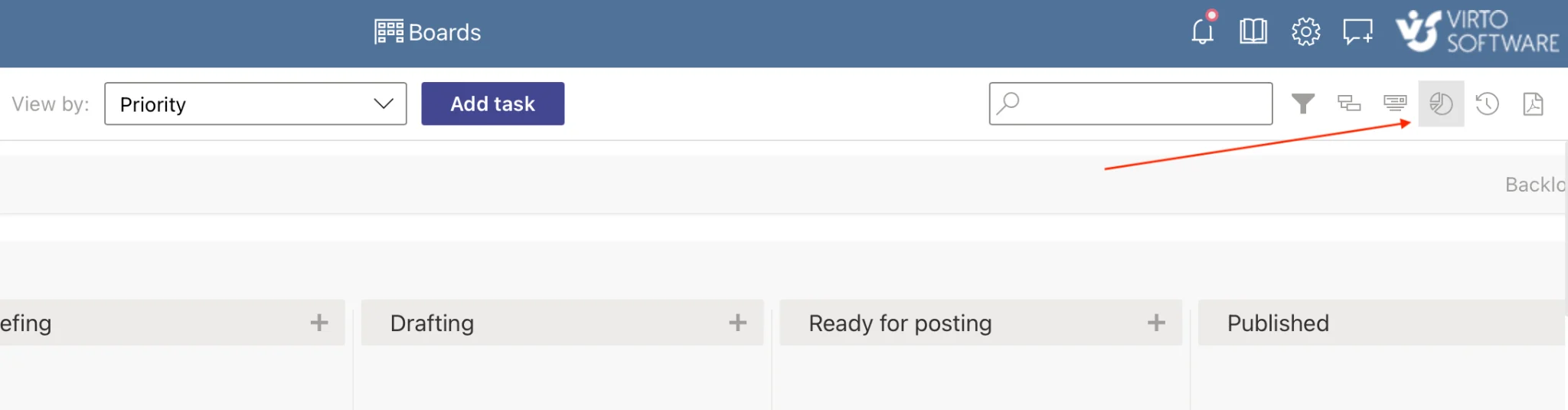
Pic. 1. Navigating to the “Charts” section.
The Virto Kanban Board app includes several types of charts, each serving a unique purpose:
- “Status” Chart — Pie chart. Groups tasks by their status, providing a visual overview of the distribution of tasks across statuses. You can select fields to analyze (e.g. due date), specify the time period, and choose the unit of measurement (number of tasks, percentage, or budget).
- “Assigned To” Chart — Graph. Groups tasks by assignees, showing which board members have modified tasks over a specified period. Like the Status chart, it lets you choose fields and time periods for analysis.
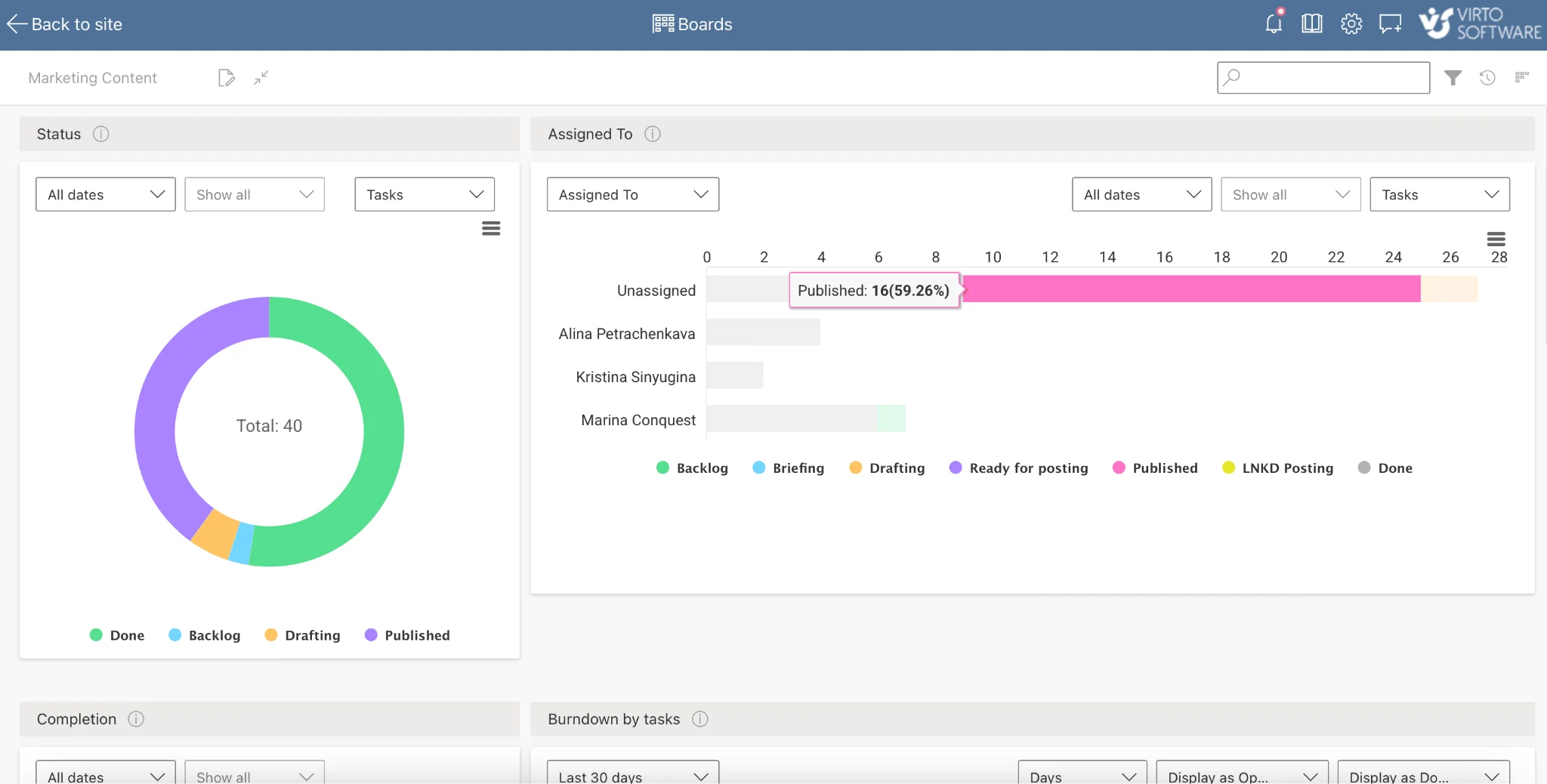
Pic. 2. Example charts: “Status” & “Assigned To”.
- “Completion” Chart — Graph. Shows tasks completed on time versus those that went overdue. It includes tasks from the SharePoint source list and can display tasks in columns like “Deferred” or “Need someone else”. Only tasks with a due date are shown.
- “Burndown” Chart — Graph. Displays the amount of work remaining over time, helping you analyze the efficiency of task completion within a selected period.
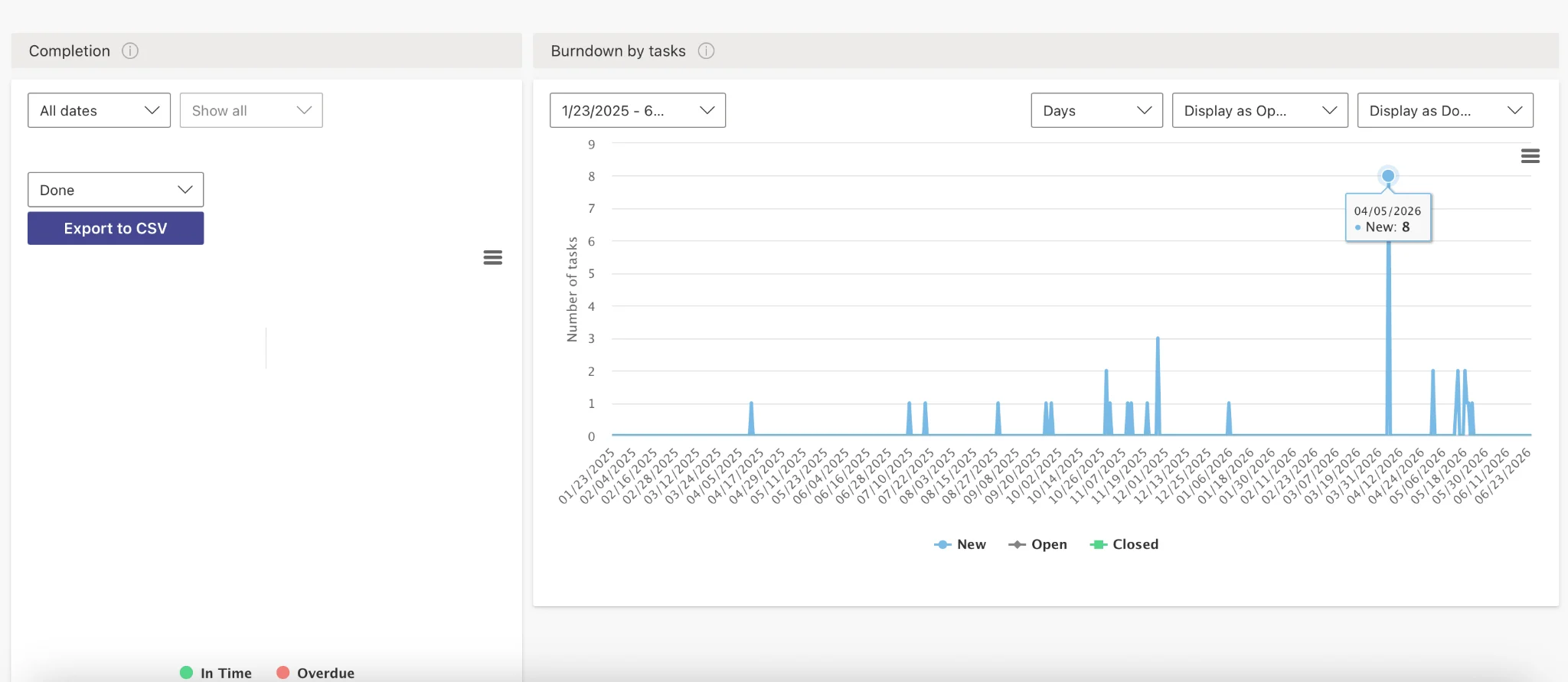
Pic. 3. Example charts: “Completion” & “Burndown”.
- “Lead Time” Chart — Graph. Measures the total time taken from the creation to the completion of work items, providing insights into the duration of the workflow.
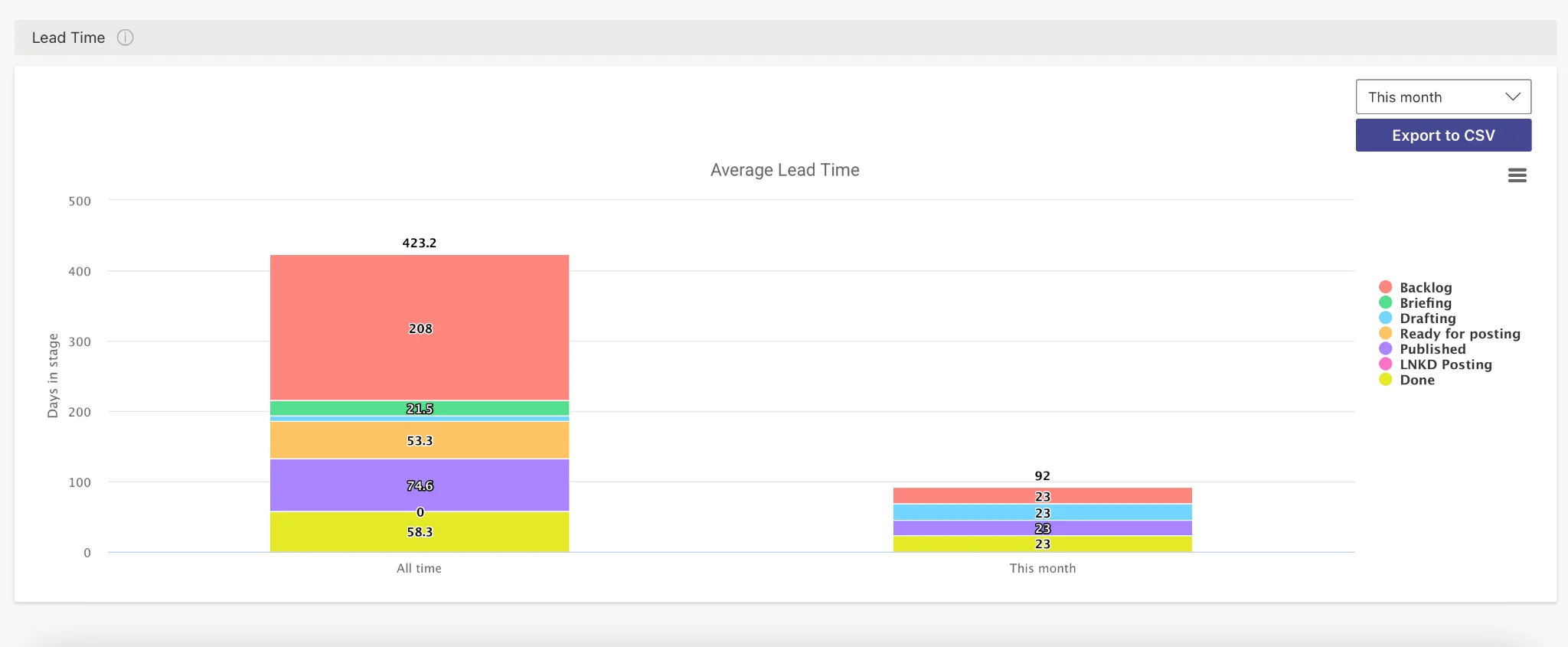
Pic. 4. Example chart: “Lead Time”.
The Virto Kanban Board App also provides options to share and export charts for reporting and collaboration. You can print your charts, download them as PNG, JPEG, or SVG vector images, or as PDF files.
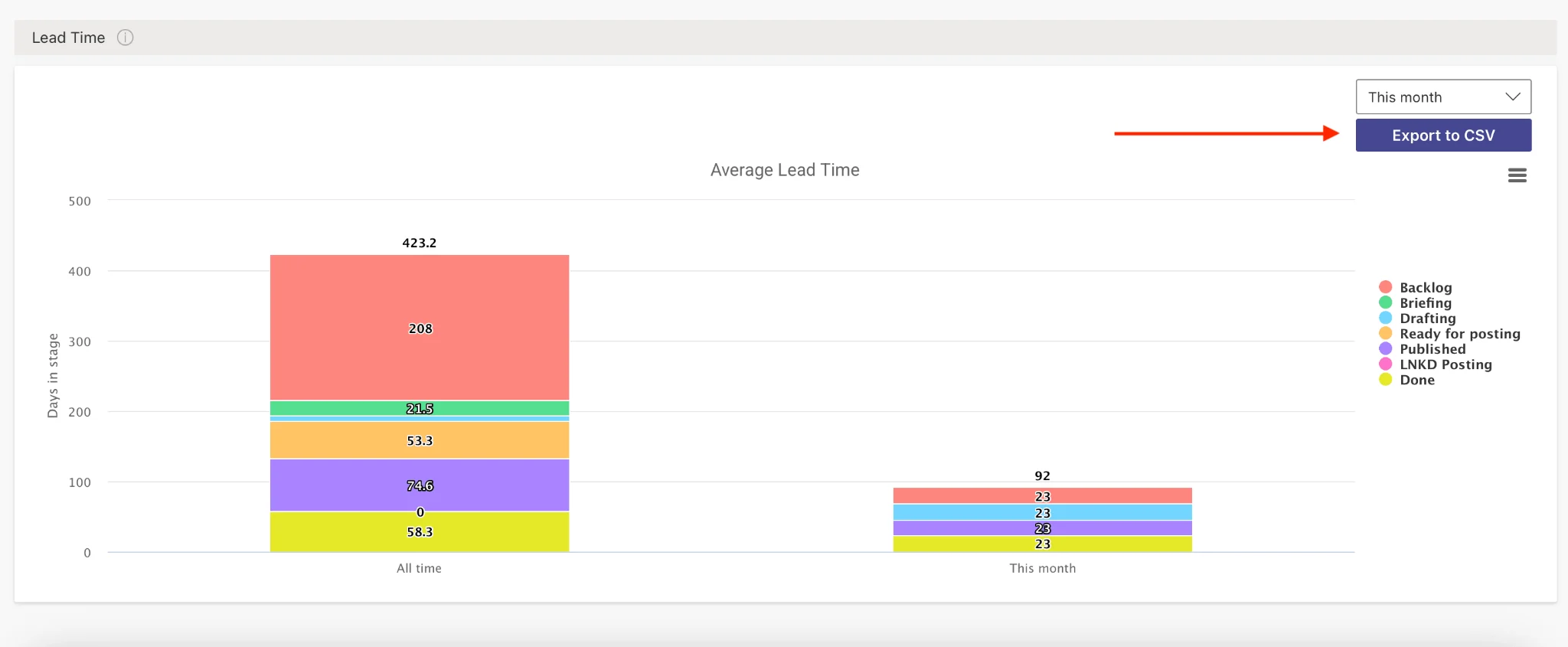
Pic. 5. Exporting and downloading your charts for further analysis.
Virto Kanban’s integrated charts transform task flows into transparent, quantified workflows. With digestible, real-time dashboards highlighting completion rates, lead times, and statuses, you can spot emerging bottlenecks early and adjust assignments to maintain sustainable velocities.
Customize your workflow with Virto Kanban Board — step up your project management game today.
👉 To gain a deeper understanding of how else the Virto Kanban Board app can help with your agile project management, explore the Agile Kanban Project Management use case page. For a user guide, refer to the Virto Kanban Board App Learning Page.
Implementing, Measuring, and Tracking Kanban Metrics
In this section, we’ll look at implementing and tracking agile Kanban metrics within a team — methods and tools for tracking these metrics, and how digital boards help you monitor and optimize your workflow.
Practical guide to implementing and tracking Kanban metrics in a team
- Define key metrics: Identify which metrics are most relevant to your team’s goals. Common metrics include Lead time, Cycle time, Throughput, WIP, and CFD.
- Set up your Kanban board: Create columns that represent the stages of your workflow (e.g. To Do, In Progress, Done) and ensure everyone understands how to move tasks through them.
👉 For a thorough, comprehensive guide on setting up your Kanban board, consider reading our previous article: Guide to Setting Up Your Digital Kanban Board.
- Establish WIP limits: Set limits on the number of tasks that can be in progress at any given time to prevent bottlenecks and ensure a steady flow of work.
- Regular stand-ups and reviews: Hold daily stand-ups to discuss progress and blockers, and conduct regular reviews (weekly or bi-weekly) to analyze metrics and discuss improvements.
- Track metrics consistently: Ensure all team members update task statuses to maintain accurate data, and use tools to record and visualize metrics regularly.
Practical tips for implementing, measuring, and tracking Kanban metrics
- Start small: begin with a few key metrics and expand as your team becomes more comfortable.
- Educate your team: ensure everyone understands the importance of metrics and how to measure them.
- Automate data collection: use digital tools to automate tracking and reporting whenever possible.
- Visualize data: use charts and graphs to make the data more accessible and easier to interpret.
- Set goals: establish clear goals based on your metrics to guide your team’s efforts and improvements.
- Review and adjust: regularly review your metrics and make necessary adjustments to your workflow and WIP limits.
👉 What are Kanban flow metrics? Flow metrics are key indicators used to measure the performance and efficiency of a workflow managed by a Kanban system. They include Lead time, Cycle time, Throughput, and WIP, along with Arrival rate (the rate at which new work items are added), Exit rate (the rate at which items are completed and exit the workflow), and Flow efficiency (the ratio of value-adding time to total cycle time).
Methods and tools for tracking metrics
- Manual tracking: record metrics manually using spreadsheets or whiteboards. Simple, but time-consuming and error-prone.
- Kanban software tools: use digital tools like Jira, Trello, Asana, or Virto Kanban Board to automate data collection and generate reports, often with built-in analytics.
- Spreadsheets: use spreadsheets for logging data and creating custom charts. Flexible, but requires more effort to maintain.
- Third-party analytics tools: integrate your Kanban board with tools like Power BI or Tableau for advanced data analysis and visualization.
How digital Kanban boards can help you track metrics
- Automation: digital boards automatically track metrics such as Lead time, Cycle time, and Throughput, reducing manual effort and errors.
- Real-time data: access up-to-date metrics in real time, enabling more responsive decision-making.
- Visualization: built-in charts and graphs, such as Cumulative Flow Diagrams, make it easier to visualize and interpret data.
- Integration: many tools integrate with project management or analytics software for a comprehensive view of your workflow.
- Accessibility: digital boards can be accessed from anywhere, making it easier for remote or distributed teams to collaborate.
👉 For practical suggestions on the best digital Kanban apps and tools, consider reading: Best Kanban Board Apps for Microsoft Teams & Online Kanban Board.
Real user perspectives on implementing and tracking Kanban metrics
Beyond high-level guidance, real-world implementation proves indispensable for extracting maximum value from metrics in Kanban. That’s why we turned to the Kanban community itself — crowdsourcing tips and suggestions from practitioners driving quantified implementations across industries.
Unlocking 30% throughput surges through Kanban metrics
Kanban practitioner Karolina Dacheva, Strategic Operations and Portfolio Manager at Businessmap, has overseen implementations across small specialized teams and enterprise-wide rollouts. Her methodology centers on tracking the key metrics discussed throughout this article — lead and cycle time, throughput, and WIP.
As Dacheva explains, “Our approach includes several life hacks that have proven to be highly effective. Firstly, we always start with clear visualization of the workflow. Next, limiting WIP helps us keep a tab on our current commitments and prevents us from overstretching resources. Keeping track of lead and cycle time assists us in visualizing potential bottlenecks which aids future planning.”
In particular, Dacheva highlights the direct impact of their Kanban implementation on throughput: “By monitoring and optimizing throughput, we increased our delivery rate by 30% over the previous quarter,” she explains.
“Remember, tracking and implementing Kanban is a continual process; there’s always something to learn and improve,” Dacheva concludes — emphasizing that Kanban is not a “set it and forget it” solution.
Dacheva’s colleague, Gabriel Lukov, a certified Kanban Trainer and Head of Inbound Growth at Businessmap, also advocates for employing visual tools like digital Kanban boards because they offer unmatchable transparency and foster accountability. He stresses measuring throughput weekly and monthly to identify trends, pinpoint bottlenecks, and optimize workflow. To maintain an optimal WIP, his team keeps a strict WIP limit aligned with capacity, reducing multitasking. Ultimately, Lukov believes “consistency in monitoring these metrics and adapting based on their trends forms the key to successful Kanban implementation.”
Visualizing productivity through online Kanban analytics
Adil Farooq, CEO of Silverstone Technologies, has not ventured beyond the basic key metrics — Lead time, Cycle time, Throughput, and WIP — because these show everything he needs to understand whether his team is heading in the right direction.
“We started with simple spreadsheets for tracking metrics,” he explains. “But as our needs grew, we transitioned to online Kanban boards with built-in analytics.” For Farooq, visualizations proved critical: “Seeing the data come alive fostered a sense of ownership and healthy competition within the team.” As he concludes, “By tracking Kanban metrics, we’ve significantly reduced lead times. Our clients are happier with faster turnaround times, and the team feels more empowered and productive.”
From bottlenecks to breakthroughs: Kanban metrics for recipe development success
Lisa Richards, CEO and Creator of The Candida Diet, understands that delivering high-quality recipes quickly is crucial for helping customers overcome health challenges. Her team has embraced Kanban metrics, focusing on two key indicators: lead time and cycle time.
“As a service that creates and publishes recipes online, the most obvious metric to track is lead time: the absolute time it takes a recipe to move from concept to publication. We saw that recipe testing was getting backed up, so we hired a person entirely dedicated to testing recipes, which significantly cut down on lead time,” she says.
Richards continues on cycle time: “We found that one of our recipe developers was spending a lot of time researching very specific anti-candida ingredients. So we created a shared ingredient library, with information readily available in one place, saving precious time for recipe development.”
The results speak for themselves: “Our utilization of Kanban metrics translates into a 20% decrease in the amount of time required to develop recipes, and a 15% improvement in developer efficiency,” Richards concludes.
Summary tables and recommendations
For your easy reference, here’s a comparison table of key Kanban reporting metrics, summarizing their definitions, purposes, and methods of measurement:
| Metric | Definition | Purpose | Method of measurement |
|---|---|---|---|
| Lead time | Total time from the initial request to task completion. | Measures overall efficiency and helps identify delays in the entire process. | Record start and end dates manually or use Kanban tools that track this automatically. |
| Cycle time | Time from the start of work on a task to its completion. | Focuses on the efficiency of the actual work process, excluding waiting times. | Record the start of work and completion dates manually or use Kanban tools for automatic tracking. |
| Throughput | Number of tasks completed in a given period. | Indicates the team’s productivity and helps in capacity planning. | Count completed tasks manually at regular intervals or use reports from Kanban tools. |
| Work In Progress (WIP) | Number of tasks currently being worked on. | Helps manage workload and identify bottlenecks. | Regularly count tasks in the “In Progress” column or monitor WIP limits set in Kanban tools. |
| Cumulative Flow Diagram (CFD) | Visual tool showing the number of tasks in each state over time. | Provides a comprehensive view of workflow stability and identifies bottlenecks and trends. | Use Kanban tools to generate CFDs automatically or manually log data in spreadsheets and create charts. |
Fig. 1. Kanban metrics list.
While individual Kanban metrics quantify critical dimensions of team productivity, analyzing indicators in unison unlocks a holistic perspective. Here’s a table with recommendations for combining Kanban metrics and the impact of these combinations on analytics and performance:
| Metric combination | Recommendations for combination | Impact on analytics and performance |
|---|---|---|
| Lead Time + Cycle Time | Track both to differentiate between waiting times and actual work times; use cycle time to pinpoint inefficiencies in the work process and lead time to understand overall process efficiency. | Provides a comprehensive view of the entire process, helping identify delays and optimize both planning and execution, and supporting better forecasting and realistic timelines. |
| Cycle Time + Throughput | Monitor cycle time to ensure tasks are completed efficiently; track throughput to measure productivity and use the data to adjust WIP limits. | Helps in understanding the relationship between work duration and productivity, enabling better capacity planning and workload distribution. |
| Throughput + WIP | Review throughput to understand team capacity and adjust WIP limits to avoid overloading the team while maintaining a sustainable pace. | Balancing throughput with WIP limits ensures a steady flow of tasks, reduces bottlenecks, and improves focus by preventing task overload. |
| Cycle Time + CFD | Use cycle time to understand how long tasks stay in different stages and analyze CFDs to visualize distribution and identify bottlenecks. | Provides a detailed view of process stability and flow efficiency, helping identify stages that cause delays and areas that need improvement. |
| Lead Time + Throughput + WIP | Track lead time for overall efficiency, monitor throughput for productivity, and adjust WIP limits to maintain steady throughput while reducing lead time. | Provides a holistic view of the process, balancing efficiency, productivity, and workload and supporting better decisions on process adjustments and resource allocation. |
Fig. 2. Combining Kanban metrics for monitoring and control.
FAQ
What are the 4 Kanban metrics?
The four core Kanban metrics are Lead time, Cycle time, Throughput, and Work In Progress (WIP).
What is the most important Kanban metric?
Cycle time is generally considered the most important — it predicts how long future tasks will take and surfaces workflow delays, enabling more accurate forecasting and process improvement.
What is the difference between lead time and cycle time?
Lead time covers the whole process from request to delivery; cycle time covers only the active work, from when work starts to when it’s done.
What are Kanban flow metrics?
Flow metrics measure the performance and efficiency of a Kanban workflow. They include Lead time, Cycle time, Throughput, and WIP, plus Arrival rate, Exit rate, and Flow efficiency.
What are Kanban metrics in Jira?
In Jira, Kanban metrics include Cycle and Lead times, Throughput, and WIP, along with the Cumulative Flow Diagram, Control chart, WIP Age, Blocked time, and Average age of WIP.
Conclusion
Kanban reporting metrics are essential tools for assessing and improving project workflows. Key metrics such as Lead time, Cycle time, and Throughput provide invaluable insights into the efficiency and health of your processes. Proper measurement and analysis of these metrics are crucial for the successful implementation of Kanban, enabling teams to identify bottlenecks, optimize performance, and ensure continuous improvement.
The use of digital and online Kanban boards significantly enhances performance monitoring, providing real-time data and facilitating remote collaboration. These tools help teams maintain visibility and control over their tasks, ensuring everyone is aligned and projects stay on track.
To boost your productivity and streamline your workflow, try the Virto Kanban Board App. It’s designed to help you harness the full potential of the Kanban methodology with ease and efficiency. Why not schedule a quick demo call now to find out more?
Try Virto Kanban Board App for free — experience our solution firsthand.
For more resources on project management and Kanban methodology, explore the following articles:
Guide to Setting Up Your Digital Kanban Board
Kanban Swimlanes: A Comprehensive Guide
Online Kanban Boards: Guide, Examples, and Best Tools
Top Kanban Board Apps & Integrations for Microsoft Teams
Agile Kanban: Maximizing Project Management Efficiency