Most teams do not have a task problem. They have a where is it written down problem — work scattered across chat threads, inboxes, sticky notes and one spreadsheet nobody trusts. Task management software fixes that by giving every piece of work a single home with an owner, a due date and a visible status.
The catch is that the market has grown enormous, and the ten tools below are not really competing with each other. A five-person studio, a 400-person operations department and a team that lives inside Microsoft Teams all need different things. This guide compares the leading options honestly, tells you which situation each one fits, and flags the cases where a tool is the wrong buy.
Every price here was re-verified against the vendor’s own pricing page in August 2026, and each one links out so you can check it yourself.
Quick answer: the best task management software
It depends on your team: Asana, monday and ClickUp for general work management, Todoist for simple task lists, and Microsoft Planner or Virto Kanban for teams standardised on Microsoft 365.
In more detail, ranked by how often each one turns out to be the right answer:
- Asana — best overall for cross-team work management
- monday work management — best for visual, highly customisable workflows
- ClickUp — best value on a paid plan, and the most generous free tier
- Todoist — best for personal task management and small teams
- Trello — best for simple kanban and fast adoption
- Wrike — best for professional services and client work
- Notion — best when tasks live alongside docs and wikis
- Jira — best for software development teams
- Microsoft Planner — best free option if you already pay for Microsoft 365
- Virto Kanban Board — best kanban tool for SharePoint and Microsoft Teams
What is task management software, and what should it do?
Task management software is a shared system for capturing individual pieces of work, assigning them, sequencing them and tracking them to completion. It sits one level below project management software: a project management tool models a whole initiative with budgets, phases and resourcing; a task management tool models the work items themselves.
In practice the line is blurry, and most of the tools in this guide sit somewhere on the spectrum. What matters is which end of it your team actually needs.
The features that matter
- Task records with real fields — owner, due date, status, priority, description, attachments and comments in one place, so context does not live in a chat thread.
- Multiple views of the same data — list, board, calendar and timeline. Different people read work differently; forcing everyone into one view is how adoption dies.
- Dependencies and subtasks — the difference between a to-do list and something that can model sequenced work.
- Automation — status changes, assignment rules and recurring tasks, so routine coordination stops eating people’s time.
- Notifications you can tune — real-time alerts are useful right up until they become noise.
- Reporting — workload across people, throughput over time, and what is overdue.
- Integrations — email, chat, calendar, file storage and single sign-on. An integration you have to build yourself is a cost, not a feature.
One honest caveat before the comparison: no tool creates discipline. A team that does not agree on what done means will produce the same confusion in Asana that it produced in a spreadsheet. The software makes a working process visible and enforceable — it does not supply the process.
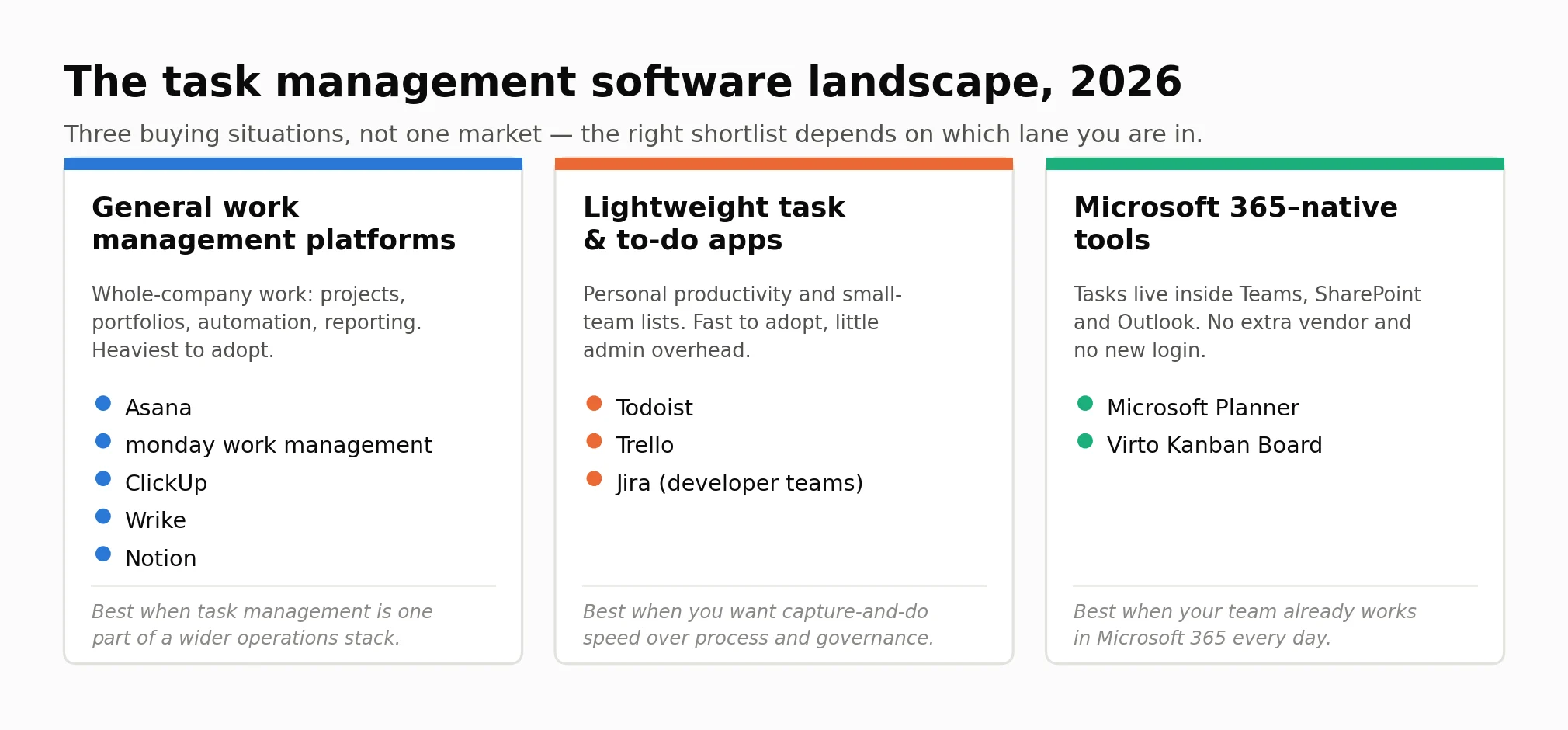
Pic.1. The task management software landscape in 2026 — three buying situations rather than one market.
Comparison: the 10 best task management software tools
Prices below are per user per month, billed annually, in USD, as listed by each vendor in August 2026. Monthly billing is typically 15–30% higher.
| Tool | Best for | Standout features | Free plan | Entry paid price |
|---|---|---|---|---|
| Asana | Cross-team work management | Rules automation, portfolios, workload view, goals | 2 seats | $10.99/user/mo |
| monday work management | Customisable visual workflows | Typed columns, dashboards, colour-coded status | 2 seats, 3 boards | $9/seat/mo |
| ClickUp | Best value and best free tier | Docs, whiteboards, goals, time tracking, automations | Unlimited members and tasks | $7/user/mo |
| Todoist | Personal and small-team lists | Natural-language capture, offline, cross-platform | 5 projects, 5 collaborators | $5/mo |
| Trello | Simple kanban, fast adoption | Boards and cards, Power-Ups, near-zero learning curve | 10 boards, 10 collaborators | $5/user/mo |
| Wrike | Agencies and client work | Request forms, proofing and approvals, resourcing | Unlimited users, 200 active tasks | $10/user/mo |
| Notion | Tasks alongside docs and wikis | Databases with multiple views, linked docs, wiki | Block-limited for teams | $10/member/mo |
| Jira | Software development teams | Sprints, backlogs, burndown and velocity reports | Up to 10 users | Tiered per-seat scale |
| Microsoft Planner | Microsoft 365 organisations | Grid, Board and Chart views, Teams and Outlook built in | Included with Microsoft 365 | $10/user/mo (Plan 1) |
| Virto Kanban Board | SharePoint and Teams kanban | Swimlanes, WIP limits, cross-list boards, card rules | 30-day trial | $2/user/mo |
The spread on entry pricing is wider than the feature gap between these tools, which is worth keeping in mind when you shortlist:
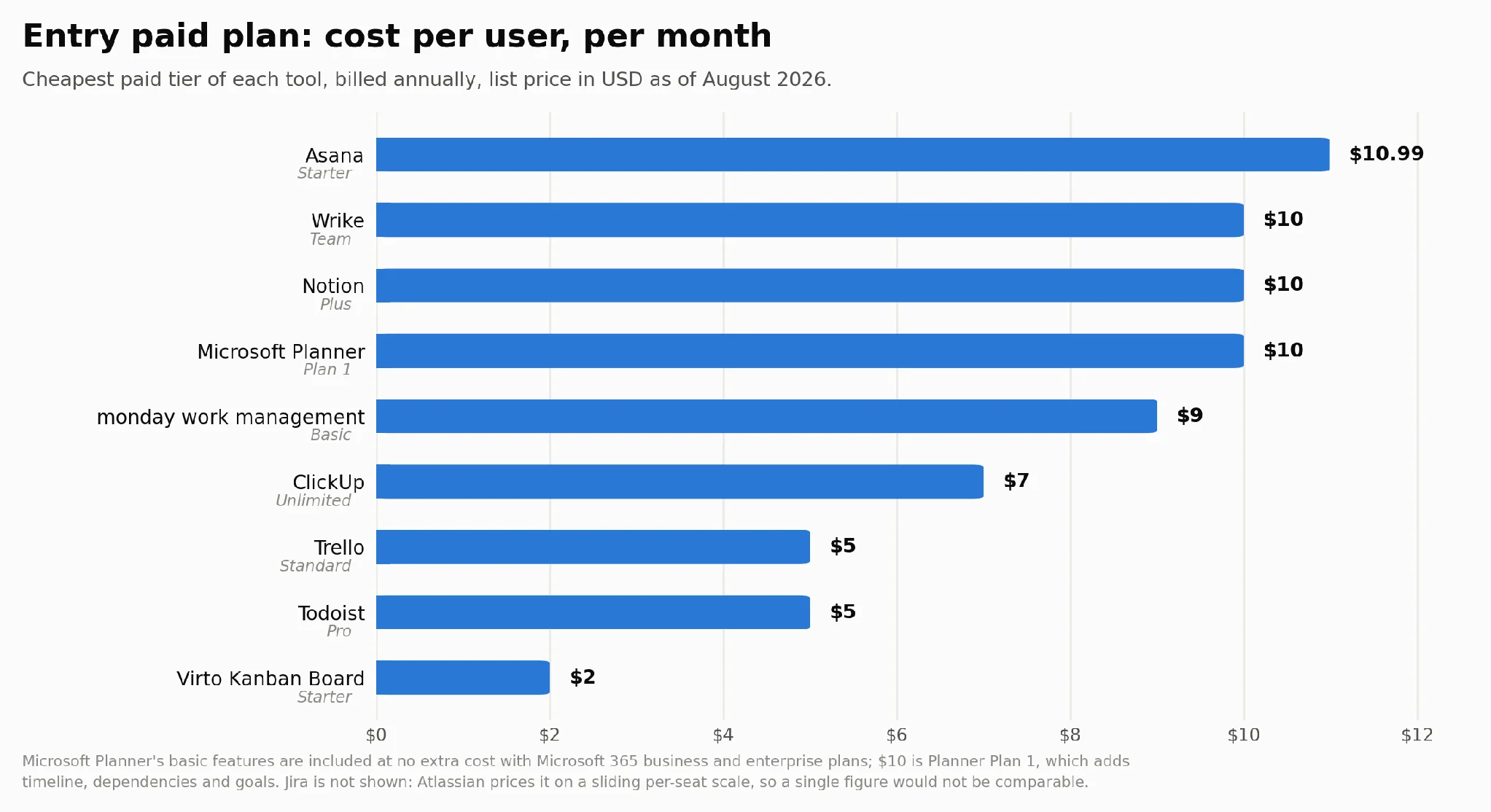
Pic.2. Entry-level paid plan cost per user per month across the tools compared in this guide.
The 10 best task management software tools, reviewed
1. Asana — best overall for cross-team work management
Asana is the most broadly capable option here for teams that need task management to scale beyond one department. Work is organised into projects, goals and portfolios, and the same tasks can appear in several projects at once — which is what makes cross-functional work legible rather than duplicated.
Its strongest feature is the rules engine: multi-step automations that move tasks between sections, assign owners, set fields and trigger approvals without anyone remembering to do it. Workload view and portfolio reporting are genuinely useful once you are past about 30 people.
Where it falls down: the free Personal plan is now capped at two seats, which makes it more of a trial than a usable free tier for a team. Asana is also the priciest entry-level plan in this comparison, and the interface takes real onboarding — teams that just want a shared board will find it heavy.
- Best for: growing companies coordinating work across several teams
- Free plan: yes — Personal, up to 2 seats
- Pricing: Starter $10.99/user/mo, Advanced $24.99/user/mo (billed annually); Enterprise on request — see Asana pricing
- Free trial: available on paid plans, no credit card required
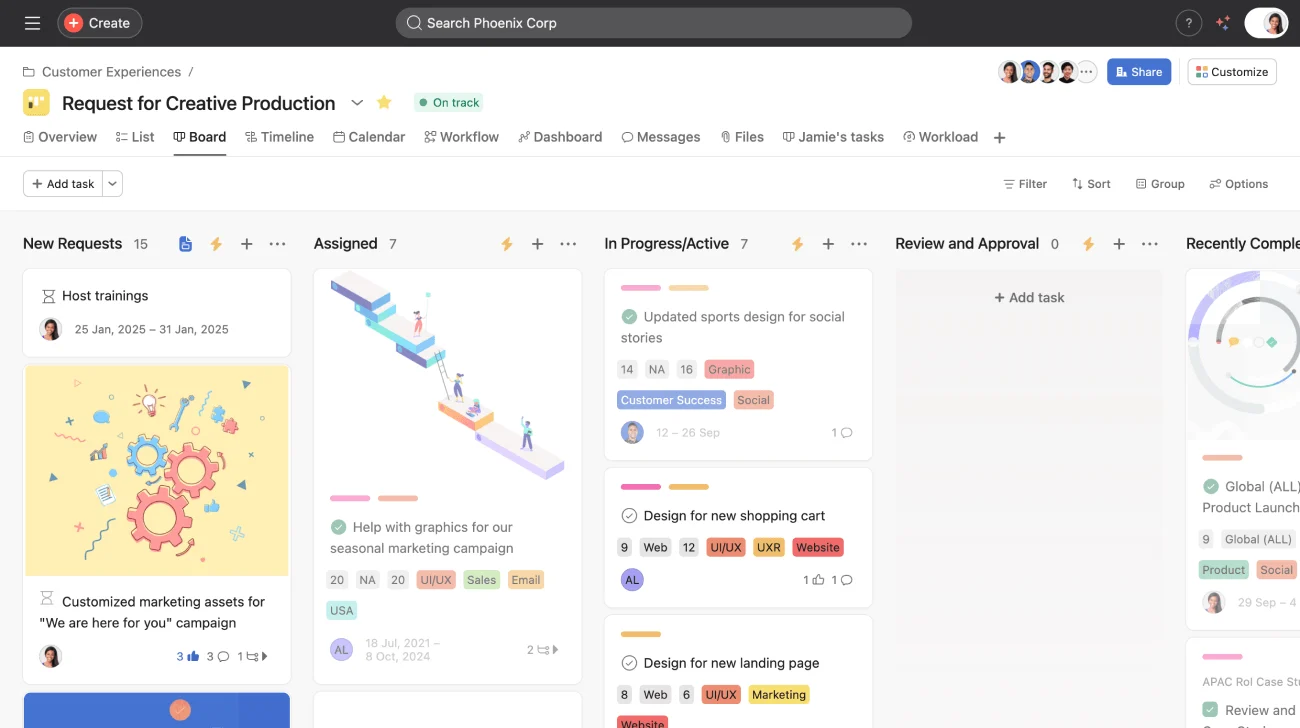
Pic.3. Asana project board with sections, custom fields and rules.
2. monday work management — best for visual, customisable workflows
monday’s core idea is the board as a configurable database. Columns are typed — status, person, date, number, formula, dependency — and you assemble the workflow you want rather than adopting one the vendor designed. For operations, marketing and HR teams that have specific processes, this is the most direct route to a tool that matches how they actually work.
The visual language is the clearest of any tool here: colour-coded status columns make the state of thirty tasks readable at a glance, and dashboards roll several boards into one view.
Where it falls down: the seat model. Paid plans start at three seats and then move in blocks of five, so a four-person team pays for five and an eleven-person team pays for fifteen. The free plan is capped at two seats and three boards. Heavy customisation also has a way of becoming heavy maintenance.
- Best for: teams with distinctive processes they want to model exactly
- Free plan: yes — 2 seats, 3 boards
- Pricing: Basic $9, Standard $12, Pro $19/seat/mo (billed annually); Enterprise on request — see monday.com pricing
- Free trial: 14 days of the Pro plan, no credit card required
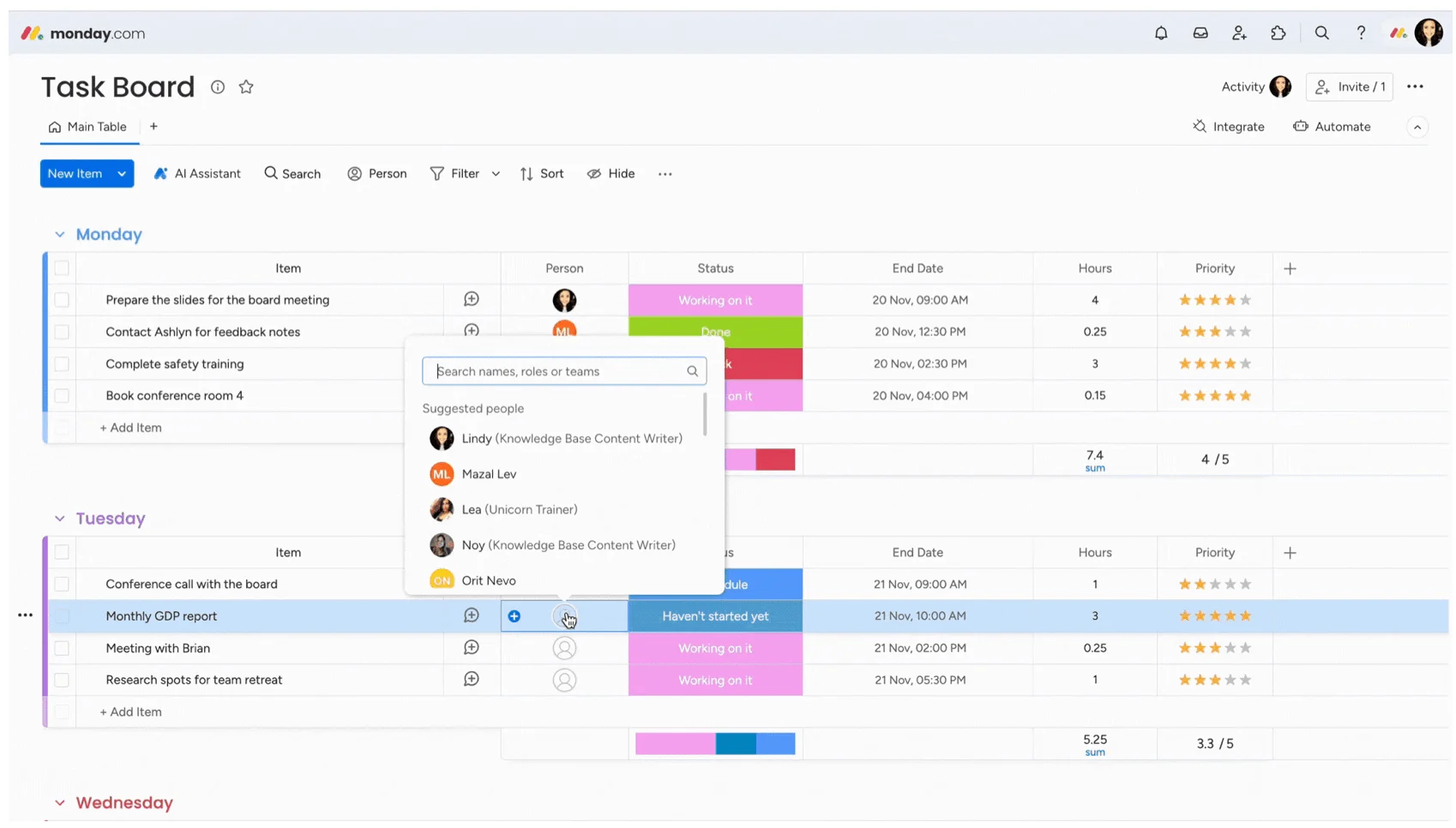
Pic.4. monday task board.
3. ClickUp — best value, and the most generous free plan
ClickUp offers the most features per dollar in this comparison, and it is the only tool here whose free plan allows unlimited members and unlimited tasks. For a small team with no budget, that alone puts it at the top of the shortlist.
The paid tiers are also the cheapest full-featured option: $7/user/mo for Unlimited, $12 for Business. You get custom fields, dependencies, time tracking, goals, docs, whiteboards and a deep automation builder.
Where it falls down: ClickUp’s breadth is also its main complaint. The hierarchy — Workspace, Space, Folder, List, Task, Subtask — is more structure than most teams need, and new users routinely describe the interface as cluttered. Free-plan storage is only 60 MB, so attachments will push you to a paid plan quickly.
- Best for: cost-conscious teams that want the full feature set
- Free plan: yes — unlimited members and tasks, 60 MB storage
- Pricing: Unlimited $7, Business $12/user/mo (billed annually); Enterprise on request — see ClickUp pricing
- Free trial: free trials of paid plans are available; ClickUp does not publish a fixed length, but offers a 30-day money-back guarantee on a first paid subscription
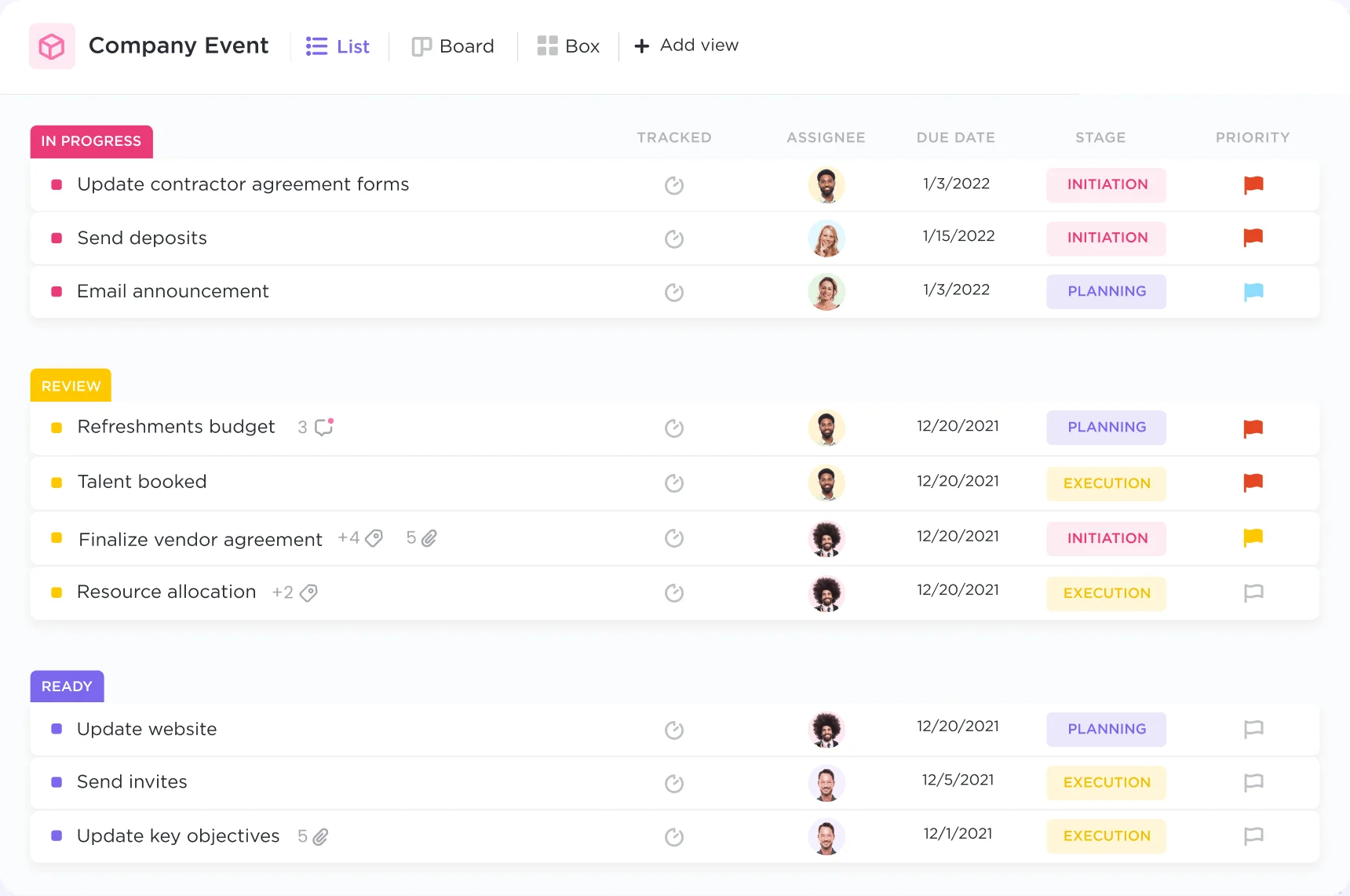
Pic.5. ClickUp list view showing custom fields and priorities.
4. Todoist — best for personal task management and small teams
Todoist is the best pure task manager on this list, and it is deliberately not trying to be a work management platform. Natural-language capture is its signature feature: type “send invoice every 1st at 9am” and it parses the date, the recurrence and the reminder without you touching a form.
It is fast, it works identically on every platform, and its offline behaviour is better than anything else here. For an individual, or a team of five who need shared lists rather than shared process, it is the least friction you can buy.
Where it falls down: no dependencies, no timeline, no workload view, minimal reporting. The free Beginner plan is limited to five personal projects and five collaborators per project. Note also that Todoist raised prices in December 2025 — Pro went from $4 to $5/mo and Business from $6 to $8/user/mo — so older comparison articles will quote the wrong figures.
- Best for: individuals and small teams who want lists, not process
- Free plan: yes — Beginner, 5 personal projects, 5 collaborators per project
- Pricing: Pro $5/mo, Business $8/user/mo (billed annually) — see Todoist pricing
- Free trial: 7 days on Pro, 14 days on Business
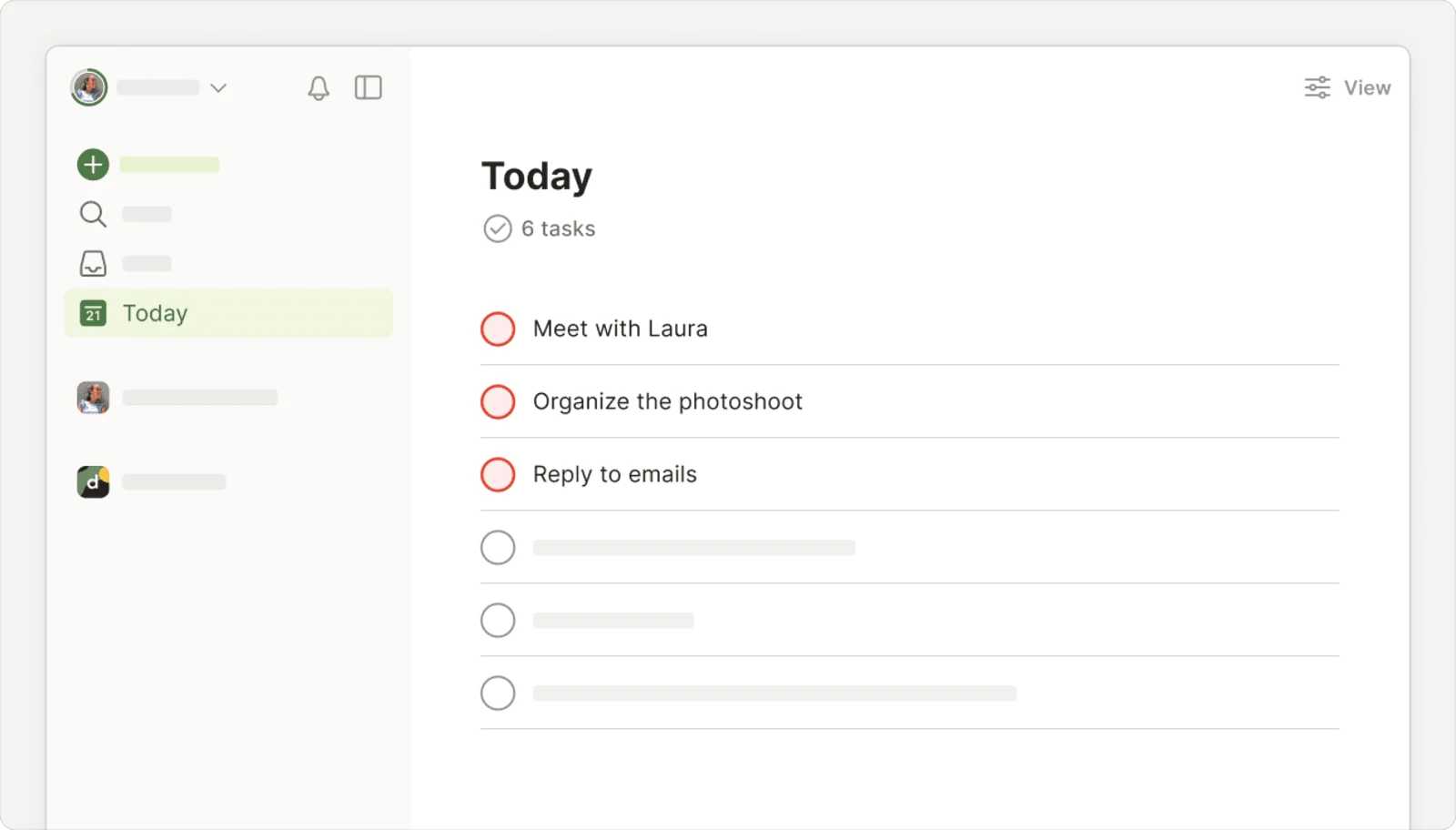
Pic.6. Todoist Today view with natural-language task entry.
5. Trello — best for simple kanban and fast adoption
Trello is the tool people learn without training. Boards, lists, cards, drag and drop — that is the whole model, and it is why Trello still wins in teams where getting everyone to actually use the thing matters more than modelling the work precisely.
Power-Ups extend it a long way: calendar views, custom fields, time tracking and integrations are all available, and the free plan now allows unlimited Power-Ups per board. If you want to understand where this style of tool fits more generally, our digital kanban board guide covers the method rather than the vendors.
Where it falls down: Trello does not scale into portfolio work. Cross-board reporting is thin, dependencies are not native, and the free plan caps you at ten boards and ten collaborators per Workspace. Teams routinely outgrow it at around 20–30 people.
- Best for: small teams that want a shared board with no learning curve
- Free plan: yes — 10 boards and 10 collaborators per Workspace
- Pricing: Standard $5, Premium $10, Enterprise from $17.50/user/mo (billed annually) — see Trello pricing
- Free trial: 14 days on Premium, no credit card required
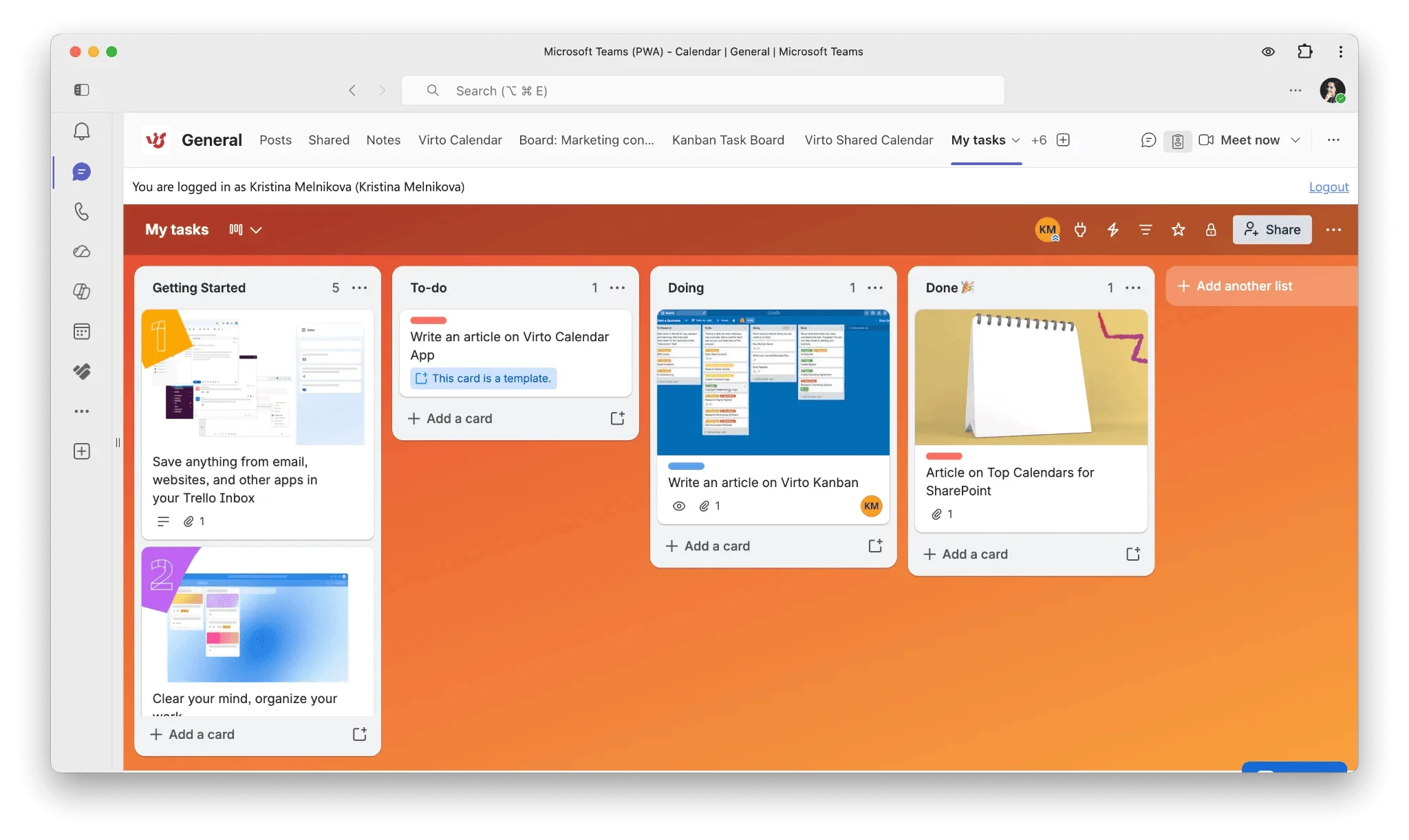
Pic.7. Trello board.
6. Wrike — best for professional services and client work
Wrike is built around billable, deliverable-based work: request forms that route incoming work to the right team, proofing and approval workflows for creative assets, time tracking, and resource planning across a portfolio. Agencies, marketing teams and professional services firms are its natural home.
It is also the only tool here with a genuinely unlimited free plan in terms of users — though see the caveat below. If you are juggling several client engagements at once, our guide on how to manage multiple projects pairs well with this category of tool.
Where it falls down: the free plan allows unlimited users but only 200 active tasks at a time, which is a hard ceiling rather than a soft one. The Team plan is capped at 15 users, so growing past that means jumping to Business at $25/user/mo — a steep step. Wrike publishes annual pricing only.
- Best for: agencies and services teams managing client deliverables
- Free plan: yes — unlimited users, 200 active tasks
- Pricing: Team $10 (2–15 users), Business $25/user/mo (5–200 users), billed annually; Pinnacle and Apex on request — see Wrike pricing
- Free trial: 14 days on Team and Business, no credit card required
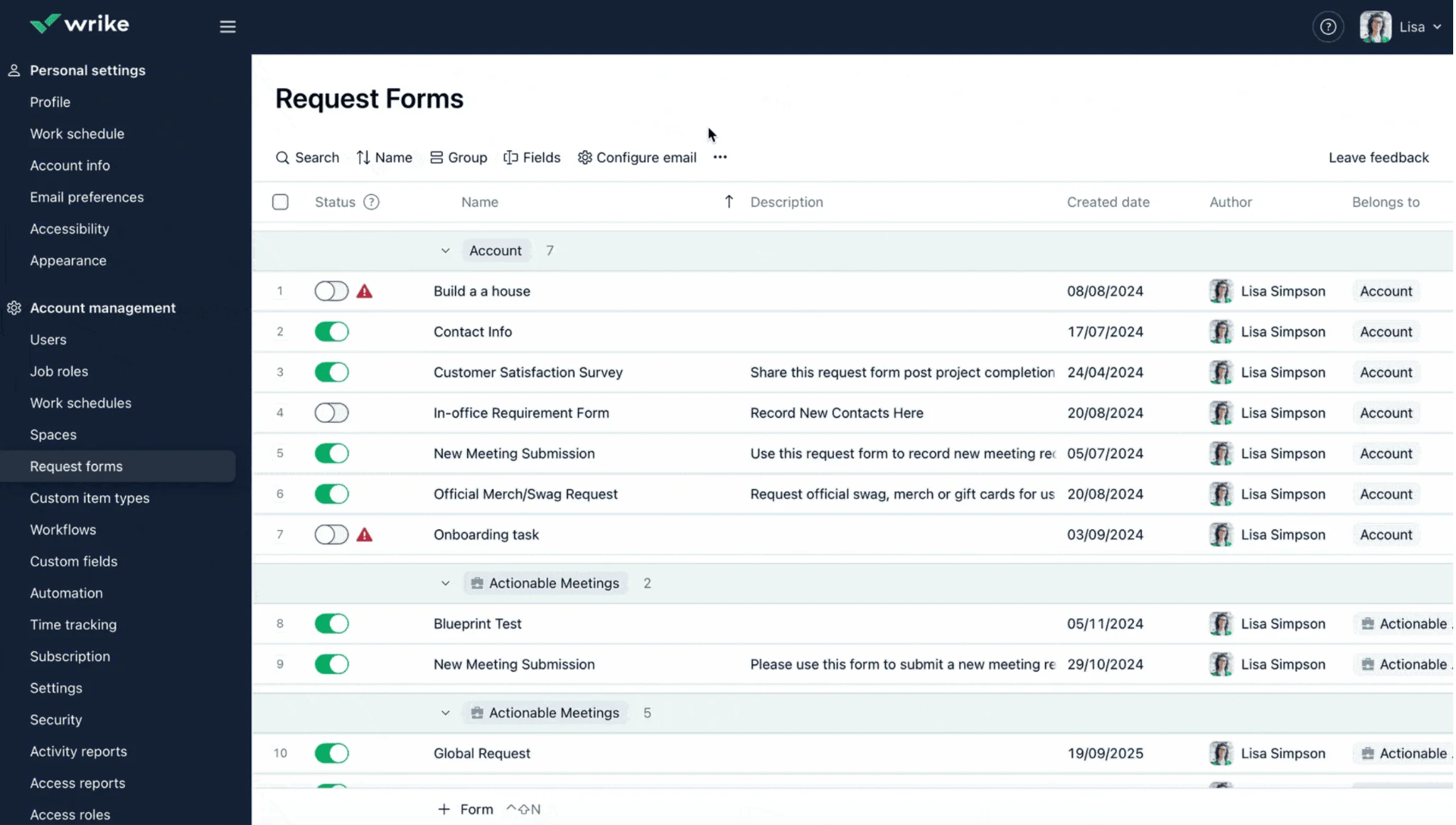
Pic.8. Wrike request form.
7. Notion — best when tasks live alongside docs and wikis
Notion is a document workspace with a database engine underneath, and task management is one of the things you can build with it. That framing matters: if your team’s real problem is that specs, meeting notes, decisions and tasks are in four different tools, Notion collapses them into one, and the tasks inherit the context.
Database views mean the same task set can be a board for one team, a calendar for another and a filtered list on someone’s personal page, with no duplication.
Where it falls down: Notion is a build-it-yourself tool. There is no opinionated task workflow out of the box, so somebody has to design and maintain it. Notifications are weaker than the dedicated tools, there is no real workload view, and the free plan becomes block-limited as soon as a workspace has more than one member.
- Best for: teams that want tasks, docs and knowledge in one workspace
- Free plan: yes — block-limited for multi-member workspaces, 5 MB file uploads
- Pricing: Plus $10, Business $20/member/mo (billed annually); Enterprise on request — see Notion pricing
- Free trial: 30 days on Business for new teams
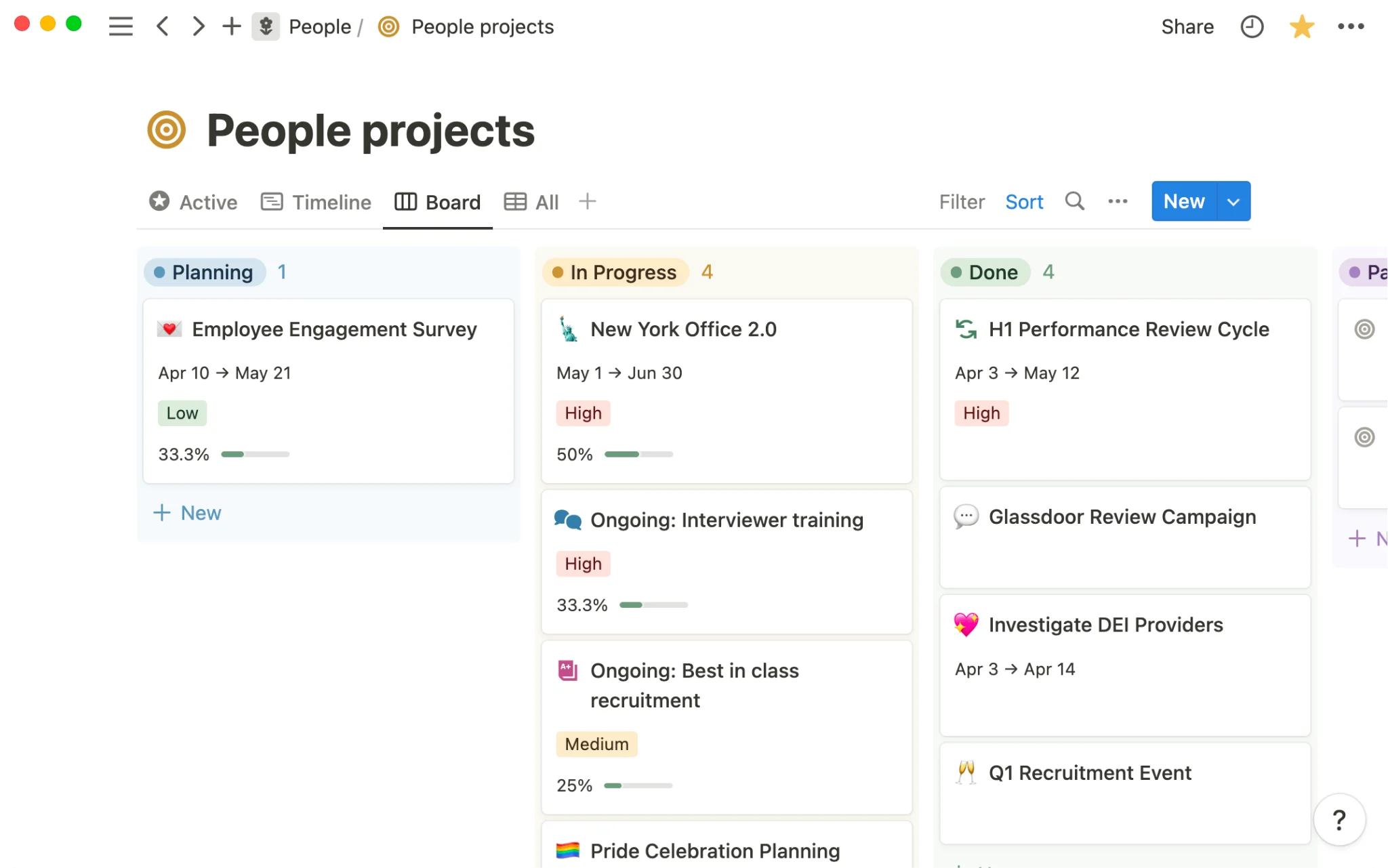
Pic.9. Notion task database shown as a board.
8. Jira — best for software development teams
Jira is the default for engineering work, and for good reason: sprints, backlogs, story points, release versions, and issue types that map to how software teams actually plan. Its reporting — burndown, velocity, cumulative flow — is built for agile ceremonies rather than retrofitted onto them.
The free plan covers up to 10 users with no time limit, which makes it viable for a small product team indefinitely.
Where it falls down: Jira is a poor general task manager. Marketing, HR and operations teams find the issue-and-workflow model alien, and administering Jira properly is a job in itself. Pricing is also the least transparent here — Atlassian uses a sliding per-seat scale that drops as user count rises, so quoted per-user figures are approximate and you should price your own seat count on their site.
- Best for: software teams running scrum or kanban
- Free plan: yes — up to 10 users, 2 GB storage, no time limit
- Pricing: tiered per-seat scale — Standard and Premium plans; check your seat count at Jira pricing
- Free trial: 7 days for new customers; 14 days for existing customers, and 30 days for annual subscribers
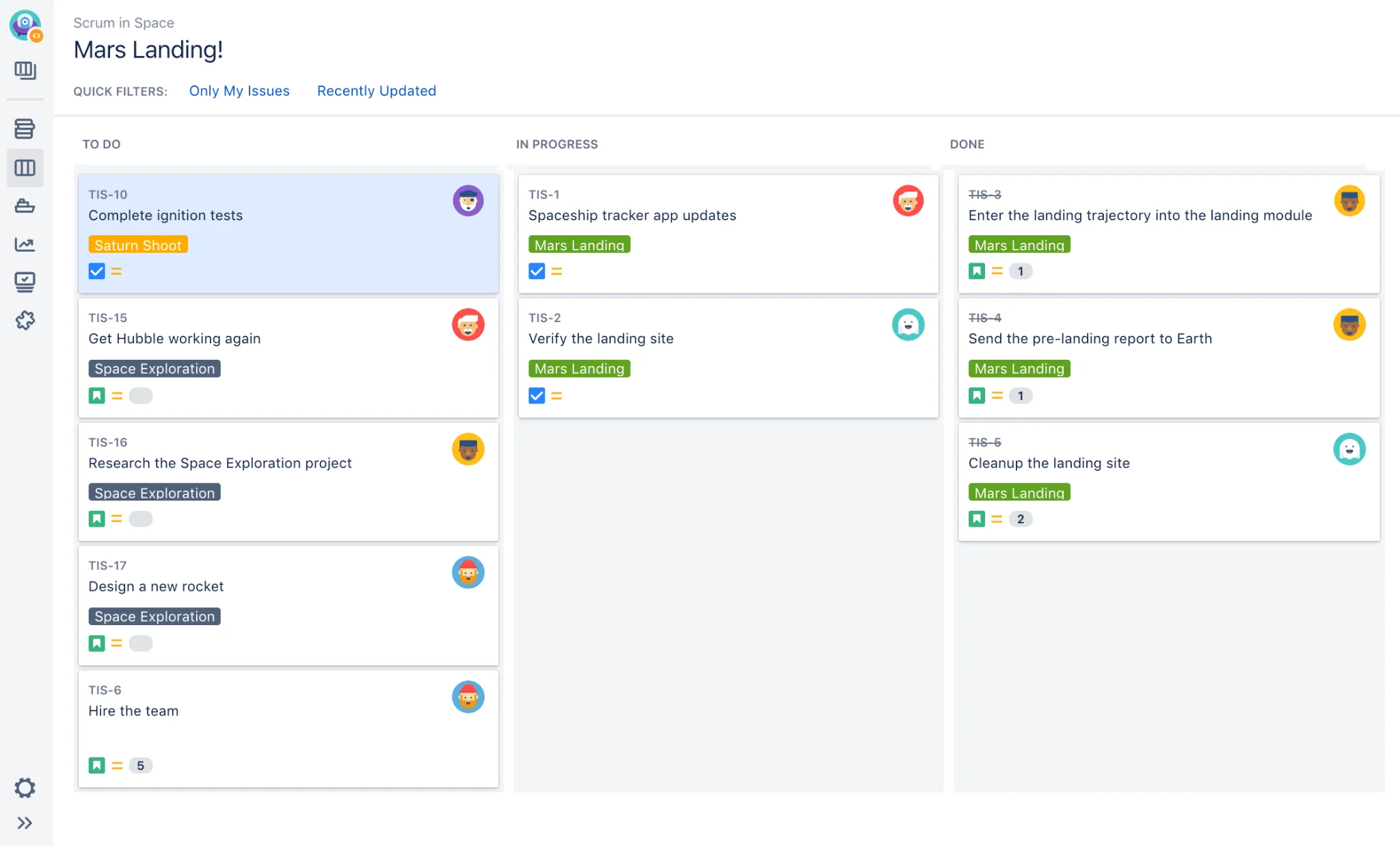
Pic.10. Jira sprint board.
9. Microsoft Planner — best free option if you already pay for Microsoft 365
If your organisation has Microsoft 365, you already own a task management tool. Planner ships with Business Basic, Business Standard, Business Premium and the enterprise plans at no extra cost, it authenticates through your existing identity, and it inherits your tenant’s compliance and retention settings — which is not a small thing for regulated teams.
Planner has consolidated what used to be three separate products: the old Planner boards, Microsoft To Do and Project for the web now sit under one roof. Basic Planner gives you Grid, Board and Chart views, filtering and grouping, recurring tasks, Excel export and up to 9,000 tasks per plan. Plans are tied to Microsoft 365 Groups, so membership and permissions are already handled.
Where it falls down: the free tier is basic in a literal sense. Timeline, dependencies, milestones, custom fields, sprints and goals all require Planner Plan 1 at $10/user/mo — at which point you are paying general-market prices. Reporting across many plans is weak, and the board view is rigid compared with a purpose-built kanban tool.
- Best for: Microsoft 365 organisations that want a no-extra-cost starting point
- Free plan: included with Microsoft 365 business and enterprise subscriptions
- Pricing: Planner Plan 1 $10/user/mo, Planner and Project Plan 3 $30/user/mo (billed annually) — see Microsoft Planner plans and pricing
- Free trial: one month free on Plan 1 and Plan 3
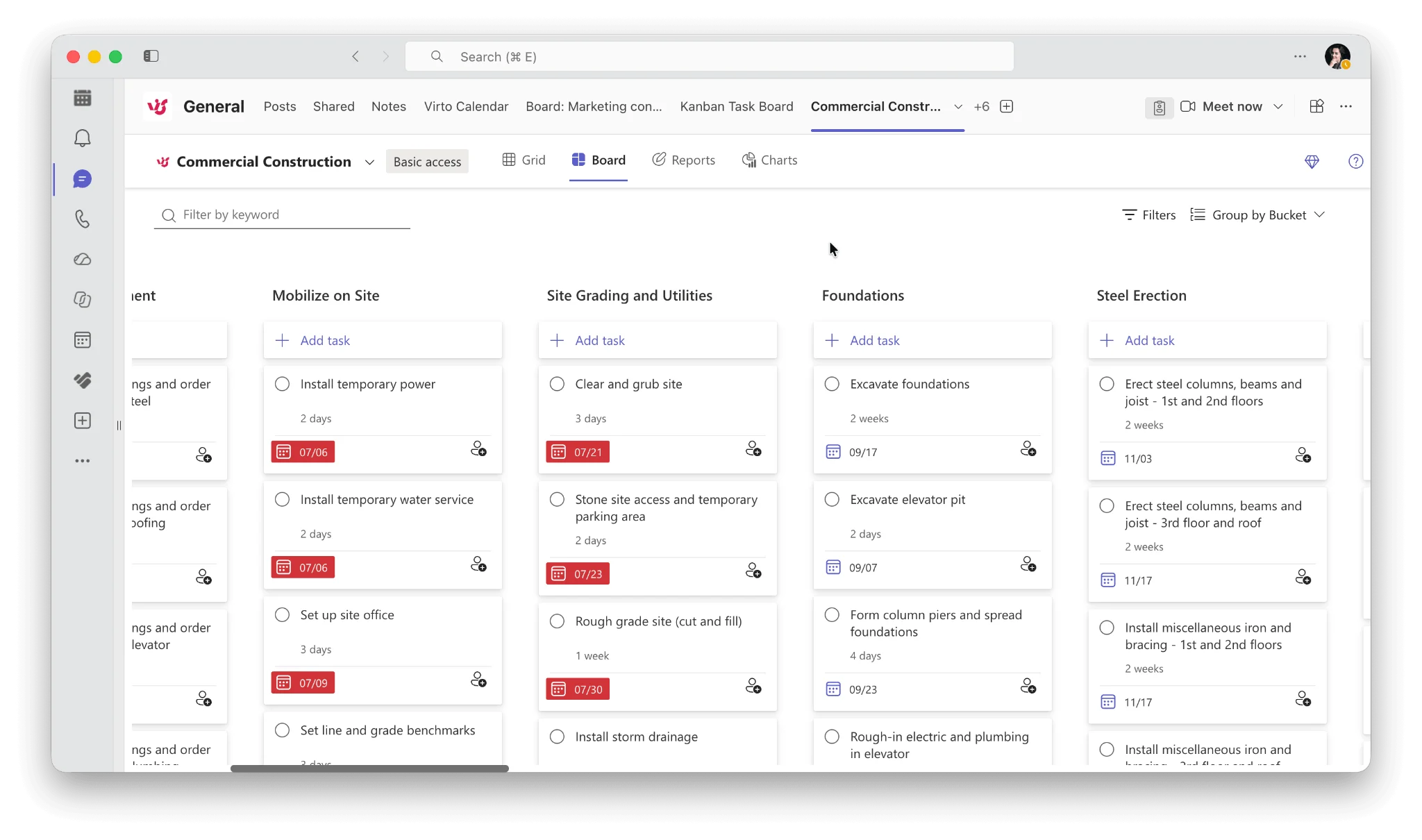
Pic.11. Microsoft Planner board view inside Microsoft Teams.
10. Virto Kanban Board — best kanban tool for SharePoint and Microsoft Teams
Virto Kanban Board is the tool we build, so treat this section as informed rather than neutral — the comparison table above is the honest place to judge it. What it does that nothing else in this list does is turn existing SharePoint lists into working kanban boards without moving the data anywhere.
That is the whole proposition. Your tasks stay in SharePoint, under your tenant’s permissions, backup and retention policy. The board is a view over that data, not a copy of it in someone else’s cloud. For organisations that have already decided their data stays in Microsoft 365, this removes the security review that a standalone tool triggers.
On top of that it adds what Planner’s basic tier does not have: configurable columns and swimlanes, work-in-progress limits, card colour rules, filtered board views per team, subtasks, and boards that combine items from multiple lists and sites. It runs as a SharePoint web part, a Microsoft Teams tab, and in Azure. Our guides on the best kanban boards for Microsoft Teams and online kanban boards go into the category in more depth.
Where it falls down: it is a kanban tool for the Microsoft ecosystem, not a general work management platform. If you are not on Microsoft 365, it is not for you. There is no portfolio-level financial reporting, and teams that want an all-in-one suite with docs, whiteboards and CRM should look at ClickUp or monday instead.
- Best for: SharePoint and Teams users who want real kanban without leaving Microsoft 365
- Free plan: no — 30-day free trial instead
- Pricing: Starter $2/user/mo for up to 30 users, Pro $3/user/mo for 31–200 users (billed annually), Enterprise on request — see Virto pricing
- Free trial: 30 days, all features, no credit card required
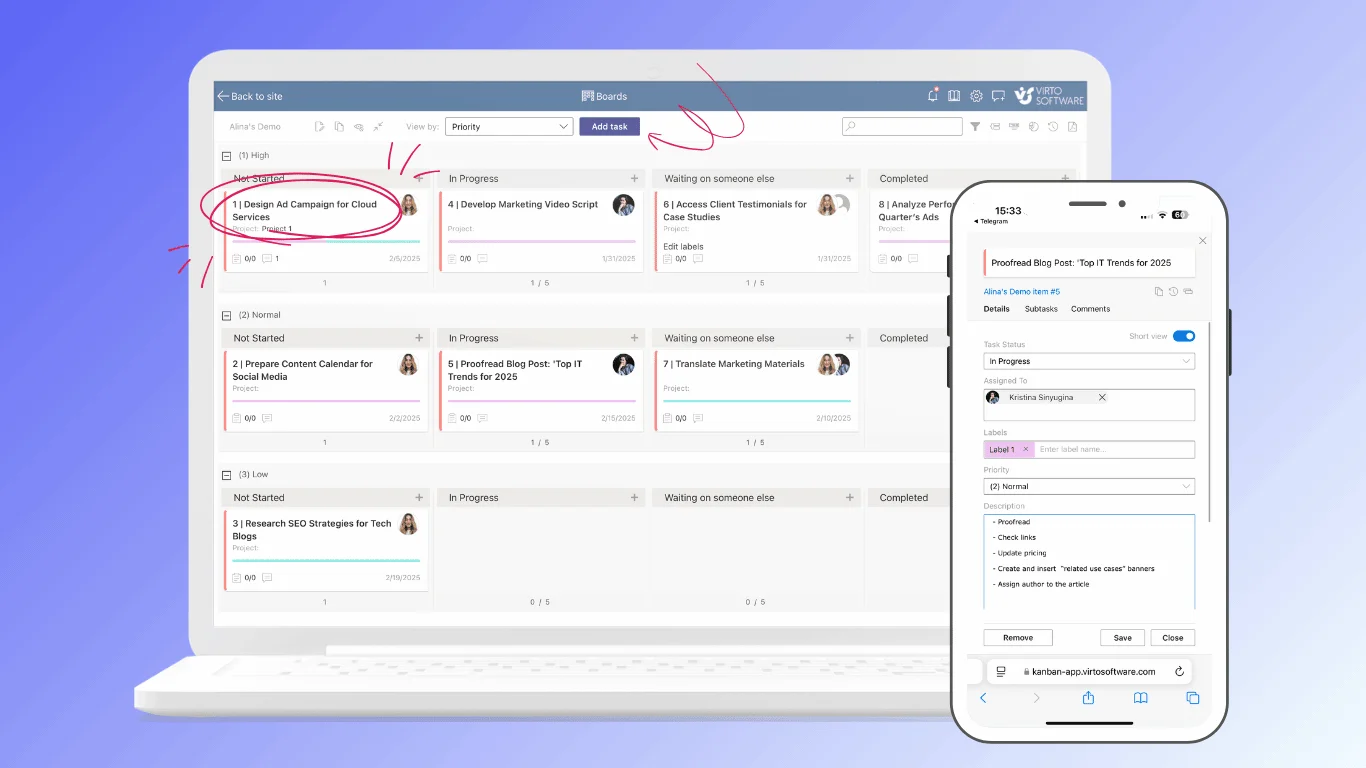
Pic.12. Virto Kanban Board built on a SharePoint list
Best task management software for Microsoft 365 teams
If your team already runs on Microsoft 365, the calculation changes. Adding a standalone platform means a second identity provider, a second place where corporate data lives, a second vendor to review, and a second app for people to remember to check. Sometimes that is worth it. Often it is not.
The practical sequence is:
- Start with Planner. You already pay for it. If Grid, Board and Chart views cover your team’s needs, stop here — you are done, at no extra cost.
- Add Virto Kanban Board if the board itself is the bottleneck. Swimlanes, WIP limits, cross-list boards, card rules and per-team filtered views are where basic Planner runs out, and at $2–3 per user per month it is a fraction of what Planner Plan 1 costs.
- Go to Planner Plan 1 or Plan 3 if you need genuine project scheduling. Dependencies, milestones, critical path and goals are project management features, not task management ones, and Microsoft charges accordingly.
- Only leave Microsoft 365 when the requirement genuinely sits outside it — client proofing workflows, CRM-linked tasks, or a portfolio financial model.
Two related tools worth knowing about if you are staying inside the Microsoft stack: Virto Calendar Overlay, which combines Exchange, SharePoint, Outlook and Planner calendars into a single view, and our guide to project calendars for teams whose work is date-driven rather than board-driven. Teams managing shifts rather than projects should look at employee scheduling software instead — it is a different problem.
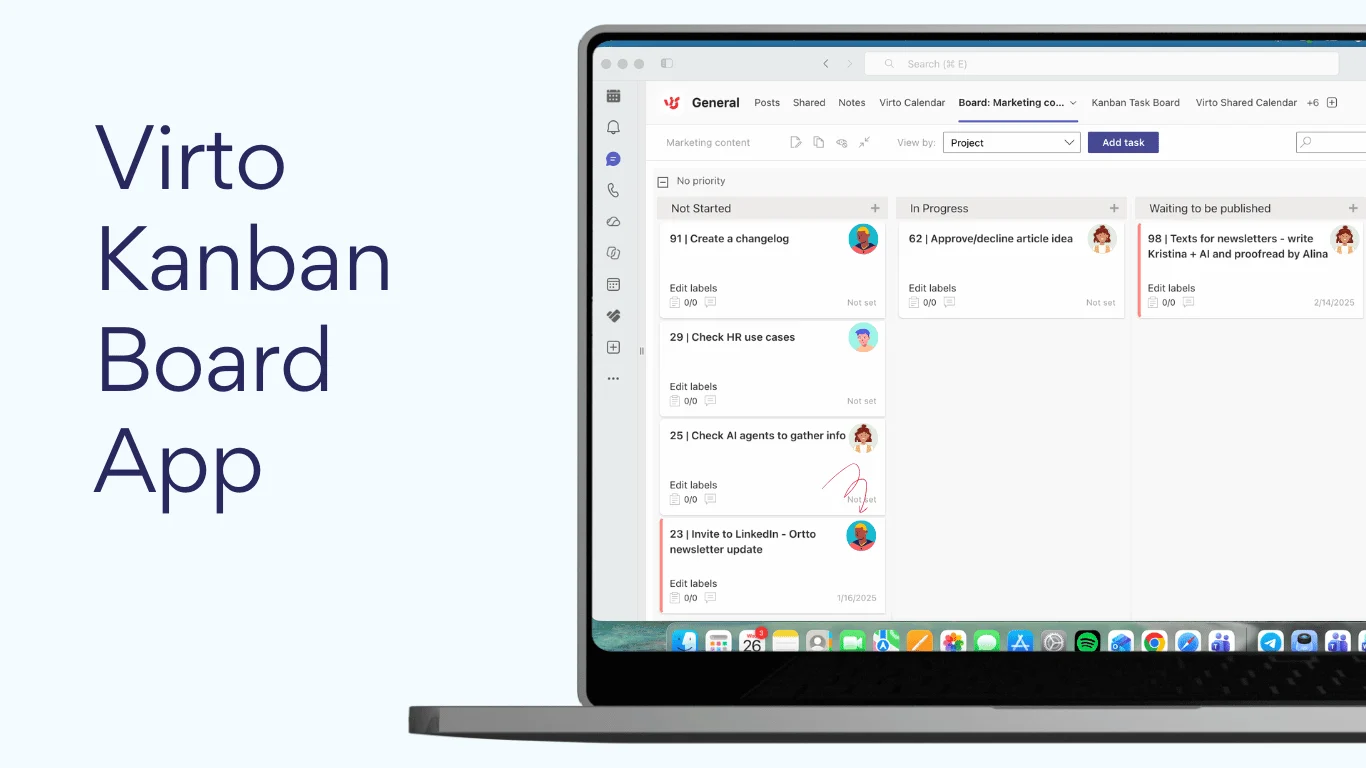
Pic.13. Virto Kanban Board running as a tab inside a Microsoft Teams channel.
How to choose task management software
Feature checklists are not much help here, because almost every tool in this comparison has almost every feature. What separates them is fit. Work through these five questions in order — each one removes options rather than adding them.
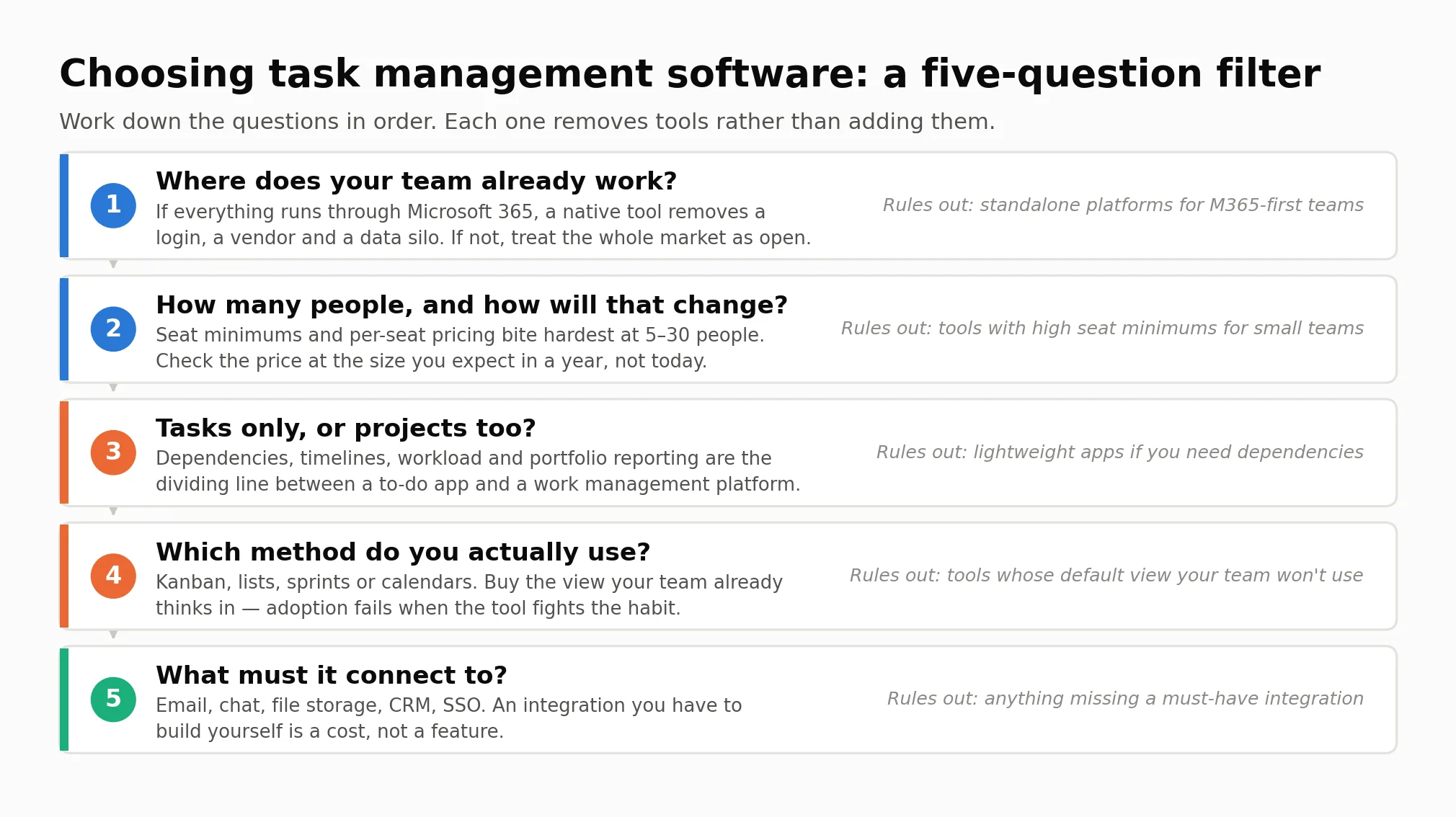
Pic.14. A five-question filter for shortlisting task management software.
1. Where does your team already work?
This is the highest-leverage question and the one most buyers skip. If everything already runs through Microsoft 365, a native tool removes a login, a vendor and a data silo. If your team lives in Slack and Google Workspace, the Microsoft-native options drop off the list immediately.
2. How many people, and how will that change?
Seat minimums and pricing bands bite hardest between five and thirty people. monday sells seats in blocks of five after a three-seat minimum. Wrike’s Team plan stops at fifteen users and the next step is two and a half times the price. Price the tool at the headcount you expect in a year, not the one you have today.
3. Tasks only, or projects too?
Dependencies, timelines, workload balancing and portfolio reporting are the dividing line between a to-do app and a work management platform. If you genuinely need them, Todoist and Trello are the wrong shortlist. If you do not, you will pay for a platform and use a tenth of it.
4. Which method does your team actually use?
Kanban, sprints, simple lists or a calendar. Buy the view your team already thinks in. Adoption fails far more often because the tool fights an existing habit than because it lacked a feature.
5. What must it connect to?
Email, chat, file storage, CRM, single sign-on. Write down the integrations that are non-negotiable before you look at any demo, and check them on the vendor’s own integrations page rather than a review site.
Then run a real trial. Not a demo — a trial with one real team doing real work for two weeks. Most tools here give you between 7 and 30 days; Virto’s is 30, Notion’s Business trial is 30, and most of the rest are 14.
Free plans: what you actually give up
Every tool in this comparison except Virto Kanban Board has a free tier, but free means very different things:
- Genuinely usable for a team: ClickUp (unlimited members and tasks, 60 MB storage) and Jira (up to 10 users, no time limit) are the two free plans a small team can run on indefinitely.
- Free but capped on people: Asana and monday both stop at 2 seats. These are extended trials, not free plans, whatever the pricing page calls them.
- Free but capped on volume: Wrike allows unlimited users but only 200 active tasks; Trello allows 10 boards and 10 collaborators per Workspace; Todoist allows 5 personal projects.
- Free because you already paid: Microsoft Planner’s basic features come with your Microsoft 365 subscription. For a lot of organisations this is the best-value option on the page and it does not appear on any pricing comparison at all.
The costs that free plans hide are storage limits, missing automation, and the absence of admin controls — which usually surfaces at exactly the moment the tool has become load-bearing.
Frequently asked questions
What is the best task management software?
It depends on your team: Asana, monday and ClickUp for general work management, Todoist for simple task lists, and Microsoft Planner or Virto Kanban for teams standardised on Microsoft 365. There is no single winner, because a five-person studio and a 400-person operations department are not solving the same problem.
What is the best free task management software?
ClickUp has the most capable free plan — unlimited members and unlimited tasks, limited mainly by 60 MB of storage. Jira’s free plan covers up to 10 users with no time limit and suits small software teams. And if your organisation already has Microsoft 365, Microsoft Planner is effectively free and is often overlooked for that reason.
What is the best task management software for small teams?
For a team of two to ten, Trello or Todoist give you the least friction, and ClickUp gives you the most capability at no cost. Watch the seat-minimum rules: monday’s three-seat minimum and five-seat blocks make it disproportionately expensive below ten people.
What is the best task management software for Microsoft Teams?
Microsoft Planner is the built-in answer and costs nothing extra. When you need real kanban behaviour — swimlanes, work-in-progress limits, cross-list boards and card rules — Virto Kanban Board adds that inside Teams and SharePoint while leaving the data in your own tenant. Both are covered in more depth in our kanban boards for Microsoft Teams guide.
What is the difference between task management and project management software?
Task management tracks individual work items — owner, due date, status. Project management adds scheduling, dependencies, budgets, resourcing and portfolio reporting on top. Most modern tools do both to some degree; the honest test is whether you need a critical path and a resource model, or just a shared list everyone actually updates.
How much does task management software cost?
Entry-level paid plans run from about $2 to $11 per user per month on annual billing. Virto Kanban Board starts at $2, Todoist and Trello at $5, ClickUp at $7, monday at $9, Notion and Wrike at $10, and Asana at $10.99. Monthly billing typically adds 15–30%. Budget for the tier above the one you are looking at — automation and admin controls almost always live one step up.
Do these tools offer free trials?
Yes, though lengths vary more than you would expect. Virto products come with a 30-day free trial across the range. Notion offers 30 days on Business for new teams. monday, Trello and Wrike offer 14 days. Todoist offers 7 days on Pro and 14 on Business. Jira gives new customers 7 days. Asana and ClickUp both offer trials without publishing a fixed length.
The bottom line
If you want one recommendation and you are not on Microsoft 365: start with ClickUp if budget matters, Asana if you are coordinating several teams, and Todoist if you genuinely only need lists.
If you are on Microsoft 365: start with Microsoft Planner, because you already own it, and add Virto Kanban Board when the board itself becomes the limitation. That order costs you nothing to test and avoids buying a platform to solve a board problem.
Whichever you pick, run a two-week trial with one real team before you roll it out. The tool that survives contact with actual work is the right one, and no comparison table can tell you which that is.
Try Virto Kanban Board free for 30 days — full features, no credit card required.