How deploying VirtoSoftware apps inside your own Microsoft 365 tenant eliminates third-party data exposure, shortens SOC 2 and ISO 27001 reviews, and gives your security team the only thing it really wants — control.
The hidden cost of “trusting” your SaaS vendors
Every CISO knows the routine. A new Microsoft 365 add-on lands on the procurement desk, business owners want it yesterday, and the security team is asked to clear the path. What follows is a months-long parade of vendor security questionnaires, SOC 2 Type II reports, ISO 27001 certificates, penetration test summaries, DPIAs, sub-processor lists, and contract negotiations over data residency, breach notification, and right-to-audit clauses.
You pay for all of this — directly, in audit fees and external assessor invoices, and indirectly, in the engineering hours your team spends reviewing reports written about somebody else’s environment.
And at the end of it, what have you actually verified? That a third party, on a particular day, in a particular scope, was found to have controls that an auditor judged adequate. You have not verified that your data, when it lives inside that vendor’s infrastructure, is genuinely safe from operator error, insider risk, accidental deletion, misconfigured backups, or an incident the vendor will not be obligated to disclose for 72 hours — or longer.
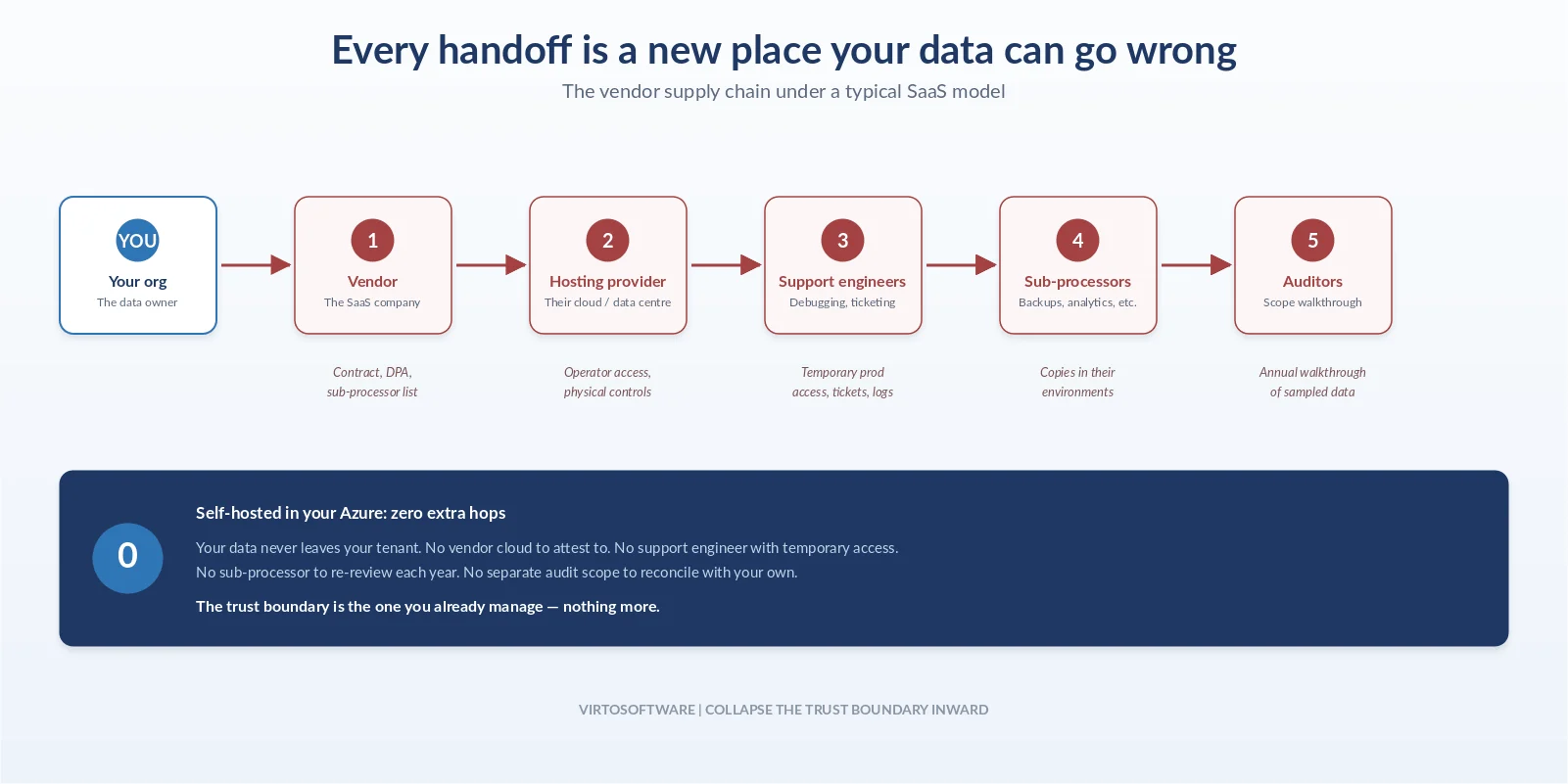
The deeper problem is structural. The SaaS model asks you to extend trust outward: to the vendor, to its hosting provider, to its support engineers who may need temporary access to debug your tenant, to the auditors who certify it, and sometimes to a chain of sub-processors you have never directly evaluated. Each handoff is a new place where data can move, be copied, be logged, or be exposed. Compliance frameworks like SOC 2 and ISO 27001 are designed to make that risk visible and manageable — they are not designed to make it disappear.
There is another way to handle this entire class of problems. Instead of extending trust outward, you can collapse the trust boundary inward — and run the application inside infrastructure you already own and already audit.
The zero-trust deployment model, in plain terms
“Zero trust” in security architecture means: never assume any actor, network, or service is trustworthy by default; verify every access, every time. Most teams apply this thinking to identity and network traffic. Far fewer apply it to vendor deployments — and that is where the largest residual risk usually sits.
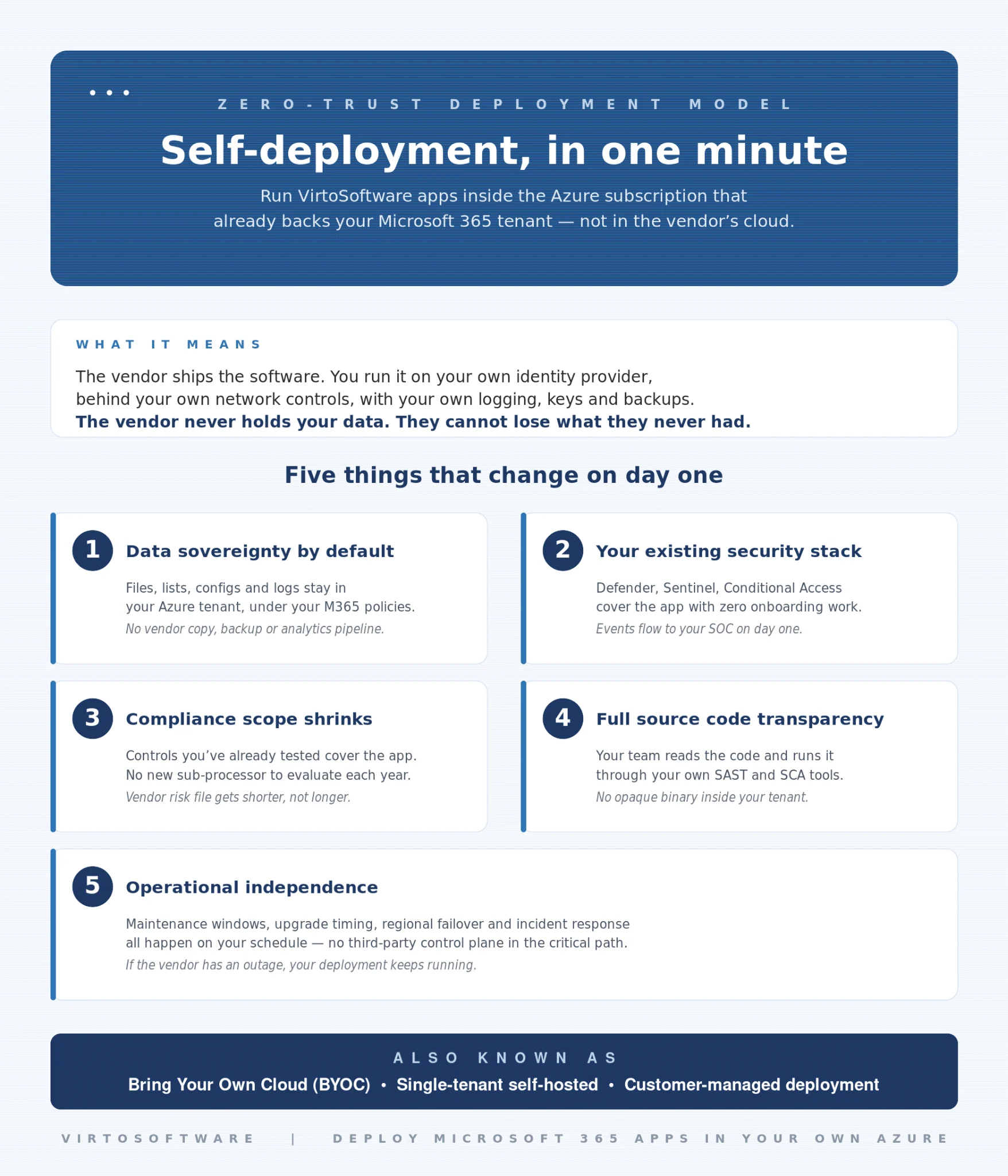
A zero-trust deployment model takes the same principle and applies it to where the application itself runs. The vendor ships you the software; you run it inside your own cloud subscription, on your own identity provider, behind your own network controls, with your own logging, your own keys, and your own backup policies. The vendor never holds your data. They cannot lose what they never had.
This model is sometimes called Bring Your Own Cloud (BYOC), single-tenant self-hosted, or customer-managed deployment. The label matters less than the property: your data stays in your tenant, governed by the same policies that govern the rest of your Microsoft 365 estate.
VirtoSoftware is built to be deployed exactly this way.
What this looks like with VirtoSoftware
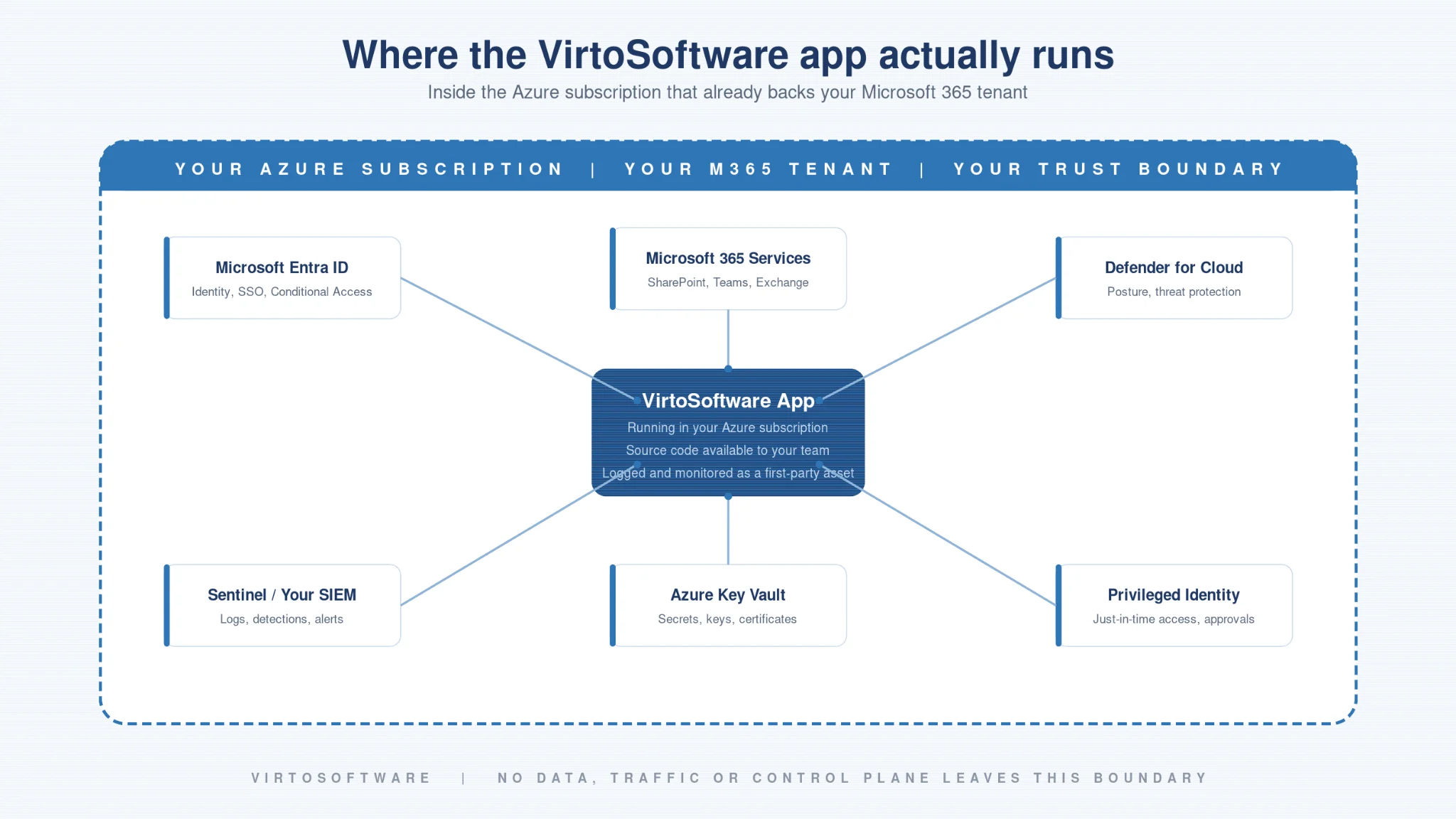
VirtoSoftware applications can be deployed directly into the Azure subscription that already backs your Microsoft 365 tenant. There is no separate vendor environment for your data to live in. There is no shared multi-tenant control plane storing your business records. The apps run as first-class citizens of your own infrastructure, integrated with the Microsoft 365 services your users already log into.
Practically, this changes five things at once.
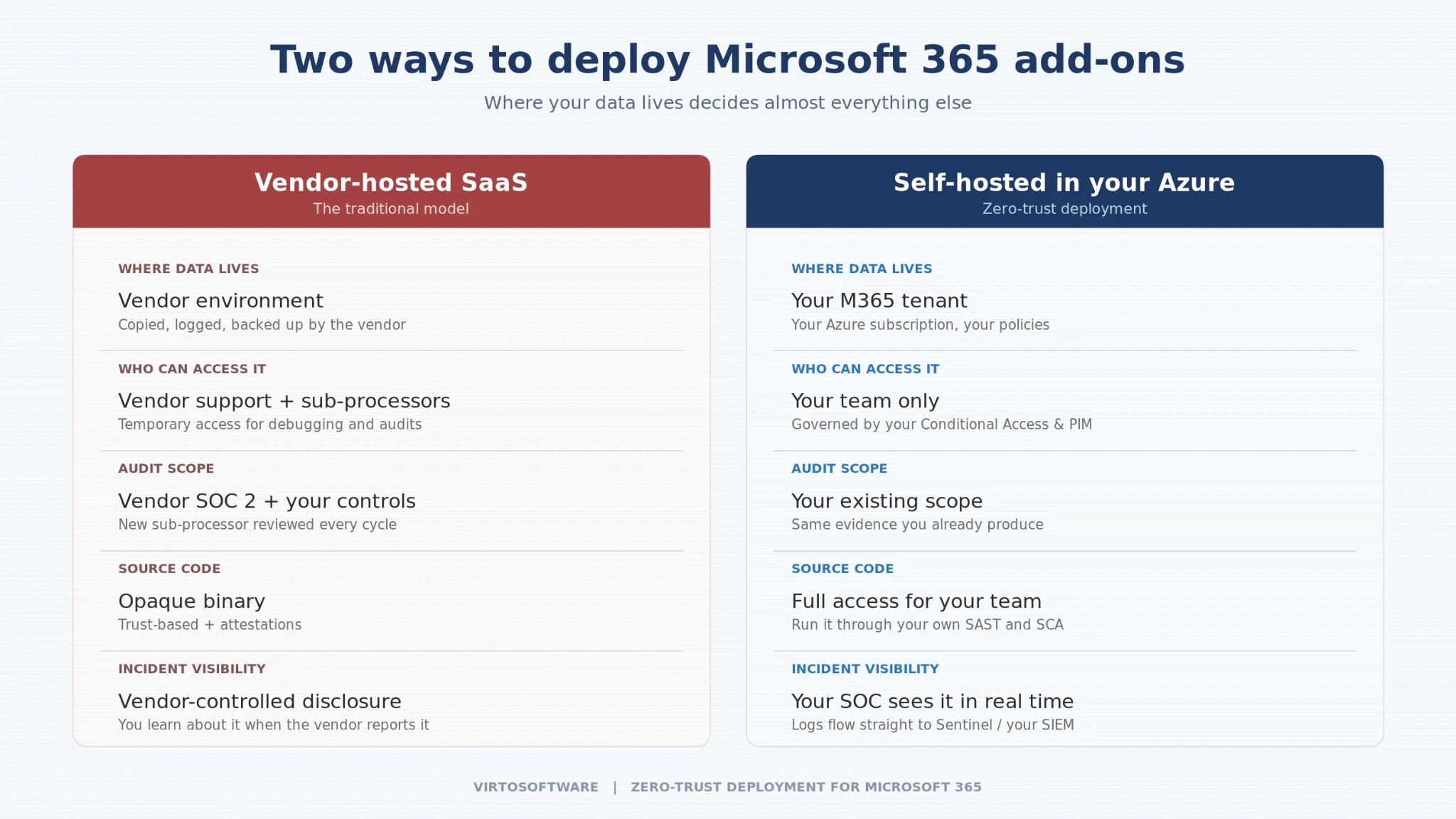
Data sovereignty becomes the default, not a contract clause. Files, lists, configurations, audit logs, and any business data the application touches stay inside your Azure subscription. They are subject to the encryption, retention, and access policies you have already negotiated for the rest of your M365 estate. There is no vendor copy, no vendor backup, no vendor analytics pipeline to worry about.
Your existing security stack does the heavy lifting. The application sits behind your Conditional Access policies, your Microsoft Defender for Cloud configuration, your Microsoft Sentinel ingestion rules, your existing SIEM, your existing key vault, and your existing privileged access workflows. You do not need to onboard a new logging pipeline or convince a vendor to forward events into your SOC. The events are already in your environment, because the application is in your environment.
Compliance scope shrinks. When the application runs inside infrastructure that is already in scope for your SOC 2 or ISO 27001 program, the controls you have already implemented and tested cover it. You are not adding a new third-party sub-processor whose own attestation report has to be reviewed, mapped, and re-evaluated annually. The vendor risk file gets shorter, not longer.
Source code transparency replaces “trust us.” VirtoSoftware provides full source code access to deployed solutions, so your IT and security teams can review exactly what the application does, how it handles data, and what dependencies it carries. There is no opaque binary doing unknown things to your tenant. Your team can read the code, run it through your own SAST and SCA tooling, and verify behavior against your own threat model.
Operational independence. Because the app runs in your subscription, it does not depend on a third-party SaaS control plane being available. Maintenance windows, upgrade timing, regional failover, and incident response all happen on your schedule, governed by your runbooks.
Why this matters during audits, not just after them
The audit risk most teams underestimate is not the audit itself — it is the cumulative attack surface that compliance programs create as they grow.
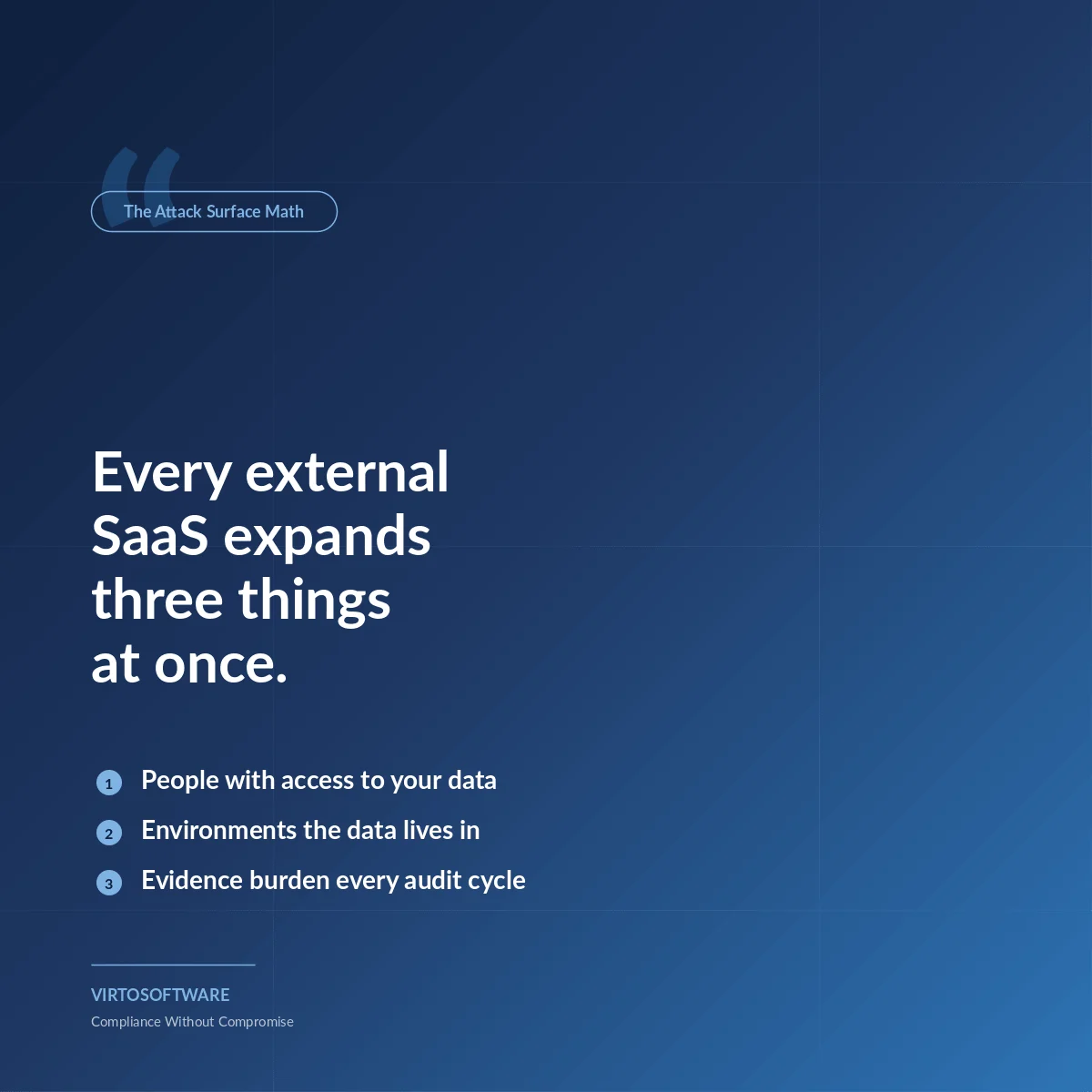
Every external SaaS in your stack adds to that surface in three ways. First, it expands the population of people with some form of access to your data: vendor engineers, vendor support, vendor auditors, vendor sub-processors, and the staff of any third party the vendor has retained. Second, it expands the set of environments where your data physically resides — and where it can be accidentally exported, snapshotted into a backup, attached to a support ticket, or left in a debug log. Third, it adds a new evidence collection burden every time you renew a SOC 2 or ISO 27001 cycle.
Self-hosted, customer-tenant deployment removes most of this. There is no vendor support engineer who needs temporary read access to your production data to debug an issue, because the data lives in your environment, not theirs. There is no separate vendor environment that needs its own attestation cycle, because the application is part of your environment, covered by your controls. The auditor’s question changes from “show me the vendor’s SOC 2 and your sub-processor governance” to “show me the controls on this Azure resource group” — which you can answer with the same evidence you are already producing for everything else.
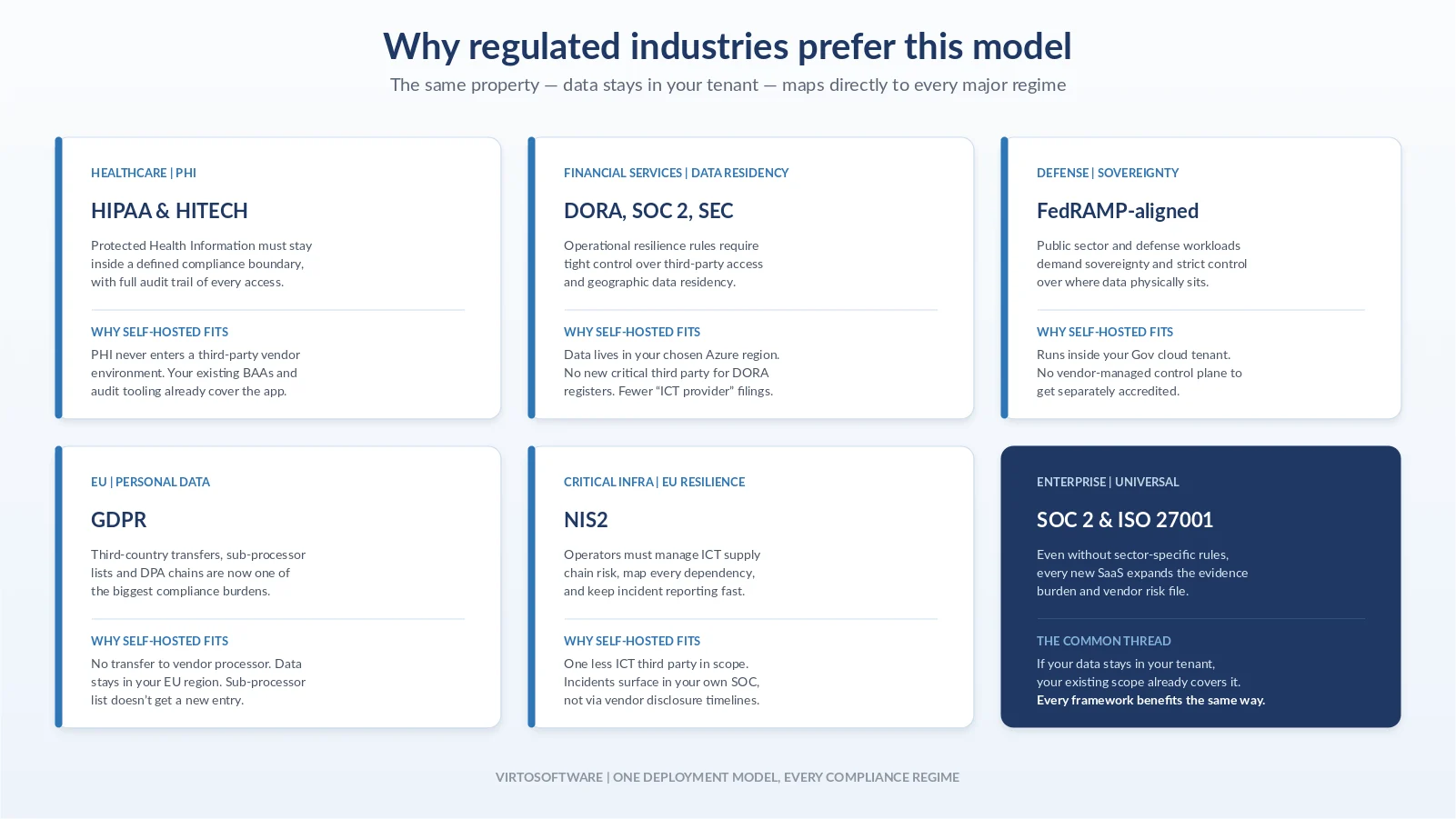
This is also why the model holds up under scrutiny in regulated industries. Healthcare organizations that need to keep PHI within a defined boundary, financial services firms with data residency obligations, defense and public sector customers with sovereignty requirements, and any organization operating under GDPR, HIPAA, FedRAMP-aligned, or sector-specific regimes — all benefit from the same property: data does not leave the tenant, and the trust boundary is one you already manage.
What deployment actually involves
The deployment process is intentionally aligned with how enterprise IT teams already operate.
The first phase is review and planning. Your team receives the source code for the chosen VirtoSoftware solution and reviews it against internal security standards. You size the Azure resources required, plan the integration with your existing M365 services, and align the deployment with your change management and security protocols.
The second phase is implementation. The solution is installed inside your Azure subscription, integrated with the relevant Microsoft 365 services, and configured to comply with your security baseline. From the moment it goes live, it is logged, monitored, and governed by the same tools that watch the rest of your environment.
VirtoSoftware supports the process end to end with custom update schedules tuned to your change windows, expert engineering assistance, optional custom development, knowledge transfer and training for your team, and flexible SLAs. Enterprise licensing can be tailored to deployment scale, contract terms, integration requirements, service plan preferences, and white-labeling needs. You can deploy first into a non-production environment to validate the model before promoting to production — the same way you would handle any other significant infrastructure change.
The bottom line
Compliance frameworks exist because trust at scale is hard. SOC 2 and ISO 27001 give you a structured way to evaluate the trustworthiness of organizations whose infrastructure you cannot directly control. They are useful, and for genuinely external services they are essential.
But they are also a tax — a real, ongoing cost in audit fees, assessor time, vendor management overhead, and the residual risk that no certificate can fully eliminate. Whenever there is a credible way to avoid extending trust outward in the first place, that is the option a security-conscious organization should prefer.
For Microsoft 365 add-ons, that option exists. By deploying VirtoSoftware applications inside your own Azure subscription, you keep your data in your tenant, keep your security posture governed by tools you already operate, keep audit scope from quietly expanding, and keep full visibility into the code your users depend on.
That is what zero-trust deployment looks like in practice — not a slogan, but a deployment model that gives your IT team something rare in the modern SaaS landscape: the ability to say “yes” to a new business capability without enlarging the trust boundary that protects everything else.
Ready to evaluate VirtoSoftware in your own environment? You can deploy and test in any non-production Microsoft 365 environment before promoting to production. Your team owns the infrastructure; we provide the application, the source code, the updates, and the support to run it confidently.