Virto Workflow Automation is now the control center for your SharePoint on-prem workflows. As of October 2025, it brings three familiar tools—Virto SharePoint Workflow Activities, Virto Workflow Status Monitor, and Virto Workflow Scheduler—into a single installer with a refreshed interface and a more consistent admin experience.
Instead of juggling separate packages and UI patterns, you install once and manage everything in one place: building workflows with an extended set of no-code activities, tracking their health in real time, and scheduling them to run exactly when you need. The core behavior of each component stays the same, so your existing processes continue to work, but the overall experience is cleaner, faster to navigate, and easier to support.
For admins and power users who live in SharePoint every day, Virto Workflow Automation effectively becomes the hub for configuring, monitoring, and tuning on-prem automation. 💡 Full technical details and configuration guidance are available in the updated product documentation at docs.virtosoftware.com.
What’s new in Virto Workflow Automation
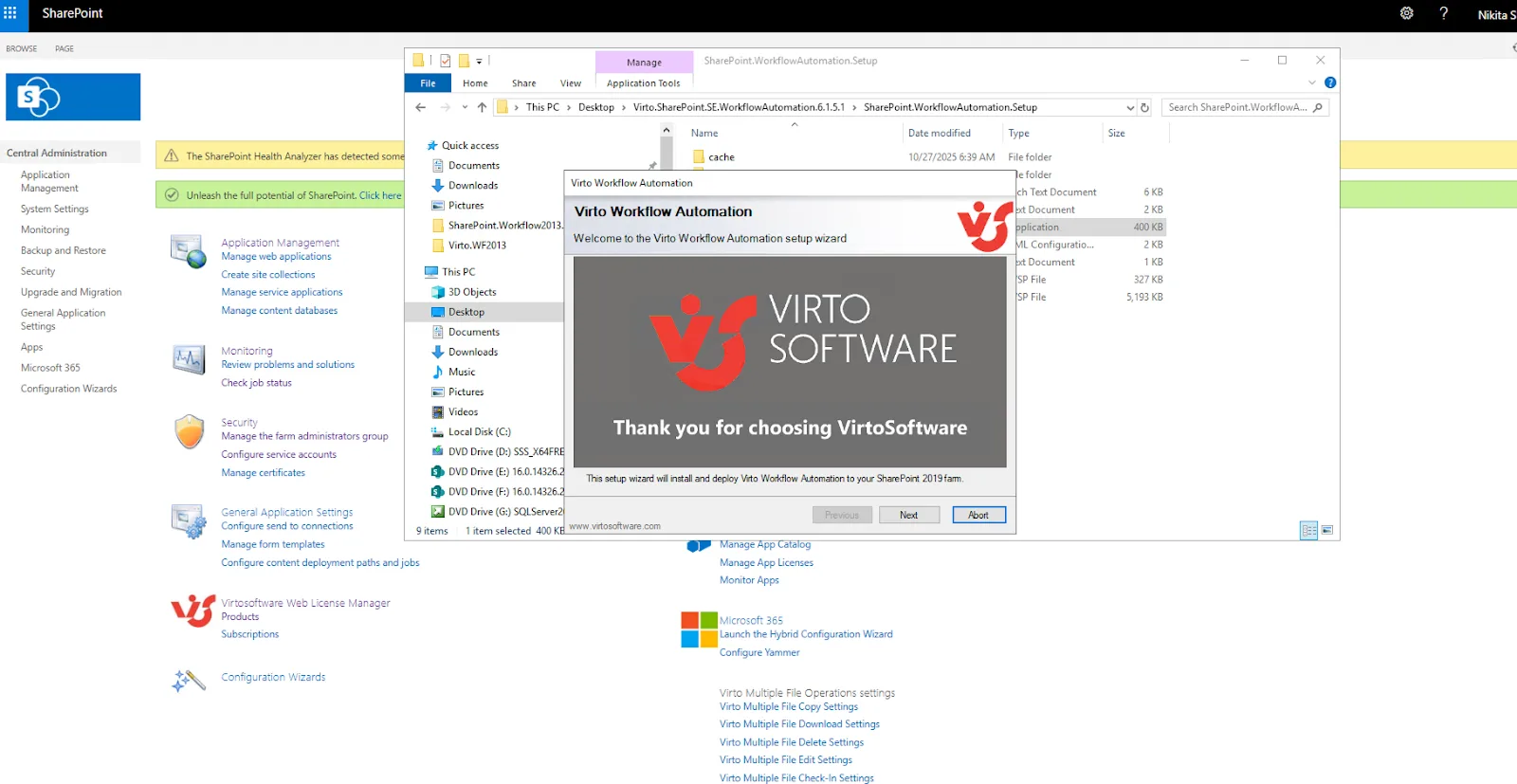
Pic. Installing Virto Workflow Automation as one package.
Previously, each workflow tool had its own installer and configuration steps. With Virto Workflow Automation you:
Install one package to get all three components.
Work with updated layouts and visual tweaks that make large lists and complex schedules easier to read and configure.
Keep the core behavior you already rely on, so existing workflows continue to run as before.
The bundle is designed for SharePoint 2016, 2019, and Subscription Edition (SE), with support for both classic and modern pages.
Who Is It For?
Virto Workflow Automation is aimed at teams that:
Run SharePoint on-prem (2016–SE), often as a key line-of-business system.
Still depend on classic SharePoint workflows but want more actions, better visibility, and time-based automation without custom coding.
Need to complement or offload some tasks from Power Automate in hybrid environments.
In Microsoft 365, SharePoint 2010 workflows are already retired and SharePoint 2013 workflows are deprecated and scheduled for full retirement in April 2026, with Power Automate as Microsoft’s recommended automation engine.
For on-premises customers, the workflow engine is still available and widely used. Virto Workflow Automation extends that engine with:
A large library of no-code actions (Activities).
Centralized tracking and troubleshooting (Status Monitor).
Time-based triggers and recurring runs (Scheduler).
Typical audiences:
SharePoint admins who need to keep workflows healthy and under control.
Business process owners (HR, finance, operations) who need approvals, notifications, and list automation without developer support.
IT and compliance teams who want scheduled checks, data clean-ups, or periodic reports.
Virto SharePoint Workflow Activities: Richer Workflows with No Code
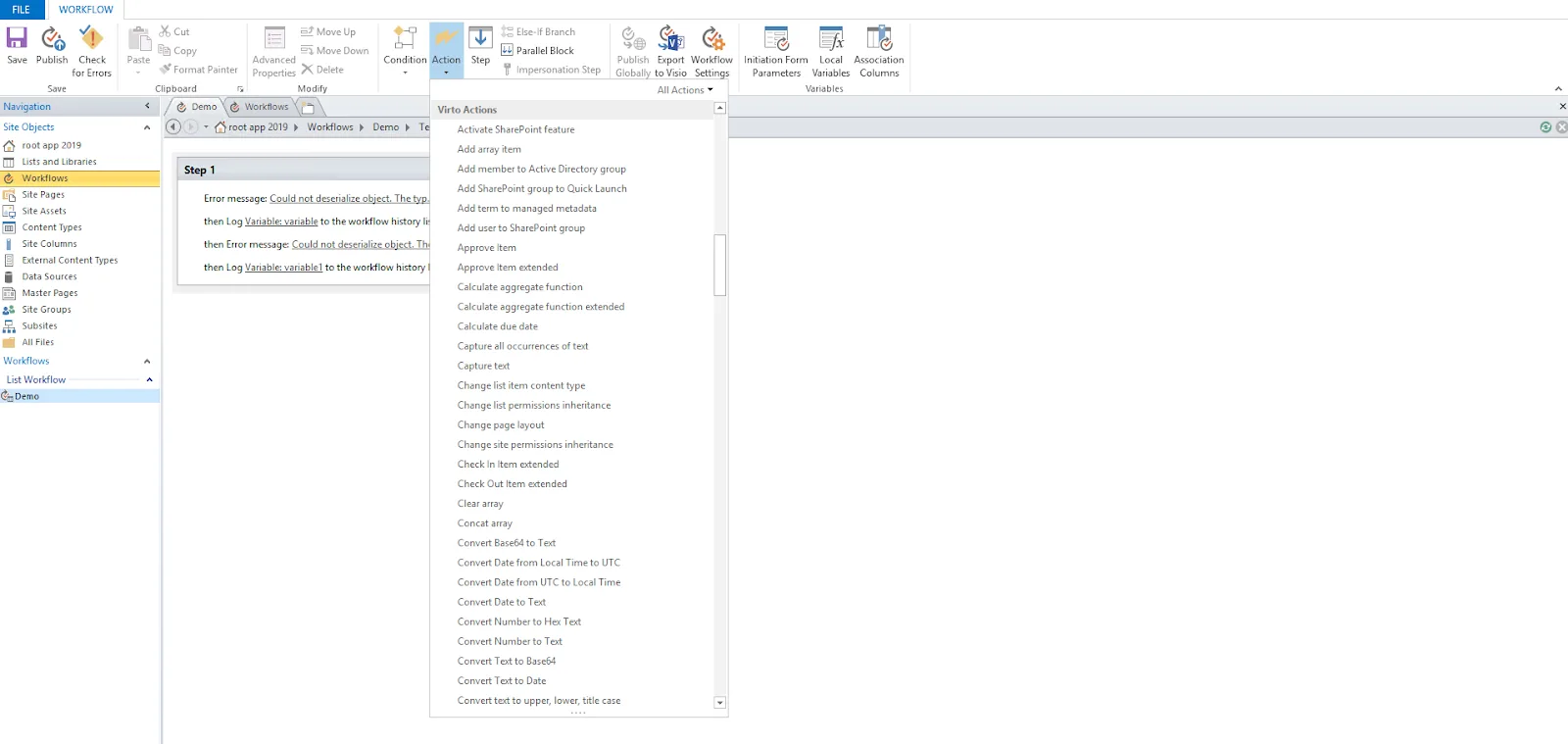
Pic. Virto Workflow Activities.
Virto SharePoint Workflow Activities remains the engine room of the bundle. It adds hundreds of actions to SharePoint Designer so you can build complex processes without writing code.
Key capabilities:
No-code workflow creation: Use a visual designer and drag-and-drop actions to build processes for document approvals, onboarding, contract management, or notifications. The toolkit is a no-code set of 270+ custom activities for SharePoint workflows 2010 and 2013, compatible with SharePoint 2019, 2016, and SE.
Extended SharePoint actions: Go far beyond the out-of-the-box workflow actions:
Send rich email notifications and reminders.
Send SMS and other messages via supported gateways.
Work with files, folders, lists, permissions, managed metadata, and arrays.
Integrate with external systems using SQL, fax, and custom code activities.
Permissions and governance: Actions for granting, adjusting, and restoring permissions on sites, lists, items, and folders help you automate security changes as part of a workflow—for example, restricting access to a document when it reaches a certain stage.
Utility actions for real-world logic: Date/time calculations, string manipulation, array operations, and metadata actions help you handle due dates, dynamic text, and complex list queries within a single workflow.
Example use cases:
HR onboarding: When a new employee list item is created, automatically:
Create a account-related tasks, assign them, and send email/SMS notifications to stakeholders.
Add the user to the right SharePoint groups and update permissions on key libraries.
Document lifecycle: Automatically move documents between libraries, update metadata, and restrict permissions as they move from draft to approved to archived.
Data maintenance: Loop through items and update fields in bulk, or import CSV data into lists on a schedule using a combination of Activities and Scheduler.
Virto Workflow Status Monitor: Real-Time Visibility and Control
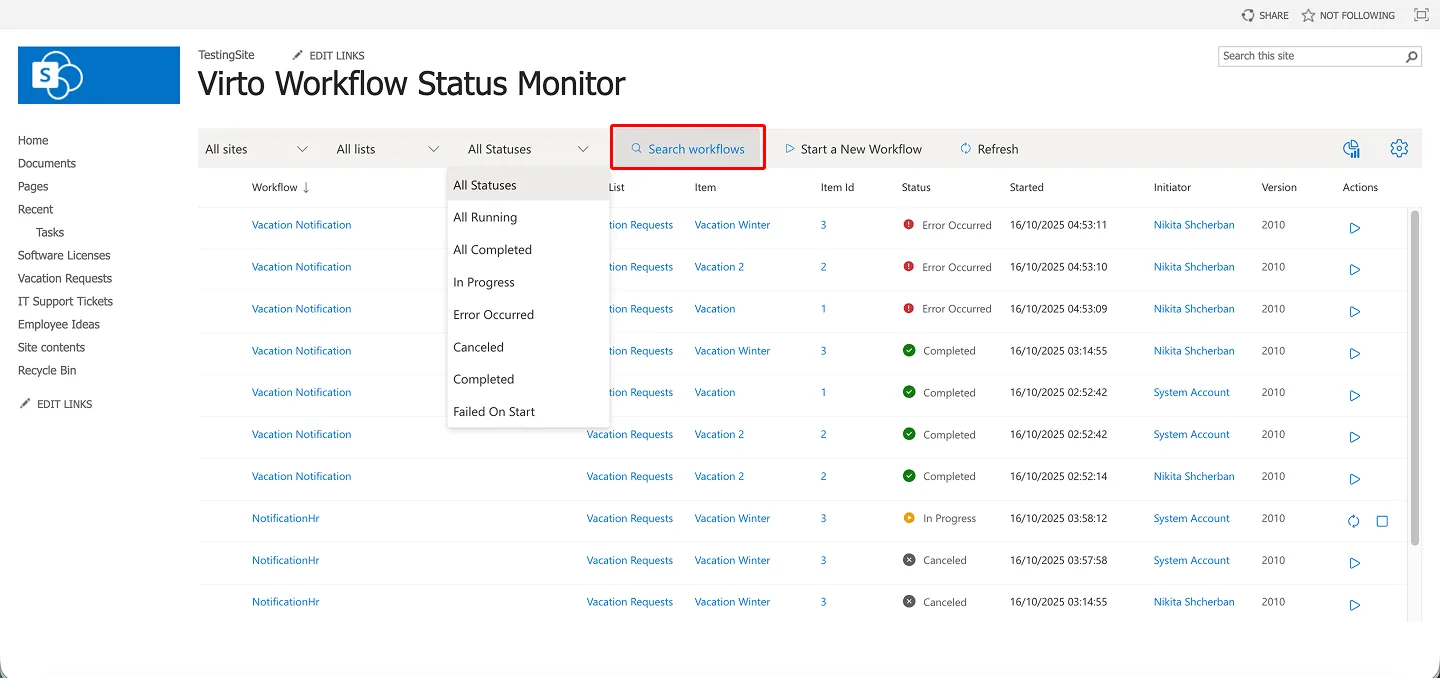
Pic. Virto Workflow Status Monitor.
Virto Workflow Status Monitor gives you a dashboard of everything running across your SharePoint site. Instead of drilling into individual lists and items, you get a consolidated view with management controls.
What it does:
Single list of all workflows: See workflows across a site or list in one place, including:
Workflow title
Status (in progress / error)
Source list and item: This makes it easy to spot stalled or failing workflows.
Filtering and error highlighting: Filter by list, item, workflow definition, date, or status, and quickly find entries where errors have occurred. Error highlighting draws attention to problematic instances so you can act before users escalate.
Workflow management actions: From the same screen you can:
Quickly identifying workflows that routinely error on specific lists or content types.
Giving administrators a “control tower” view during upgrades or configuration changes.
Virto Workflow Scheduler: Time-Based Workflows for SharePoint
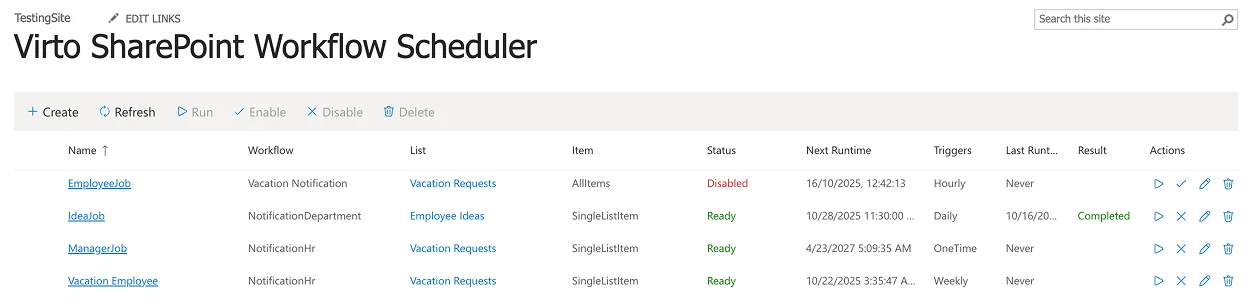
Pic. Virto Workflow Scheduler.
Virto Workflow Scheduler is the timing engine in the bundle. It handles recurring or delayed execution of SharePoint workflows without needing additional scripting or custom services.
What it does
Automatic execution on schedule: Run any SharePoint workflow within a single site collection at specific dates and times.
Flexible scheduling options: Choose from:
One-time runs (e.g. a one-off migration or cleanup).
Daily, weekly, or monthly schedules.
Custom recurrences such as “every hour” or “every weekday at 18:00.”
Targeted data scopes: Scheduler can:
Trigger workflows for a specific list item.
Target items in a particular view.
Use a CAML query to run only on items that match your conditions.
Site-level workflows: You can run workflows at the site level, not just on lists. That means site-wide checks and maintenance tasks are possible using one configuration rather than many.
Example use cases:
Nightly compliance checks: Every night, run a workflow that identifies overdue documents or tasks and sends reminders or escalations.
Weekly clean-up: Once a week, auto-archive completed items or move them to archive libraries.
Monthly reporting: On the first of the month, run workflows that aggregate data into reporting lists or send summary emails.
Try the Updated Workflow Automation Web Part
Virto Workflow Automation keeps your existing workflow logic intact while giving you a cleaner, more centralized way to build, monitor, and schedule it on SharePoint Server.
[{"cat":"News","date":"July 29, 2026","image":"/images/uploads/2026/07/virto-calendar-app-teams-outlook-microsoft-365-cover.webp","title":"Virto Calendar App now opens right inside Teams, Outlook, and Microsoft 365","url":"/news/virto-calendar-app-teams-outlook-microsoft-365/"},{"cat":"News","date":"June 8, 2026","image":"/images/uploads/2026/06/deploy-virtosoftware-in-own-azure-tenant-cover.webp","title":"How to Deploy VirtoSoftware Apps in Your Own Azure Tenant","url":"/news/deploy-virtosoftware-in-own-azure-tenant/"},{"cat":"News","date":"June 1, 2026","image":"/images/uploads/2026/06/ai-schedule-virto-calendar-color-coding-cover.webp","title":"Build Any Schedule with AI — and See It Color-Coded in Virto Calendar","url":"/news/ai-schedule-virto-calendar-color-coding/"},{"cat":"News","date":"April 28, 2026","image":"/images/uploads/2026/04/zero-trust-microsoft-365-deployment-cover.webp","title":"Compliance Without Compromise: Why a Zero-Trust Deployment Model Beats the SaaS Audit Trap","url":"/news/zero-trust-microsoft-365-deployment/"},{"cat":"News","date":"March 11, 2026","image":"/images/uploads/2026/03/SharePoint-Online-Add-Ins-die-April-2-2026.-2-2.png","title":"SharePoint Online Add-Ins Retired April 2, 2026 — VirtoSoftware Apps Remain Unaffected","url":"/news/sharepoint-online-add-ins-retirement-virto-apps-unaffected/"},{"cat":"News","date":"March 10, 2026","image":"/images/uploads/2026/03/virto-ad-user-manager-2.png","title":"Virto Active Directory User \u0026 Password Manager: Now 5 Tools in One Powerful Solution","url":"/news/virto-ad-user-password-manager/"},{"cat":"News","date":"March 6, 2026","image":"/images/uploads/2026/03/linkedin-post-aws-4-2.png","title":"IT Sovereignty in 2026: Why On-Premise SharePoint Beats Cloud During Geopolitical Crises","url":"/news/it-sovereignty-on-premise-sharepoint-vs-cloud/"},{"cat":"News","date":"February 23, 2026","image":"/images/uploads/2026/02/Multiple-operations-2.png","title":"Virto Multiple Operations for SharePoint Online \u0026 M365 – Now Available!","url":"/news/virto-multiple-operations-m365-launch/"},{"cat":"News","date":"February 12, 2026","image":"/images/uploads/2026/02/virto-alerts-news-3.png","title":"Virto Alerts \u0026 Reminders Gets a Major Update — New Price and Powerful Admin Feature!","url":"/news/virto-alerts-new-price-admin-updates/"},{"cat":"News","date":"February 12, 2026","image":"/images/uploads/2026/02/Multiple-File-Op-web-part-2.png","title":"Virto Multiple File Operations: Now 73% More Affordable!","url":"/news/virto-multiple-file-operations-price-drop/"},{"cat":"News","date":"February 3, 2026","image":"/images/uploads/2026/02/Virto-Shared-Calendar-permissions-3-2.png","title":"New Update: Permissions Now Available in Virto Shared Calendar","url":"/news/new-permissions-virto-shared-calendar/"},{"cat":"News","date":"January 23, 2026","image":"/images/uploads/2026/01/Virto-Calendar-App-4.png","title":"Virto Calendar App Update: Persistent Category Filters Save Your Preferences","url":"/news/virto-calendar-persistent-category-filters/"},{"cat":"News","date":"January 15, 2026","image":"/images/uploads/2026/01/Alerts-new-3-2.png","title":"SharePoint Alerts Retirement: Your Complete Migration Guide for 2026","url":"/news/sharepoint-alerts-retirement-migration-guide/"},{"cat":"News","date":"December 22, 2025","image":"/images/uploads/2025/12/2025-wrap-2.png","title":"VirtoSoftware's 2025: A Year of Game-Changing Launches and Updates in M365 and SharePoint On-Premise","url":"/news/2025-year-in-review/"},{"cat":"News","date":"December 15, 2025","image":"/images/uploads/2025/12/secure-deployment-2.jpg","title":"When Security Comes First: Deploy VirtoSoftware Apps in Your Own Microsoft 365 Environment","url":"/news/deploy-virto-in-your-m365-environment/"},{"cat":"News","date":"September 22, 2025","image":"/images/uploads/2025/09/sharepoint-classic-alerts-retirement-virto-alternatives.jpeg","title":"Classic SharePoint Alerts Are Retiring—Virto Alerts Has You Covered","url":"/news/sharepoint-classic-alerts-retirement-virto-alternatives/"},{"cat":"News","date":"September 15, 2025","image":"/images/uploads/2025/09/virto-multiple-file-operations-cross-site.jpeg","title":"Virto Multiple File Operations: Copy \u0026 Move Across Site Collections","url":"/news/virto-multiple-file-operations-cross-site/"},{"cat":"News","date":"September 7, 2025","image":"/images/uploads/2025/09/Image-12.jpeg","title":"Virto Calendar: Smoother Mobile Editing Experience","url":"/news/virto-calendar-mobile-editing-update/"},{"cat":"News","date":"August 27, 2025","image":"/images/uploads/2025/09/virto-shared-calendar-ics-support.jpeg","title":"Virto Shared Calendar Update: Full .ICS \u0026 iCalendar Feed Support!","url":"/news/virto-shared-calendar-ics-support/"},{"cat":"News","date":"May 21, 2025","image":"/images/uploads/2025/05/Virto-Shared-Calendar-2.png","title":"Introducing Virto Shared Calendar: Effortless Scheduling for Teams, Clients, and Beyond","url":"/news/virto-shared-calendar-launch/"},{"cat":"News","date":"May 6, 2025","image":"/images/uploads/2025/05/News-4.jpg","title":"Welcome Skype Users to Microsoft Teams: Tips \u0026 Tools to Get You Started","url":"/news/welcome-skype-users-to-teams/"},{"cat":"News","date":"April 21, 2025","image":"/images/uploads/2025/04/News-alerts-2.jpg","title":"Virto Alerts \u0026 Reminder App Is Back and Fully Functional — Get Notified Seamlessly!","url":"/news/virto-alerts-reminder-app-is-back-and-fully-functional/"},{"cat":"News","date":"March 20, 2025","image":"/images/uploads/2025/03/News-3-2.jpg","title":"Supercharge Your SharePoint On-Premises: Introducing Virto Multiple File Operations","url":"/news/multiple-file-operations-sharepoint-on-premise/"},{"cat":"News","date":"February 14, 2025","image":"/images/uploads/2025/02/Microsoft-Teams-update-2.jpg","title":"Teams Update Causes Virto Calendar App Issues: Here's How to Fix It","url":"/news/virto-calendar-workaround-teams/"},{"cat":"News","date":"February 7, 2025","image":"/images/uploads/2025/02/News-2.jpg","title":"What's New in Virto Calendar? Optional Attendees, Agenda Printing, and More!","url":"/news/virto-calendar-forms-slideshow-updates/"},{"cat":"News","date":"January 27, 2025","image":"/images/uploads/2025/01/Virto-Cal-News-4-2.jpg","title":"What’s New in Virto Calendar? Approvals, Planner Management, and More! ","url":"/news/virto-calendar-news-approvals-ms-planner/"},{"cat":"News","date":"November 7, 2024","image":"/images/uploads/2024/11/updates.webp","title":"Virto Calendar Update: iCal Flexibility, Multisource View, Dark Mode \u0026 More!","url":"/news/virto-calendar-updates-nov-2024/"},{"cat":"News","date":"September 20, 2024","image":"/images/uploads/2024/09/new-virto-calendar-features-2.jpg","title":"Virto Calendar Just Got Smarter: Explore New Permissions and Views","url":"/news/new-views-in-virto-calendar/"},{"cat":"News","date":"July 10, 2024","image":"/images/uploads/2024/07/New-Website-1920x1080-1.png","title":"VirtoSoftware's Website Makeover: Sleek Design \u0026 Performance","url":"/news/virtosoftware-website-makeover/"},{"cat":"News","date":"May 17, 2024","image":"/images/uploads/2024/06/Virto-Calendar-App-Update_-Enhanced-Note-Functionality.jpg","title":"Virto Calendar App Update: Enhanced Note Functionality","url":"/news/enhanced-note-functionality/"},{"cat":"News","date":"April 18, 2024","image":"/images/uploads/2024/06/New-Virto-Calendar-is-out.jpg","title":"New Virto Calendar is out!","url":"/news/new-virto-calendar-is-out/"},{"cat":"News","date":"March 20, 2024","image":"/images/uploads/2024/06/First-to-Witness_-The-New-Virto-Calendar-and-Its-Fresh-Features.jpg","title":"First to Witness: The New Virto Calendar and Its Fresh Features","url":"/news/first-to-witness-the-new-virto-calendar-and-its-fresh-features/"},{"cat":"News","date":"March 14, 2023","image":"/images/uploads/2024/06/Kanban-Board-Pro_-New-Notification-System.jpg","title":"Kanban Board Pro: New Notification System","url":"/news/new-notification-system-in-kanban-board-pro/"},{"cat":"News","date":"December 31, 2022","image":"/images/uploads/2024/06/Explore-VirtoSoftwares-2022-Archive-of-News-and-Product-Updates.jpg","title":"Explore VirtoSoftware’s 2022 Archive of News and Product Updates","url":"/news/2022/"},{"cat":"News","date":"September 21, 2022","image":"/images/uploads/2022/09/Kanban-Board-Pro-by-Virto_-New-Authorization-Process.jpg","title":"Kanban Board Pro by Virto: New Authorization Process","url":"/news/kanban-app-new-authorization-process/"},{"cat":"News","date":"August 24, 2022","image":"/images/uploads/2024/06/Calendar-Overlay-Pro-Update_-New-Authorization-Process.jpg","title":"Calendar Overlay Pro Update: New Authorization Process","url":"/news/calendar-app-new-authorization-process/"},{"cat":"News","date":"August 19, 2022","image":"/images/uploads/2024/06/New-Authorization-Process-for-Calendar-App.jpg","title":"New Authorization Process for Calendar App","url":"/news/new-authorization-process-for-calendar-app/"},{"cat":"News","date":"June 7, 2022","image":"/images/uploads/2024/03/20-Off-for-All-Virto-One-Bundles.jpg","title":"20% Off for All Virto One Bundles","url":"/news/20-discount-virtoone-june/"},{"cat":"News","date":"December 31, 2021","image":"/images/uploads/2024/06/Explore-VirtoSoftwares-2021-Archive-of-News-and-Product-Updates.jpg","title":"Explore VirtoSoftware’s 2021 Archive of News and Product Updates","url":"/news/2021/"},{"cat":"News","date":"April 7, 2021","image":"/images/uploads/2024/06/Bulk-File-Copy-Move_-April-Update.jpg","title":"Bulk File Copy Move: April Update","url":"/news/bulk-file-copy-move-april-update/"},{"cat":"News","date":"March 17, 2021","image":"/images/uploads/2024/06/Calendar-Overlay-Pro-Update_-New-Views-Navigational-Options.jpg","title":"Bulk File Downloader Update","url":"/news/bulk-file-downloader-update-mar21/"},{"cat":"News","date":"December 31, 2020","image":"/images/uploads/2024/06/Explore-VirtoSoftwares-2022-Archive-of-News-and-Product-Updates.jpg","title":"Explore VirtoSoftware’s 2020 Archive of News and Product Updates","url":"/news/2020/"},{"cat":"News","date":"December 31, 2019","image":"/images/uploads/2024/06/Explore-VirtoSoftwares-2022-Archive-of-News-and-Product-Updates.jpg","title":"Explore VirtoSoftware’s 2019-2012 Archive of News and Product Updates","url":"/news/2019-2012/"},{"cat":"News","date":"March 26, 2018","image":"/images/uploads/2024/06/Office-365-Forms-Designer-has-a-new-management-feature.jpg","title":"Office 365 Forms Designer has a new management feature","url":"/news/office-365-forms-designer-has-a-new-management-feature/"}]