Ignite 2026 was mostly about Copilot. Here is what changed for the people who run SharePoint, Teams and Outlook calendars, and what is still only a plan.
Microsoft Ignite 2026 opened in San Francisco and online on 17 November and runs until 20 November. The facts below come from Microsoft’s Book of News, the Microsoft Tech Community blogs, Microsoft Learn, the Microsoft 365 roadmap and the Message center. We kept what touches SharePoint, Teams, Outlook, Lists and Planner, and every change that moves a date in one of our guides.
Each item says where it stands: available now, in preview or rolling out, or announced with a planned month. The dates are Microsoft’s, and every item links to the page it comes from. This year the Book of News has no section of its own for Teams, SharePoint or Outlook. Most of what changes for calendars and lists came through the roadmap and the Message center around the conference instead.
Available now
- Office in the Copilot app. Word, Excel and PowerPoint now open inside the Microsoft Copilot app, so a chat can turn straight into a document, workbook or deck. Files are saved to OneDrive and keep Microsoft 365 permissions and sensitivity labels. Source: Book of News.
- Copilot in SharePoint. Microsoft confirmed that it reached general availability in October. Nothing in our guide had to change. Source: SharePoint blog. Our guide: SharePoint Copilot.
In preview or rolling out
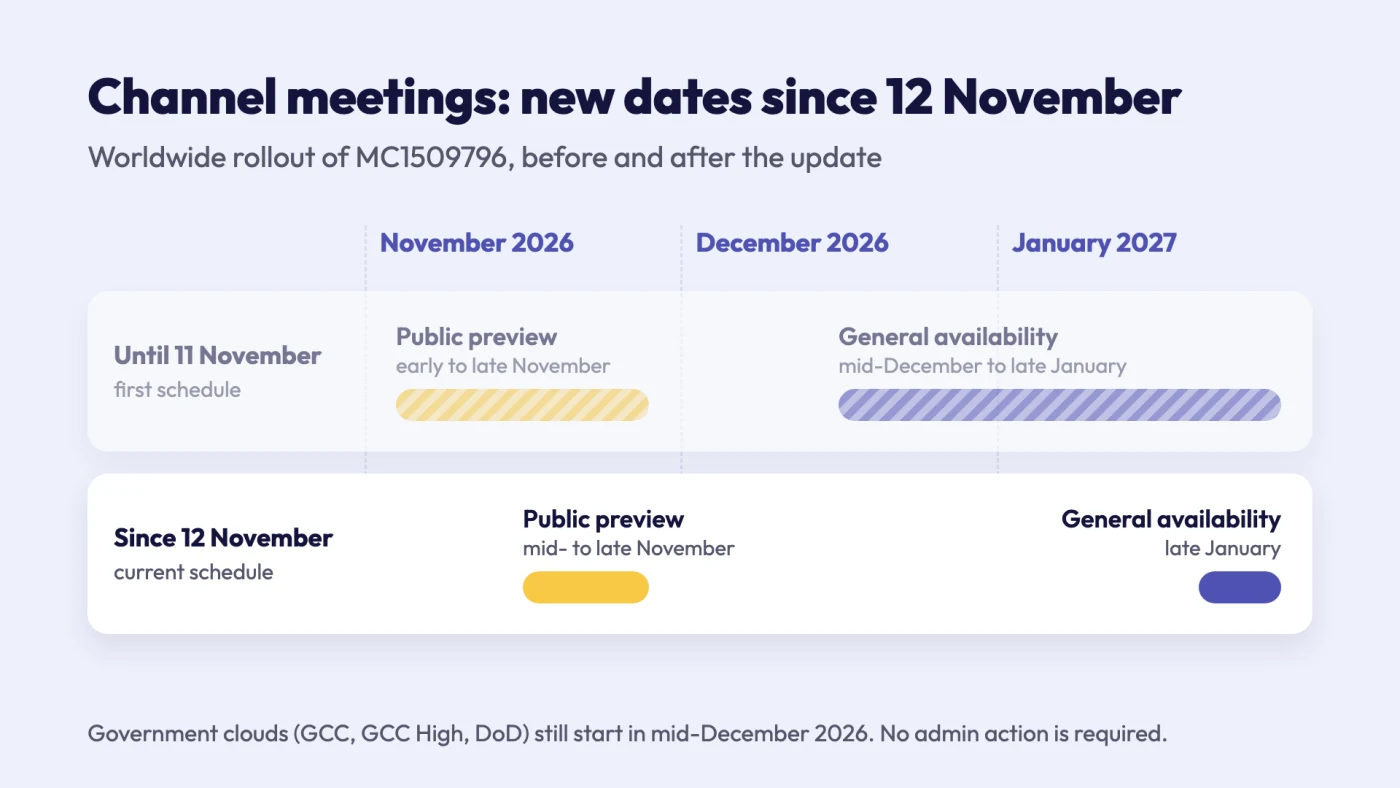
Fig. 1. Channel meetings from the Teams calendar and Outlook: the worldwide dates before and after the 12 November update
- Channel meetings from the Teams calendar and Outlook. On 12 November Microsoft moved worldwide general availability from mid-December 2026 to late January 2027, after a public preview in the second half of November. Government clouds still start in mid-December. On 17 November the roadmap items for scheduling channel meetings from Outlook (571388 and 571389) switched to Rolling out. Source: Message center post MC1509796. Our guide: Channel meetings from the Teams calendar.
- Baseline security mode 2026. Generally available, rolling out in phases, with 24 new settings that can each run in simulation first. One of them lets an administrator block the creation and editing of classic SharePoint pages now, ahead of Microsoft’s 2027 and 2028 dates. Others require third-party apps to have scoped access to SharePoint files and sites, and keep external users in the Teams lobby. Before you enforce the setting for third-party apps, run it in simulation and read its report: it lists the apps that use broad permissions, such as access to all files or all sites, and once the setting is on, those apps are blocked unless their access is limited to specific sites or an administrator approves them. Sources: Microsoft 365 blog, Microsoft Learn. Our guide: SharePoint classic vs modern.
- Multi-column Power Apps forms for SharePoint lists. Public preview from November 2026, general availability planned for February 2027. New custom forms start from a responsive layout with several columns; forms you have already customized keep their layout. Source: roadmap 580457.
- SharePoint tools in Work IQ and the Copilot app. Public preview. Copilot and agents can work with lists, libraries, files, approvals and rules, more than 60 SharePoint operations in all. Source: SharePoint blog.
- Today in Outlook and the Copilot app. Private preview, Frontier program only. Today gathers mail, calendar, chats and meetings into one view and prepares drafts and scheduling changes for you to approve. The morning Today Brief comes with a Microsoft 365 Copilot licence; the Today Feed, which refreshes during the day, uses Copilot credits. Source: Book of News.
- Autopilot. Rolling out through the Frontier program. It is a personal agent with its own identity, and colleagues can @mention a person’s Autopilot in a Teams channel or group chat. Source: Book of News.
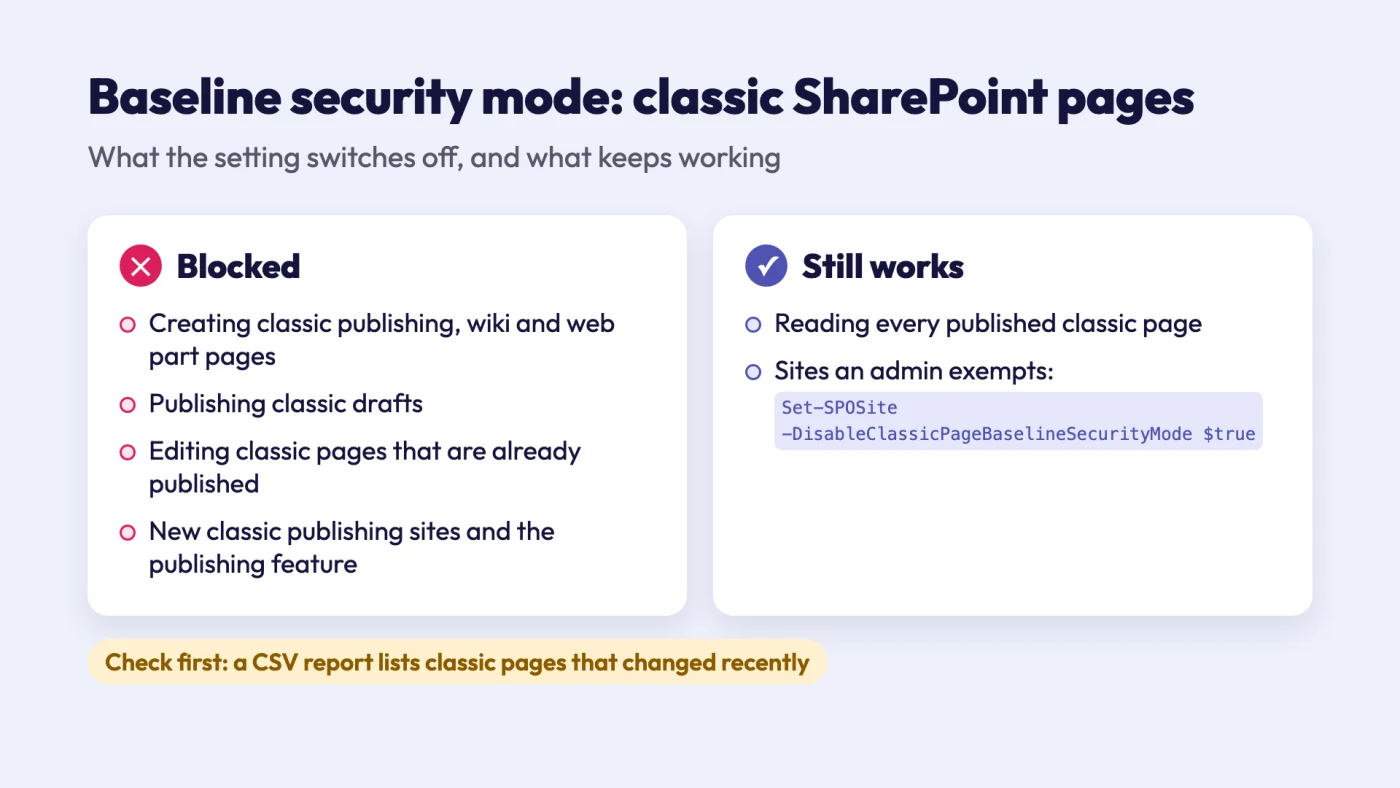
Fig. 2. What the Baseline security mode setting for classic SharePoint pages blocks, and what keeps working
Announced, with a planned month
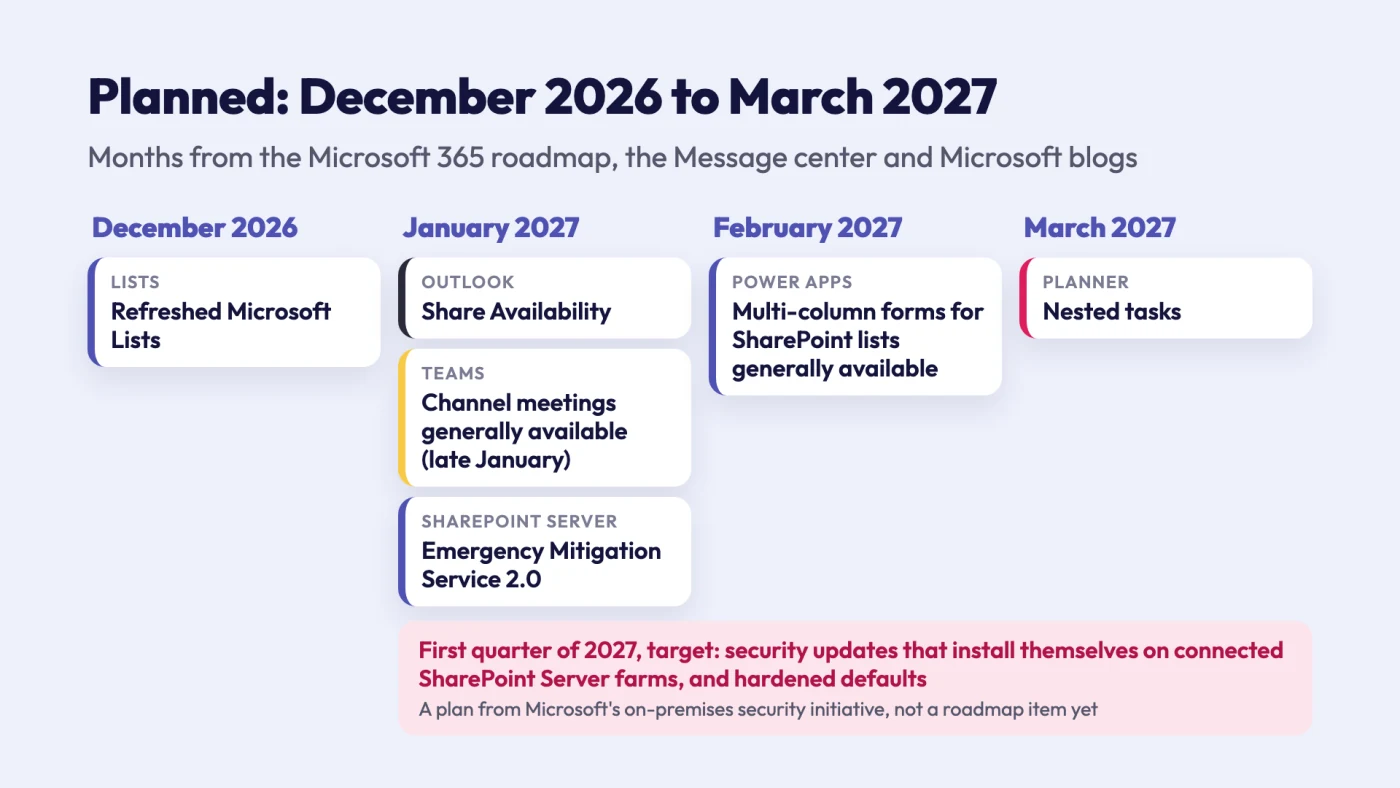
Fig. 3. What Microsoft has planned for December 2026 to March 2027, by month
- December 2026: a refreshed Microsoft Lists. A reorganized command bar, breadcrumbs in lists with folders, easier view selection and visible filter pills. Source: roadmap 578879. We will check the steps in What is Microsoft Lists when it ships.
- January 2027: Share Availability in Outlook. In new Outlook and on the web you pick free slots and insert them into an email; for a one-to-one meeting the recipient books a slot in one click. Source: roadmap 580444. Our guide: Outlook Scheduling Assistant.
- January to March 2027: SharePoint Server security by default. Microsoft’s on-premises security initiative plans Emergency Mitigation Service 2.0 for SharePoint Server in January 2027. For the first quarter of 2027 it targets security updates that install automatically on connected SharePoint Server, Exchange Server and Skype for Business Server farms after a fixed period, and hardened default configurations. These are plans from a blog post, not roadmap items yet. Source: Microsoft Security blog. Our guide: SharePoint on-premises vs online.
- March 2027: nested tasks in Planner. Listed as Task Hierarchy for Unified Plans. Source: roadmap 580879.
What did not change
- Exchange Web Services. Nothing this week moves the EWS shutdown. Exchange Online is switching EWS off tenant by tenant, an administrator can turn it back on only until April 2027, and after that EWS is no longer an option. Source: Exchange Team Blog. Our guide: Outlook shared calendar not showing.
- SharePoint Server Subscription Edition. The on-premises initiative adds updates and protections for supported releases. It announces no change to the product’s lifecycle.
What this means for Virto customers
Creating a channel meeting gets easier in late January, but the meeting still belongs to one channel and invites the whole team. If a team needs leave, deadlines and meetings from several sources in one channel tab, the question-by-question comparison is in Virto Calendar App vs. Microsoft 365 calendars.
Guides we updated
| Guide | What changed in it |
|---|---|
| Channel meetings from the Teams calendar | General availability moved to late January 2027: quick answer, rollout table, FAQ |
| Teams channels | The MC1509796 paragraph now gives the January date |
| Virto Calendar App vs. Microsoft 365 calendars | The channel meetings note and FAQ now say late January 2027 |
| SharePoint classic vs modern | New paragraph on the Baseline security mode setting that blocks classic pages |
| Outlook Scheduling Assistant | Share Availability, planned for January 2027 |
Sources
- Microsoft Ignite 2026 Book of News
- SharePoint and OneDrive at Microsoft Ignite 2026: Putting AI-powered content to work, SharePoint blog, 17 November 2026
- Microsoft Baseline security mode 2026 general availability, Microsoft 365 blog, 17 November 2026
- Block creation and editing of classic SharePoint pages, Microsoft Learn
- Require scoped access to files and sites for High-Privileged-Access applications, Microsoft Learn
- New investments to reduce on-premises security risk, Microsoft Security blog, 5 November 2026
- Microsoft 365 roadmap: 571388, 571389, 578879, 580444, 580457, 580879
- Message center post MC1509796, Microsoft Teams: Enhanced channel meeting experience, updated 12 November 2026
- Exchange Online EWS application stopped working? Do this., Exchange Team Blog, 21 October 2026