


Book desks, rooms and parking in Microsoft TeamsVirto Desk & Room Booking App
Add a tab to a channel, chat or meeting, or open the personal app, and plan office days, see who is in, and book desks, parking, meeting rooms and equipment on top of Microsoft Places. It runs in Outlook and the Microsoft 365 app too.
Key features:

Book from the team's tab
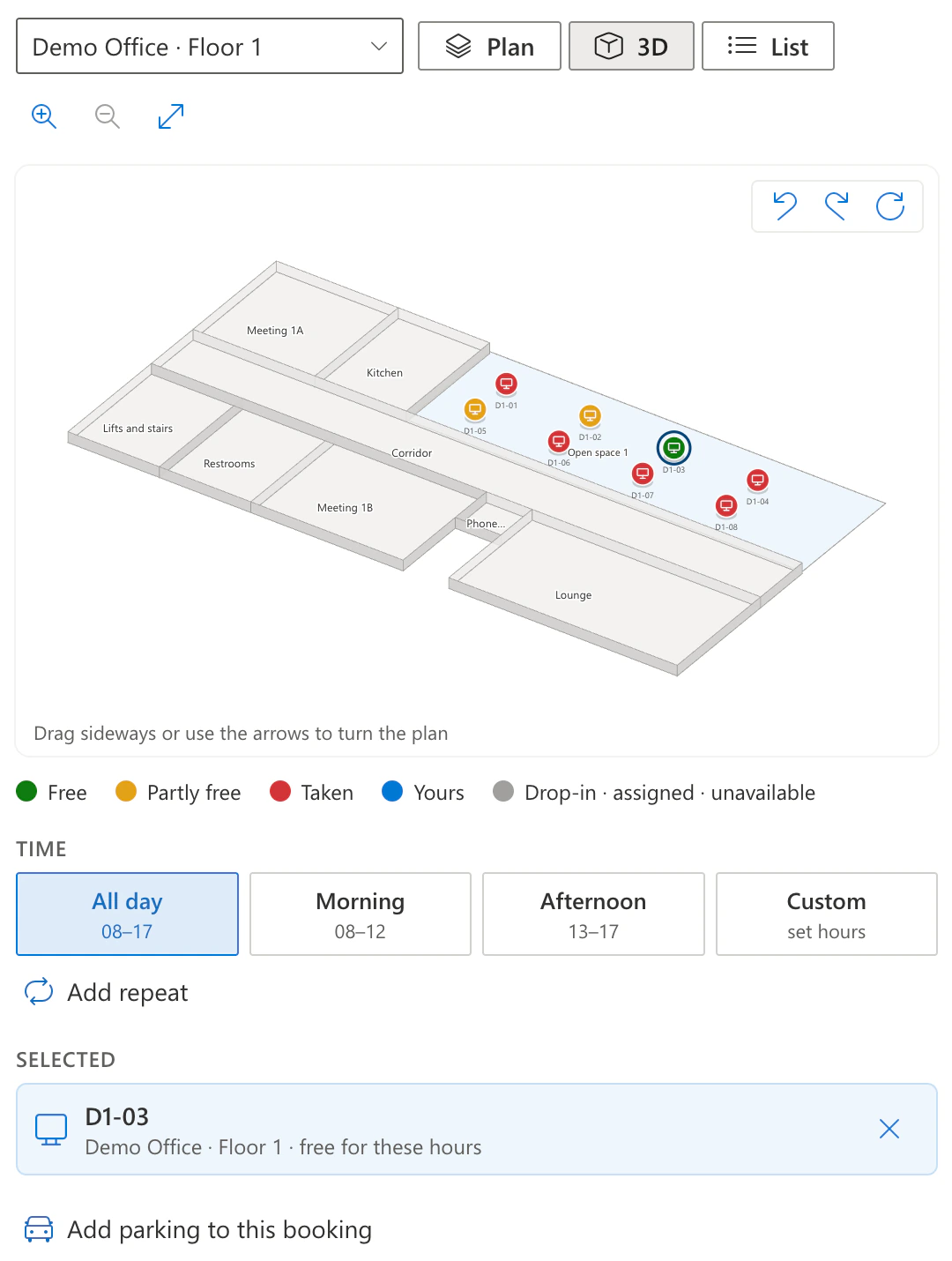
The tab opens the app straight away, with no set-up step. Pick a desk on the floor plan from Microsoft Places, and add parking and equipment to the same booking.

A room for the meeting
See the meeting rooms that are free for the hours you need, with their seats and equipment, and book one into your calendar.

Who comes in, and where they sit
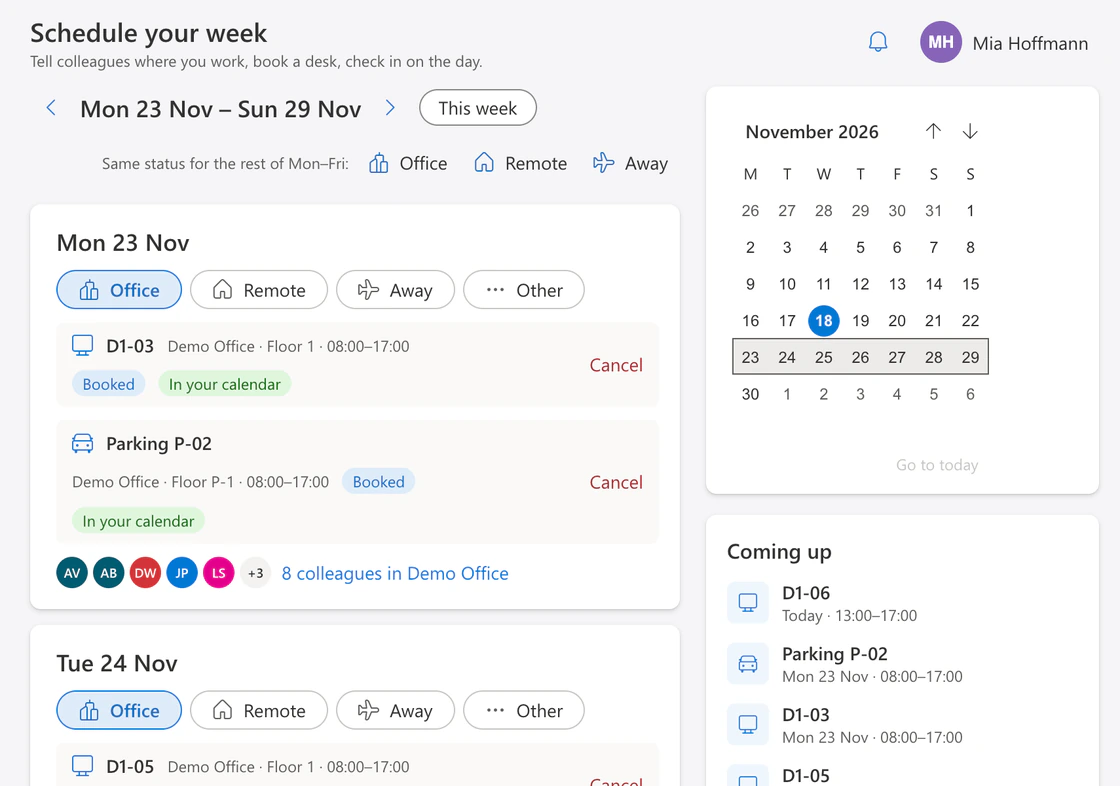
Set Office, Remote or Away for each day, and see the colleagues in the office and their desks on the plan.
Trusted by Industry Leaders


and over 8,000 businesses worldwide
Microsoft Places, inside Teams
The Teams app books what Microsoft Places and Exchange Online already have. Bookings become calendar entries in Outlook, and setting a day to Office or Remote also sets your work location in Outlook and Teams. No package in the SharePoint App Catalog and no SharePoint site are needed for it.
 Tabs and a personal app
 Room and equipment mailboxes
 Calendar entries in Outlook
- Work location in Outlook and Teams
Wherever your team meets
- Channel, chat or meetingIts own tab, added with + next to the tabs by a team owner or meeting organiser.
- The personal appOpened from Apps in Teams, for each person on their own, with nothing to set up.
- Outlook and Microsoft 365The same app under More apps, once it is installed in Teams. Nothing to set up there.
A tab in Teams shows the same bookings as the web part on a SharePoint page, so a team can use either.
What is Virto Desk & Room Booking App for Microsoft Teams?
It is the hybrid-office app as a Teams app. A team adds it as a tab to its channel, chat or meeting, and everyone can open it as a personal app or in Outlook. People plan which days they come in, see who else is in the office, book desks, parking spaces, meeting rooms and equipment, and check in on arrival. The app follows the theme of Teams, light, dark or high contrast. Bookings, day statuses, rules and the audit are kept on Virto's server, where people appear only by their Microsoft Entra ID.
What you need
Microsoft Places
Buildings, floors and desks set up in Microsoft Places. Only the places marked Reservable there can be booked.
Exchange Online
A mailbox for each person who books, and mailboxes for the meeting rooms and the equipment. Every booking is an entry in their calendars.
A space licence for each individual desk
Microsoft Places requires a Microsoft Teams Shared Space or Shared Space – Single Space licence on every desk that people book, including a parking space set up as a desk. Without it, Microsoft Places shows the desk as unavailable. Meeting rooms, desk pools and equipment need no extra licence.
The Teams app, uploaded once
A Teams Administrator uploads the package VirtoDeskRoomBooking.zip in the Teams admin center, under Manage apps, and makes sure the app is allowed there.
Admin consent
A Global Administrator approves the app's three delegated Microsoft Graph permissions once, under Permissions of the app in Manage apps.
English
The app's screens are in English in the first release.
Sized to fit your business
Launch price for the first three months after release. One subscription for your whole organisation, by the number of users.
Up to 100 users
- Up to 100 users in your organisation
- Desks, parking, meeting rooms and equipment
- SharePoint, Teams, Outlook and the Microsoft 365 app
- Booking rules, check-in, analytics and audit
Up to 500 users
- 101 to 500 users in your organisation
- Desks, parking, meeting rooms and equipment
- SharePoint, Teams, Outlook and the Microsoft 365 app
- Booking rules, check-in, analytics and audit
500+ users
- More than 500 users in your organisation
- Desks, parking, meeting rooms and equipment
- SharePoint, Teams, Outlook and the Microsoft 365 app
- Booking rules, check-in, analytics and audit
Enterprise

For large organizations needing advanced features and enterprise-grade security and controls.
- Price on request
- Your own terms for a large organisation
- Everything in the other plans
Good to know
Installation and documentation
Installation, Microsoft Places setup, permissions and data, step by step.
Documentation →Coming soon
The launch price above is for the first three months after release. Request early access, and we email you first when you can try it.
Your data
Bookings, day statuses and the audit are stored on VirtoSoftware's Azure, with people only as their Microsoft Entra ID.
Trust & Security Center →
Talk to our team
Need clarity on our app's suitability for you? Set up a quick call with us or chat via Microsoft Teams chat to explore its potential for your needs.


FAQ
Desk and room booking in Microsoft Teams
A Teams Administrator uploads the package VirtoDeskRoomBooking.zip in the Teams admin center, under Teams apps → Manage apps → Upload new app, and makes sure the app is allowed. A Global Administrator then grants the admin consent under the app's Permissions. After that, a team owner or meeting organiser presses + next to the tabs, searches for Virto Desk & Room Booking and adds it; the tab opens the app at once. Everyone else can open it as a personal app.
Yes. Once the app is installed in Teams, it appears under More apps in Outlook and in the Microsoft 365 app, with nothing to set up: it finds your organisation from the sign-in. Every booking is also a calendar entry in your Outlook calendar.
No. The Teams app loads from Virto's server and signs people in with their Microsoft 365 account; no package goes to the SharePoint App Catalog and no SharePoint site is needed. If you also put the web part on a SharePoint page, both show the same bookings.
Yes. The app books the buildings, floors, desks, meeting rooms and equipment that Microsoft Places and Exchange Online already have. You add or change them in Microsoft Places and the Exchange admin center, not in the app.
Yes, the same one as in Microsoft Places. Since 1 April 2026, Microsoft requires a Microsoft Teams Shared Space or Shared Space – Single Space licence on each individual desk that people book, and without it Microsoft Places shows the desk as unavailable. A parking space set up as a desk needs it too. Meeting rooms, desk pools (workspaces) and equipment need no extra licence.
Buildings, desks, rooms and floor maps stay in Microsoft Places, and each booking is a calendar entry in Exchange Online in your tenant. The bookings themselves, day statuses, the booking rules and the audit are kept on Virto's server on Microsoft Azure, one store for your organisation, with people only as their Microsoft Entra ID. The data is deleted 90 days after your subscription or trial ends; on day 60 your administrators of the app get an email with the deletion date.
Yes. In Teams, Outlook and the Microsoft 365 app, the app follows the theme of the host, light, dark or high contrast, and switches with it.
A guest opens the app from the tab in the team or chat of the organisation that invited them.
Global Administrators and SharePoint Administrators, and the people named in Admin → Administrators; naming someone there gives them no permission anywhere else. Administrators set the booking rules and see the audit and the analytics. Floor plans also need the Exchange Administrator or Places Administrator role of the person, and the Demo office the Exchange Administrator role.