Quick answer. Since 1 April 2026, Microsoft Places licensing is per space, not per user. The core features come with any Microsoft 365 or Office 365 plan that includes Outlook and Teams, from Business Basic to E5, plus the A and F plans and Teams Enterprise, Essentials and standalone. Those features are work plans, booking rooms and desk pools, Places finder and explorer, desk assignment, check-in and most of Places analytics. Three features need a licence on the space itself: booking an individual desk, auto-release, and occupancy reports. For desks that licence is Microsoft Teams Shared Space at $8 per space per month. Each one you buy entitles you to three free Single Space licences, so a bookable desk works out at about $2 a month.
Next question: what about everything that is not a desk? Places models buildings, floors, rooms and desks, and has no object type for vehicles or equipment. To see meeting rooms, offices, vehicles and equipment in one calendar in Microsoft 365, with who has booked what and when each one is out for maintenance, add Virto Calendar App.
Many search results on Microsoft Places licensing still say you need Teams Premium. That stopped being true on 1 April 2026, when almost all of Places became part of the ordinary Microsoft 365 licence and booking a specific desk moved to a licence you assign to the desk. This guide covers what is free, what each space licence covers, how to claim the free licences Microsoft does not hand out automatically, and what a bookable desk costs. New to the product? Start with what Microsoft Places is and how it works. Prices are the US list prices on Microsoft Learn, before taxes and fees.
Is Microsoft Places free?
For most features, yes. Places has no user licence of its own. Anyone with one of these plans can use it:
- Microsoft 365 Business Basic, Business Standard and Business Premium
- Microsoft 365 or Office 365 E1, E3 and E5
- Microsoft 365 or Office 365 for Education A1, A3 and A5
- Microsoft 365 for frontline workers F1 and F3
- Microsoft Teams Enterprise, Teams Essentials and Teams standalone
Some core features still have to be switched on by an admin, but they need no extra licence. What costs money is attached to the space, not the person, and AI features need a Microsoft Copilot licence.
One condition is not about licences at all. Places works only with mailboxes in Exchange Online. In a hybrid organisation, users whose mailbox is still on-premises can’t open the Places app, Places finder or work plans; they keep Room Finder in Outlook.
Microsoft Places licensing at a glance
| Feature | What it does | Licence since 1 April 2026 |
|---|---|---|
| Work plans and workplace presence | Office days, and who else is coming in | Core |
| Automatic update of work location | “In the office” from corporate Wi-Fi or a desk peripheral | Core |
| In-person events and hybrid RSVP | Attend in person or online | Core |
| Places finder and Places explorer | Find rooms and desks with photos, floor plans, equipment | Core |
| Booking rooms and desk pools | A meeting room, or a place in a zone of shared desks | Core |
| Desk assignment | A desk permanently given to one person | Core |
| Check-in to a building, room or desk | Confirm arrival | Core |
| Places management portal | Admin web app for the building hierarchy | Core |
| Places analytics | Planned versus actual use of buildings, rooms, desk pools | Core, except occupancy reports |
| Individual desk booking | Reserve one specific desk | Space licence on the desk |
| Auto-release | Free a booking when nobody checks in | Space licence on the room or desk |
| Occupancy reports | Actual use of rooms and desks in Places analytics | Space licence on the room or desk |
| Quick book | Room recommendations, rooms added to meetings | Microsoft Copilot licence |
| Copilot room booking | Copilot picks and rebooks rooms | Microsoft Copilot licence |
Sources: Microsoft Learn, License requirements and the Places FAQ.
Two points are easy to miss. Once a desk has a licence, any Teams user in the organisation can book it. And Microsoft states that buildings, floors, sections, assigned desks, room bookings and desk pool bookings need no licence at all.
What changed on 1 April 2026
Places became generally available on 19 November 2024, with its premium features sold as part of Teams Premium, a per-user add-on listed at $10 per user per month on an annual subscription. Everyone who wanted Places finder, explorer, analytics or desk booking needed that licence. An office of 300 people where everyone could book a desk needed 300 Teams Premium licences: $3,000 a month at list price, though that also bought the rest of Teams Premium.
On 1 April 2026 these features moved:
| Feature | Before 1 April 2026 | Since 1 April 2026 |
|---|---|---|
| Places explorer | Teams Premium | Core |
| Places finder | Teams Premium | Core |
| Places analytics | Teams Premium | Core; occupancy reports need a space licence |
| Individual desk booking | Teams Premium | Space licence |
| Auto-release | Teams Premium | Space licence |
| Quick book | Teams Premium | Microsoft Copilot licence |
Work plans, presence, in-person events and Places management were core before and still are.
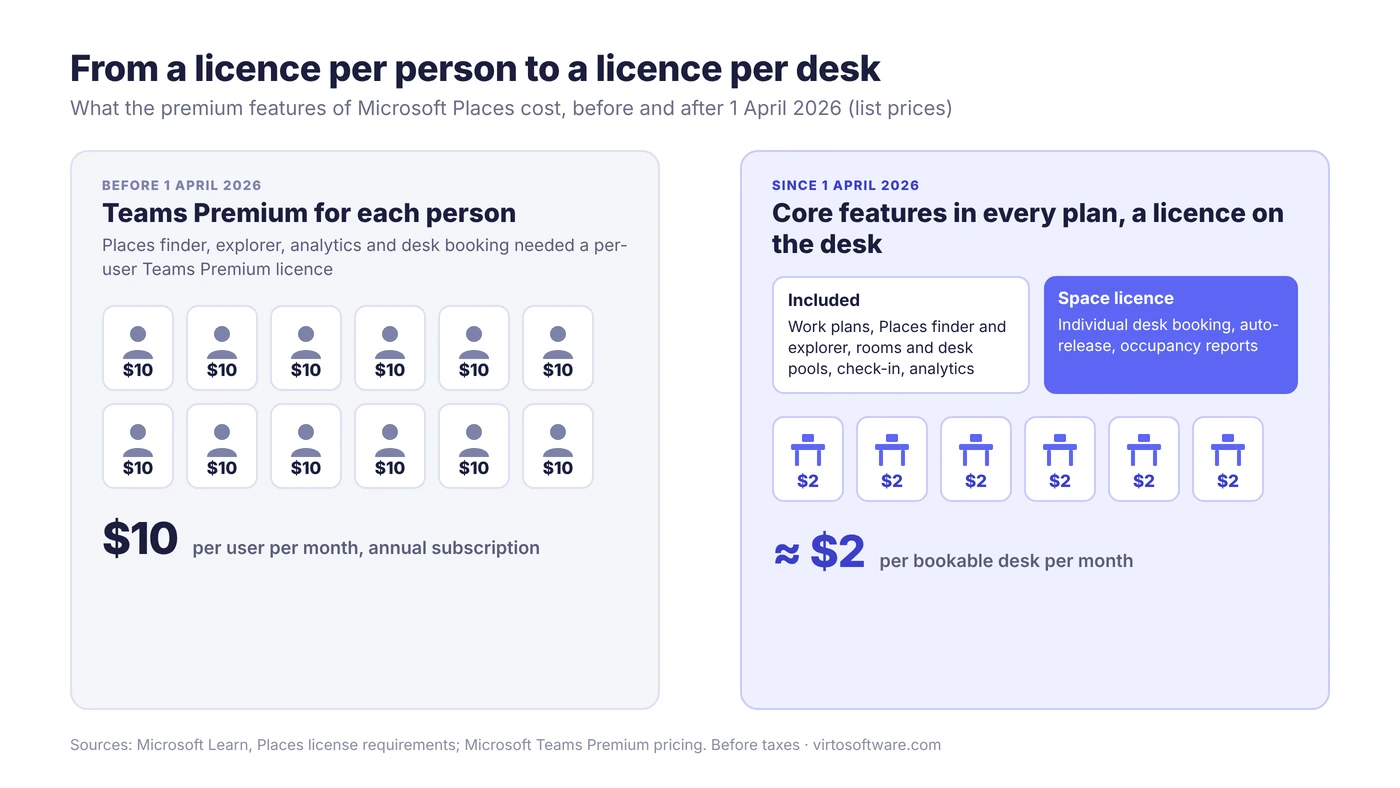
Fig. 1. Microsoft Places licensing before and after 1 April 2026: from a licence per person to a licence per desk
You now pay for desks, not people. In an office with fewer desks than staff, which is the point of hot desking, that usually costs less. Teams Premium itself still exists for meetings, branding and the Queues app; it just stops covering Places once your subscription renews.
The space licences: Teams Rooms, Teams Shared Space and Single Space
Three licences can sit on a space:
| Licence | Price | Where it can go | What it unlocks in Places |
|---|---|---|---|
| Microsoft Teams Rooms (MTR) | Teams Rooms pricing | Meeting rooms | Auto-release, occupancy reports |
| Microsoft Teams Shared Space (MTSS), formerly Teams Shared Devices | $8 per month | Desks, BYOD rooms, and Teams devices: common area phones, panels, desk docks, shared Android phones | Desks: booking, auto-release, occupancy reports. Rooms: auto-release, occupancy reports |
| Teams Shared Space – Single Space (MTSS-SS) | $0, three per paid MTSS | Desks and BYOD rooms only | The same as MTSS |
How to read it:
- A desk takes Teams Shared Space or Single Space.
- A meeting room with a Teams Rooms system or Surface Hub already has a Teams Rooms licence, which covers auto-release and occupancy reports. Teams Shared Space licences don’t work on Teams Rooms devices.
- A BYOD room is any room without a Teams Rooms system or Surface Hub, such as a focus or huddle room. It takes Teams Shared Space or Single Space. If it already has a Teams panel licensed with Teams Shared Space, it needs nothing more.
- Single Space has the same service plans as Teams Shared Space except Teams Phone, which is why Teams devices won’t accept it.
The Teams device exception
The three free licences come only from a paid licence used on a desk or a BYOD room. A Teams Shared Space licence that runs a Teams device, whether a common area phone, a Teams panel, a desk dock or a shared Android phone, gives no Single Space licences. So don’t count the licences you already own for phones and panels towards your desk budget.
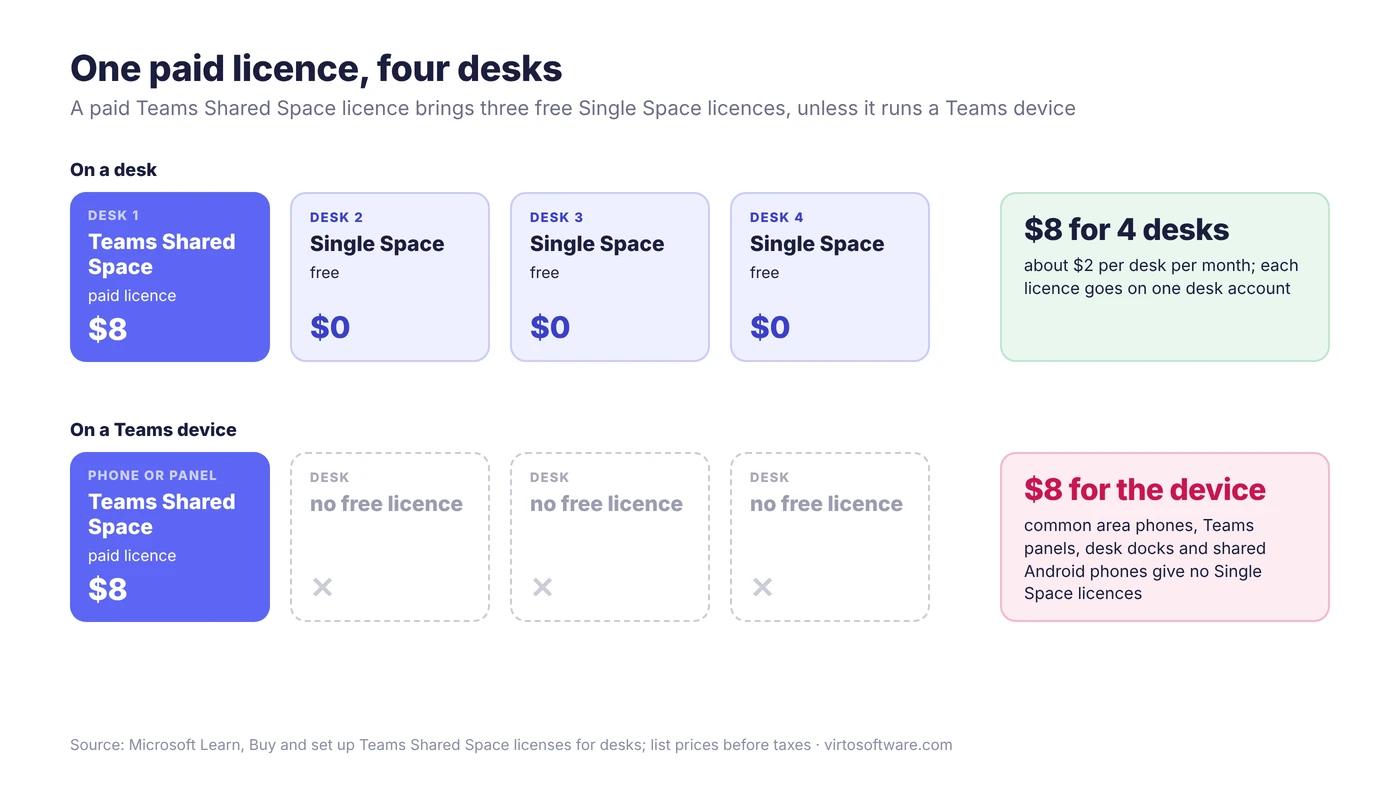
Fig. 2. One paid Teams Shared Space licence covers four desks, unless it runs a Teams device
How to get the free Single Space licences
Single Space licences are not generated or provisioned automatically. Buying the paid licence creates the entitlement; you have to acquire the free licences yourself. Microsoft warns that customers who wait for them to appear “will wait indefinitely”.
Before you order, check that you have billing account administrator or billing profile contributor rights (without them, Marketplace doesn’t appear in the admin center), that at least one paid licence already exists (the free option stays hidden until then), and that your Places building with its desks is published.
Microsoft Customer Agreement: the Microsoft 365 admin center
- Open Marketplace and confirm the billing account is marked (MCA); if not, select Change billing account.
- Search for Shared Space and open Details on Microsoft Teams Shared Space.
- Under Build your plan > Select a plan, choose Microsoft Teams Shared Space (paid). Pick a subscription length of 1 month, 1 year or 3 years, a billing frequency and a quantity, then Buy.
- Open the same listing again and choose Microsoft Teams Shared Space - Single (free). Enter three for each paid licence as one quantity, check that the cost reads zero and select Buy.
- Assign the licences in Users > Active users: open each desk account, choose Assign licenses, select the licence and save. One licence covers one desk.
Enterprise Agreement: the Volume Licensing Center
- Order the paid licences through your reseller, or reserve them in the Volume Licensing Center if the SKU is already in your agreement (reserved licences are charged at the next true-up).
- In the Volume Licensing Center, select the Microsoft Teams Shared Space SKU, choose Add usage on the single-space option, enter three for each paid licence and select Reserve services. The request provisions shortly after.
- Assign the licences to desk accounts in the Microsoft 365 admin center, as above.
MOSA and CSP
- MOSA: Single Space is available only with an MCA billing account, not a Microsoft Online Services Agreement (MOSA) account. If you can’t find it, check your account type.
- CSP: Cloud Solution Provider is a listed channel for Teams Shared Space, but Learn does not describe how CSP customers get Single Space licences. Ask your partner before you budget on $2 a desk.
Reseller orders can take several weeks, so order before you open a new floor.
What a bookable desk really costs
One paid licence plus three free ones covers four desks:
Paid licences = desks ÷ 4, rounded up · Monthly cost = paid licences × $8
In Excel, with the desk count in B2: =ROUNDUP(B2/4,0)*8.
Worked example: 150 desks. 150 ÷ 4 = 37.5, rounded up to 38 paid licences, which cover 152 desks; you use 112 of your 114 free licences. The bill is 38 × $8 = $304 a month, or $3,648 a year. Without the free licences, every desk needs a paid one: 150 × $8 = $1,200 a month.
| Desks | Paid licences | Single Space used (entitled) | Monthly cost | Per desk | Without free licences |
|---|---|---|---|---|---|
| 20 | 5 | 15 (15) | $40 | $2.00 | $160 |
| 50 | 13 | 37 (39) | $104 | $2.08 | $400 |
| 150 | 38 | 112 (114) | $304 | $2.03 | $1,200 |
| 500 | 125 | 375 (375) | $1,000 | $2.00 | $4,000 |
Our calculation from Microsoft’s list prices, before taxes and fees.
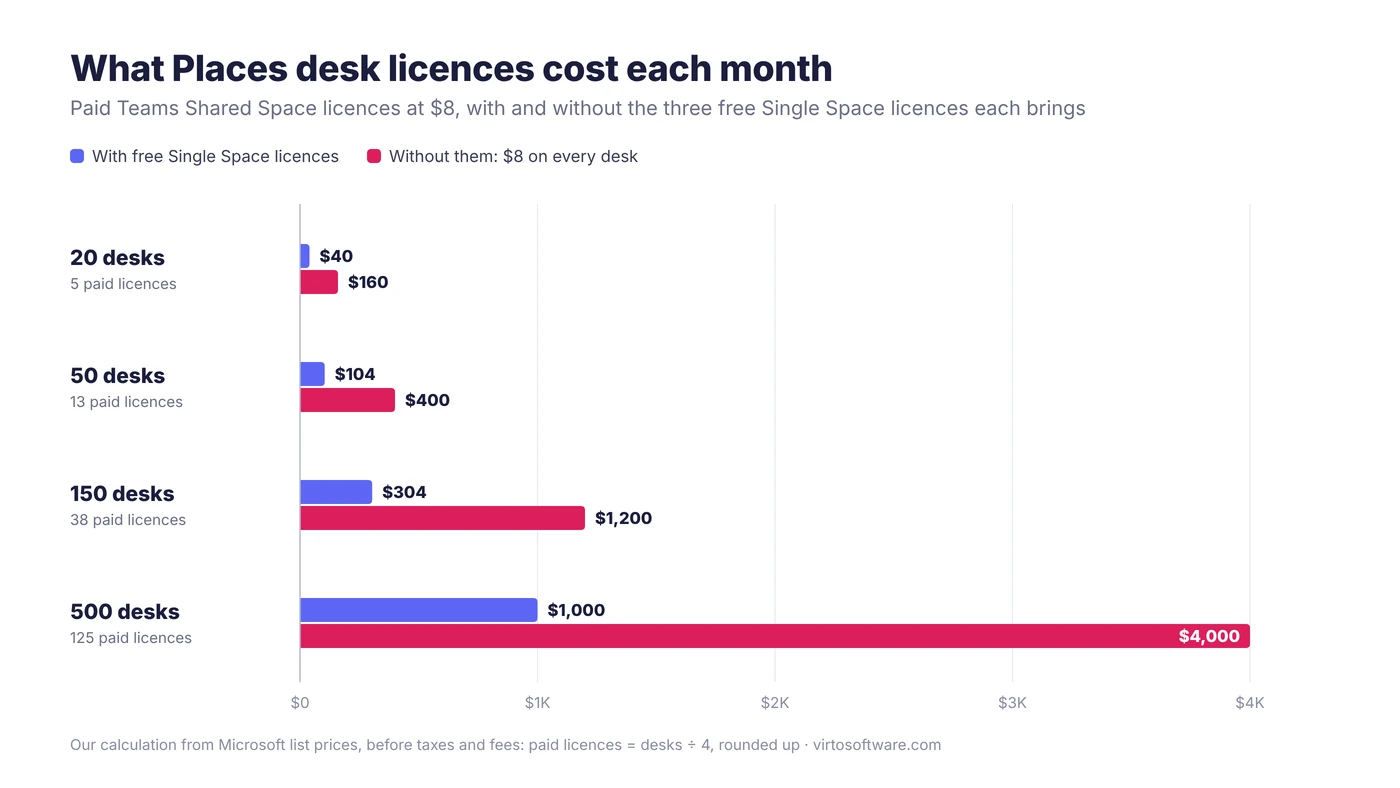
Fig. 3. Monthly Places desk licensing cost with and without the free Single Space licences
Adjust the count in three cases. BYOD rooms that need auto-release or occupancy reports share the same pool, so add them to the desks before dividing. Licences on phones, panels or desk docks bring no free licences, so leave them out. And only desks people choose one by one need a licence; assigned desks and desk pools don’t.
What happens to Teams Premium customers
If you bought Teams Premium before 1 April 2026, nothing changes until renewal. Your Teams Premium users can still book any desk, licensed or not, and check in and use auto-release on any desk or room. Users without Teams Premium can book only desks with a space licence. At renewal, Teams Premium stops including Places premium features and the per-space model applies to everyone.
Find your renewal date and count back by the licence lead time. Before you buy, decide which desks really need individual booking: desks that work as a pool, or are always used by the same person, can become desk pools or assigned desks and need no licence.
What users see when a desk has no licence
Your configuration doesn’t change; the desk stays reservable, but users can’t book it. Microsoft’s Message Center post on the change, MC1235124, says that desks “configured as bookable but not covered by a Shared Space license will appear as unavailable to users”. During a Teams Premium transition both states can coexist: a Teams Premium user books the desk while a colleague sees it as unavailable. Auto-release is similar: you can still set a policy on an unlicensed room or desk, but the same post says it won’t take effect until the space is licensed.
If users report that every desk is unavailable, check licences first, then that the desk is Reservable and Places finder is enabled for them; both are covered in our guide to setting up desk booking in Microsoft Places.
When you need more than Places
The licence model shows where Places ends: it licenses rooms and desks. Places has no object types for equipment, vehicles, parking or visitors, and Microsoft leaves those to partners and building services. Exchange equipment mailboxes still exist, but they don’t appear in Places. Pool cars, projectors, labs and loan laptops still need a schedule that people can check before they ask. Our guide to room and meeting room booking software covers what to look for when Places and Room Finder don’t cover all your resources.
Rooms, vehicles and equipment in one calendar: Virto Calendar App
Places handles desks and the rooms in its building hierarchy. For the resources it has no object type for, and for the rooms you want to see alongside them, Virto Calendar App shows availability in one calendar in Microsoft Teams and Microsoft 365.
It draws meeting rooms, offices, company vehicles and equipment from the Exchange calendars and SharePoint lists your organisation already uses, each in its own colour. Coordinators see who has booked what and what is still free, with maintenance jobs, inspections and blackout periods next to the bookings they interrupt. The Rooms, Equipment, and Availability in One Calendar use case shows the setup. Virto Calendar App comes with a 30-day free trial.
See Rooms and Equipment in One Calendar

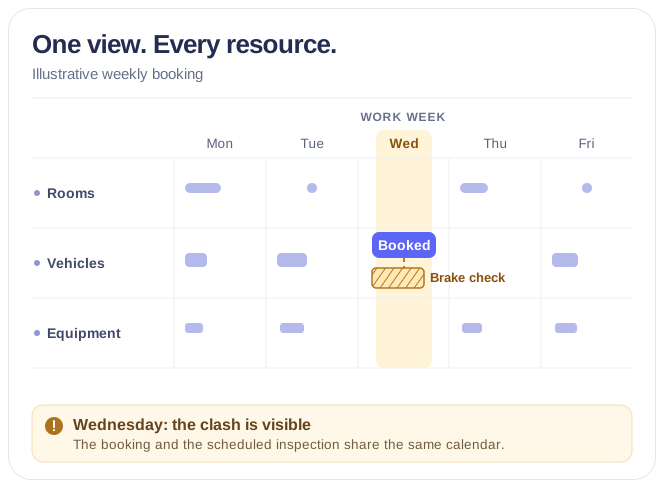
Rooms & Equipment Calendar
Combine rooms, offices, vehicles and equipment in one Microsoft 365 calendar, with the maintenance jobs and blackout periods that make them unavailable.
Learn more about Rooms & Equipment CalendarFAQ
Do I still need Teams Premium for Microsoft Places?
No. Since 1 April 2026, Places finder, Places explorer and Places analytics come with every supported Microsoft 365 plan. Individual desk booking, auto-release and occupancy reports need a space licence instead. If you bought Teams Premium before that date, your users keep the Places premium features until the subscription renews.
Is desk pool booking free?
Yes. Anyone with a supported Microsoft 365 plan can book a room or a place in a desk pool (a workspace in Exchange Online) at no extra cost; only booking one specific desk needs a space licence. Auto-release, which frees a booking nobody checks in to, is a separate feature: it needs a space licence wherever you use it, desk pools included.
Do Teams panels need a licence?
Yes. Each Teams panel needs a Teams Rooms Pro or a Teams Shared Space licence. Use Teams Rooms Pro if the room has a Teams Rooms system or Surface Hub, so one licence covers both, and Teams Shared Space if it doesn’t. Teams Rooms Basic can’t license panels, and a Shared Space licence on a panel brings no free Single Space licences.
Is the $8 per user or per desk?
Per space. One $8 Teams Shared Space licence on a desk or BYOD room, plus its three free Single Space licences, covers four spaces. That is where “about $2 a desk” comes from.
Conclusion
Microsoft Places licensing became simpler on 1 April 2026, but not automatic. Almost every feature now comes with the Microsoft 365 plan your users already have. The three that cost money, booking a specific desk, auto-release and occupancy reports, are licensed on the space at $8 for every four desks, provided you claim the free Single Space licences yourself and keep the paid ones off Teams devices. For 150 desks that is $304 a month rather than $1,200. Count the desks people really book one by one, check your billing agreement, and order before your Teams Premium renewal.
Desks are only part of the office. For the meeting rooms, vehicles and equipment your teams share, Virto Calendar App puts their bookings and maintenance windows in one calendar in Microsoft 365, and the 30-day trial is the quickest way to see it with your own resources.