Court dates, filing deadlines and matter calendars in one place — what legal calendar software does, the features that actually prevent missed deadlines, and how to pick the right tool for your firm.
Quick answer: what is legal calendar software?
Legal calendar software centralizes a law firm’s court dates, filing deadlines and matter calendars in one view, and applies rules-based reminders so attorneys never miss a deadline. Most tools sync with Outlook and Microsoft 365, and the strongest ones calculate deadlines automatically from court rules rather than relying on manual entry.
Also called legal calendaring software or docketing software. Firms already on Microsoft 365 often layer an overlay calendar on top of Outlook instead of buying a separate platform.
Missing a deadline is not an administrative slip in legal practice — it is a malpractice exposure. This guide covers what legal calendar software does, the features worth paying for, how court-date and deadline tracking actually works, and which tools fit firms of different sizes in 2026.
Why Law Firms Need Legal Calendar Software
Deadline management is consistently among the leading causes of legal malpractice claims. The mechanics are unforgiving: a filing date is computed from a triggering event, court rules dictate how the days are counted, weekends and court holidays shift the result, and the responsibility sits with the calendaring attorney regardless of who typed the date in.
Three problems create most of the risk:
- Calendar fragmentation. Court dates live in one system, client meetings in Outlook, internal matter deadlines in a spreadsheet. Nobody sees the whole picture, and conflicts surface late.
- Manual deadline calculation. Counting days by hand across jurisdictions with different rules — calendar days versus court days, holiday exclusions, service-method extensions — is where errors enter.
- No shared visibility. When a deadline sits in one attorney’s personal calendar, a vacation or a departure turns it into an invisible liability.
Legal calendar software addresses all three: it consolidates sources into one color-coded view, automates the calculation where court rulesets exist, and makes deadlines visible to the paralegals and co-counsel who need them.
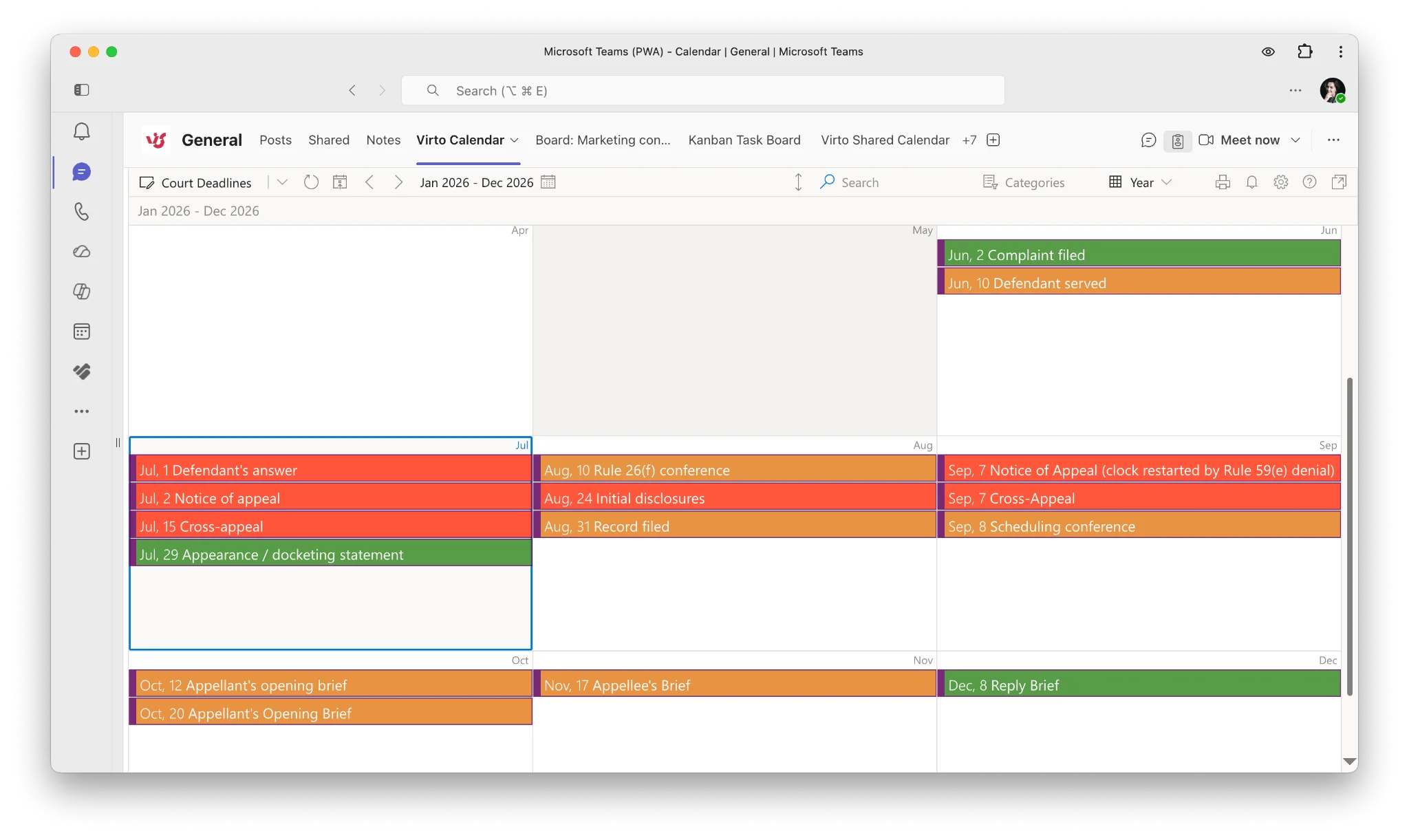
Pic. 1. A unified law firm calendar showing court dates, filing deadlines and client meetings in a single color-coded view.
Must-Have Features in Legal Calendar Software
Not every firm needs every feature, but these are the ones that separate a genuine legal calendaring tool from a generic scheduler:
1. Rules-based deadline calculation
The defining feature. You enter a triggering event — a filing, a service date, a trial date — and the software applies the applicable court rules to generate every downstream deadline. Dedicated rulesets from providers such as LawToolBox, Aderant CompuLaw and Aderant Milana cover thousands of US jurisdictions with court holidays built in. If your firm litigates across multiple jurisdictions, this is the feature that justifies the spend.
2. Docketing and matter calendars
Every deadline should attach to a matter, not float loose in a personal calendar. Matter-level calendaring lets you see all dates for a case at once and hand a case off cleanly.
3. Court-date tracking with reminders
Escalating, multi-stage reminders — 30 days, 7 days, 1 day — routed to the responsible attorney and a backup. A single reminder to a single inbox is not a safety net.
4. Outlook and Microsoft 365 sync
Attorneys live in Outlook. A calendaring tool that forces a separate app for checking dates will not be used consistently. Two-way sync with Exchange Online and Microsoft 365 is a practical requirement, not a nice-to-have.
5. Shared and permission-aware calendars
Paralegals, calendaring clerks and co-counsel need visibility, but client confidentiality means not everyone should see everything. Look for calendar-level permissions that mirror your existing Microsoft 365 or SharePoint security model rather than a separate access system to maintain.
6. Conflict checking
Built-in conflict detection prevents double-booked appearances and flags scheduling collisions before they reach a client.
7. Audit trail
Who set the deadline, who changed it and when. If a date is ever disputed, this record matters.
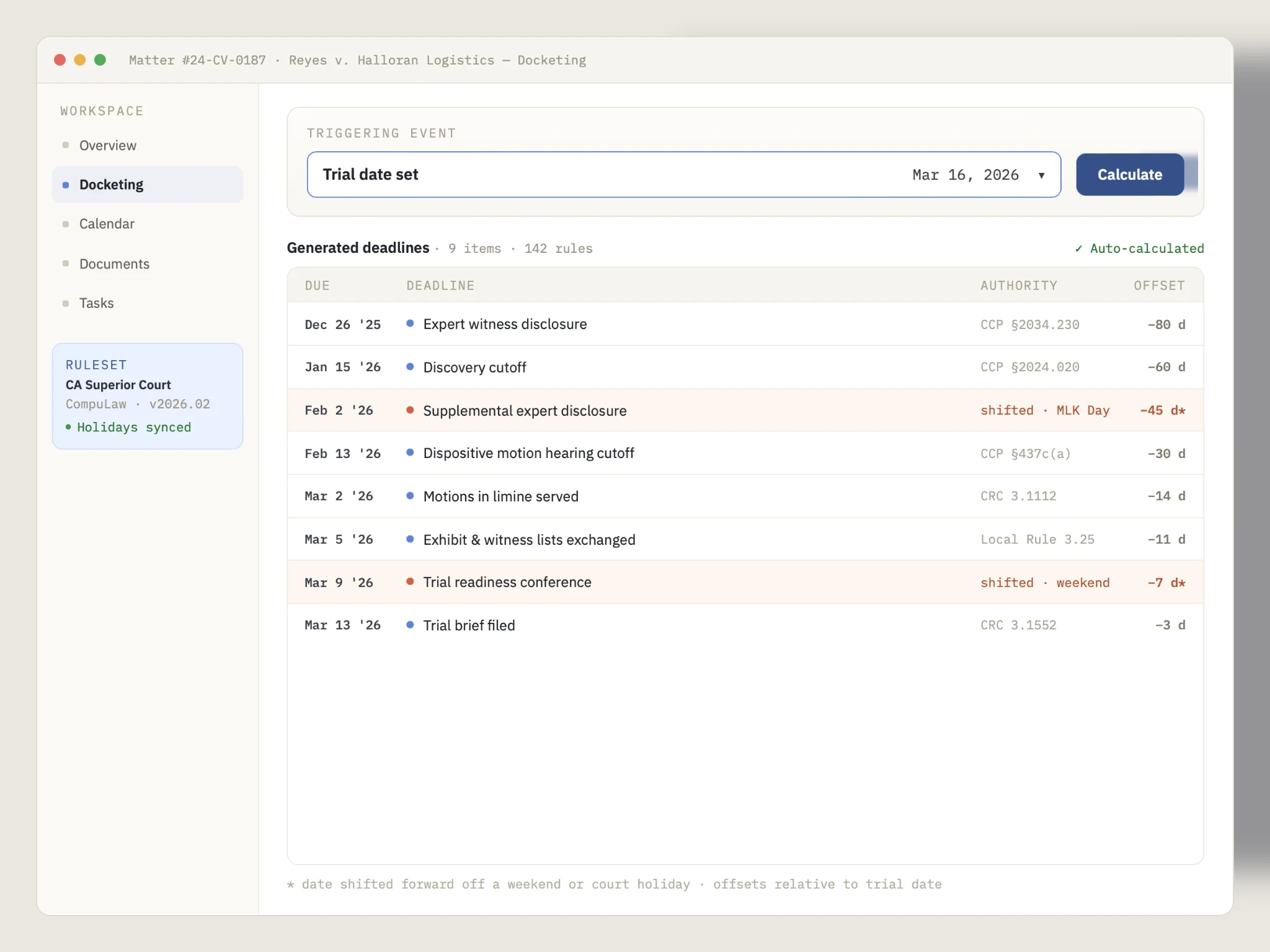
Pic. 2. Rules-based deadline calculation: a triggering date generates the full downstream deadline chain automatically.
Court Dates and Deadline Tracking: How It Actually Works
How do law firms track court deadlines?
Firms use legal calendaring or docketing software that applies court rules to a filing or service date to auto-calculate all dependent deadlines, then pushes those dates with reminders to attorneys’ shared calendars. Larger firms use dedicated court-rules platforms; smaller firms often calculate deadlines manually or with AI assistance and import them into a shared Microsoft 365 calendar.
The workflow breaks into four steps:
- Identify the triggering event. A complaint is served, an order is entered, a trial date is set. Everything downstream counts from this date.
- Apply the correct rule. Federal practice generally follows FRCP Rule 6 for computing time; state systems differ, and some count court days rather than calendar days. Local rules and standing orders can override both.
- Adjust for weekends and holidays. Court holiday calendars vary by jurisdiction and change year to year — this is a common source of error in manual calculation.
- Calendar it and set reminders. The computed date goes into the matter calendar with reminders assigned to the responsible attorney and a backup.
Firms without a dedicated court-rules subscription increasingly use AI tools for step 2 and step 3 and then import the results. If that is your situation, our AI court calendar calculator guide walks through the prompts, the export format and the verification steps in detail. Whichever route you take, computed deadlines are a starting point — always verify against the rule text and any standing orders.
To keep the computed dates next to hearings and every attorney’s calendar in Microsoft 365, see the court date and deadline calendar use case.
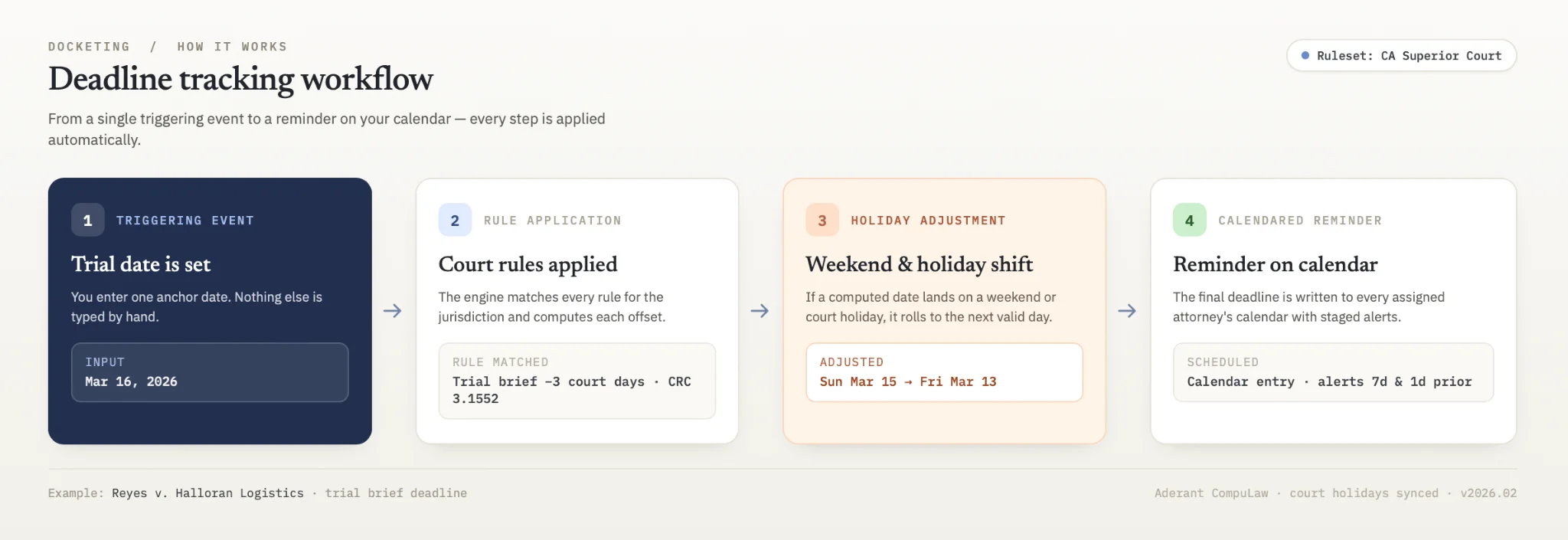
Pic. 3. Deadline tracking workflow: triggering event → rule application → holiday adjustment → calendared reminder.
Explore Our Use Cases for Law Firms
Court Date & Deadline Calendar
A court calendar for law firms in Microsoft 365: hearings, filing deadlines and attorneys' calendars in one view. Your docketing rules and your people set the dates; Virto Calendar App shows them.
Learn more about Court Date & Deadline Calendar
Client Appointment Scheduling
Optimize your law practice's client interactions with a scheduling calendar tailored to legal professionals. Manage consultations efficiently, balance workloads, and improve client satisfaction.
Learn more about Client Appointment Scheduling
Compliance Management Software
See every audit and filing date in one calendar, move remediation tasks across Kanban boards, and email owners before compliance deadlines, all in Microsoft 365.
Learn more about Compliance Management SoftwareHow to Choose Legal Calendar Software
Work through these five questions before you look at a single demo:
- Do you need court rules, or just a calendar? A litigation-heavy firm needs rules-based calculation. A transactional practice, in-house team or firm with a light litigation docket usually needs shared visibility and reliable reminders — a much cheaper problem to solve.
- What is already in your stack? If your firm runs on Microsoft 365, a tool that layers onto Outlook and SharePoint avoids a second platform, a second login and a second security model.
- Where does your data live? Client confidentiality and, for some practices, regulatory requirements make data residency a real constraint. Ask whether the vendor can deploy inside your own tenant or infrastructure.
- How many jurisdictions? Multi-jurisdiction practice is the main driver of cost in this category. Single-jurisdiction firms often over-buy.
- Total cost, not sticker price. Per-user pricing in legal practice management typically excludes e-signature, document automation, payment processing markup and premium support. Price the configuration you will actually run.
A note on free legal calendaring tools
Free tools — Google Calendar, the Outlook calendar included in your Microsoft 365 licence, Zoho Calendar — handle basic scheduling and reminders competently. What they do not do is calculate deadlines from court rules, attach dates to matters, or provide an audit trail.
A free tool is reasonable if you are a solo practitioner with a light docket in one jurisdiction, or if you are calculating deadlines separately and only need somewhere to store and share them. It stops being reasonable once you are managing multiple jurisdictions, handling sensitive client data that needs governed access, or relying on one person’s memory as the backup.
Note on pricing: vendor prices in this category change frequently and vary by billing term. Figures below reflect publicly listed entry pricing at the time of writing — verify current pricing on each vendor’s own site before budgeting.
Legal calendar software compared
| Tool | Best for | Rules-based deadlines | M365 / Outlook sync | Entry pricing* |
|---|---|---|---|---|
| Clio | Mid-size to large firms wanting a full practice platform | Yes (via integration) | Yes | From ~$49/user/mo |
| MyCase | Solos and small firms wanting all-in-one simplicity | Limited | Yes | From ~$39/user/mo |
| PracticePanther | Small firms prioritising ease of adoption | Via integration | Yes | From ~$49/user/mo |
| Rocket Matter | Billing-heavy small and mid-size firms | Via integration | Yes | From ~$39/user/mo |
| LawToolBox | Firms needing court rules natively inside M365 | Yes (core strength) | Yes — built for M365 | Quote |
| Aderant Milana / CompuLaw | Large firms, multi-jurisdiction docketing | Yes (2,500+ jurisdictions) | Yes | Quote |
| Virto Calendar App | M365 firms needing unified, governed calendar visibility | No — overlay, not a rules engine | Native M365 / SharePoint / Teams | $2,412 / 100 users / year, 3-year agreement; 30-day trial |
*Publicly listed entry pricing, subject to change and billing term. Confirm with each vendor.
The important distinction in this table: the first six tools and the last one solve different problems. Dedicated legal platforms compute deadlines from court rules. An overlay calendar consolidates and shares dates that already exist. Many firms run both — a rules engine to produce the dates, and a shared calendar layer so the whole team can see them.
Legal Calendar Software for Attorneys and Solo Practitioners
Individual attorneys have a different problem from firm administrators. The firm cares about risk management across a docket; the attorney cares about not losing an afternoon to calendar admin.
Practical priorities for attorneys:
- It has to live in Outlook. If checking tomorrow’s schedule requires opening a second app, it will drift out of date.
- Mobile access is non-negotiable. Court dates get confirmed in hallways, not at desks.
- Client meetings and court dates in one view. Splitting personal and matter calendars across systems is how double-bookings happen.
- A visible backup. Someone other than you should be able to see your deadlines. This is both a risk control and a practical convenience during holidays and trials.
Solo practitioners in particular should resist over-buying. If you practise in one jurisdiction with a modest docket, a well-organised shared calendar plus careful manual or AI-assisted deadline calculation often covers the need at a fraction of the cost of a full practice management platform.
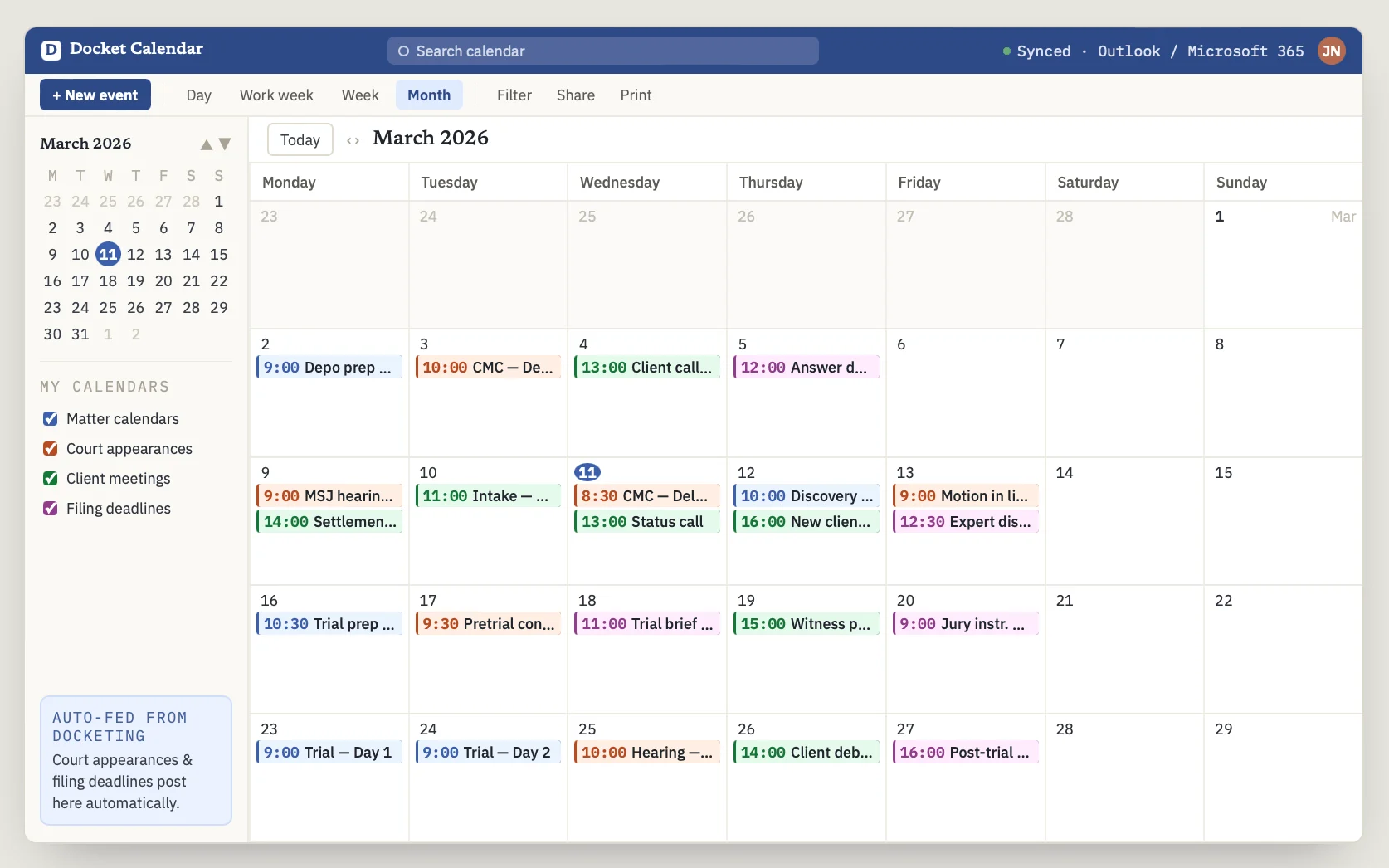
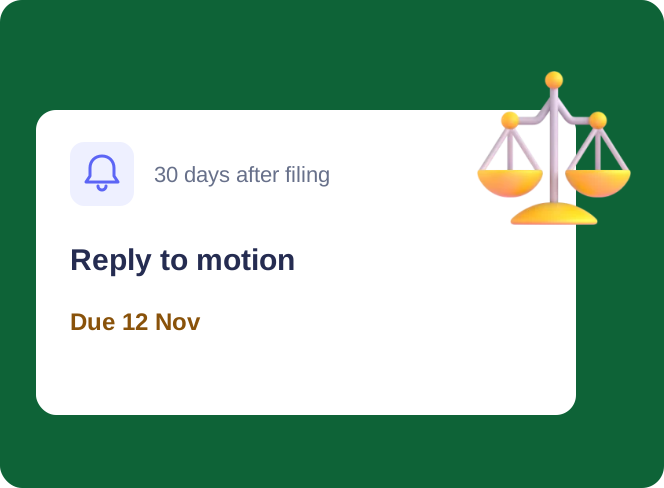
Pic. 4. Attorney view: matter calendars, court appearances and client meetings overlaid in Outlook-like interface.
How Virto Calendar App Works for Law Firms in Microsoft 365
If your firm already runs on Microsoft 365, the calendar visibility problem often does not need a new platform — it needs a layer over the calendars you already have. Virto Calendar App overlays multiple Microsoft 365, Outlook, Exchange and SharePoint calendars into one color-coded view inside SharePoint, Teams or Outlook.
For a law firm, that means:
- Matter and court-date calendars from different sites and teams combined into a single schedule, without moving data between systems.
- Color-coded separation of court appearances, filing deadlines, client meetings and internal work, so a crowded week is readable at a glance.
- Permissions that follow your existing Microsoft 365 and SharePoint security model — no parallel access system to maintain, and confidential matters stay restricted.
- Deployment inside your own Microsoft 365 tenant or Azure subscription, so client data does not leave your infrastructure — relevant for firms with strict confidentiality or data-residency obligations.
What it is not: Virto Calendar App is an overlay and visibility layer, not a court-rules engine. It does not compute FRCP deadlines for you. Firms that need rules-based calculation typically pair a docketing tool with Virto Calendar App for the shared, governed view across the whole practice. Related: legal workflow automation and VirtoSoftware for legal services.
Pricing and trial
Virto Calendar App costs $2,412 per 100 users per year with a 3-year agreement (100 users and up). A 30-day free trial is available — no commitment required. Smaller firms can use Virto Shared Calendar, which has a free plan.
Improve Your Legal Calendar with Virto Apps



FAQ
What is legal calendar software?
Software that centralizes a law firm’s court dates, filing deadlines and matter calendars with rules-based reminders so attorneys don’t miss deadlines. It commonly syncs with Outlook and Microsoft 365.
How do law firms track court deadlines?
They use legal calendaring or docketing software that applies court rules to a filing date to auto-calculate dependent deadlines, then pushes reminders to attorneys’ shared calendars. Firms without a rules subscription calculate deadlines manually or with AI assistance and import them into a shared calendar.
What is the difference between legal calendaring and docketing software?
The terms overlap heavily. “Docketing” usually emphasises tracking court filings and case events with rules-based deadline generation, while “calendaring” emphasises the resulting schedule and its visibility. Most modern tools do both.
Are there free legal calendaring tools?
Yes — Google Calendar, the Outlook calendar in your Microsoft 365 licence and Zoho Calendar all handle scheduling and reminders at no extra cost. None of them calculate deadlines from court rules or provide matter-level docketing, so they suit solos with light, single-jurisdiction dockets rather than litigation-heavy practices.
Does legal calendar software integrate with Outlook and Microsoft 365?
Most do. Some, like LawToolBox and Virto Calendar App, are built specifically for the Microsoft 365 environment and run inside Outlook, Teams and SharePoint rather than alongside them.
Can legal calendar software prevent malpractice claims?
It substantially reduces the risk of the most common cause — missed deadlines — through automated calculation, shared visibility and escalating reminders. It does not remove the calendaring attorney’s responsibility to verify computed dates against the applicable rules.
How much does legal calendar software cost?
Full practice management platforms typically start around $39–$49 per user per month and rise sharply with tier and add-ons. Dedicated court-rules platforms are usually quoted. Overlay calendars for firms already on Microsoft 365 are considerably cheaper — Virto Calendar App costs $2,412 per 100 users per year with a 3-year agreement (100 users and up), with a 30-day free trial, and smaller firms can use the free plan of Virto Shared Calendar.
Choosing Your Approach
The right answer depends on one question: does your firm need deadlines calculated, or deadlines visible?
- Litigation-heavy, multi-jurisdiction practice: invest in a rules-based docketing platform. The subscription cost is small relative to a single missed deadline.
- Microsoft 365 firm with fragmented calendars: an overlay calendar solves the visibility problem without a platform migration.
- Solo or small firm, single jurisdiction: careful manual or AI-assisted calculation plus a well-organised shared calendar is usually sufficient — and far cheaper.
Most firms that get this right end up with both layers: something that produces reliable dates, and something that makes them visible to everyone who needs them.
See Virto Calendar App in your own environment
Overlay your firm’s court dates, matter calendars and client meetings in one governed Microsoft 365 view. Start a 30-day free trial or book a demo with our team.
This article is informational and is not legal advice. Always verify computed deadlines against the applicable court rules, local procedure and any standing orders.