
If you’ve tried to use the SharePoint Events web part as your team’s calendar, you’ve likely discovered it can’t display a monthly view, doesn’t support recurring events, and can’t overlay calendars from multiple sources. You’re not alone — these are among the most common complaints from SharePoint administrators, and some of the open threads about them on Microsoft’s community forums date back to 2018.
The Events web part was designed as a lightweight widget for surfacing upcoming items from a single events list. It was never built to be a full team calendar. The problem is that Microsoft didn’t ship a modern replacement for the classic Calendar app, so site owners keep reaching for the Events web part — and keep hitting the same walls.
This article documents every known limitation of the SharePoint Events web part, compares it fairly against the other native options (Group Calendar web part and SharePoint List calendar view), and walks through three alternatives that actually deliver a working calendar on modern SharePoint pages.
Every Limitation of the SharePoint Events Web Part
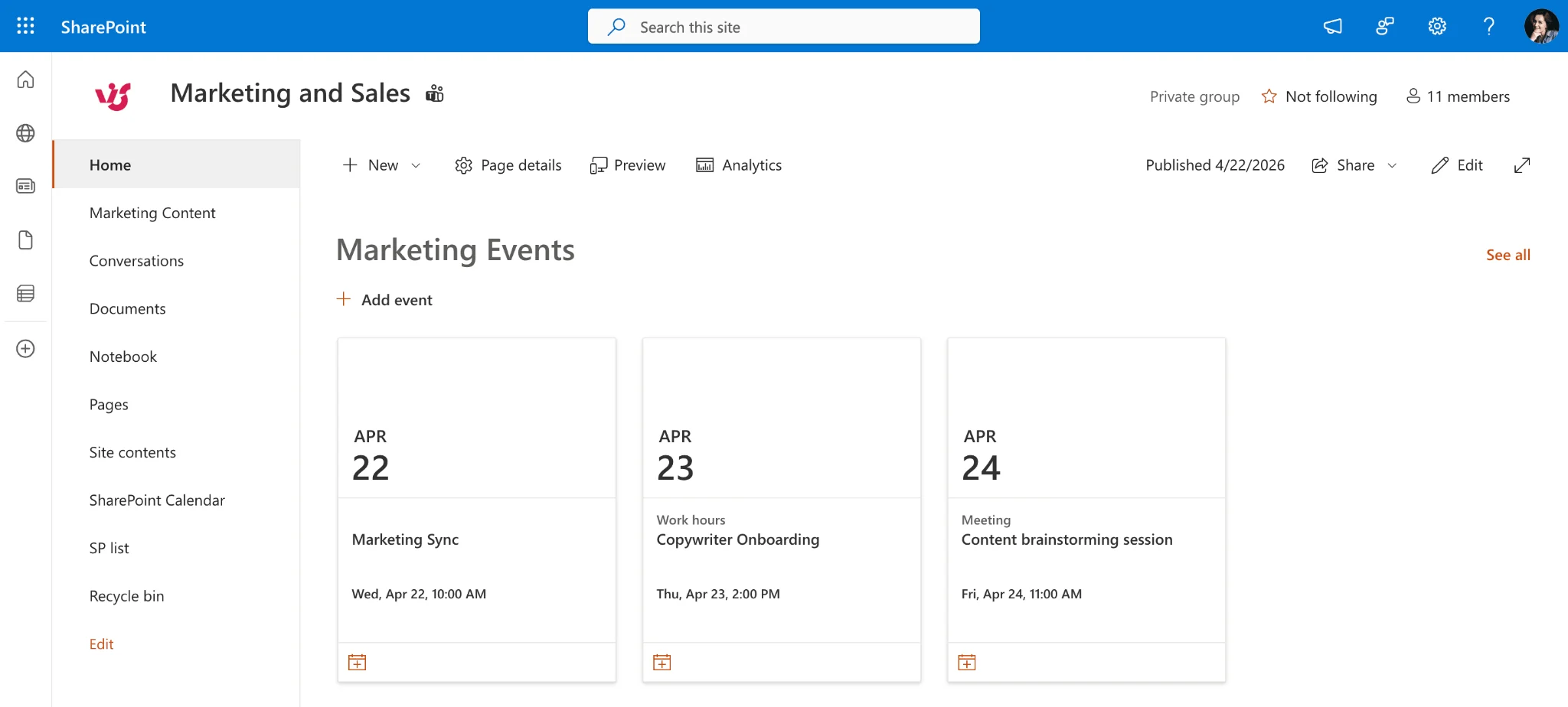
The SharePoint Events web part does not support monthly or weekly calendar views, recurring events, multi-source overlay, Exchange calendar integration, color-coding by category, or drag-and-drop rescheduling. It displays events from a single SharePoint Events list in either a filmstrip or a compact list layout.
Here is the full list of gaps users run into, with the impact of each and Microsoft’s current position.
- No monthly or weekly calendar view. The Events web part only renders events as a filmstrip (a row of event cards) or a compact vertical list. There is no grid-based month or week view, and no UI control to switch to one. This is the single most-requested feature, with an active Microsoft Community thread asking for it that has been open since 2018 and remains unresolved.
- No recurring events. Microsoft’s own documentation is explicit on this: “Recurring events are not supported, even if you manually set up a recurrence in the events list.” If a team meeting happens every Tuesday, a site owner has to create 52 individual events per year — or use a different tool. This limitation alone disqualifies the Events web part for most real-world team calendars.
- No calendar overlay or multi-source aggregation. The web part points at exactly one Events list. You can configure it to pull events across multiple sites via SharePoint Search, but that aggregation is unreliable: it depends on the search crawl, which introduces delays of minutes to hours, and it silently drops events if the crawl hasn’t completed. There’s no true overlay where you see departmental calendars stacked on the same view.
- No color-coding by category. Every event renders in the same visual style. Training sessions, company holidays, and customer meetings all look identical — so readers can’t distinguish event types at a glance.
- No Exchange or Outlook calendar integration. Personal calendars, shared mailbox calendars, and meeting room calendars are invisible to the Events web part. If your scheduling lives in Outlook (which, for most organizations, it does), the Events web part can’t see it.
- No drag-and-drop rescheduling. Events can’t be moved between dates visually. Every change requires opening the list item and editing the date field manually.
- Limited filtering. You can filter by a single category at a time. There is no multi-category filter, no filter by source, and no filter by attendee or organizer.
- Search-dependent aggregation. Even when “pulling from multiple sites” is configured, the display depends on the SharePoint Search crawl. New events don’t appear until the crawl picks them up, which means the web part is not a reliable real-time view.
SharePoint Events Web Part — Complete Limitation List
| Limitation | Impact | Microsoft status |
|---|---|---|
| No monthly or weekly view | Users can’t see schedule at a glance | No fix announced |
| No recurring events | Manual duplication for every occurrence | Acknowledged, no fix |
| No multi-source overlay | Can’t combine departmental calendars | Not planned |
| No color-coding | Events all look the same | Not available |
| No Exchange / Outlook integration | Personal and room calendars invisible | Not supported |
| No drag-and-drop | Can’t reschedule visually | Not available |
| Limited filtering | One category at a time only | Not planned |
| Search-dependent aggregation | Minutes-to-hours delay for new events | Working as designed |
What About the Other Native Options?
Before jumping to third-party solutions, it’s worth covering the two other native approaches Microsoft offers for calendars on SharePoint pages. Neither is a complete answer, but each solves part of the problem.
Group Calendar Web Part
The Group Calendar web part displays events from a Microsoft 365 Group’s Outlook calendar. Because it’s backed by Outlook under the hood, it supports recurring events natively — the one big thing the Events web part can’t do.
The trade-offs: there’s still no monthly view (it renders as a list), it’s limited to a single M365 Group, and adding it to a Communication site or Team site creates an M365 Group as overhead even if you didn’t want one. If the underlying group was created via Teams, the calendar is hidden in Outlook by default, which confuses users who try to find it. And the display caps at roughly the next quarter of events — long-range planning views aren’t possible.
SharePoint List with Calendar View
Every modern SharePoint list now supports a Calendar view format, which renders list items on a monthly (or weekly) grid. This is the only native option that actually gives you a real month view on a modern page.
The catches: there’s no Exchange or Outlook integration, no recurring events (SharePoint lists don’t model recurrence), no overlay from multiple lists, and no “Add to Outlook” button for end users. Color-coding is possible only by writing JSON column formatting — there’s no simple category-color picker in the UI. For a single-source, non-recurring calendar (think: a team’s internal deadlines), it’s usable. For anything more, it falls short quickly.
Events Web Part vs Group Calendar vs List Calendar View
| Capability | Events Web Part | Group Calendar Web Part | List Calendar View |
|---|---|---|---|
| Monthly view | No | No | Yes |
| Weekly view | No | No | Yes |
| Recurring events | No | Yes | No |
| Multi-source overlay | Search-based only | No | No |
| Exchange / Outlook | No | Yes (one group) | No |
| Color-coding | No | No | Via JSON only |
| Drag-and-drop | No | No | No |
| Add to Outlook | No | Yes | No |
| Modern UI | Yes | Yes | Yes |
The pattern is clear: no single native option covers all the basics. Most teams end up running two of the three in parallel and still missing features.
3 Better Alternatives to the Events Web Part
1. Virto Calendar App — Best All-Round Replacement
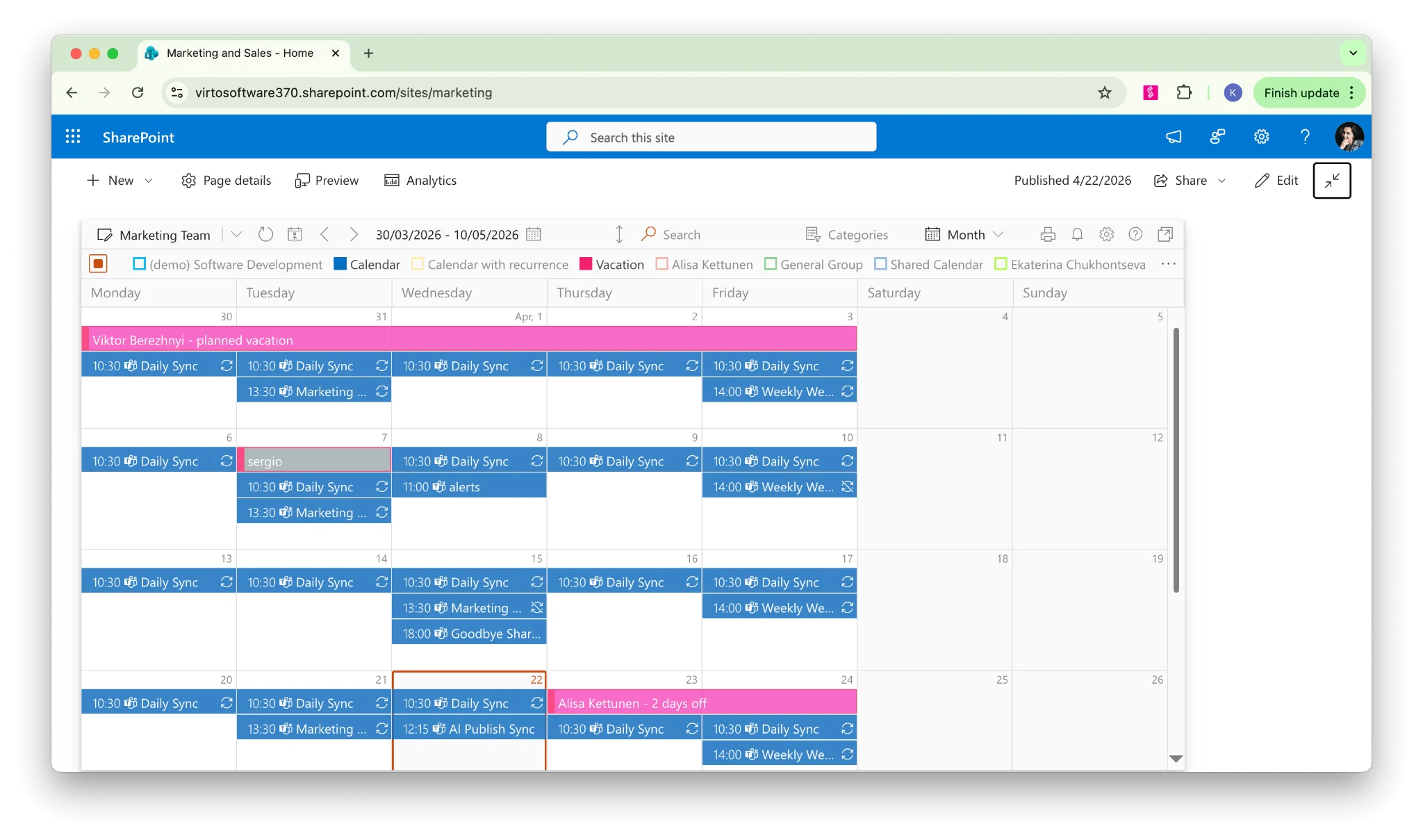
Virto Calendar App is a modern SPFx web part that drops into any SharePoint page and replaces the Events web part with a full calendar experience. It was built specifically to solve the gaps Microsoft hasn’t closed.
On the viewing side, it supports month, week, day, year, and Gantt views, with drag-and-drop rescheduling and color-coding at both source and category levels. On the data side, it overlays events from an unlimited number of sources — SharePoint lists, Exchange and shared Outlook calendars, meeting room calendars, Microsoft Planner tasks, iCal feeds, and Google Calendar — on a single unified view. Recurring events work because they’re read from the source systems that natively support them (Outlook, Google). End users can create Teams meetings, filter by source, and export to their personal Outlook.
It runs on modern SharePoint pages in Microsoft 365, respects existing permissions, and is free to try for one month — which means you can prove it works on a real page before committing to a license.
2. SharePoint List + Calendar View — Best Free Native Workaround
If a third-party app isn’t an option in your tenant, a SharePoint list with the Calendar view format is the least-bad native route. You get a real monthly grid, modern styling, and it costs nothing beyond your existing Microsoft 365 license.
Accept the trade-offs going in: single source only, no recurring events, no Outlook integration, and any color-coding will require custom JSON formatting. Use it for simple, single-team calendars where every event is a one-off.
3. Combine Group Calendar + Events Web Part (Workaround)
For site owners who need recurring events but can’t install anything, you can place the Group Calendar web part and the Events web part on the same page — using the Group Calendar for recurring team meetings (it supports them) and the Events web part for one-off announcements (which render nicely in filmstrip).
This is a workaround, not a solution. Users see two disconnected components instead of one unified calendar, there’s no overlay, and keeping them in sync is manual. But on pages where you can’t add third-party components, it’s better than either option alone.
Feature Comparison — Events Web Part vs Virto Calendar
| Feature | Events Web Part | Virto Calendar App |
|---|---|---|
| Monthly calendar view | No | Yes (plus Week, Day, Year, Gantt) |
| Recurring events | No | Yes (via connected sources) |
| Multi-source overlay | No | Yes (unlimited sources) |
| Exchange / Outlook calendars | No | Yes |
| Meeting room calendars | No | Yes |
| Microsoft Planner tasks | No | Yes |
| iCal / Google Calendar | No | Yes |
| Color-coding by source or category | No | Yes (multi-level) |
| Drag-and-drop rescheduling | No | Yes |
| Teams meeting creation | No | Yes |
| Free tier | Yes (built-in) | No |
| Modern SharePoint pages | Yes | Yes |
The distinction is architectural. The Events web part is a display widget for a single events list. Virto Calendar App is a calendar platform that aggregates events from across your Microsoft 365 environment — SharePoint, Outlook, Planner, meeting rooms, external feeds — into one interactive view. If you need the latter, no amount of configuration will coax the former into delivering it.
Frequently Asked Questions
Why does the SharePoint Events web part have no monthly view?
The Events web part was designed as a lightweight event display widget, not a full calendar. It supports only filmstrip and compact layouts. Microsoft has not announced plans to add monthly or weekly calendar views. For a monthly view, use a SharePoint list with Calendar view (native) or the Virto Calendar App (third-party).
Can the SharePoint Events web part show recurring events?
No. Microsoft’s documentation explicitly states that recurring events are not supported in the Events web part, even if you manually set up a recurrence in the underlying events list. You must create a separate event for each occurrence. The Group Calendar web part does support recurring events because it’s backed by Outlook’s calendar engine.
What is the best replacement for the SharePoint Events web part?
The Virto Calendar App is the most complete replacement. It delivers monthly, weekly, and day views, multi-source overlay, Exchange integration, color-coding, and drag-and-drop on modern SharePoint pages. It’s free to try for a month, so you can validate it in your own environment before scaling.
Can I display Outlook calendar events on a SharePoint page?
Not with the Events web part. The Group Calendar web part can display a single Microsoft 365 Group calendar. To overlay multiple Outlook or Exchange calendars — including personal, shared, and meeting room calendars — on a SharePoint page, you need a third-party solution such as Virto Calendar App.
Is the SharePoint Events web part being deprecated?
As of April 2026, Microsoft has not announced deprecation of the Events web part. The classic Calendar app (a separate feature from the Events web part) is part of the broader classic SharePoint experience that Microsoft is gradually phasing out, but the modern Events web part remains in the product with no sunset date published.
The Bottom Line
The Events web part does what it was designed to do: show a simple list of upcoming items from a single events list on a modern page. The frustration most users feel comes from using it as a calendar — a role it was never built for and that Microsoft hasn’t updated it to fill.
If you need a real team calendar on modern SharePoint — month view, recurring events, multiple sources, Outlook integration, color-coding — the Virto Calendar App closes every gap in the list above and runs on the same pages you’re already using.
→ Try Virto Calendar App free for a month.
For larger deployments, book a demo with our team to walk through enterprise setup, tenant-wide deployment, and calendar governance.
Related reading: