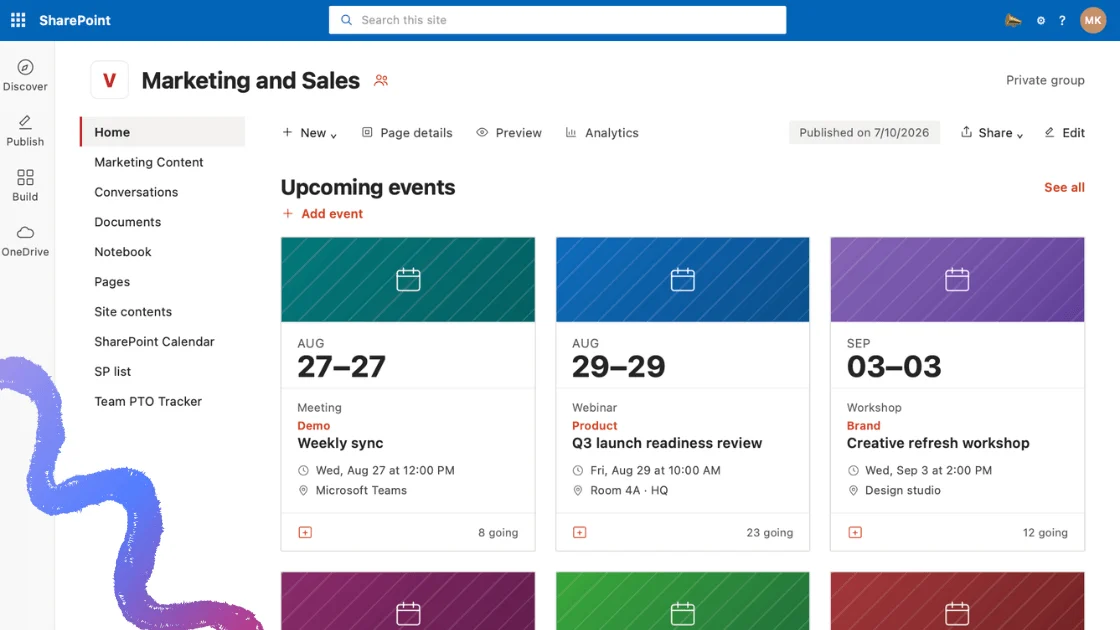
Meeting rooms are among the most contested resources in any office, and among the least visible. A room can sit empty all afternoon while three teams hunt for space, simply because nobody can see the schedule. Room and meeting room booking software closes that gap — and in Microsoft 365, it does so by combining Exchange room mailboxes with a calendar overlay that surfaces availability where people actually work.
This guide covers what room booking software does, what to look for when evaluating it, how meeting room booking works natively in Outlook and Microsoft 365, how conference room scheduling differs in practice, and how the leading tools compare. It closes with how Virto Calendar App handles room and resource booking inside SharePoint, Teams, and Outlook.
VirtoSoftware has been building calendar and scheduling applications for the Microsoft ecosystem since 2011, working with organizations across corporate, education, healthcare, government, and legal sectors. The guidance below reflects that implementation experience rather than vendor marketing.
Quick Answer: What Is Meeting Room Booking Software?
Meeting room booking software shows room availability and lets people reserve meeting or conference rooms — and often equipment and desks — from a shared calendar, so two teams never claim the same space at the same time. In Microsoft 365, it works with Exchange room mailboxes as the booking layer and a calendar overlay as the visibility layer.
That two-layer distinction matters more than any feature list. The booking layer is where a reservation is actually recorded. The visibility layer is where employees see what is free. Microsoft 365 ships the first out of the box and leaves the second largely unsolved — which is the single most common reason organizations go looking for software in the first place.
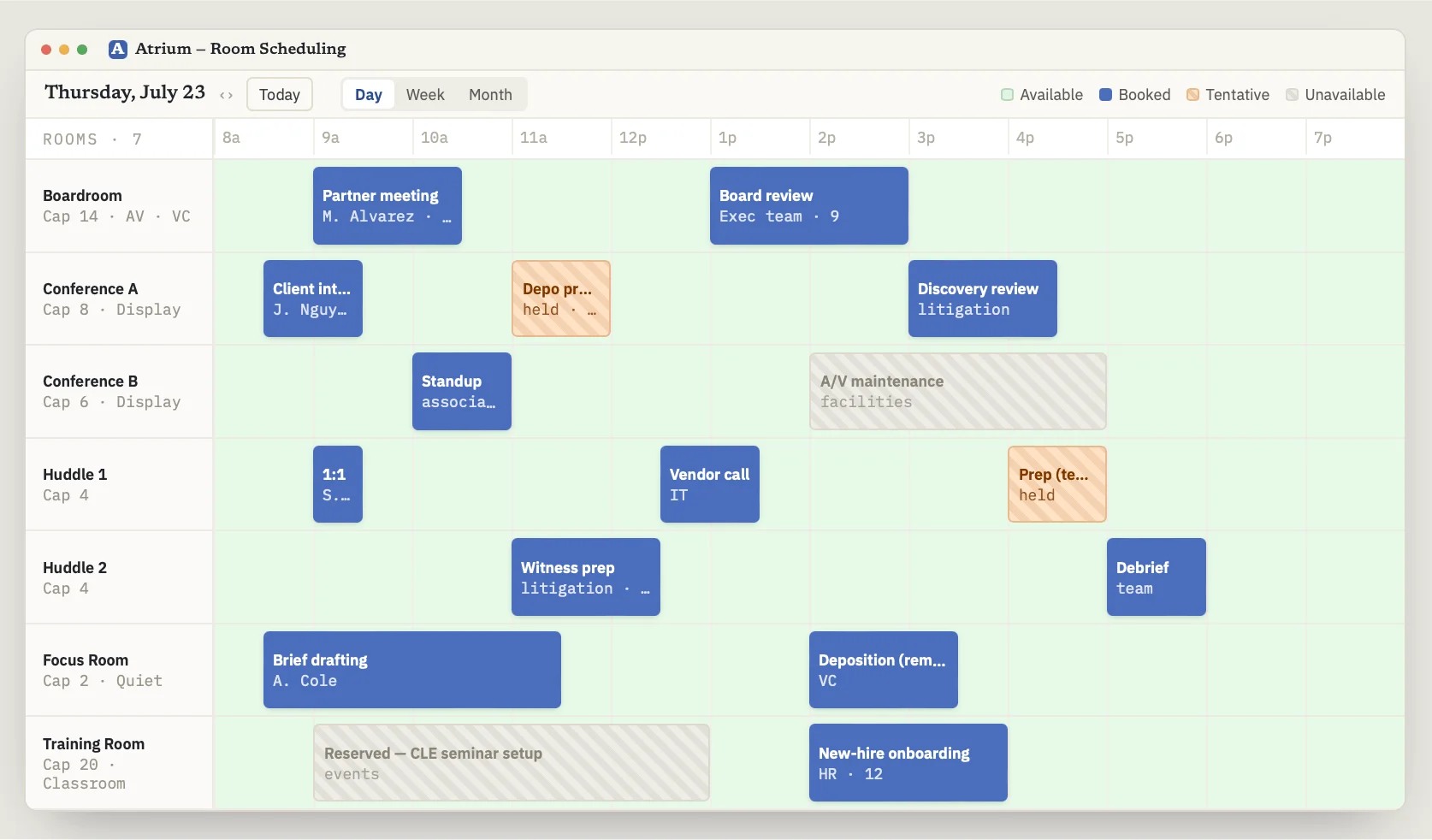
Pic. 1. Room availability shown as a color-coded overlay across multiple rooms.
What Room & Meeting Room Booking Software Does — and Who Needs It
Room booking software is the systematic layer over a process that most organizations otherwise run on email chains, shared spreadsheets, or a printed sheet taped to a door. Its job is to organize, schedule, and track the use of physical spaces so that rooms are used efficiently and conflicts are prevented before they happen.
What it actually delivers
- Better space utilization. Real-time availability and usage data reveal which rooms are chronically overbooked and which sit idle, so you can rebalance before adding real estate.
- Fewer conflicts. A centralized system where every booking is visible to everyone removes the main cause of double-booking: nobody knowing the room was taken.
- Time saved. Checking availability and confirming a reservation becomes a few clicks instead of a chain of emails and follow-ups.
- Coordination across teams. One shared source of truth for schedules, with calendar integration, notifications, and reminders keeping everyone aligned.
- Ease of use for both sides. Administrators manage schedules, cancellations, and rules with less overhead; employees book without training.
- Scalability. The same system handles three rooms in one office or three hundred across multiple sites.
Where the friction usually is
Adopting dedicated software is not free of trade-offs, and being candid about them makes for better decisions:
- Setup cost. Licenses, and sometimes hardware such as door panels or kiosks, plus configuration time.
- Integration work. The system has to talk to your existing calendar, directory, and identity infrastructure. Mismatches mean custom work.
- User adoption. People default to what they know. Without clear communication and a short learning curve, the old habits persist alongside the new tool.
- Ongoing maintenance. Updates, support, and periodic reconfiguration as the organization changes.
- Data security. Booking data reveals who meets whom and when. Access control, audit logging, and compliance posture are not optional considerations.
Set against manual methods, though, these costs are usually the smaller number. Manual calendars are error-prone — double bookings and missed reservations are routine — and email coordination generates long correspondence chains that delay decisions, especially when several people must weigh in.
Who needs it
| Sector | Typical scenarios | Booking frequency | Specific requirements |
|---|---|---|---|
| Corporate offices | Meeting rooms, client calls, interviews | Hourly to daily | AV setup, video conferencing, privacy, hybrid support |
| Educational institutions | Classroom scheduling, exam room allocation | Daily | Accessibility, AV equipment, seating configuration |
| Healthcare facilities | Consultation and treatment rooms | Hourly to daily | Patient confidentiality, equipment tracking, sterilization windows |
| Event venues | Conference rooms, seminar halls, workshops | Weekly to monthly | Capacity, AV, catering coordination |
| Government agencies | Meeting and training rooms | Daily | Security clearance, access control, audit trails |
| Legal firms | Client meetings, depositions, internal reviews | Daily | Confidentiality, secure document handling, AV |
| Hospitality | Banquet halls, meeting rooms | Weekly to monthly | Catering, AV setup, flexible layouts |
Fig. 1. Organizations that rely on room booking, and what each needs from it.
What to Look For: A Feature Checklist
Vendor feature lists tend to blur together. The following breaks down what genuinely differentiates room booking platforms, separated into core functionality and the technical and security requirements that IT will ask about.
Core functionality
Automatic room scheduling.
- Real-time booking so rooms are reserved instantly, with no lag between reservation and visibility.
- Conflict detection that prevents double bookings and offers alternatives when a slot is taken.
- Recurring reservations for standing meetings, configurable daily, weekly, or monthly.
Calendar integration.
- Sync with the calendars people already use — Microsoft Outlook, Google Calendar, Apple Calendar.
- Two-way sync, so changes made in either system propagate to the other rather than silently diverging.
- A unified view that puts personal appointments and room availability on one screen.
Notifications and reminders.
- Immediate booking confirmations with the reservation details.
- Configurable reminders ahead of the meeting, by email, push, or SMS.
- Change alerts when a booking is moved, shortened, or cancelled.
Reporting and analytics.
- Usage reports covering occupancy rates, bookings per room, and peak hours.
- Trend analysis that surfaces which rooms are consistently underused.
- Customizable reports and export to PDF or Excel for stakeholder review.
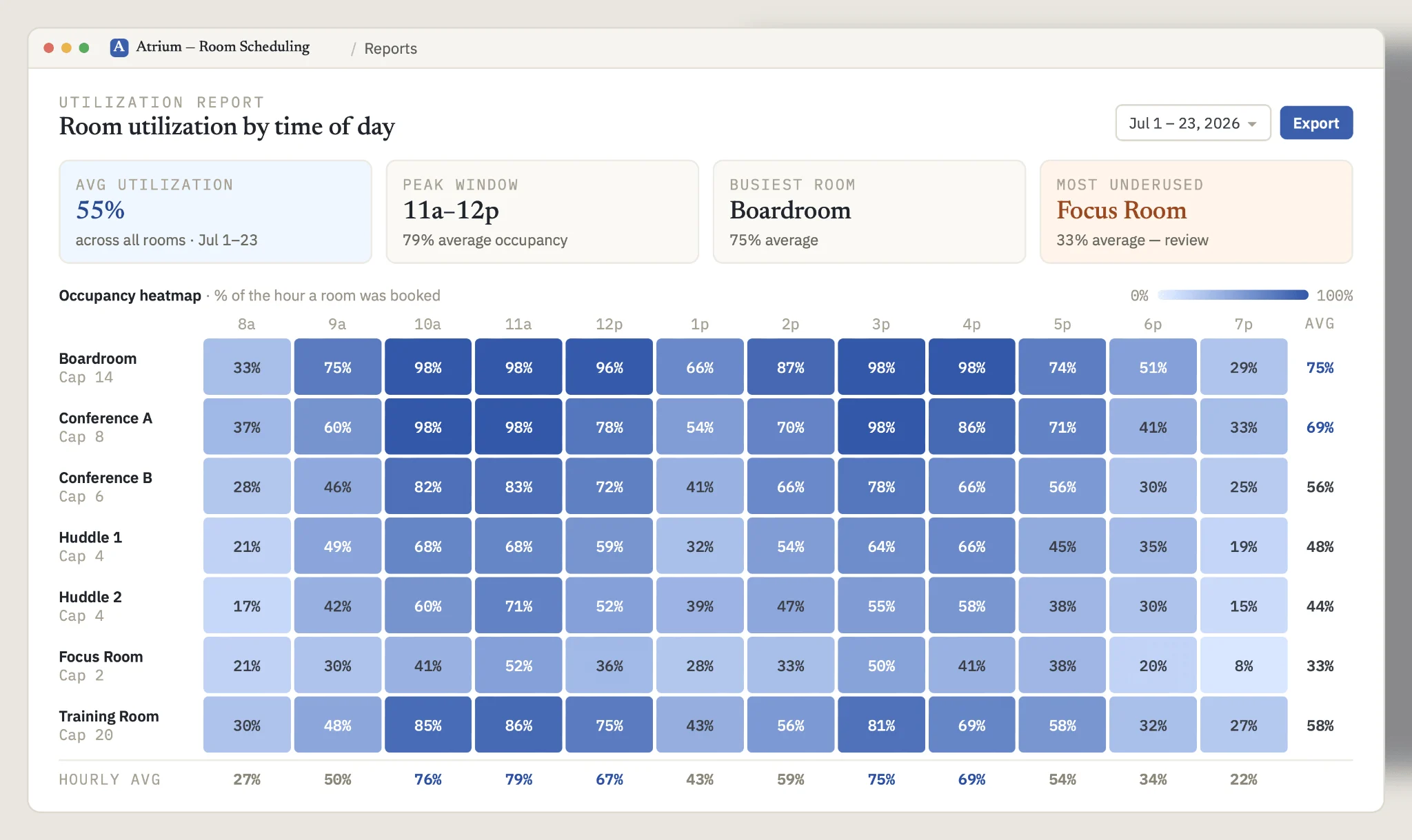
Pic. 2. Room utilization report showing occupancy by room and time of day.
Deployment and security requirements
Deployment model.
- Cloud-based: minimal IT overhead, automatic updates, accessible anywhere. Best fit for distributed teams.
- On-premises: full control over data residency and configuration, at the cost of significant IT resources for setup and maintenance.
- Hybrid: sensitive data kept in-house while less critical operations run in the cloud.
Security posture.
- Encryption in transit and at rest, using established protocols such as TLS.
- Multi-factor authentication and single sign-on against your existing identity provider.
- Role-based access control, so booking and administration rights match job function.
- Audit logs covering logins, bookings, and changes — essential for investigation and compliance.
- Regular third-party security assessments, and compliance with the standards your sector requires (GDPR, HIPAA, ISO/IEC 27001).
- A clear model for guest and external access that balances convenience against exposure.
Universal calendar or dedicated platform?
One decision shapes everything else: extend the calendar you already run, or buy a purpose-built platform.
| Extend your existing calendar when… | Buy a dedicated platform when… |
|---|---|
| Booking needs are varied but not complex, spanning several departments without specialized rules. | Requirements are specific enough that general tools cannot express them — approval chains, quotas, tiered access. |
| You want to avoid adding another system, and value keeping everything in one ecosystem. | You need industry-specific capability: visitor management, hardware panels, clinical equipment scheduling. |
| You are growing and want to scale without a migration. | You are running many rooms across multiple sites, with analytics driving real estate decisions. |
| You are a small or mid-sized organization where cost-effectiveness and quick rollout matter most. | You operate coworking or shared space where booking is itself the business model, including payments. |
Fig. 2. Choosing between a universal calendar and dedicated room booking software.
For organizations already standardized on Microsoft 365, the honest answer is often a middle path: keep Exchange room mailboxes as the booking layer, and add a calendar overlay for visibility rather than replacing the stack wholesale.
Meeting Room Booking System in Outlook and Microsoft 365
This is where most Microsoft-centric organizations start, so it is worth being precise about what is included and what is not.
How room booking works natively
In Microsoft 365, every bookable room is an Exchange resource mailbox — a special mailbox tied to a physical space. It has its own calendar, its own address, and its own booking policy (auto-accept, require approval, restrict to certain groups). When someone invites the room to a meeting, the room’s calendar records the reservation and accepts or declines according to that policy.
How do I set up meeting room booking in Outlook or Microsoft 365?
Create a room mailbox in Exchange, add the room as a resource (optionally grouping rooms into room lists by floor or building), then invite or select that room when booking a meeting. A calendar overlay shows all rooms in a single view.
Room Finder and the Scheduling Assistant
Room Finder is the built-in tool for locating and reserving a space. It browses rooms by room list, usually one per building, filters them by capacity and equipment, and pulls live availability directly from Exchange. Microsoft’s newer Places finder reads the same Exchange Online rooms but browses by building and floor and shows photos. It no longer needs Teams Premium: since 1 April 2026 it is included in the Microsoft 365 business, enterprise, education and frontline plans. Tenants onboarded since 1 August 2026 get it by default; older tenants with room lists keep Room Finder until an admin switches Places finder on, and each user sees one or the other. Paired with the Scheduling Assistant (labelled Scheduler in new Outlook, Outlook on the web and the Teams calendar), either one lets an organizer find a time when both the attendees and the room are free, in one pass.
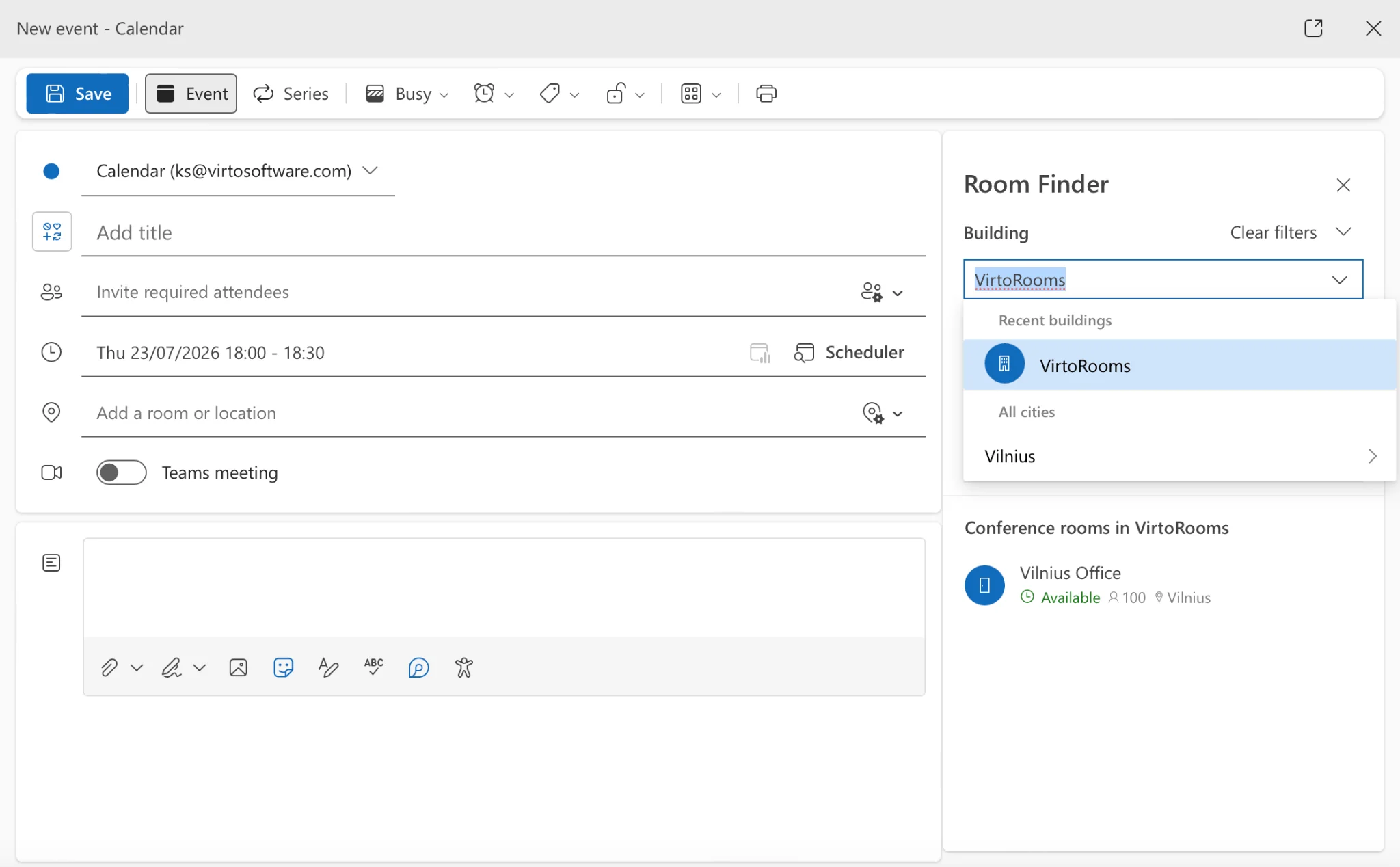
Pic. 3. Room Finder in Outlook.
Adding a room calendar in Outlook on the web
- Open Outlook on the web and switch to the Calendar view, signed in with an account that has permission to view resource calendars.
- In the left pane, under My calendars, select Add calendar.
- Choose Add from directory.
- Type the name of the room list or the individual room. Matching entries from your organization’s directory appear.
- Select the room or room list and confirm. It appears under Other calendars.
- To reserve it, create a new event and add the room in the location or room field, then save. The booking lands on both your calendar and the room’s.
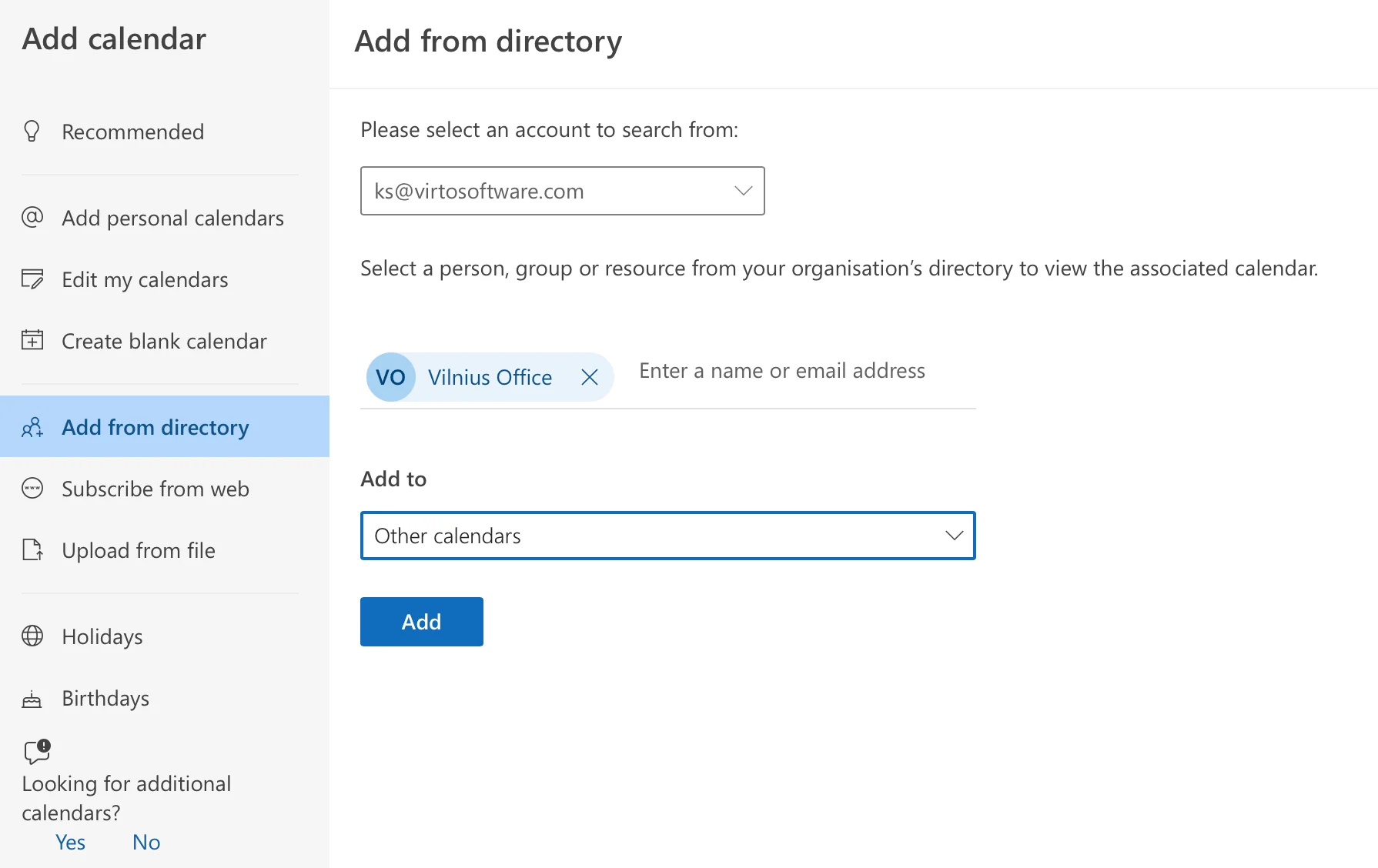
Pic. 4. Adding a room list from the directory in Outlook on the web.
Where the native experience runs out
Room mailboxes handle the booking well. The gap is visibility. SharePoint Online does not surface Exchange room mailboxes on a page: the modern Events web part reads only from a SharePoint Events list, and the Lists calendar view has no connector pointing at a room calendar. So bookings that exist in Outlook do not appear on the intranet page where employees plan their day.
Two other limits show up at scale. Outlook shows one room’s calendar clearly, but comparing a dozen rooms across three floors means opening a dozen calendars. And the filtering in Room Finder and Places finder, while useful, does not extend to booking rules such as approval workflows or departmental quotas.
👉 Looking specifically for how to display room calendars on a SharePoint page or a reception screen? That is covered step by step in our dedicated guide. How to Display Meeting Rooms in Microsoft 365
Conference Room Scheduling
Conference rooms are the same category of resource with a different risk profile. They are larger, better equipped, in higher demand, and more visible to clients — so failures cost more. A meeting room that is double-booked wastes ten minutes; a conference room that is double-booked during a client presentation costs credibility.
What makes conference room scheduling different
- Resource dependency. Conference rooms come with AV systems, video conferencing hardware, and sometimes catering. Booking the room without the equipment is only half a reservation.
- Higher contention. Fewer large rooms serving more competing requests means booking rules, priority tiers, and approval workflows earn their keep.
- Hybrid participation. Most conference sessions now mix in-person and remote attendees, so the room booking and the virtual meeting link need to be created together.
- Setup and turnaround. Layout changes, tech checks, and cleanup need buffer time built into the schedule rather than discovered on the day.
Managing conference rooms well
- Centralize scheduling. One system, one schedule, visible to everyone. Parallel systems guarantee conflicts.
- Set explicit policies. How far ahead rooms can be booked, how cancellations work, who gets priority, and what happens to no-shows.
- Use approvals selectively. Reserve them for the highest-demand rooms rather than applying them everywhere, where they become a bottleneck.
- Automate reminders. No-shows are the largest source of wasted capacity; a reminder ahead of the meeting is the cheapest fix available.
- Encourage real-time release. If a meeting ends early or is cancelled, the room should go back into the pool immediately.
- Maintain the rooms on a schedule. Test AV, check connectivity, restock supplies — on a cycle, not reactively.
- Collect feedback. A simple channel for reporting a broken projector shortens the time between fault and fix.
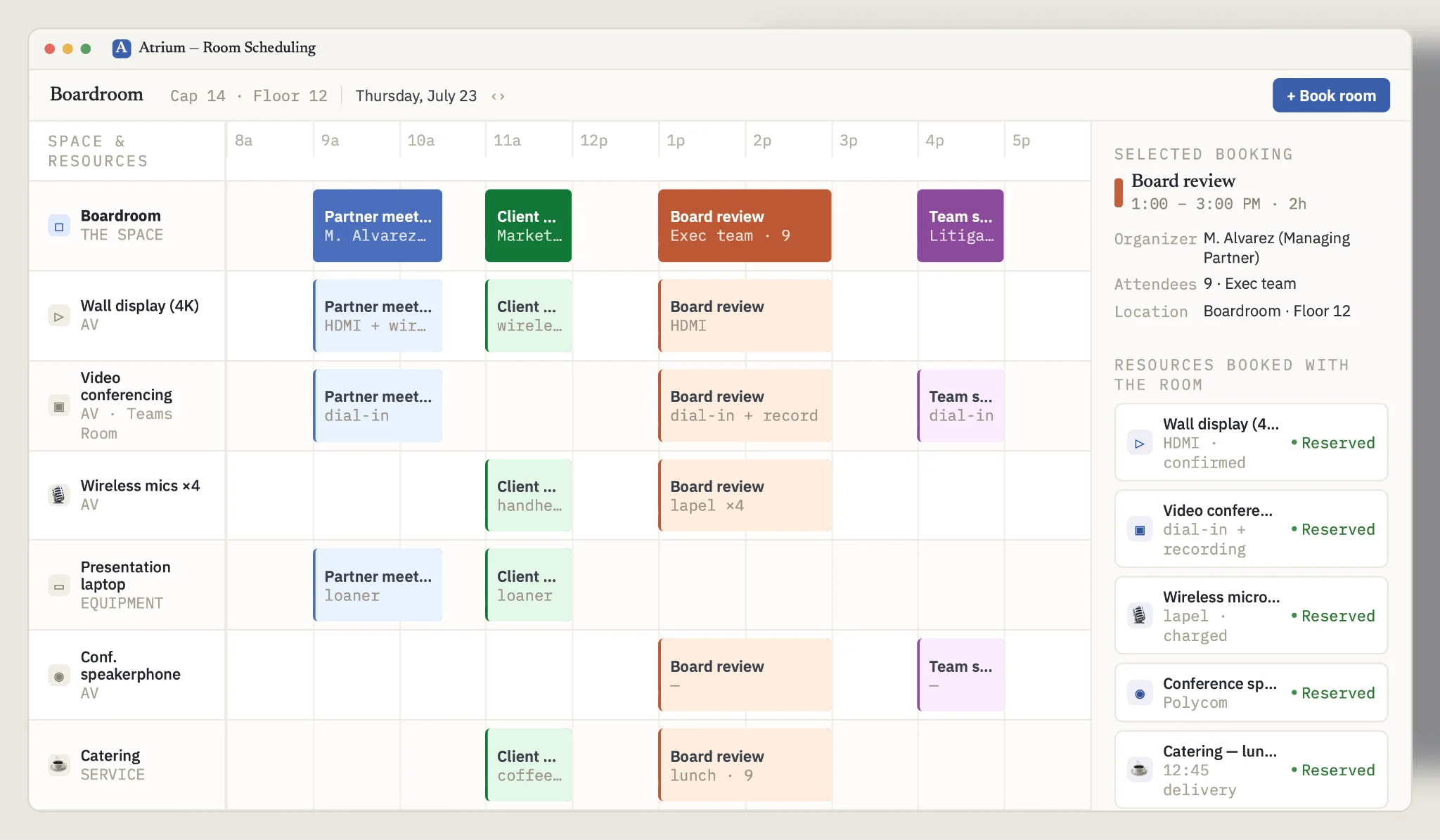
Pic. 5. Conference room schedule with equipment and AV resources booked alongside the space.
At enterprise scale
Large organizations layer additional requirements on top: rooms spread across multiple buildings and time zones, coordination of equipment that may move between locations, access control tied to clearance level, and often a dedicated facilities team. The scheduling system has to handle volume without degrading, and give administrators a bird’s-eye view across the entire estate rather than one room at a time.
Comparison: Best Room Scheduling Software
The tools below span three categories: dedicated workplace platforms, universal calendars extended for room booking, and Microsoft-native options. Pricing changes frequently and varies by contract, so treat published figures as a starting point and confirm directly with each vendor.
Dedicated platforms
Skedda
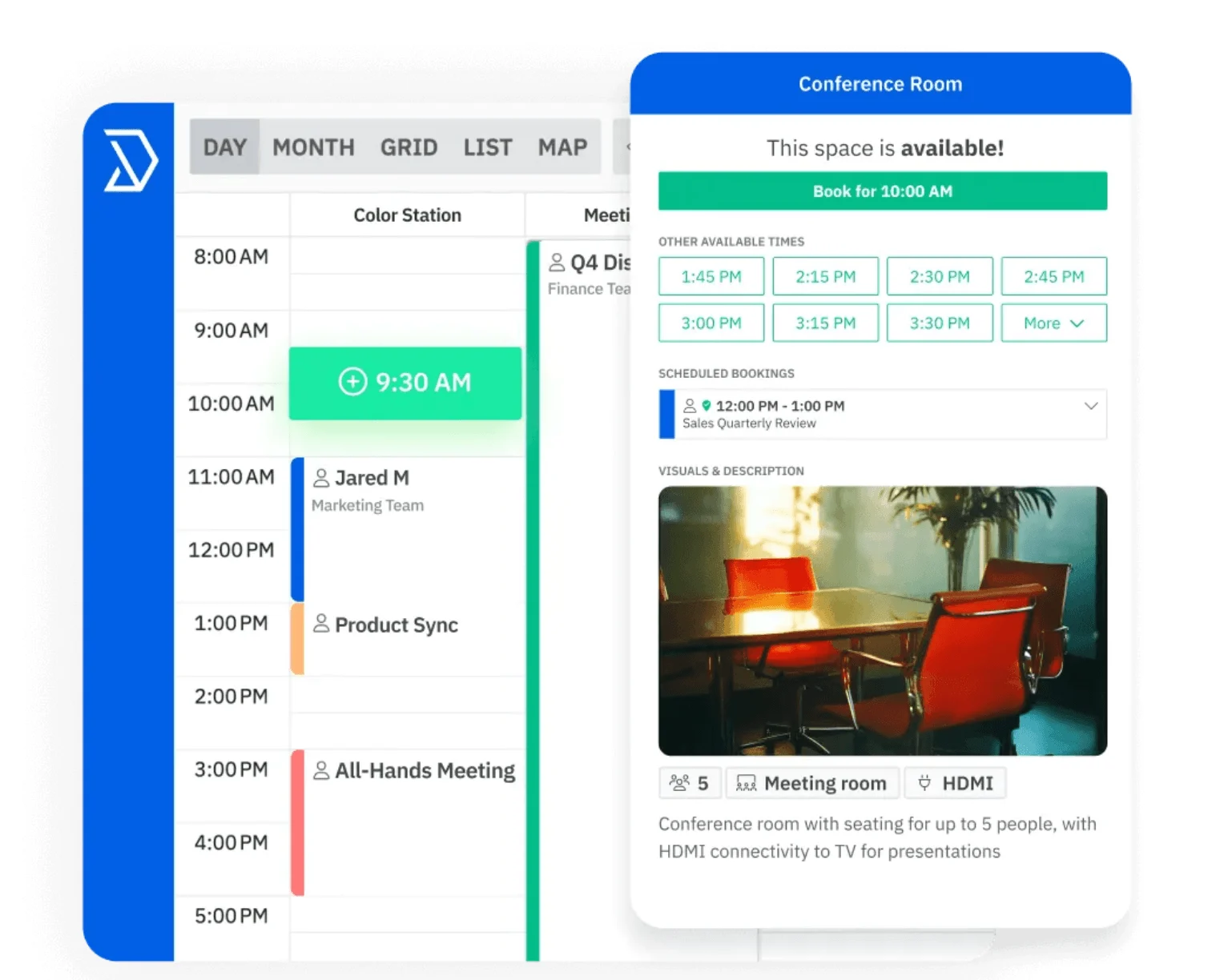
Pic. 6. Skedda booking interface.
Space management software covering offices, meeting rooms, coworking, universities, labs, sports venues, and parking. Its strengths are configurability and the visual booking experience. → Skedda
- Key features: interactive floor plans, custom booking rules and quotas, two-way sync with Microsoft 365 and Google Workspace, visitor management, utilization analytics, online payments.
- Scalability: small businesses through large enterprises.
- Integrations: Microsoft 365, Google Workspace, Slack, SAML SSO providers.
- Security: GDPR compliant, SSO, documented subprocessor list.
- Best for: organizations needing granular booking policies, and any setting where space is charged for.
Robin
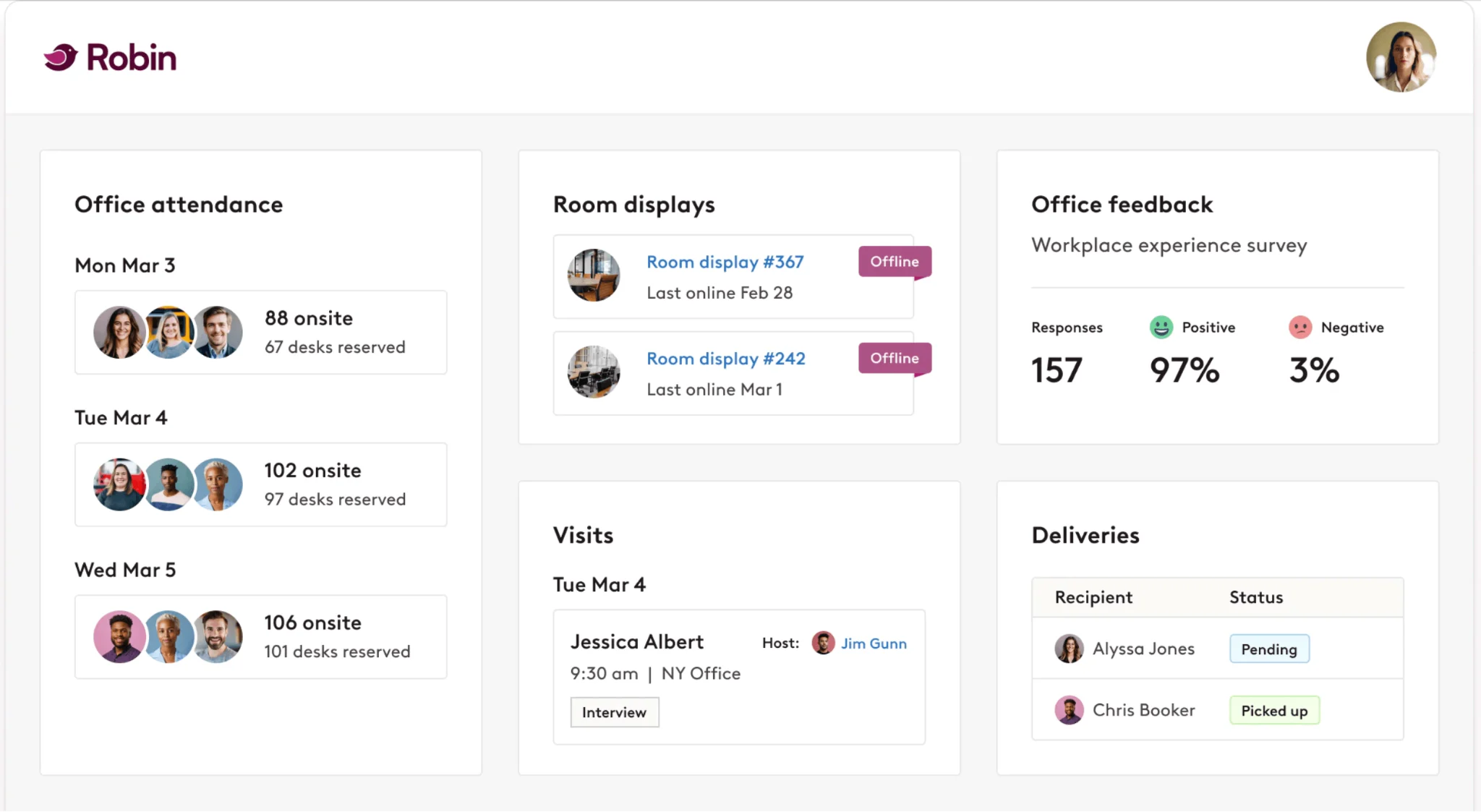
Pic. 7. Robin workplace dashboard with room and desk booking.
A workplace management platform built around hybrid work, combining room scheduling with desk booking, wayfinding, and analytics. → Robin
- Key features: room and desk booking, smart room suggestions based on capacity and equipment, check-in with auto-release, workplace analytics, visitor management.
- Scalability: designed to scale with enterprise requirements.
- Integrations: Microsoft 365, Google Workspace, Slack, Zoom, Cisco Webex, room display hardware.
- Security: encryption in transit and at rest, regular audits, SOC 2.
- Best for: medium to large enterprises where utilization data drives real estate decisions.
Eptura Engage (Condeco)
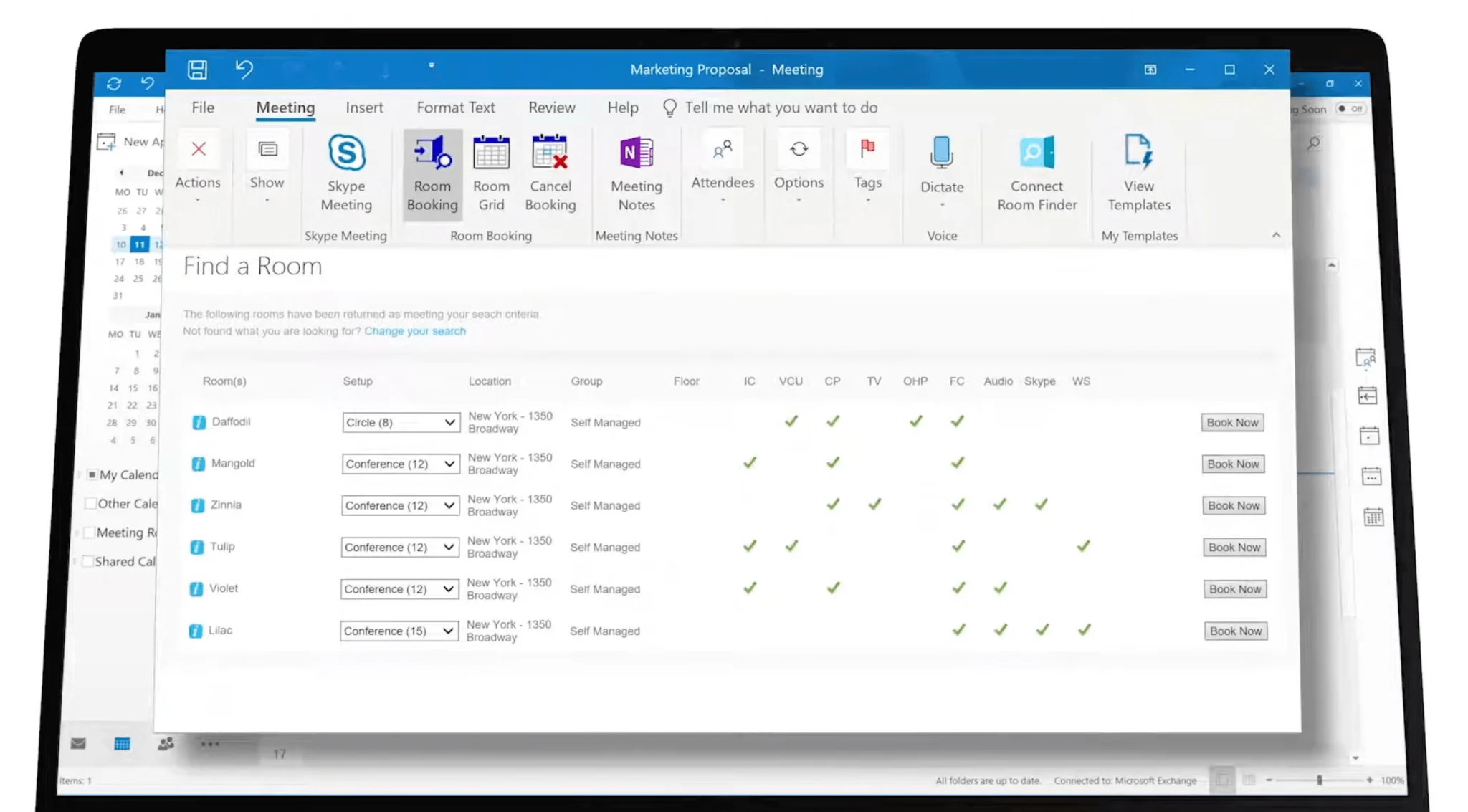
Pic. 8. Condeco meeting room booking through the Outlook add-in.
Enterprise workspace booking from Eptura, which now sells Condeco as Eptura Engage, with deep Microsoft integration, aimed at large and complex office estates. → Eptura Engage (Condeco)
- Key features: meeting room and desk booking through an Outlook add-in, visitor management, dynamic rebooking when plans change, workplace analytics, room screens and wayfinding hardware.
- Scalability: built for large enterprises with complex layouts.
- Integrations: Microsoft 365, Teams, Zoom, Power BI, Okta and Microsoft Entra ID provisioning, MapsPeople wayfinding.
- Security: enterprise-grade, ISO 27001, encryption, regular audits.
- Best for: multinationals and organizations with dedicated facilities teams.
OfficeSpace
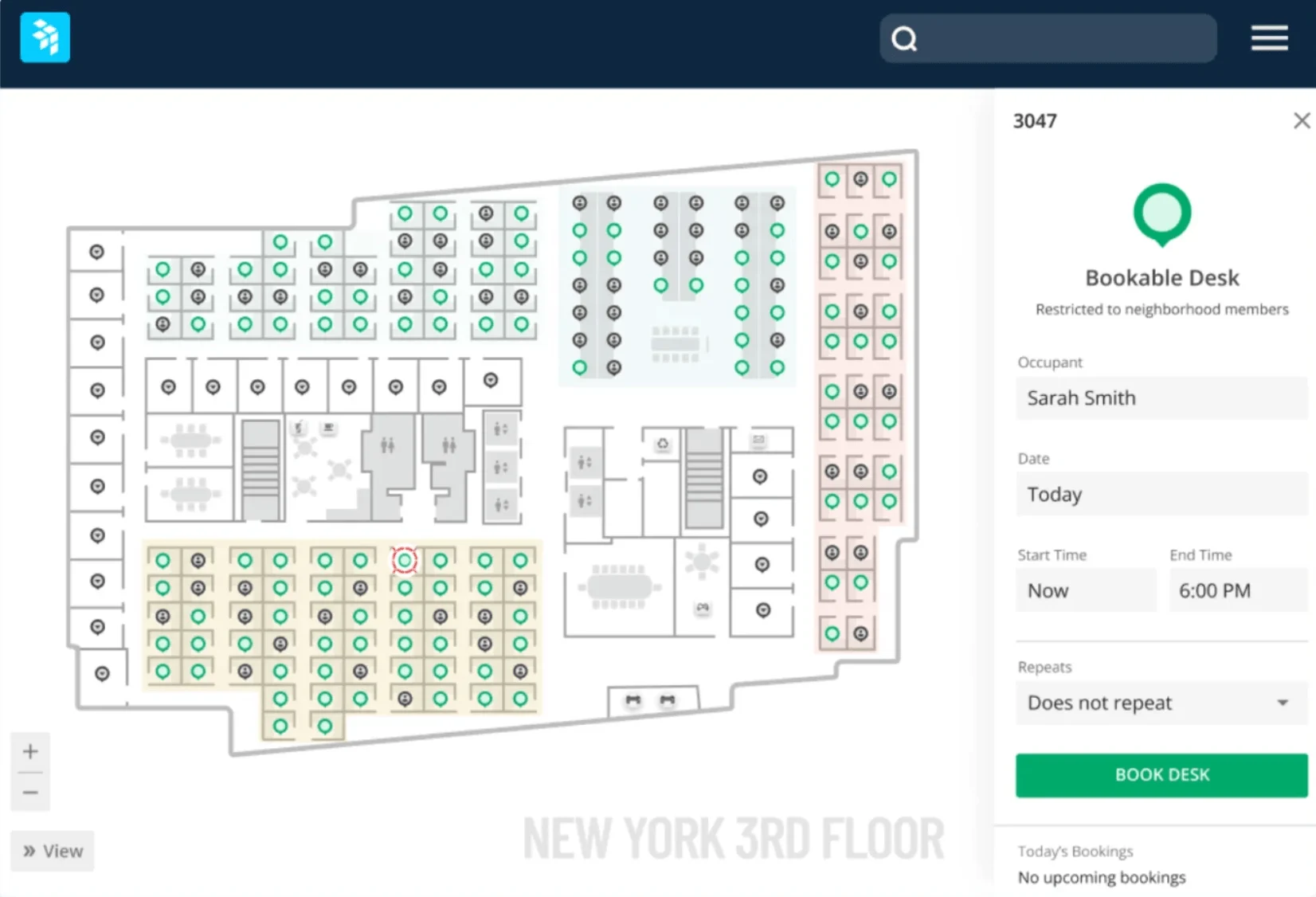
Pic. 9. OfficeSpace real-time floor plan for finding and booking rooms.
Workplace management with a strong space-planning emphasis, including move management alongside room and desk booking. → OfficeSpace
- Key features: interactive real-time floor plans, advanced search by room feature, room displays, Outlook add-in with maps attached to invites, auto-release for no-shows, booking dashboards.
- Scalability: medium to large organizations.
- Integrations: Microsoft, Google, Slack, Zoom, facility management systems.
- Best for: organizations actively reconfiguring their office footprint.
DeskFlex
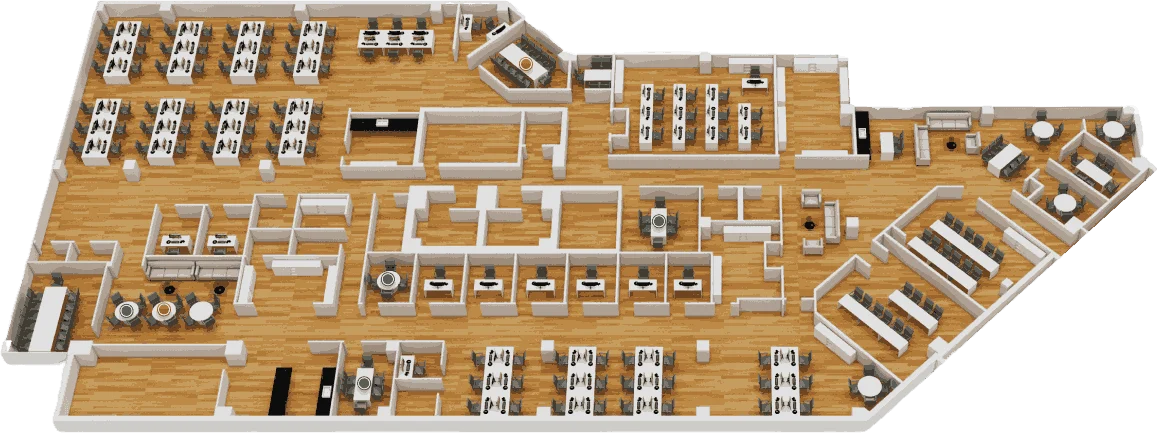
Pic. 10. DeskFlex 3D floor map for workspace selection.
Hoteling and scheduling software covering conference rooms, desks, parking, and equipment, with a customization-first approach. → DeskFlex
- Key features: room and desk booking, 3D floor maps, room display touchscreens, check-in/check-out to manage no-shows.
- Scalability: enterprise, government, education, healthcare.
- Integrations: Microsoft 365 and Outlook, Zapier, major PBX systems.
- Security: SSO, Okta integration, granular user management.
- Best for: organizations moving to hybrid arrangements that need custom configuration.
Joan
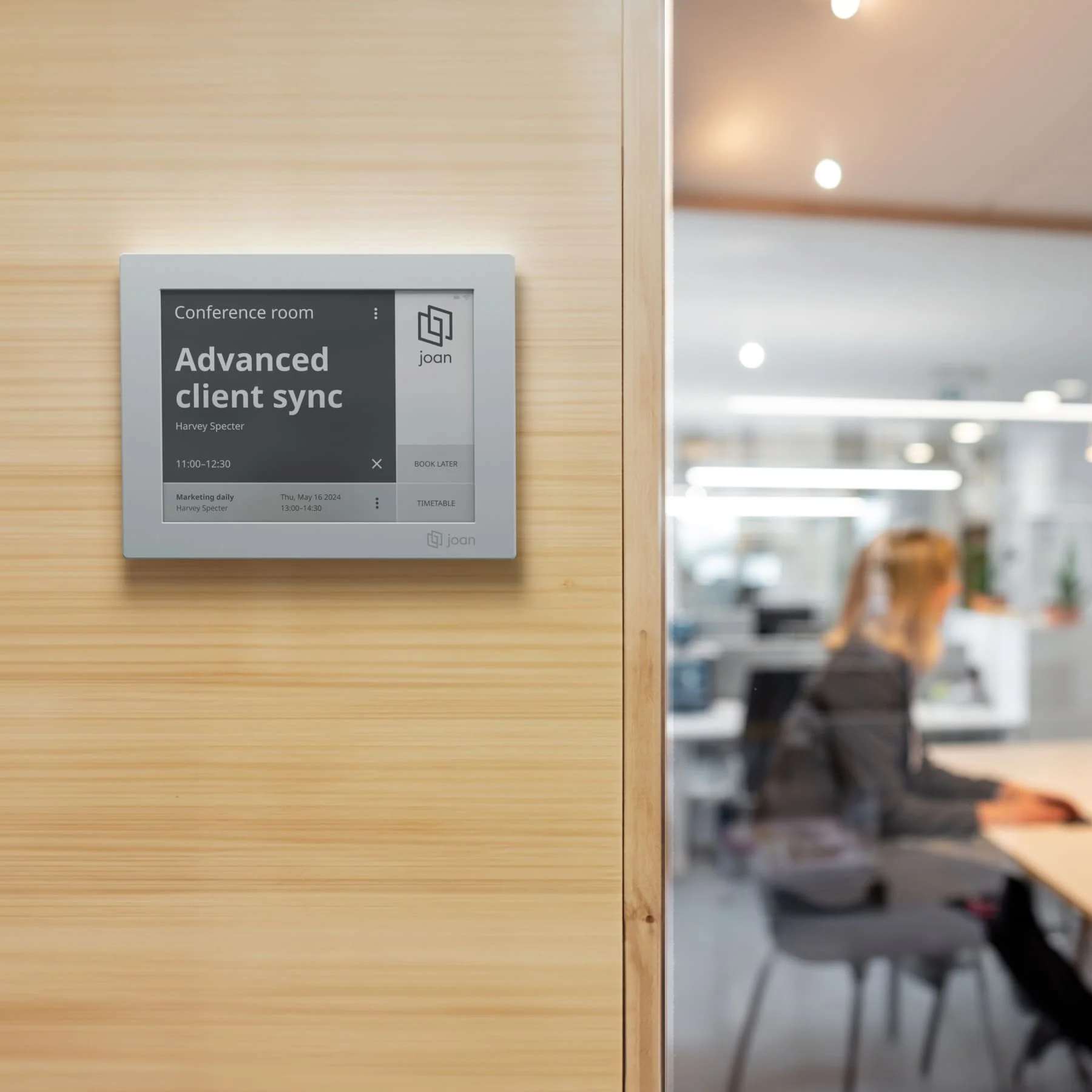
Pic. 11. Joan e-paper room display showing live availability.
Best known for e-paper door displays, paired with a booking platform covering rooms, desks, assets, and visitors. → Joan
- Key features: e-paper displays mountable without drilling or cables, on-the-spot booking at the door, calendar sync, mobile app, usage analytics.
- Scalability: best suited to small and mid-sized organizations.
- Integrations: Google Workspace, Microsoft 365, Outlook, iCal.
- Best for: teams that want physical room panels without a hardware installation project.
Resource Guru
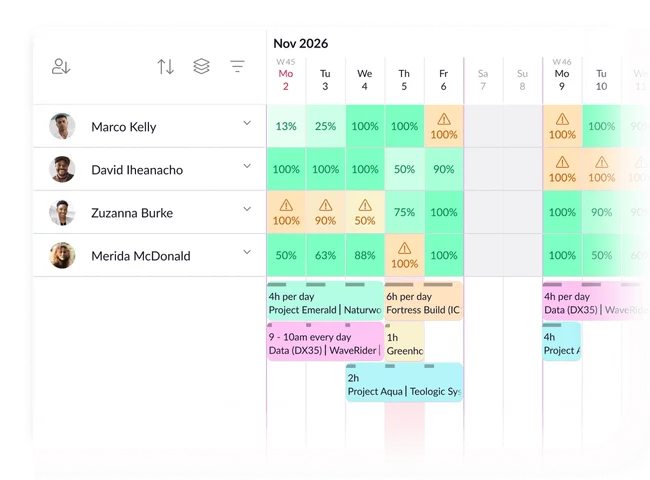
Pic. 12. Resource Guru scheduling view across people, equipment, and rooms.
Resource management software where meeting rooms are one bookable resource type alongside people and equipment. → Resource Guru
- Key features: drag-and-drop scheduling, clash management, leave management, meeting room booking with equipment, utilization reporting, timesheets.
- Scalability: small to medium teams and enterprises.
- Integrations: Google Calendar, Outlook Calendar, Zapier, open API.
- Security: GDPR compliant, encryption in transit and at rest, SSO.
- Best for: project-based teams scheduling people and rooms in the same view.
Universal calendars and Microsoft-native options
Outlook Calendar and Room Finder
Included with Microsoft 365, and the default in most Microsoft-centric organizations. Room mailboxes plus Room Finder or Places finder plus the Scheduling Assistant cover single-room booking well. The constraint, as described above, is comparing many rooms at once and surfacing availability outside Outlook. Booking rooms and desk pools in Microsoft Places comes with the same plans. Since 1 April 2026, auto-release and occupancy reports need a Teams Rooms or Teams Shared Space license on each room instead of Teams Premium; our guide to Microsoft Places licensing has the details.
- Cost: included with Microsoft 365 subscriptions.
- Best for: organizations already in Microsoft 365 with straightforward booking needs.
- Limitation: no native way to display room calendars on a SharePoint page.
Microsoft Bookings
An appointment scheduling tool included in Microsoft 365 Business Basic, Standard and Premium and in most enterprise, education and frontline plans. Built for customer-facing appointments, and adaptable to internal room booking, though that is not its primary design. → Microsoft Bookings
- Cost: included with qualifying Microsoft 365 plans.
- Best for: appointment-style scheduling rather than general room reservation.
Google Calendar
Room booking through Google Workspace resources, with smart suggestions based on attendee count and location. The natural choice for Google Workspace organizations. → Google Calendar
- Cost: included with Google Workspace subscriptions.
- Best for: Google Workspace organizations with standard room booking needs.
Virto Calendar App
A calendar overlay for Microsoft 365, SharePoint, and Teams that aggregates Exchange room mailboxes, SharePoint lists, Planner, Google, and iCal sources into one color-coded view. It complements Exchange rather than replacing it — the booking layer stays native, the visibility layer moves to SharePoint and Teams. Covered in detail in the next section.
Side-by-side comparison
| Software | Category | Key strengths | Microsoft 365 integration | Best suited for |
|---|---|---|---|---|
| Virto Calendar App | Overlay for M365 | Aggregates room mailboxes and other sources into one color-coded view in SharePoint/Teams; resource and equipment booking; approve/decline | Native — built for M365, SharePoint, Teams, Exchange | Microsoft-based organizations needing room visibility where staff already work |
| Outlook / Room Finder / Places finder | Native M365 | Room mailboxes, Scheduling Assistant (Scheduler), filter by capacity and equipment | Native | Simple single-room booking inside Outlook |
| Skedda | Dedicated platform | Interactive floor plans, granular booking rules, payments, analytics | Two-way calendar sync | Custom booking policies; chargeable space |
| Robin | Dedicated platform | Hybrid work focus, smart suggestions, auto-release, workplace analytics | Calendar sync | Data-driven workplace and real estate decisions |
| Eptura Engage (Condeco) | Dedicated platform | Outlook add-in booking, dynamic rebooking, hardware ecosystem | Deep — Outlook and Teams add-ins | Large enterprises with complex estates |
| OfficeSpace | Dedicated platform | Real-time floor plans, move management, auto-release | Outlook add-in | Organizations reconfiguring office space |
| DeskFlex | Dedicated platform | 3D floor maps, room touchscreens, hoteling, check-in/out | Microsoft 365 and Outlook | Hybrid workplaces needing customization |
| Joan | Hardware-led | E-paper door displays, on-the-spot booking, simple setup | Microsoft 365 and Outlook sync | Teams wanting room panels without installation work |
| Resource Guru | Resource management | People, equipment, and rooms scheduled together; clash management | Outlook Calendar sync | Project teams scheduling mixed resources |
| Microsoft Bookings | Native M365 | Appointment scheduling, customizable booking pages | Native | Appointment-style rather than room booking |
| Google Calendar | Universal calendar | Resource booking, smart room suggestions | Not applicable | Google Workspace organizations |
Fig. 3. Comparison of leading room and meeting room booking software.
Free and open-source options
If budget is the binding constraint, several open-source systems handle room booking, provided you have the technical capacity to install and maintain them.
- LibreBooking — the open-source fork of Booked Scheduler, which became a SaaS-only service on 1 November 2020; a mature reservation system for rooms, resources, and equipment, with recurring bookings and access controls.
- MRBS (Meeting Room Booking System) — long-established, lightweight, focused specifically on meeting rooms.
- Easy!Appointments — appointment-oriented but adaptable to space reservation.
These suit educational institutions, libraries, community centers, and small businesses with in-house technical skills. Several commercial tools also have free trials worth evaluating before committing: Skedda offers one on its paid plans, and Virto Calendar App a 30-day free trial.
Meeting Room Management and Etiquette
Software solves the coordination problem. It does not solve the behavioral one. Studies have found that a large share of professionals see poorly run meetings as a drag on productivity, while a substantial proportion of booked rooms sit empty because of no-shows. Both are policy and culture problems that no booking tool fixes on its own.
Managing the booking process
- Centralize bookings in one system, so nobody is working from a second, stale schedule.
- Publish the rules: booking horizon, cancellation expectations, and priority for different meeting types.
- Automate reminders to cut no-shows, and use auto-release so unclaimed rooms return to the pool.
- Use recurring reservations for standing meetings, and review them periodically — recurring bookings for meetings that no longer happen are a common source of phantom occupancy.
- Ask people to release rooms immediately when a meeting ends early or is cancelled.
- Review utilization data quarterly, and act on it: convert the room nobody books, add capacity where contention is highest.
Choosing and preparing the room
- Match room to group size and meeting type. A workshop in a boardroom and a board meeting in a huddle room both fail, for opposite reasons.
- Confirm the room has the technology the session needs — display, conferencing hardware, reliable connectivity — and test it before the meeting rather than during it.
- Arrange the layout for the format: U-shape for interactive discussion, theater style for presentation.
- Check lighting, ventilation, and temperature. These are invisible when right and corrosive when wrong.
- Have materials ready in advance, including digital documents accessible to remote participants.
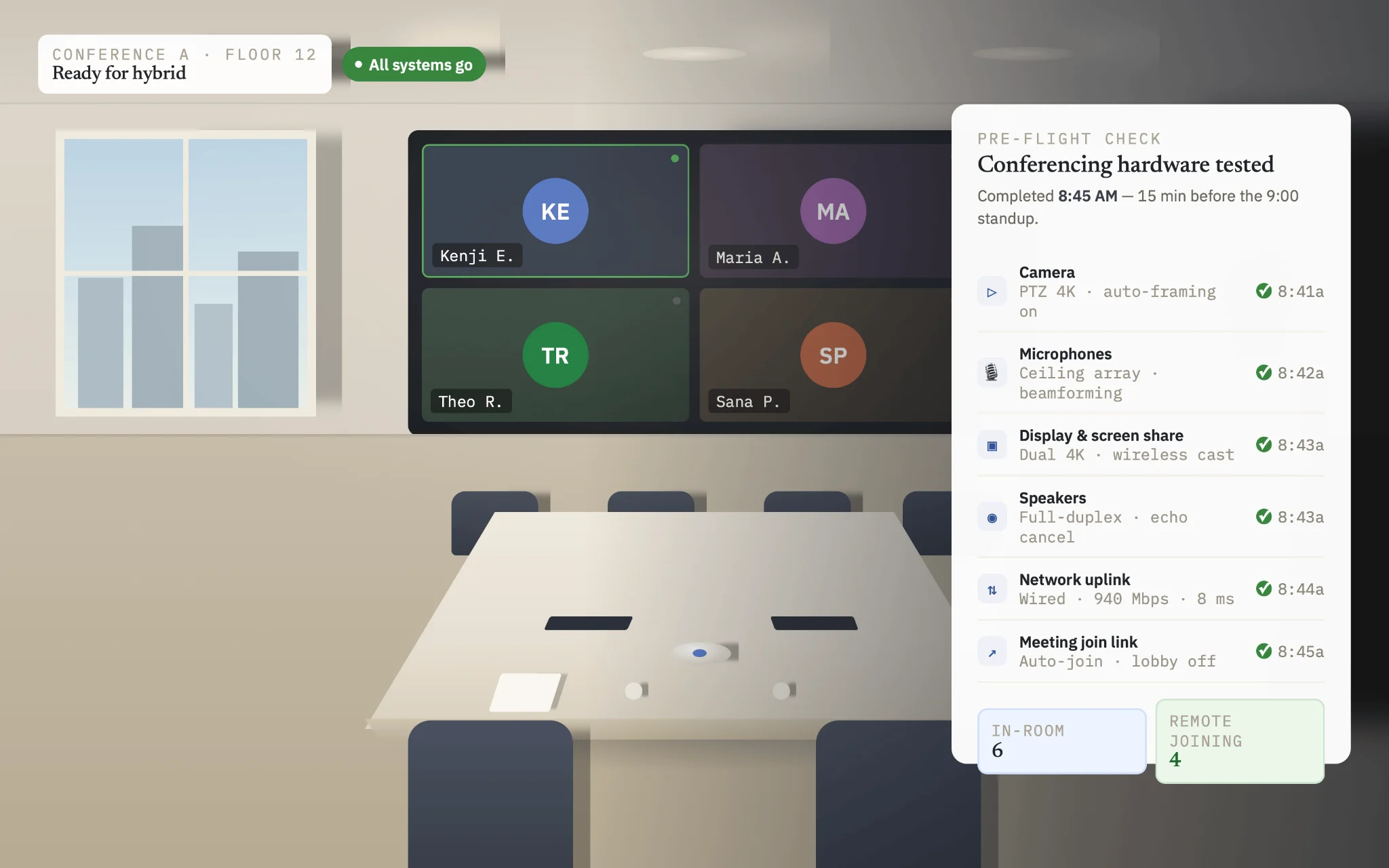
Pic. 13. Meeting room prepared for hybrid participation, with conferencing hardware tested in advance.
Etiquette that makes rooms work
- Arrive on time and end on time. Meetings that overrun cascade into the next booking.
- Come prepared, so shared time is spent on discussion rather than orientation.
- Listen actively, speak clearly, and keep critique focused on the issue rather than the person.
- Manage devices. Phones on silent, laptops used for the meeting rather than around it.
- Respect confidentiality when sensitive material is discussed.
- Close with a clear summary of decisions, owners, and deadlines.
- Leave the room as you found it — cleared, tidy, and ready for the next group.
What makes a good meeting room, in the end, is unglamorous: correctly sized for the group, equipped with technology that works, acoustically private, well lit, comfortably furnished, and flexible enough to handle more than one kind of session.
How Virto Calendar App Handles Room and Resource Booking
For organizations already running Microsoft 365, the practical problem is rarely booking itself — Exchange handles that. It is visibility: getting room availability in front of people on the SharePoint pages and Teams channels where they actually work. → Virto Calendar App
Virto Calendar App addresses that layer. It aggregates unlimited calendar sources — Exchange room mailboxes, Microsoft 365 and Outlook calendars, SharePoint lists, Planner, Google, and external iCal feeds — into a single color-coded view that can be embedded as a SharePoint web part or a Teams tab.
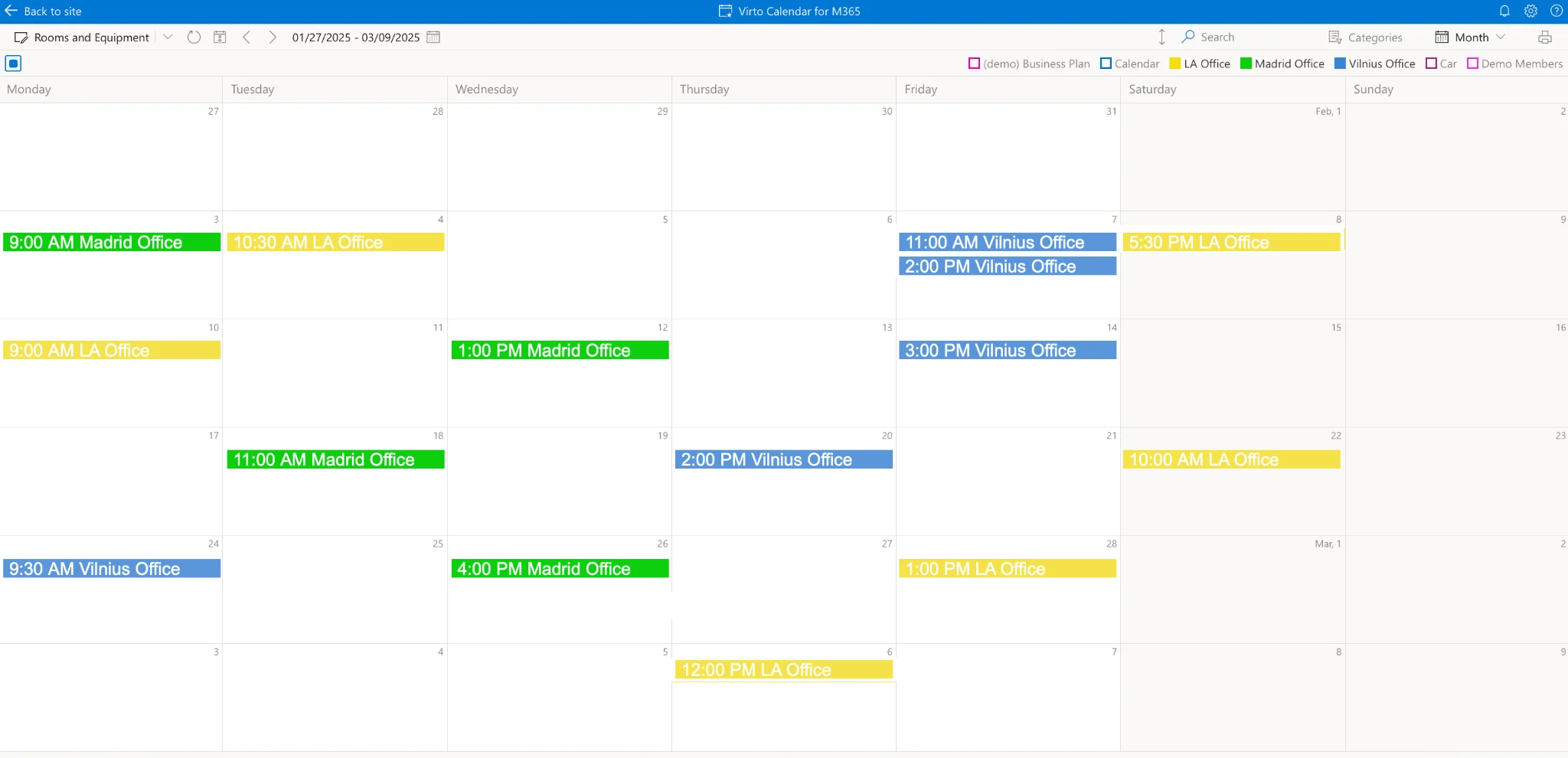
Pic. 14. Virto Calendar App overlaying multiple meeting room calendars in a single SharePoint view.
What it does for room booking
- Centralized room visibility. Overlay every room’s calendar in one view, so availability across floors or buildings is a single glance rather than a dozen open calendars.
- Color-coded rooms and event categories. Assign each room or event type its own color to make occupancy legible at a distance — useful for reception screens and floor displays.
- Equipment and workstation booking. Beyond rooms, manage bookings for AV equipment, specialized machinery, and desks through the same interface.
- Approve/decline workflow. Route requests for high-demand rooms to a designated approver who can accept or reject them directly in the calendar.
- Filtering and views. Filter by resource type, location, or busy status, and switch between day, week, month, year, and task views.
- Real-time synchronization. Changes made in Outlook or Exchange appear in the overlay, and vice versa, so there is one version of the truth.
- Booking from Teams. Add the calendar as a Teams tab and reserve rooms without leaving the channel.
- Recurring events and external calendars. Standing meetings and third-party iCal feeds are consolidated in the same view.
Connecting your room mailboxes
- Open Virto Calendar App and select Edit Calendar to reach the settings.
- Scroll to the Exchange settings section.
- Enter the email addresses of the room mailboxes you want to display. Multiple addresses can be added at once.
- Enable Display all so every configured room appears, then select Save and open.
- Return to the calendar view and confirm the room schedules are showing as expected.
The same method adds other users’ shared calendars, so team availability and room availability can sit in one view.
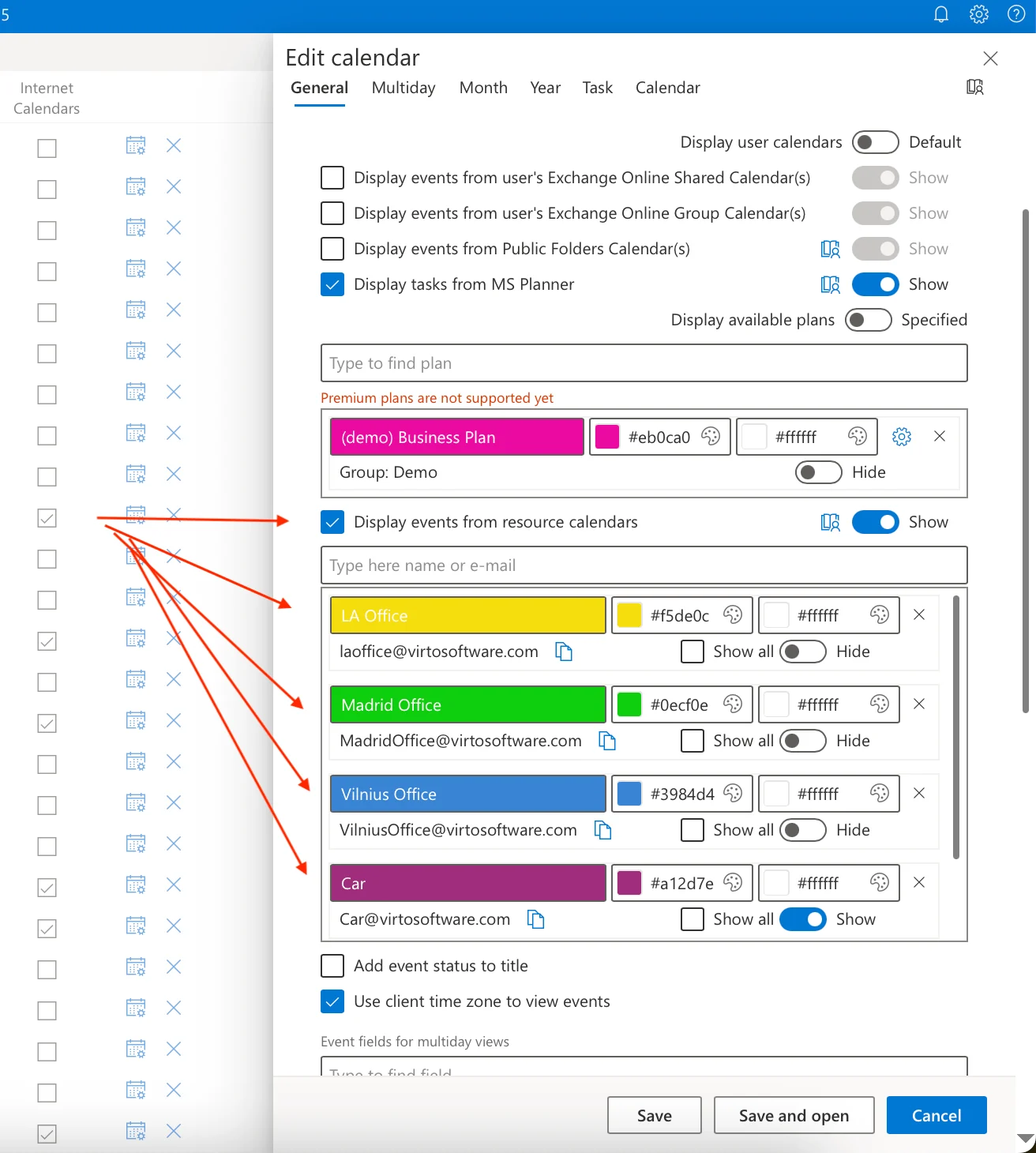
Pic. 15. Adding Exchange room mailboxes in Virto Calendar App settings.
Who it fits
- Corporate offices coordinating meeting rooms and workstations across departments and floors.
- Educational institutions managing classrooms, labs, and shared facilities.
- Healthcare facilities scheduling treatment rooms and medical equipment together.
- Project teams needing one platform for rooms and resources across concurrent projects.
- Hybrid organizations where flexible workstation and room booking is a daily requirement.
👉 Virto Calendar App is available on a 30-day free trial. It costs $2,412 per 100 users per year with a 3-year agreement (100 users and up); smaller teams can use Virto Shared Calendar, which has a free plan.
👉 Related reading:
Frequently Asked Questions
What is meeting room booking software?
Software that shows room availability and lets people reserve meeting or conference rooms — and often equipment and desks — from a shared calendar, preventing double-booking. In Microsoft 365 it works with Exchange room mailboxes as the booking layer and a calendar overlay as the visibility layer.
How do I set up meeting room booking in Outlook or Microsoft 365?
Create a room mailbox in Exchange, add the room as a resource, and configure its booking policy. Users then invite or select the room when creating a meeting, using Room Finder or Places finder and the Scheduling Assistant (Scheduler in new Outlook and Teams) to check availability. To show all rooms in one place, add a calendar overlay such as Virto Calendar App to a SharePoint page or Teams tab.
What is the best room scheduling software?
It depends on the stack you already run. For Microsoft 365 organizations, Exchange room mailboxes plus a calendar overlay is usually the most efficient answer, since booking already works and only visibility is missing. Organizations needing granular booking rules or payments tend toward Skedda; those making data-driven real estate decisions toward Robin; large complex estates toward Eptura Engage (Condeco). Where physical door panels are the priority, Joan is purpose-built for that.
What is the difference between a room booking system and a room calendar display?
A booking system records reservations and enforces the rules around them. A display surfaces availability — on a SharePoint page, a reception screen, or a panel outside the door. Most organizations need both, and in Microsoft 365 they are two distinct layers rather than one product.
Is there free room scheduling software?
Yes. Open-source options include LibreBooking (the open-source fork of Booked Scheduler), MRBS, and Easy!Appointments, all of which require self-hosting. Several commercial tools have free trials: Skedda on its paid plans, and Virto Calendar App for 30 days.
How do I stop meeting rooms being double-booked?
Centralize every booking in one system with real-time availability, set the room mailbox policy to reject conflicting requests automatically, publish clear booking rules, and use automated reminders with auto-release so unclaimed rooms return to the pool. Reviewing utilization data periodically catches recurring bookings that no longer correspond to real meetings.
Conclusion
Choosing room booking software is less about feature counts than about identifying which layer is actually missing. If bookings are being recorded correctly but nobody can see them, the problem is visibility, and replacing the whole stack is an expensive answer to a narrow question. If booking rules, approvals, and analytics are the gap, a dedicated platform earns its cost.
For Microsoft 365 organizations, the usual configuration is Exchange room mailboxes for booking, plus a calendar overlay that surfaces availability in SharePoint and Teams. That keeps the booking layer native and supported while solving the visibility problem where employees already spend their day.
To see how that works in practice, you can start a 30-day free trial of Virto Calendar App or book a demo with our team to walk through a configuration matched to your rooms and booking rules. → book a demo