


Virto Calendar On-Premisesfor SharePoint Server
Overlay SharePoint lists, Exchange calendars, iCal feeds, SQL Server tables and XML files in one color-coded SharePoint Server calendar.
On SharePoint Online or Microsoft 365? Use Virto Calendar App.
Key features:

Multi-Source Calendar Overlay
Combine SharePoint lists, Exchange, SQL Server, XML, iCal and BCS sources, even lists of another farm, in one calendar.

Exchange and Outlook Calendars
Events you create or change in the calendar are saved in the Exchange mailbox, invitations and recurring series included.

Eleven Views & Color Coding
Day, Week and Month, Year Quarter, Flat Year, Multisource, Live view and more, with a color for each source and category.
Trusted by Industry Leaders


and over 8,000 businesses worldwide
Moving to SharePoint Server Subscription Edition?
Microsoft ended support for SharePoint Server 2016 and 2019 on July 14, 2026. Virto Calendar On-Premises runs on Subscription Edition: the current build is version 10.0.4. While your updates and support are active, moving your licence costs 25% of the full licence price; once they have ended, it takes a new licence. Tell us about your farm and we will plan the move with you. Which Virto products run on SE

What is Virto Calendar On-Premises?
Virto Calendar On-Premises brings the events of SharePoint lists, Exchange calendars, internet calendars (iCal), SQL Server tables, external content types and XML files into one color-coded calendar on SharePoint Server. Version 10, released in November 2026, keeps calendars and data sources once per site collection, so one calendar can appear on any number of classic or modern pages. Unlike native SharePoint calendars, Virto lets users view and edit events from different sources in one place.
Why Enterprises Choose Virto Calendar On-Premises

Overlay All Calendars in One View
Team vacations, project milestones, shared resources and company holidays from different sources, side by side. Hide or show a source with one click in the legend.
Work with Exchange and Outlook Calendars
Connect an Exchange mailbox as a data source. New events and meetings are written to the mailbox, invitations go out, and recurring series stay series, so Outlook and the calendar show the same thing.
Customize Views and Color Codes
Choose which of the eleven views users get. Color events by data source, by the value of a field, or by common categories shared across sources.
Comparison: Virto Calendar On-Premises vs Native SharePoint Calendars
 Native SharePoint Calendar
 Virto Calendar On-Premises
Upgrade your scheduling from visibility gaps to total calendar harmony.
Try Virto Calendar On-Premises TodayUse cases
Explore the versatility of Virto Calendar On-Premises through these real-world scenarios:

Team and Project Calendar
Maximize project visibility and coordination across teams with Virto Calendar, streamlining workflow and simplifying stakeholder communication.
Learn more about Team and Project Calendar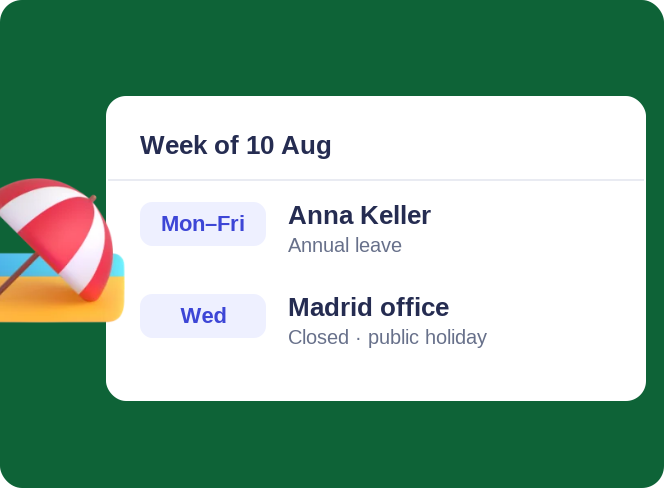
Employee Vacation Tracker
Team absences in Virto Calendar App: who is out each day, time-off requests approved in the calendar, warnings when too many people are away, and each person's annual allowance, in a SharePoint list on your site.
Learn more about Employee Vacation Tracker
Rooms & Equipment Calendar
Combine rooms, offices, vehicles and equipment in one Microsoft 365 calendar, with the maintenance jobs and blackout periods that make them unavailable.
Learn more about Rooms & Equipment CalendarTechnical & Enterprise Readiness
Virto Calendar On-Premises is built for enterprise-grade reliability and seamless integration into existing SharePoint farm solutions.
Compatibility: SharePoint Server 2016 / 2019 / Subscription Edition (version 9 for 2013)
Architecture
- One farm solution for all three editions, plus an app for modern pages on 2019 and Subscription Edition
- Calendars and data sources kept once per site collection
- Exchange, SQL Server and remote SharePoint servers approved in Central Administration
- 14 languages, following the language of the user
Migration: installs next to version 9; the Import tab moves its calendars and can roll back
Deployment: On-premises only (no external dependencies)

Sized to fit your business
Choose the perfect plan to match your business needs.
Pro
50% discount from the second year
RequestFor mid-size businesses that need a unified calendar overlay across SharePoint, Outlook, and external data sources.
- Help & learning content
- Global web ticketing support
- Up to 72 hours of response time
- One support contact
Enterprise

For large organizations needing advanced features and enterprise-grade security and controls.
- All Pro plan features
- Priority support
- Microsoft Teams support sessions
- Technical account manager
- Up to 24 hours of response time
- Unlimited number of support contacts
- Customer success manager
- Consulting sessions
Need your IT team's approval?
Send them the brief: what runs in your farm and what leaves it, how the products install, security testing and cost.
Good to know
Installation and documentation
Setup steps, video guides, FAQs and troubleshooting articles in our documentation.
Documentation →Perpetual licence
Yours to keep. The first year of updates and support is included, then renews at 50% of the price.
Moving to Subscription Edition
Moving your licence to SharePoint Server Subscription Edition, or to another SharePoint version, costs 25% of the full licence price while updates and support are active. Once they have ended, you buy a new licence.
Your data
The web part runs inside your SharePoint farm; your content stays on your servers.
Trust & Security Center →Discounts and quotes
15% off for education, healthcare and charities; custom quotes for larger organisations.
Talk to sales →
The pricing outlined herein is valid only as to new purchases occurring on or after June 1, 2024. VirtoSoftware reserves the right to adjust its packaging and pricing at any time.
Mastering SharePoint Calendars
Improve your SharePoint calendar skills with tutorials and guides from VirtoSoftware's knowledge hub.
FAQ
SharePoint Server Calendar Management
Yes. Unlike the native SharePoint calendar, Virto overlays several data sources in one calendar, writes events to Exchange mailboxes and gives you eleven color-coded views. One calendar can be placed on any number of pages.
Yes. One calendar can combine SharePoint lists, Exchange calendars, SQL Server tables, XML files, external content types, iCal feeds and lists of another SharePoint farm, each in its own color.
Yes. Virto Calendar 10 runs on classic pages in SharePoint Server 2016, 2019 and Subscription Edition, and on modern pages in 2019 and Subscription Edition.
Version 10 installs next to version 9 and does not replace it. The Import tab on the settings page turns every version 9 web part into a calendar of version 10 and keeps a rollback until you confirm the result. Version 10 is licensed separately from version 9; write to sales@virtosoftware.com about its license. The packages of version 9 stay available in the documentation.
Fourteen: English, Chinese, Czech, Danish, Dutch, Finnish, French, German, Italian, Polish, Russian, Spanish, Swedish and Ukrainian. The calendar follows the language each user chose in SharePoint.
Virto Calendar operates entirely within your SharePoint farm, ensuring data never leaves your infrastructure.
Talk to our team
Need clarity on our app's suitability for you? Set up a quick call with us or chat via Microsoft Teams chat to explore its potential for your needs.


Try Virto Calendar On-Premises Free
Download and extract the zip file to a folder on your SharePoint server.
Run Setup.exe under SharePoint administrator account and follow the simple wizard.
Step-by-step installation guide
Download the Latest Version
Choose your SharePoint product version:
2016 SHA-256: F534D822BC2E2EE3DF509BE050CCC66B75573CF635A0226209B7CE0185B7518D
2019 SHA-256: E12560B70A3862598063CDF328CA611303E5FC75D78529C58344FA01C150498B
SE SHA-256: FDEDAB5AC1E6A6D0B11C2FB127817D4F75A6876EAE44C83FA310B862A876D314
Need any help? — email us at support@virtosoftware.com