Virto Alerts & Reminder Appfor SharePoint Online & Microsoft 365
Automate and customize updates for unparalleled team engagement and efficiency.
Key features:

Emails the moment a list item changes
An email as soon as an item in a SharePoint list or library changes, on every change or only on the ones your filter selects.

Reminders before deadlines
Date-based reminders announce a deadline or event a set time before it happens, or send a weekly summary every Friday.

Messages that say what changed
HTML templates with your logo, tables and links. Tags insert the item title and a link to the list into every message.
Trusted by Industry Leaders


and over 8,000 businesses worldwide
SharePoint Alerts are retired — bring notifications back with Virto Alerts.
Want the quick, practical plan? Read our article for the timeline, risks, side-by-side alternatives, and why Virto Alerts is the fastest, most reliable way to keep SharePoint notifications working at scale.
Read the ArticleHow it works
Dynamic Alert Conditions
Set alerts on changes in a SharePoint list or library, sent immediately or as a summary on a schedule you choose.
Targeted Notifications
Configure alerts to reach specific users or groups according to your organizational timetable.
Engaging Content in Alerts
Use customizable templates for detailed and visually appealing notifications, enhancing the readability for recurring events or announcements.

Instant Alerts: Real-Time Notifications for Critical Updates
Critical Data Modification Alert
Scenario: A SharePoint list item (e.g., a client contract) is edited, triggering an email alert to the legal team and a Teams channel post with a link to the modified item.
Purpose: Ensure accountability and prompt review of critical changes.
New Item Added Alert
Scenario: A new task is added to a project tracker list, sending an email to the project manager and notifying the team via Teams.
Purpose: Keep stakeholders informed of new assignments or updates.
Approval Workflow Alert
Scenario: A pending approval request in a SharePoint list is updated (e.g., status changed to "Rejected"), triggering an email to the requester and a Teams alert to the approver.
Purpose: Speed up decision-making and task resolution.
Compliance Violation Alert
Scenario: A restricted file type is uploaded to a SharePoint list, triggering an email to IT and a Teams message to the compliance officer with a "Delete" action link.
Purpose: Automate policy enforcement and risk mitigation.
Escalation Alert for Unacknowledged Changes
Scenario: A high-priority list item (e.g., incident report) remains unmodified for 24 hours, escalating alerts via email and Teams to senior staff.
Purpose: Prevent delays in resolving urgent issues.

Timely Reminders: Automated Prompts for Events and Deadlines
Deadline Reminder
Scenario: A "Due Date" field in a SharePoint task list approaches within 2 days, triggering an email and Teams reminder to the assignee with a link to the task.
Purpose: Ensure timely task completion and project adherence.
Meeting Reminder
Scenario: A calendar event stored in a SharePoint list (e.g., "Quarterly Review") is 1 hour away, sending a reminder email and Teams notification with the agenda.
Purpose: Reduce no-shows and keep meetings productive.
Vacation/Holiday Coverage Reminder
Scenario: An employee's "Out of Office" date in a SharePoint HR list is 3 days away, triggering reminders via email and Teams to the employee and their backup.
Purpose: Ensure smooth handovers and uninterrupted workflows.
Contract Renewal Reminder
Scenario: A "Contract Expiry Date" in a vendor list is 30 days away, sending an email to procurement and a Teams alert to the legal team.
Purpose: Avoid lapses in vendor agreements or services.
Training Session Reminder
Scenario: A "Training Date" in a SharePoint learning list is 1 day away, notifying attendees via email and Teams with a link to pre-read materials.
Purpose: Maximize preparedness and participation.

Use cases
Explore the versatility of Virto Alerts & Reminder App through these real-world scenarios:
Expiration & Renewal Reminders
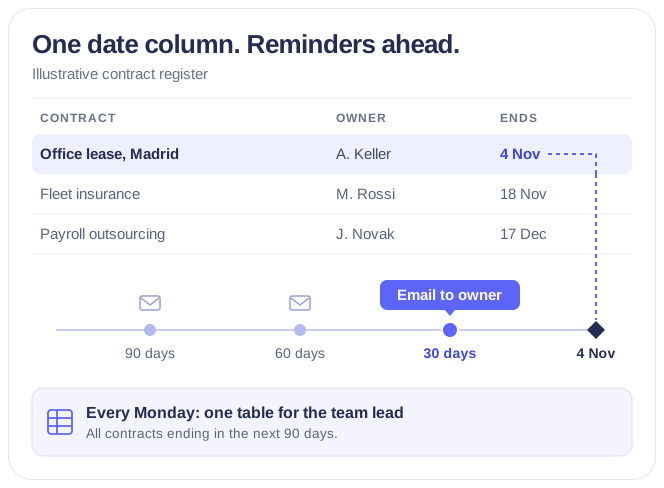
Each owner gets an email 90, 60 and 30 days before a contract, certificate or licence ends, and the team lead gets one weekly table — from the SharePoint list you already keep.
Learn more about Expiration & Renewal Reminders
Notifications Automation for Government
For government, legal and finance teams: Virto Alerts & Reminder App sends email and Teams reminders before the deadlines kept in your SharePoint lists and alerts owners when items change.
Learn more about Notifications Automation for Government
Compliance Management Software
See every audit and filing date in one calendar, move remediation tasks across Kanban boards, and email owners before compliance deadlines, all in Microsoft 365.
Learn more about Compliance Management SoftwareSized to fit your business
Choose the perfect plan to match your business needs.
Basic
- Up to 30 alerts
- Enterprise-grade security
- Help & learning content
- Web ticketing support
- Up to 72 hours response time
Pro
- Up to 100 alerts
- Enterprise-grade security
- Help & learning content
- Web ticketing support
- Up to 48 hours of response time
Enterprise

For large organizations needing advanced features and enterprise-grade security and controls.
- Up to 250 alerts
- All Pro plan features
- Top-notch security
- Unlimited priority support
- Live setup training
- Customer success manager
- Consulting sessions
Good to know
Install from Microsoft Marketplace
A SharePoint or Global Administrator adds the app and approves its permissions once.
Documentation →One license for all platforms
Get SharePoint, Microsoft Teams and Azure license at once without any additional purchase.
Deploy in your own Azure
Run the app in the Azure subscription linked to your Microsoft 365, under your control.
How it works →Your data
Your content stays in your Microsoft 365 tenant: the app processes it without storing it.
Trust & Security Center →Discounts and quotes
15% off for education, healthcare and charities; custom quotes for larger organisations.
Talk to sales →
The pricing outlined herein is valid only as to new purchases occurring on or after June 1, 2024. VirtoSoftware reserves the right to adjust its packaging and pricing at any time.
Talk to our team
Need clarity on our app's suitability for you? Set up a quick call with us or chat via Microsoft Teams chat to explore its potential for your needs.